Best Sales Management Software in 2026 (10 Picks)
The average B2B sales team runs 8.3 tools at $187 per rep per month. That's not a tech stack - it's a tax. And 73% of those teams report overlapping functionality that wastes roughly $2,340 per rep per year. So picking sales management software isn't about finding the best CRM. It's a consolidation decision: which tools can you collapse, which gaps need filling, and where are you lighting money on fire?
"Sales management software" used to mean a CRM with a pipeline view. Now it spans deal tracking, conversation intelligence, prospecting databases, forecasting, and workflow automation. The CRM market alone hit $112.91 billion in 2025 and is projected to reach $262.74 billion by 2032 - more options, more overlap, more chances to buy the wrong thing. We don't sell CRM software, so we can tell you what actually works and what's just marketing.
Our Picks (TL;DR)
Three picks for three buyer types, because the right tool depends on what you're solving for.
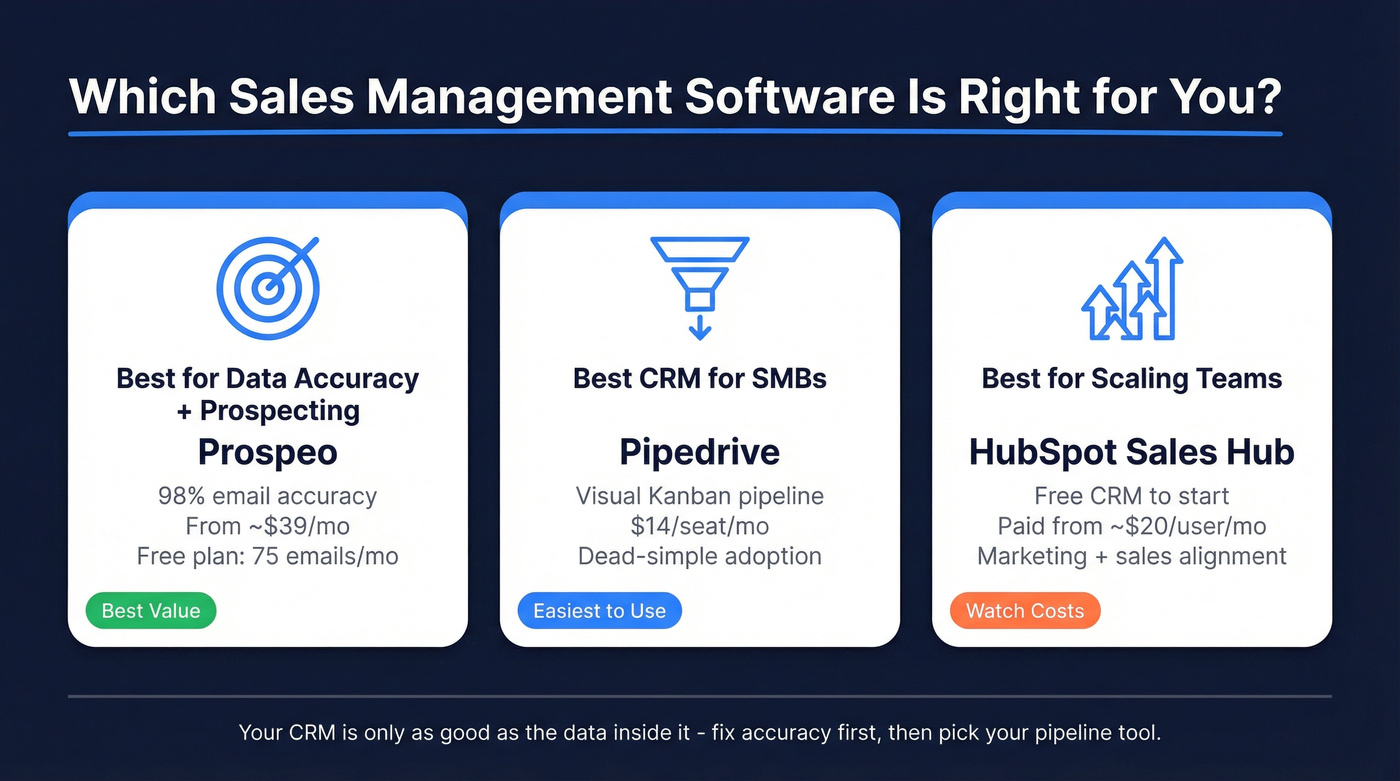
Best for data accuracy + prospecting: Prospeo. 98% email accuracy, free plan includes 75 verified emails and 100 Chrome extension credits every month, paid plans from ~$39/mo. Your CRM is useless if the data inside it bounces.
Best CRM for SMBs: Pipedrive. Starts at $14/seat/month, dead-simple pipeline UI, and one of the easiest CRMs to get adopted on small teams. It does one thing well and doesn't try to be Salesforce.
Best for scaling teams: HubSpot Sales Hub. Free CRM to start, paid from ~$20/user/month. The marketing-to-sales alignment is the real draw - just budget for costs to climb as you unlock sequences, custom reporting, and advanced automation.
Comparison Table
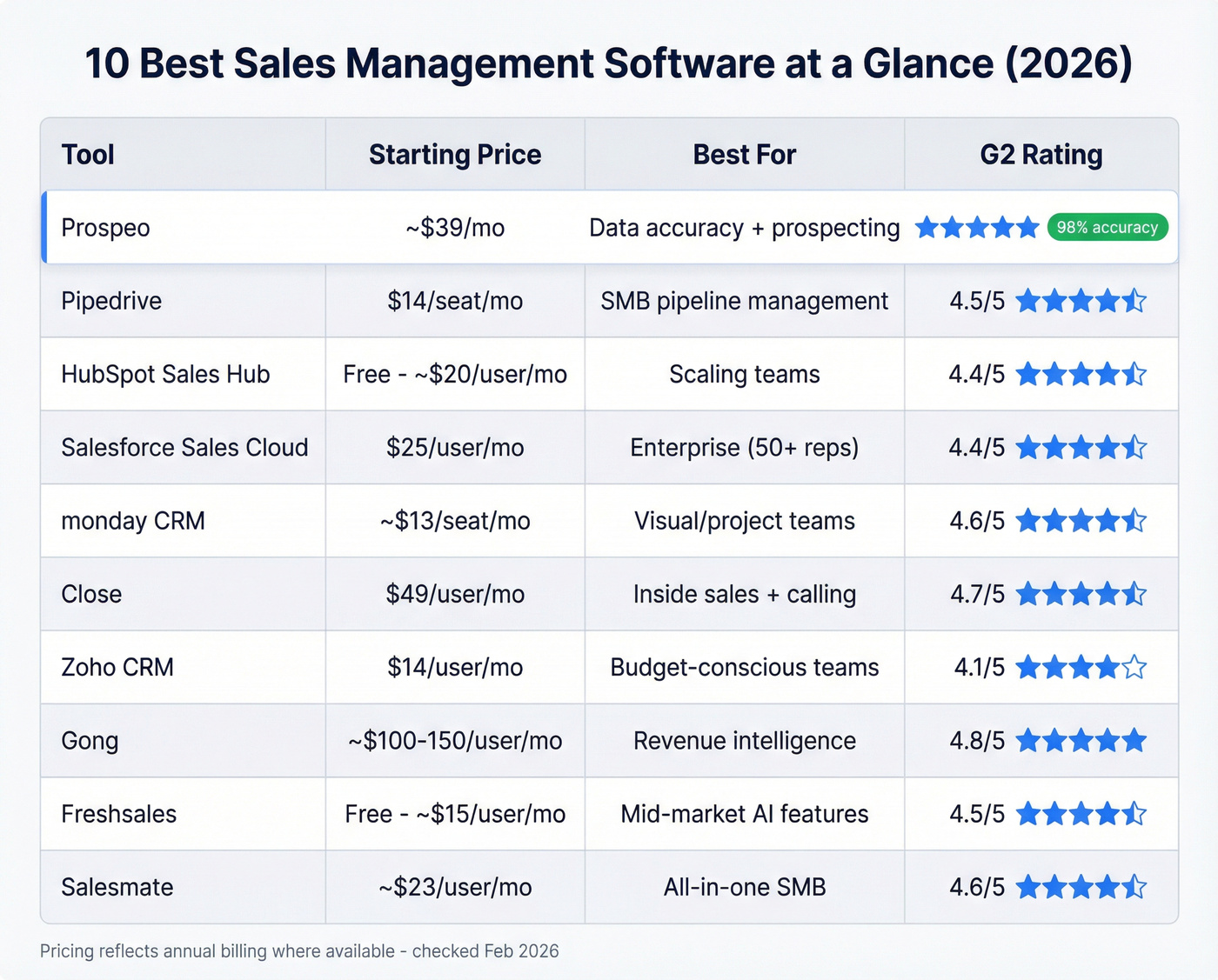
All 10 side by side. Pricing reflects annual billing where available.
| Tool | Starting Price | Best For | G2 Rating | Standout Feature |
|---|---|---|---|---|
| Prospeo | ~$39/mo | Data accuracy + prospecting | - | 98% email accuracy |
| Pipedrive | $14/seat/mo | SMB pipeline management | ~4.5/5 | Visual Kanban pipeline |
| HubSpot Sales Hub | Free; paid ~$20/user/mo | Scaling teams | ~4.4/5 | Marketing + sales alignment |
| Salesforce Sales Cloud | $25/user/mo (Starter) | Enterprise orgs (50+ reps) | 4.4/5 | Ecosystem + customization |
| monday CRM | ~$13/seat/mo | Visual/project-oriented teams | ~4.6/5 | Drag-and-drop everything |
| Close | $49/user/mo | Inside sales + calling | ~4.7/5 | Built-in dialer |
| Zoho CRM | $14/user/mo | Budget-conscious teams | ~4.1/5 | Feature breadth at low cost |
| Gong | ~$100-150/user/mo | Revenue intelligence | 4.8/5 | Conversation analytics |
| Freshsales | Free; paid ~$15/user/mo | Mid-market AI features | ~4.5/5 | Freddy AI assistant |
| Salesmate | ~$23/user/mo | All-in-one SMB | ~4.6/5 | Calling + CRM + automation |
monday CRM has no free plan - the free tier only applies to monday Work Management. Seat-bucket pricing means you pay for minimums of 3, then multiples of 5.

You're comparing 10 sales management tools, but none of them fix bad contact data. Prospeo's 98% email accuracy and 7-day refresh cycle mean your CRM pipeline stays clean - no bounces, no disconnected numbers, no wasted rep time.
Stop managing a pipeline full of dead leads. Fix the data layer first.
The 10 Best Sales Management Tools
Prospeo
Every CRM on this list tracks deals. None of them guarantee the contact data inside those deals is any good. That's the gap Prospeo fills - and it's a bigger gap than most teams realize.
Prospeo's database covers 300M+ professional profiles with 143M+ verified emails and 125M+ verified mobile numbers. The 98% email accuracy rate comes from a 5-step verification process with catch-all handling, spam-trap removal, and honeypot filtering. Data refreshes every 7 days, compared to the ~6-week cycle across the industry. For context, UpLead guarantees 95% accuracy at $99/month - Prospeo delivers 98% starting at $39.

The 30+ search filters go well beyond basic firmographics. You can layer buyer intent signals powered by Bombora across 15,000 topics, technographics, job changes, headcount growth, and funding data. The Chrome extension - used by 40,000+ reps - finds verified contacts from any website or inside CRMs. Native integrations with Salesforce, HubSpot, Smartlead, Lemlist, Instantly, and Clay mean data flows without manual exports.
Real results: Snyk's 50-person AE team went from a 35-40% bounce rate to under 5% after switching, with AE-sourced pipeline up 180%.
Use this if: Your pipeline is full of bounced emails and disconnected numbers, and you need a data layer that makes your CRM actually work.
Skip this if: You only need deal tracking and already have clean, verified contact data.
Pricing starts free with 75 emails/month + 100 Chrome extension credits/month. Paid plans from ~$39/mo. No contracts, no sales calls.
Pipedrive
Use this if: You have a team under 20 reps and want the CRM they'll actually open every morning.
Skip this if: You need marketing automation, conversation intelligence, or anything beyond core pipeline management built in.
Pipedrive's strength is simplicity. The visual Kanban pipeline is best-in-class for small teams - reps drag deals between stages, and managers get instant visibility without building custom reports. We've seen it adopted faster than any other CRM on teams under 15 people, and the consensus on r/sales backs that up.

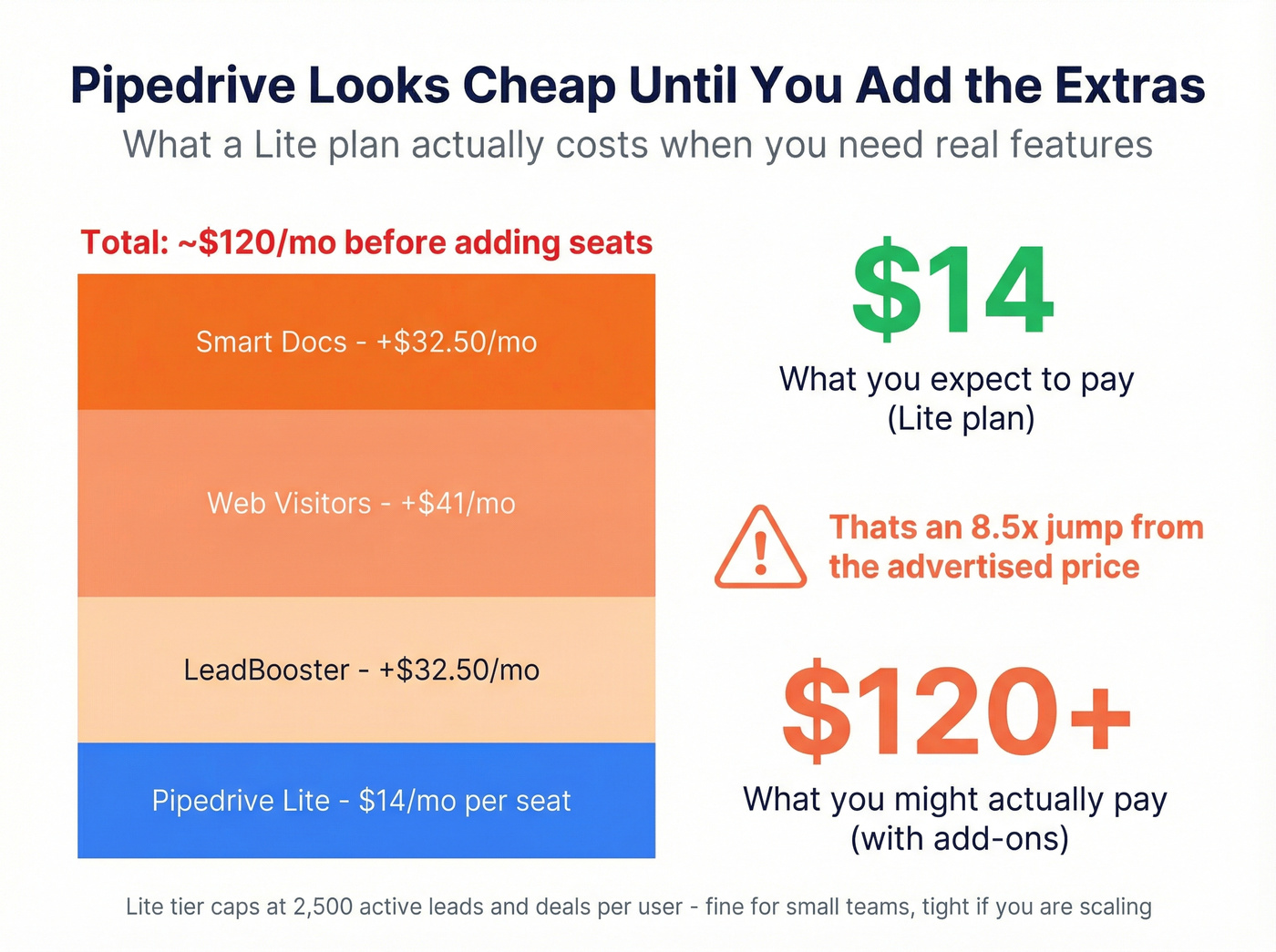
Pricing runs $14/seat/month (Lite) to $79/seat/month (Ultimate), billed annually. Pipedrive restructured its plans in 2025, renaming Essential to Lite, Advanced to Growth, and so on. The Lite tier caps you at 2,500 active leads and deals per user - up from 2,000 on the old Essential plan. Fine for most small teams, but you'll hit it fast if you're scaling.
The real cost gotcha is add-ons. LeadBooster runs $32.50/month extra. Web Visitors tracking is $41. Smart Docs is another $32.50. Stack those on top of Lite and your bill jumps to about $120/month before you add a single seat. We break this down in the pricing section below.
If you're evaluating other SMB CRMs, compare against Pipedrive alternatives before you commit.
HubSpot Sales Hub
Use this if: You need CRM and marketing in one platform and want a free starting point that grows with you.
Skip this if: You're budget-conscious and think you won't need paid features within 12 months. You will.
HubSpot's free CRM is the best free tier in the category - contact management, deal tracking, basic reporting, and email integration at zero cost. The catch is that HubSpot is designed to make you upgrade, and the paid tiers escalate quickly.
Paid plans start at ~$20/user/month, but the features most sales teams actually need - sequences, custom reporting, advanced automation - live in the Professional tier at ~$100/user/month. Where HubSpot shines over standalone CRMs is marketing-to-sales alignment. If your marketing team already runs HubSpot, adding Sales Hub creates a unified funnel view that's genuinely hard to replicate with separate tools.
If you're stuck between the two big ecosystems, see HubSpot vs Salesforce.
Just know it gets expensive fast once you're past the free tier. Budget accordingly.
Salesforce Sales Cloud
Use this if: You have 50+ reps, a dedicated Salesforce admin, and enterprise ecosystem requirements.
Skip this if: You don't have a dedicated admin. You'll waste $165/seat/month on a tool nobody configures properly.
Salesforce is the default for a reason - the ecosystem, customization depth, and third-party integrations are unmatched. With 4.4/5 on G2 across 25,445 reviews and an Ease of Use score of 8.2/10, it's the most battle-tested CRM on the planet. It's also the most complex. The top G2 complaint is "Learning Curve," which tracks with what we see in practice. Without executive buy-in and a dedicated admin driving configuration, Salesforce implementations stall.

Pricing starts at $25/user/mo (Starter) for Starter, but most teams end up on Enterprise at $165/user/month or Unlimited at $330. Einstein 1 Sales, the AI-forward tier, runs $500/user/month. Implementation takes months, not days.
Here's the thing: Salesforce is worth it for the right org. If you're running complex sales processes across multiple business units with deep reporting needs, nothing else comes close. For everyone else, it's overkill.
The Data Quality Problem
Before we cover the next six tools, let's be honest about something: most teams shopping for pipeline and tracking tools are solving the wrong problem. They compare CRM features and pricing while ignoring the foundation - whether the data inside those CRMs is any good.
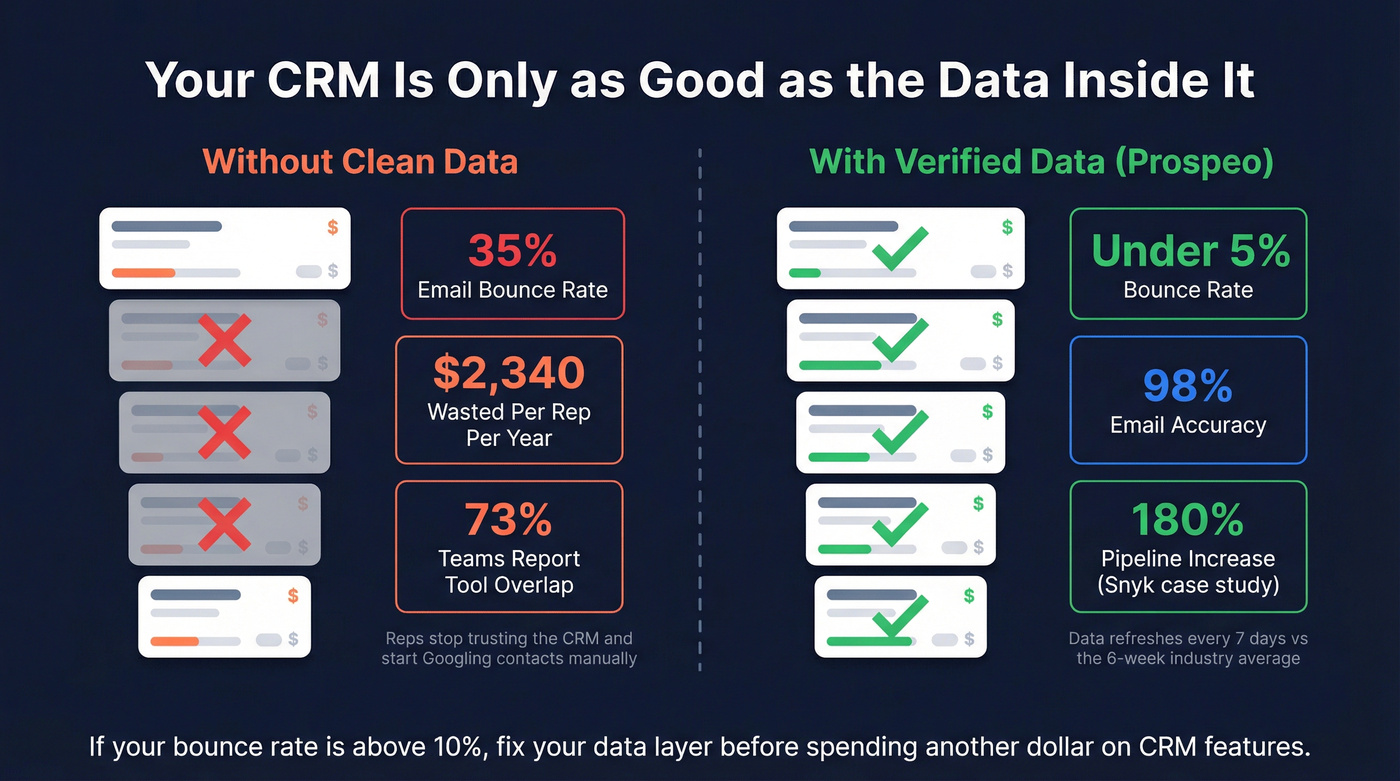
Your VP asks why pipeline is down 20%. You dig in. Half the opportunities have bounced emails. A third have disconnected phone numbers. Reps stopped trusting the data months ago and started Googling contacts manually. I've watched a team spend six figures on Salesforce only to discover their reps were copy-pasting contacts from company websites because nothing in the CRM was reliable. A $165/seat Salesforce instance with a 35% email bounce rate is worse than a $14/seat Pipedrive with verified contacts.

Before you spend another dollar on CRM features, check your bounce rate. If it's above 10%, fix your data layer first. Everything else - the automation, the forecasting, the AI scoring - depends on having accurate contacts to work with. (If you need a process, start with CRM hygiene and a proper CRM verify workflow.)
monday CRM
monday CRM works best for teams that already live in monday's Work Management ecosystem and think visually. The drag-and-drop interface makes pipeline management feel intuitive, and the customization options are flexible enough to model most sales processes.
Pricing starts at ~EUR12/seat/month (~$13 USD) for Basic, EUR17 for Standard, and EUR28 for Pro. But watch the seat-bucket pricing - plans start at a minimum of 3 seats, then jump in multiples of 5. A team of 4 pays for 5 seats. A team of 6 pays for 10. That math adds up fast.
The Basic tier caps you at 1,000 active contacts and deals, which is tight for any team doing real outbound. Standard bumps that to 10,000. And there's no free plan for monday CRM - that only exists on the Work Management product.
Best for: Visual thinkers and teams already on monday. Skip if: You're between seat buckets and hate paying for unused seats.
Close
Close is purpose-built for inside sales teams doing high-volume calling. The built-in dialer eliminates the need for a separate calling tool, and that's a real cost savings versus paying for a standalone dialer on top of your CRM.
At $49/user/month, it sits between budget CRMs and enterprise platforms. Calling, SMS, and email sequencing all live in one interface. For reps spending most of their day on the phone, Close removes friction that Pipedrive and HubSpot can't match without add-ons.
If you're comparing CRMs for calling-heavy teams, Close vs Salesforce is a useful sanity check.
Who should care: Phone-heavy inside sales teams running 50+ dials a day. Who shouldn't: Teams that need field sales features or marketing alignment.
Zoho CRM
Zoho CRM packs an absurd number of features into a $14-$40/user/month price range - pipeline management, workflow automation, AI predictions via Zia, social media integration, and analytics. All at budget pricing.
The tradeoff is polish. Zoho's UI isn't as intuitive as Pipedrive's, and the sheer breadth of features creates a learning curve. If you're a budget-conscious team that wants a full-featured CRM without Salesforce pricing, Zoho is the obvious pick. Just don't expect your reps to love the interface on day one.
Gong
Gong isn't a CRM - it's the intelligence layer that tells you what's actually happening in your deals. With 4.8/5 on G2 across 6,469 reviews and an Ease of Use score of 9.3/10, it's the highest-rated tool on this list.
79% of sales leaders say their CRM fails to predict deal outcomes. Gong addresses that by analyzing actual conversations - calls, emails, meetings - and surfacing deal risk, coaching opportunities, and forecast accuracy that CRM data alone can't provide. Teams who layer conversation intelligence on top of their CRM see forecast accuracy improve by 42%.
Pricing isn't public. Expect ~$100-150/user/month for mid-market teams, and you'll need to book a demo to get a real number.
If forecasting is the pain, pair this section with deal forecast accuracy.
Worth it when: You have 10+ reps, record calls, and want revenue intelligence layered on your CRM. Not worth it when: You're a small team that doesn't do enough recorded calls to feed the analytics engine.
Freshsales
Freshsales offers a free tier and paid plans from ~$15-$69/user/month, with Freddy AI baked in for lead scoring, deal insights, and workflow suggestions. It's a solid mid-market option for teams that want AI features without paying Salesforce prices. AI CRM tools can reach time-to-value in about 7 days compared to 90 days for traditional CRM implementations - a meaningful difference when you need to move fast. The Freshworks ecosystem, including Freshdesk and Freshmarketer, adds value if you're already in that world.
Best for: Mid-market teams wanting AI-powered lead management at a reasonable price. Skip if: You need deep customization or a massive integration ecosystem.
Salesmate
Salesmate bundles calling, CRM, and automation into one platform at ~$23-$63/user/month. It's designed for small teams that don't want to stitch together three separate tools. The built-in dialer and text messaging compete directly with Close, but at a lower price point.
For a team of 5-15 reps wanting an all-in-one without enterprise complexity, Salesmate deserves a serious look. The tradeoff is a smaller integration ecosystem and less brand recognition, which means fewer third-party resources and community support when you hit a wall.
How to Choose the Right Tool
Picking the right platform doesn't require a 6-month evaluation. Ask these five questions and you'll narrow the field to 2-3 finalists in an afternoon.
1. How big is your sales team? Under 10 reps: Pipedrive, Close, or Salesmate. Between 10 and 50: HubSpot Sales Hub or monday CRM. Over 50: Salesforce. Team size determines complexity tolerance - small teams need simplicity, large teams need governance. For reference, 91% of companies with 10+ employees already use a CRM, so if you don't have one yet, you're behind.
2. What's your budget per seat? CRM pricing ranges from $10 to $300+ per user per month. Basic CRMs like Pipedrive Lite and Zoho Standard run $14/seat. Mid-range platforms like HubSpot Professional and Salesforce Enterprise hit $100-$165. Enterprise tiers push $300-$500. Know your ceiling before you start demos.
3. What integrations are non-negotiable? If your reps live in Gmail, make sure the CRM syncs natively. If marketing runs HubSpot, Sales Hub is the path of least resistance. Integration gaps create data silos that reduce workflow efficiency and kill adoption.
4. How clean is your contact data? If your bounce rate exceeds 10%, no CRM feature will save you. Fix the data layer first - verify and update your existing CRM contacts in bulk before investing in new pipeline tools. Then pick your CRM. If you need a tool shortlist, start with an email checker tool or a dedicated email ID validator.
5. Can you consolidate? The 80% rule is useful here: if a single platform handles 80%+ of your team's use cases, consolidate. Every dollar spent on CRM returns $8.71 on average - but only if reps actually use it. Fewer tools means higher adoption, and higher adoption is where the ROI lives.
Pricing Reality Check
List prices are just the starting point. Here's where the real costs hide.
Pipedrive's add-on trap: A $14/seat Lite plan looks great until you add LeadBooster at $32.50, Web Visitors at $41, and Smart Docs at another $32.50. Suddenly your monthly bill jumps to about $120/month before you add a single extra seat.
monday's seat buckets: Your team of 4 pays for 5 seats. Your team of 6 pays for 10. At EUR28/seat on Pro, that's EUR280/month for a 6-person team instead of the EUR168 you'd expect.
Salesforce's module creep: Teams start on Enterprise at $165/user/month ($39,600/year for 20 seats), realize they need Unlimited features at $330 ($79,200/year), then get pitched Einstein 1 at $500 ($120,000/year). That's before implementation and add-ons.
The demo pricing rule: If you have to book a demo to find out what something costs, budget 2-3x what you'd expect. This applies to Gong, Salesforce enterprise tiers, and any tool with "custom pricing" on their website.
| Hidden Cost | Example | Impact |
|---|---|---|
| Add-ons | Pipedrive LeadBooster: $32.50/mo | +230% on base Lite plan |
| Seat buckets | monday team of 6 pays for 10 | +67% over expected cost |
| Tier upgrades | Salesforce $165 to $330/seat | +100% when you need features |
| Implementation | Salesforce setup: $10-50K+ | One-time but significant |
Snyk's 50 AEs cut their bounce rate from 35% to under 5% and grew AE-sourced pipeline 180% - all by switching their data layer to Prospeo. No CRM swap required. 300M+ profiles, 125M+ verified mobiles, native integrations with Salesforce and HubSpot.
Your CRM already works. Feed it data that actually connects to real buyers.
FAQ
What is sales management software?
Sales management software helps teams track deals, manage pipelines, automate repetitive workflows, and forecast revenue. The category ranges from simple CRMs like Pipedrive to full revenue intelligence platforms like Gong. Most teams need 2-3 tools rather than a single monolithic platform.
How much does it typically cost?
Expect $10-$300+ per user per month depending on complexity. Basic CRMs start at $14/seat with Pipedrive and Zoho. Mid-range platforms run $100-$165 with HubSpot Professional and Salesforce Enterprise. Always factor in add-ons and implementation costs - they can double the sticker price.
What's the best free option?
HubSpot CRM offers the most capable free tier for deal tracking and contact management. Freshsales rounds out the free options with basic AI-powered lead scoring. If your primary gap is data quality rather than deal tracking, Prospeo's free plan gives you 75 verified emails and 100 Chrome extension credits per month - no credit card required.
CRM vs. sales management software - what's the difference?
CRM is a subset of the broader category. Sales management software also includes conversation intelligence tools like Gong, prospecting platforms, forecasting tools, and engagement platforms. Most teams need a CRM plus one or two specialized tools rather than forcing everything into a single product.
How do I get my team to actually use the CRM?
Pick a tool built for simplicity - Pipedrive and Close get adopted quickly on small teams for a reason. Involve reps in the trial process, integrate the CRM into their daily workflow rather than treating it as a reporting chore, and have managers model usage. A CRM with 90% adoption beats one with 40% adoption and 10x the features every single time.