


The Best Zapmail Alternatives in 2026: What Cold Emailers Actually Need to Know
You just checked your Google Admin Console. Clicked into Billing. And there it is: "Reseller Club India." Those "US-based" Google Workspace accounts you've been paying $3.50/mailbox for? They're sourced at $2/account through an Indian bulk reseller. Meanwhile, you're burning through 20-25% of your inboxes every month and wondering why deliverability keeps tanking.
You're not the only one searching for zapmail alternatives. The Zapmail-to-something-else pipeline is one of the most active migrations in cold email right now, and the reasons go deeper than pricing. Here's what actually matters when you're picking your next infrastructure - plus the upstream data problem that most cold emailers ignore until it's too late.
Our Picks (TL;DR)
Maildoso - Best overall Zapmail replacement. Google Workspace at scale with real community backing. 140+ G2 reviews, a 1,300-member Slack community, and tiered pricing that drops to $1.80/mailbox at volume. The closest thing to a consensus pick in cold email infrastructure right now.
Aerosend - Best for deliverability-obsessed teams. Private infrastructure with dedicated IPs, domain isolation every 10 domains, and premium warmup from Warmupinbox.com. Costs more per mailbox (~$4), but teams report reply rates jumping from 0.62% to 2.87% after switching. If you're tired of the shared infrastructure lottery, this is the answer.
Prospeo - Best for stopping inbox burn at the source. Most infrastructure articles won't tell you this: bad data burns domains faster than bad infrastructure. Prospeo's 98% email accuracy and 7-day data refresh cycle keep bounce rates under 3%, which means your mailboxes last longer regardless of which provider hosts them. Free tier available, no contracts. (If you're evaluating tools, start with an email verifier website and work backward from bounce rates.)
Honorable mentions:
- Inframail - Best for agencies needing unlimited inboxes at a flat rate ($85.80-$215.80/mo, Microsoft-backed).
- ColdSire - Best for teams willing to pay $10.80/mo per mailbox for genuine US-based Google Workspace.
What Zapmail Gets Right - and Where It Falls Apart
Zapmail isn't a scam. It's a real service that's set up over a million mailboxes and manages 330K+ domains. The pricing is competitive at $2.50-$3.50/mailbox, setup is fast, and the 50+ outreach tool integrations (Instantly, Smartlead, Lemlist, Reply) mean you can be sending within an hour.
The ZapShield feature - rotating DNS zones, blacklist protection, Google Cloud DNS - is genuinely useful for teams managing dozens of domains. The Blacklist Alert workflow matters more than most teams realize once you scale beyond a handful of domains. And the Placement Test tool ($2/mailbox) gives you inbox-vs-spam visibility that most resellers don't offer at all.
Where It Falls Apart
The India IP issue is the elephant in the room.
A Reddit user who spent six months reverse-engineering Zapmail's infrastructure laid out the verification steps: request admin access, open Google Admin Console, navigate to Billing, and you'll find it linked to Reseller Club India. The accounts are sourced at ~$2 each and resold at $3-$3.50.
Why does this matter? Non-US IPs carry higher spam filter risk when you're targeting US and EU audiences. It's not a death sentence, but it's a headwind you're paying a premium to avoid - except you're not actually avoiding it. Reddit user hahabriankent put it bluntly: after testing Zapmail for a client, "we didn't get the standards of deliverability vs if we use our own manual infra setup." Another user, straysaint, flagged the ReachInbox association as a trust concern when evaluating Zapmail for 1,000 mailboxes.
Zapmail's own blog publishes inbox placement rates for competitors, but these are self-reported vendor numbers, not independent benchmarks. Take them with appropriate skepticism.
The other frustrations are more practical:
- No free trial or demo. You're committing before you can test deliverability.
- Basic analytics. You get SPF/DKIM/DMARC configuration, but not the granular deliverability reporting that Maildoso or Aerosend provide. (If you're rusty on records, see our guide to SPF DKIM & DMARC.)
- Setup isn't fully automated despite the marketing copy suggesting otherwise.
None of these are dealbreakers in isolation. But stack them together - India IPs, no trial, limited reporting, association with ReachInbox - and you've got enough reasons to shop around.

You're shopping for Zapmail alternatives to fix deliverability - but your data is the real problem. Prospeo's 98% verified emails and 7-day refresh cycle keep bounce rates under 3%, so your mailboxes last months instead of weeks. At $0.01/email, you'll spend less protecting your domains than replacing burned inboxes.
Fix the upstream problem before you buy another mailbox.
Understanding Cold Email Infrastructure Types
Before you pick an alternative, you need to understand what you're actually buying. Not all "cold email infrastructure" is the same, and the differences directly affect deliverability, cost, and risk. (For the full picture, see our guide to email sending infrastructure.)
The Four Types
| Type | Cost/Mailbox | Send Velocity | Risk Level | Examples |
|---|---|---|---|---|
| GWS/M365 Reseller | $2.50-$4.00 | 15-25/day | Medium | Zapmail, Maildoso, Mailpool |
| Azure Inboxes | $0.50-$1.50 | 5-10/day | High | Hypertide |
| Shared SMTP | $2-$5 | Varies | Medium-High | Mailforge, Mailscale |
| Dedicated SMTP | $4-$10+ | 25-50+/day | Low | Aerosend, ColdSire |
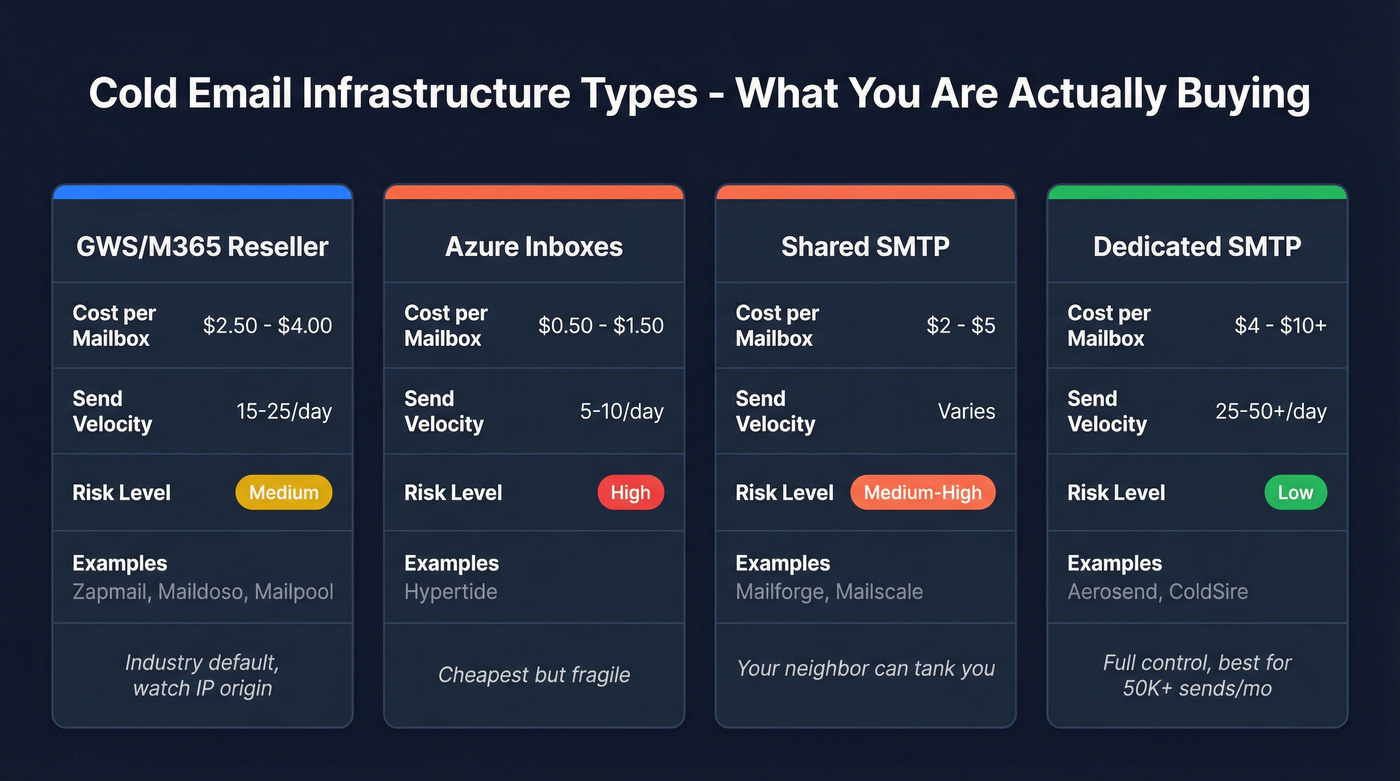
Google Workspace / Microsoft 365 resellers are the industry default. You get real GWS or M365 accounts, typically 3-5 mailboxes per domain, sending 15-25 emails per day per mailbox after warmup. The catch: most resellers source through the same handful of bulk providers, and the IP origin matters more than the marketing copy admits.
Azure inboxes are the budget play. Hypertide sells 100 inboxes for $50/mo - that's $0.50 each. But Azure-based cold email infrastructure is fragile. At least two companies running Azure-based infra have shut down completely. The send velocity is lower (5-10/day), and you're betting on Microsoft not cracking down harder.
Shared SMTP pools IPs across multiple senders. If your neighbor on the same IP is blasting garbage, your deliverability suffers. It's cheap and fast to set up, but you're sharing risk with strangers. (If you're deciding between models, read Dedicated IP vs Shared IP cold outreach.)
Dedicated SMTP gives you your own IPs and full control. It costs more, but your reputation is yours alone. This only makes sense at 50K+ sends per month - below that, you're paying for isolation you don't need.
The Diversification Principle
Running everything through one provider is the single biggest infrastructure mistake in cold email.
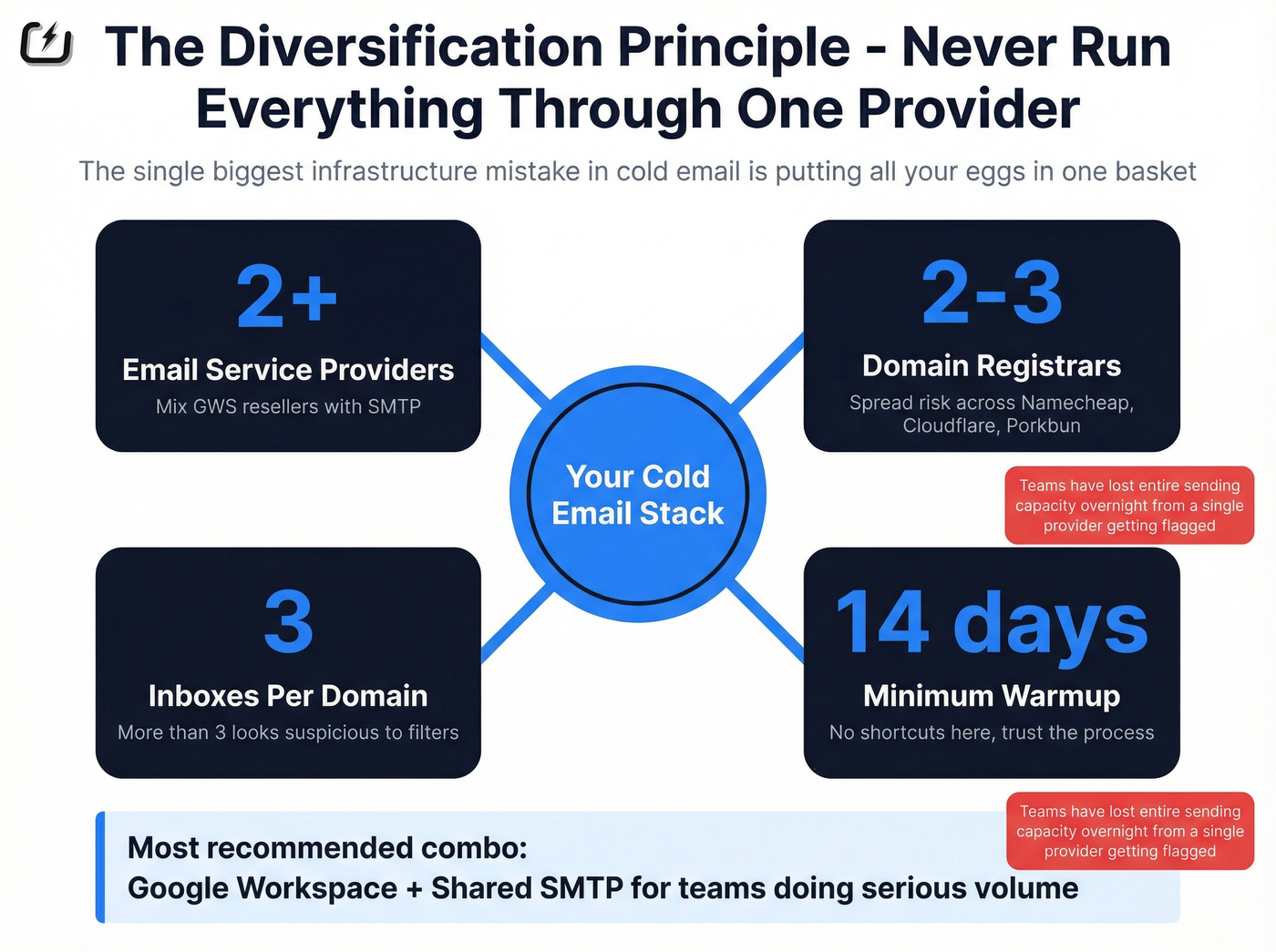
I've seen teams lose their entire sending capacity overnight because a single reseller got flagged. The sweet spot: 2+ email service providers, 2-3 domain registrars, 3 inboxes per domain, 14-day warmup minimum. Google Workspace plus shared SMTP is the most common and recommended combo for teams doing serious volume. (If you're scaling, use this email pacing and sending limits playbook to avoid sudden spikes.)
The Upstream Problem - Bad Data Burns Domains
Every article about Zapmail competitors focuses on infrastructure. Mailbox pricing, IP quality, warmup protocols. And that stuff matters. But here's the thing: the fastest way to burn a domain isn't bad infrastructure. It's bad data.
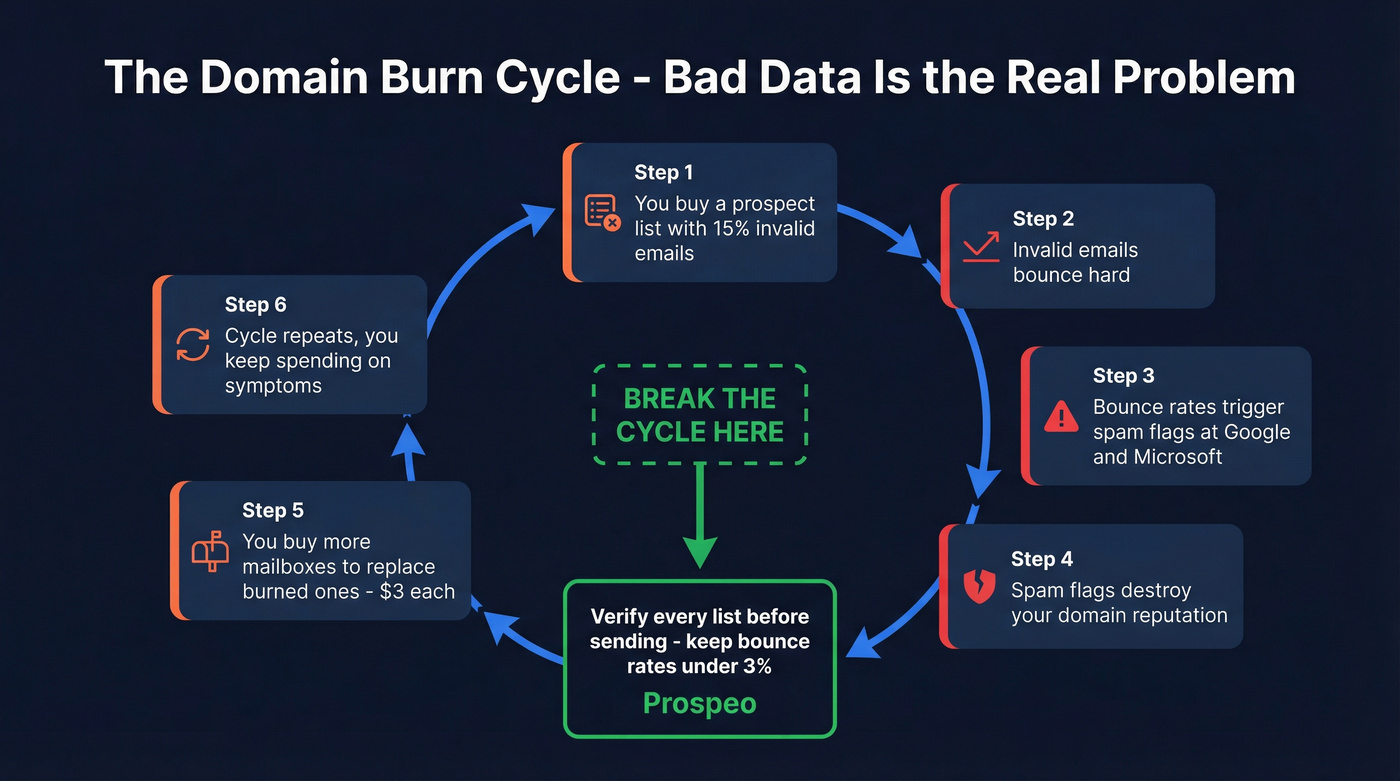
The causal chain looks like this: you buy a prospect list with 15% invalid emails, those emails bounce, bounce rates trigger spam flags, spam flags burn your domain reputation, you buy more mailboxes to replace the burned ones, and the cycle repeats. You're treating the symptom (dead mailboxes) while ignoring the disease (bad data). (More on this: B2B contact data decay is why lists rot faster than your sending stack.)
Stack Optimize built from $0 to $1M ARR running cold email campaigns for clients. Their secret wasn't some magic infrastructure provider - it was maintaining 94%+ deliverability, under 3% bounce rates, and zero domain flags across all clients. The difference? They verified every prospect list before sending. Meritt saw the same pattern: bounce rates dropped from 35% to under 4% and their pipeline tripled from $100K to $300K per week after switching to verified data. (If you want an SOP, start with our email verification list workflow.)

This is where Prospeo fits into the cold email stack. It's not infrastructure - it's the data quality layer that makes your infrastructure last. The 5-step verification process with catch-all handling, spam-trap removal, and honeypot filtering delivers 98% email accuracy. The 7-day data refresh cycle means you're not sending to contacts who changed jobs three months ago. At ~$0.01 per email verified, it's a fraction of the cost of replacing burned mailboxes. (If you're comparing options, see our roundup of email lookup tools.)
Think about it: if you're spending $3/mailbox and burning 20-25% monthly, you're effectively paying $0.60-$0.75/mailbox/month in replacement costs alone. A verified list that cuts your bounce rate from 15% to under 3% pays for itself in the first week.
Every burned domain in your cold email stack started with a bounced email. Prospeo's 5-step verification with catch-all handling and spam-trap removal means the addresses you load into Instantly or Smartlead actually land. 15,000+ companies already trust the data - your new infrastructure deserves it too.
Your Maildoso or Aerosend inboxes are only as good as your contact data.
The Best Zapmail Alternatives Compared
Maildoso - Best Overall Replacement
Use this if: You want the safest, most battle-tested replacement with real community support and transparent pricing. Maildoso is the consensus pick in cold email communities for a reason - 140+ G2 reviews and a 1,300-member Slack community mean you're not flying blind.

Pricing scales nicely: $3.10/mailbox at 32 inboxes, $2.40 at 68, and $1.80 at 400. All plans include free domains (8, 17, and 100 respectively). The catch: billing is quarterly, not monthly. And AI warmup is a separate add-on that ranges from $160/mo (32 mailboxes) to $2,000/mo (400 mailboxes) - that's a significant extra cost most comparison articles conveniently forget to mention.
They also offer Google Workspace-only plans starting at $3.25/mailbox (20 inboxes) and SMTP-only plans from $2.50/mailbox, plus combo plans mixing both. The flexibility here is genuinely better than anything Zapmail offers.
Skip this if: You need fewer than 32 mailboxes (there's no smaller plan), or you can't commit to quarterly billing. The warmup add-on pricing can also blow up your budget if you're not careful - $2,000/mo for warmup on 400 mailboxes is more than some teams spend on their entire sending platform.
Aerosend - Best for Private Infrastructure
Use this if: You've been burned by shared infrastructure and want dedicated IPs with real domain isolation. Aerosend prices by domain slots - $120/mo per 10 domains on Starter, $112/mo on Growth (which adds campaign creation and lead list building). Each domain gets 3 mailboxes, putting the effective cost at ~$4/mailbox.
That's more expensive than Zapmail or Maildoso on a per-mailbox basis. But here's what you get for the premium: every 10 domains sits on its own dedicated infrastructure with aged IPs. Domain burn alerts track 5 metrics. Bi-weekly inbox placement tests catch problems before they tank your campaigns. And the premium warmup comes from Warmupinbox.com - not some in-house afterthought.
The results speak for themselves. Teams report reply rates jumping from 0.62% to 2.87%, and one client maintained 95-99% inbox placement across 250+ inboxes. Recommended send volume is 20-25 cold emails per day per mailbox.
Skip this if: You're optimizing purely for cost per mailbox. At ~$4/inbox, Aerosend is 2x Maildoso's volume pricing. It's also overkill if you're running fewer than 30 mailboxes - the domain-slot model doesn't scale down well for small operations.
Inframail - Best for Unlimited Inboxes at Flat Rate
Use this if: You're an agency managing multiple clients and you're tired of per-mailbox math. Inframail's model is refreshingly simple: $85.80/mo (annual) for unlimited inboxes on 1 dedicated IP, or $215.80/mo for the Agency Pack with 3 dedicated IPs and 15 domain setups per day.
The unlimited inbox model means your cost per mailbox drops toward zero as you scale. For an agency running 200+ inboxes across clients, the math is dramatically better than any per-mailbox provider.
But there are real tradeoffs. Inframail runs on Microsoft-backed architecture, not Google Workspace. Warmup isn't included - you'll need to purchase that separately. There are zero public reviews anywhere - not on G2, not on Capterra, not on Reddit. And there's no free trial.
Skip this if: You need Google Workspace specifically, you want social proof before committing (there is literally none), or you need warmup included in your infrastructure cost. The lack of any public reviews after being in market is a yellow flag I can't ignore.
Mailpool - Same Sourcing, Different Label
Here's the uncomfortable truth about Mailpool: it uses the same Indian bulk reseller model as Zapmail. Reddit users have confirmed it. So if you're leaving Zapmail because of the India IP issue, switching to Mailpool doesn't actually solve that problem.
You're trading one brand for another with identical sourcing.
That said, Mailpool has scale on its side - 35,000+ domains and 250,000+ inboxes for 2,000+ companies. Server inboxes run $3/mo, Google Workspace $4/mo, and Microsoft 365 $5/mo, with annual discounts bringing those down to $2.60, $3.40, and $4.30 respectively. The feature set is solid: AI Domain Generator, bulk inbox creation, blacklist monitoring, one-click integrations with Smartlead, Lemlist, Reply, and HubSpot. Mailpool touts 94-95% inbox placement, but given the identical Indian reseller sourcing, take that number with appropriate skepticism.
The verdict: If the India IP issue is your primary reason for leaving Zapmail, Mailpool is a lateral move, not an upgrade.
Hypertide - The $0.50 Gamble
| Pros | Cons |
|---|---|
| $0.50/inbox (100 for $50/mo) | Azure providers have a history of sudden shutdowns |
| Each domain on its own Azure tenant and IP | 5-10 emails/day send velocity |
| Setup in 4-6 hours | No public reviews, no free trial |
| Native Entra/Outlook UI (8% better performance than other Azure sellers) | 5,000 emails/month cap after 2-week warmup |
Hypertide is the cheapest option on this list by a wide margin. The per-inbox price is incredible. But the total cost of risk isn't. You need 3-5x more inboxes to match Google Workspace throughput, and if Microsoft tightens Azure enforcement again, you could lose everything overnight. This is a calculated bet, not a safe default.
ColdSire - Premium US-Based Infrastructure
The single G2 review (3.5/5) for ColdSire says it all: the reviewer appreciates the pricing transparency but acknowledges it's "more expensive than competitors who CLAIM they do the same thing." That reviewer gets it - you're paying for authenticity, not marketing claims.
ColdSire charges $10.80/mo per account for genuine US-based Google Workspace. Standard GWS and Microsoft 365 run $6/mo each. Used by 600+ agencies. At $10.80/mailbox, a 100-mailbox setup costs $1,080/mo - versus $180 at Maildoso's volume pricing. That's a steep premium.
Worth it if: You've been burned by Indian-sourced accounts and need verified US infrastructure. Not worth it if: Budget is your primary concern and you're comfortable with the deliverability tradeoffs of cheaper resellers.
Mailscale - Read the Fine Print
The good: Mid-range pricing at $63/mo (15 inboxes), $95/mo (50 inboxes), and $199/mo (200 inboxes). Warmup is included. The Business tier comes with a deliverability consultant, which is a nice touch you won't find at this price point elsewhere.
The bad: Domains are advertised at $9-13, but users report .com domains actually cost $15 once you log in. You're forced to buy domains inside Mailscale - no bringing your own. One Reddit user running 50 inboxes and 10 domains reported emails "not landing properly" with bounces.
Not exactly a confidence builder for a tool whose entire job is deliverability.
The verdict: Decent if you go in with eyes open about the domain pricing bait-and-switch. Test with a small plan first.
QuickMail - Wait, It Does Both?
QuickMail is the only tool on this list that sells you mailboxes and a sending platform from the same vendor. Gmail accounts at $3/mo each (ready in 3-5 hours) alongside a sending platform starting at $9/mo (Starter) up to $299/mo (Agency) with unlimited email senders on Growth and above. Free AutoWarmer included on all plans, a 14-day free trial, and a "stealth mode" feature for reduced detection.
For solopreneurs and small teams, this is the lowest-friction option. One vendor, one bill, one support channel. The 14-day trial means you can actually test deliverability before committing - something Zapmail doesn't offer.
The tradeoff: if you already have a sending platform you love (Instantly, Smartlead), you're paying for capabilities you won't use. And the $3/mailbox Gmail accounts are competitive but not the cheapest - Maildoso or manual GWS setup gives you more flexibility at scale.
SendFlock - Not What You Think
Stop. Before you compare SendFlock to Zapmail, understand this: SendFlock is a sending platform, not an infrastructure provider. It doesn't provision mailboxes. You still need to source your own Google Workspace or Microsoft 365 accounts from somewhere else.
What it does offer: unlimited mailbox connections at a flat $29-$99/mo, unlimited warmup, email rotation, A/B testing, unified inbox, and a built-in CRM. The 14-day free trial requires no credit card. It connects to Gmail, Gsuite, Outlook, Zoho, or custom SMTP.
Note: the Scale plan ($99/mo) lists 12,000 emails/month on SendFlock's site - lower than Solo's 60,000. That's almost certainly a site error, but confirm before purchasing.
Different category entirely from Zapmail. Useful tool, wrong comparison.
Mailforge
Mailforge offers shared SMTP mailboxes at $2-$3/mailbox with fast setup (minutes, not hours). It's the budget option for teams who want to get sending quickly and don't mind shared infrastructure. Shared IPs mean shared risk - your deliverability is partially at the mercy of other senders on the same pool.
Primeforge
Primeforge runs $3.50-$4.50/mailbox for official Google Workspace and Microsoft 365 accounts on US IPs, with setup in about 30 minutes. A straightforward premium reseller without the India IP concerns. If you want legitimate GWS accounts without ColdSire's pricing, Primeforge sits in the middle ground.
Mailreef
Mailreef offers dedicated server infrastructure and gets mentioned frequently in Reddit cold email communities. Pricing details are limited publicly - expect the $3-$5/mailbox range based on market positioning. If you're already using Mailreef, diversifying with a second provider is still the smart play. Don't put all your mailboxes with any single vendor.
Full Pricing Comparison
Here's every tool side by side. The column that matters most isn't "Price per Mailbox" - it's the one you calculate yourself: total monthly cost including replacements for burned inboxes.

| Tool | $/Mailbox | Warmup? | Free Trial? | Notable Risk |
|---|---|---|---|---|
| Zapmail | $2.50-$3.50 | Basic DNS only | No | India IPs |
| Maildoso | $1.80-$3.10 | Add-on ($160+) | 30-day refund | Quarterly lock-in |
| Aerosend | ~$4.00 | Premium included | No | Higher cost |
| Inframail | Flat rate* | Not included | No | Zero reviews |
| Mailpool | $3.00-$5.00 | Included | No | India IPs |
| Hypertide | ~$0.50 | Limited | No | Azure shutdown risk |
| ColdSire | $6-$10.80 | Not included | No | High cost |
| Mailscale | ~$1-$4.20 | Included | 7-day | Domain pricing bait |
| QuickMail | $3.00 | Free AutoWarmer | 14-day | Platform lock-in |
| SendFlock | Unlimited** | Included | 14-day | Platform only |
| Mailforge | $2-$3 | Varies | No | Shared IPs |
| Primeforge | $3.50-$4.50 | Varies | No | Limited reviews |
| Mailreef | ~$3-$5 | Varies | No | Limited public info |
*Inframail: $85.80-$215.80/mo flat for unlimited inboxes. **SendFlock: $29-$99/mo flat; you supply your own mailboxes.
Real talk: the cheapest per-mailbox provider is almost never the cheapest total cost. If you're burning 20-25% of inboxes monthly on a $2.50/mailbox provider, you're spending $0.60-$0.63 per mailbox per month just on replacements. A provider at $4/mailbox with half the burn rate actually costs less over a quarter. In our experience, most teams would save more money verifying their prospect lists at $0.01/email than switching from a $3 reseller to a $2 reseller. Fix the data first, then optimize the infrastructure.
How to Choose the Right Zapmail Alternative
Stop comparing tools in a vacuum. Start with your situation.
Solopreneur or Small Team (Under 30 Mailboxes)
QuickMail's $3/inbox Gmail accounts with the free AutoWarmer and 14-day trial is the lowest-risk starting point. Or set up Google Workspace manually - multiple experienced operators report better deliverability with manual setup versus any reseller. The tradeoff is time: expect 30-60 minutes per domain for DNS, SPF, DKIM, and DMARC configuration.
Agency Running 100+ Inboxes
Maildoso at $1.80/mailbox (400-mailbox plan) or Inframail's unlimited model ($215.80/mo Agency Pack). Maildoso gives you Google Workspace with community support; Inframail gives you Microsoft-backed unlimited inboxes with dedicated IPs. Your choice depends on whether you prioritize GWS deliverability or flat-rate economics.
Maximum Deliverability (Money Is Secondary)
Aerosend's private infrastructure with dedicated IPs and domain isolation, or ColdSire's genuine US-based Google Workspace at $10.80/mailbox. Both cost more. Both deliver measurably better inbox placement.
The Diversification Checklist
Regardless of which infrastructure you choose:
- 2+ email service providers (don't put all mailboxes with one vendor)
- 2-3 domain registrars (if one gets flagged, you don't lose everything)
- 3 inboxes per domain (the sweet spot for Google Workspace)
- 14-day warmup minimum before sending cold email (use this automated email warmup guide to avoid common pitfalls)
- Verify your prospect list first. 98% email accuracy keeps bounce rates under 3%, extending domain lifespan regardless of infrastructure.
I've watched teams spend weeks optimizing their infrastructure stack while sending to lists with 12% invalid emails. They're tuning the engine while pouring sugar in the gas tank. Fix the data first. Then worry about which reseller gives you the best per-mailbox rate.
FAQ
Is Zapmail legit?
Yes, Zapmail is a real service managing 330K+ domains and 1M+ mailboxes. But users have discovered accounts are sourced through Reseller Club India at ~$2/account despite US marketing positioning. You can verify this yourself: request admin access, open Google Admin Console, navigate to Billing, and check the billing entity.
What's the cheapest cold email infrastructure in 2026?
Hypertide at ~$0.50/inbox is the cheapest per-mailbox option, but Azure infrastructure carries real shutdown risk. For Google Workspace, Maildoso at $1.80/inbox on the 400-mailbox plan is the best value at scale. Below 30 mailboxes, QuickMail's $3/inbox with free warmup and a 14-day trial is hard to beat.
Google Workspace or Microsoft 365 for cold email?
Google Workspace is the industry standard with better deliverability to Gmail recipients, which represent the majority of business email. Microsoft 365 performs better for Outlook-heavy audiences. Best practice: use both and diversify your infrastructure across providers to reduce single-point-of-failure risk.
How do I stop burning through inboxes every month?
Diversify infrastructure across 2+ providers so a single flag doesn't kill your entire operation, and verify prospect data before sending. Prospeo's 5-step verification catches invalid emails before they trigger bounces - free tier with 75 credits, no credit card. Keep bounce rates under 3% and you'll dramatically extend domain lifespan.
Can I set up Google Workspace for cold email myself?
Yes, and multiple experienced operators report better deliverability with manual setup versus resellers. Expect 30-60 minutes per domain for DNS, SPF, DKIM, and DMARC configuration. For teams running fewer than 20 domains, manual setup is often the best option. Beyond that, the time cost makes a quality reseller worth it.