

Conditional Sequences in 2026: A Practical Guide Across Tools & Use Cases
"Conditional sequences" sounds simple until you get three teams in a room.
Sales ops means branching outreach. IT means workflow containers. QA means "don't fail if the button isn't there." And the LSAT crowd means trigger rules in ordering games.
I've watched a RevOps lead and a QA engineer argue for 15 minutes and realize they were both right - they were just talking about different systems.
Conditional sequences (2026): the one definition that covers every meaning
A conditional sequence is a flow that changes what happens next based on a condition.

That's the whole idea. Everything else is implementation detail: a UI "If/then" branch, an if exists in a test, a SQL window function, or an LSAT trigger rule.
The practical way to design one is a five-part loop:
- Condition: the fact you care about (reply received, field populated, element exists, rule triggered)
- Monitor: how the system checks it (event-driven vs polling, and how long it waits)
- Branch: what path you take when it's true vs false (Yes/No, multiple branches, or "run/skip")
- Action: what happens next (send step, create task, move record, enroll elsewhere)
- Exit criteria: when the flow stops (reply, meeting booked, timeout, max attempts, success state)
Mini glossary (because people overload terms):
- Trigger: what starts the sequence (enrollment event)
- Guard clause): a condition that blocks the flow until it's satisfied
- Polling window: "check every X minutes for Y hours/days"
- Branch label: the UI's way of naming paths (often ugly, always real)
What you need (quick version): pick your meaning + build it safely
Checklist (don't overthink it)
- Pick your meaning using the intent map below (outreach vs workflow vs testing vs SQL vs LSAT).
- Build with the canonical framework: Condition → Monitor → Branch → Action → Exit.
- 2026 rule: don't branch on opens. Apple Mail Privacy Protection makes opens noisy, so open-based logic routes people randomly.
- Make your inputs trustworthy before you automate. Conditional logic amplifies whatever you feed it - good or bad.
Here's the thing: these flows don't fail because "automation is hard." They fail because teams treat messy data and noisy signals like truth, then act shocked when the branches behave like a slot machine.
Intent mini-table (pick your lane fast)
| You mean... | Typical place | Conditional form | Output |
|---|---|---|---|
| Sales outreach | Sequencer UI | Yes/No branches | Next step |
| Business workflow | Workflow engine | Guard container | Run/skip |
| Test automation | Test DSL | if exists |
Continue |
| SQL | Query | ROW_NUMBER() |
Sequence id |
| LSAT | Logic games | trigger rule | allowed orders |

You just read why guard clauses matter: require clean data before enrollment, or your branches behave like a slot machine. Prospeo's 5-step email verification delivers 98% accuracy - so your conditional sequences branch on truth, not garbage.
Fix your inputs before you automate. Start with 100 free credits.
Intent map: the 5 most common "conditional sequences" interpretations
The keyword's fragmented, so let's un-fragment it.

| Interpretation | What it means | Typical implementation | What "branch" looks like |
|---|---|---|---|
| Outreach sequencing | Message path adapts | UI condition step | Yes/No paths |
| Workflow automation | Run a block only if true | Guard/container | Run/skip block |
| Testing automation | Don't fail on missing UI | if exists / if-else |
Optional step |
| SQL sequencing | Number rows per condition | Window function | Reset per group |
| LSAT sequencing | Triggered ordering rule | Diagram + contrapositive | Trigger/non-trigger |
Short explanations (the gotchas people miss):
- Outreach: the condition's often an event (reply/click) or a data state (field present). The monitor window matters because tools poll.
- Workflows: "conditional sequence" often means a container - everything inside runs only if the condition's satisfied, otherwise the workflow keeps going.
- Testing: conditionals are about resilience. You're encoding "if the app shows this modal, dismiss it; if not, keep going."
- SQL: it's not branching. It's "generate a sequence number that resets when the condition changes."
- LSAT: the trap is forgetting non-trigger scenarios. If the trigger doesn't happen, the rule often imposes no constraint.
Conditional sequences framework: Guard → Monitor → Branch → Action → Exit
If you're building branching outreach, Reply.io is a clean mental model because it exposes the primitives directly: Condition and Action.
This is the framework we use when we're designing these with teams, because it forces you to answer the boring questions before the sequence goes live and starts doing expensive things at scale.
Guard (preconditions)
Decide what must be true before you even start.
Example: "Only enroll contacts with a valid email" or "only run the call step if a phone number exists." Put data hygiene here, not halfway through the sequence when you've already wasted touches. (If you need a quick SOP, start with a simple email verification workflow before enrollment.)
Guard rule I recommend: if a field's required for a branch later, require it up front (or route to enrichment first). That single decision prevents half your "why did this go to the wrong path?" debugging.
Monitor (how it evaluates)
These systems poll; they're not continuous evaluation engines.
Reply.io's Condition step monitors engagement over a chosen time frame, and it checks every 10 minutes. If the condition becomes true during the monitoring window, the prospect advances immediately. If it never becomes true, they fall into the No branch when the window expires.
That polling detail matters more than people think, because it changes who gets handled first when your reps are busy: a "close enough" polling loop can still be the difference between catching intent today and calling someone after they've already bought from a competitor.
Branch (Yes/No, labeled like real life)
Reply.io splits into Yes/No branches, and the UI labels them like 4.1 and 4.2 when the condition is step 4.
It's not pretty. It's also exactly how you'll debug it at 11pm when someone asks, "Why did this prospect get SMS'd?"
Ops reality: editing branches without breaking everything
Branching's easy. Maintaining branching is the real job.
When you remove or change a condition step, a good sequencer lets you clean up intelligently - delete the whole condition block, or remove only the Yes path or only the No path - so you don't orphan steps, wreck reporting, or accidentally keep a dead branch running. If your tool forces "delete everything or nothing," you'll end up cloning sequences just to make small logic changes, and your analytics will turn into noise.
Action (what happens next)
Reply.io also adds an Action step, including Move to Sequence. That's the power move: instead of building a 40-step monster, you route people into smaller sequences based on what you learned.
My opinion: "Move to Sequence" is the feature that separates grown-up sequencing from toy automation. It keeps logic readable, makes QA possible, and stops your team from shipping spaghetti.
Exit criteria (how you stop)
Define the stop events up front: reply received, meeting booked, hard bounce, manual disqualify, or "max touches reached."
I've seen conditional trees fail in production because nobody defined exit criteria, so contacts looped into "nudge" paths forever and burned domains. (If this is happening, you likely have a broader email deliverability problem too.)
Failure modes (the ones that actually hurt)
These are the four ways conditional sequences blow up in the real world:

No exit criteria → infinite loops Contacts keep re-entering follow-up branches, your domain gets hammered, and reps stop trusting automation.
Monitoring window too short → false No branch If you monitor clicks for 24 hours but your buyers click on day 3, you route engaged leads into the cold path and wonder why conversion drops.
Branching on stale fields → wrong routing at scale "Has phone number?" becomes "had a phone number 6 weeks ago." Stale CRM properties turn conditional logic into a confident liar. (This is classic B2B contact data decay.)
Too many branches → impossible debugging + garbage reporting Every extra branch multiplies edge cases. Past 2-3 branches, teams stop testing, and "automation" becomes "randomness with timestamps."
Hot take: if your deal size is small, you almost never need more than two branches - Engaged and Not engaged. Anything more is you procrastinating with flowcharts.
Signals that don't lie in 2026 (and what to use instead)
Most branching flows fail because teams route on the wrong signals. The fix's simple: use signals that reflect human intent, not tracking artifacts.

Do this (strong signals, in priority order)
Replies (best signal) If they replied, stop selling and route to a human or a reply-handling path. Treat "reply" as an exit unless you're intentionally running auto-triage.
Clicks (best scalable engagement signal) Clicks happen more often than meetings, and they're specific. Define your click condition tightly:
- Count only first-party links you control (your domain, your calendar page, your doc page)
- Ignore unsubscribe and view-in-browser links
- Prefer one primary CTA link per email if you plan to branch on clicks
Meetings booked / calendar events (best outcome signal) Treat this as an exit condition. In practice, "meeting booked" comes from a scheduling completion event, a CRM lifecycle stage change, or a meeting object created in your CRM.
Bounces / invalid emails (best operational signal) This isn't engagement, but it saves deliverability and time. The right move is immediate: stop email touches, tag the record, and reroute to another channel or enrichment. (If you're seeing SMTP errors, start with 550 Recipient Rejected.)
Field presence / enrichment success (best personalization signal) Examples: phone exists, industry known, intent topic present, tech stack known. These are perfect for guard clauses and for deciding whether to send a personalized vs generic first touch.
Avoid this (or you'll automate nonsense)
- Opens as a branch condition. With Apple Mail Privacy Protection, opens are polluted by machine activity and IP masking. Open-based branching is branching on proxy behavior, not buyer intent.
- UTM-dependent attribution as a hard gate. Apple's Link Tracking Protection can strip tracking parameters, so "clicked with UTM" becomes brittle.
- Viewed-style events that depend on pixels. Same problem as opens, different label.
A vivid example: Beehiiv documented a newsletter open rate jumping from ~28% to 55% after MPP. Nothing about the audience changed; the measurement did.

Templates: 5 branching recipes you can copy (without open-tracking)
Most teams only need two branches: engaged and not engaged.
The temptation is to build a decision tree that looks like a product roadmap. Don't. You'll spend more time debugging than selling.
Step 0 (do this once): verify + refresh before you branch
If you're going to branch on bounce/invalid or field exists, you need clean inputs.
In our experience, the fastest way to stop "random" branches is to put a data-quality step before enrollment. Prospeo, "The B2B data platform built for accuracy", is built for that: 300M+ professional profiles, 143M+ verified emails, 125M+ verified mobile numbers, and 98% email accuracy on a 7-day refresh cycle. That freshness is what makes "field exists" logic behave like logic instead of guesswork. (If you're evaluating vendors, compare against other email verifier websites.)
Template 1: Reply-based fast exit (the simplest setup)
- Trigger: contact enrolled
- Steps: Email 1 → wait 2 days → Email 2 → wait 3 days → Email 3
- Condition: replied?
- Yes: exit (or create task: respond within 2 hours)
- No: continue sequence
- Exit criteria: reply or meeting booked
Why it works: you're branching on the strongest signal and keeping the tree tiny.
Template 2: Click-based "warm handoff" (no opens)
When to use it
- You have a real asset worth clicking (pricing page, 2-minute demo, case study).
- Your reps can follow up within 24 hours.
Skip it if
- Your link is fluff (generic homepage) or you can't follow up quickly. A click with no fast response is wasted intent.
Build
- Trigger: contact enrolled
- Steps: Email 1 (one clear link) → monitor window: 3 days
- Condition: clicked primary link?
- Yes: create task "call within 24 hours" + send a short follow-up ("Worth a quick chat?")
- No: send Email 2 with a different angle (pain point, not features)
- Exit criteria: reply/meeting
Signal → branch → next action:
| Signal | Branch | Next action |
|---|---|---|
| Click | Engaged | Call + short email |
| No click | Not engaged | New angle email |
| Reply | Exit | Human follow-up |
Template 3: Monitor-window "wait for the right moment" (Reply.io-style polling)
This is the pattern Reply.io's designed for, and it's the backbone of many adaptive follow-up sequences.
- Trigger: contact enrolled
- Step: Email 1
- Condition: has replied? with monitor window: 5 days Tool behavior: checks every 10 minutes; advances immediately when true
- Yes: exit + task to respond
- No: move to a different channel (call/SMS) or a different message style
- Exit criteria: reply/meeting/max touches
Template 4: Bounce/invalid reroute to phone (pseudo-flowchart)
IF email is invalid/bounced THEN stop email touches → tag record → route to phone-first ELSE continue email sequence
Concrete version:
- Trigger: contact enrolled
- Guard: email status must be valid (verified before enrollment)
- Condition: bounce/invalid detected?
- Yes: move to "Phone-first" sequence (call + voicemail + SMS)
- No: continue email sequence
- Exit criteria: reply/meeting/disqualify
This is the deliverability saver. The whole point is to learn "invalid" before you rack up bounces.
Template 5: Enrichment-dependent personalization (branch on "field exists")
- Trigger: contact enrolled
- Condition: has industry + role + one relevant tech signal?
- Yes: send personalized Email 1 (tight relevance) using conditional content that only renders when the supporting fields exist
- No: send generic Email 1 + enqueue enrichment job + retry personalization later
- Exit criteria: reply/meeting/max touches
This avoids the classic failure mode: branching logic that assumes fields exist, then sends broken personalization tokens.
How to read verification statuses (and what to do next)
Treat verification results like routing rules, not "nice-to-have" metadata.
- Valid: safe to enroll in email steps.
- Invalid: don't email. Route to enrichment, a different contact at the same account, or a phone-first sequence.
- Catch-all: isolate into a separate segment and run secondary checks (or lower-volume, higher-caution sending).
- Unknown: treat like catch-all until proven otherwise; don't mix it into your Valid pool.
One split does most of the work: Valid vs everything else.
The framework says enrich before you branch. Prospeo's CRM enrichment returns 50+ data points per contact at a 92% match rate - on a 7-day refresh cycle. Your conditional sequences finally have fields worth branching on.
Stop debugging empty fields at 11pm. Enrich first, branch confidently.
Tool capability snapshot (and pricing reality)
Conditional sequences are one of those features vendors love to tier-gate. Branching is "automation," and automation is where pricing jumps.
Here's the practical snapshot: what each tool contributes, what's gated, and what you should expect to pay.
| Tool | Best for | Branching engine? | Role in conditional sequences | Pricing signal (2026) |
|---|---|---|---|---|
| Prospeo | Data quality + enrichment | No | Verification, enrichment, intent + fresh fields for reliable conditions | Free tier available; ~$0.01/verified email; mobiles are credit-based (10 credits/number). No contracts. |
| Reply.io | Outreach branching | Yes | Condition (Yes/No) + Action (move/reroute) with monitoring windows | Starts at $49/user/mo (annual) for Email Volume; Multichannel starts at $89/user/mo (annual). Add-ons extra. |
| HubSpot | CRM-native automation | Yes (Workflows) | If/then branching + enrollment into sequences; strong CRM triggers | Pro/Enterprise pricing; expect mid-to-high spend as you add hubs and seats. |
| Laserfiche | IT workflows | Yes | Conditional container blocks inside workflows | $53-$93/user/mo (cloud, annual). |
| testRigor | Test resilience | Yes | if exists / if-else for optional UI + configurable waits |
Not public; quote-based and tied to parallelization/infrastructure. |
Prospeo (Tier 1: the data-quality layer that makes branches reliable)
Prospeo is the layer you put before your sequencer or workflow so every condition evaluates on clean, fresh fields. It's the best pick for email accuracy, data freshness, and self-serve B2B data: 300M+ professional profiles, 143M+ verified emails, 125M+ verified mobile numbers, and 98% email accuracy on a 7-day refresh cycle.
If you're building routing logic, two numbers matter more than most teams expect: a 92% API match rate (updates actually land in your systems) and an 83% enrichment match rate (your "field exists" checks stop failing mid-sequence). Enrichment returns 50+ data points per contact, and intent data covers 15,000 topics. (More on keeping fields trustworthy: data quality basics.)
Pricing's credit-based and transparent: free tier includes 75 emails + 100 Chrome extension credits/month, verified emails run about $0.01/email, and mobiles are 10 credits per number. No contracts, cancel anytime. (If you're budgeting, see the full Prospeo pricing breakdown.)
Reply.io (Tier 1)
Reply.io is the most literal implementation of conditional sequences in sales outreach: it adds a Condition step (Yes/No branches) and an Action step (including Move to Sequence). The monitoring model is operationally clear: conditions watch for engagement over a time frame and check every 10 minutes, advancing immediately when true.
Pricing's public: Email Volume starts at $49/user/mo billed annually, and Multichannel starts at $89/user/mo billed annually. Add-ons are where it creeps.
HubSpot Sequences + Workflows (Tier 1 stack entry)
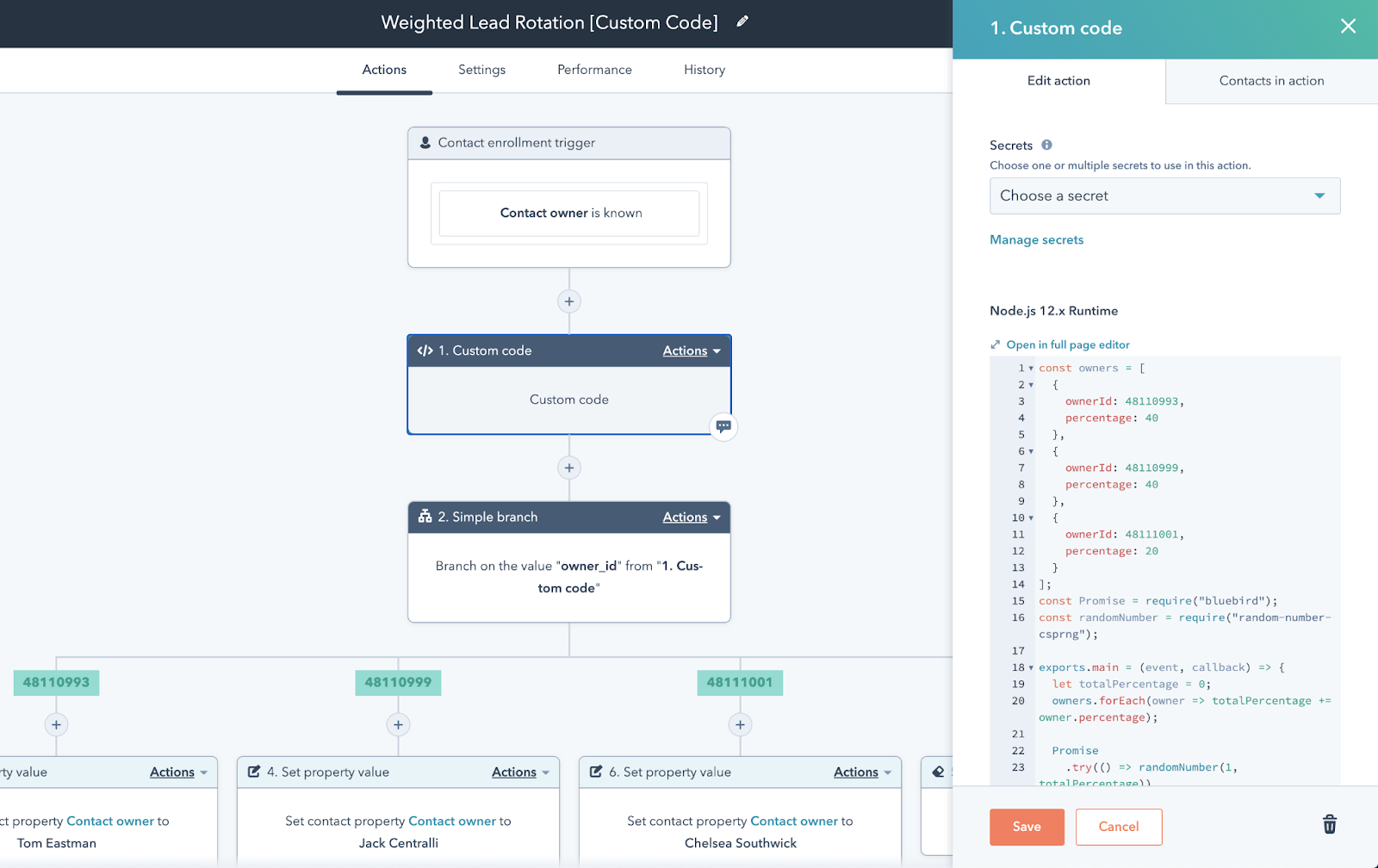
HubSpot Sequences are still basically linear: timed emails + tasks, with auto-unenrollment when a contact replies or books a meeting. The conditional logic lives in Workflows, which is powerful - and also where teams burn time.
Real talk: the split between "sequence brain" and "workflow brain" makes branching outreach clunky. To mimic a simple Yes/No path, teams juggle multiple sequences plus a workflow that enrolls and unenrolls people at the right time. It works, but it's easy to misconfigure, and it's annoying to maintain.
Workflow branching has real limits: up to 250 branches for a single property/value equals, and up to 20 branches for AND/OR logic. Timing isn't instant either: HubSpot recommends 80 minutes delay for analytics updates and 5 minutes for engagement updates, so you design with those lags in mind or your branches fire late.
Sidebars: how it works in workflows, testing, SQL, and LSAT
Laserfiche Workflow (Tier 2)
In Laserfiche, a Conditional Sequence is a container: it runs the activities inside only if the conditions are satisfied; otherwise the workflow continues without them. The condition editor supports grouping logic like any/all must be true/false, including nested groups for precedence.
Quick setup path: in Workflow Designer, drag Conditional Sequence from the toolbox onto the canvas, configure the rules in its Properties pane, then drop the activities you want to guard inside the container.
The edge case that trips people: multi-value field groups. The common pattern is to loop through one multi-value token, then loop through another, and add a condition that the iteration indices match so you're comparing values at the same position.
testRigor (Tier 2)
testRigor's conditional sequences are about making tests resilient: click "ok" if exists won't fail if the element isn't present. In practice, it's the same idea as outreach if-statements: only do the step if the condition's true, so the run doesn't break on optional states.
Two details matter:
if existscan't be used with validations. If you need conditional validation, use anifblock and put the validation inside it.- When a conditional behaves unexpectedly, inspect the run output: open More details and enable Show extra info to see how the true/false evaluation resolved.
Pricing is quote-based and tied to parallelization/infrastructure, not seats.
SQL approach (Tier 3)
In SQL, "conditional sequence" usually means generating a sequence number that resets by group. The standard pattern is:
ROW_NUMBER() OVER (PARTITION BY condition, id ORDER BY date)
That gives you 1,2,3... for each (id, condition) combination without procedural code.
LSAT logic games (Tier 3)
In LSAT sequencing, conditional rules are triggers: "If A is earlier than B, then B is earlier than C." The key lesson is non-trigger scenarios: if the sufficient condition doesn't happen, the rule imposes no constraint.
With three variables and no ties, there are 6 possible orders of A/B/C. For the rule "If A is earlier than B, then B is earlier than C," only two orders are disallowed: ACB and CAB. That leaves 4 valid orders:
- ABC
- ACB (invalid)
- BAC
- BCA
- CAB (invalid)
- CBA
So you've got 4 valid orders (ABC, BAC, BCA, CBA) and 2 invalid (ACB, CAB). That quick enumeration fixes the most common LSAT mistake instantly.
FAQ: conditional sequences (quick answers)
Is a conditional sequence the same as if/else logic?
It's if/else logic applied over time: you evaluate a condition, then take different next steps based on true/false (or run/skip). The difference is monitoring - most tools poll on a schedule or wait a window, so it isn't instant like code.
Should I use email opens as a condition in 2026?
No. Opens are a weak signal in 2026 because Apple Mail Privacy Protection creates machine opens and masks user behavior, so open-based branches misfire. Use replies, clicks, meetings booked, and bounce/invalid states instead.
How do conditional sequences check conditions - instantly or on a schedule?
Usually on a schedule inside a monitoring window. Reply.io's Condition step polls every 10 minutes; if the condition becomes true during the window, the prospect advances immediately, and if it never becomes true, they fall into the No branch when the window expires.
How do I do conditional sequences in HubSpot if Sequences don't branch?
Use HubSpot Workflows to branch, then enroll contacts into different sequences (or set properties that sequences reference via personalization tokens). Workflows support if/then branching with limits, and you'll often add short delays so engagement data updates before the branch fires.
What's a good free tool to keep branches from failing due to bad data?
Prospeo's free tier includes 75 email credits + 100 Chrome extension credits/month. Use it to verify and enrich before enrollment so your routing rules evaluate on clean fields instead of stale CRM properties.
Summary: build conditional sequences on signals you can trust
Conditional sequences are just branching logic over time: pick the right meaning (outreach, workflows, testing, SQL, or LSAT), then design with Guard → Monitor → Branch → Action → Exit so you can debug it later.
In 2026, the biggest win is simple: stop routing on opens, and start routing on replies, clicks, meetings, bounces, and verified field presence.