

Time-Zone Triggers Sales Outreach: The 2026 Playbook
You queue up a "perfect" sequence at 4:30pm... and your prospect gets step 1 at 3:07am.
Then your reply rates get weird, deliverability slides, and reps blame the tool instead of the setup.
This playbook fixes the boring stuff that causes 90% of "why did it send at 3am?" threads: DST-safe timezones, deterministic fallbacks, and schedules that actually run in the recipient's local time.
What you need (quick version)
Checklist (the reliable setup):
- A timezone field on the lead/contact (preferably IANA format like
America/Los_Angeles) - A normalization rule that converts messy inputs (state, city, phone) into IANA timezones
- Sequence schedules defined as blocks (not "send anytime") for consistent prospect-local sending
- Fallback logic for missing timezone (sender timezone or a default like UTC-5)
- Monitoring/QA: a weekly spot-check + a "sent outside window" alert
Data-backed default send window (start here):
- Siege Media analyzed 85,000+ personalized outreach emails and found the best window was 6-9am PST (9am-12pm EST).
- Set your default to 6:00-9:00am prospect local time.
- Skip the "10:00am is always best" myth. In that dataset, 10am dropped.
Copy/paste default schedule snippet (use everywhere):
Mon-Thu: 06:30-09:00 (prospect local time)

Fri:     07:00-08:30 (prospect local time)

No sends: Sat-Sun

Fallback: sender timezone if prospect TZ missing
Timing's a multiplier; clean data's the base layer.

Why time-zone triggers exist (and what they actually are)
A time-zone trigger is automation that assigns or updates the prospect's timezone field, so your sequence schedule can interpret "send at 7:30am" in the prospect's local time (assuming your sequencer's configured to use it).
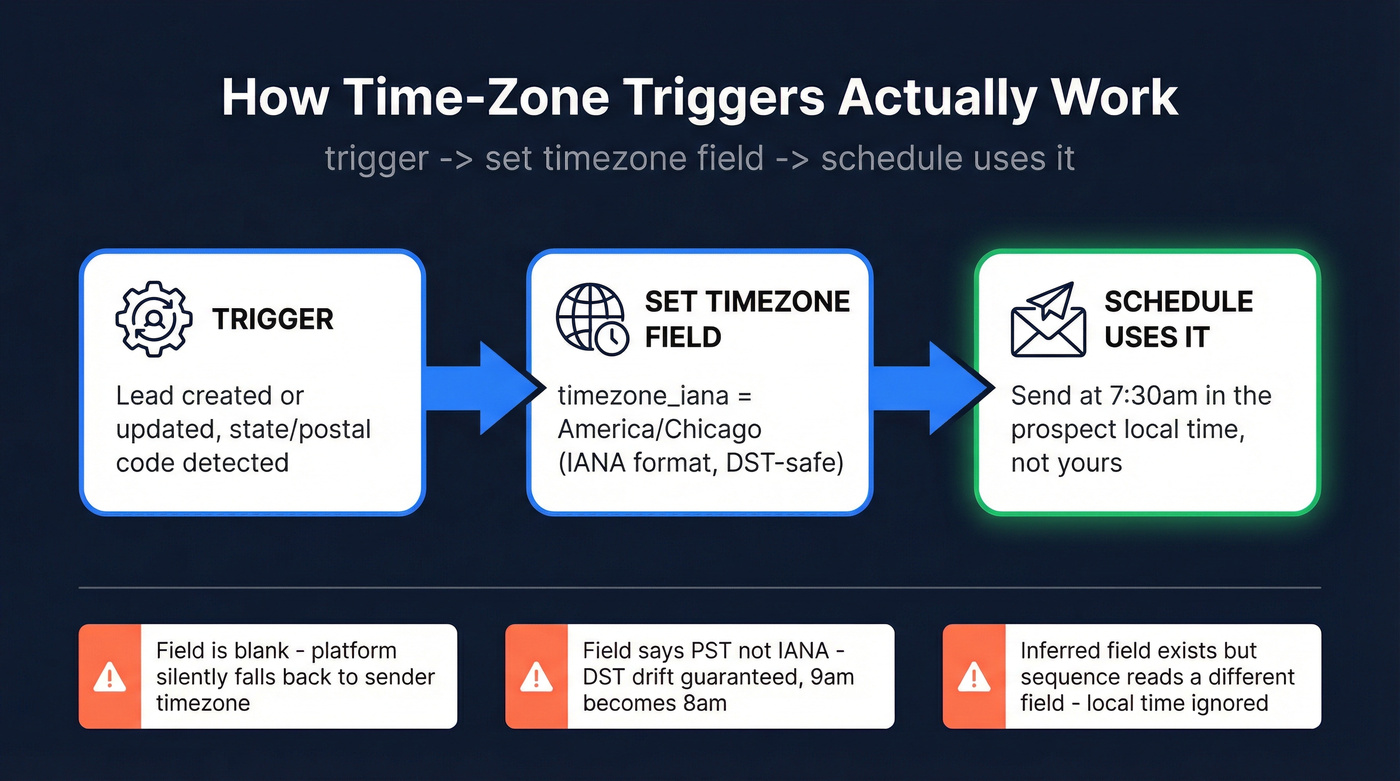
The simplest mental model:
trigger -> set timezone field -> schedule uses it
Here's the distinction teams blur (and then spend weeks debugging):
- Field: the stored value on the record (
timezone_iana = America/Chicago) - Behavior: the sending engine interpreting your schedule block using that field (for example, "Use prospect's timezone as default" in Outreach)
When the field's blank, stored as PST, or shoved into an "inferred" property your sequencer doesn't read, local-time sending collapses into guesswork. Guesswork fails in three predictable ways:
- DST drift: abbreviations don't move with daylight savings, so "9am" becomes "8am" for part of the year.
- Silent fallbacks: platforms quietly switch to the sender/admin timezone when the prospect TZ is missing.
- Inferred-but-unused fields: the tool "knows" a timezone somewhere, but sequences still run off a different field.
Look, off-hours sending also creates a pattern spam filters love: bursts at weird local times, low engagement, and robotic timing across many recipients. Even if you don't land in spam, you look sloppy. Prospects notice.
Keep it straight: A time-zone trigger populates a lead/contact timezone value (ideally IANA). "Send in recipient's local time" is the execution behavior that uses that value when scheduling steps.
Time-zone triggers sales outreach: a platform-agnostic blueprint
If you want this to work across Outreach, HubSpot, Apollo, Salesloft, or Smartlead, you need the same five-part system every time.
| System part | What it is | What "good" looks like |
|---|---|---|
| Field | Where TZ lives | timezone_iana on lead/contact |
| Normalization (IANA) | Convert inputs -> IANA | America/Chicago, not CST |
| Schedule blocks | Allowed send windows | 06:30-09:00 local |
| Fallbacks | Missing/unknown TZ | sender TZ -> default TZ |
| Monitoring/QA | Catch drift & bugs | weekly audit + alerts |
Two hard rules:
- If it's not IANA, DST handling's broken. Abbreviations like PST/EST don't "move" when daylight savings shifts.
- Don't treat timezone as a "nice-to-have." It's a routing field, like territory. If it's wrong, execution's wrong.
A concrete normalization rule set (steal this)
Use a strict precedence order so your automation's deterministic:
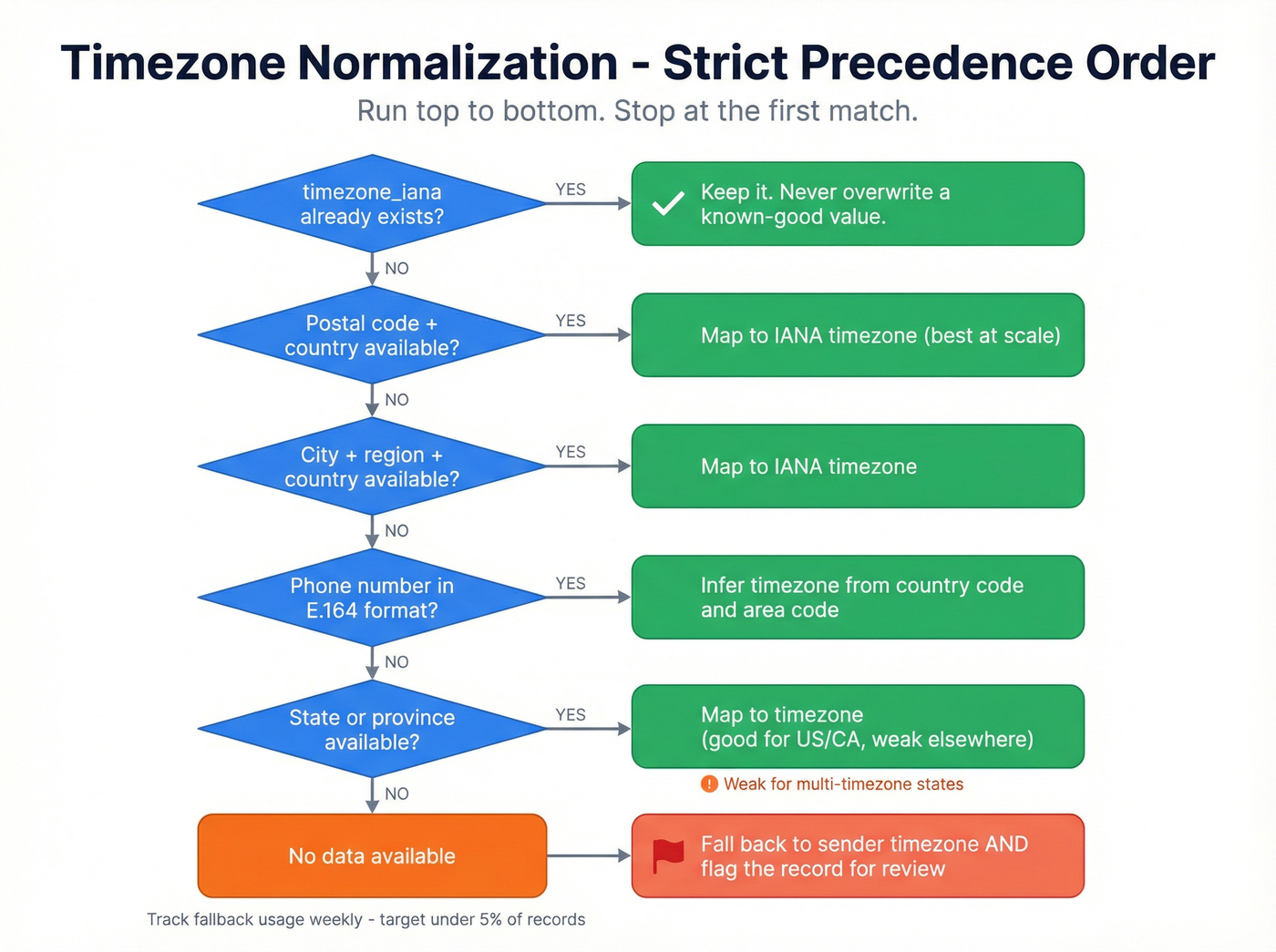
- If
timezone_ianaexists -> keep it. Never overwrite a known-good value. - Else if postal code + country exists -> map to timezone (best at scale).
- Else if city + region + country exists -> map to timezone.
- Else if phone is E.164 (
+14155552671) -> infer timezone from number/country/area. - Else if state/province exists -> map (good for US/CA, weak elsewhere).
- Else -> fallback to sender timezone (and track it).
Monitoring metrics that catch breakage fast
Track these weekly or you'll relive the same "why did it send at 3am?" thread forever:
- % records missing
timezone_iana(target: under 5%) - % sends using fallback timezone (target: trending down)
- "Sent outside window" incidents (target: near zero; investigate every spike)
- Top 10 states/countries with missing TZ (this tells you where your data pipeline's failing)
Best send windows for cold outreach (data-backed defaults)
Most timing advice online is recycled newsletter guidance. Cold outreach behaves differently because you're fighting three things at once: attention, inbox placement, and the recipient's meeting load, all while your list quality and deliverability settings quietly decide whether your message even gets a fair shot.

Siege Media's benchmark on 85,000+ personalized outreach emails is one of the few datasets that's actually relevant to sales-style sending. Their findings are clean enough to operationalize:
- Best time window: 6-9am PST (9am-12pm EST)
- They recommend scheduling 7-8am PST to catch an 8-10am engagement spike
- Best day: Monday at about 20% open / 4.3% click / 2.8% reply
- 10am decline: meaningful drops around 10am (both PST and EST)
Full benchmark: Siege Media's best time to send cold email (published 2026).
Amplemarket's analysis across 200,000+ leads lands on the more useful truth: there's no universal best time, because audience + offer + follow-up strategy change the curve. (Amplemarket timing analysis (2026))
Default templates (use these until you've tested):
- Global B2B outbound (safe): Mon-Thu 6:30-9:00am local
- If you sell to execs: 6:00-8:30am local (they get booked early)
- If you sell to ICs: 7:00-9:30am local (they ramp slower)
Here's the thing: if your average deal size is small, you don't need "perfect timing." You need clean targeting, verified emails, and a sequence that earns replies. Timing helps, but it won't rescue a bad list.

Your time-zone triggers are only as good as the data feeding them. Prospeo enriches leads with 50+ data points - including location, postal code, and country - so your normalization rules actually have something to work with. 98% email accuracy means your perfectly timed sends actually land.
Stop optimizing send times on a list full of bad emails.
Global time conversion examples (why local-time sending matters)
If you run global outbound, manual conversion is where good intentions go to die.
- 8:00am New York -> ~2:00pm CET (varies by DST week). If you schedule "8am ET" without local-time logic, you'll hit Europe mid-afternoon, which is fine for some audiences and awful for others.
- 8:00am London -> ~5:00pm AEST (varies by DST week). That's end-of-day in Australia, which often underperforms for cold email.
This is exactly why you store IANA timezones and let the platform schedule locally. Humans shouldn't be doing DST math in spreadsheets.
How sequence schedules really execute (blocks, delays, holidays, "no catch-up")
Use time blocks. Skip "send anytime." That's the difference between controlled outreach and accidental spam.
Execution rules that matter in real life:
- If a step's due outside the allowed block, the platform waits until the next window.
- There's no catch-up. When step 2 waits, step 3 shifts forward too.
- Delays are computed as "wait X business days/hours," then applied to the next available send window.
Holidays are another gotcha. Most systems treat holidays as schedule-level settings, not prospect-level. In Outreach, you pick one country's holidays per schedule, so if you're mixing US + UK + AU prospects in one schedule, somebody's holiday logic will be wrong.
Troubleshooting decision tree (fast, no theory)
If you see a "3am send" or "outside window" complaint, run this in order:

- Was the schedule set to prospect local time? If yes, check the prospect's timezone value, not the rep's.
- Is the timezone field blank or non-IANA?
If blank, you're in fallback. If it's
PST/EST, DST drift's guaranteed. - Is the tool using an inferred field you can't see? If inference populates a hidden/read-only property, sequences still won't respect it.
- Did step 1 send immediately on enrollment? HubSpot workflow enrollment can fire step 1 right away.
- Are holidays compressing your windows? A skipped holiday plus tight blocks pushes steps into the next day's first window.
Time-zone triggers in Outreach (DST-safe setup)
Outreach is where "time-zone triggers" are the most literal: you can create triggers that set the prospect's timezone field based on state (or other inputs), then sequences interpret schedule blocks in the prospect's timezone.
Outreach's reference sample is here: Sample Trigger: Automatically Assign Prospect Time Zones. Below is the version that survives production messiness.
The trigger recipe (the version that works)
Goal: When a prospect is created/updated and their timezone's blank, set it to the correct IANA timezone based on state/province (or your own logic).
Event
- Prospect Created or Updated
Conditions (this is where teams mess up)
- Group your state checks under ANY (because a prospect can't be in two states)
- Add a separate condition group under ALL that ensures you only set timezone when it's blank
Example logic
- ANY: State equals
CAORWAORORORNV - ALL: Time Zone field is blank
Action
- Set field -> Time Zone (IANA) ->
America/Los_Angeles
Operationally, you'll clone this trigger per timezone region. That's normal.
IANA vs abbreviations (DST-safe vs not)
Outreach prefers IANA timezones like America/Los_Angeles because they include daylight savings behavior. Abbreviations like PST and EST don't.

If Salesforce sync sends an unrecognized timezone format, Outreach can ignore the timezone field but still sync the record. So you think you're syncing timezones... and Outreach isn't using them.
If you're stuck with abbreviations in Salesforce, the clean workaround is: sync that value into a custom field, then use an Outreach trigger to set the real Time Zone (IANA) field.
The dumbest bug that wastes hours: trailing spaces
Outreach calls this out for a reason: trailing spaces after the state value can break timezone display/assignment behavior. CA won't match your trigger condition for CA.
Trim your state field upstream or you'll be debugging ghosts.
"Why are emails sending outside my schedule blocks?"
Nine times out of ten, nothing's "sending outside the block." You're just looking at it in the wrong timezone.
When you enable Use prospect's timezone as default in an Outreach sequence schedule, the schedule blocks are interpreted in the prospect's timezone, which is why keeping that field clean is non-negotiable.
Example:
- You're an ET user.
- Prospect's PT.
- Your schedule block is 8am-6pm.
- Outreach sends 8am-6pm PT, not ET.
Schedule settings that keep you out of trouble
In Outreach sequence schedules, set:
- Use prospect's timezone as default
- Use sender's timezone if prospect timezone is unavailable
- A default timezone only as a last resort
Also decide your holiday behavior per schedule. If you sell globally, you'll end up with multiple schedules (US, UK/EU, APAC) even if the blocks are identical, just to keep holiday logic sane.
The InferredTimeZone nuance that trips teams
Outreach can infer timezone from phone number or from state (but state inference is only United States or Canada). The catch: phone-based inference updates a read-only API field called InferredTimeZone, and it doesn't populate the UI timezone field your sequences rely on.
If you want sequences to behave, you need the visible timezone field populated via sync, trigger, or enrichment.
Outreach admin risk: trigger sprawl (governance or chaos)
Outreach triggers multiply fast. Without governance, they conflict, overwrite each other, and nobody remembers why.
Do this:
- Naming convention:
TZ - US - Pacific (CA/WA/OR/NV) - v1 - Single owner (RevOps), with a change log
- Quarterly audit: duplicates, overlaps, and "sets timezone even when already set" mistakes
Cross-platform setup (HubSpot, Apollo, Salesloft, Smartlead)
Every tool supports "local time" in some form, but they disagree on (1) where timezone comes from and (2) what happens when it's missing.
| Tool | Where TZ comes from | How to enable local-time | Fallback behavior | Key gotcha | Pricing posture |
|---|---|---|---|---|---|
| Outreach | Prospect TZ field | Schedule: prospect TZ | Sender TZ, then default | Blocks read in prospect TZ | Enterprise (~$100+/seat/mo typical) |
| HubSpot | Contact TZ property | "Use contact TZ" | Sender user TZ | Step 1 can send immediately | Sales Hub Enterprise (enterprise base pricing) |
| Apollo | Location data | Schedule local-time | Uses account/user TZ | Location quality drives TZ | ~$59-$99+/seat/mo typical |
| Salesloft | Person or user | timezone_mode=person |
User TZ | Admin UI varies | Enterprise (~$100+/seat/mo typical) |
| Smartlead | Lead timezone |
CSV/lead TZ | Workspace default | Case-sensitive TZ values | Paid plans (SMB-friendly) |
When to use which (a blunt operator's view)
- Outreach / Salesloft: pick these when you need strict governance, complex routing, and enterprise reporting. They're heavy, but they're built for scale.
- HubSpot: great if your CRM's the center of gravity and you can live with workflow enrollment quirks (especially step 1 firing immediately).
- Apollo: best "good enough" option for SMB outbound: fast to launch, solid scheduling, but you must keep location data clean.
- Smartlead: strong for high-volume cold email ops where lead-level control (including timezone in CSV) is the workflow.
HubSpot (Sequences + Workflows)
HubSpot's cleanest "timezone trigger" equivalent is workflow enrollment into sequences with the checkbox Use Contact's Time Zone. When it's enabled, follow-up steps schedule in the contact's timezone.
Two gotchas matter:
- The first step can execute immediately upon enrollment. If you enroll someone at 9:47pm their time, step 1 can go out right then unless you design around it.
- If the contact's timezone isn't available, HubSpot falls back to the sender's user timezone.
HubSpot doc: enroll contacts in sequences using workflows.
Operator fix: if you need strict local-time control for step 1, don't use workflow enrollment for that first touch. Enroll manually with "send later," or make step 1 a task and start email at step 2.
Apollo (sequence schedules)
Apollo's scheduling's straightforward.
Path: Settings -> Team email & sequences -> Sequences -> Schedules. Then enable the option to use a contact's local time zone if location data's available. Doc: Configure a Sequence Sending Schedule.
Two practical notes:
- Apollo's "local time" is only as good as your location fields. Garbage city/state in -> garbage timezone out.
- Holiday skipping often defaults to US holidays (and can be turned off). If you run global sequences, split schedules by region.
Pricing posture: Apollo commonly starts around $59+ per seat/month, and plenty of teams land in the $59-$99+/seat/mo range depending on plan and data.
Salesloft (person-timezone sending exists)
Salesloft supports person-timezone execution cleanly in its model: timezone_mode: person|user. You can also control time_of_day and weekend sending.
Use person timezone for any cross-region cadence. Use user timezone only when a rep owns a tight region and you want their working hours to define the window.
Pricing posture: Salesloft is enterprise-priced, commonly $100+/seat/mo in real deployments.
Smartlead (lead-level timezone via CSV)
Smartlead's explicit: you set timezone at the lead level.
Import checklist:
- Add a
timezonecolumn to your CSV - Use values that match Smartlead's reference list exactly
- They're case-sensitive
- Map
timezoneas a custom variable during import
If you get casing wrong, Smartlead treats timezone as missing and falls back to your workspace default.
Tier-3 cold email tools (quick sidebar)
If you're running a leaner outbound stack, monday CRM, Salesforge, smartreach.io (typical starter ~$29/mo), Instantly (typical starter ~$30/mo), and Lemlist (typical starter ~$55-79/mo) all support timezone-aware sending in some form, usually via schedule windows plus contact location/timezone fields.
Skip this whole category if you need strict governance, multi-team reporting, and predictable admin controls. You'll spend more time fighting edge cases than shipping pipeline.
What practitioners complain about (and what actually fixes it)
I've seen teams waste weeks arguing about "best send time" while their CRM has blank cities and untrimmed state fields. That's not optimization; it's self-sabotage.
A few common complaints, and the fixes that actually move the needle:
- "It's throttling - we set 50/day and only 5-7 go out." That's usually warmup status, inbox health, account-level limits, or deliverability safeguards doing their job. Fix the sending reputation and limits first, then touch the schedule.
- "Timezone sending's inconsistent across tools." Translation: your location inputs are inconsistent. Local-time logic doesn't create timezones; it exposes bad data.
- "We tightened timing and replies jumped." That happens, but it's rarely timing alone. In one real rollout we watched closely, the lift came after they cleaned list quality, verified emails, tightened infra, and then used local-time morning blocks; timing was the last 10% that made the rest pay off.
The hidden failure: your timezone data's missing or wrong (fix the data model)
Time-zone triggers fail for one boring reason: your CRM doesn't have reliable location inputs. Then you're building automation on sand.
Use this hierarchy and you'll stop arguing with your sequencer:
Best -> worst timezone inputs
- IANA timezone (best)
- Geo precision (city + postcode)
- Phone number in E.164 (timezone inference)
- State/province (works for US/CA, weak elsewhere)
- Fallback (sender timezone or default)
Do this / not that
- Do store
America/New_York(IANA). Don't storeESTorPSTand expect DST to behave. - Do normalize phone numbers to E.164 (
+14155552671). Don't keep "(415) 555-2671" and hope inference tools guess the country correctly. - Do keep a clear fallback rule. Don't let "missing timezone" silently become "send in admin's timezone."
In our experience, the fastest way to make local-time sending boring again is to improve the upstream inputs (location + verified mobile) so timezone assignment's accurate and your fallback rate drops. Tools like Prospeo ("The B2B data platform built for accuracy") are built for exactly that: 300M+ profiles, 143M+ verified emails at 98% accuracy, 125M+ verified mobile numbers, and a 7-day refresh cycle (the industry average is about 6 weeks). If you want the mechanics, start here: Prospeo data enrichment.
Missing timezone fields start with missing contact data. Prospeo's enrichment API returns location data at a 92% match rate, giving your automation the inputs it needs to map IANA timezones deterministically. All records refresh every 7 days - not 6 weeks - so your timezone fields stay accurate through every DST shift.
Fix your timezone gaps at the source - start with better data.
Advanced: timezone enrichment at scale (ZIP/postcode -> IANA mapping)
If you're doing this at real volume (hundreds of thousands to millions of leads), you outgrow "state -> timezone" triggers. You need deterministic mapping that doesn't crumble the first week you add international data or hit a DST transition.
The practical approach:
- Start with a postcode dataset that includes coordinates (lat/long)
- Use IANA timezone boundary polygons (GeoJSON)
- Run a point-in-polygon match to assign
timezone_iana - Store the result on the record and treat it as the source of truth
Teams implement this in PostGIS:
- Postcodes table (point geometry)
- Timezone polygons table
- Spatial join to assign timezone
Caveat: the US is full of exceptions. States and even counties span multiple time zones, and "ZIP -> timezone" isn't always one-to-one. That's why city/postcode beats state, but IANA-from-geo beats both.
If you're building this yourself, GeoPostcodes' walkthrough on ZIP code time zone databases is a solid starting point: https://www.geopostcodes.com/blog/zip-code-time-zone-database/
Testing send-time without fooling yourself (timing experiments that work)
Most "timing tests" fail because list quality changes week to week. Treat it like an ops experiment.
Experiment checklist
- Test time blocks, not single times: Example: 7-9am vs 9-11am (prospect local time)
- Hold list quality constant: Same ICP slice, same source, same enrichment/verification rules
- Keep copy identical for the test window
- Watch deliverability confounds: If one cohort has more bounces or spam placements, timing didn't lose; your data did
- Measure the right outcome: Opens are noisy. Replies and positive replies are the point.
DST transition week: expect a dip if you're using abbreviations or narrow windows. If you're on IANA timezones and you give yourself wider blocks (like 6:30-9:30), the impact's usually a blip.
Email vs call timing (stop mixing stats)
A lot of timing stats floating around are for calls, not email, and teams mash them together like they're interchangeable. They aren't.
One popular cold-calling stat: 4-5pm local time drives 71% higher success than 11am-12pm (often attributed to Outplay and repeated by Peak Sales Recruiting). That's about call connects or conversions, not email opens or replies.
Revenue.io's own writeups show why call timing's messy: some datasets favor 8-11am, others favor 4-5pm, and plenty call out 1pm as a dead zone. Different datasets, different motions, different outcomes.
Practical guidance:
- Keep local-time guardrails for both email and calls.
- Don't use call stats to set email schedules.
- If you're running a mixed cadence (email + call tasks), use separate windows per channel.
FAQ
What's the difference between a time-zone trigger and "send in recipient's local time"?
A time-zone trigger populates a lead/contact timezone field (use IANA like America/Denver). "Send in recipient's local time" is the sequence setting that reads that field to schedule steps in the prospect's morning instead of the rep's. If the field's blank, most tools fall back to sender/admin time and you'll see off-hours sends.
Why did my sequence send "outside" my schedule block?
It's usually a timezone interpretation issue: the block's being applied in the prospect's timezone, not yours, or the record had no timezone so the tool used a fallback. Check two things: the stored timezone value (must be IANA) and the fallback rate (keep it under 5% if you want this to feel reliable).
Should I store time zones as PST/EST or IANA (America/Los_Angeles)?
Store IANA timezones like America/Los_Angeles because they handle daylight savings automatically and stay consistent across systems. PST/EST abbreviations don't adjust for DST, so a "9am" send drifts by an hour for weeks at a time.
What do I do when a lead has no timezone?
Use a strict fallback order: IANA if present, else infer from postcode+country, else city+region, else phone in E.164, else state/province, else sender timezone. Then track missing timezone rate weekly; if it's above 10%, your enrichment or form capture's failing and local-time scheduling won't be stable.
Summary: make local-time sending boring again
Time-zone triggers sales outreach isn't about being clever. It's about being consistent.
Store IANA timezones, normalize deterministically, send inside tight morning blocks, define fallbacks explicitly, and monitor "outside window" incidents like a real ops metric. Do that, and 3am sends become a rare bug, not your default reality.