

Personalized Outreach Using CRM (2026): The CRM-First Playbook
Personalization doesn't fail because reps "aren't good writers." It fails because your CRM data's stale, inconsistent, and missing the exact fields your sequences depend on.
If you're serious about personalized outreach using crm, the hard part isn't clever first lines. It's building a system that never ships broken tokens, never enrolls risky emails, and always logs outcomes back to the CRM.
Here's the thing: most teams try to fix this with more copy, more tools, and more fields. That usually makes it worse.
What you need (quick version)
Implement first: minimal CRM personalization schema + fallbacks
- Standardize a small set of fields everyone uses the same way.
- Add fallback rules so blanks never break enrollment or create awkward merges.
- Keep personalization to 1-2 angles per email. More than that turns into data roulette.
Implement first: deliverability guardrails + stop rules
- Set hard thresholds for bounces, complaints, and unsubscribes.
- Auto-pause senders/campaigns when thresholds trip.
- Cap per-sender volume until domains earn trust.
Implement first: signals -> CRM trigger workflow
- Pick signals that matter (events, pricing intent, job changes, funding, renewal risk).
- Normalize them into CRM fields/events.
- Auto-enroll the right sequence and sync outcomes back.
Verify/enrich before enrollment (for example, Prospeo) so CRM tokens don't break and bounce rates stay under thresholds.

Why CRM personalization fails (and it's not your copy)
Most teams blame copy because it's visible. The real failure is upstream: CRMs are full of half-empty records.
When you scale outreach, blanks stop being a nuisance and start being a production incident: enrollments fail, tokens render weird, and deliverability tanks because you mailed unverified addresses.
Plan around this reality: 22.5%-30% of B2B data decays every year. Titles change, people switch companies, domains consolidate, and "temporary" fields become permanent. (If you want the mechanics + benchmarks, see B2B data decays.)
Bad data's also expensive. A commonly cited Gartner estimate (shared widely across the industry) puts the cost of bad data at ~$15M/year for the average business. Even if your org's smaller, the mechanism's identical: bad data hits deliverability, routing, reporting, and rep productivity at the same time.
What practitioners complain about (and they're right):
- "We added a bunch of fields and nobody filled them in."
- "Personalization got creepy, so we stopped trusting it."
- "The sequencer looked fine, then the CRM sync broke and we double-contacted people."
Real talk: if your average deal size is small, you don't need "AI personalization." You need a ruthless CRM data contract and fast triggers.
The CRM-first personalization loop (signals -> enrich -> trigger -> sync back)
CRM-first personalization works when the CRM stays the system of record and everything else behaves like a specialist.
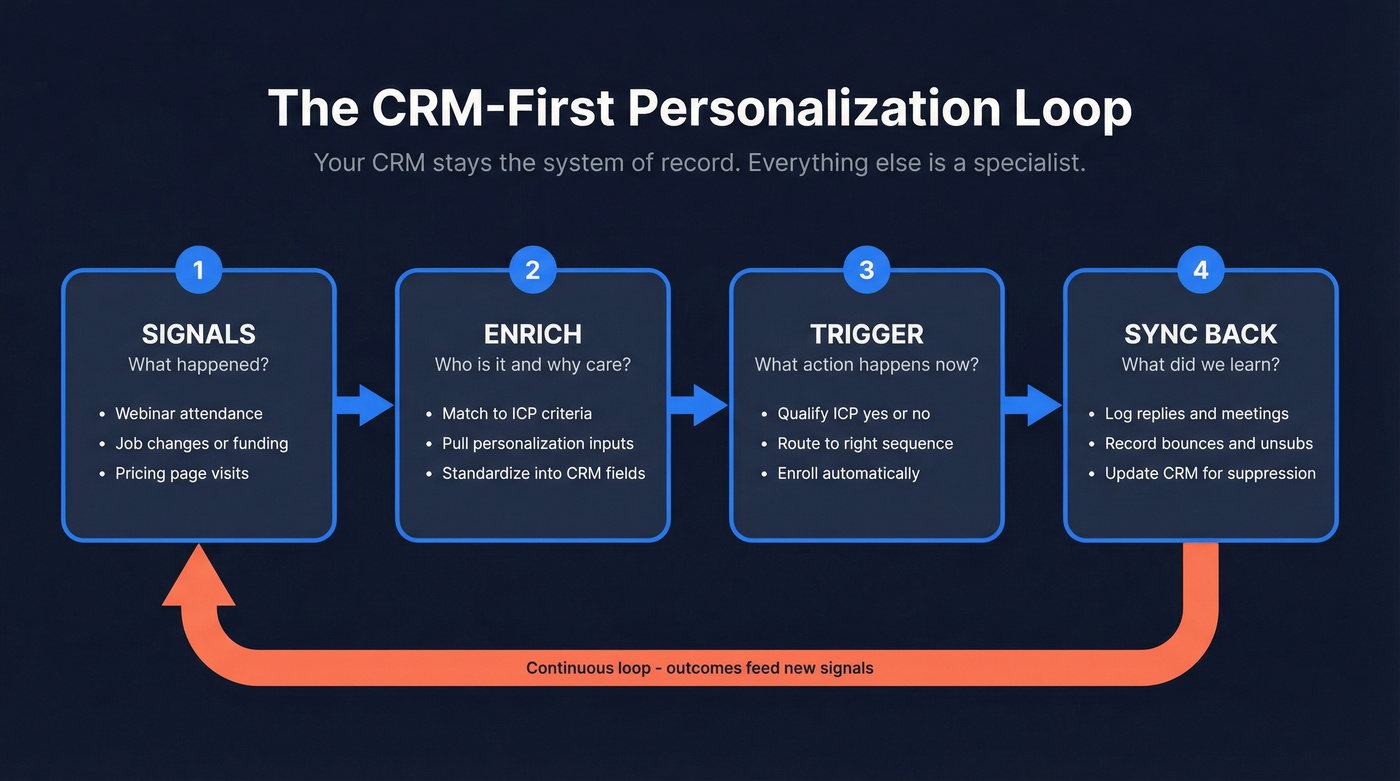
1) Signals (what happened?)
Signals are inbound (webinar attendance, form fills, site behavior) and outbound-adjacent (job changes, funding, headcount growth, intent topics). The point's simple: connect inbound timing to outbound execution.
You'll hear two stats in RevOps/operator circles all the time: "95% of the buyer journey happens without direct vendor interaction" and "84% of marketers are shifting away from purely inbound." Treat them as directional operator truths. The takeaway still holds: if you wait for a demo request, you're late.
2) Enrich (who is it, and why do we care?)
A signal without context is noise. Enrichment is where you match the person/company to ICP, pull a small set of personalization inputs, and standardize them into CRM fields.
Clay's popular here because it's built for chained steps: clean -> enrich -> conditional logic -> write-back.
3) Trigger (what action happens now?)
Don't build 40 sequences. Build a few that map to intent level + persona, then let triggers route people into the right one.
A workflow that holds up in real ops:
- Capture signal
- Enrich + qualify (ICP yes/no)
- Enroll in a sequencer (or CRM-native sequence)
- Log activity back to the CRM for reporting, routing, and suppression
4) Sync back (what did we learn?)
Replies, meetings, bounces, and unsubscribes must land back in the CRM. If they don't, you'll re-contact "no" replies, inflate pipeline metrics, and lose trust in reporting.
If you're exporting CSVs every week, you don't have a system. You've got a recurring failure point.

Your CRM personalization loop is only as good as the data feeding it. Prospeo enriches CRM contacts with 50+ data points at a 92% match rate - verified emails, job titles, intent signals - so your merge fields never render blank and your bounce rate stays under 4%.
Stop shipping broken tokens. Enrich before you enroll.
Your CRM personalization spec (fields, fallbacks, QA checks)
You want a spec that's boring, enforceable, and hard to misuse. More fields feels like progress, but it usually creates more empty properties and more inconsistent values.
One note before the tables: name these differently per CRM (Lead vs Contact vs Account, custom property labels, etc.). The contract's the meaning + allowed values, not the label.
Required fields (identity + routing + compliance + segmentation)
| Field | Object | Type | Why it exists | Fallback |
|---|---|---|---|---|
| first_name | Contact/Lead | Text | Greeting + tone | "there" |
| Contact/Lead | Sending + dedupe | suppress | ||
| company_name | Company/Acct | Text | Context | suppress |
| job_title | Contact/Lead | Text | Persona routing | "your role" |
| persona | Contact/Lead | Picklist | Sequence selection | default persona |
| region | Contact/Lead | Picklist | Timing + compliance | "Unknown" |
| owner_id | Contact/Lead | Lookup | Assignment | round-robin |
| consent_status | Contact/Lead | Picklist | Compliance | suppress |
| source_signal | Contact/Lead | Picklist | Why now | "Outbound" |
| last_enriched_at | Contact/Lead | Date | Freshness | block if stale |
Do this / don't do this #1: Don't add 20 custom fields "for personalization." Add 10 fields you can keep >=95% populated in your ICP segment.
Optional fields that actually move replies (trigger/signal fields, proof points)
| Field | Type | Use in copy | Notes |
|---|---|---|---|
| trigger_event | Picklist | "Saw you..." | webinar/pricing/job change |
| trigger_detail | Text | "You asked about..." | keep short |
| pain_hint | Text | "Teams like yours..." | from persona mapping |
| proof_point | Text | "We helped X..." | must be approved |
| tech_stack | Multi-select | "Noticed you use..." | don't be creepy |
| intent_topic | Picklist | "Teams researching..." | keep generic |
| last_touch_channel | Picklist | "Following up from..." | prevents repeats |
Direct recommendation: one strong trigger + one proof point beats five weak "insights." It also keeps your QA surface area small.
The two-field pattern (signal -> generated line)
This is the simplest personalization pattern that scales without turning your CRM into a junk drawer.
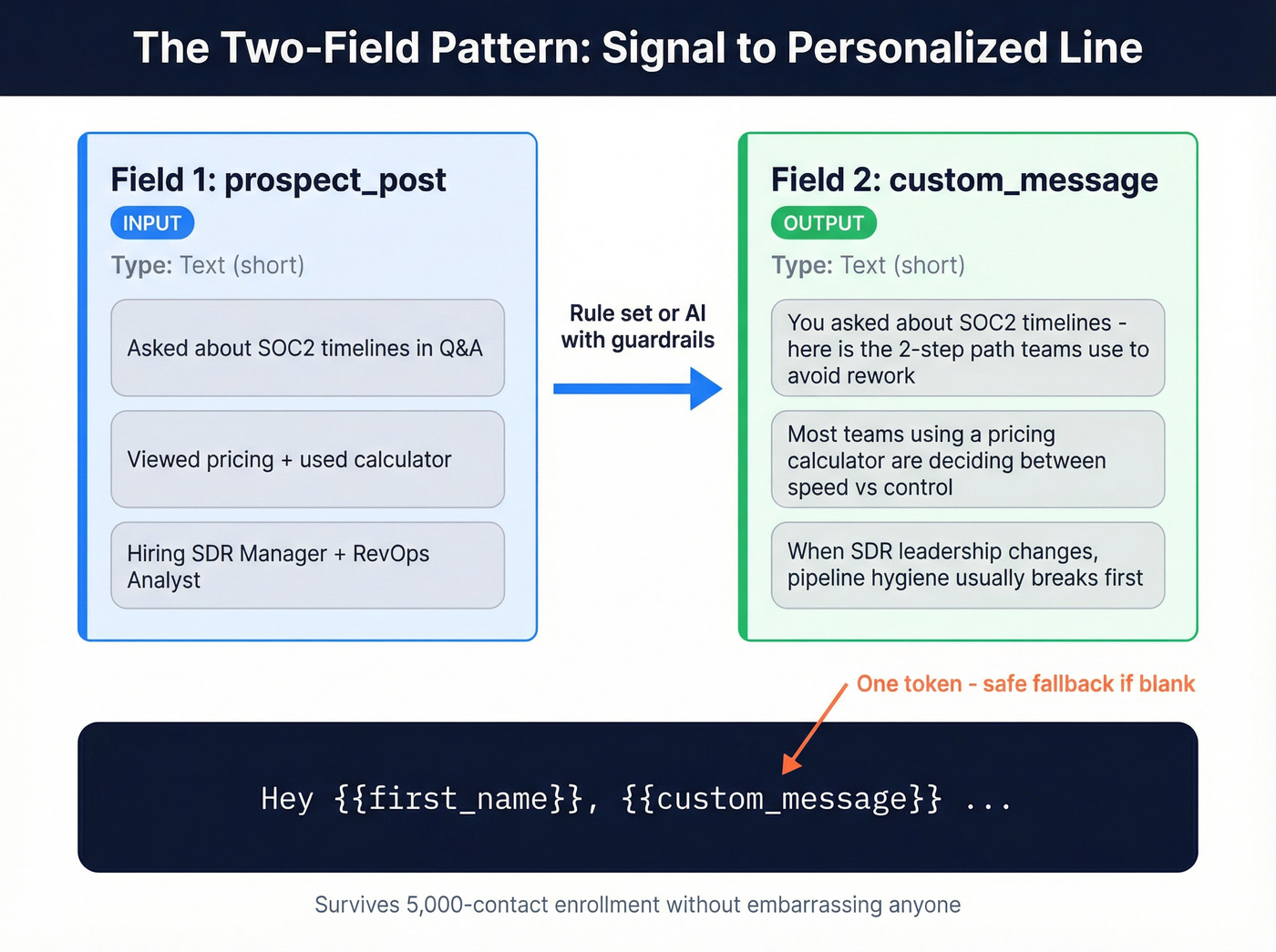
Field 1: prospect_post (input)
- Type: Text (short)
- What it stores: the raw "reason to reach out" snippet you trust (a signal detail, a short note, a quote from an event question, a hiring clue).
- Example values:
- "Asked about SOC2 timelines in Q&A"
- "Viewed pricing + used calculator"
- "Hiring SDR Manager + RevOps Analyst"
Field 2: custom_message (output)
- Type: Text (short)
- What it stores: a single, ready-to-token line that's safe to send.
- Example values:
- "You asked about SOC2 timelines, here's the 2-step path teams use to avoid rework."
- "Most teams using a pricing calculator are deciding between speed vs control, happy to share a quick benchmark."
- "When SDR leadership changes, pipeline hygiene usually breaks before pipeline generation does."
How it flows into outreach
- Your workflow writes
prospect_postfrom the signal. - A human-approved rule set (or generation step with guardrails) produces
custom_message. - Your email template uses one token:
{{custom_message}}with a safe fallback.
In our experience, this pattern's the difference between "personalization that looks nice in a template" and "personalization that survives a 5,000-contact enrollment without embarrassing anyone."
Fallback rules (if blank -> default copy block; if unknown -> suppress)
Fallbacks are where scale's won.
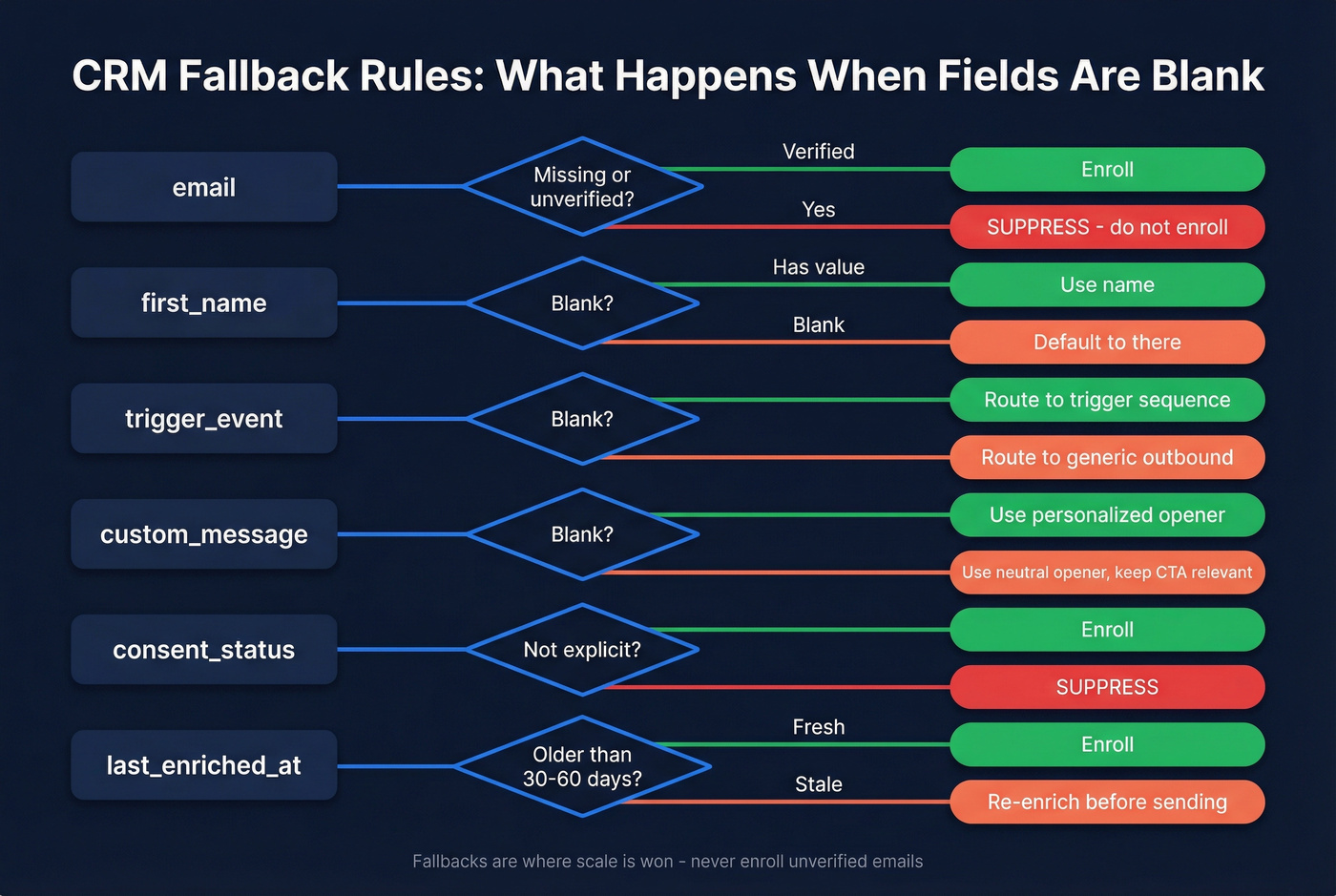
Use rules like:
- If email's missing or unverified -> suppress from enrollment
- If first_name's blank -> use "there"
- If trigger_event's blank -> route to a generic outbound sequence
- If custom_message's blank -> use a neutral opener and keep the CTA relevant
- If consent_status isn't explicit for your region -> suppress
- If last_enriched_at's older than 30-60 days -> re-enrich before sending
Do this / don't do this #2: Never enroll unverified emails. You don't "test deliverability" by gambling with bounce rates. (If you need an SOP, use an email verification list workflow.)
QA checklist (merge preview, sample size, "embarrassment tests")
Before you enroll a batch:
- Spot-check 200-300 records. Small samples hide pattern failures.
- Run a merge preview of every step.
- Enforce 1-2 personalization angles per email:
- Angle #1: trigger (webinar/pricing/job change)
- Angle #2: persona pain + proof point
- Run the embarrassment tests:
- Would you send this to your CEO?
- Does any line imply you're tracking them personally?
- Would a wrong value be humiliating (wrong company, wrong geo)?
- Validate routing:
- Every persona maps to exactly one default sequence.
- Suppression rules are applied before enrollment.
Data-quality KPIs
Track these weekly:
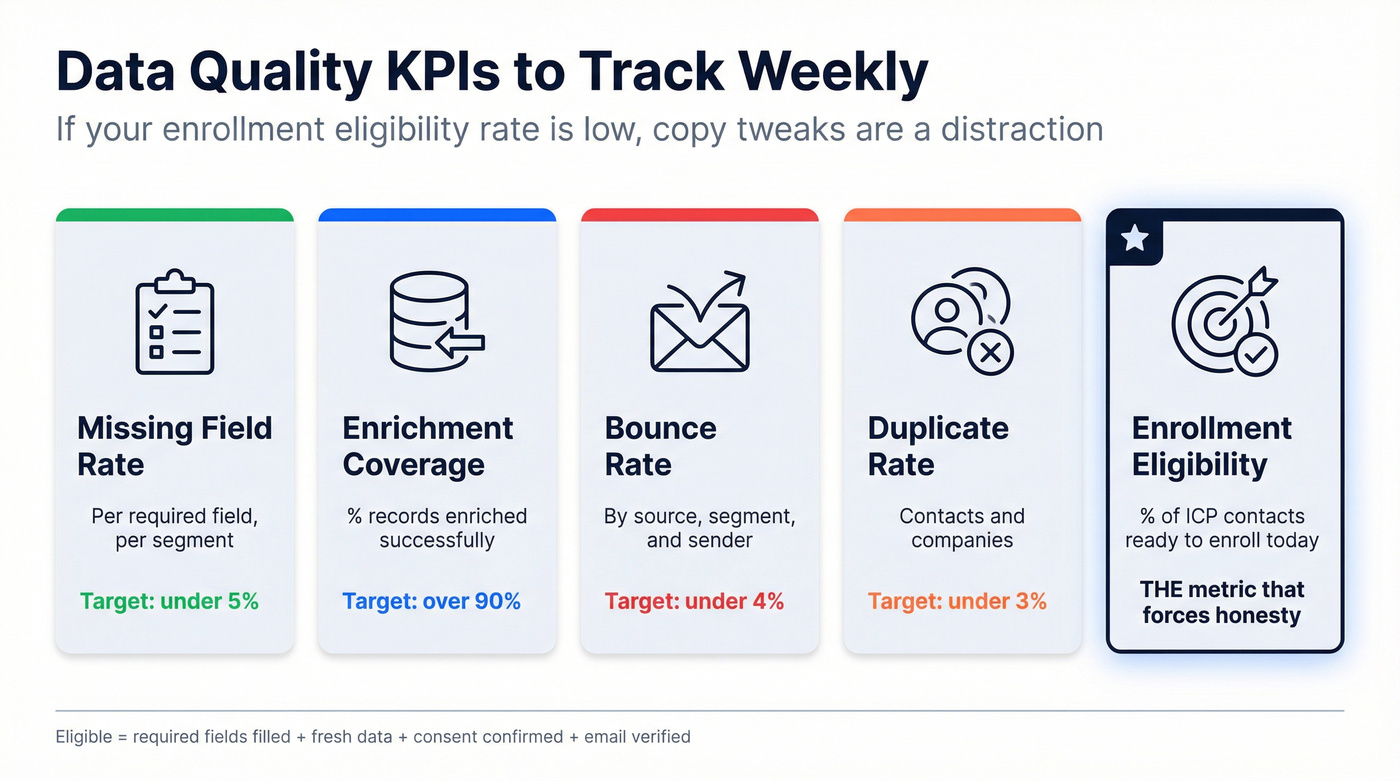
- Missing-field rate (per required field, per segment)
- Enrichment coverage (% records enriched successfully)
- Bounce rate (by source, by segment, by sender)
- Duplicate rate (contacts + companies)
- Stale rate (% with last_enriched_at older than threshold)
My favorite KPI because it forces honesty: % of ICP contacts eligible for enrollment today (meets required fields + freshness + consent + verified email). If that number's low, copy tweaks are a distraction.
Personalization token hygiene (how to prevent broken merges and failed enrollments)
Use this if you want scale.
Skip it if you enjoy firefighting.
Use this if:
- you use CRM properties as tokens,
- you enroll in bulk,
- you've seen "enrollment failed" errors.
Skip this if:
- you only send 1:1 emails manually,
- you don't use tokens.
HubSpot has a nasty operational gotcha: sequence enrollment can fail when required tokens are blank. The fix isn't "better templates." The fix is pre-enrollment defaults.
Set placeholders in CRM workflows before enrollment:
- if
personais blank -> set "General" - if
first_nameis blank -> set "there" - if
company_nameis blank -> don't enroll - if
custom_messageis blank -> route to the generic opener variant
Also: a HubSpot Community thread (Sep 2026) discussed template fallback values being in beta. Don't bet your system on a beta feature. Build defaults in the CRM so your enrollment logic's deterministic.
Personalized outreach using crm: trigger playbooks (timing beats clever copy)
Most personalization fails because it's late. A perfect email sent three days after the signal is just a generic email with extra steps.
Webinar/event follow-up SLA (2 hours)
Why it works: 73% of event leads go cold within 72 hours. The advantage is speed. Follow up within 2 hours, not "tomorrow."
CRM logging (minimum):
trigger_event = Webinartrigger_detail = asked_question / stayed_to_end / downloaded / left_early / no_showwebinar_topicwebinar_timestampowner_id
Segmentation tracks (behavior-based):
- Asked questions (high intent): reference the question directly.
- Stayed to end: reference a specific segment + offer a short next step.
- Downloaded resource: offer the "next artifact" (benchmark, checklist).
- Left early: offer the timestamped section they missed.
- No-shows: "Want the 3 bullets + recording?" with a low-friction CTA.
Example first lines (steal these):
- Asked Q: "You asked about [X] during the Q&A, quick answer: [one sentence]."
- Stayed to end: "You made it to the end of the session on [topic]; most folks drop halfway."
- Downloaded: "Saw you grabbed the [asset]; the part people usually ask next is [Y]."
- Left early: "You dipped early, if it helps, the 4-minute section on [topic] starts at 18:40."
- No-show: "Want the 3 takeaways and the recording link?"
Pricing page / high-intent site behavior
What to log in CRM:
trigger_event = Pricingtrigger_detail = plan_viewed / calculator_used / comparison_pageintent_score(1-3)last_seen_at
Sequence entry criteria:
- Pricing event in last 24-48 hours
- ICP match = true
- Suppress if open opportunity exists or active sequence already runs
What to say (don't be creepy):
- Good: "Teams evaluating pricing usually get stuck on [common tradeoff]."
- Bad: "I saw you were on our pricing page at 2:14pm."
CTA that converts: give two options: "Want a 10-minute fit check, or should I send a 1-page breakdown by email?"
Job change / new role
Job changes are a timing gift because priorities reset.
Sequence entry criteria:
job_change = truedays_in_role <= 90- persona in target set
Personalization block:
- "Congrats on the new role, first 90 days usually means [pain]."
- "If you're rebuilding [process], I can share a template."
One congrats line, then relevance. Anything more reads like a bot. (More timing + templates: job changes.)
Funding / headcount growth
Stop writing the same three funding lines everyone writes. I'm tired of reading them, and your buyers are too.
Reference:
- headcount growth in the function you sell into
- new geo expansion
- hiring for roles that imply a project (RevOps, SDR leader, security)
Avoid:
- exact dollar amounts unless they matter to your offer
- empty hype ("you must be scaling fast!")
A line that lands: "When teams add 10+ reps in a quarter, pipeline hygiene breaks before pipeline generation does."
Renewal risk / expansion signals
This is CRM personalization for existing customers, and it's often the highest ROI.
Signals:
- support volume spike
- usage drop
- champion left
- NPS detractor
- contract end within 90 days
CRM handoff fields (CS + sales):
risk_reasonnext_best_actionapproved_offer(training, audit, add-on)
If CS and sales don't share the same fields, you get the classic self-own: CS flags risk, sales sends an upsell, and the account churns out of spite.
Cadence, benchmarks, and stop rules (protect deliverability)
Belkins' Jan-Dec 2024 dataset of 16.5M cold emails found an average reply rate of 5.8%. Treat that as "normal," not "good." (Benchmarks + rules: email outreach analytics.)
Operational rules that actually matter:
- Keep emails under 200 words and ~6-8 sentences.
- One-touch sequences can win: that dataset shows 8.4% reply rate for one-touch sequences.
- Reply rate drops as you extend: adding a third email can drop reply rates up to 20%.
- Complaints rise as you push: 0.5% -> 1.6% by email 4.
- Don't spam accounts: 1-2 contacts/company = 7.8% reply vs 10+ = 3.8%.
Do this / don't do this #3: Cap to 1-2 contacts per account in a 14-day window. If you need more coverage, rotate contacts, not volume.
A practical cadence table (that won't torch your domain)
| Sequence type | Steps | Days | Notes |
|---|---|---|---|
| High-intent trigger | 3 | 5-7 | fast, tight |
| Standard outbound | 4 | 10-14 | conservative |
| Event follow-up | 3 | 3-5 | SLA-driven |
| Expansion/renewal | 3-5 | 14-21 | more context |
Stop rules (minimum)
- Stop on reply
- Stop on meeting booked
- Stop on hard bounce
- Stop on complaint
- Stop on unsubscribe
- Stop if contact enters an active opportunity stage
Opinion from painful experience: great copy loses to bad stop rules. If you keep hammering the same accounts, you'll burn reputation and poison future sends for the whole team.
Metrics that matter
Track outcomes and risk signals together:
- Reply rate -> meeting rate -> opportunity rate (by trigger/persona/sequence)
- Positive vs negative reply rate (separate them)
- Bounce rate (by list source + enrichment freshness)
- Complaint rate + unsubscribe rate (early warning system)
- Meetings per 100 contacts (best efficiency metric)

Deliverability guardrails for CRM-driven personalization
Deliverability isn't "email nerd stuff." It's the constraint that decides whether your CRM-triggered machine works at all.
A conservative operational model (popularized by senders who live and die by inbox placement) looks like this: keep complaints < 0.3%, keep bounces < 2%, and warm up over 4-6 weeks, starting at 5-10 emails/day per inbox, because mailbox providers punish sudden spikes and they don't care that your sequence "looked reasonable" in a dashboard. (If you want the updated playbook, see email deliverability.)
Non-negotiables (set once, stop arguing)
- SPF configured
- DKIM configured
- DMARC configured (monitor -> enforce)
- Separate sending domains for outbound vs core corporate mail (when it makes sense)
- One-click unsubscribe where required by bulk sender rules
- Daily send caps per inbox
- Seed/inbox placement testing on major changes (new domain, new copy, new list source)
Auto-pause rules (put them in the sequencer)
- Pause sender if bounce rate > 2% over last 200 sends
- Pause sender if complaints > 0.3% over last 500 sends
- Pause campaign if unsubscribes spike
- Quarantine a segment if one data source causes failures
Over-following-up is a deliverability tax. You pay with reputation, and it compounds.
Where verification/enrichment sits (and why it's upstream)
Verification belongs before enrollment, not after you get burned.
I've seen teams spend weeks "optimizing" a cadence, only to discover the real issue was a stale CRM segment feeding catch-all domains and old job changes into a sequencer that never should've touched those addresses in the first place; once they put verification in front of enrollment and wrote the results back to the CRM, reply rates didn't magically triple, but the whole motion stopped breaking every Monday. (Related: verify an email address.)
Pilot acceptance criteria ("done when" checklist)
This is the part most teams skip, then they argue about copy for months.
You're done when:
- Required fields are populated >=95% in your ICP segment
last_enriched_atis within your freshness window for >=90% of enrolled contacts- Bounce rate is <2% in a 500-send pilot
- Complaint rate is <0.3% in the same pilot
- Auto-pause rules are tested (you forced a pause and confirmed it works)
- Suppression rules prevent double-contacting (active opp, active sequence, recent "no")
- Sync-back is verified (reply/meeting/bounce/unsub lands in CRM within 15 minutes)
- One sequence maps to one persona (no routing ambiguity)
- You can answer: "Why did this person get this email?" from CRM fields alone
If you can't pass this checklist, scaling volume isn't "growth." It's self-sabotage.
CRM-native sequences: what's actually possible (HubSpot + Dynamics) + tooling map
CRM-native sequencing's convenient. It's also full of constraints that matter the moment you scale.
Quick comparison: HubSpot vs Dynamics vs dedicated sequencers
| Option | Best for | Key limit | Governance/logging | Scaling risk |
|---|---|---|---|---|
| HubSpot Sequences | warm follow-up | 1 seq/contact | good in-CRM | medium |
| Dynamics Accelerator | governed plays | setup overhead | strong | low-med |
| Instantly/Smartlead | cold volume | CRM not native | needs sync | high* |
*High risk if you don't enforce verification, caps, and auto-pause.
HubSpot Sequences: requirements + real limits
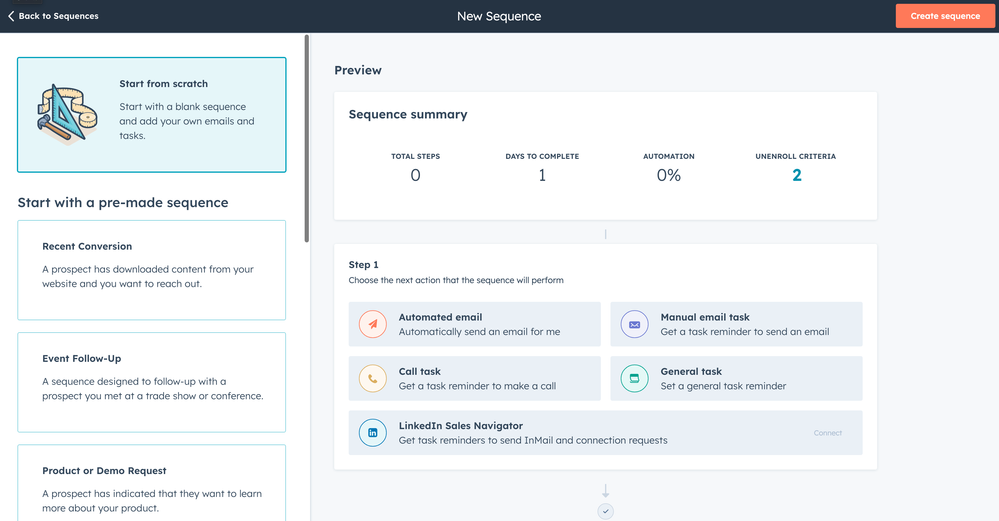
HubSpot Sequences require Sales Hub or Service Hub Professional/Enterprise plus an assigned seat. Sequence emails send from a connected personal inbox (not a team inbox).
Constraints that matter in production:
- One sequence at a time per contact
- Bulk enrollment throttling: max 3 emails per minute
- Daily send limit won't increase for sequence emails
- Sequences no longer update Lifecycle stage automatically (use workflows)
Blunt guidance: don't run scaled cold outbound from HubSpot Sequences. Use it for warm follow-up and pipeline progression where CRM-native logging's the point.
For details, HubSpot's docs cover the mechanics:
- https://knowledge.hubspot.com/sequences/create-and-edit-sequences
- https://knowledge.hubspot.com/sequences/enroll-contacts-in-a-sequence
Dynamics 365 Sales accelerator: what you can govern
Dynamics Sales accelerator sequences are CRM-native by design: email/call/task steps, conditions, assignment logic, and reporting.
Key constraints and governance controls that matter:
- Org limit: up to 250 active sequences
- Admin control over work hours, wait-time computation, timeline activity linking, and reporting
If you're a Dynamics shop, this is the cleanest path to "process you can audit."
When to add calls/tasks/social touches (multi-channel reality)
Email-only's fine for low ACV and simple motions. For anything complex, multi-channel wins because it creates more surface area for a response without spamming inboxes.
Add non-email touches when:
- the trigger's high intent (pricing, event Q&A, renewal risk)
- the persona's hard to reach by email alone
- you need internal coordination (AE + CSM + SDR)
How to keep it sane:
- Log every call/task/social touch as a CRM activity tied to the contact and account.
- Use a single field like
last_touch_channelto prevent repeats ("don't email them again 10 minutes after a call"). - Keep the sequence logic in one place (CRM-native or sequencer), but keep the source of truth in the CRM.
Light tooling map (keep CRM as system of record)
You don't need a monster stack. You need clean boundaries.
- CRM (HubSpot/Dynamics): fields, routing, reporting, suppression lists
- Enrichment layer (Clay): recipes, conditionals, write-back
- Sequencing (Smartlead / Instantly): deliverability controls + auto-pause
- Sales engagement (Outreach / Salesloft): deeper governance, tasks/calls, enterprise workflow
- Outreach is quote-based per user; Outreach Voice anchors at $300/month/org for 10,000 minutes.
- Salesloft is quote-based; dialer is typically an add-on.
- Data source example (Apollo): solid budget list-building; expect $0 free tier, then roughly $49-$149/user/month depending on tier/credits.
- Automation glue (Zapier / Make): event -> field update -> enroll -> log back (see CRM integration patterns)
One opinionated rule: if your stack adds per-seat tools before you've fixed data + stop rules, you're buying complexity, not performance.
B2B data decays 22-30% per year, and stale CRM records kill personalized sequences before they send. Prospeo refreshes every 7 days - not 6 weeks - with 98% email accuracy and native HubSpot + Salesforce integrations that sync enrichment back automatically.
Fresh CRM data at $0.01 per email. No contracts, no sales calls.
FAQ: Personalized outreach using a CRM
What CRM fields do I need for personalization that scales?
Use 10-12 fields that stay >=95% populated in your ICP: name/email/company, persona + region, consent status, a trigger field (event + detail), and freshness (last_enriched_at). Add strict fallbacks ("there") and suppression rules (missing/unverified email) so enrollment never breaks.
How do I prevent blank tokens from breaking sequence enrollment?
Set defaults in the CRM before enrollment and suppress records that can't be safely messaged. In practice: if first_name is blank set "there," if persona is blank set "General," and if company_name or verified email's missing, block enrollment entirely.
What's a safe outreach cadence in 2026 without hurting deliverability?
For most teams, run 3-4 steps over 10-14 days for standard outbound and 3 steps over 5-7 days for high-intent triggers. Keep emails under 200 words, cap to 1-2 contacts per account per 14 days, and stop on reply, bounce, complaint, or unsubscribe.
What's a good free tool to verify emails before CRM-triggered outreach?
Prospeo's free tier includes 75 email credits plus 100 Chrome extension credits per month, with 98% email accuracy and a 7-day refresh cycle, which makes it a clean pre-enrollment gate. If you're piloting, verify every address before the first send and re-check active segments every 30-60 days.
Summary: make the CRM the system, not the scrapbook
Personalization at scale is an ops problem disguised as a copy problem.
If you want personalized outreach using crm that doesn't implode, build a small field contract, enforce fallbacks and suppression, trigger off real signals, and sync outcomes back automatically. Do that, verify/enrich upstream, and your "personalization" stops being a gamble and starts being a machine.
