

Job Change Sales Outreach: The 2026 Playbook (Timing, Scoring, Templates)
Most outbound fails because it's untethered from reality. Job change sales outreach is different: it's one of the few "cold" triggers that behaves like intent, because priorities, budgets, and vendors get re-evaluated when someone new walks in. The teams that win aren't louder. They're faster, cleaner, and patient enough to ask at the right moment.
Here's the thing: job-change outreach isn't a copy problem. It's a timing + ops problem.
What job-change outreach is (and why it beats cold)
Job-change outreach is outbound triggered by a role move: a champion switching companies, a new exec joining your ICP, a decision-maker promotion, or a stakeholder leaving a customer account. The move is the reason you're reaching out, so you're not inventing urgency.
Job changes don't just create "openness." They create operational chaos.
New leaders inherit tools, contracts, and political baggage. They need quick wins, and they're quietly mapping the buying committee.
Buying committees are bigger than most reps act like they are. Expandi's State of LinkedIn Outreach (H1 2026) cites ~6.3 stakeholders in the average B2B buying committee. That's not job-change-specific, but it explains why this trigger works: it's a clean excuse to start (or restart) multi-threading without sounding random.
Myth vs reality
- Myth: "Congrats" messages are enough. Reality: Everyone sends "Congrats." You win with relevance + timing, not confetti.
- Myth: The best play is to pitch hard in week one. Reality: Week one is for relationship + context. The ask comes later.
- Myth: This is only for closed-lost revival. Reality: It's also land-and-expand, churn prevention, and referral paths.

What you need (quick version)
If you only do 3 things, do these:
- Run a phase-based sequence (fast touch → delayed ask)
- Use a scoring model (not every mover is worth a sequence)
- Verify/enrich contact data before sending (bounce control)
Decision shortcuts
- If you've got <20 movers/week: do it manually, but be disciplined about timing and follow-ups.
- If you've got 20-200 movers/week: you need a queue + routing + dedupe, or you'll spam the same person from three reps.
- If you've got 200+/week: you need automation, enrichment, and deliverability guardrails or you'll burn domains.
Deliverability guardrails matter more than copy. Instantly's baseline is the one I enforce: keep bounces <2% and spam complaints <0.3%. If you're above that, your "mover play" turns into "why did our domain get throttled?"
One practical move: verify the new email and append a verified mobile before you send. That single step prevents a lot of mover sequences from dying on bounce rate. (If you need a quick shortlist, start with an email verifier and an email lookup workflow.)
The 30-60-90 day plan (what to do when)
Most reps treat job changes like a one-and-done message. That's lazy, and it leaves money on the table.
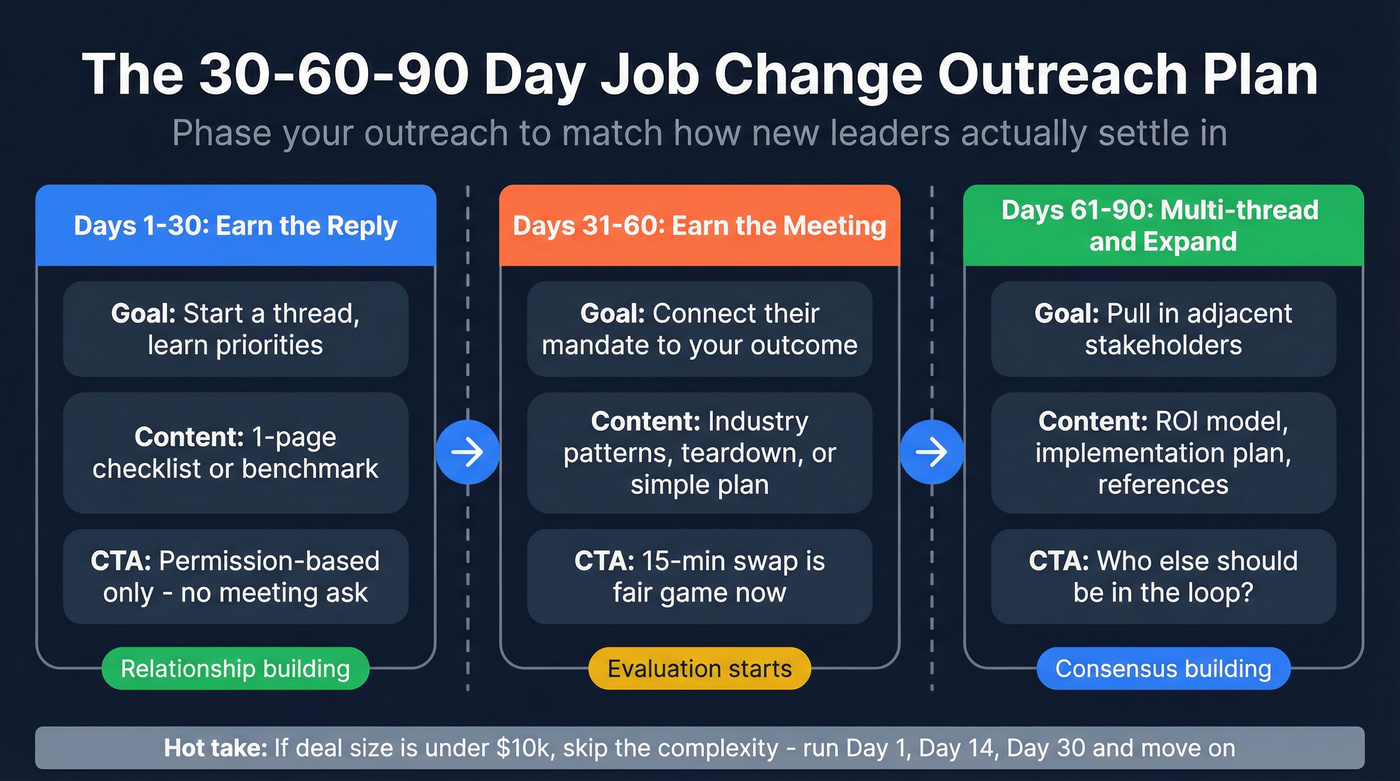
First 30 days: earn the reply
- Goal: start a thread, learn priorities, get routed to the right owner.
- Content: 1-page checklist, "what good looks like" benchmark, or a short POV.
- CTA: permission-based ("Want me to send X?"), not "book time."
Days 31-60: earn the meeting
- Goal: connect the mover's new mandate to a specific outcome you can drive.
- Content: 2-3 patterns you're seeing in their industry, a teardown, or a simple plan.
- CTA: "15-min swap" is fine now. This is when evaluation starts.
Days 61-90: multi-thread and expand
- Goal: pull in adjacent stakeholders and build consensus.
- Content: ROI model, implementation plan, security answers, references.
- CTA: "Who else should be in the loop?" and "What's your internal process?"
Hot take: if your average deal size is below $10k, skip the complicated "mover machine." Run a tight Day 1 / Day 14 / Day 30 sequence, protect deliverability, and spend the rest of your time on accounts with real upside.

Your mover playbook dies at step one if the email bounces. Prospeo tracks job changes in real time, enriches movers with 98% accurate emails and verified mobiles, and refreshes data every 7 days - so your Day 1 "congrats" actually lands.
Stop losing mover sequences to bad data. Verify before you send.
Timing for job change sales outreach (30-90 day window)
Job-change outreach has two phases: fast touch (relationship + relevance) and delayed ask (value + meeting). UserGems' guidance gets the nuance right: reach out quickly with no ask, then wait 2-4 weeks before you go for a stronger ask.
Use this timeline as your default.
Day 1: "Congrats + context" (no ask)
- Goal: get a reply, not a meeting.
- Mention the move, tie it to a real reason you're reaching out, and exit cleanly.
- If you have history, use it. If you don't, keep it short.
Day 7: "Helpful nudge" (still no meeting ask)
- Share a tiny asset: a checklist, a benchmark, a 90-day plan.
- Keep it skimmable. One screen.
Day 14: "Permission-based ask"
- First time you can ask a light question like "Worth sending the 90-day plan?"
- Still not "book time."
Day 30: "Stronger ask" (meeting CTA)
Now you can be direct: "Want to compare notes?" or "Worth a 15-min swap?" This lines up with reality: new leaders avoid big vendor moves in the first couple of weeks unless something's on fire, and by week four they've usually got enough context to take a real meeting without feeling like they're gambling their first 90 days on a random vendor.
Day 60: "Last touch + reroute"
If they don't respond, you either (a) ask who owns it now, or (b) pivot to another stakeholder.
Valley reports that speed-to-contact within 48 hours correlates with 2.5x higher meeting acceptance. Treat that as directional: aim for same-week outreach, not same-day desperation. (If you want to systematize this, build around speed-to-lead metrics and a clear SLA.)
Scoring model: which job changes are worth your time
Job-change outreach falls apart when you treat every mover like gold. You need a simple score that tells reps what to do next, and you need it to be strict enough that your best accounts don't get buried under "Congrats!" spam.
Mover score (0-10)
| Factor | 0 points | 1 point | 2 points |
|---|---|---|---|
| Seniority | IC | Manager | Dir+ / Exec |
| Dept fit | Not buyer | Influencer | Budget owner |
| ICP fit | Outside ICP | Adjacent | Core ICP |
| Company stage | Wrong stage | Maybe | Perfect stage |
| Prior relationship | None | Light | Strong |
| Intent topics | None | Some | High intent |
| Type of mover | New-to-you | Warm intro | Champion moved |
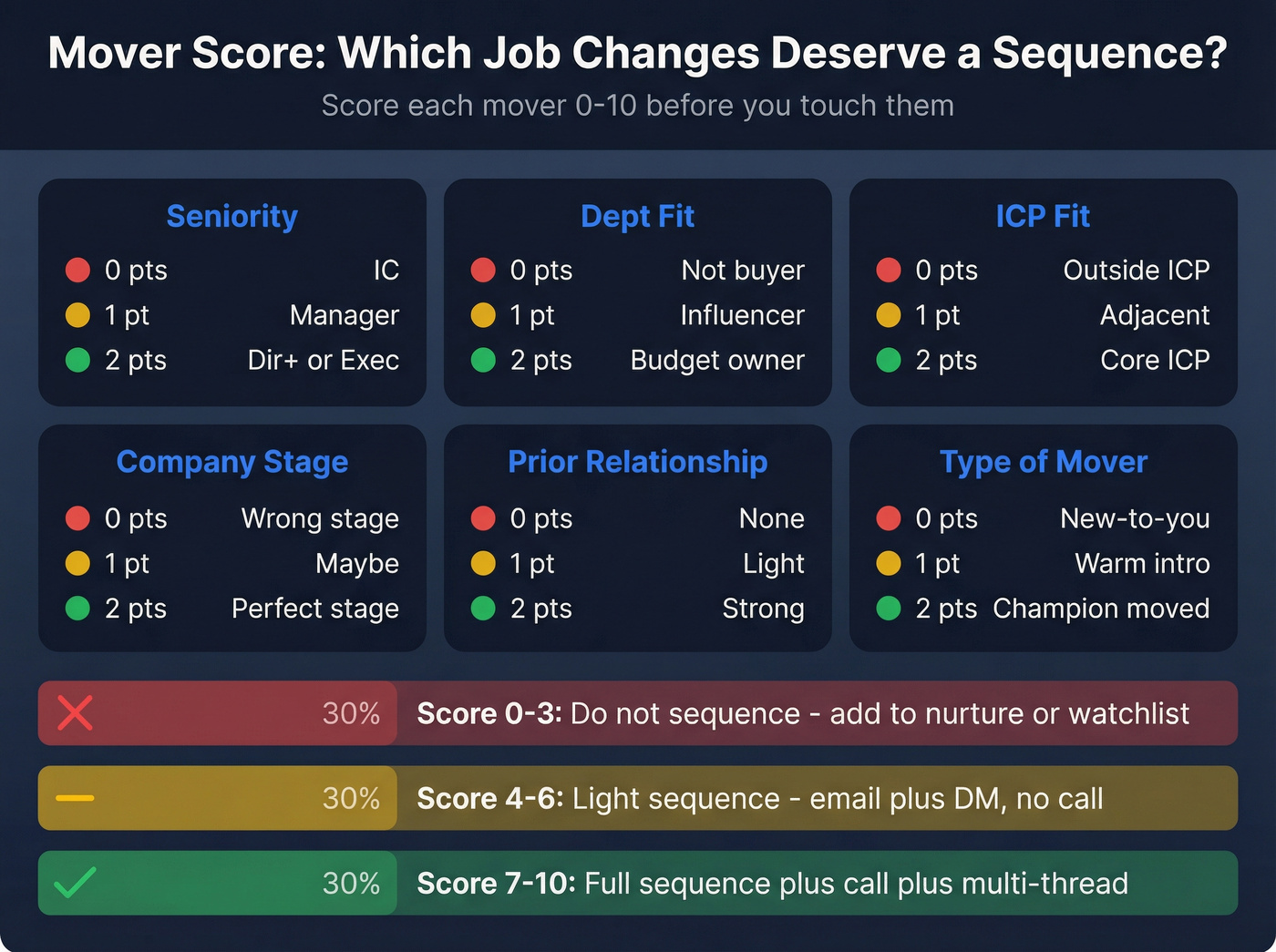
How to use it
- 0-3: Don't sequence. Add to nurture or watchlist.
- 4-6: Light sequence (email + DM), no call.
- 7-10: Full sequence + one call + multi-thread.
Decision tree (fast and brutal)
- Did a champion move (someone who used you, evaluated you, or advocated for you)? → Yes: score starts at 7. Run the full play.
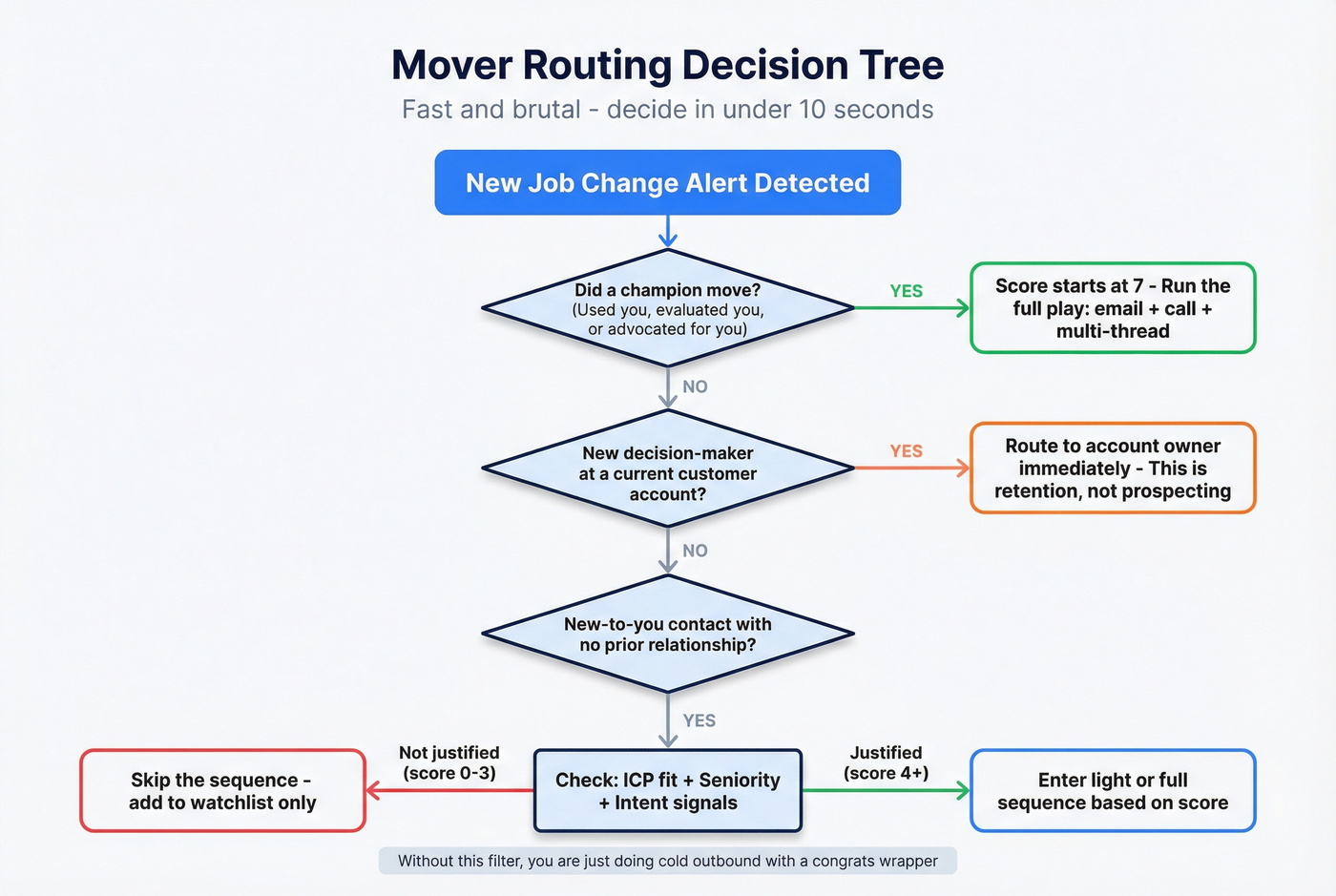
Is this a new decision-maker at a customer account (land-and-expand / renewal risk)? → Yes: route to account owner immediately. This is retention, not prospecting.
Is it new-to-you with no relationship? → Only sequence if ICP fit + seniority + intent justify it. Otherwise you're doing cold outbound with a "Congrats" wrapper.
A concrete example from a rollout I ran with a 12-rep SDR team: we were seeing ~140 mover alerts/week and constant territory fights. We added (1) a score gate (only 4+ entered sequences), (2) a 24-hour routing SLA, and (3) a "one owner per mover" rule. Within two weeks, duplicate touches dropped sharply and reply rates stopped getting dragged down by low-fit movers. (This is basically lead scoring systems + routing discipline.)
Messaging rules that keep you from sounding like every other "congrats" pitch
Most job-change outreach is cringe because it's performative. It reads like: "I noticed your life event, now buy my software."
Don't do that.
Do / don't (practitioner rules that actually work)
Do
- Keep it to one screen. If it doesn't fit, it dies.
- Personalize with context (role + company + why it matters), not tokens.
- Use soft CTAs: "Worth a quick look?" / "Should I send the checklist?"
- Follow up like a human. Reply-style follow-ups beat "bumping this."
Don't
- Don't fake familiarity ("Loved your post..." when you didn't).
- Don't assume priorities ("You're probably rebuilding your stack...").
- Don't ask for 30 minutes in email #1.
- Don't send from three people at once. That's how you get marked as spam.
Follow-ups are where the money is. In our experience, 60-70% of replies show up after email #3 or #4 because the first two get buried. That's not permission to spam. It's permission to be politely persistent. (If you want a clean structure, use a follow up email sequence strategy.)
The "Lavender-style" constraints that lift replies
These rules are simple, and they work:
- Write at a 3rd-5th grade reading level → 68% more replies
- Keep early touches under 50 words
- Ask 0-1 questions
- Avoid "authoritative assumptions" → 26% fewer replies when you do
- Personalization matters: personalized emails can double reply rate
Benchmarks (so you know if it's working)
Benchmarks keep you honest. If your mover play underperforms generic cold outbound, something's broken (usually targeting, timing, or data quality).
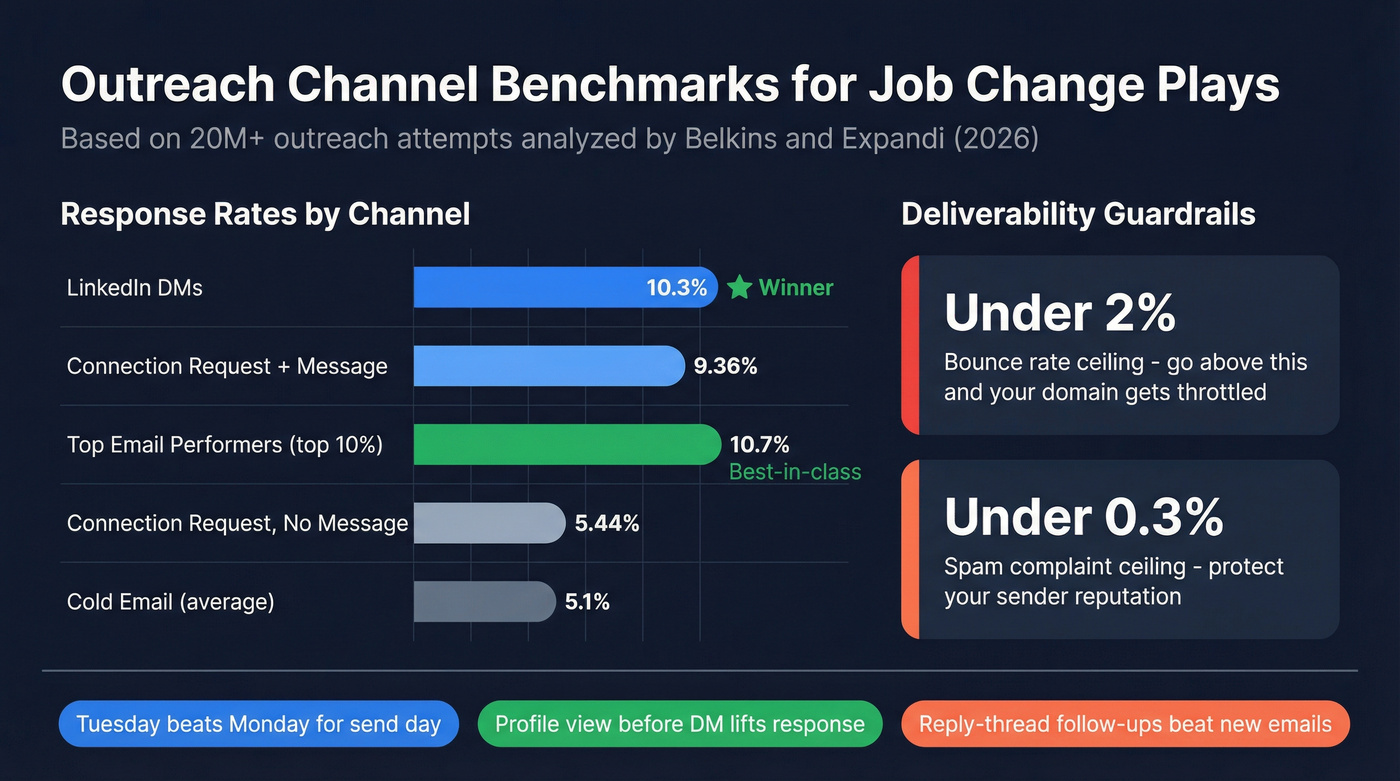
Channel benchmarks (directional targets)
| Channel | Avg response | "Good" target | Winner |
|---|---|---|---|
| DMs | 10.3% | 11-16% | DMs |
| Cold email | 5.1% | 5-10% | DMs |
| Top email | - | 10.7%+ | Email (top performers) |
| Conn req + msg | 9.36% | 10%+ | Conn req + msg |
| Conn req no msg | 5.44% | 6%+ | Conn req + msg |
Expandi's dataset shows DMs averaging 10.3% response vs cold email 5.1%. Belkins + Expandi analyzed 20M+ outreach attempts across Jan-Dec 2026 and found connection requests with a message get 9.36% response vs 5.44% without (acceptance rates were 26.42% with a message vs 26.37% without). If you're going to connect, add the short message.
On email, Instantly's benchmark framing is the one I use with teams: 5-10% reply is "good," and the top 10% hit 10.7%+. (For a deeper deliverability layer, see email deliverability.)
What to test (don't boil the ocean)
- Timing: Day 1 vs Day 3 first touch (speed matters, but don't be weird-fast)
- Send day: Tuesday vs Monday (it's a real delta in large datasets)
- Ask strength: "Send checklist?" vs "15-min swap?"
- Follow-up style: reply-thread vs new email
- DM sequencing: connect + message vs connect blank then DM
- Extra actions: add a profile view before the DM (often lifts response)
- AI-assisted opener vs human opener: test it, but QA it. Bad AI openers are worse than generic.
If you want one external benchmark to anchor on for DMs, the Belkins + Expandi outreach study is still the cleanest large-sample reference.

Templates for job change sales outreach (email + DM + call)
These templates match the timing framework: fast touch early, delayed ask later. Keep the spacing, but adjust for your cycle.
A community summary of Instantly's 2026 benchmark is the reminder everyone ignores: 42% of replies come from follow-ups (steps 2-7), and reply-style follow-ups perform about 30% better than fresh threads. So yes, you're going to follow up. (If you want more structure, start with a B2B cold email sequence.)
Scenario A: Champion job change outreach (closed-lost revive)
Who this is for: You lost a deal, but the champion is now at a new company that fits.
Day 1 - Email (no ask) Subject: New role - quick note Hi {{First}}, saw you moved to {{Company}} - congrats.
When we spoke at {{PrevCompany}}, you were focused on {{Outcome}}. If that's still on your plate, I can send the 90-day rollout checklist we used with similar teams.
--{{Name}}
Day 3 - DM (short + human) Hey {{First}} - quick congrats on {{Company}}. Want me to send that 90-day checklist we used at {{PrevCompany}}?
Day 7 - Email (asset + permission) Subject: 90-day checklist Hi {{First}} - here's the checklist (1 page): {{Link}}.
If you're rebuilding anything around {{Problem}}, I can share what tends to work in the first 30-60 days.
--{{Name}}
Day 14 - Email (delayed ask begins) Subject: Worth comparing notes? Hi {{First}} - is {{Problem}} a priority at {{Company}} this quarter?
If yes, want to do a quick 15-min swap and I'll share the 3 patterns we're seeing with teams in {{Industry}}?
--{{Name}}
Day 30 - Call (one polite attempt)
Voicemail script: "Hey {{First}}, it's {{Name}} - congrats again on {{Company}}. I emailed a one-page 90-day checklist. If you want the quick version, call me back at {{Number}}."
Day 30 - Email (reply-style follow-up) Reply to Day 14: Totally fine if now's hectic. Should I send the 3-pattern summary here, or is there someone else owning {{Area}} at {{Company}}?
Scenario B: New decision-maker at a customer account (land-and-expand)
Who this is for: A new VP/Director joins an account that already uses you. This is retention + expansion, not prospecting.
Day 1 - Email (no ask, reassure) Subject: Welcome to {{Account}} Hi {{First}} - welcome to {{Account}}.
You inherited {{Product}} on the team. If helpful, I can send a 1-page "what's live + what's next" summary so you've got the lay of the land.
--{{Name}}
Day 3 - Email (make it easy to say yes) Subject: 1-page summary? Want me to send the 1-page summary (current usage, wins, open items), or would you rather I share it with your ops lead?
Day 7 - DM (light touch) Congrats on joining {{Account}}. I can send a quick "what's live" snapshot for {{Product}} so you don't have to dig - want it?
Day 14 - Email (meeting ask, framed as risk reduction) Subject: 15 mins to de-risk Hi {{First}} - if you're doing any stack/contract review in your first month, a quick 15-min check-in prevents surprises later.
Want to do next week?
--{{Name}}
Day 30 - Email (expansion angle, only now) Subject: Next win Hi {{First}} - teams like {{PeerCompany}} usually get the next win by expanding {{UseCase}} into {{AdjacentTeam}}.
Worth me mapping what that would look like at {{Account}}?
Scenario C: Auto-reply "no longer with company" reroute
Who this is for: Your email bounces or you get an auto-reply that the contact left.
Trigger moment - Immediately when you get the auto-reply
- Tag contact as Moved
- Find new company + new role
- Identify the new owner at the old company
- Launch two parallel plays: "mover" + "reroute"
Day 1 - Email to mover (new company, no ask) Subject: Quick congrats Hi {{First}} - got an auto-reply that you moved on from {{OldCompany}}. Congrats on {{NewCompany}}.
If you're rebuilding anything around {{Area}}, I can send a short checklist that helps in the first 30-60 days.
--{{Name}}
Day 1 - Email to old account (reroute owner) Subject: Who owns {{Area}} now? Hi {{First}} - I was trying to reach {{OldContact}} and saw they've left {{Company}}.
Who's the best person to speak with about {{Area}} now?
--{{Name}}
Day 7 - Follow-up to old account (reply-style) Reply to Day 1: Quick bump - happy to route this to the right owner. Who should I contact?
Day 14 - Email to mover (delayed ask) Subject: Worth a quick swap? Hi {{First}} - if {{Area}} is on your roadmap at {{NewCompany}}, want to do a quick 15-min swap? I'll share what we're seeing work for teams in your seat.
Operationalize it: from signal → queue → verify/enrich → route → sequence (plus tooling + costs)
Most teams don't fail at job-change outreach because reps can't write. They fail because the signal-to-action path is messy: alerts everywhere, duplicates in CRM, no owner, stale emails, and sequences launching late.
We've tested a bunch of variations of this over the years, and this workflow holds up under real volume.
Step 1: Capture the signal into one queue
Sources can be Sales Navigator alerts, UserGems, Clay monitoring, Champify, community tools, or even auto-replies.
The rule: one queue, one schema. Every mover record needs:
- Person name + profile URL
- Old company + new company
- New title + department
- Date detected
- Account context (customer/prospect/closed-lost)
- Owner (rep/CSM/AM)
Step 2: Dedupe + route (before anyone touches it)
Routing logic:
- If customer account → account owner (AM/CSM) within 24 hours
- If closed-lost champion → original opportunity owner
- If new-to-you → SDR pool, but only if score ≥4
Three failure modes I see constantly, and the fixes:
- Duplicate touches (and internal fights): two reps message the same mover. Fix: "One mover = one owner" enforced by CRM assignment + a hard dedupe rule on profile URL.
- Territory conflicts: movers trigger across regions/segments and no one knows who owns it. Fix: routing based on new company territory, not old; add an SLA (24 hours) and an escalation owner (RevOps).
- CRM clutter: mover alerts create junk tasks and half-created leads. Fix: create a dedicated "Mover" object/status and only convert to Lead/Contact after verification. (More on that in how to keep CRM data clean.)
Step 3: Verification + enrichment layer (before sending)
This is the step most teams skip, then wonder why deliverability tanks. I've watched teams torch a perfectly good domain because they got excited about movers and started blasting unverified "new company" emails that were wrong, dead, or catch-all.
Prospeo, "The B2B data platform built for accuracy," fits this layer well because it's built for clean contact data at speed: 300M+ professional profiles, 143M+ verified emails, 125M+ verified mobile numbers, and 98% email accuracy with real-time verification on a 7-day data refresh cycle (the industry average is 6 weeks). It also returns 50+ data points per enrichment, hits an 83% enrichment match rate, and supports API workflows with a 92% API match rate, which matters once you're routing movers at scale. (If you want the SOP, use an email verification list.)
Practical flow:
- Drop the mover list (CSV or CRM view) into enrichment
- Verify emails + append mobiles
- Export only verified contacts into your sequencer/CRM
Deliverability rule repeats here: keep bounces <2%. Verification isn't optional. It's how you keep the whole machine working.
Step 4: Launch the right sequence within the same week
Reply.io's trigger-based framing is simple: event → sequence quickly. Reply.io cites a TNW trigger sequence at 74% opens and 34% CTR. Mover triggers won't match that, but the mechanism (event → fast, relevant sequence) is the takeaway.
My rule: same-week launch for movers, with a Day 1 touch whenever possible. (For more cadence mechanics, see outreach sequences.)
Step 5: Close the loop (so it improves)
Minimum reporting:
- Movers detected
- Movers scored 7-10
- Sequences launched within 7 days
- Reply rate by scenario
- Bounce rate (must stay <2%)
- Meetings booked per 100 movers
Step 6: Tooling & costs (realistic ranges)
You don't need a $100k stack to do this. You need signal, routing, and clean data.
| Tool | Best for | Model | Typical cost (USD) | Winner (for that job) |
|---|---|---|---|---|
| Sales Navigator | Manual alerts | Seat-based | $99.99/seat/mo | Sales Navigator (solo/manual) |
| UserGems | Revenue signals + workflows | Contract | $2,750 / $5,750 / $10,000 per month (+ implementation) | UserGems (enterprise signals) |
| Champify | Champion tracking + routing playbooks | Contract | starting at $2,000 / $3,000 / $6,000 per month | Champify (champion routing) |
| Clay | Custom monitoring + automations | Usage credits | ~$200-$2,000+/mo (varies) | Clay (build-anything) |
| Common Room | Community + identity signals | Contract | ~$2,000-$10,000+/mo | Common Room (community-led GTM) |
| LeadIQ | Capture + basic enrichment | Credits-based tiers | Free tier available; Pro $200/month; Enterprise annual | LeadIQ (lightweight capture) |
| Lantern | CRM-connected workflows | Usage credits | Not public (usage-based credits) | Lantern (workflow-heavy teams) |
Clay cost model (so "0.2 credits/check" becomes real): if you check 10,000 contacts weekly, that's 10,000 × 0.2 = 2,000 credits per run. Multiply by your plan's $/credit and your run frequency. Clay gets expensive when you monitor huge tables too often. It's worth it when you're replacing manual ops work.
Tier-3 quick hits (rough ranges)
- Wiza Monitor: monitoring add-on for role changes; expect ~$50-$150/seat/mo plus usage-based monitoring fees depending on volume.
- Boomerang AI: job-change tracking for SMBs; expect ~$99-$499/mo depending on seats and alert volume.
- Sequencers (Instantly / Smartlead / Lemlist): generally ~$30-$100/seat/mo depending on plan and sending features. (If you're comparing options, start with cold email outreach tools.)
- DM tools (Expandi): generally ~$99-$150/mo per account.
What practitioners complain about (and how to avoid it)
- "It's too manual at scale." → Use a single queue + routing SLA. Don't rely on rep inbox alerts.
- "It's too technical to maintain." → If nobody on your team owns automations, choose a simpler signal tool and a strict process.
- "It's too expensive for what it does." → Pay for signal only when you can act within a week. Otherwise you're buying noise.
Implementation plan (2 weeks to launch, 30 days to make it good)
Week 1 (build the rails)
- Define the mover schema + required fields
- Add CRM statuses (below)
- Set routing rules + 24-hour SLA
- Turn on dedupe (profile URL as the unique key)
Week 2 (make it safe + shippable)
- Add verification/enrichment gate before sequencing
- Publish 3 sequences (Champion moved / New exec at customer / Reroute)
- Build the dashboard (movers → sequences → replies → meetings + bounce rate)
Weeks 3-4 (optimize, don't reinvent)
- Run 2 A/B tests (subject line + Day 1 vs Day 3)
- Review bounce/spam weekly; pause any segment that breaks thresholds
- Add multi-threading rules for 7-10 scores (2-3 stakeholders, not 8) (use this A/B testing lead generation campaigns framework.)
CRM tagging taxonomy (steal this)
Create a dedicated set of fields so movers don't become a mess:
- Lifecycle status:
Mover - New→Mover - Scored→Mover - Verified→Mover - Sequenced→Mover - Replied→Mover - Meeting→Mover - Closed/Won(orMover - Closed/Lost) - Mover type:
Champion moved/New exec (prospect)/New exec (customer)/Promotion/Left account (reroute) - Sequence type:
Mover A/Mover B/Mover C - Ownership rule: one owner field + timestamp of assignment (so you can audit SLA)
Running 200+ mover alerts per week? Prospeo's job change tracking, intent data across 15,000 topics, and CRM enrichment let you score, route, and sequence movers automatically - with bounce rates under 2% baked in.
Build the mover machine that doesn't burn your domain.
FAQ
Is job-change outreach "creepy," and how do you avoid that?
It's only creepy when you over-explain how you found the move or pretend you're friends. Keep it to 1 short congrats line, 1 relevant reason, and a permission-based CTA like "Want me to send the 1-page checklist?" Avoid "loved your post" fakes, and don't ask for 30 minutes in message #1.
When's the best time to reach out after someone changes roles?
Day 1-7 is best for a fast touch with no meeting ask, then wait 2-4 weeks before a stronger CTA like a 15-minute call. That matches how new hires operate: they're busy, risk-averse early, and start evaluating vendors once they've mapped priorities and stakeholders.
How many touches should a job-change sequence include?
Run 5-7 touches over ~30 days: 3-4 emails, 1-2 DMs, and one polite call. In most outbound programs, replies skew toward follow-ups (often around touches 3-4), so a single "Congrats" message is basically choosing to lose.
What's the easiest way to prevent bounces when a contact moves companies?
Verify the new work email before you send and only sequence contacts that pass verification, keeping bounces under 2%. Prospeo's a strong fit for this because it delivers 98% email accuracy, runs on a 7-day refresh cycle, and can append verified mobile numbers so you've still got a path when inboxes are locked down.
Summary: make job change sales outreach boring (and it prints)
The best job change sales outreach isn't clever. It's consistent: same-week routing, a simple score gate, verified contact data, and a 30-90 day sequence that earns the reply before it asks for the meeting.
Do that, and "Congrats spam" turns into a repeatable pipeline channel you can scale without burning your domain.