

Email Lookup: How to Find, Verify, and Investigate Any Email Address
You send 200 cold emails. 47 bounce. Your domain reputation drops. Three months of warmup - gone.
That's not a hypothetical. It's the reality for teams trusting "verified" email data that's anything but. Independent bulk benchmarks show most email lookup tools land around 35-65% real-world accuracy, despite plastering "95%+ verified" across their marketing pages.
Here's the thing: finding or investigating an email address isn't one problem. It's three. Most people conflate them, pick the wrong tool, and waste money.
What You Need (Quick Version)
Before going deep, here's the fast answer based on what you're actually trying to do:
Find who owns an email address. Use Epieos (free reverse lookup) or a B2B enrichment tool for company, title, and phone data from an email input.
Investigate an email for OSINT purposes. Combine Epieos + HaveIBeenPwned + Google dorking. No single tool does it all, but this stack covers 90% of investigation scenarios.
Recruiting or sourcing candidates? ContactOut specializes in personal email coverage. Running fraud or security checks? Start with Epieos and layer in breach databases. Marketer building segmented lists? Apollo's 60+ filters are your best friend - just verify the output before you send.
What Is Email Lookup? Three Types You Need to Know
"Email lookup" gets thrown around like it means one thing. It doesn't. The broader email finder tools market hit $13.9B in 2024 and is projected to reach $19.2B by 2032 - that kind of money attracts a lot of tools solving slightly different problems. Understanding which type you need saves you from buying the wrong one.
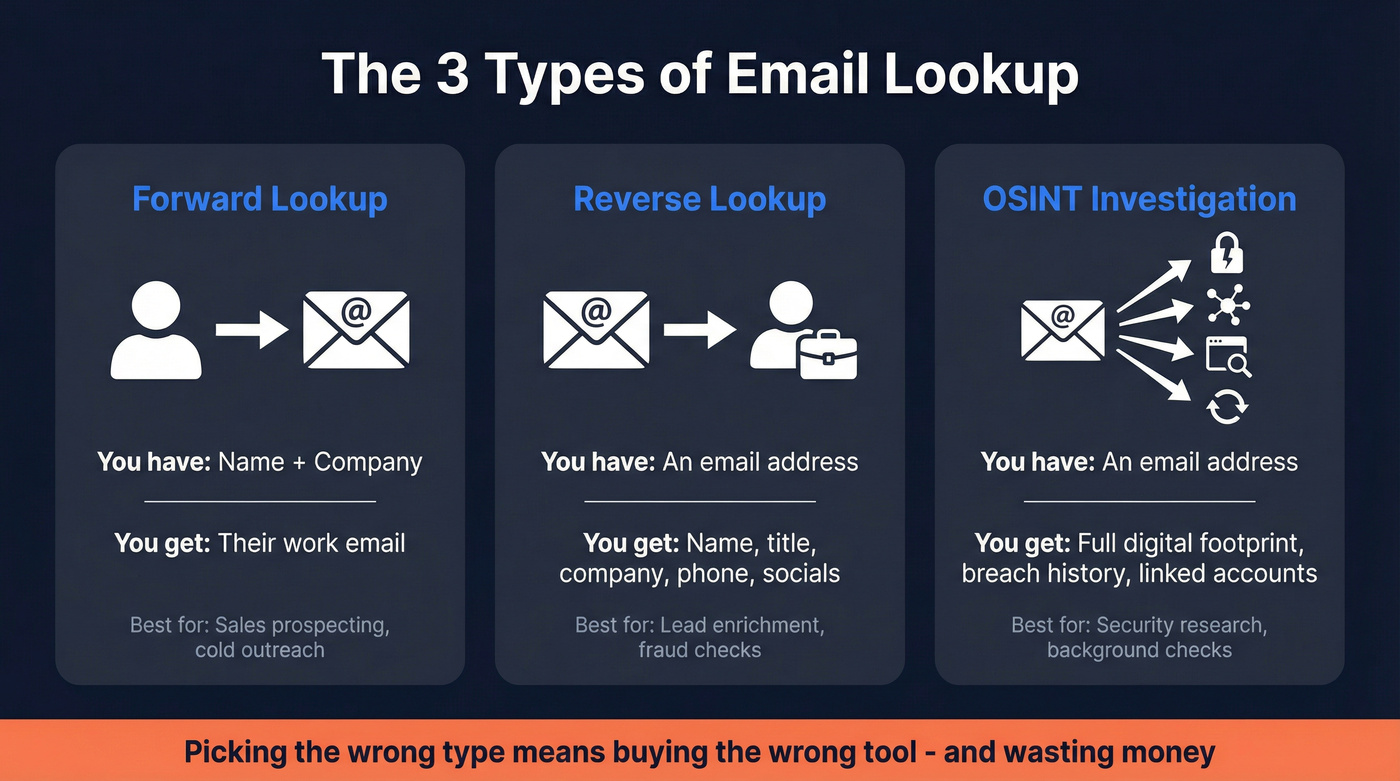
Forward Email Lookup
This is what most people mean: you have a name and a company, and you want their work address. Tools guess patterns (first.last@company.com, flast@company.com, first@company.com), then verify which one actually exists. The best tools build verification into the finding step. The worst ones hand you an unverified guess and call it a result.
Reverse Email Lookup
You have an email address and want to know who's behind it. This surfaces name, job title, company, phone number, social profiles, and sometimes domain registrations or breach history. Sales teams use it for enrichment. Fraud teams use it for identity verification. It's a completely different workflow from forward lookup.
OSINT Email Investigation
This goes deeper than reverse lookup. You're not just finding a name - you're building a complete digital footprint. Breach databases, username pivoting, email header analysis, Google dorking. This is investigator territory, not sales territory, but the techniques overlap more than you'd think.

The distinction matters because a tool that's great at forward lookup might be useless for reverse lookup or OSINT. And a free OSINT tool won't help you build a 5,000-person prospect list.
How Email Search Tools Actually Work
Every tool in this space runs some combination of four processes. Understanding them explains why accuracy varies so wildly - and why "95% verified" is almost always a lie.
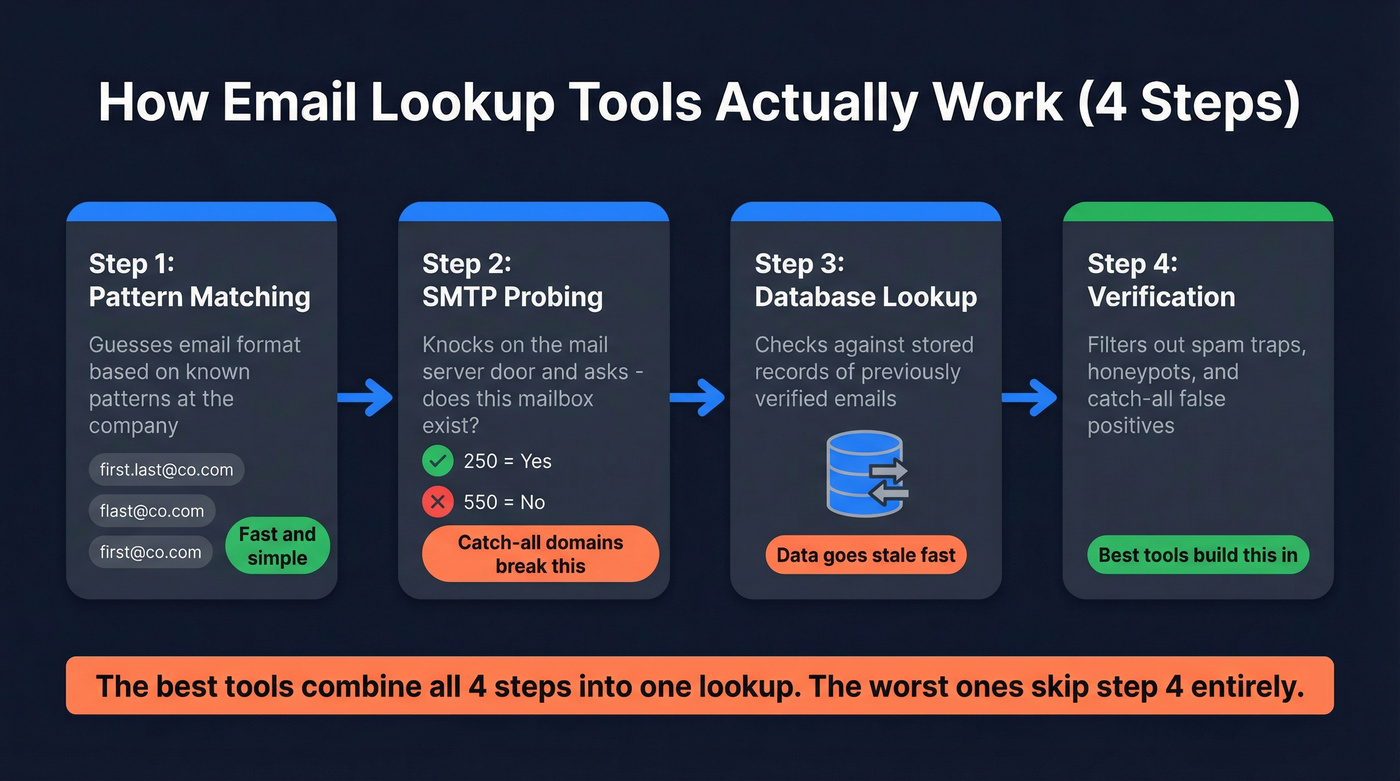
Pattern Matching
Most professional emails follow predictable formats. Tools maintain databases of known patterns per domain - if they've seen five people at Acme Corp using first.last@acme.com, they'll guess that pattern for the sixth. Common formats: first@domain, first.last@domain, firstlast@domain, flast@domain. Simple, fast, and surprisingly effective for large companies with consistent naming conventions.
SMTP Probing
This is where it gets technical. The tool connects to the recipient's mail server and asks, essentially, "does this mailbox exist?" A 250 response means yes. A 550 means no. It's like knocking on a door to see if anyone's home - without actually sending a letter.
The problem? Catch-all domains. Some companies configure their mail servers to accept all incoming email regardless of whether the specific mailbox exists. The server returns 250 for everything, making it impossible to distinguish real addresses from fabricated ones. This is the single biggest source of false positives in the entire industry.
Database Lookup
Tools like Apollo (275M+ contacts) maintain massive databases of previously verified emails. When you search, they're often pulling from stored records rather than probing in real time. The freshness of that data matters enormously - an email verified six months ago might belong to someone who's changed jobs twice since then.
Verification
Finding an email isn't the same as verifying it. Some tools build verification into the finding process - catch-all handling, spam-trap removal, honeypot filtering - so you skip the separate verification step. Others hand you an unverified result and expect you to run it through a separate service. That's two tools, two costs, and twice the friction.
For developers and API-first teams: Most tools here offer REST APIs for programmatic lookup and verification. If you're building email search into a product or internal workflow, check each tool's API documentation, rate limits, and match rates before committing.

The benchmarks above show most email lookup tools deliver 35-65% accuracy. Prospeo hits 98% with a proprietary 5-step verification process - catch-all handling, spam-trap removal, and honeypot filtering built into every lookup. No separate verification tool needed.
Get emails that actually land for $0.01 each. 100 free credits, no card required.
The Accuracy Problem - What Independent Tests Actually Show
This is where the industry's marketing falls apart.
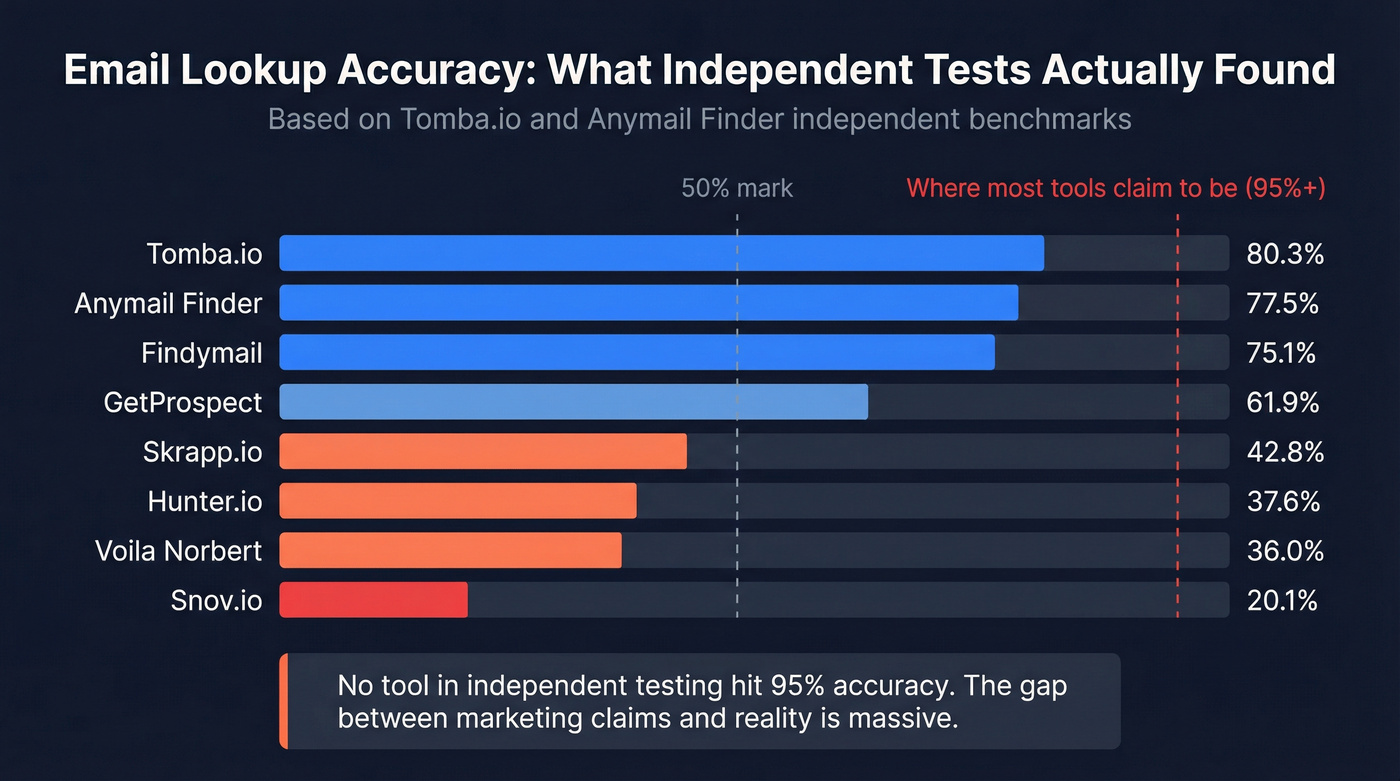
Two benchmarks tested thousands of contacts across major email finder tools. The results are brutal. The Anymail Finder test broke results into domain-only and company-name-only lookups. The Tomba.io test reported a single overall score per tool. Both were run by vendors (Anymail Finder and Tomba), but the relative rankings are remarkably consistent across both tests, which lends credibility.
| Tool | Tomba.io Test (Overall) | Anymail Test (Domain) | Anymail Test (Company Name) |
|---|---|---|---|
| Tomba.io | 80.3% | - | - |
| Anymail Finder | 77.5% | - | - |
| Findymail | 75.1% | - | - |
| GetProspect | 61.9% | 59.3% | 64.5% |
| Skrapp.io | 42.8% | 40.0% | 45.6% |
| Hunter.io | 37.6% | 35.5% | 39.8% |
| Voila Norbert | 36.0% | 42.0% | 30.0% |
| Snov.io | 20.1% | 39.5% | 0.8% |
The tools that claim 95%+ accuracy? None of them hit it. Hunter.io scores in the high 30s in both tests. Snov.io craters in both - and its near-total failure on company-name lookups (0.8%) means it's essentially useless without a domain.
The #1 complaint on r/coldemail is "verified" emails bouncing at 20%+ rates. These benchmarks explain why.
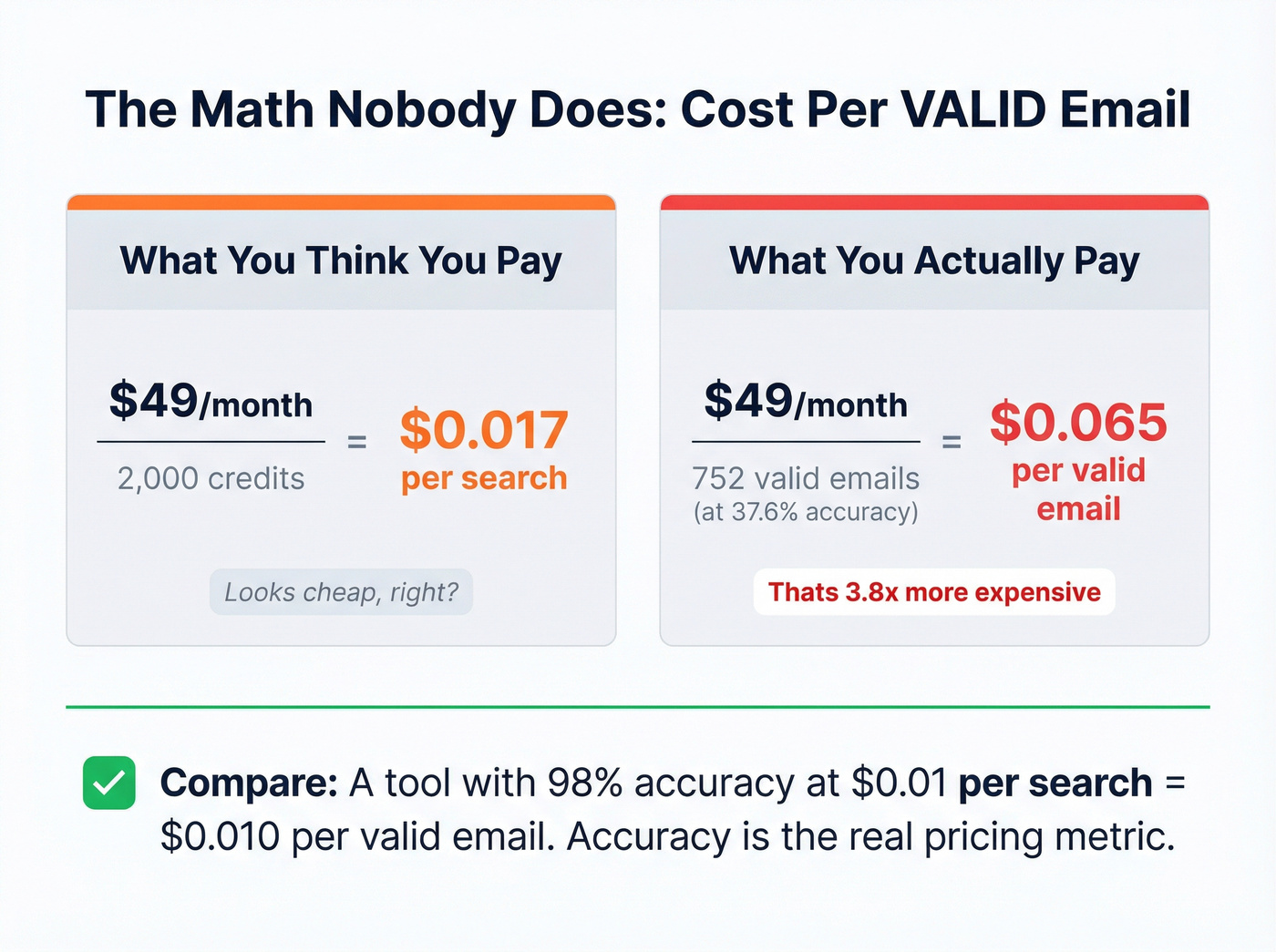
The Cost-Per-Valid-Email Math Nobody Does
Here's where it gets expensive. Hunter.io at $49/month ($34 on annual billing) gives you 2,000 credits - that's $0.017 per search. Sounds cheap. But at 37.6% accuracy, your effective cost per valid email is $0.045. You're paying for 2,000 searches and getting roughly 752 usable emails.
Hot take: If your average deal size is under $10K, you probably don't need the most expensive data tool on the market. But you absolutely need accurate data. A $0.01 email that lands in the inbox generates more pipeline than a $0.10 email that bounces.
Stop optimizing for volume. Start optimizing for deliverability.
Best Email Lookup Tools in 2026
Ten tools, ranked by what actually matters: accuracy, cost-efficiency, and whether they solve your specific problem.
Prospeo - Best for Email Accuracy and Data Freshness
Use this if: You're running outbound at scale and can't afford bounces tanking your domain. You want finding and verification in one step, not two tools duct-taped together.
Skip this if: You need a free-forever OSINT tool for reverse lookups (use Epieos instead).
Prospeo covers 300M+ professional profiles with 143M+ verified emails, all refreshed on a 7-day cycle. That refresh matters - the industry average is 6 weeks, which means most databases are serving you contacts who changed jobs a month ago. The Chrome extension (40,000+ users) works on any website and in CRMs - find verified emails and phones without leaving your browser. Free tier gives you 75 emails/month. Paid plans run ~$0.01/email with no contracts (cancel anytime). GreyScout doubled their sales team from 2 to 5 reps using Prospeo, cutting bounce rates from 38% to under 4% and growing pipeline 140%.

Hunter.io - Free Tier and Brand Recognition
Hunter's the tool everyone knows. It's the Google of email finders - massive brand, massive user base, and the first thing most people try.
| Strength | Weakness |
|---|---|
| 100M+ professional emails | 37.6% accuracy in independent benchmarks |
| 50 free searches/month, no credit card | Verification costs 0.5 credits, eating your allocation |
| Chrome extension with 600,000+ users (4.7 rating) | Effective cost per valid email ($0.045) is 4.5x what the pricing page suggests |
| Dead-simple UI | Individual lookups are hit-or-miss |
Paid plans start at $49/month ($34 on annual billing) for 2,000 credits. For quick, one-off searches where accuracy isn't life-or-death, the free tier is hard to beat. But if you're feeding results into cold email sequences, verify separately. Always.
Apollo.io - Best Database for List Building
I've seen teams treat Apollo's "verified" emails as gospel and get burned with 20%+ bounce rates. Don't be that team. Here's how to use Apollo correctly:
What Apollo does better than anyone: 275M contacts with 60+ search filters - the deepest filtering in the space. Slice by tech stack, headcount, funding, job title, and dozens more. Built-in sequencing means you can prospect and email from one platform. Around 88% accuracy for US contacts in Saleshandy's testing. Free tier available, paid plans from ~$49/month per user.
Where Apollo falls short: Accuracy drops to ~60% outside the US - EMEA teams, beware. Mobile number accuracy is, frankly, terrible based on widespread user reports. The credit system is confusing, and data hygiene in niche markets is poor.
The right way to use Apollo: Build your filtered lists in Apollo (nobody does this better), then verify through a dedicated tool before you hit send. Apollo for targeting, a verification layer for deliverability.
Anymail Finder - Pay Only for Verified Results
Use this if: You want a simple, no-BS model where you only pay for emails that actually verify. Their 77.5% benchmark score is legitimate.
Skip this if: You need a full prospecting platform. Anymail Finder is a single-purpose tool - email finding and nothing else.
Starts at $49/month for 1,000 verified emails. The "only charges for verified results" model is genuinely fair. No credits wasted on dead ends.
Epieos - Best Free Reverse Email Lookup
Use this if: You have an email address and need to know who's behind it. Epieos maps social account registrations and footprint signals tied to an email. Free to use.
Skip this if: You need to find emails (forward lookup) or build prospect lists. Epieos doesn't do that.
This is the go-to tool in the OSINT community for a reason. Pair it with HaveIBeenPwned for breach data and you've got a solid free investigation stack.
Skrapp.io - Simple and Affordable
Skrapp keeps things straightforward: free tier with 100 credits/month, paid plans starting at $30/month for 1,000 credits. They don't charge for invalid or unknown emails - only valid or catch-all results, which is a fair model. The 42.8% benchmark score isn't great, but for budget-conscious teams doing basic searches with a simple workflow, it gets the job done.
ContactOut
800M profiles with triple-verified data and strong G2 ratings (9.2 for lead quality). Best known in recruiting circles - if you're sourcing candidates rather than sales prospects, ContactOut's personal email coverage is a differentiator. 5 free credits daily, paid plans from ~$29-99/month.
Snov.io
$39/month for 1,000 credits. The 20.1% benchmark score is hard to overlook - and the near-total failure on company-name lookups (0.8%) means it's essentially useless without a domain. There are better options at this price point. Skip it.
Clearout
Not an email finder - it's a verification layer. 100 free credits to start, then around ~$7 per 1,000 credits. ISO and SOC 2 Type II certified, which matters if compliance is a concern. Use it to clean lists you've built elsewhere. Customers report open rates as high as 82% after running lists through Clearout.
Voila Norbert
$39/month for 1,000 searches. Known for a clean UI and pleasant user experience. The 36% benchmark score puts it in the same tier as Hunter - usable for light lookups, but not reliable enough for high-volume outbound.
Pricing Comparison
| Tool | Free Tier | Starting Paid | Cost/Search | Est. Cost/Valid |
|---|---|---|---|---|
| Hunter.io | 50/mo | $49/mo ($34 annual) | $0.017 | ~$0.045 |
| Apollo.io | Yes | ~$49/mo/user | Credit-based | ~$0.020 (US) / ~$0.035 (EMEA) |
| Anymail Finder | No | $49/mo (1K) | $0.049 | $0.049 (verified only) |
| Skrapp.io | 100/mo | $30/mo (1K) | $0.030 | ~$0.070 |
| ContactOut | 5/day | ~$29/mo | ~$0.03-0.10 | ~$0.04-0.11 |
| Snov.io | 50/mo | $39/mo (1K) | $0.039 | ~$0.194 |
| Clearout | 100 (once) | ~$7/1K credits | $0.007 | Verification only |
| Voila Norbert | No | $39/mo (1K) | $0.039 | ~$0.108 |
The cost-per-valid-email column is the one that matters. A tool that costs $0.017/search but only delivers 37% valid results is more expensive than one that costs $0.049/search but delivers 77% valid results. Always do the math.
How to Look Up an Email Address (Step-by-Step)
77% of B2B buyers prefer email contact. Finding the right address isn't optional - knowing how to look up emails efficiently is a core sales skill.
Forward Lookup Workflow
Step 1: Start with what you know. You need at minimum a name and a company (or domain). The more context you have - job title, location, department - the better your results.
Step 2: Use a dedicated tool. Paste a URL or upload a CSV into your email finder of choice, and get verified emails back in seconds. Chrome extensions let you prospect without switching tabs. For one-off lookups, Hunter's free tier works fine.
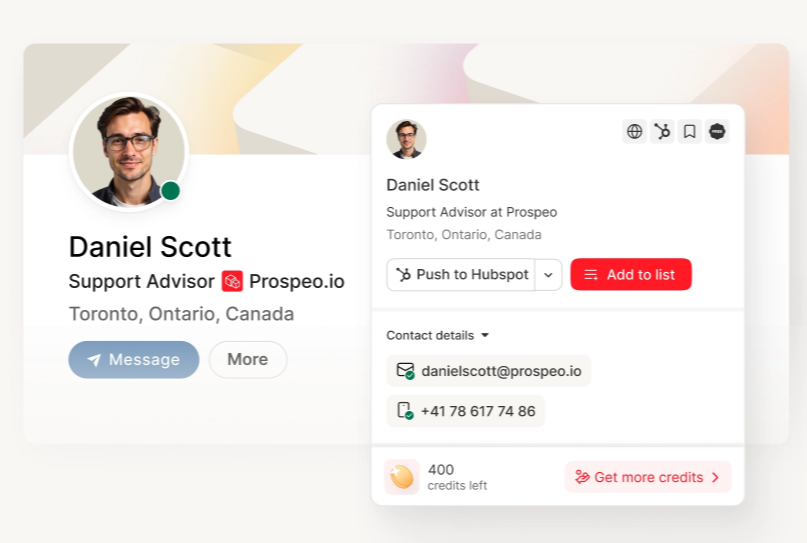
Step 3: Verify before sending. If your tool doesn't include built-in verification, run results through a verification service. ZeroBounce ($10/1K) and NeverBounce ($8/1K) are solid options. Never skip this step - see a full email verifier breakdown if you're comparing providers.
Step 4: Check for catch-all domains. If the domain accepts all email (catch-all), your verification tool can't confirm the specific mailbox exists. Flag these contacts for manual review or lower-priority sequences.
Manual Methods That Still Work
Not everything requires a paid tool. These approaches still deliver if you're looking for email addresses without spending a dime.
Google search operators. Try "John Smith" "@acme.com" - you'd be surprised how often email addresses appear in conference speaker lists, PDF directories, and forum posts.
Domain pattern guessing. Find one confirmed email at a company (check press releases, blog author pages, or job postings), identify the pattern, and apply it to your target contact. If marketing@acme.com and jdoe@acme.com both exist, the pattern is probably first-initial-last-name. (More options in this guess patterns guide.)
Company website scraping. Team pages, press releases, and "contact us" pages often list individual emails. It's manual, but it's free and the data is fresh.
Reverse Email Lookup - Finding Who's Behind an Address
Reverse email lookup flips the process: you start with an email address and work backward to identify the person. With 4+ billion email addresses in active use globally, the data tied to a single address is more extensive than most people expect.
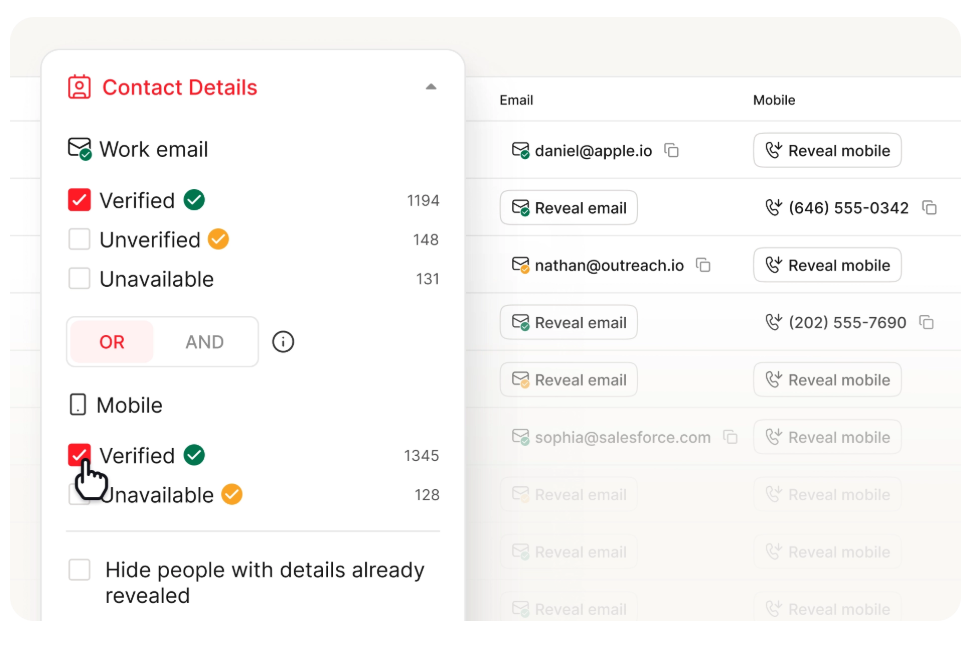
A reverse lookup can surface:
- Identity: Full name, age, gender, physical addresses
- Professional context: Job title, company, department, employment history
- Contact details: Phone numbers, alternate email addresses
- Online presence: Social media profiles, forum accounts, website registrations
- Domain data: Websites registered to that email
- Breach history: Services where the email was exposed in data breaches
- Associated IPs (if you have an email message): IP addresses linked to the sender in header data
The key mistake people make: relying on a single tool. Cross-referencing two or three sources catches errors and fills gaps that any individual tool misses.
OSINT Email Investigation Techniques
When you need to go deeper than a reverse lookup - investigating phishing attempts, verifying candidate backgrounds, or running threat intelligence - here's the process experienced investigators follow.
1. Basic email analysis. Break the address into its local part (before the @) and domain. The local part often reveals naming conventions, department codes, or personal usernames. The domain tells you if it's corporate, free provider (Gmail, Outlook), or custom.
2. MX record check. Run dig MX domain.com to see which mail servers handle the domain's email. This reveals the email provider (Google Workspace, Microsoft 365, self-hosted) and confirms the domain actually receives mail.
3. SMTP verification. Connect via telnet to the mail server and test whether the specific mailbox exists. A 250 response means the address is active. A 550 means it's not. This is what automated tools do at scale, but you can do it manually for individual addresses.
4. Breach database searches. Check HaveIBeenPwned and Dehashed. Breach data reveals which services the email was registered with, historical passwords (hashed), and sometimes associated usernames or alternate emails.
5. Social media discovery. Search the email directly on major platforms. Many social accounts are discoverable by email even when profiles appear private. Epieos automates this across dozens of platforms simultaneously.
6. Username pivoting. If the email's local part is a username (e.g., jsmith2847), search that username across platforms using tools like Sherlock, Namechk, or WhatsMyName. People reuse usernames far more than they realize.
7. Google dorking. Search "email@domain.com" in quotes. This surfaces forum posts, PDF documents, conference attendee lists, mailing list archives, and cached pages where the email appears. Add filetype:pdf or site:reddit.com to narrow results.
8. Domain-level OSINT. Run WHOIS and historical WHOIS lookups on the email's domain. Check for other domains registered to the same email address. Subdomain enumeration (using tools like Sublist3r or Amass) can reveal staging environments, internal tools, or forgotten assets tied to the organization.
9. Email header analysis. If you have an email from the address, examine the full headers. Look for Received headers (showing the sending server's IP), X-Originating-IP, and Message-ID patterns. This can reveal the sender's actual location and infrastructure.
The Aware Online email search tool streamlines steps 4-7 by querying 12+ sources from a single email input - Hunter for verification, Google/Bing/Yandex for web presence, HaveIBeenPwned for breaches, Dehashed/Pastebin for leak data, and web sources for context.
Is Email Lookup Legal? GDPR, CCPA, and CAN-SPAM
Short answer: yes, using email lookup tools is legal for B2B outreach - but the rules have teeth, and ignorance isn't a defense.
GDPR (EU/UK). You can use these tools for cold outreach under the "legitimate interest" legal basis. The outreach must be relevant to the recipient's professional role, and you must conduct a legitimate interest assessment balancing your purpose against their privacy rights. You're required to explain how you obtained their email, offer an easy unsubscribe, and practice data minimization - collect only what you actually need. Fines run up to EUR 20M or 4% of global revenue, whichever is higher. Meta's EUR 1.2B fine proves these aren't theoretical.
CCPA/CPRA (California). Applies to businesses with over $25M in revenue or those handling data from 50,000+ California residents. Gives consumers the right to know what data you've collected and request deletion. Less restrictive than GDPR for B2B, but still requires transparency.
CAN-SPAM (US federal). The baseline for US email. In Washington state, misleading subject lines can trigger $500 penalties per recipient - that adds up fast on a 10,000-person campaign. Physical address required. Unsubscribe must work within 10 business days.
Regulation is accelerating. Eight new comprehensive state privacy laws took effect in 2025 alone. Using reputable data sources (not purchased or scraped lists of unknown provenance) and maintaining clean, regularly updated email lists isn't just best practice - it's legal protection.
Pre-checked boxes and implied consent don't meet GDPR standards. If you're selling into Europe, assume you need legitimate interest documentation for every campaign.
What Happens When Your Email Data Is Wrong
Bad data doesn't just waste money. It triggers a chain reaction that can take months to recover from.
The threshold. Keep total bounces below 2% and hard bounces under 1%. Exceed those numbers and ISPs start flagging your domain.
The chain reaction. More bounces lead to lower sender reputation, which means fewer emails reaching the inbox, which means lower open and reply rates, which means reduced pipeline, which eventually means domain blacklisting. A reply is the strongest positive engagement signal ISPs track - if your emails aren't reaching inboxes, you're not getting replies, and the problem compounds on itself.
The real cost of blacklisting. Getting your domain blacklisted means around 3 months of warmup time to rebuild reputation. For agencies running client campaigns, that's not just your domain - it's your client's trust. SMTP error code 550 5.1.1 means the address is flat-out invalid. 550 5.7.1 means you've been blocked for policy violations. (If you're seeing this, start with this 550 recipient rejected guide.)
The catch-all trap. Catch-all domains accept all email, so standard verification can't confirm whether a specific mailbox is active. These addresses inflate your "verified" count while quietly contributing to deliverability problems.
Verification pricing if you're doing it separately:
| Service | Cost per 1K | Accuracy |
|---|---|---|
| DeBounce | ~$1.50 | 97%+ |
| MillionVerifier | ~$3.70 | 99%+ |
| NeverBounce | ~$8 | 97-99% |
| ZeroBounce | ~$10 | 99% |
| Hunter | ~$24.50 | Not published |
This is why verification built into the finding step matters. Stack Optimize built from $0 to $1M ARR using Prospeo with 94%+ deliverability, bounce under 3%, and zero domain flags across all clients. That's the difference between data that works and data that burns your infrastructure.
Your domain reputation can't survive a 37% accuracy rate. Prospeo refreshes 300M+ profiles every 7 days - not every 6 weeks like the tools in those benchmark tables. That's why teams using Prospeo see bounce rates under 4%.
Stop gambling your sender reputation on stale data.
FAQ
Is email lookup legal for cold outreach?
Yes - it's legal for B2B outreach under GDPR's "legitimate interest" basis and CAN-SPAM's commercial email rules. You must disclose how you found the address, include an easy unsubscribe, and collect only necessary data. GDPR fines reach EUR 20M or 4% of global revenue; CAN-SPAM penalties hit $500 per recipient in some states.
Are free email lookup tools accurate enough for outbound?
Free tiers are useful for testing but limited in volume and often accuracy. Independent benchmarks show most tools achieve 35-65% real-world accuracy - far below advertised rates. Prospeo's free tier (75 emails/month) includes full verification at 98% accuracy, making it the strongest free option for real campaigns.
How do I do a reverse email lookup for free?
Epieos is the best free reverse lookup tool - enter any address and it maps social registrations and digital footprint signals with no account required. Pair it with HaveIBeenPwned for breach data and Google dorking ("email@domain.com") for web mentions. This free stack covers most investigation needs.
What's a safe bounce rate for cold email campaigns?
Keep total bounces below 2% and hard bounces under 1%. Exceeding these thresholds triggers ISP flags, deliverability drops, and potential domain blacklisting - which takes roughly 3 months of warmup to recover from. Top-performing outbound teams target hard bounce rates well under 0.5%.
What's the most accurate email lookup tool in 2026?
In bulk CSV benchmarks, Tomba.io (80.3%) and Anymail Finder (77.5%) score highest. For real-world outbound deliverability, Prospeo's 98% accuracy and 7-day data refresh consistently produce bounce rates under 4% for customers. The best choice depends on your workflow - bulk list building and targeted prospecting yield different results.