

Best AI Email Address Finder Tools (2026): Accuracy, Pricing & Picks
An ai email address finder can cost you more than your tool bill. Pay $15k-$40k/year for "verified" data, launch your first outbound sequence, and suddenly 8%-12% of emails bounce. Inbox placement drops, sending gets throttled, replies dry up, and everyone blames "copy" when the real culprit is list quality.
Most tools marketed as "AI" aren't magic. The useful "AI" is the automation behind the scenes: matching identities, classifying risk, enriching records, and running verification at scale. The useless "AI" is a chat box that confidently guesses first.last@domain.com and hands you a confidence score while your sending domain takes the hit.
Deliverability's a data problem first.
If you want <2% total bounces and <1% hard bounces, you need three things: fresh data, real verification, and unit economics that reward verifying everything (instead of charging you extra for hygiene).
Look, if you're selling smaller deals, you probably don't need a giant "all-in-one GTM suite." You need clean emails, fast refresh, and a workflow your team will actually follow.
Our picks (TL;DR)
If I had to pick 3 to trial first: Prospeo, Hunter, RocketReach.

Use this checklist to decide fast and keep your bounce rate where it belongs: <2% total bounces and <1% hard bounces.
- Prospeo - Best overall for accuracy + freshness + self-serve verified emails. Built around verification and a 7-day refresh cycle, not "AI prompts."
- Hunter - Best "utility layer" for domain search + verifier with transparent pricing.
- RocketReach - Best when you want a finder that just works and you're fine with per-seat pricing.
If you're bouncing above 2%, don't trial 10 tools. Trial 2-3, verify everything, and measure hard bounces by source.

Side-by-side comparison table: pricing, verification, freshness
Most teams compare tools on "database size" first. That's backwards.
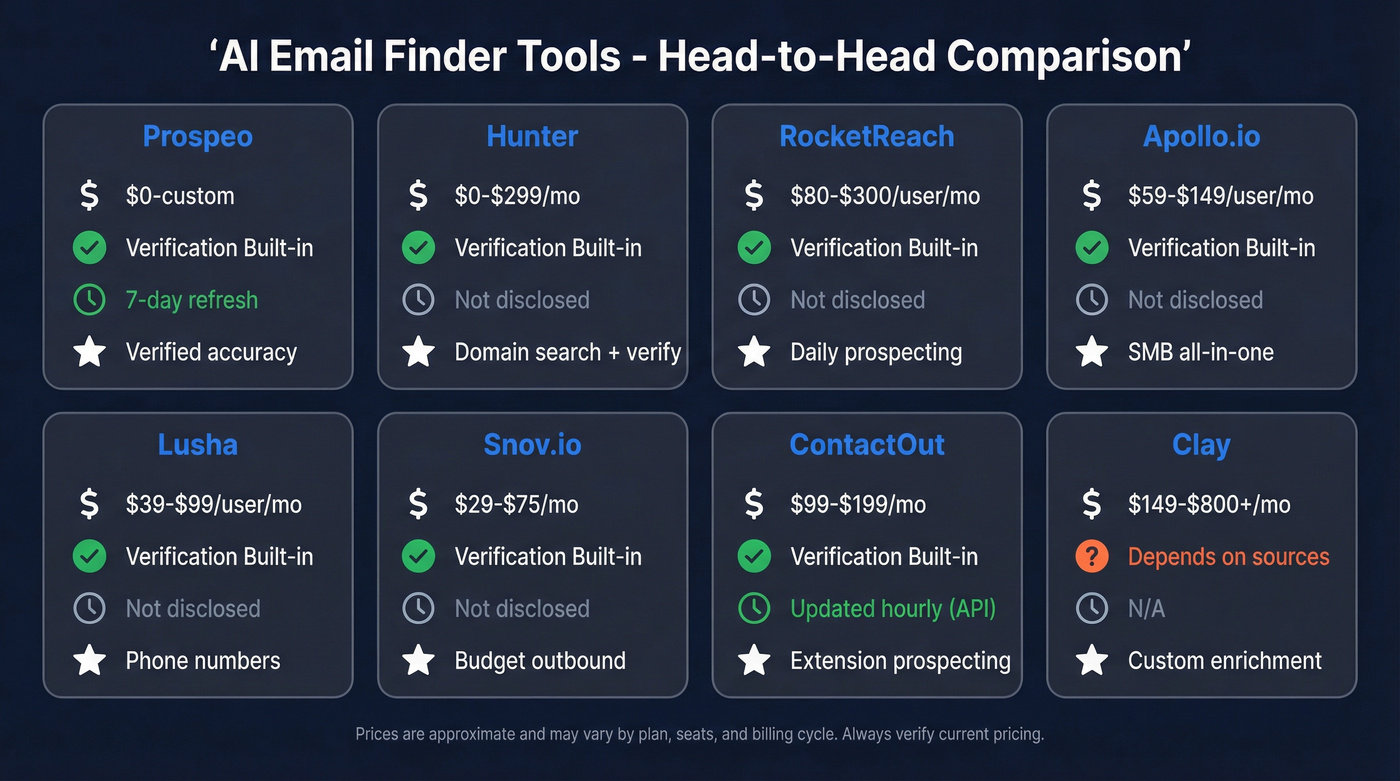
The real comparison is: can it find the email, can it verify it, how fresh is the data, and what do 1,000 verified emails actually cost? Big suites can be powerful, but they're often bundled with workflows you won't use and priced like a platform, not a finder.
Here's a practical snapshot for email-finder workflows (not full GTM suites):
| Tool | Best for | Accuracy signal | Freshness | Verification | Pricing signal |
|---|---|---|---|---|---|
| Hunter | Domain + verify | High (verifier-led) | Not disclosed | Verifier included | $0-$299/mo |
| RocketReach | "Just works" finding | Strong in practice | Not disclosed | Verifier included | ~$80-$300/user/mo |
| Apollo.io | SMB all-in-one | Mixed by segment | Not disclosed | Verifier included | ~$59-$149/user/mo |
| Lusha | Phones + emails | Good for dials | Not disclosed | Verifier included | ~$39-$99/user/mo + credits |
| LeadIQ | Prospecting workflow | Solid for teams | Not disclosed | Verifier included | ~$75-$200/user/mo |
| ContactOut | Extension-led sourcing | Strong on web sourcing | Updated hourly via API | Verifier included | ~$99-$199/mo (individual) |
| Snov.io | Budget + automation | Good for price | Not disclosed | Verifier included | $29.25-$74.25/mo |
| Clay | Enrichment workflows | Depends on sources | N/A | Depends | ~$149-$800+/mo |
A few interpretation bullets that matter in production:
- Prospeo's 7-day refresh is the outlier. The industry average is about 6 weeks, which is why "verified" lists still rot fast. (If you're fighting decay, see contact data decay benchmarks and fixes.)
- Hunter's verifier economics are unusually fair: verification costs 0.5 credit, so "verify everything" stays affordable.
- Phones are where budgets quietly explode. Many tools price phones at 10 credits while emails cost 1 - fine if dials drive meetings, painful if reps reveal phones "just in case." (If you need dials, use a dedicated B2B phone number workflow.)
- ContactOut pricing often lands around $99-$199/mo for individuals; team/API goes higher.

Most "AI email finders" guess patterns and hand you a confidence score. Prospeo runs 5-step verification with catch-all handling, spam-trap removal, and honeypot filtering - then refreshes every 7 days so your list doesn't decay. 143M+ verified emails at 98% accuracy, ~$0.01 each.
Keep your bounce rate under 2% without overpaying for hygiene.
The best ai email address finder tools (ranked)
Two complaints show up across almost every tool once you're doing this for real: credits feel like a tax (especially when verification burns the same pool), and stale data hurts more than missing data. Keep those in mind as you pick.

Prospeo - best for verified accuracy + freshest self-serve data (Tier 1)
Best for: deliverability-first outbound teams that want verified emails without annual contracts.
We've tested a lot of "email finder + verifier" combos, and the pattern's always the same: the tool that wins long-term isn't the one that finds the most emails on day one, it's the one that keeps your bounce rate stable after month three when titles change, people switch jobs, and your old exports quietly decay.
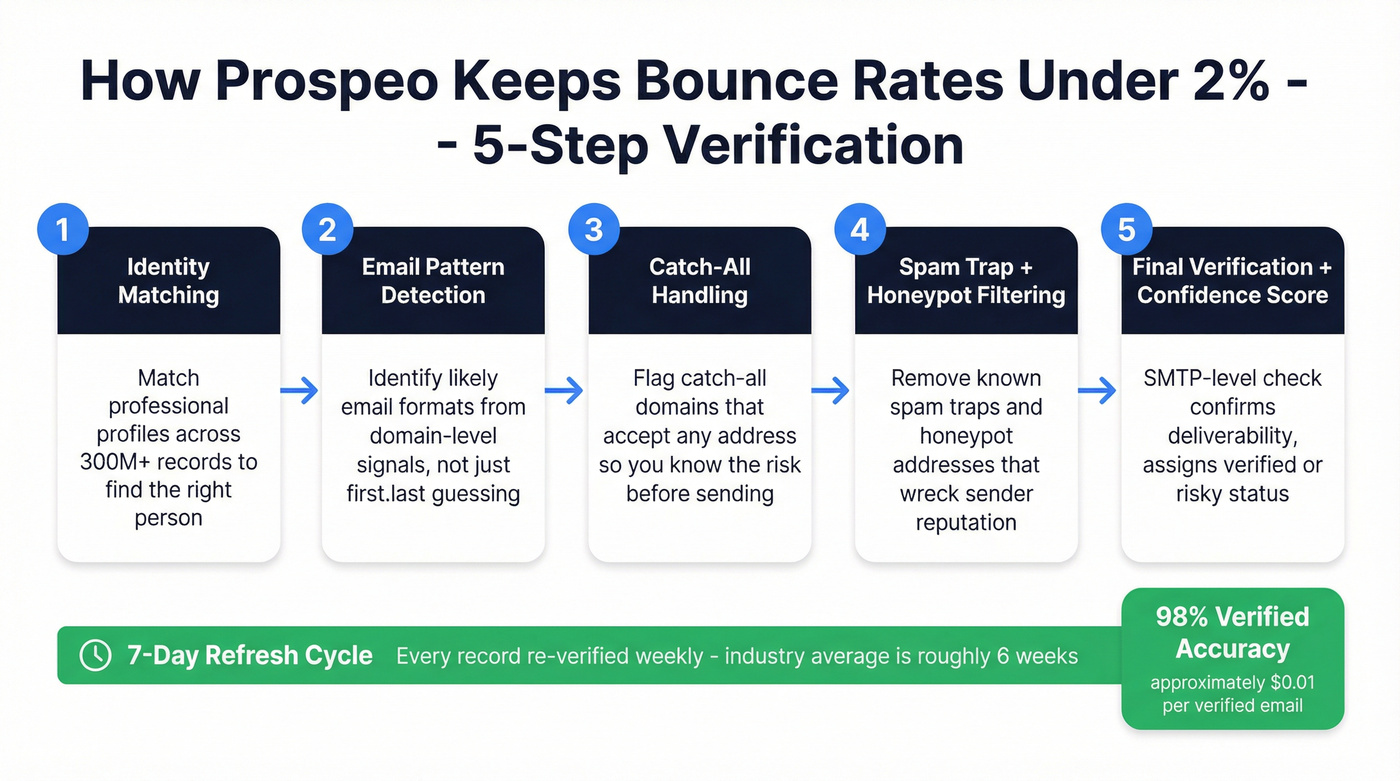
Prospeo is "The B2B data platform built for accuracy". It includes 300M+ professional profiles, 143M+ verified emails, and 98% verified email accuracy, with every record refreshed on a 7-day cycle (the industry average is about 6 weeks). Under the hood, it's built around 5-step verification with catch-all handling plus spam-trap removal and honeypot filtering, which is exactly the stuff that saves you from the "why are we suddenly at 4% hard bounces?" fire drill. (For a broader rundown, compare email lookup tools by pricing and accuracy.)
Here's a real scenario I've seen: an SDR team exports 5,000 contacts, runs one quick "spot check" verification, and starts sending. Week one looks fine. Week two, they add a second sending domain and ramp volume. Week three, bounces creep up, then the sequencer starts throttling, then replies fall off a cliff. Nothing "mystical" happened - they just scaled stale data. A weekly refresh cycle and strict verification rules prevent that spiral.
You also get 30+ filters and practical integrations (Salesforce, HubSpot, Smartlead, Instantly, Lemlist, Clay, Zapier, Make), so the "verified" status doesn't die in a CSV on someone's desktop. (If you're standardizing the workflow, see email finder CRM integration.)
Pricing: self-serve, cancel anytime, and it works out to ~$0.01 per verified email. Free includes 75 emails + 100 Chrome extension credits/month.
Links if you want to click around: https://prospeo.io/email-finder and https://prospeo.io/integrations.

Hunter - best simple "domain search + verifier" utility (Tier 1)
Best for: domain-based prospecting and a verifier you can standardize.
Hunter stays in its lane: Domain Search, Email Finder, and Email Verifier that's easy to operationalize across a team. Pricing's clean: free tier, then $49/2,000 credits, $149/10,000, $299/25,000. The detail that matters in practice is verification = 0.5 credit, so you can actually afford to verify everything instead of "saving credits" and paying for it later in bounces. (If you want more options, see email verifier websites ranked and tested.)
My take: even if you outgrow Hunter as a finder, it's worth keeping as a verification layer when lists come from events, partners, or manual research.
Pricing: $0-$299/mo, with higher tiers for teams.
RocketReach - best "it just works" day-to-day (Tier 1)
Best for: teams that want a finder that feels reliable and don't mind seat pricing.
RocketReach shows up in practitioner threads for one reason: it tends to reduce the daily friction of "I need this email right now." It's fast to adopt, and it's a strong "get me the email now" tool for SDRs and recruiters who live in a browser all day. (If you're budgeting seats/credits, see RocketReach pricing.)
What to watch: per-user pricing adds up quickly for agencies or research-heavy teams, and it's easy to end up paying for seats that aren't used consistently.
Pricing: expect ~$80-$300 per user/month depending on tier and volume.
Apollo.io - best all-in-one for SMB prospecting (Tier 2)
Best for: small teams that want database + sequences + basic enrichment in one login.
Apollo's the default starting point because it bundles a lot. When the data matches your segment, reps move fast: search -> enrich -> sequence -> sync. The tradeoff is consistency: Apollo can feel great in one niche and noisy in another, and that inconsistency is exactly what makes deliverability hard to manage because your bounce rate won't be stable across segments, geos, or job levels. (If you're evaluating it specifically, read Apollo.io accuracy.)
Skip this if you're already fighting deliverability. Convenience doesn't matter if you're cleaning bounces every week.
Pricing: typically ~$59-$149/user/month (higher tiers for enrichment/dialer).
Lusha - best when phone numbers actually change outcomes (Tier 2)
Best for: outbound motions where direct dials drive meetings (and you measure connect rate, not just "numbers found").
Lusha's model is blunt in a good way: email = 1 credit, phone = 10 credits. That forces you to budget correctly instead of pretending phones are "free." It's also easy for reps to use via extension-based workflows. (If you're comparing plans, see Lusha pricing.)
What to watch: credit burn. Put a rule in place: only reveal phones for ICP accounts or late-stage follow-up.
Pricing: commonly ~$39-$99/user/month for smaller plans, with credits and team tiers above that.
Snov.io - best budget-friendly credits + automation add-ons (Tier 2)
Best for: budget-conscious outbound with built-in outreach features.
Snov.io is easy to plan around: Starter is $29.25/mo (1,000 credits) and Pro is $74.25/mo (5,000 credits) on annual billing. It's also one of the few tools where the math stays understandable as you scale.
What to watch: automation add-ons can become the real bill. If you only need finding + verifying, don't pay for extras you won't use.
Pricing: $29.25-$74.25/mo (annual view), plus add-ons.
ContactOut - best for extension-led prospecting (Tier 2)
Best for: SDRs and researchers who live in professional profiles and want contact info without context switching.
ContactOut shines when your workflow is "browse -> reveal -> export." It advertises contact data updated hourly via API, which is a meaningful promise if you're sourcing from web surfaces that change often.
What to watch: "Unlimited" plans still have practical caps (exports, throttles, fair use). Treat it like a productivity tool, not an infinite data firehose.
Pricing: individuals typically land around ~$99-$199/mo; team/API is higher.
Clay - best for custom enrichment workflows (Tier 2)
Best for: RevOps teams that want a repeatable enrichment machine across multiple sources.
Clay is the glue: pull lists, enrich from multiple providers, dedupe, score, verify, then push to your CRM or sequencer. If you're tired of random exports turning into a Salesforce mess, Clay is how you turn enrichment into a system. (For alternatives and stack design, see lead enrichment tools.)
What to watch: Clay doesn't replace data sources. You still need at least one strong provider and a verification standard, or you'll just automate the wrong data faster.
Pricing: expect ~$149-$800+/mo depending on volume and team needs.
Mailmeteor Email Finder (Tier 3)
A lightweight finder for quick lookups. It's a utility, not a database: good when you already have a person + company and want fast results without a heavy platform.
Pricing: Free.
LeadIQ (Tier 3)
LeadIQ is built for prospecting workflows and team adoption, especially when you want reps to capture contacts quickly and keep CRM data moving. It's commonly bought per seat. (If you're cost-checking, see LeadIQ pricing.)
Pricing: expect ~$75-$200/user/month (with Pro often landing around $200/mo per user in practice).
PlusVibe (Tier 3)
More of an outreach + warmup bundle than a pure finder. Useful if your main problem is sending infrastructure and inbox health, not sourcing depth.
Pricing: $37/mo, $77/mo, or $497/mo after a trial.
Swordfish AI (Tier 3)
An OSINT-style contact finder that can be handy for broad web discovery. It's best for scrappy research, not governed B2B ops.
Pricing: expect ~$30-$100/mo for individual plans; teams go higher.
Tomba (Tier 3)
A solid finder utility with a useful reminder baked into its own benchmarking: domain-based inputs beat company-name-only searches by a mile. Use it when you have clean domains and want a straightforward finder + API.
Pricing: typically ~$49-$199/mo depending on credits and API needs.
One-minute decision framework (pick the right category)
Stop trialing 10 tools because a listicle told you to. Pick the category that matches your workflow, then pick the best tool in that category.
There are four buckets that get lumped under "email finder":
Database finders (best for speed + coverage)
These tools already have contact records. You filter, export, and go.
- Use this if you need volume, targeting filters, and you don't want to scrape the web.
- Skip this if you only need a handful of emails for niche accounts and you already know the exact people.
Pattern guessers (best for known domain + known person)
These generate likely formats (first@, first.last@) and then try to verify.
- Use this if you have name + domain and you can tolerate misses.
- Skip this if you're targeting enterprises with strict gateways and lots of catch-all behavior. (If you're doing this route, follow a safer guess email address format workflow.)
Scrapers (best for "it's on a website somewhere")
These crawl pages (team/about/contact PDFs) and extract emails.
- Use this if you're doing niche research and the emails are publicly posted.
- Skip this if you need compliance-friendly outbound at scale. Scraped lists are where legal and deliverability problems start.
Enrichment/workflow tools (best for building a repeatable system)
These orchestrate multiple sources, dedupe, enrich, verify, and push to your CRM/sequencer.
- Use this if RevOps owns pipeline hygiene and you want a reliable process.
- Skip this if you just want a quick list today.
Clay's the obvious example here: it's the glue, not the source.
One contrarian take I'll stand by: the "best" email finder is usually a stack - a primary source + a verifier + a dedupe/enrichment step. Teams that buy a single "all-in-one" often spend the next quarter cleaning Salesforce because nobody owned data quality.
How an ai email address finder actually works (and where it fails)
Most tools follow the same pipeline:
- Inputs: name + company domain (best), name + company name (worse), company only (worst).
- Candidate generation: database match, pattern inference, or web extraction.
- Identity matching: confirm the person belongs to the company (title, profile signals, historical associations).
- Verification: technical checks + risk scoring.
- Delivery: export to CRM/sequencer with clear statuses (valid/risky/invalid).
Where they fail in the real world:
- Catch-all domains (the classic trap): the domain accepts mail for any address, so SMTP checks can't confirm the mailbox exists. If your tool doesn't label catch-all as risky, you'll learn the hard way.
- Role accounts and aliases:
sales@,info@, and shared inboxes can "verify" but still bounce or trigger spam filters depending on policy. Aliasing (j.smith@vsjohn.smith@) also creates false positives if the tool guesses the wrong variant. - Corporate gateways that lie on purpose: many enterprise mail systems accept the handshake and only reject later (or silently drop). That's why "verified" isn't a lifetime guarantee, and why refresh + re-verify matters.
- Bad inputs create confident garbage: company-name-only searches are where tools hallucinate. If you can't provide the domain, expect lower hit rates and more risk.
If you want a clean example of what "good" looks like, use a finder that's built around verification and freshness rather than UI tricks. That's what separates a professional email finder from a pattern-guesser with a confidence badge.
Verification & deliverability rules (the <2% bounce standard)
If you only remember one thing: total bounces <2% and hard bounces <1%. That's the operational standard that keeps inbox placement stable.
Here's a checklist that works:
- Verify every email before first send. Not "spot check." Every email.
- Separate statuses:
- Valid = send
- Risky (catch-all) = send carefully (lower volume, better copy, monitor bounces)
- Invalid = never send
- Track bounces by source tool. If one provider produces 3%-4% hard bounces, cut it off immediately.
- Re-verify before big campaigns. Data decays: job changes, mailbox deactivations, gateway policy changes. (Use a documented email verification list SOP so it actually happens.)
What verification's doing under the hood:
- MX checks: does the domain accept email?
- SMTP handshake/ping: can the server be reached, and does it reject obvious invalids?
- Heuristics/scoring: syntax, role accounts, disposable domains, historical deliverability signals.
Catch-all reality: catch-all domains can't be definitively confirmed at the mailbox level. Good tools label them "risky" and let you decide.
Also, integrated verification is usually cheaper at scale. Standalone verifiers that charge per check become a growth tax once you're verifying tens of thousands of records a month.

Pricing reality (credits -> cost per 1,000 verified emails)
Credits are where tools quietly stop being "cheap."
You don't buy an email finder. You buy 1,000 verified emails (or you buy bounces). So translate everything into unit economics.
Quick cost math (examples)
| Tool | Verification unit | 1,000 verifs cost | Notes |
|---|---|---|---|
| Prospeo | Pay per valid | ~$10 | ~$0.01/email |
| Hunter | 0.5 credit | 500 credits | 2 verifs/credit |
| Lusha | Email = 1 credit | 1,000 credits | Phone = 10 credits |
| LeadIQ | Seat + credits | Varies | Budget per user |
| Snov.io | 1 credit | 1,000 credits | Verif = 1 credit |
| ContactOut | "Unlimited" | Varies | Export/fair-use caps |
Worked scenario: 10,000 prospects/month (verify all, phones for 20%)
This is the scenario most outbound teams drift into without noticing:
- You source 10,000 contacts/month.
- You verify all 10,000 (non-negotiable).
- You reveal phones for 20% of them (2,000 numbers) because dials matter for your ICP.
What happens:
- On a verifier-friendly model (like Hunter's 0.5-credit verification), verification stays predictable. You can budget verification as a fixed monthly hygiene cost.
- On phone-heavy credit models (where phone = 10 credits), the phone step becomes the real spend driver. 2,000 phones = 20,000 credits in a month, often more than the email work.
- On "unlimited" plans, you hit export caps or throttles right when you scale, which is the worst time to discover limits.
My recommendation: separate your "email hygiene budget" from your "phone budget." If you lump them into one credit pool, reps will ration verification to save credits for phones, and bounces creep up.
Compliance & ethical outreach checklist (GDPR/CAN-SPAM/CCPA)
Recipient location decides legality. There's no single global rulebook, and "we're US-based" doesn't protect you if you're emailing EU residents. (If you're operating in the EU, follow a practical GDPR for sales and marketing playbook.)
And inbox penalties happen before legal penalties. You'll feel deliverability pain long before a regulator emails you back.
Do
- Have a legitimate business purpose for contacting the person.
- Include clear identity + physical address in your emails.
- Honor opt-outs fast (CAN-SPAM requires processing within 10 business days; operationally, do it immediately).
- Keep proof of suppression (don't re-add unsubscribed contacts).
- Minimize data: only store what you need for outreach.
Don't
Don't buy scraped lists and blast them. That's how you get spam traps and domain blocks.
Don't mislead with fake reply chains, spoofed identities, or deceptive subject lines. It's not clever. It's self-sabotage.
Don't ignore regional rules because "everyone does outbound."
Penalty reality:
- GDPR: up to EUR20M or 4% of global revenue
- CAN-SPAM: up to $43,792 per email
- CCPA: up to $7,500 per violation
FAQ
What's the difference between an email finder and an email verifier?
An email finder discovers likely addresses, while an email verifier checks deliverability signals (MX records, SMTP behavior, and risk heuristics) to decide if you should send. In practice, teams that verify 100% of contacts keep total bounces under 2% and protect inbox placement.
Can AI email finders verify catch-all domains?
Catch-all domains can't be confirmed at the mailbox level because the server accepts mail for any address, so the best tools mark them as risky rather than "valid." A practical rule is to send to catch-all contacts at lower volume first and pause the source if hard bounces exceed 1%.
Is using an email address finder legal in 2026?
Using an email address finder is legal when you follow the recipient's regional rules (GDPR, CAN-SPAM, CCPA) and honor opt-outs quickly. Operationally, the bigger risk is deliverability: if your list produces 3%-4% hard bounces, mailbox providers will throttle or block you long before legal trouble shows up.
Why do "verified" emails still bounce sometimes?
"Verified" usually means the domain is configured to receive email and the address looks deliverable at the time of the check, not that the mailbox will exist forever. Job changes, mailbox deactivations, and catch-all behavior create drift, so re-verify before large sends and suppress any segment that pushes hard bounces above 1%.
Which tool is a good free alternative to Hunter for verified emails?
For small teams, Prospeo is a strong free alternative because it includes 75 emails plus 100 Chrome extension credits per month and only charges for valid addresses. Hunter's free tier is also useful for domain search.
Final recommendation (what I'd do)
Do this in the next 48 hours:
- Pick 2 tools from Tier 1 (one primary source + one verifier-first utility).
- Pull 500 leads per tool from the same ICP slice (same titles, same geo, same company size).
- Verify every email and label outcomes as valid/risky/invalid before you send anything.
- Send a small, controlled sequence and measure hard bounces by source. Keep the winner, cut the loser, and lock the process as a team rule.
If you're tempted to "use AI to find email addresses" by generating patterns in a spreadsheet, treat it as a last resort. It can work for small batches, but it won't protect you from catch-all risk at scale.
You read the comparison table. No other self-serve finder combines a 7-day refresh cycle with 98% email accuracy at $0.01/lead. Prospeo plugs into HubSpot, Salesforce, Instantly, and Lemlist - so verified status survives past the CSV export.
Start with 75 free verified emails and measure hard bounces yourself.