

Best Email Finder Tools With CRM Integration (2026 Guide)
Paying $15,000/year for an email finder feels fine... right up until your CRM turns into a graveyard of bounced emails, duplicate contacts, and "VP Marketing (left company)" records.
The dirty secret: most teams don't have a prospecting problem. They've got a data freshness problem.
If you're buying an email finder with crm integration, the bar isn't "can it find emails?" It's "can it write clean data into HubSpot/Salesforce (and keep it fresh) without sending you back to CSV hell?"
Hot take: if you're selling a lower-priced product and you're not calling, you don't need a "platform." You need verified emails, sane CRM writes, and a refresh loop. Everything else is expensive procrastination.
What you need (quick version) to choose the right tool
Use this checklist to avoid buying the wrong tool and then spending your Fridays cleaning up the mess.

Your must-haves:
- A real integration path: native HubSpot/Salesforce app or a reliable Zapier/Make/n8n workflow or an API you can actually build on. (If you want the deeper setup mechanics, see our Email Finder CRM Integration guide.)
- Clear object writes:
- HubSpot: Contacts + Companies (and ideally association support)
- Salesforce: Lead + Contact + Account Don't buy expecting Deals/Opportunities to sync automatically. Almost nobody does it.
- Field mapping you can control: at minimum you want to map and protect:
email+ a verification status field (e.g.,verified_email_status) (More on this in our How to Verify an Email Address guide.)- an enrichment timestamp (e.g.,
enriched_at) - source vendor (e.g.,
data_source) - optional:
job_title,seniority,department,company_domain,employee_count,industry(If you’re standardizing these fields, start with a data quality scorecard.)
- Verification you can trust: catch-all handling + spam-trap filtering. If your tool treats catch-all as "good enough," your deliverability pays the price. (If you’re comparing vendors, use our email verifier websites roundup.)
- A refresh loop: data decays fast - 22.5% of B2B data goes bad yearly, and Gartner pegs bad data at $15M/year for the average business. If your tool enriches once and disappears, your CRM rots on schedule. (Related: B2B contact data decay.)
- Dedupe + overwrite control: either built-in, or enforced via workflows (protect owner/lifecycle stage; don't overwrite verified emails with unverified ones). (If you want a practical SOP, see How to Keep CRM Data Clean.)
- Write safety: a staging list/queue for catch-all or low-confidence records so you don't auto-poison your CRM.
- Admin/security reality: OAuth scopes, API limits, and auditability matter. If you can't log "who enriched what, when," you can't fix mistakes.
- Pricing you can model: do they charge for attempts or only for deliverables? And is CRM sync locked behind a tier jump?
Our picks (opinionated):
- Best "simple + predictable" finder: Hunter (clean UX, strong verification economics)
- Best if you need a vendor that explicitly claims 2-way sync: Snov.io (HubSpot + Pipedrive)
- Best enrichment-first (but watch the gotcha): Dropcontact (email finder != CRM enrichment plan)
- Best "pay only for deliverables" billing: Skrapp (fair credit policy; CRM sync gated to Professional)

What "CRM integration" actually means for an email finder
Most tools say "CRM integration" and mean "we can export a CSV and you can import it." That's not integration. That's punishment.

There are three integration types that matter, and they behave very differently once reps start hammering the CRM every day.
1) Native CRM app (best when it's actually native)
- You connect HubSpot or Salesforce directly.
- The tool writes to CRM objects like:
- HubSpot: Contacts, Companies (Deals sync is rare)
- Salesforce: Lead, Contact, Account (Opportunity writes are rare)
- You get field mapping, and sometimes enrichment-on-create.
The operational win: native apps reduce glue work and break less often than Zapier chains.
The operational trap: plenty of "native" apps still don't handle dedupe/overwrite the way your RevOps team expects, so you end up cleaning up the same mess... just faster.
2) Zapier/Make/n8n (the "good enough" middle)
- Works when native apps are thin or gated.
- You build: "new lead found -> find/verify email -> create/update contact -> enrich missing fields -> log timestamp/source."
- You control overwrite rules (which is exactly what you want if you care about CRM hygiene). (If you’re building this end-to-end, our CRM integration for sales automation guide helps.)
The operational win: you can enforce rules like "never overwrite owner" and "only write phone if verified."
The operational trap: if you don't design dedupe up front, you'll create a duplicate storm and reps will stop trusting the CRM.
I've seen this happen in a real HubSpot instance: a team shipped a "quick" Zap, matched on name only, and accidentally created 1,800 duplicates in a week. The fix wasn't swapping tools. It was fixing the matching logic and adding a staging step for anything that wasn't verified.
3) API (best for RevOps teams who want control)
- You call the finder/enrichment API from your own workflow layer.
- You can enforce strict rules:
- "Only write
emailwhen status = verified" - "Write enrichment to a staging object first"
- "Log
enriched_at+data_sourceon every update"
- "Only write
- You own maintenance, but you also own correctness.
The operational win: governance, auditability, and predictable data behavior.
The operational trap: you need someone who'll maintain it after the initial build, not just ship it and disappear.
Compliance & privacy-by-design (don't skip this if you sync to a CRM)
If you're enriching into HubSpot/Salesforce, you're creating a data processing workflow. Treat it like one. (For outbound-specific requirements, see GDPR for Sales and Marketing.)
CRM enrichment compliance checklist:
- DPA availability (you want it ready before procurement asks)
- Opt-out handling (global suppression should be enforceable)
- Data retention policy (how long enrichment data is stored and where)
- Source transparency (at least vendor/source fields in your CRM)
- Audit log fields:
enriched_at,data_source, and ideallyenriched_by_workflow - Regional routing if your org requires EU/US data boundaries
One more thing: if your legal team asks "where did this contact data come from?" and you can't answer in 10 seconds inside the CRM, you're setting yourself up for a miserable internal thread.

You just read about the data freshness problem killing CRMs. Prospeo solves it: 98% email accuracy, 7-day data refresh (not the 6-week industry average), and native integrations with HubSpot, Salesforce, and 10+ tools. No CSV hell. No duplicate storms. Clean writes at $0.01/email.
Stop enriching once and watching your CRM rot on schedule.
CRM integration scorecard (the table you came for)
Marketplace listings rarely disclose object-level sync, dedupe behavior, and tier gating consistently. So here's the rule that keeps you sane: assume standard objects unless the vendor explicitly documents more.

Mobile-friendly snapshot (quick scan)
| Tool | Native CRM | API | Sync | Gating |
|---|---|---|---|---|
| Hunter | Yes (limited) | Yes | 1-way | Tiered |
| Snov.io | HS + Pipedrive | Yes | 2-way* | Tiered |
| Dropcontact | HS + Pipedrive | Yes | 1-way | Split |
| Skrapp | - | Enterprise | 1-way | Professional+ |
*"2-way" is vendor-labeled for specific CRMs/features, not "everything syncs both directions."
Full matrix (detailed)
| Tool | Native CRM(s) named | Zapier/Make/n8n | API | 1-way vs 2-way | Typical objects | Setup time (est.) | Plan gating note |
|---|---|---|---|---|---|---|---|
| Hunter | Yes (limited) | Yes | Yes | 1-way | HS: Contacts/Companies; SF: Leads/Contacts/Accounts | 1-2h | Tiered |
| Snov.io | HS, Pipedrive | Yes | Yes | 2-way* | HS: Contacts/Companies; Pipedrive: People/Orgs | 1-2h | Tiered |
| Dropcontact | HS, Pipedrive | Yes | Yes | 1-way | HS: Contacts/Companies; SF: Leads/Contacts/Accounts | 1-3h | Split subscriptions |
| Skrapp | Generic | Yes | Enterprise | 1-way | Contacts/Companies | 30-90m | CRM sync on Professional+ |
| Tomba | Some | Yes | Yes | 1-way | Contacts | 1-2h | Volume-based tiers |
| GetProspect | Some | Yes | Yes | 1-way | Contacts | 1-2h | Tiered |
| AeroLeads | Some | Yes | Limited | 1-way | Leads/Contacts | 1-2h | Tiered |
| Voila Norbert | Minimal | Yes | Limited | 1-way | Contacts | 1-2h | Usage-based |
How to validate in a sandbox (so you don't wreck production)
Do this once in a sandbox and you'll avoid most "the tool ruined our CRM" stories.
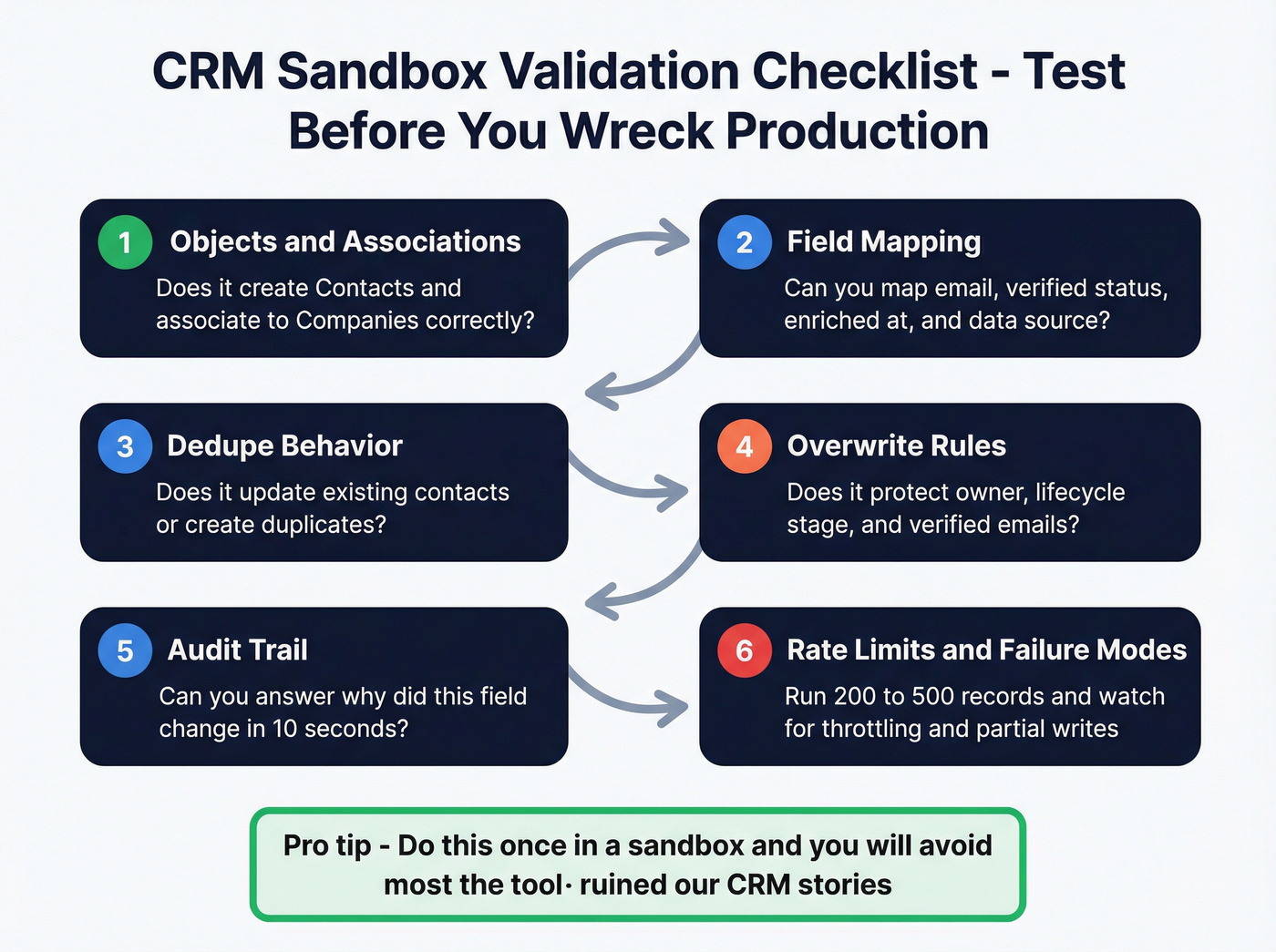
1) Objects & associations
- HubSpot: does it create Contacts and associate to Companies correctly?
- Salesforce: does it respect your Lead vs Contact strategy, or does it spray duplicates into both?
2) Field mapping
- Confirm you can map:
email,verified_email_status,enriched_at,data_source. - Confirm it writes to the fields you expect (not random custom properties you'll forget about).
3) Dedupe behavior
- HubSpot: does it update existing contacts by email, or create new ones?
- Salesforce: does it respect Matching Rules/Duplicate Rules, or bypass them?
4) Overwrite rules
- Test a record with a good title/phone/owner. Run enrichment. Confirm it doesn't overwrite protected fields.
- Decide your policy: "fill blanks only" beats "overwrite everything" for most teams.
5) Audit trail
- You want to answer: "Why did this field change?"
If the integration can't stamp
enriched_atanddata_source, add it in your workflow layer.
6) Rate limits & failure modes
- Run a batch of 200-500 records. Watch for throttling, partial writes, and retries that create duplicates.
2-way sync reality check (what it really means)
When a vendor labels "2-way," here's what actually matters:
What typically syncs back to the vendor/tool: tags, list membership, campaign status, enrichment timestamp, sometimes lifecycle stage.
What almost never syncs back cleanly: full property mirroring, custom object logic, and your entire Salesforce schema.
If you need "true 2-way," define it in writing: which objects, which fields, conflict resolution rules, and whether updates are real-time or batch. Otherwise you're buying a label and arguing about it later.
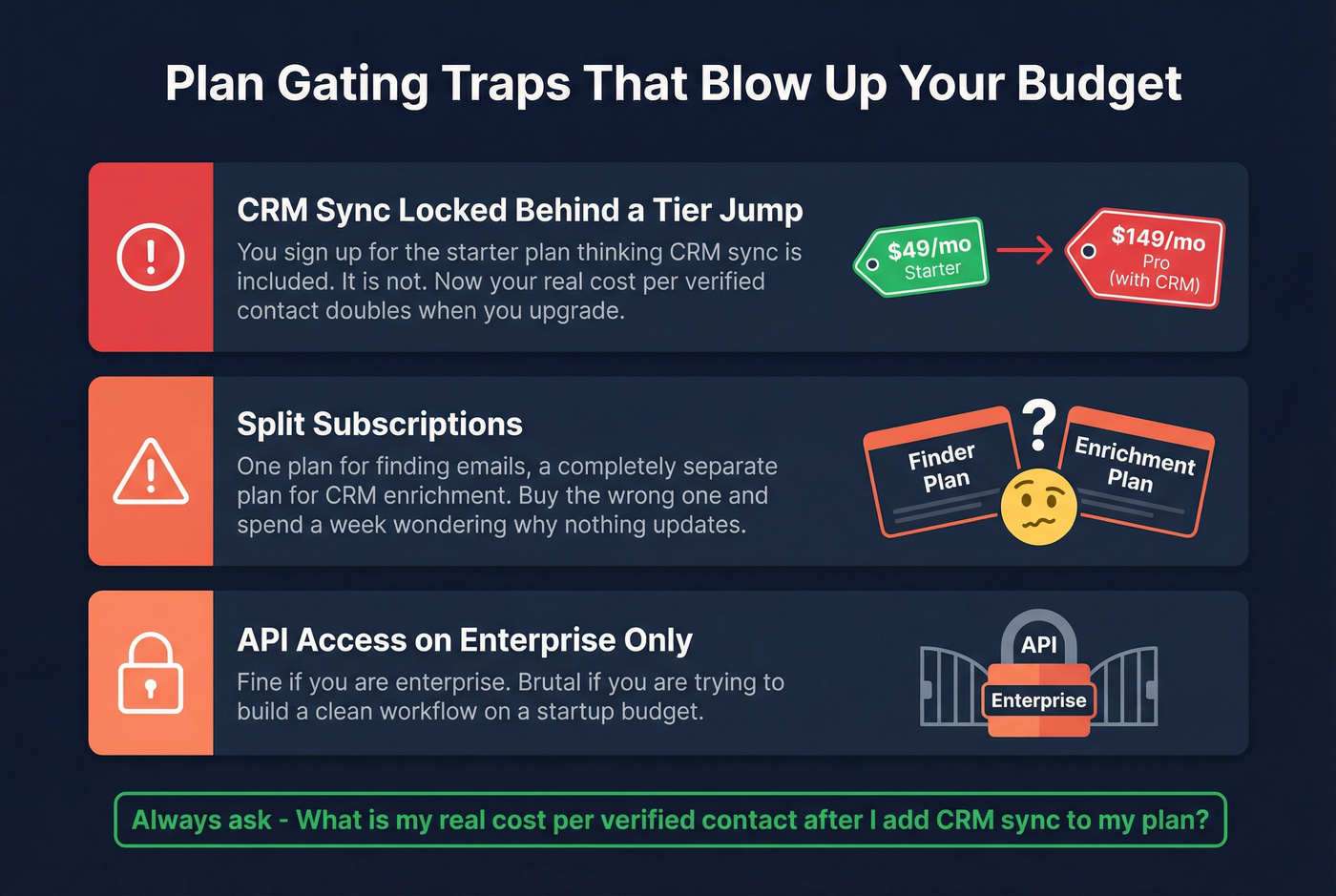
Plan gating traps (the stuff that blows up budgets)
- CRM sync locked behind a tier jump: common, and it changes your real cost per verified contact.
- Split subscriptions: one plan for finding, another for CRM enrichment. Buy the wrong one and you'll spend a week asking why nothing updates.
- API access on enterprise only: fine if you're enterprise; brutal if you're trying to build a clean workflow on a budget.
Email finder + CRM integration by CRM: HubSpot vs Salesforce vs Pipedrive
If you want a fast answer, here it is.
HubSpot
If your team wants a HubSpot email finder, prioritize tools that can write cleanly to Contacts/Companies, respect dedupe, and stamp enriched_at/data_source so you can audit changes later.
- Pick #2: Hunter - best when you want a simple finder and you're happy wiring the CRM write via Zapier/API with your own overwrite rules.
- Pick #3: Snov.io - choose it when you want a vendor that explicitly labels 2-way HubSpot integration and you'll actually use that sync.
Salesforce
- Pick #2: Dropcontact - strong fit for enrichment workflows when your priority is filling missing fields across existing records (just buy the correct subscription for CRM enrichment).
- Pick #3: Hunter - best when RevOps wants API-driven control and strict verified-only writes.
Pipedrive
- Pick #1: Snov.io - the most direct answer if you want a vendor that explicitly labels 2-way Pipedrive integration.
- Pick #2: Dropcontact - good for enrichment hygiene inside Pipedrive when you're running list cleanup and structured updates.
- Pick #3: Hunter - works well via Zapier when you want a lightweight stack.
Best tools: email finder with CRM integration (ranked)
Prospeo - best for keeping CRM data fresh weekly (Tier 1)
Prospeo is the pick when the goal isn't "find emails," it's "stop my CRM from decaying." It's "The B2B data platform built for accuracy" with 300M+ professional profiles, 143M+ verified emails, and 125M+ verified mobile numbers, used by 15,000+ companies and 40,000+ Chrome extension users.
Here's the thing: CRM integration only helps if the data stays current. Prospeo runs a 7-day data refresh cycle (industry average: 6 weeks), delivers 98% email accuracy, and returns 50+ data points per enrichment with an 83% enrichment match rate. If you're building workflows, the API side is strong too: 92% API match rate, plus the controls you need to stamp enriched_at and data_source so you can actually debug changes later.
Quality controls are built for deliverability: 5-step verification with catch-all handling, spam-trap removal, and honeypot filtering. And if calling is part of your motion, the mobile side's real: 125M+ verified mobiles and a 30% pickup rate across regions. (If calling is core to your motion, pair this with a B2B cold calling guide.)
On the CRM side, you get native HubSpot and Salesforce integrations, plus Zapier/Make/n8n and API access. In our experience, the best setup is simple: verified-only writes into the CRM, catch-all routed to a review queue, and a weekly refresh job that updates titles and company changes before reps hit "send" on the next sequence.
Mini pricing model (CRM writes): Prospeo runs around ~$0.01 per verified email, so 1,000 verified emails written to CRM ~= $10 (plus whatever you spend on your workflow layer). (See the full breakdown in Prospeo pricing.)
Every tool on this list gates something behind a tier jump. Prospeo gives you search, email finding, verification, Chrome extension, and CRM sync on every plan - including the free tier. 143M+ verified emails, 92% API match rate, 50+ data points per enrichment.
Get verified emails into your CRM in minutes, not Fridays.
Hunter - best for simple prospecting + verification economics (Tier 1)
Integration reality check first: Hunter supports native CRM integrations, plus Zapier and an API. In practice, a lot of teams still use Zapier/API for controlled writes (dedupe, overwrite rules, stamping enriched_at/data_source) even if they connect a native integration.
Hunter's boring in a good way. The UX is straightforward, verification is built in, and pricing is unusually transparent. You can model cost without a spreadsheet meltdown, and that matters when you're writing into a CRM.
Pricing (monthly list price, with annual discounts available):
- Free: $0 (50 credits/mo)
- Starter: $49/mo for 2,000 credits/mo
- Growth: $149/mo for 10,000 credits/mo
- Scale: $299/mo for 25,000 credits/mo
The detail that makes Hunter practical for CRM hygiene: email verification costs 0.5 credit. That pushes teams to verify aggressively before syncing. (If you want a broader comparison set, see our email lookup tools roundup.)
Mini pricing model (CRM writes): if you assume 1 credit ~= 1 found email and you verify everything, 1,000 verified emails typically lands around ~1,500 credits (find + verify). On the Starter plan, that's roughly $25 per 1,000 verified emails in credit economics.
What users complain about (from audits):
- Teams wire a Zapier flow quickly, then forget dedupe rules and create duplicates.
- People expect "CRM integration" to include enrichment timestamps and source fields; they have to add those themselves.
Snov.io - best when you want a vendor that puts "2-way" in writing (Tier 1)
If your requirement doc literally says "2-way sync," Snov.io's the cleanest pick because they label it: their pricing page lists HubSpot 2-way integration and Pipedrive 2-way integration.
Instead of another long feature rundown, here's the workflow fit:
Best workflow fit
- Use Snov.io to capture/fill lead data.
- Sync into HubSpot/Pipedrive with the 2-way integration features you're paying for.
- Use the sync-back side for statuses/tags so your outbound tool and CRM stay aligned.
Pricing (annual shown on their page) is aggressive:
- Starter: $29.25/mo (1,000 credits)
- Pro S: $74.25/mo (5,000 credits)
Mini pricing model (CRM writes): at $29.25 for 1,000 credits, you're around $29 per 1,000 credits before verification overhead. If your workflow verifies and discards a chunk, budget ~$35-$60 per 1,000 verified emails written depending on how strict you are.
What users complain about (from audits):
- "2-way" gets interpreted as "everything mirrors both directions." It doesn't. It's specific fields and specific flows.
- Teams underestimate setup time because they skip field mapping and conflict rules.
Dropcontact - best for enrichment-first teams (mind the plan split) (Tier 1)
Dropcontact is enrichment-first, and it's a strong choice when your CRM problem is "we have records, but they're incomplete and stale." (If you’re comparing enrichment vendors, see our lead enrichment tools guide.)
Pricing starts at EUR79/mo for 500 credits (Starter), with Growth at EUR120/mo, and there are 50 free credits to test.
The gotcha that bites teams: Email Finder and CRM enrichment are separate subscriptions. If you buy finder credits and expect CRM enrichment to light up, you'll have a bad week. Buy the subscription that matches the workflow you're implementing.
Mini pricing model (CRM writes): at EUR79 for 500 credits, you're at ~EUR158 per 1,000 credits before considering match rate. Dropcontact can be worth it for enrichment hygiene, but budget based on usable updates, not raw credits.
What users complain about (from audits):
- Confusion over which plan powers CRM enrichment vs email finding.
- Teams expect "enrichment" to mean "always finds email." It's often "fills fields when it can," which is still valuable... just different.
Skrapp - best for "pay only for deliverable emails" billing (Tier 1)
Skrapp's biggest win is billing fairness: you're not charged for Invalid/Unknown - only Valid/Catch-all. That's how credit systems should work when your end goal is CRM writes.
Pricing (annual shown):
- Free: $0 (100 credits/mo, 1 user, credits roll over)
- Professional: $30/mo for 1,000 credits/mo (2 users) - unlocks CRM sync
- Enterprise: $262/mo for 50,000 credits/mo (15 users) - adds API, SSO
Credit definition matters for modeling: 1 credit = find one professional email (Valid or Catch-all) or verify one email.
Mini pricing model (CRM writes): on Professional, $30 per 1,000 deliverable emails is the baseline. If your workflow discards some catch-all addresses, your written-to-CRM cost rises, so decide up front whether catch-all goes to a review queue or gets written.
On G2, Skrapp sits at 4.4/5 (296 reviews). The recurring operational pain points are verification inconsistency, outdated contacts, and limited credits, so put a verifier gate and dedupe rules in front of your CRM writes.
Tomba (Tier 2)
Tomba's a solid mid-market email finder when you want finder + verification + integrations without paying platform tax. Most plans are credit-based; expect ~$39/mo for low-volume tiers and ~$100-$200/mo once you're pushing meaningful monthly volume.
Integration-wise, it's "native where available, otherwise Zapier/Make/API." Use it when your workflow's already defined and you just need emails flowing into your CRM reliably.
GetProspect (Tier 2)
GetProspect works for basic list building and CRM pushes. Plans are credit-based, with paid plans starting at $49/mo (1,000 valid emails + 2,000 verifications). The free plan includes 50 valid emails + 100 verifications.
Context that matters for CRM writes: in Dropcontact's benchmark, GetProspect shows 26.1% effective enrichment with a 10.6% hard bounce rate. If you use it, verify aggressively and don't auto-write unverified emails into your CRM.
AeroLeads (Tier 2)
AeroLeads is the lightweight "capture leads and push them somewhere" option. It's tiered and credit-based, with plans starting at $19/mo.
Use it for quick lead capture with a straightforward CRM push. If you care about pristine CRM hygiene, put a verifier and dedupe rules in front of it.
Voila Norbert (Tier 2)
Voila Norbert is the straightforward email finder archetype: find emails, verify, export/sync. Paid plans start at $39/mo for 1,000 searches/mo (and there's a free option with 50 searches).
Use it when you want simplicity and you already enforce CRM hygiene (dedupe, protected fields, lifecycle stages).
Anymail Finder (Tier 3, 2 sentences max)
Anymail Finder publishes a transparent benchmark methodology (5,000 fresh contacts split into "domain only" vs "company name only"). Pricing starts at $19 for 50 searches/mo and $39/mo for 1,000 searches, with credits that roll over.
Reply.io (Tier 3, 2 sentences max)
Reply.io is a sequencing platform, not a pure finder. Pricing starts at $49/month and the free tier includes 200 email-finding credits/month, so pair it with a dedicated finder upstream if you need higher-volume verified data.
Overloop (Tier 3, 2 sentences max)
Overloop is outbound workflow + sequencing, not an email finder first. Pricing starts at $49/mo (500 email searches), and you'll usually connect your finder via Zapier/API.
Bouncer (Tier 3, 2 sentences max)
Bouncer is verification-only, which makes it a great gate before CRM writes. Expect ~$20-$200/mo based on volume.
Clearbit (Tier 3, 2 sentences max)
Clearbit sits in enterprise enrichment pricing territory - typically ~$12k-$60k/year depending on product and volume. It shines when marketing ops already runs an enrichment-heavy stack and wants tighter firmographic coverage.
Pricing reality: credits, catch-all domains, and the hidden cost of CRM sync
Credit systems are where tools quietly overcharge you.
The big driver is catch-all domains. In Dropcontact's benchmark, 15%-28% of B2B domains are catch-all. That means a lot of "maybe" emails, and different tools bill those "maybes" very differently.
Two pricing mechanics decide whether your CRM stays clean and your budget stays sane.
1) Charged for attempts vs charged for deliverables
- Attempt-based billing looks cheap until you run bulk enrichment and half your credits disappear into Unknown/Invalid.
- Deliverable-based billing is fairer for CRM sync because you're only writing what you can actually use.
Skrapp's model is the clean example: you're charged only for Valid/Catch-all, not Invalid/Unknown.
2) Verification economics (the hidden multiplier)
Verification is where "1,000 contacts" becomes "1,600 credits" overnight. Hunter's 0.5-credit verification is a smart middle ground because it makes verification cheap enough that teams actually do it. (If you need a repeatable process, use our email verification list SOP.)
Mini math (simple but real):
- Enrich 1,000 contacts/month.
- If 20% are catch-all and 10% are invalid:
- Attempt-based billing often charges for all 1,000.
- Deliverable-based billing charges for ~900 (valid + catch-all) and skips the rest.
- If you're strict and you don't write catch-all into the CRM, your verified-written number might be 700-850. That's why you budget on verified writes, not contacts processed.
Also: CRM sync is often gated to higher tiers. Skrapp's explicit: CRM sync unlocks on Professional ($30/mo annual shown). That gating's a real cost because it forces a plan jump even if you don't need more credits.
Accuracy & deliverability benchmarks (what the numbers say)
Benchmarks aren't perfect, but they beat "99% accurate" marketing pages.
Dropcontact published an "Email Finder Benchmark 2026" based on 20,000 real-world tests across 15 tools. It's vendor-published, but the comparative table's still useful for setting expectations, especially on bounce rates. Here's the excerpt that matters most for CRM writes (effective enrichment + hard bounces):
| Tool | Effective enrichment | Hard bounce rate |
|---|---|---|
| Dropcontact | 54.9% | 0.9% |
| Hunter | 32.5% | 11.2% |
| Anymail Finder | 41.3% | 13.7% |
| GetProspect | 26.1% | 10.6% |
You can read the full benchmark on Dropcontact's benchmark page.
How to interpret this without fooling yourself:
- Effective enrichment rate is how often you get something usable back. It's heavily dependent on your ICP, geo, and seniority targets.
- Hard bounce rate is the scary one. High bounces don't just hurt one campaign - they hurt your sender reputation and make every future campaign worse.
A CRM integration that syncs bad emails faster isn't a feature. It's a faster way to poison your outbound.
Implementation playbooks: from "CSV hell" to automated CRM enrichment
Most teams don't need 12 tools. They need 1 primary data source + 1 workflow layer that enforces rules.
I've run bake-offs where the "best finder" lost because it created a duplicate storm in HubSpot and reps stopped trusting the CRM. Your workflow matters more than the logo.
Playbook 1: HubSpot outbound team (fast, safe, repeatable)
- Define protected properties (email, lifecycle stage, owner).
- Enrich fill-blanks-only (don't overwrite good data).
- Verify before write; route catch-all to a "Needs review" list.
- Sync into HubSpot Contacts + Companies and stamp
enriched_at+data_source. - Run a weekly refresh job (job changes + title updates).
Use this if: you run sequences from HubSpot or lists that drive outbound.
Skip this if: you don't have dedupe rules. You'll create duplicates and blame the tool.
Playbook 2: Salesforce RevOps (controlled writes + auditability)
- Decide your system of record: Lead vs Contact strategy first.
- Enrich into a staging object or protected fields via API or Make/Zapier.
- Promote to Lead/Contact only when email's verified (or your defined confidence threshold's met).
- Use Salesforce Matching Rules + Duplicate Rules to prevent collisions.
- Log enrichment source + timestamp so you can roll back bad updates.
Use this if: governance and reporting matter.
Skip this if: you want one-click enrichment with no admin involvement.
Playbook 3: Waterfall enrichment (maximize match rate without wrecking deliverability)
PhantomBuster ran a waterfall-style test (Aug 2026, n=1,000 profiles) and published the results:
- Hunter: 68% success rate, ~1 sec/lead
- Dropcontact: 72% success rate, ~8 sec/lead
- Hunter + Dropcontact: 73% success rate, ~3 sec/lead
The lesson isn't "buy both." The lesson is: stacking adds a few points, but your overwrite rules decide whether those extra points help or hurt, because the fastest way to kill a CRM is letting two vendors fight over the same fields with no conflict policy.
My default stack in 2026:
- Primary data source: one tool you trust for verified writes + refresh
- Workflow layer: Zapier/Make/API to enforce dedupe + overwrite rules
- Optional verifier gate: a dedicated verifier if you want a second opinion before CRM writes
FAQ
What's the difference between an email finder and CRM enrichment?
An email finder discovers and verifies an email for a person, while CRM enrichment updates existing records with fields like title, company data, phones, and verification status. For most teams, the winning setup is finder + verification before write, then enrichment on a weekly cadence so records don't decay between campaigns.
Do any email finders offer true 2-way sync with HubSpot or Pipedrive?
A few tools offer limited 2-way sync, but it usually covers specific fields (statuses, tags, list membership) rather than full object mirroring. Snov.io explicitly labels HubSpot 2-way integration and Pipedrive 2-way integration; validate the exact objects and 10-20 fields you need in a sandbox before committing.
How do I prevent duplicates and bad overwrites when syncing to Salesforce/HubSpot?
Preventing CRM damage comes down to 3 rules: dedupe first, protect key fields, and stage low-confidence data. Match on email + domain + name, never overwrite owner/lifecycle stage, and route catch-all/unknown emails to a review queue; in Salesforce, enforce Matching Rules + Duplicate Rules and test with a 200-500 record batch.
What's a good free option for CRM enrichment and verified emails?
For small teams, Prospeo's free tier includes 75 emails plus 100 Chrome extension credits per month, which is enough to test verified writes and enrichment workflows before paying. Hunter and Skrapp also have free tiers, but you should still gate CRM writes behind verification and stamp enriched_at + data_source for auditability.
Which tool's best if I want weekly-refresh enrichment inside my CRM?
Prospeo's the best choice for weekly-refresh CRM hygiene because it runs a 7-day refresh cycle, delivers 98% email accuracy, and supports native HubSpot/Salesforce enrichment. With an 83% enrichment match rate and 92% API match rate, it's built for "the CRM stays accurate" rather than "we found an email once."
Summary: choosing an email finder with crm integration in 2026
The best email finder with crm integration is the one that keeps your CRM trustworthy: verified-only writes, dedupe/overwrite control, and a refresh loop that updates records before your sequences and reps suffer.
If you want the cleanest path to accurate, weekly-refreshed CRM data, Prospeo's the top pick. If you want simple verification economics, Hunter's the safe choice. And if you need vendor-labeled 2-way sync for specific CRMs, Snov.io's the most direct fit.