

Anymail Finder Extension: What the Chrome Web Store Won't Tell You
Independent testing across 20,000 contacts puts the Anymail Finder extension's effective enrichment rate at 41%. That means you're getting back less than half the emails you search for - and 9.5% of returned emails still hard bounce. The gap between the marketed "97%+ delivery guarantee" and real-world performance is worth understanding before you commit.
What Is This Chrome Extension?
Anymail Finder is a London-based email finder founded in 2015. Its Chrome extension pulls professional email addresses while you browse company websites and professional networks. Behind the scenes, it scrapes the web, runs real-time verification by checking with the receiving server, and only charges credits when it returns an email marked "valid." Guessed emails, risky results, and not-found lookups cost nothing. The platform also supports bulk CSV uploads and a REST API.
The pay-only-for-verified model is the headline differentiator - and it genuinely protects your budget on failed lookups. The question is how often the tool actually finds and verifies.
30-Second Verdict
Use Anymail Finder if you're doing fewer than 500 lookups a month, you're cost-sensitive, and you can live with verified emails coming back roughly 40% of the time.
Skip it if you need high enrichment rates or you're running outbound at scale. A 41% hit rate means more than half your list comes back empty. Prospeo covers 300M+ profiles at 98% email accuracy with a free tier - if hit rate matters more than per-credit cost, start there.
Accuracy: Claims vs. Reality
Anymail Finder's homepage leads with a "97%+ delivery guarantee." That number refers specifically to emails the tool marks as "valid" - not to overall find rates. The distinction matters enormously.
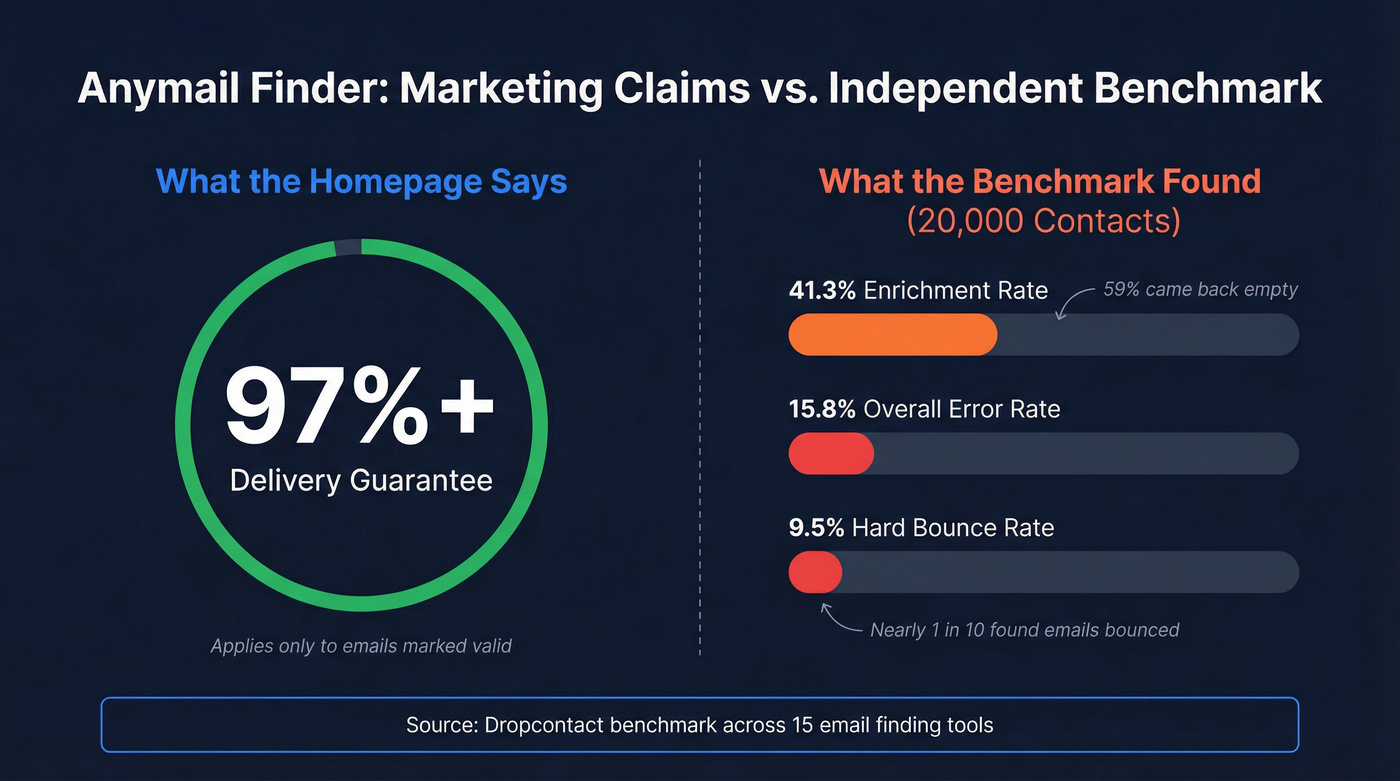
A Dropcontact benchmark tested 20,000 real contacts across 15 tools. Anymail Finder landed around #12 with a 41.3% effective enrichment rate, a 15.8% overall error rate, and a 9.5% hard bounce rate on returned emails. That last figure is rough - nearly 1 in 10 emails that came back still bounced. In our experience testing multiple email finders side by side, the gap between credit cost and effective cost catches most teams off guard.
Here's the thing: catch-all domains make verification genuinely hard. Between 15% and 28% of B2B domains accept any email address regardless of whether the mailbox exists. Anymail Finder uses proprietary signals beyond basic SMTP checks, but the benchmark numbers show clear limits. If you want the deeper mechanics, see our guide to AI email verification.

A 41% enrichment rate means 59% of your list comes back empty. Prospeo's database covers 300M+ profiles with 98% email accuracy - refreshed every 7 days, not weeks. At ~$0.01 per email, your effective cost stays low because the hit rate stays high.
Stop paying for misses. Find the other 59% of your list.
Pricing and Credit Breakdown
Anymail Finder runs on a credit system with yearly-billed tiers:
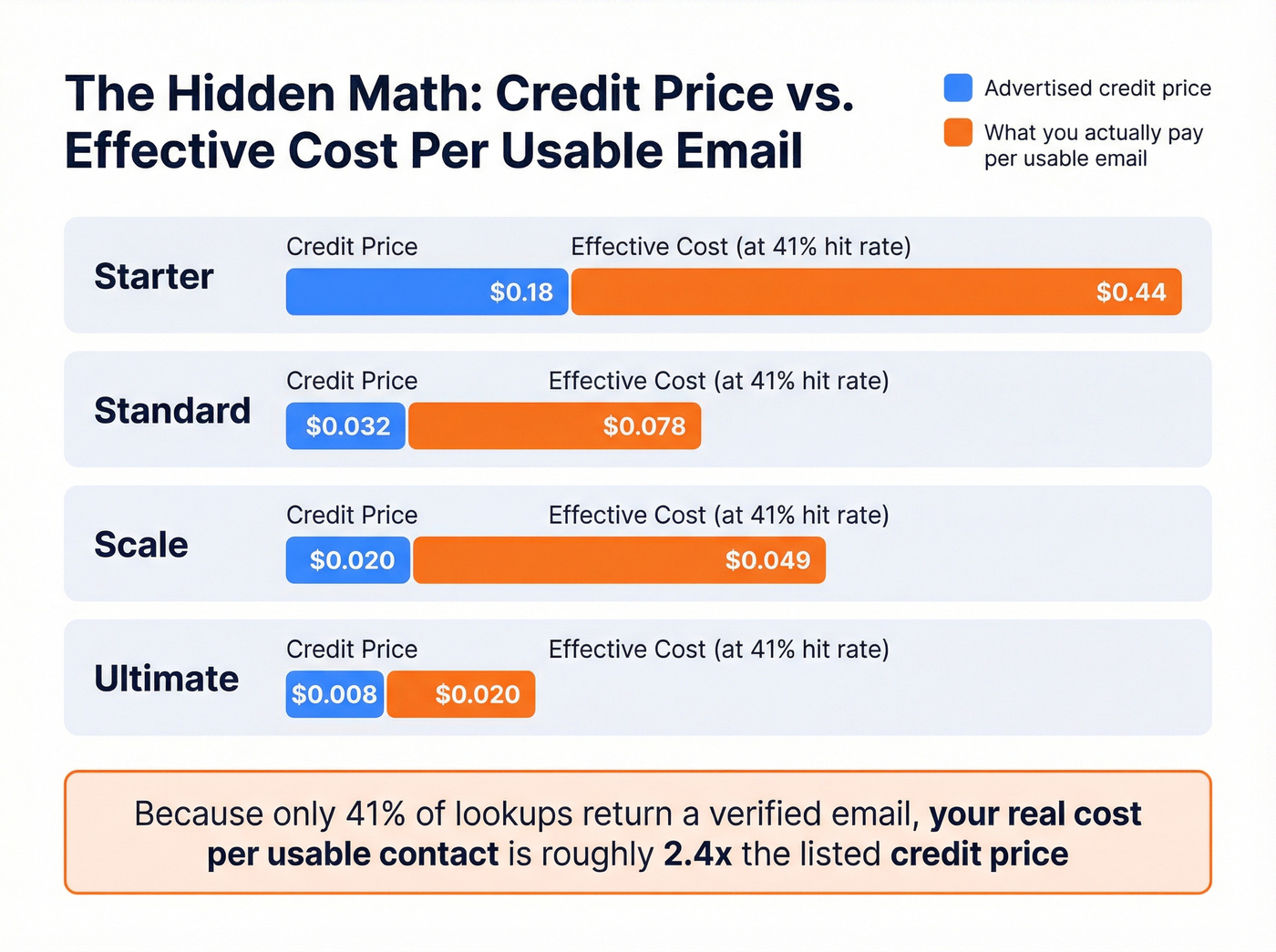
| Plan | Monthly Cost | Credits/Year | Cost per Credit |
|---|---|---|---|
| Starter | $9/mo | 600 | ~$0.18 |
| Standard | $32/mo | 12,000 | ~$0.032 |
| Scale | $99/mo | 60,000 | ~$0.020 |
| Ultimate | $200/mo | 300,000 | ~$0.008 |
One credit gets you a single email lookup, but domain and company-name searches return up to 20 valid emails per credit - a meaningful value multiplier for account-based prospecting. Decision-maker searches cost 2 credits, standalone verification costs 0.2 credits. Unused credits roll over up to 2x your plan's allocation.
The 3-day trial gives you 100 credits (card required, $1 authorization refunded). After the trial, you auto-enroll into the Standard plan unless you cancel. Set a reminder.
One detail no competitor article mentions: Anymail Finder offers a refund if more than 3% of valid emails bounce across a sample of 1,000+ lookups. That's a real safety net for larger campaigns.
At the Scale tier, you're paying about $0.02 per credit. But since only ~41% of lookups return a verified email, your effective cost per usable email is closer to $0.05. Still cheap - but not as cheap as the credit price suggests. If you're optimizing for deliverability, pair any finder with an email deliverability checklist.
Pros and Cons
Pros:
- Pay-only-for-verified pricing genuinely protects your budget
- Strong customer support - 4.8/5 on Trustpilot across 132 reviews with fast refund processing
- Dead-simple interface, zero onboarding required
Cons:
- No dashboard filtering or sorting - contacts appear chronologically with no way to organize by status
- Guessed and not-found results come back frequently, per third-party reviews
- G2 rating sits at 3.4/5 with only 5 reviews, a notable gap from the Trustpilot score
How It Stacks Up Against Other Email Finder Extensions
| Tool | Starting Price | Credits | Cost/Email | Accuracy Signal |
|---|---|---|---|---|
| Prospeo | Free (75/mo) | 75 free/mo | $0 (free tier) | 98% accuracy |
| Anymail Finder | $9/mo (yearly) | 600/yr | ~$0.18 | 41% enrichment |
| Snov.io | $39/mo | 1,000/mo | ~$0.039 | - |
| Findymail | $49/mo | 1,000/mo | ~$0.049 | - |
| Wiza | $0 + $0.15/ea | Pay-per-use | $0.15 | - |
| Kaspr | $49/mo | 60 emails | ~$0.82 | - |
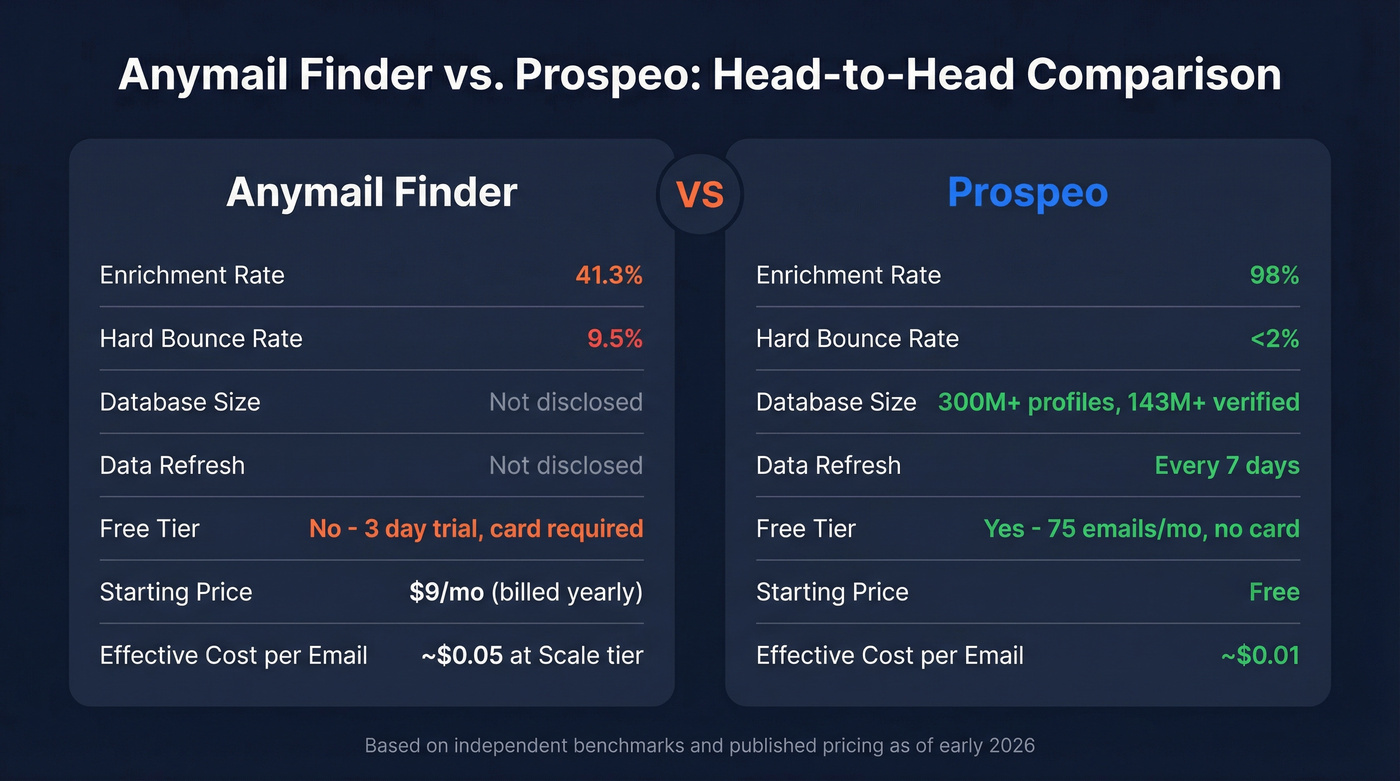
Prospeo's database spans 300M+ professional profiles with 143M+ verified emails, and the 98% accuracy rate applies across the full dataset - not just a delivery guarantee on found emails. Data refreshes every 7 days versus the industry average of 6 weeks. The free tier gives you 75 emails per month with no credit card, enough to benchmark against whatever you're using now.
Snov.io bundles email warmup and drip campaigns alongside its finder at $39/mo for 1,000 credits. Good if you want an all-in-one outreach stack on a budget. Findymail at $49/mo is a popular pick for teams that want a simple finder with predictable monthly credits. Wiza charges $0.15 per email with no subscription, which works for sporadic prospecting but gets expensive at volume.
Kaspr starts at $49/mo for 60 credits - that can make sense for very targeted prospecting where you don't need thousands of emails per month, but the per-email cost is steep. Other tools in this space include the Swordfish AI extension (focused on personal email and cell phone data) and GetProspect for profile-focused email extraction at scale. If you're comparing options broadly, start with our roundup of the best email hunter tools.
Let's be honest: Anymail Finder's pay-only-for-verified model sounds like the safest bet, but a tool that finds 98% of emails at ~$0.01 each will always beat a tool that finds 41% for "free" on misses. You're not saving money - you're saving credits while losing prospects.
Who Should Use It?
Anymail Finder works best for low-volume prospectors doing fewer than 500 lookups a month who care more about not wasting money on bad results than about maximizing hit rate. If you uploaded 1,000 contacts and got 410 verified emails back - and that's enough for your pipeline - it's a fair tool at a fair price.
If you're building lists from scratch, you'll likely want dedicated list building tools alongside an email finder.
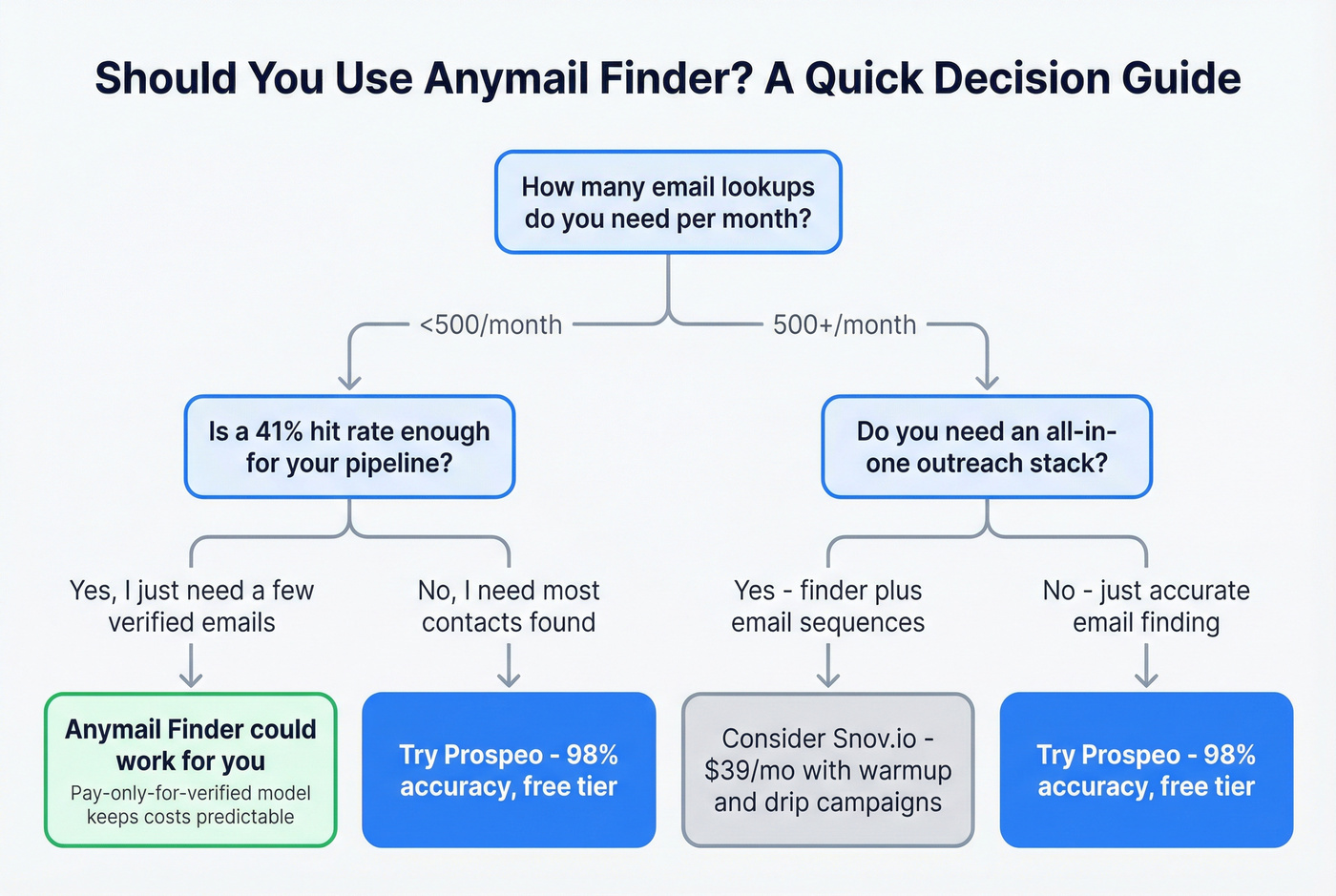
For teams running real outbound volume, that 41% return rate leaves too many gaps. We've seen teams spend weeks supplementing results with manual research that a bigger database would've handled automatically. Also worth noting: this tool is Chrome-only, so if your team doesn't standardize on Chrome, you'll need a different option. For scaling safely, follow cold email volume best practices.
Catch-all domains trip up most email finders. Prospeo runs 5-step verification with catch-all handling, spam-trap removal, and honeypot filtering across 143M+ verified emails - so you get real inboxes, not bounces.
Replace a 9.5% bounce rate with 98% accuracy - no credit card required.
FAQ
Does Anymail Finder charge for emails it can't find?
No. Credits are only consumed for emails marked valid. Guessed results, risky emails, and not-found lookups are free. Duplicate searches within 30 days also cost nothing, so you won't burn credits re-checking the same contact.
What's the actual accuracy rate?
An independent benchmark of 20,000 contacts measured a 41.3% effective enrichment rate with a 9.5% hard bounce rate on returned emails. The vendor's 97%+ claim applies only to the subset of emails marked "valid," not overall find rate.
Can I find personal emails with this extension?
Anymail Finder focuses primarily on professional business emails. For personal addresses, tools like Swordfish or ContactOut specialize in surfacing personal emails and direct phone numbers alongside work contacts.