How to Use an Email Finder Tool Without Destroying Your Sender Reputation
You launch a sequence, bounces pile up, your domain reputation drops, and suddenly even legitimate emails start landing in spam. That's what happens when you use an email finder tool and skip verification. The industry rule is simple: keep hard bounces under 1%, total bounces under 2%. Everything below exists to keep you on the right side of that line.
What You Need (Quick Version)
If you're short on time, here's the checklist:
- Built-in verification - don't rely on a separate tool to clean what your finder gives you. (If you do need a separate layer, start with an email ID validator.)
- Catch-all handling - 15-28% of B2B domains are catch-all, and SMTP-only checks can't distinguish valid from invalid on those servers.
- Fresh data - contact data decays roughly 30% per year. If the database isn't refreshed regularly, you're emailing ghosts (see B2B contact data decay).
Here's a strong opinion we'll stand behind: if your outbound volume is under 200 emails per month, you probably don't need a $300/month platform. A high-accuracy finder with a free tier will outperform an expensive tool with mediocre verification every single time.
How Email Finders Actually Work
Most email finder tools combine three methods. Pattern matching generates the likely address from a name - if a company uses firstname.lastname@company.com, the tool fills in the blanks. Database lookup checks the tool's own index of previously collected and verified addresses. SMTP verification performs a handshake with the recipient's mail server to ask "does this inbox exist?" without actually sending an email.
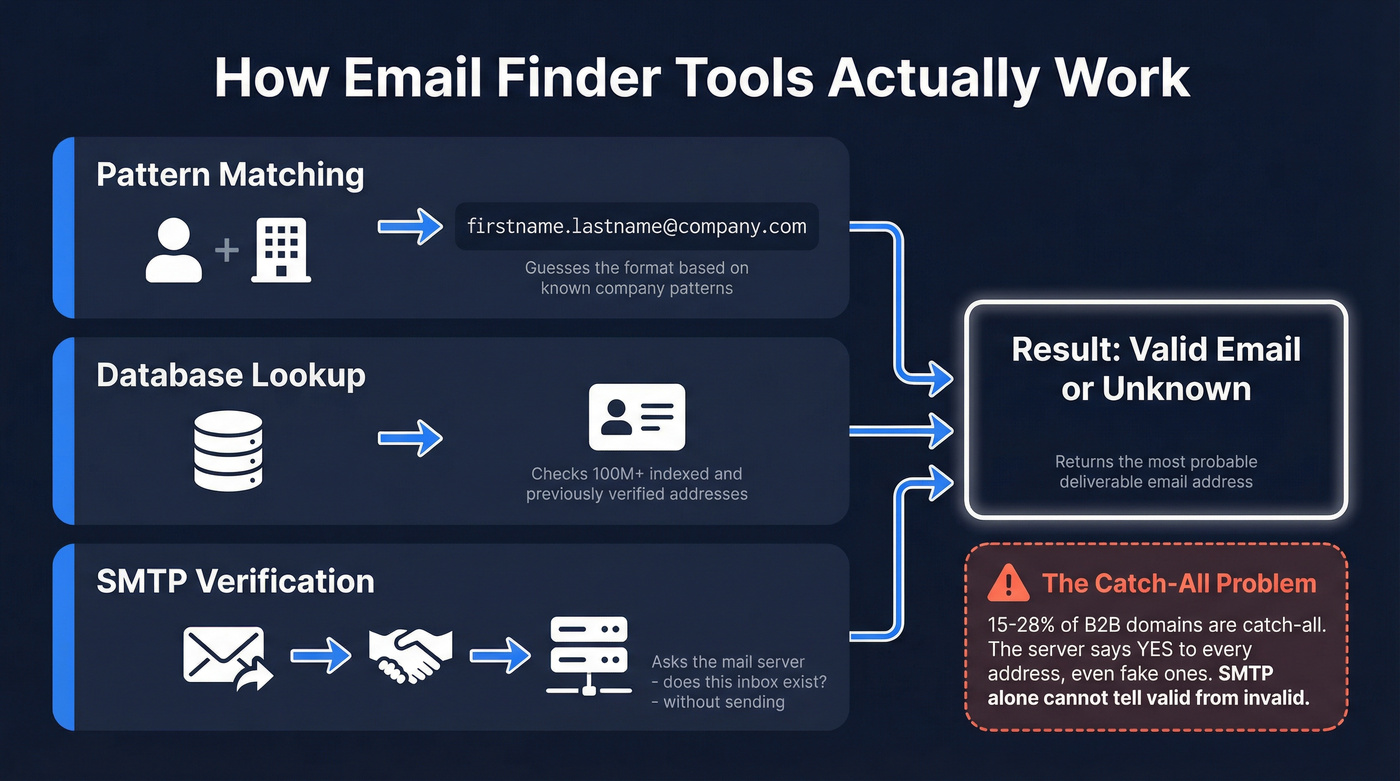
Here's the thing: SMTP-only verification breaks on catch-all domains. A catch-all server accepts all emails for a domain, even for non-existent mailboxes. The server says "yes" when it shouldn't. Since 15-28% of B2B domains are catch-all - and they skew toward large enterprises - this isn't an edge case. It's a core problem that separates good email lookup tools from bad ones.

Step-by-Step: Finding Verified Emails
1. Start with name + company domain. The minimum input for any email finder is a person's full name and their company's domain. Some tools accept just the domain and return all known contacts, which is useful for account-based prospecting but noisier.
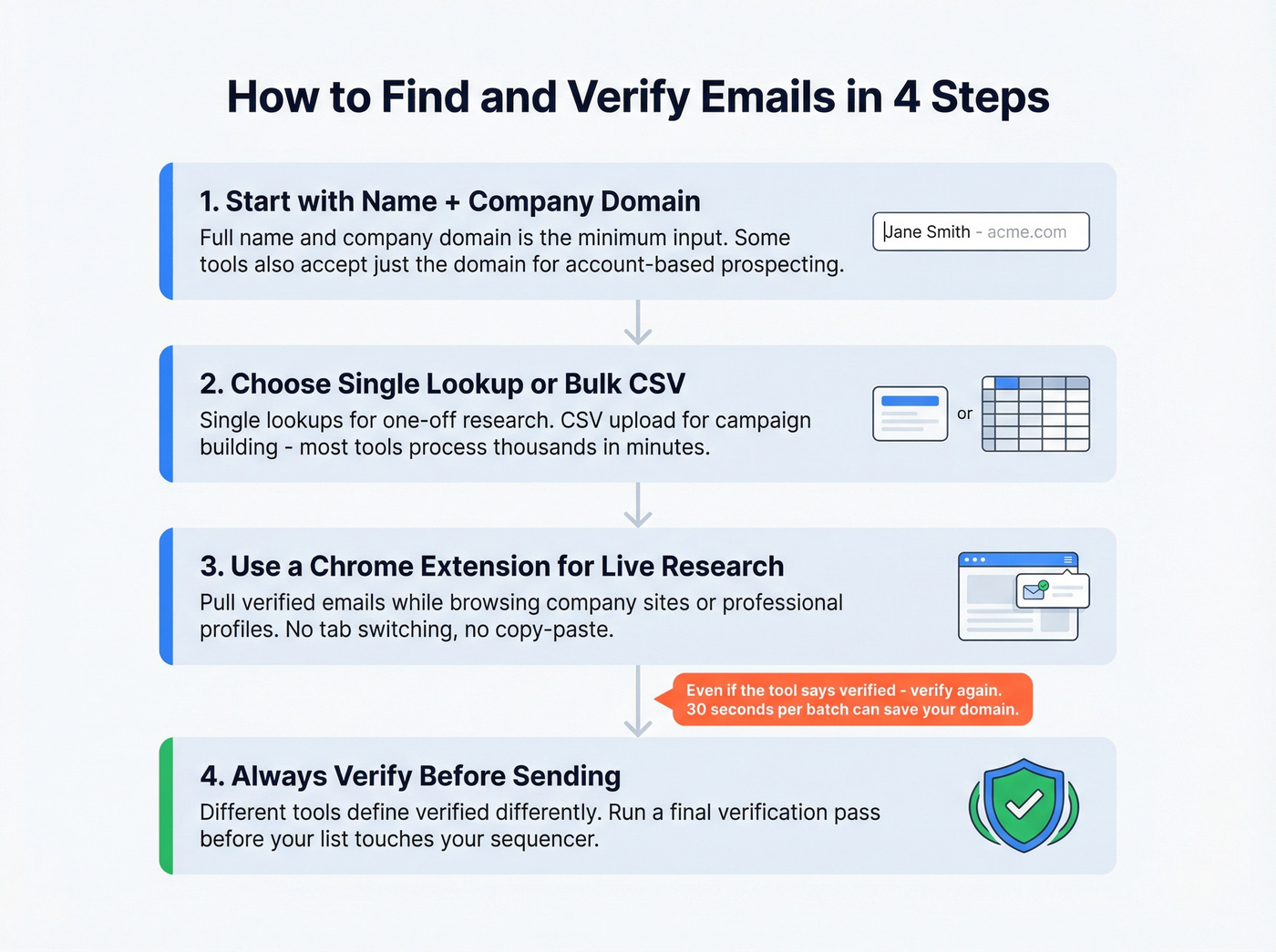
2. Choose single lookup vs. bulk CSV upload. For one-off research, single lookups work fine. For campaign building, upload a CSV with names and domains. Most tools process large files in minutes. (If you're building lists across sources, use a prospecting workflow so verification doesn't get skipped.)
3. Use a Chrome extension for on-the-fly prospecting. When you're browsing company websites or professional profiles, a browser extension lets you pull verified emails without switching tabs. We've found this is the fastest workflow for building targeted lists during research sessions - it cuts the back-and-forth between tools dramatically.
4. Always verify before sending - even if the tool says "verified." Different tools define "verified" differently. Some only run lightweight checks like syntax and domain validation. Others do SMTP but can't handle catch-alls. Run a final verification pass before your list touches your sequencer. The extra 30 seconds per batch can save your domain. (For a deeper deliverability-first workflow, follow an email verification for outreach process.)

You just read why catch-all handling and fresh data separate good email finders from domain-killers. Prospeo runs a 5-step verification pipeline with proprietary catch-all handling, spam-trap removal, and a 7-day refresh cycle - not the 6-week industry average. 98% email accuracy at ~$0.01 per email.
Test it free - 75 verified emails, no credit card required.
Mistakes That Tank Deliverability
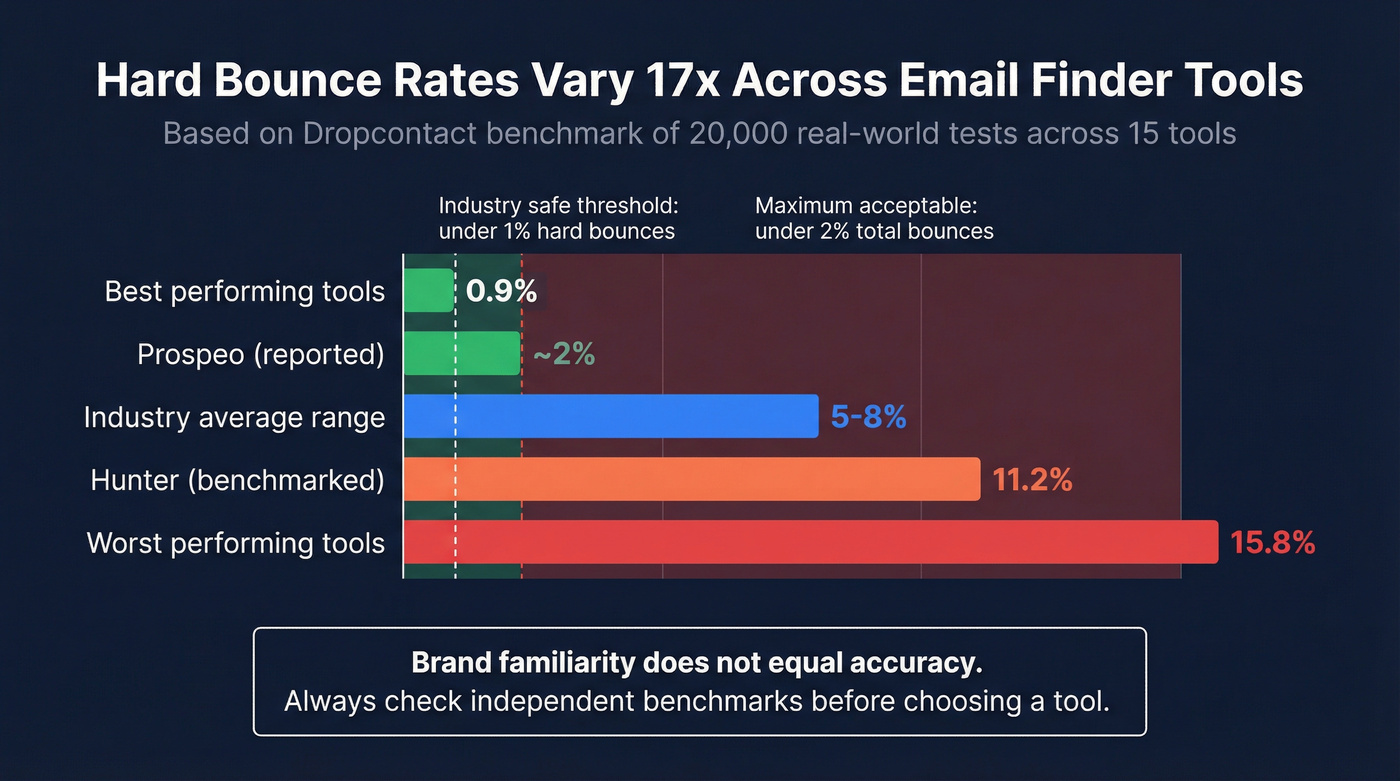
Skipping verification entirely. A Dropcontact benchmark of 20,000 real-world tests across 15 tools found hard bounce rates ranging from 0.9% to 15.8%. That's a 17x spread. The difference between the best and worst tool is the difference between a healthy domain and a blacklisted one. (If you're already in trouble, start with a blacklist alert triage.)
Ignoring catch-all results. When a tool returns a "catch-all" status, that email is unverifiable by SMTP alone. Sending to all catch-alls blindly inflates your bounce risk. Either use a tool with proprietary catch-all handling or segment catch-all results into a separate, lower-volume sending pool.
Using stale data. People change jobs, companies rebrand, domains expire. At ~30% annual decay, a six-month-old list has already lost 10-15% of its contacts. Look for tools with frequent refresh cycles. Weekly is ideal, monthly is acceptable, anything longer is a gamble. (This is also basic CRM hygiene if you're syncing contacts anywhere.)
Trusting brand recognition over benchmarks. Hunter is probably the most recognized email finder on the market. It also posted an 11.2% hard bounce rate in that same Dropcontact benchmark. Brand familiarity doesn't equal accuracy. The consensus on r/sales echoes this - threads about email tools consistently warn against assuming the biggest name gives you the cleanest data.
The most common operational complaints are consistent: outdated data, catch-all uncertainty, and paying credits for results that still bounce. The fix is also consistent - prioritize verification depth, prioritize refresh cycles, and when it makes sense, run a simple waterfall across 2-3 providers instead of trusting a single source. (If you're comparing stacks, see waterfall alternatives.)
Which Email Finder to Pick
In practice, many email finders land around 60-80% deliverable results depending on region and industry. The gap between that baseline and 98% is where domain reputation lives or dies. A separate 2026 benchmark of 5,000 identical searches across 9 tools confirmed the same pattern: effective cost per valid email varies by several multiples depending on the tool's actual accuracy, not its list price.
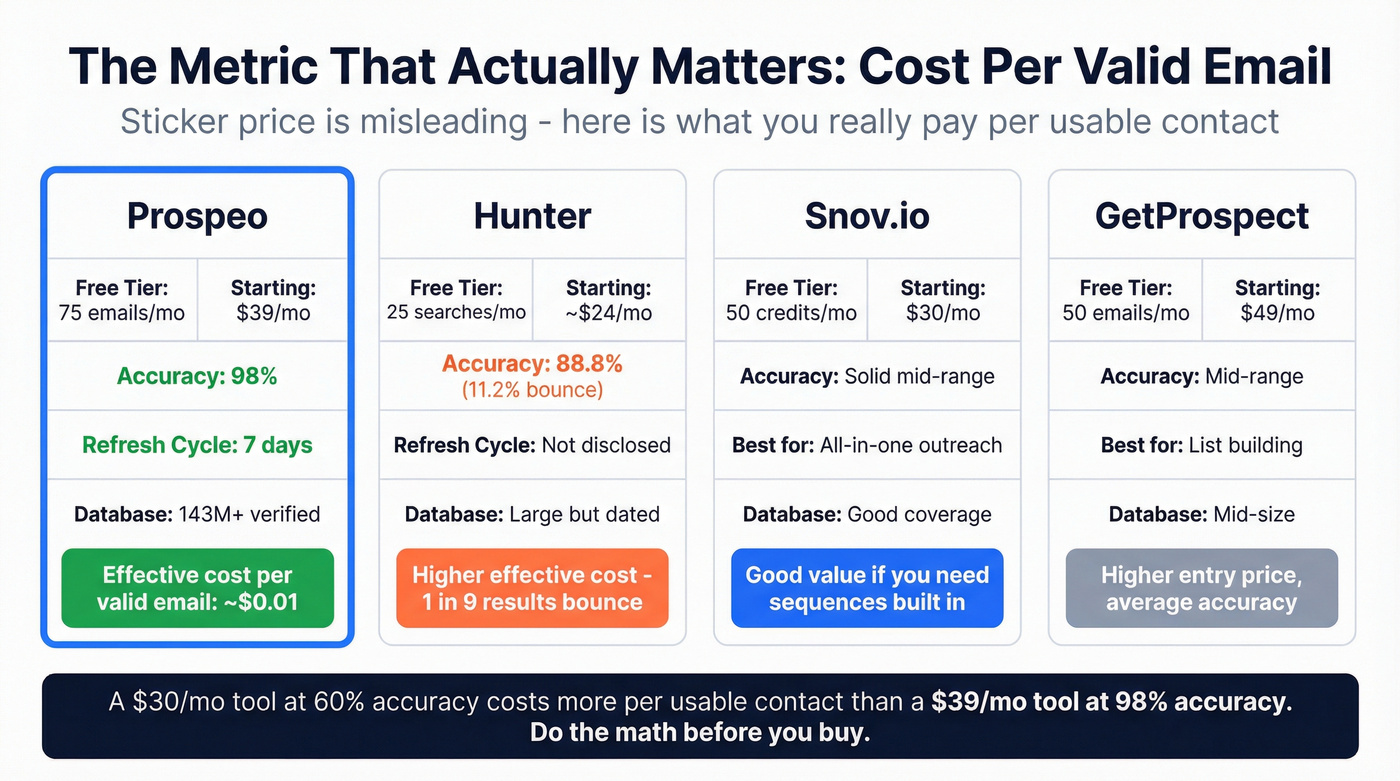
| Tool | Free Tier | Starting Price | Accuracy Note | Best For |
|---|---|---|---|---|
| Hunter | 25 searches/mo | ~$24/mo (500 searches) | 11.2% hard bounce in benchmark | Brand recognition |
| Snov.io | 50 credits/mo | $30/mo (1K credits) | Solid all-in-one | Cold outreach + finding |
| GetProspect | 50 emails/mo | $49/mo (1K emails) | Mid-range accuracy | List building |
| Anymail Finder | 3-day trial (100 credits) | From $14/mo | Credits used only for valid | Low volume, budget |

The metric that matters most is cost per valid email - not sticker price. A tool charging $30/month that delivers 60% valid results is more expensive per usable contact than one charging $39/month at 98% accuracy. In our testing, Prospeo wins on this math: 300M+ profiles, 143M+ verified emails, a 7-day refresh cycle versus the 6-week industry average, and a free tier that lets you test before committing.
Snov.io is worth considering if you want email search and cold outreach sequences in one platform - it's a genuine all-in-one that saves toggling between tools. Hunter works if you're already embedded in its ecosystem, but that 11.2% bounce rate makes it a poor fit for high-volume campaigns. Skip Anymail Finder if you're doing more than a few hundred lookups a month; the database is smaller and you'll hit limits fast. (If you're building a full stack, compare options in cold email marketing tools.)
Staying Compliant (GDPR + CAN-SPAM)
B2B cold outreach typically relies on GDPR Article 6(1)(f) - legitimate interest. Document your balancing test before you send. This isn't optional paperwork; EUR 5.88B in GDPR fines have been issued through 2025, and enforcement is accelerating.
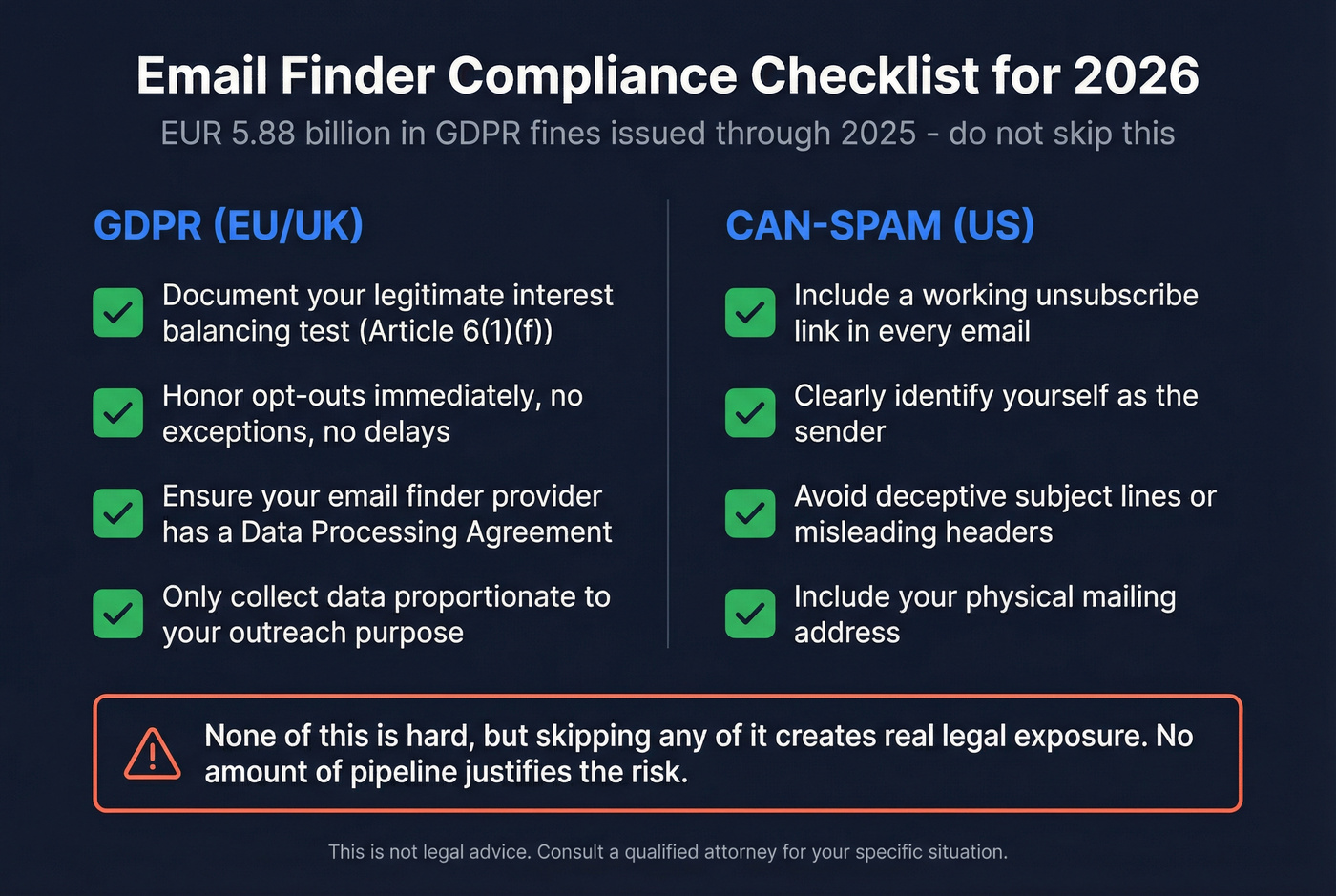
Honor opt-outs immediately. No exceptions. Ensure your email finder provider offers a Data Processing Agreement. For CAN-SPAM compliance, include a working unsubscribe link, identify yourself as the sender, and avoid deceptive subject lines or headers. Let's be honest - none of this is hard, but skipping any of it creates real legal exposure that no amount of pipeline can justify. (For the operational version, use our GDPR for Sales and Marketing playbook.)
The article's math is clear: cost per valid email matters more than list price. At 98% accuracy across 143M+ verified emails, Prospeo delivers more usable contacts per dollar than tools posting 11%+ bounce rates. Free tier included so you can benchmark it yourself.
Run your own benchmark - 75 free lookups, real results.
FAQ
Are email finder tools legal?
Yes, for B2B outreach. Most teams operate under GDPR Article 6(1)(f) legitimate interest. Honor opt-outs, use a provider with a DPA, and comply with CAN-SPAM's sender identification and unsubscribe requirements.
How accurate are email finder tools?
Accuracy varies enormously. Independent benchmarks show hard bounce rates from 0.9% to 15.8% across tools. The gap comes down to verification depth: tools with multi-step verification and catch-all handling consistently outperform those relying on SMTP-only checks.
Can I use an email finder tool for free?
Most tools offer free tiers. Prospeo gives 75 verified emails per month free, Hunter offers 25 searches, Snov.io provides 50 credits, and GetProspect includes 50 emails. That's enough to test accuracy before committing budget.
What's the best free email finder for small teams?
For small teams, you want the most usable credits at the highest accuracy. Prospeo's free tier delivers 75 verified emails monthly with full 5-step verification at 98% accuracy. Hunter's 25 free searches are popular but cap enrichment, and its higher bounce rate means fewer of those 25 results are actually sendable.