The Best Free Bulk Email Verification Tools in 2026
You upload a purchased list of 8,000 contacts, fire off your first Instantly sequence, and wake up to a 14% bounce rate. Your sending domain is toast within 48 hours. That's not a hypothetical - it's the most common way outbound teams destroy their deliverability before a campaign even gets traction.
Free bulk email verification prevents this entirely. Here are the 10 best tools, ranked by what actually matters: accuracy, free-tier generosity, and whether they'll hold up when you scale.
Why You Can't Skip Bulk Verification
Since May 2025, Google and Yahoo enforce hard limits for bulk senders: bounces under 2%, spam complaints under 0.3%. Exceed either threshold and your emails get throttled or blocked outright. No warning shot.
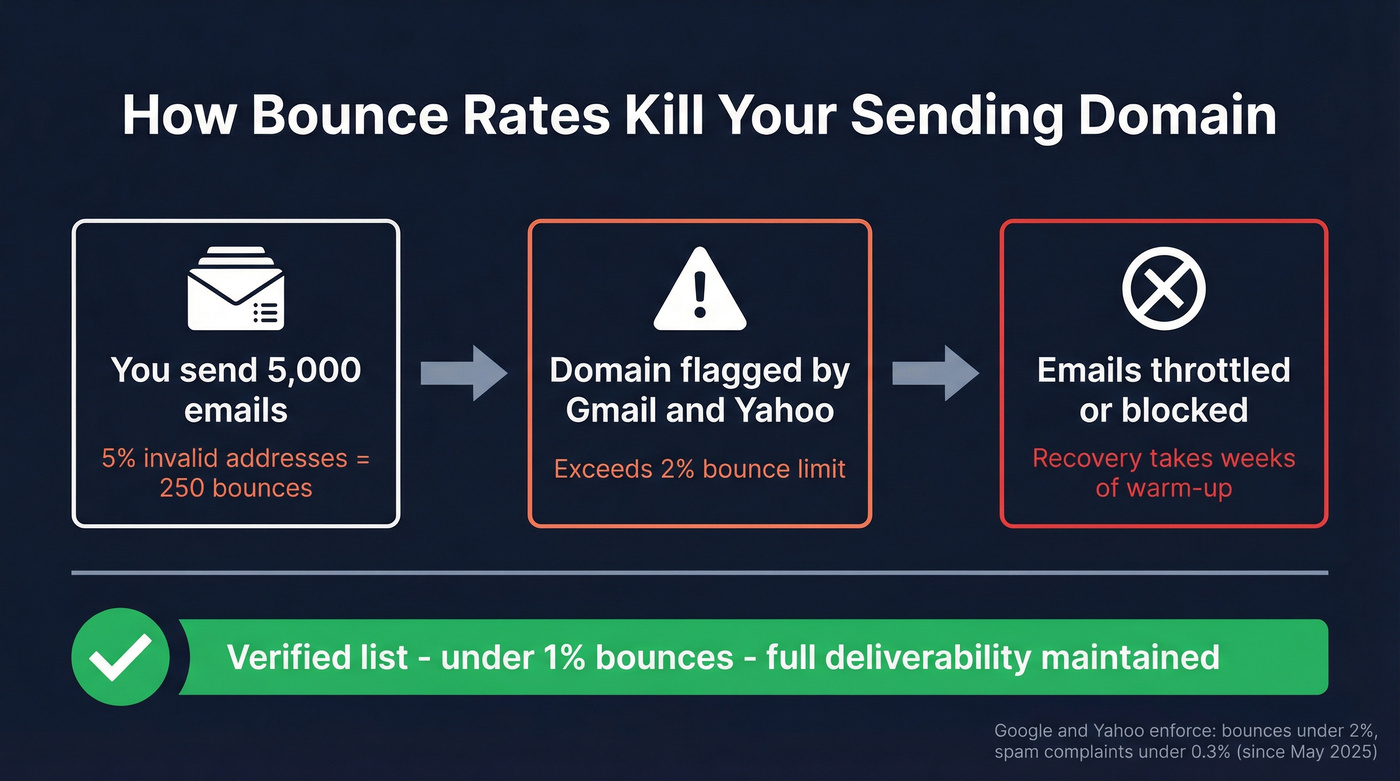
The math is brutal. A 5,000-contact list with even 5% invalid addresses means 250 bounces on a single send. That's enough to flag your domain across major inbox providers, and recovery takes weeks of warm-up sends and reduced volume.
Top-performing teams target hard bounces under 1%. That means verifying every list before it touches a sequencer - whether you built it from scratch or bought it from a vendor who swore the data was "fresh." We've seen teams with $50k/year data subscriptions still bounce at 8-10% because they skipped verification. A reliable bulk email verifier eliminates this problem before it starts.
Our Picks (TL;DR)
| Use Case | Pick | Why |
|---|---|---|
| Best accuracy + find-and-verify | Prospeo | 98% email accuracy, 5-step verification with catch-all handling, 75 free emails/mo |
| Most generous free tier | QuickEmailVerification | 3,000 free credits/mo - verify thousands without paying a cent |
| Best feature depth | Clearout | 20+ validation checks, greylisting detection, Yahoo/AOL handling, 100 free credits |
For most outbound teams, Prospeo is the pick because it finds and verifies emails in one step - you're not bolting together two separate tools. If you just need to clean an existing list for free, QuickEmailVerification's 3,000 monthly credits are hard to beat.
The 10 Best Tools for Bulk Email Checking
Prospeo
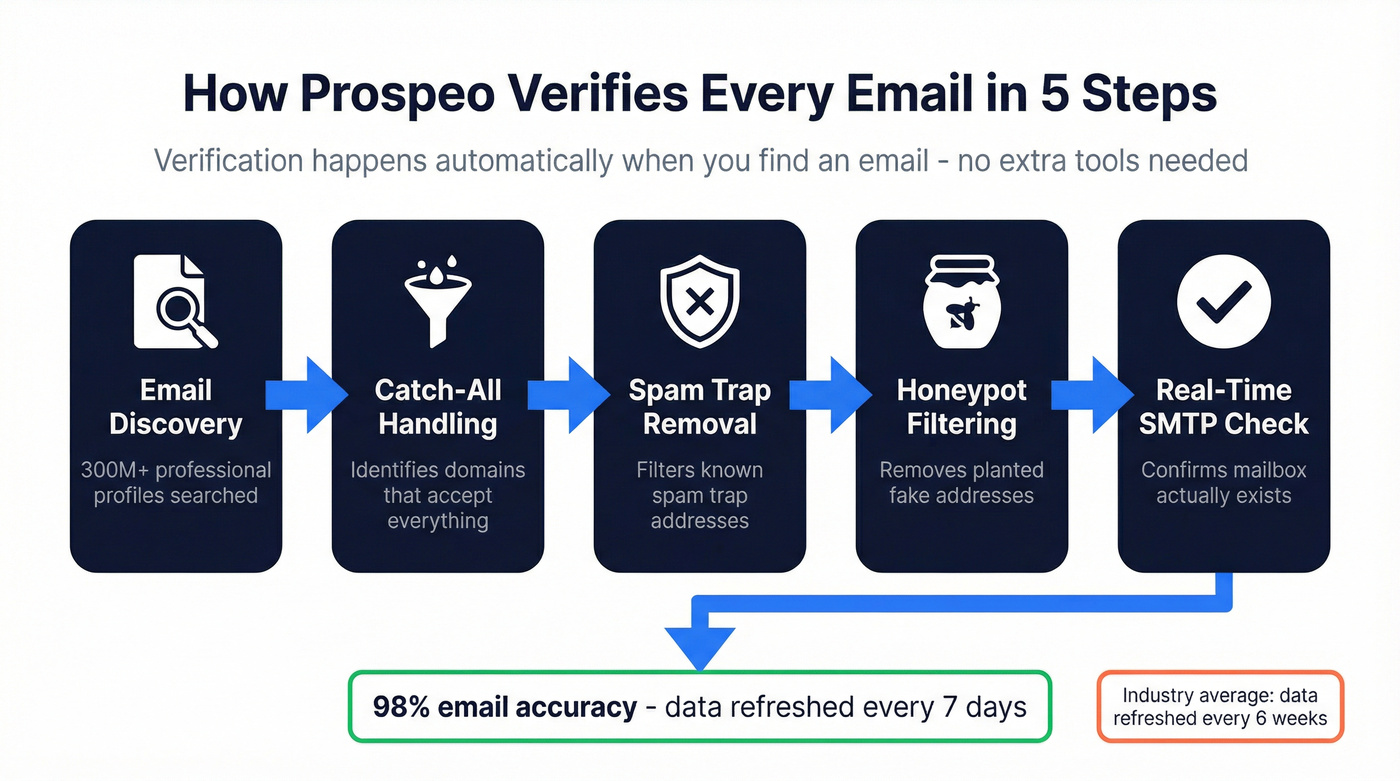
Prospeo isn't a standalone verifier - it's a sales prospecting platform with 300M+ professional profiles and 143M+ verified emails that bakes verification into the finding process. Every email runs through a 5-step verification pipeline: catch-all handling, spam-trap removal, honeypot filtering, and real-time SMTP checks. The result is 98% email accuracy out of the box, which means you're not cleaning data after the fact.
Customer results back this up. Snyk's 50-person AE team went from a 35-40% bounce rate to under 5% after switching. Stack Optimize maintains 94%+ deliverability and sub-3% bounce rates across all their clients. That's not a benchmark test - that's production volume.
Data refreshes every 7 days versus the 6-week industry average, so you're not verifying against stale records. The free tier gives you 75 emails per month, and paid plans run about $0.01 per email - though that covers finding and verifying, not just verification alone. The API hits a 92% match rate for enrichment workflows.
Use this if: You need to find and verify B2B emails in one workflow - no duct-taping two tools together.
Skip this if: You already have a massive list and just need a cheap bulk cleaner for 100k+ addresses.
QuickEmailVerification
QuickEmailVerification hands you 3,000 free credits every month - no credit card required. Credits never expire. That's enough to verify a meaningful outbound list without spending a dollar, making it the most generous free option we've found. It's also ISO 27001 and GDPR compliant, which matters when you're uploading prospect data to a third party.
The platform supports CSV upload and has a solid API if you're building verification into a workflow. Verification covers syntax, domain, MX record, and SMTP checks - standard stuff, but it works. Paid plans are tiered with volume discounts when you outgrow the free tier.
Use this if: You're running lean and need to verify 1,000-3,000 emails per month without paying anything.
Skip this if: You need real-time API verification at scale or accuracy benchmarks matter more than free volume.
Clearout
Clearout runs 20+ validation checks per email, including an anti-greylisting method that most competitors skip entirely. It hits 96%+ accuracy on Yahoo and AOL domains - notoriously difficult mailboxes that trip up cheaper tools. In a 15-tool benchmark using 3,000 real business emails, Clearout scored 68.37%, placing second overall.
You get 100 free credits at signup. Credits are only charged for definitive results - valid, invalid, or catch-all. Unknown results don't cost you, and duplicates within the same upload aren't billed. Purchased credits never expire, and subscription credits roll over.
One catch worth knowing: Clearout's "Safe-to-Send" guarantee requires you to send within 24 hours of verification and excludes .edu, Yahoo/AOL, and Office 365 domains. That's a meaningful carve-out for B2B lists heavy on enterprise domains.
Use this if: You need deep validation checks and your lists include tricky Yahoo/AOL or greylisted domains.
Skip this if: 100 free credits isn't enough and you don't want to pay for the volume you actually need.
NeverBounce vs. ZeroBounce: CRM-First Verification
If your workflow lives inside a CRM, these two tools compete for the same niche.
NeverBounce gives you 1,000 free credits on signup and charges $8 per 1,000 on PAYG. It scored 63.17% in the 15-tool benchmark. Straightforward, well-integrated, no surprises.
ZeroBounce provides 100 free verifications per month. PAYG pricing is around $10 per 1,000, with a 2,000-credit minimum buy. It scored 60.70% in the same benchmark - slightly lower, but the monthly free tier means you're not burning through a one-time signup allotment.
For teams that want a simple verifier with a big ecosystem, NeverBounce is usually the easier pick. ZeroBounce is a solid alternative if you prefer a recurring free tier.
MyEmailVerifier
MyEmailVerifier takes a different approach to free access: instead of a monthly lump sum, you get 100 free credits daily - roughly 3,000 per month if you're consistent. This daily drip model works well for teams willing to verify in batches. Bulk uploads handle up to 100,000 emails at once with a 10MB max, supporting CSV and TXT files.
One UX quirk: after upload, you'll see sample validation of the first 10 emails, then need to register for full results and downloads. Trustpilot ratings sit at 4.8/5 across 126+ reviews.
Best for: Teams that can work in daily batches and want a steady drip of free verifications.
EmailListVerify
The budget play at scale. EmailListVerify's PAYG pricing starts at ~$4 per 1,000 verifications - one of the cheapest rates for high-volume cleans. Subscriptions begin at ~$139/month for 5,000 verifications per day. You get 100 free verifications to test, and PAYG credits don't expire.
Processing speed is the standout: 100,000+ emails per hour per customer. It scored 63.87% in the 15-tool benchmark - middle of the pack on accuracy, but the price-to-volume ratio is strong.
Use this if: You're cleaning massive lists (50k+) and cost per verification matters more than marginal accuracy gains.
Bouncer
Bouncer is the quiet overperformer. It scored 65.43% in the 15-tool benchmark - fourth place overall - and the UI is one of the cleanest of any tool on this list. You get 1,000 free credits on signup and pay $7 per 1,000 after that, with volume discounts available. No ongoing free tier, so this is a "try before you buy" tool, not a long-term freebie.
MillionVerifier
MillionVerifier is the cheapest paid option at scale: ~$3.70 per 1,000 verifications. No notable free tier. Purely for teams doing large one-time list cleans where per-email cost is the deciding factor.
Hunter
Hunter offers 50 free verifications per month and charges ~$24.50 per 1,000 - the most expensive option on this list. It scored 70.00% in its own benchmark, and they ran the test themselves, so take that with appropriate context. Hunter's better known as an email finder; verification is a secondary feature.
Free Bulk Email Verification: Side-by-Side
| Tool | Free Tier | Cost/1K (Paid) | Benchmark Score | Key Differentiator |
|---|---|---|---|---|
| Prospeo | 75 emails/mo | ~$10 (find + verify) | 98% accuracy* | Finds + verifies in one step |
| QuickEmailVerification | 3,000/mo | Tiered | N/A | Most free credits |
| Clearout | 100 credits | Credit-based | 68.37% | 20+ checks, greylisting |
| MyEmailVerifier | 100/day | N/A | N/A | Daily free drip |
| EmailListVerify | 100 | ~$4 | 63.87% | Cheapest at scale |
| NeverBounce | 1,000 (one-time) | $8 | 63.17% | Bulk + workflow-friendly |
| ZeroBounce | 100/mo | ~$10 | 60.70% | Monthly free tier + bulk cleaning |
| Bouncer | 1,000 (one-time) | $7 | 65.43% | Clean UI, solid accuracy |
| MillionVerifier | None | ~$3.70 | N/A | Cheapest paid option |
| Hunter | 50/mo | ~$24.50 | 70.00% | Email finder first |
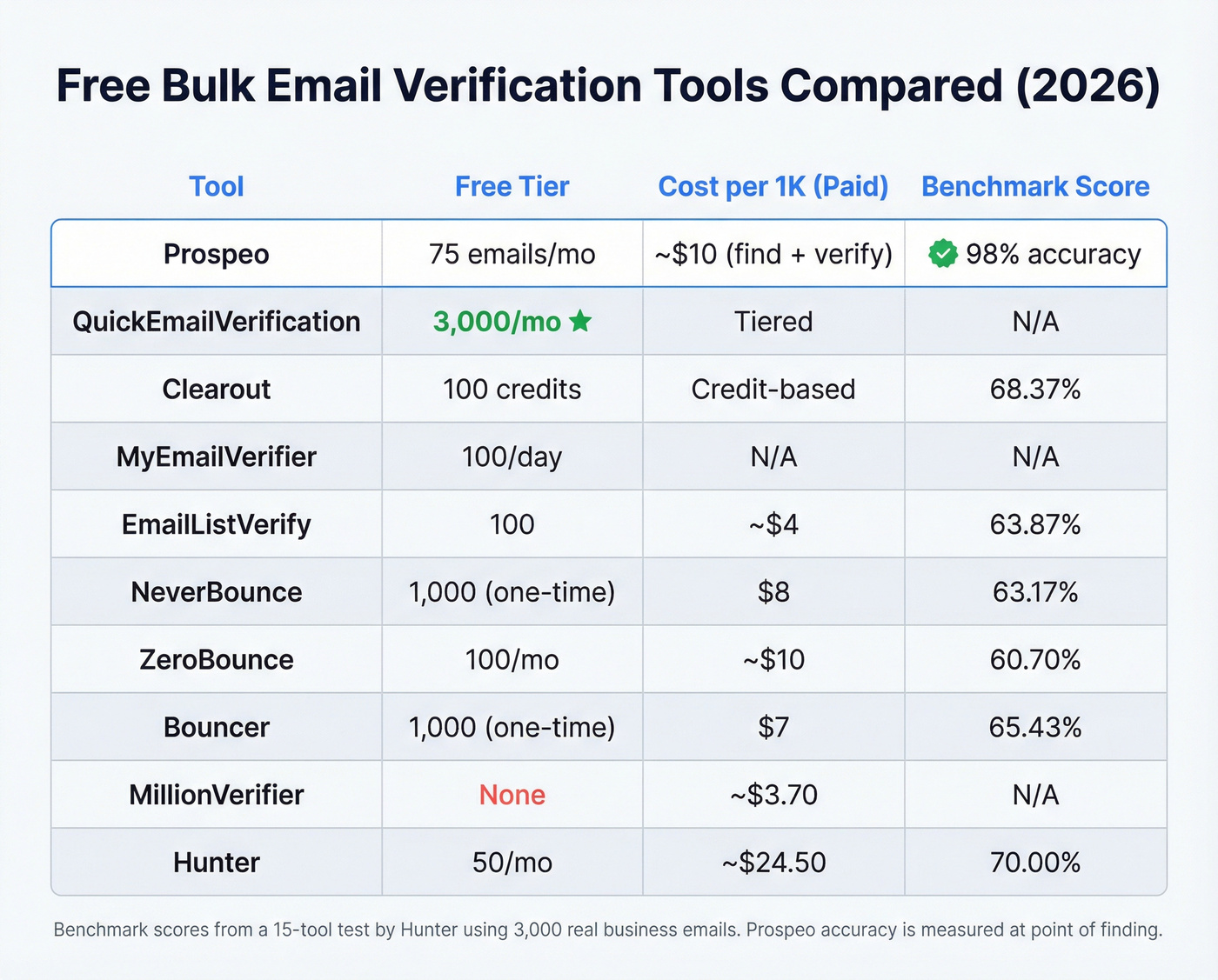
*Benchmark scores are from a 15-tool test by Hunter using 3,000 real business emails. Prospeo's 98% accuracy is measured at the point of finding - a different methodology than post-hoc verification benchmarks.

Bulk verification fixes bad lists. Prospeo prevents them. Every email runs through 5-step verification - catch-all handling, spam-trap removal, honeypot filtering - before it ever reaches your sequencer. 98% accuracy. Data refreshed every 7 days, not 6 weeks.
Find and verify emails in one step. Start with 75 free emails.
The Truth About "99% Accuracy"
Every verification tool on the market claims 97-99% accuracy. When someone actually tests them, the numbers look very different.
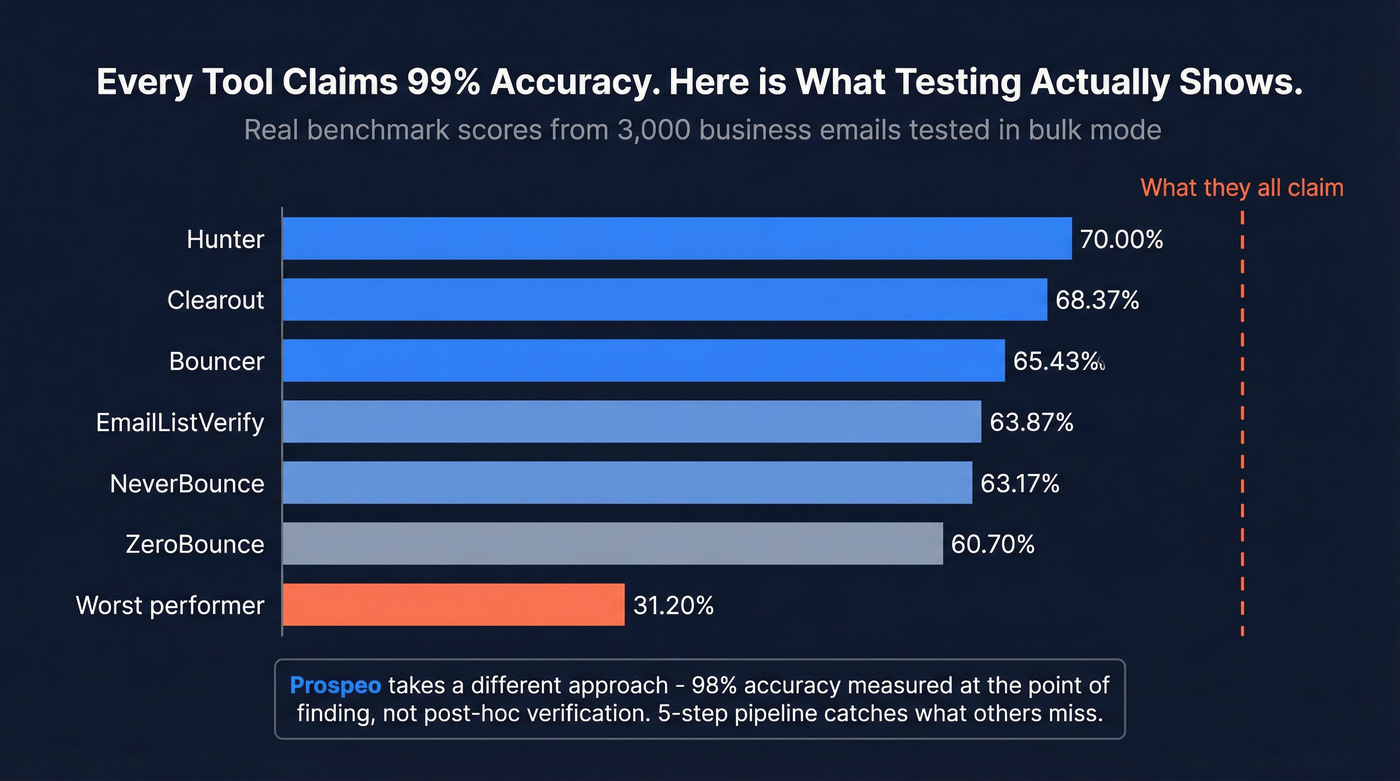
Hunter ran a benchmark of 15 email verification tools using 3,000 real business emails segmented by company size, plus 300 invalid emails added to balance the sample. Testing was executed inside Clay using bulk mode and default settings for each provider. The top performer hit 70.00%. The worst scored 31.20%. Nobody touched 99%.

That 31-70% range tells you "accuracy" means wildly different things depending on how you measure it. There's also a bias worth flagging: the dataset validity was derived from email activity patterns observed on Hunter's own platform, which could advantage their tool.
Here's the thing: if your average deal size is under $15k, you probably don't need to obsess over marginal accuracy differences between verification tools. The gap between "verified" and "not verified at all" dwarfs the gap between a 63% and a 70% benchmark score. Verify everything, pick a tool you'll actually use consistently, and move on.
Snyk went from 35-40% bounce rates to under 5%. Stack Optimize holds sub-3% bounces across every client. The difference isn't a better bulk cleaner - it's verified-at-source data from 300M+ profiles at $0.01 per email.
Ditch the duct-taped workflow. Get emails that don't bounce.
What to Do with Catch-All Results
Between 15% and 28% of B2B domains are catch-all, especially among large enterprises. A catch-all domain accepts email sent to any address - whether the mailbox exists or not. Your verification tool marks it "catch-all" or "accept-all," and you're left guessing.
A catch-all result isn't a valid result - it just means the server didn't reject it. If you treat catch-all addresses as verified and blast your full sequence, you'll hit dead mailboxes that silently damage your sender reputation. The consensus on r/coldemail is pretty clear: don't send to catch-all at full volume. Here's the practical playbook:
- Send in small batches. Start with 50-100 catch-all addresses per day and monitor bounce rates in real time.
- Use a secondary sending domain. Don't risk your primary domain on unverified addresses.
- Monitor hard bounces aggressively. If bounce rates on catch-all batches exceed 3%, stop and re-segment.
- Prioritize tools with catch-all handling. Clearout attempts deeper verification on catch-all domains rather than just flagging and moving on.
- Remove catch-all addresses from automated sequences. Manual or semi-manual outreach is safer for these contacts.
How to Verify Bulk Emails for Free
The biggest recurring free tier in this list is 3,000 verifications per month from QuickEmailVerification, so you'll need to stack tools to reach 10,000 without paying. We've tested this approach ourselves, and it works - it just takes some coordination.
Step 1: Clean your list locally. Remove syntax errors, duplicates, and role-based addresses like info@, support@, and sales@. No verification tool should waste credits on addresses you can filter out yourself. (If you want the deeper mechanics, see our guide on email validity check.)
Step 2: Split your list across free tiers.
- QuickEmailVerification: 3,000/month
- MyEmailVerifier: ~3,000/month (100/day)
- Bouncer: 1,000 (one-time signup)
- NeverBounce: 1,000 (one-time signup)
That's roughly 8,000 free verifications if you time it right.
Step 3: Upload, merge, tag. Download results, merge into a master file, and tag each email with its verification status. Each tool handles its portion of the list.
Step 4: Handle unknowns separately. Any email that comes back "unknown" or "catch-all" goes into a separate segment. Don't send to these without the small-batch approach from the previous section. For more on deliverability guardrails, use an email deliverability checklist before you scale volume.
Let's be honest - this approach takes more effort than paying for a bulk clean. But when budget is genuinely zero, it gets the job done.
Is It Safe to Upload Your List?
When you upload 10,000 email addresses to a verification tool, you're handing over your prospect data to a third party. That should make you at least a little uncomfortable.
Before uploading, check three things: SOC 2 compliance or equivalent security certification, a clear GDPR data processing policy, and an explicit data deletion timeline. QuickEmailVerification holds ISO 27001 and GDPR certifications. MyEmailVerifier carries SOC 2 and GDPR compliance. When in doubt, use a tool's API instead of their web upload - it gives you more control over data flow and reduces exposure. This matters especially with free online verification options, where security standards vary widely. If you're building a repeatable process, pair this with CRM hygiene so bad data doesn't creep back in.
FAQ
How often should I re-verify my email list?
Every 30-90 days. Email addresses decay at roughly 2-3% per month as people change jobs, companies restructure, or domains expire. Re-cleaning quarterly at minimum prevents bounce rate creep that silently damages sender reputation.
What's the difference between syntax checks and SMTP verification?
Syntax checks only confirm the email format is valid - name@domain.com. SMTP verification pings the actual mail server to confirm the mailbox exists and accepts messages. Always use SMTP-level verification for bulk lists; any credible tool includes it.
What's a safe bounce rate for cold email?
Keep hard bounces under 2% - ideally under 1%. Google and Yahoo enforce the 2% threshold for bulk senders. Exceed it and your emails get throttled or blocked. A single bad send can take weeks of warm-up to recover from.
Are free verification tools accurate enough for cold outreach?
For lists under 3,000 emails, free tiers from QuickEmailVerification or MyEmailVerifier are adequate. For larger campaigns, invest in a paid tool or use a combined find-and-verify workflow. The cost of a burned sending domain - weeks of recovery, lost pipeline - far exceeds a few dollars per thousand verifications.