How to Find Email Addresses Free: Manual Methods, Tools, and the Workflow That Works
Sales teams burn roughly 6 hours per week manually searching for contact info. That's 312 hours a year wasted on something that should take minutes. And if you're trying to find email addresses free of charge, most of the advice online is a bait-and-switch: "free" in the headline, credit card required on step two.
Here's what's genuinely free, what's really a trial wearing a free-tier costume, and the exact workflow we use to get verified emails without spending a dollar.
What You Need (Quick Version)
Three paths, depending on how much time you have:
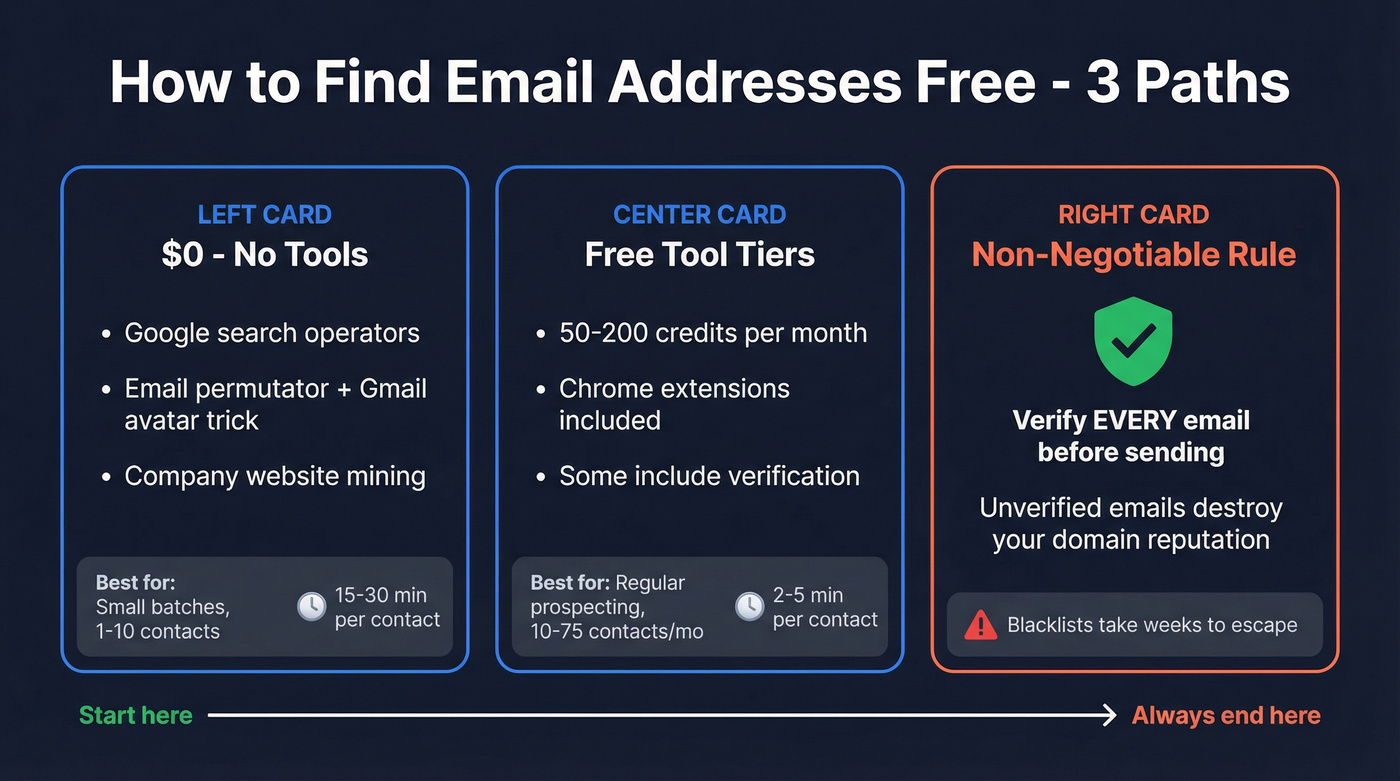
- $0 and no tools: Google search operators + an email permutator + the Gmail avatar trick. Slower, but genuinely free forever.
- Non-negotiable rule: Verify every email before you send it. Unverified emails destroy your domain reputation. This isn't optional - it's the difference between landing in inboxes and landing on a blacklist.
Manual Methods That Cost Nothing
These require no signups and work surprisingly well for small batches. They're the only methods that are truly unlimited - perfect for anyone who wants to locate a professional email without handing over a credit card.
Google Search Operators
Google indexes more email addresses than most people realize. The trick is knowing the right queries:
"Jane Smith" email site:acme.com
"Jane Smith" [filetype:pdf](https://support.google.com/websearch/thread/314462227/the-filetype-search-operator-and-its-features?hl=en)
site:acme.com "team" OR "contact" email
"Jane Smith" "jane.smith@" OR "jsmith@"
The first query searches a company domain for any page mentioning the person's name alongside an email. The filetype:pdf query catches conference presentations, whitepapers, and speaker bios where people casually include contact info. The third finds team pages and contact directories. And the fourth hunts for specific email patterns published somewhere online.
Realistic expectations: 15-25% success rate for public-facing professionals - marketers, executives with speaking engagements, anyone who's published content. For engineers or operations people without a public presence, you'll hit closer to 5%.
Bonus method most people skip: X (Twitter) advanced search. Search from:username email or just check bios directly. Creators, journalists, and developer advocates put their email in their bio more often than you'd expect. We've found this works about 10-20% of the time for those roles.
Company Website Mining
Before you fire up any tool, spend 60 seconds on the company's website:
- About / Team - often lists leadership with direct emails
- Press / Newsroom - PR contacts are almost always published
- Blog author bios - writers frequently include their email
- Contact page - look for
mailto:links in the source code - Newsletter signup - the sender address reveals the email format
Two minutes of this gives you the company's email pattern for free. Once you know the pattern, you can guess almost anyone's address at that domain. It's the simplest approach before touching any tool.
Email Permutator + Gmail Validation
This is the most underrated free method, and it's the one we reach for before burning any tool credits.
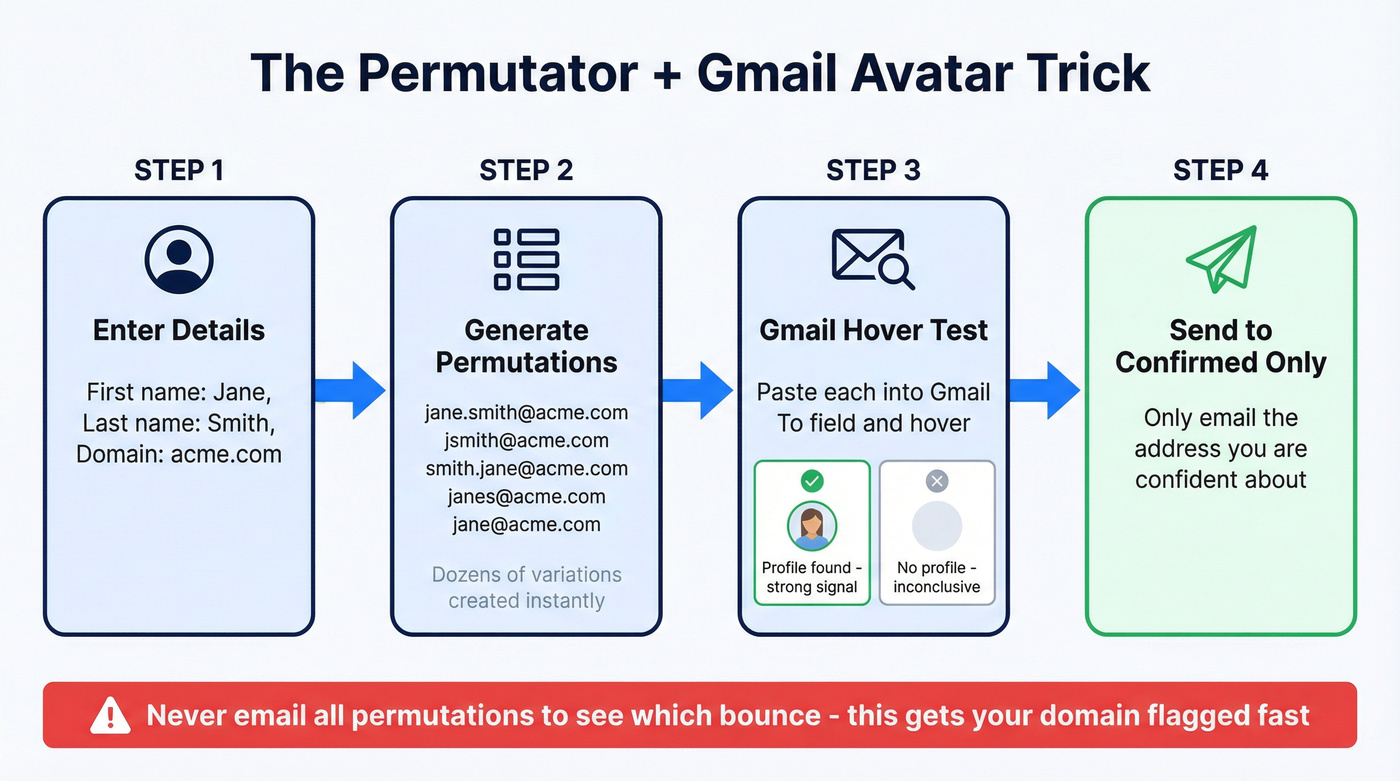
Go to Mailmeteor's email permutator. Enter a first name, last name, and company domain. The tool generates dozens of permutations: first.last@, flast@, last.first@, firstl@, and every other common pattern.
Now here's the trick: paste each permutation into Gmail's "To:" field and hover over it. If the address shows a profile picture or Google account info, that's a strong signal you've found a real mailbox. No profile image doesn't mean the address is invalid, but a profile image is near-certain confirmation. In our testing, the avatar trick confirmed about 1 in 4 permutations.
One critical warning: don't email all the permutations to see which ones bounce. That's a fast way to get your sending domain flagged. Generate the variations, validate with the Gmail hover trick, and only send to the one you're confident about.
Free Email Finder Tools Compared
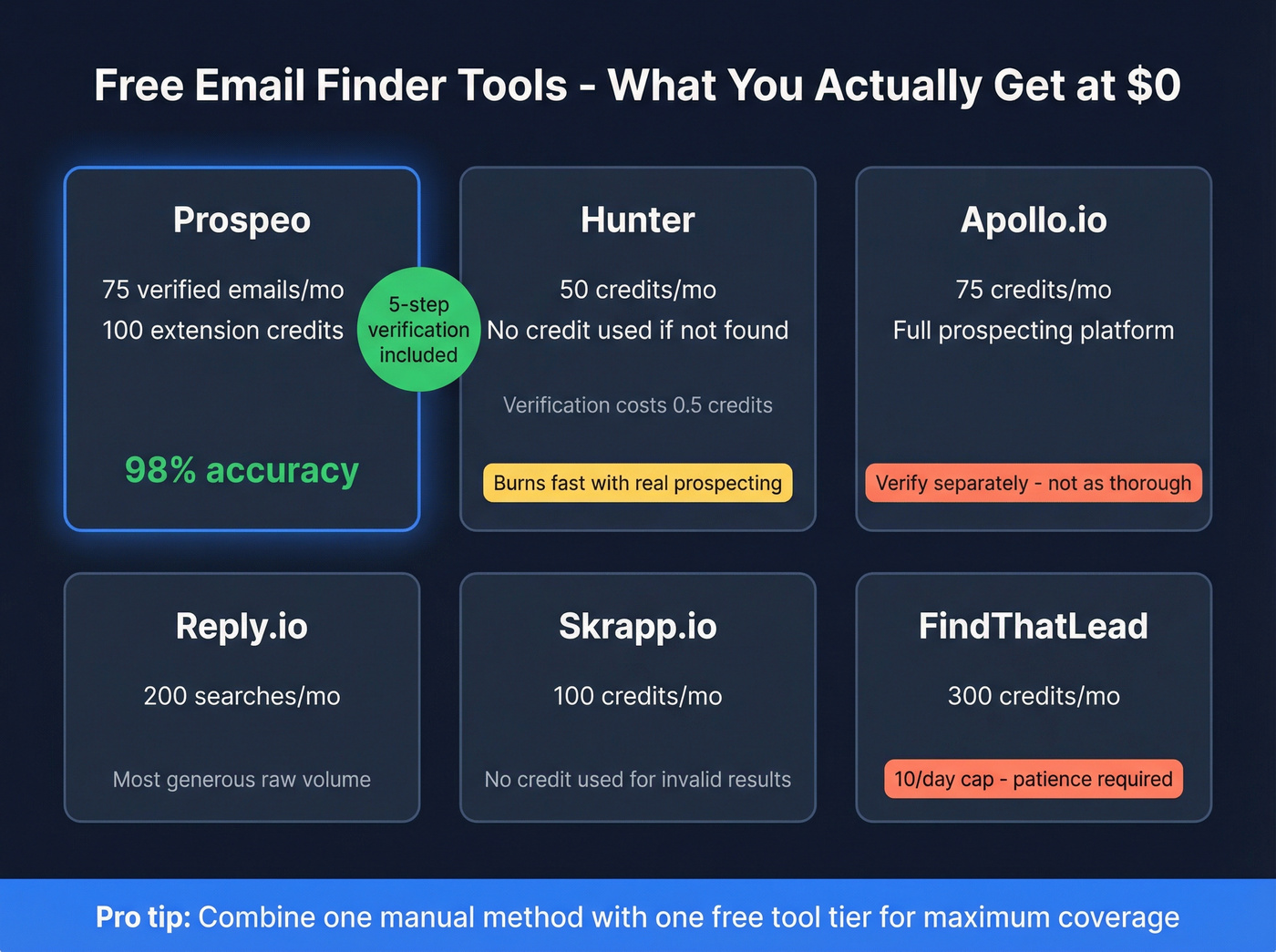
Most "free email finder" tools give you 20-50 credits and then hit you with a paywall. That's a free trial, not a free tool. Here's what each one actually gives you at $0.
| Tool | Free Tier | Verification | Best For |
|---|---|---|---|
| Prospeo | 75 verified emails + 100 ext. credits/mo | Yes (5-step) | Verified emails at scale |
| Hunter | 50 credits/mo | Yes (0.5 credit each) | Occasional lookups |
| Apollo.io | 75 credits/mo | Partial | All-in-one prospecting |
| Reply.io | 200 searches/mo | Limited | Raw volume |
| Snov.io | 50 searches/mo | Yes | Outreach workflows |
| Skrapp.io | 100 credits/mo | Yes | Volume on a budget |
| GetProspect | 50 emails/mo | Yes | Chrome extension prospecting |
| Voila Norbert | 50 searches | Limited | Quick one-off lookups |
| FindThatLead | 300 credits/mo (10/day cap) | Yes | Steady daily use |
| EXPERTE.com | Unlimited (single lookups) | Basic | One-off checks |
Prospeo
Use this if you want every email pre-verified before it reaches you and don't want to burn a separate credit on verification.
The free tier gives you 75 verified emails per month plus 100 Chrome extension credits. Every email runs through 5-step verification with catch-all handling, spam-trap removal, and honeypot filtering before it's delivered to you - no separate verification step, no extra credit cost. The result is 98% email accuracy on a free plan.

The Chrome extension works on company websites and professional profiles to pull verified contact data in one click. At $0, nothing else on this list matches the combination of volume and verification depth.
Hunter
Hunter's free plan gives you 50 credits per month. One credit gets you one email found; verification costs 0.5 credits per check. If no email is found, no credit is used - a fair mechanic that most competitors don't match. The free tier also includes sequences (one connected email account, 500 recipients), a basic leads CRM, the Chrome extension, and API access.

Here's the thing: Hunter is the default recommendation in every "free email finder" article because it's widely known, not because it's the best value. You'll burn through 50 credits in an afternoon if you're doing real prospecting. Solid for 10-15 emails per week, but it won't carry a campaign. Paid plans start at $49/mo for 500 credits.
Apollo.io
Apollo's free tier offers 75 credits per month inside a full prospecting platform, so you can search, build lists, and run outreach workflows in one place. The search filters are genuinely powerful even on the free plan, which is why the consensus on r/sales leans toward Apollo for teams that want one tool for everything. That said, always run a verification pass on what you pull before you send - Apollo's verification isn't as thorough as dedicated email finders. Paid plans run ~$49-99/mo per user.
Snov.io
Snov.io gives you 50 free searches per month. Paid plans start at ~$30/mo for 1,000 credits. If you want a single tool that handles both finding contacts and running outreach, it's a popular option.
The Rest (Quick Hits)
Reply.io offers 200 free searches per month - the most generous raw number on this list. Paid from ~$49/mo.
Skrapp.io gives 100 free credits per month across a 200M+ professionals database. Credits don't get used for invalid or unknown results, which is a nice touch.
FindThatLead offers 300 credits per month, capped at 10 per day. Good for patient, steady prospecting. Paid from ~$29/mo.
GetProspect provides 50 free new email addresses each month with a solid Chrome extension. Paid plans start at $49/month.
Voila Norbert gives 50 free searches but doesn't check catch-all domains, which means false positives will slip through. Paid plans start at ~$39/mo.
EXPERTE.com is free with no signup - unlimited individual lookups, one at a time. Fine for checking a single address, useless for building a list.
Skip Voila Norbert if catch-all accuracy matters to you. And if you need more than 10 emails a day, FindThatLead's daily cap will frustrate you fast.

Manual methods work for a handful of emails. But 312 hours a year on Google operators and Gmail avatar tricks? Prospeo's free tier gives you 75 pre-verified emails monthly - every one filtered through 5-step verification with catch-all handling and spam-trap removal. 98% accuracy at $0.
Skip the permutator guesswork and get verified emails in seconds.
Why Verification Isn't Optional
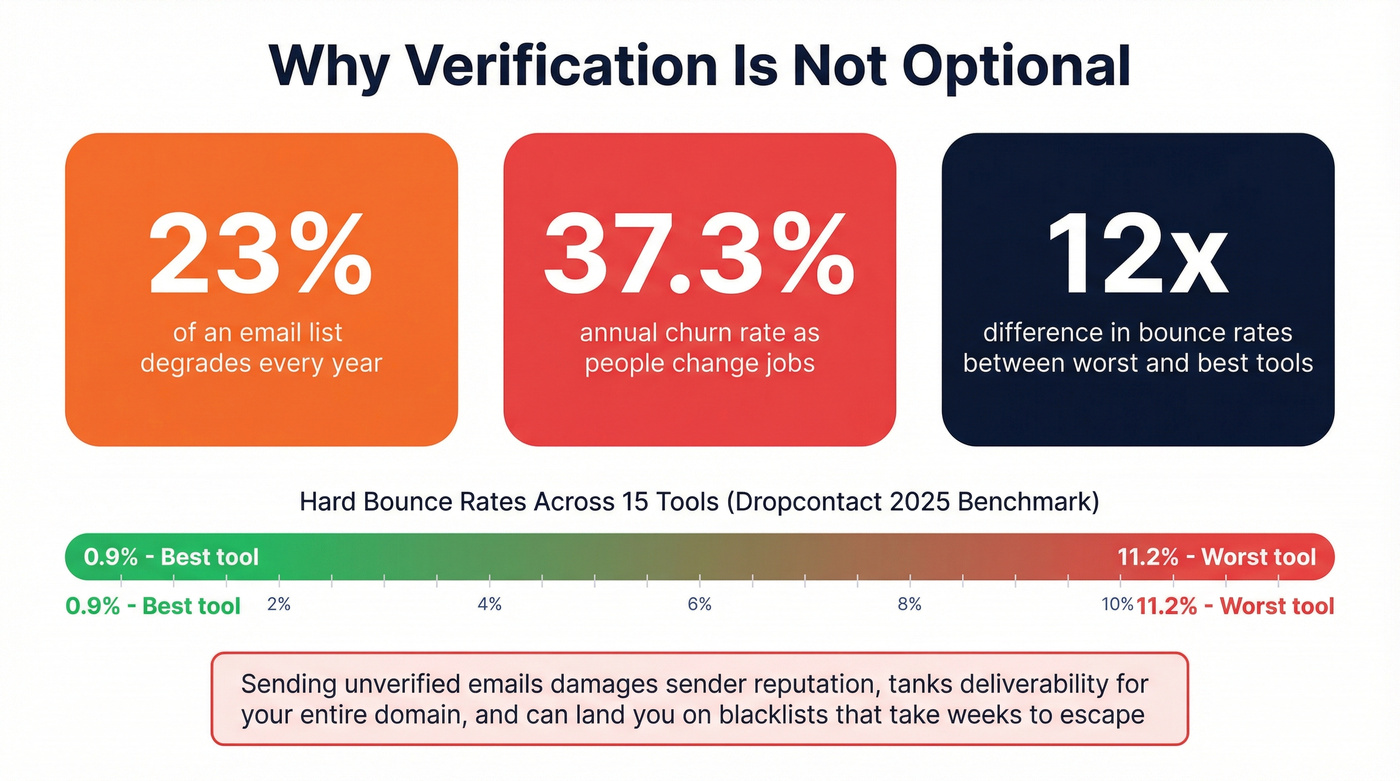
Let's be honest: 23% of an email list degrades within a year. The annual churn rate sits around 37.3% as people switch jobs, get promoted, or leave companies entirely.

The Dropcontact 2025 benchmark tested 15 email finder tools across 20,000 lookups. Hard bounce rates ranged from 0.9% to 11.2%. That's a massive spread - the worst tool bounced more than 12x as often as the best. Sending to unverified addresses doesn't just waste your time. It damages your sender reputation, tanks deliverability for your entire domain, and can land you on blacklists that take weeks to escape.
No single free tool covers everything. Combine one manual method with one tool tier, and upgrade once you hit volume. But verification is the one step you can't skip.
Hot take: If your average deal is under $5k, you probably don't need a $500/month data platform. A free tier covering 75 verified contacts per month handles early-stage prospecting just fine. Save your budget for the sending infrastructure.
The Complete Free Email Workflow
The smart order is free methods first, tools for the gaps:
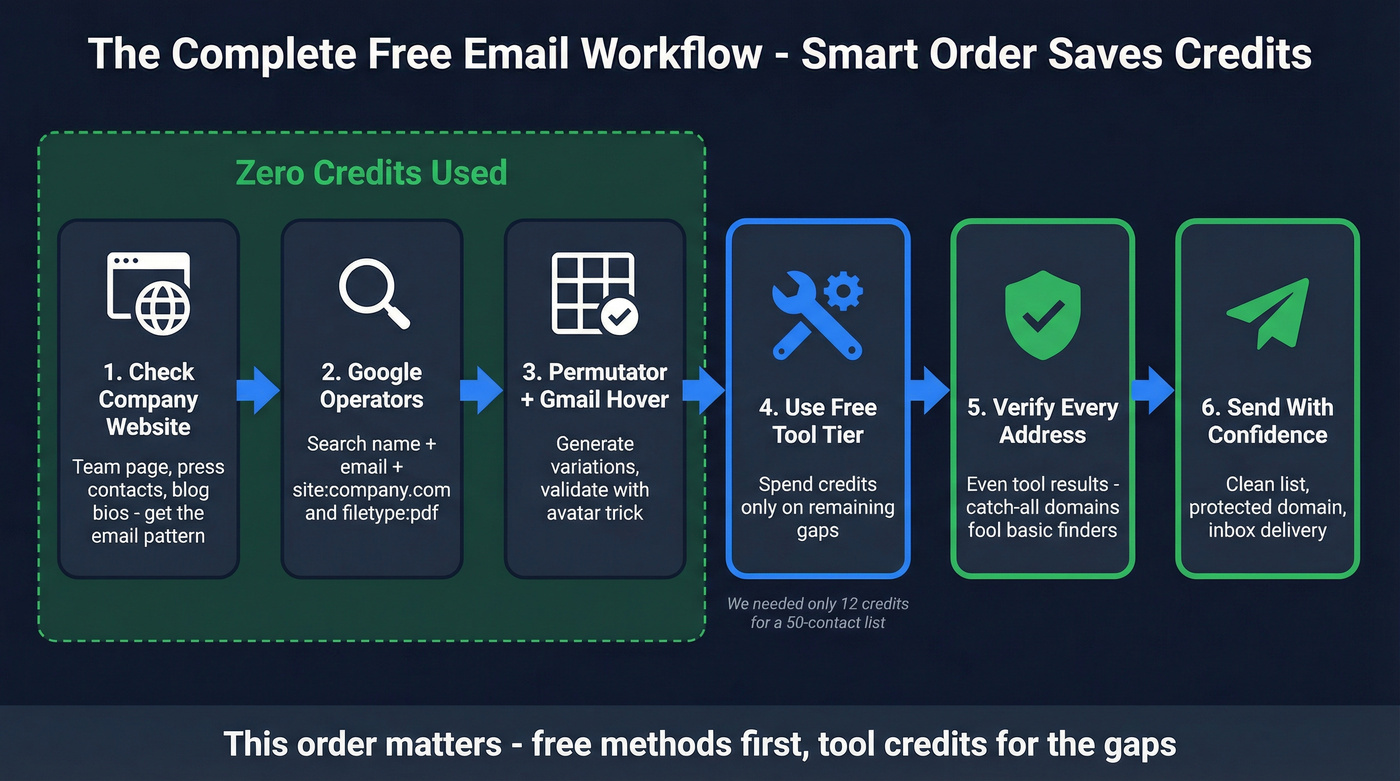
- Check the company website - team page, press contacts, blog author bios. Get the email pattern.
- Run Google operators -
"Name" email site:company.comand the other queries above. - Try the permutator + Gmail hover - generate variations, validate with the avatar trick.
- Use your free tool tier for remaining contacts - this is where your credits go.
- Verify every address - even ones from tools. Catch-all domains fool basic finders.
- Send - with confidence that your list is clean.
This order matters because steps 1-3 cost zero credits. We ran this exact sequence for a 50-contact list last quarter and only needed 12 tool credits to fill the gaps - the rest came from manual methods. Save your tool credits for the contacts you can't find any other way.
Compliance in 60 Seconds
- GDPR: B2B cold email is permitted under legitimate interest, but you must offer an opt-out and honor it immediately.
- CAN-SPAM: Every email needs your physical business address and a working unsubscribe link. No exceptions.
- The general rule: Finding someone's email is legal. Spamming them isn't. Include an unsubscribe link, honor opt-outs immediately, and don't buy scraped lists.
Every free tool on this list requires a separate verification step - or skips it entirely. Prospeo verifies before delivery: catch-all handling, honeypot filtering, spam-trap removal. That's why teams using Prospeo see bounce rates under 4% while others destroy their sender reputation.
Free emails are worthless if they bounce. Get 75 verified ones monthly.
FAQ
How do you find email addresses for free without any tools?
Start with Google search operators ("Name" email site:company.com), mine company websites for the email pattern, then use an email permutator paired with the Gmail avatar trick. These three manual methods work indefinitely without credit limits or signups.
What's a catch-all domain and why does it matter?
A catch-all domain accepts email sent to any address at that domain - even fake ones. Your message won't bounce, but it may never reach a real person. Prospeo's 5-step verification flags catch-all domains explicitly; basic SMTP checks miss them entirely.
Which free email finder is most accurate in 2026?
Prospeo delivers 98% email accuracy across 75 free emails per month. Every address goes through 5-step verification with catch-all handling and spam-trap removal before it reaches you - no separate verification credit needed.
Is it legal to find and email someone you don't know?
In most B2B contexts, yes. GDPR allows cold outreach under legitimate interest, and CAN-SPAM permits it with a physical address and unsubscribe link. Avoid buying scraped consumer lists - that's where legal trouble starts.
Can I combine multiple free tools to avoid paying?
Technically yes, but managing four accounts wastes more time than it saves. Pick one manual method and one tool with a decent free tier. Once volume demands more, a single paid plan at $30-50/month is cheaper than the hours you'll burn juggling logins.