Best Read AI Alternatives in 2026
Your IT team just sent a Slack message asking who authorized Read AI to join company meetings. Nobody knows. The tool showed up uninvited, started recording, and now someone in legal wants answers.
If you're looking for Read AI alternatives, you're not alone. With a 3.9/5 on G2 from just 36 reviews, the product hasn't earned the trust its aggressive onboarding demands. You don't need a meeting assistant that asks for access to your emails, messages, and documents via an enterprise search feature. You need one that transcribes your meetings accurately and shuts up.
Our Picks (TL;DR)
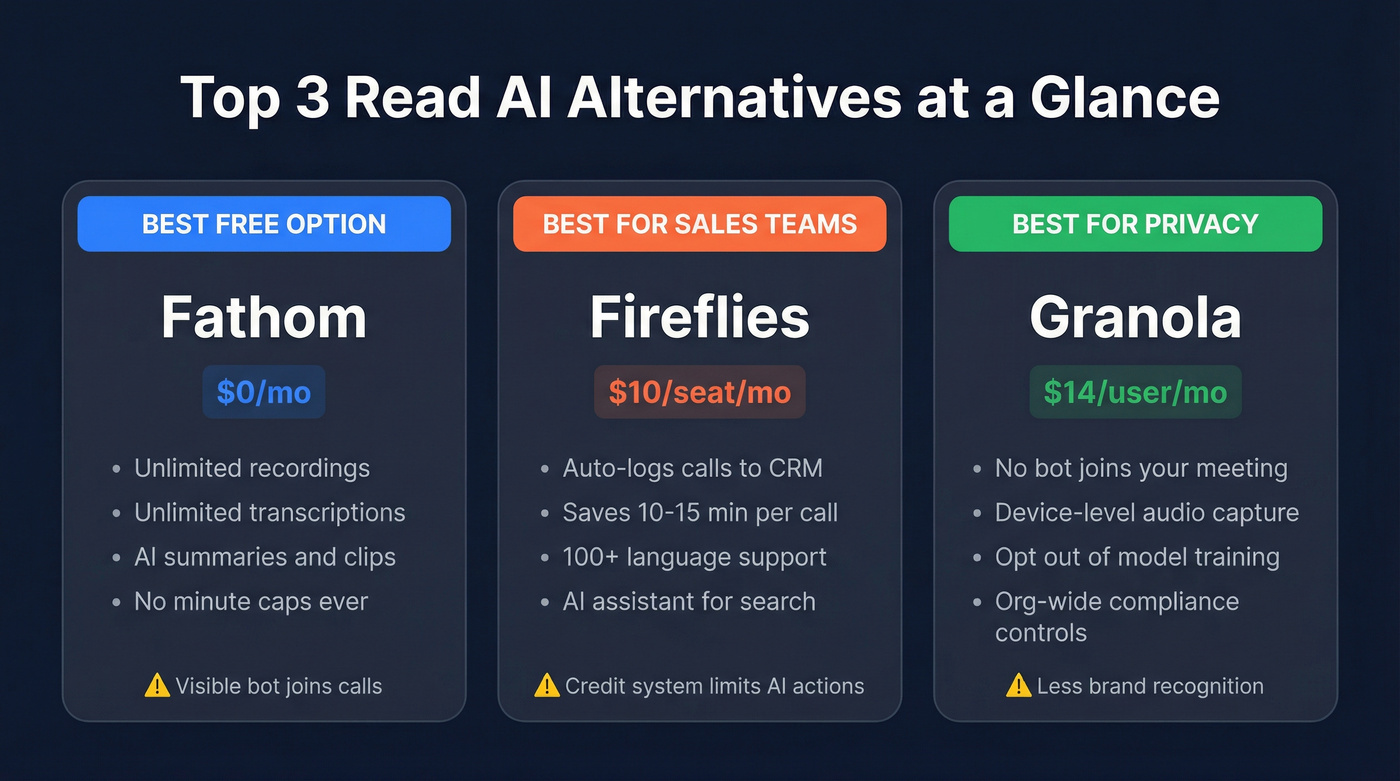
- Fathom - Best free option. Unlimited transcription at $0 with no gotchas.
- Fireflies - Best for sales teams. Auto-logs calls to your CRM and saves 10-15 minutes of post-call admin per conversation.
- Granola - Best for privacy. No bot joins your meeting. Device-level capture means there's no visible participant on the call.
Why Teams Switch From Read AI
The privacy concerns aren't theoretical. Chapman University and the University of Washington have outright banned Read AI due to security risks. When universities - not exactly known for moving fast on policy - take action, the underlying issues are serious.
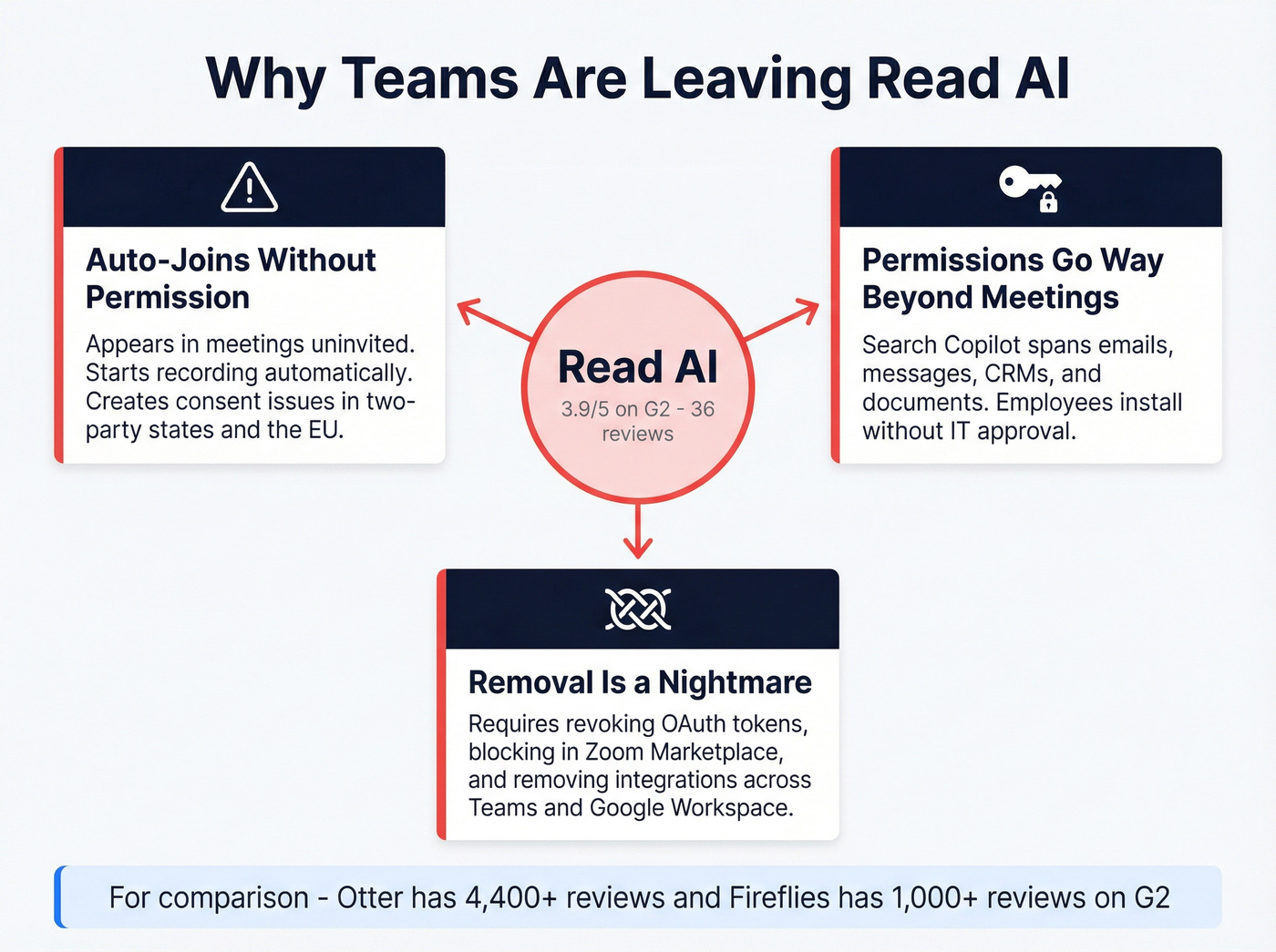
The core complaints cluster around three problems:
- Auto-joining without permission. Multiple users report Read AI appearing in meetings they didn't authorize. It begins recording automatically, creating consent issues in two-party-consent states and across the EU.
- Broad permissions that go beyond meetings. Read AI's Search Copilot can span meetings, emails, messages, CRMs, and documents. That's a feature for some teams and a dealbreaker for others, especially when employees install it without IT approval.
- Removal is a nightmare. Getting Read AI fully out of your org isn't a simple uninstall. Admins often need to revoke OAuth tokens, block the app in the Zoom Marketplace, and remove connected integrations across Teams and Google Workspace.
The G2 profile tells its own story: 36 reviews and a 3.9/5 rating. Compare that to Otter (4,400+ reviews) or Fireflies (1,000+), and the gap in market validation is obvious.
10 Best Read AI Alternatives for 2026
Fathom
Use this if you want the best free meeting assistant, period. Fathom's free tier includes unlimited recordings, unlimited transcriptions, instant AI summaries, clips, playlists, and search. No minute caps. No lifetime limits. No "5 meetings and then pay us" bait-and-switch.

Premium runs $16/mo annually for individuals who want CRM sync and advanced features. Team plans start at $15/user/mo annually with a two-user minimum. Every paid plan comes with a 90-day guarantee.
We've tested a lot of free tiers in this category, and Fathom's is the only one that doesn't feel like a trap. The catch is visibility: Fathom joins meetings as a visible participant, which can feel awkward on sensitive external calls. For executive-level discovery calls where optics matter, consider Granola instead.
Fireflies.ai
Use this if your sales team wastes time logging calls manually. Fireflies auto-logs transcripts, summaries, and action items directly to HubSpot, Salesforce, and other CRMs. In our testing, that workflow saves roughly 10-15 minutes per call - which adds up fast across a 10-rep team doing 5+ calls a day.
Pro starts at $10/seat/mo annually. Business is $19/seat/mo annually for unlimited storage. Transcription covers 100+ languages. The "AskFred" AI assistant lets you query across all your meeting history.
Here's the frustrating part: Fireflies uses a credit system - 20 on Pro, 30 on Business, 50 on Enterprise - that limits how many AI-powered actions you can take per month. The word "unlimited" appears a lot on their pricing page, but the credits are the real limiter. Read the fine print before you commit.
Granola
Use this if privacy is non-negotiable. Granola doesn't send a bot into your meeting. It captures audio at the device level, which means there's no visible third-party participant on the call. Zapier called it the "best for combining human + AI notes" - and that framing is exactly right.
Free basic tier. Business at $14/user/mo. Enterprise at $35/user/mo with SSO, admin controls, and org-wide auto-deletion periods. Every tier lets you opt out of model training, which is increasingly rare.
The enterprise plan includes an org-wide notification feature so everyone knows Granola is in use - a smart compliance move. Granola is the sleeper pick on this list. It doesn't have the brand recognition of Otter or Fireflies, but for teams where meeting recording creates political friction, it's the obvious choice.
Otter.ai
Otter is great for real-time collaboration - multiple people can highlight, comment, and edit transcripts live during a meeting. Accuracy runs ~93-95% in clean conditions, near the top of the category. Pro at $8.33/user/mo is competitively priced.
The free plan caps at 300 minutes/month with a 30-minute conversation limit and only one concurrent meeting. That's roughly 10 meetings before you hit the wall. Otter also gets flagged for auto-joining friction in the same conversations that criticize Read AI, which partially defeats the purpose of switching.
Fellow
Fellow earns its spot through compliance. SOC 2 Type II plus HIPAA support/BAA on the Enterprise tier make it one of the few meeting tools that can survive a security audit in regulated industries. The "Ask Fellow" feature lets you query across all your meetings - genuinely useful for managers tracking action items across teams. Team plan at $7/user/mo is affordable.
The free plan gives you 5 AI notes and 5 recordings. Not per month - lifetime. That's a trial disguised as a free tier, with a 5-seat cap to boot. Fellow is also overengineered for teams that just want clean transcription. If you don't need meeting agendas, OKR tracking, and 360-degree feedback tools baked into your notetaker, you're paying for complexity you won't use.
Bluedot
Bluedot is the other bot-free option worth considering alongside Granola. Trusted by 50,000+ companies, it records in the background so no participant appears on the call. Pro at $20/user/mo gets you unlimited video meetings, custom templates, and Zoom/Google Drive imports. Bluedot supports transcription and AI notes in 100+ languages, and it explicitly doesn't train on your data.
The problem is the free tier: 5 meetings, lifetime. Basic ($14/user/mo) is audio-only with a one-hour recording cap and no imports. You're essentially forced into Pro to get a usable product. The jump from "free trial" to "functional tool" is steep.
tl;dv
The standout feature is AI-powered meeting search - query your entire meeting library with natural language and get answers with timestamps. Pro runs ~$18/user/mo annually. Business at ~$59/user/mo adds unlimited everything.
The free plan auto-deletes recordings after 90 days and caps you at 10 AI notes - lifetime. If you're building a searchable archive, the free tier actively works against you. That's a frustrating design choice for a tool whose main selling point is search.
MeetGeek
Free tier gives you 3 hours/month with transcripts deleted after 3 months. Pro at $9.99/user/mo bumps that to 20 hours with a year of transcript storage. Offers a no-bot recording option via browser extension. Processing times run slower than Fireflies and Fathom, which matters if you need summaries immediately after a call.
Jamie
Priced in EUR - free tier gets 10 meetings/month with a 30-minute limit. Plus at EUR25/mo, Pro at EUR47/mo. EU data residency and ISO 27001 on Enterprise make Jamie the natural pick for European teams with strict data sovereignty requirements.
Circleback
No free plan - just a 7-day trial. Individual at $20.83/user/mo annually, Team at $25/user/mo. Boasts 1,000+ app integrations and 100+ language support. In a category where everyone else offers at least a limited free plan, the lack of one is a tough sell.
Honorable mentions: We excluded revenue intelligence platforms like Gong and Avoma, plus built-in platform AI like Zoom AI Companion and Microsoft Copilot. Different categories, different price points, different buying decisions.

Your meeting tool captures the conversation. But who follows up with the prospects you discussed? Prospeo gives sales teams 143M+ verified emails and 125M+ direct dials so every action item from every call turns into pipeline - not a forgotten note.
Turn meeting action items into booked meetings with verified contact data.
Pricing and Free Plan Gotchas
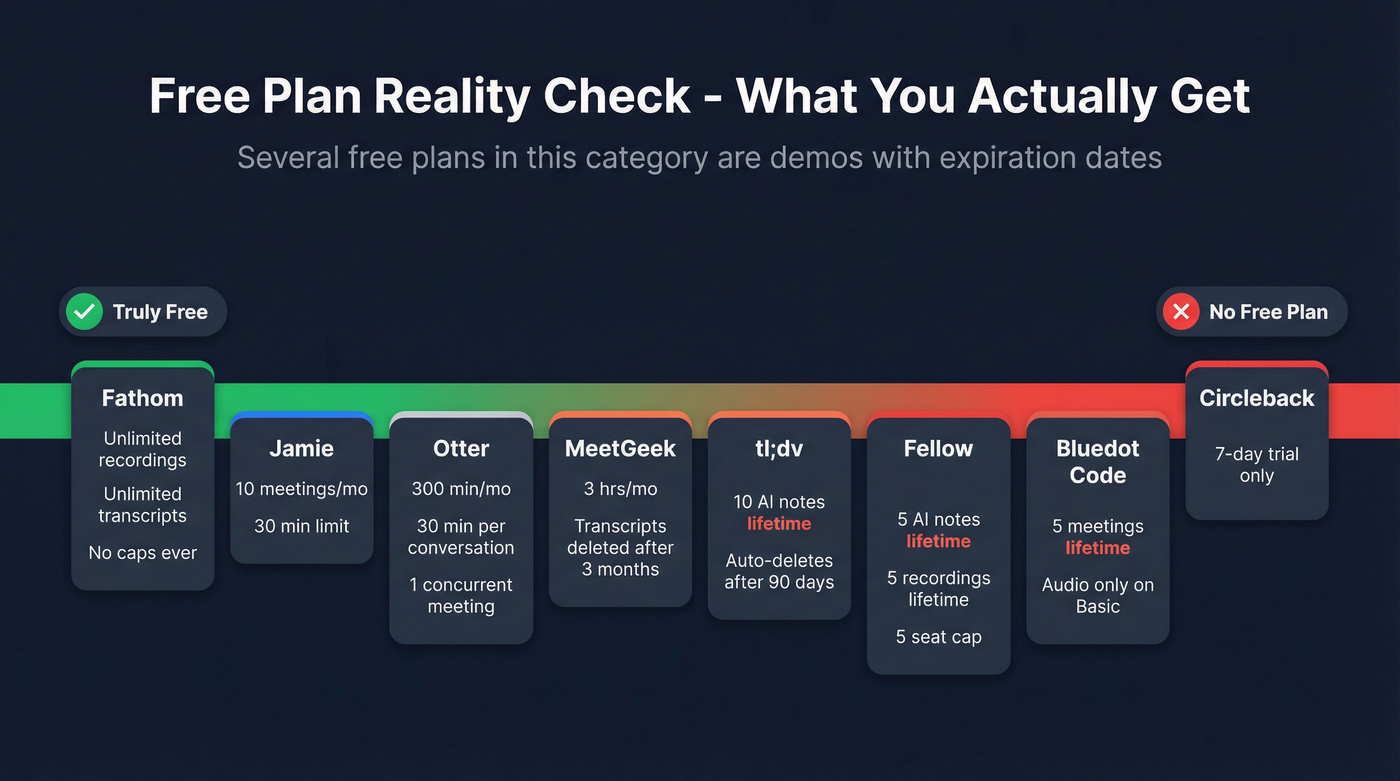
Let's be honest: several "free" plans in this category are demos with expiration dates. Fellow gives you 5 AI notes lifetime on free. tl;dv auto-deletes everything after 90 days. Bluedot's free tier is 5 meetings lifetime. MeetGeek deletes transcripts after 3 months. Know what you're signing up for.
| Tool | Starting Price | Free Plan Limits | Bot-Free? | Key Features |
|---|---|---|---|---|
| Read AI | $15/user/mo (annual) | 5 meeting transcripts/mo | Optional | GDPR, enterprise search |
| Fathom | $0 (free) | Unlimited | No | Best free tier |
| Fireflies | $10/seat/mo | 800 min storage | No | CRM auto-sync |
| Granola | $14/user/mo | Basic free | Yes | Best privacy |
| Otter | $8.33/user/mo | 300 min/mo | No | Real-time collab |
| Fellow | $7/user/mo | 5 notes lifetime | No | SOC 2 Type II, HIPAA/BAA (Enterprise) |
| Bluedot | $14/user/mo | 5 meetings lifetime | Yes | No data training |
| tl;dv | ~$18/user/mo | 90-day auto-delete | No | AI meeting search |
| MeetGeek | $9.99/user/mo | 3 hrs/mo | Optional | Browser extension |
| Jamie | EUR25/mo | 10 mtgs/mo, 30 min | Yes | EU data residency |
| Circleback | $20.83/user/mo | 7-day trial only | No | 1,000+ integrations |
How Accurate Are These Tools?
Accuracy is the metric everyone asks about and nobody defines properly. The standard measure is Word Error Rate - the percentage of words the tool gets wrong. An AssemblyAI analysis breaks down what to expect by scenario: clean studio audio hits 95-98% accuracy, video conference calls land at 85-92%, and noisy environments drop to 70-85%.
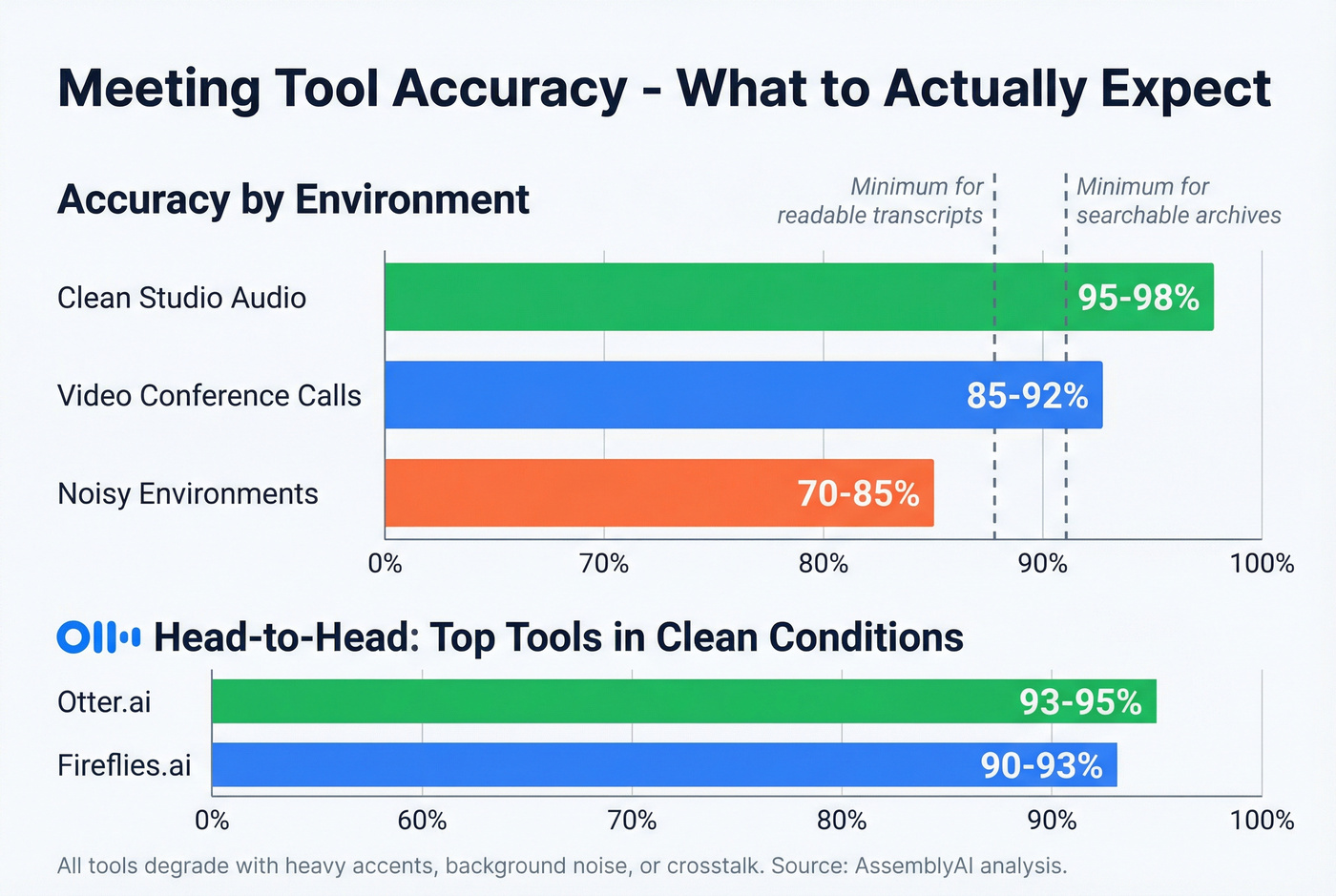
For practical purposes, you need 88%+ accuracy for readable transcripts and 92%+ for searchable archives. In head-to-head testing, Otter consistently hits ~93-95% in clean conditions, while Fireflies lands around 90-93%. Every tool degrades with heavy accents, background noise, or multiple speakers talking over each other.
Here's our take: the accuracy gap between the top tools is smaller than vendors want you to believe. The difference between 90% and 95% is 5 extra errors per 100 words - noticeable but not catastrophic. What matters more is how the tool handles those errors. Can you edit inline? Can you search despite typos? That's where the UX separates the good from the mediocre.
The Step Every Meeting Tool Misses
You just finished a discovery call. Your AI notetaker captured a perfect summary with action items, key questions, and next steps. Now you need the prospect's direct email and mobile to follow up - and your meeting tool can't help.
This is the workflow gap nobody talks about. Meeting tools capture conversations. They don't help you find the contact data to act on those conversations. The VP who mentioned a budget review in Q3, the director who asked for a proposal, the champion who said "loop in my boss" - you need verified contact info for all of them, and your notetaker has no idea how to get it. Prospeo fills that gap with 98% email accuracy and 125M+ verified mobile numbers refreshed on a 7-day cycle. The free tier gives you 75 emails and 100 Chrome extension credits per month - enough to follow up on every meeting that matters.
Fireflies logs calls to your CRM. Prospeo fills that CRM with the right people to call. 300M+ profiles, 30+ filters including buyer intent and job changes, and emails verified at 98% accuracy - all at roughly $0.01 per lead.
Stop transcribing meetings with people you found in bad data.
How to Choose the Right Tool
Don't overthink this. Match the tool to your actual problem:
- Free with no strings: Fathom. Nothing else comes close on the free tier.
- Sales team CRM logging: Fireflies. The auto-sync alone justifies the $10/seat/mo.
- Privacy is non-negotiable: Granola or Bluedot. No bot, no drama, device-level capture.
- Enterprise compliance: Fellow. SOC 2 Type II and HIPAA/BAA on higher tiers.
- EU data residency: Jamie. ISO 27001 and EU hosting.
For teams under 20 people running deals that average under five figures, you probably don't need anything beyond Fathom's free plan. Seriously. The paid tools justify themselves through CRM integrations and compliance controls that small teams rarely need. Start free, upgrade when the pain is real.
One more thing: trial at least two tools in parallel for a week. We've seen teams commit to a tool based on a demo, only to discover the bot visibility or storage limits don't work for their actual meeting cadence. A week of real usage tells you more than any comparison article - including this one.
FAQ
Is Read AI safe to use?
Read AI has been banned by Chapman University and the University of Washington over privacy and security concerns. The tool auto-joins meetings without explicit consent, requests broad access across email and messaging via enterprise search, and requires OAuth revocation plus marketplace blocking to fully remove from an organization.
What's the best free AI meeting assistant?
Fathom is the only tool offering truly unlimited free transcription - no minute caps, no lifetime limits, and no storage expiry. Every other "free" tier in this category imposes hard caps that force upgrades within days or weeks of real usage.
Can I record meetings without a bot joining?
Yes. Granola, Bluedot, Jamie, and MeetGeek (via browser extension) all offer device-level or browser-based capture that doesn't add a visible participant to the call. Granola and Bluedot are the strongest bot-free options for teams prioritizing discretion.
How accurate is AI meeting transcription?
Video conference transcription typically lands at 85-92% accuracy. You need 92%+ for searchable archives and 88%+ for readable transcripts. Otter leads at ~93-95% in clean conditions; all tools degrade with accents, noise, and crosstalk.
How do I find contact info for people mentioned in meetings?
Prospeo's Chrome extension pulls verified emails and phone numbers from any website in one click. The free tier includes 75 emails and 100 extension credits per month - enough to act on every meeting follow-up without paying a dime.