How to Check If an Email Is Legit in 2026
A CEO sends you a wire transfer request at 4:47 PM on a Friday. The email looks right - logo, signature, even the tone matches. But something feels off. That instinct is worth listening to, because knowing how to check if an email is legit - whether it's a suspicious message or an unverified address - is one of the most practical skills you can build right now.
This Is Actually Two Different Questions
When someone wants to verify email legitimacy, they're usually asking one of two very different things: "Is this message in my inbox a scam?" or "Does this email address actually exist?" The answers require completely different tools and techniques, and most guides only cover one side. We'll cover both.
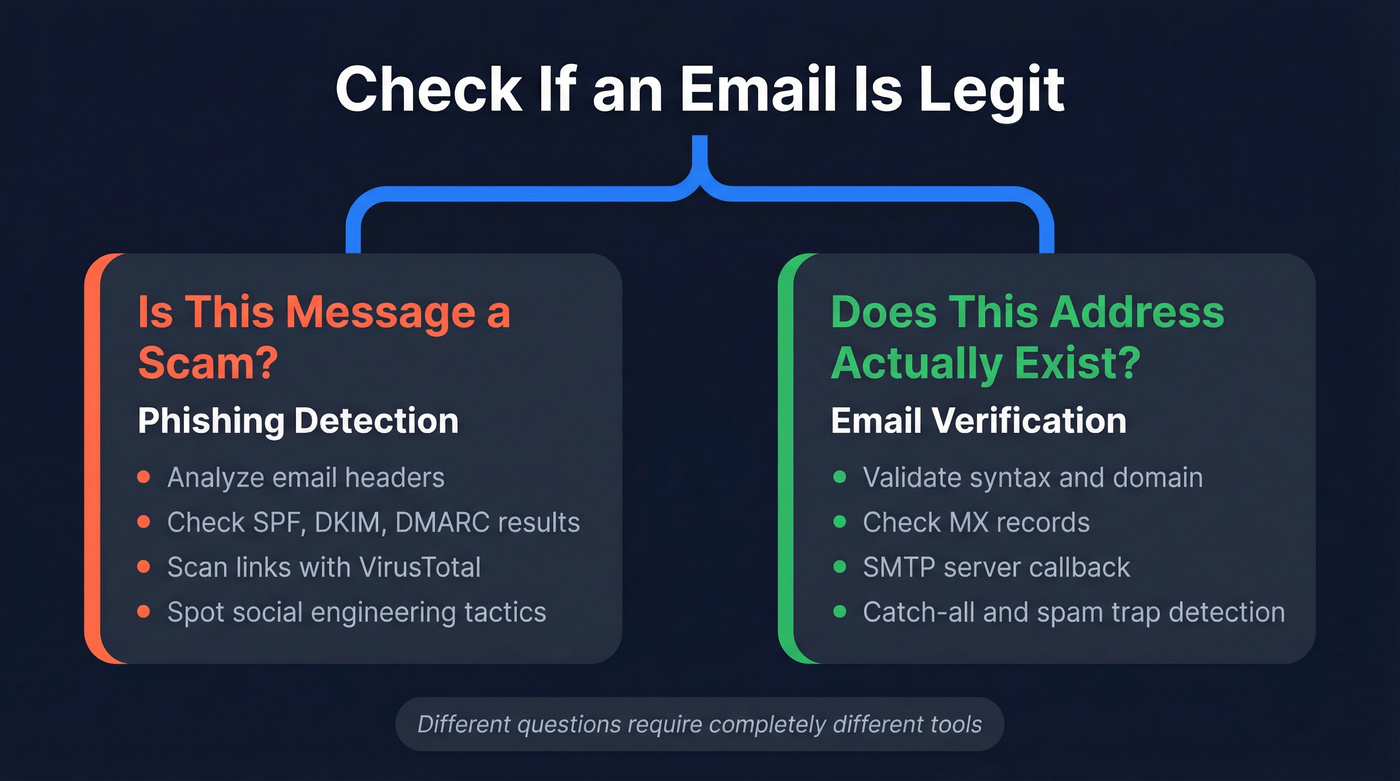
The first question is about phishing detection - analyzing headers, scanning links, and spotting social engineering. The second is about email verification - confirming that an address is real, active, and safe to send to. Mixing them up sends people to the wrong solution.
The scale of both problems is staggering. 3.4 billion malicious emails hit inboxes every single day, and the average phishing-related breach costs $4.88 million. APWG recorded over 1 million phishing attacks in Q1 2025 alone. On the verification side, sending cold outreach to invalid addresses tanks your deliverability and can take weeks to recover. Google blocks roughly 100 million phishing emails daily, but plenty still slip through.
Quick Answer: What You Need
Suspicious email in your inbox? Check the sender's headers for SPF/DKIM/DMARC results and scan any links with VirusTotal. That's the fastest way to confirm whether the sender is who they claim to be.
Worried your own emails look suspicious to recipients? Run your domain through MxToolbox to check your SPF, DKIM, and DMARC records. If any of those fail, your emails are landing in spam - or getting flagged as phishing by the people you're trying to reach.
How to Spot a Phishing Email
The human element is involved in roughly 60% of breaches, according to Verizon's 2025 DBIR. That means your ability to recognize a phishing email is genuinely one of the most valuable security skills you can develop. If you browse r/phishing on Reddit, you'll see posts daily from people who almost fell for CEO impersonation emails or fake invoice scams - and some who didn't catch it in time. Here's how to evaluate email legitimacy before you click anything.
Classic Red Flags
- Sender domain mismatch. The display name says "PayPal" but the actual email comes from
support@paypa1-secure.com. Always check the full address, not just the name. Watch for legitimate-looking subdomains too - something likelogin.google.com.example.comlooks official at first glance, but the actual domain isexample.com. - Urgency language. "Your account will be suspended in 24 hours." Legitimate companies rarely threaten you via email.
- Generic greetings. "Dear Customer" instead of your actual name.
- Suspicious links. Hover before you click. If the URL doesn't match the supposed sender's domain, don't touch it.
- Unexpected attachments. Especially .zip, .exe, .html, or .svg files you didn't ask for.
- Invoice lures. Roughly 32% of detected phishing emails use fake invoices as the hook - the single most common bait.
- Mismatched Reply-To address. The "From" says one thing, but the Reply-To points somewhere completely different.
2026 Tactics That Bypass Old Advice
The "look for typos" advice is increasingly useless. Here's what's actually hitting inboxes now.
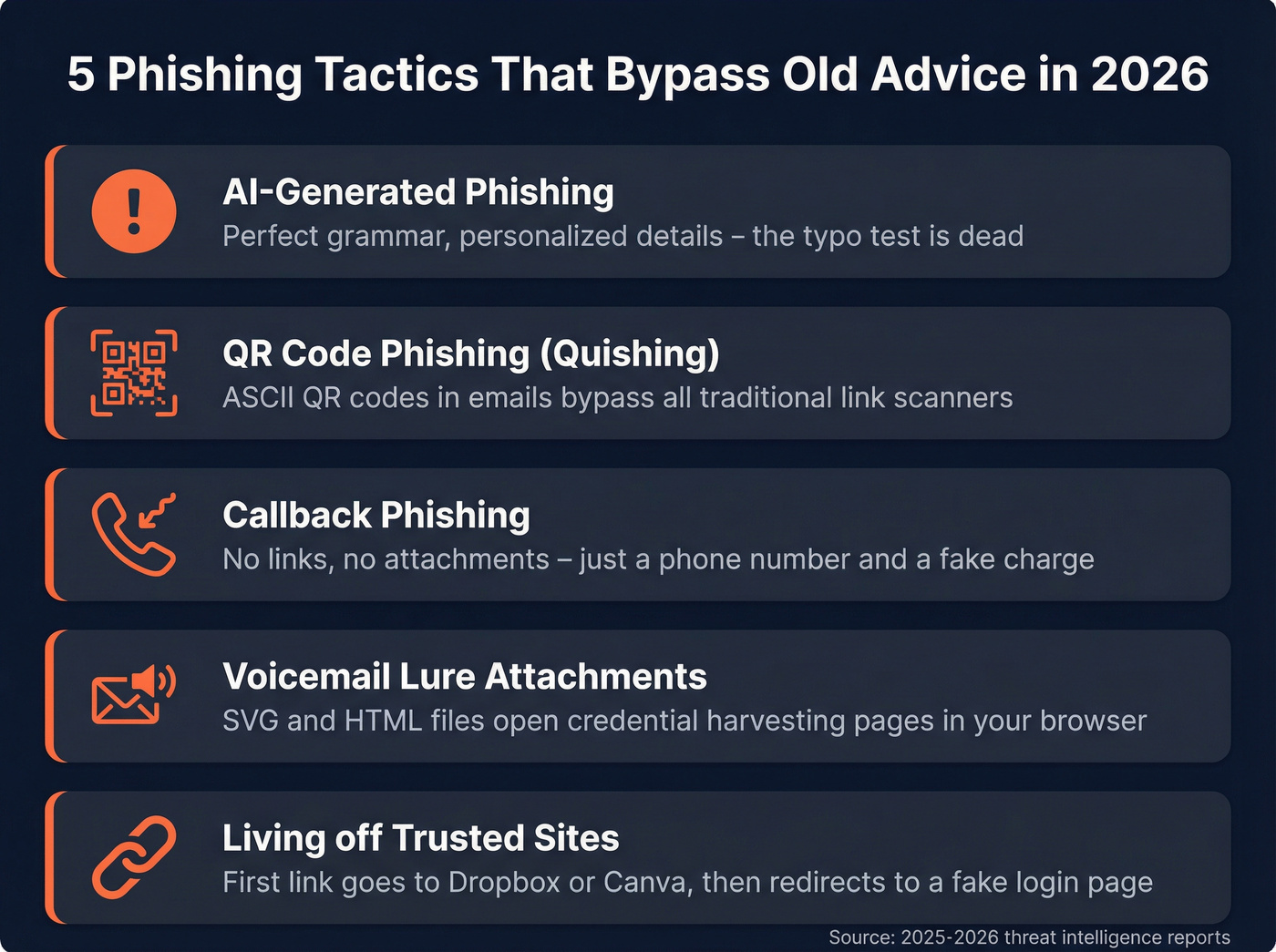
AI-generated phishing is the big shift. Generative AI produces grammatically perfect, highly personalized messages that reference your actual job title, company, and recent activity. The old "bad grammar = scam" heuristic is dead. We've seen samples that are indistinguishable from real executive communication - the only giveaway was in the headers.
QR code phishing (quishing) has exploded. Attackers embed ASCII QR codes in fake shipping notifications that bypass traditional link scanners entirely. Your email security tool can't read a QR code the way it reads a URL, which is exactly why this works so well.
Voicemail lure attachments are a newer twist. You receive an email claiming you missed a voicemail, with an SVG, HTML, or HTA file attached. Opening the file launches a credential-harvesting page in your browser. These bypass most attachment scanners because the file types look benign.
Callback phishing skips links altogether. The email includes a phone number and a fake charge ("Your subscription renewal of $499.99 has been processed"). You call to dispute, and a live human walks you through installing remote access software. No links to scan. No attachments to flag.
Living off Trusted Sites is particularly nasty. The initial link goes to a legitimate service - Dropbox, Canva, DocuSign - then redirects to a credential-harvesting page. The link looks clean because the first hop is clean.

Spotting phishing is half the battle. The other half is making sure the emails you send go to real, verified addresses. Prospeo's 5-step verification catches catch-all domains, spam traps, and honeypots - delivering 98% email accuracy at $0.01 per address.
Send to verified addresses only. Your domain reputation depends on it.
Inspect the Headers
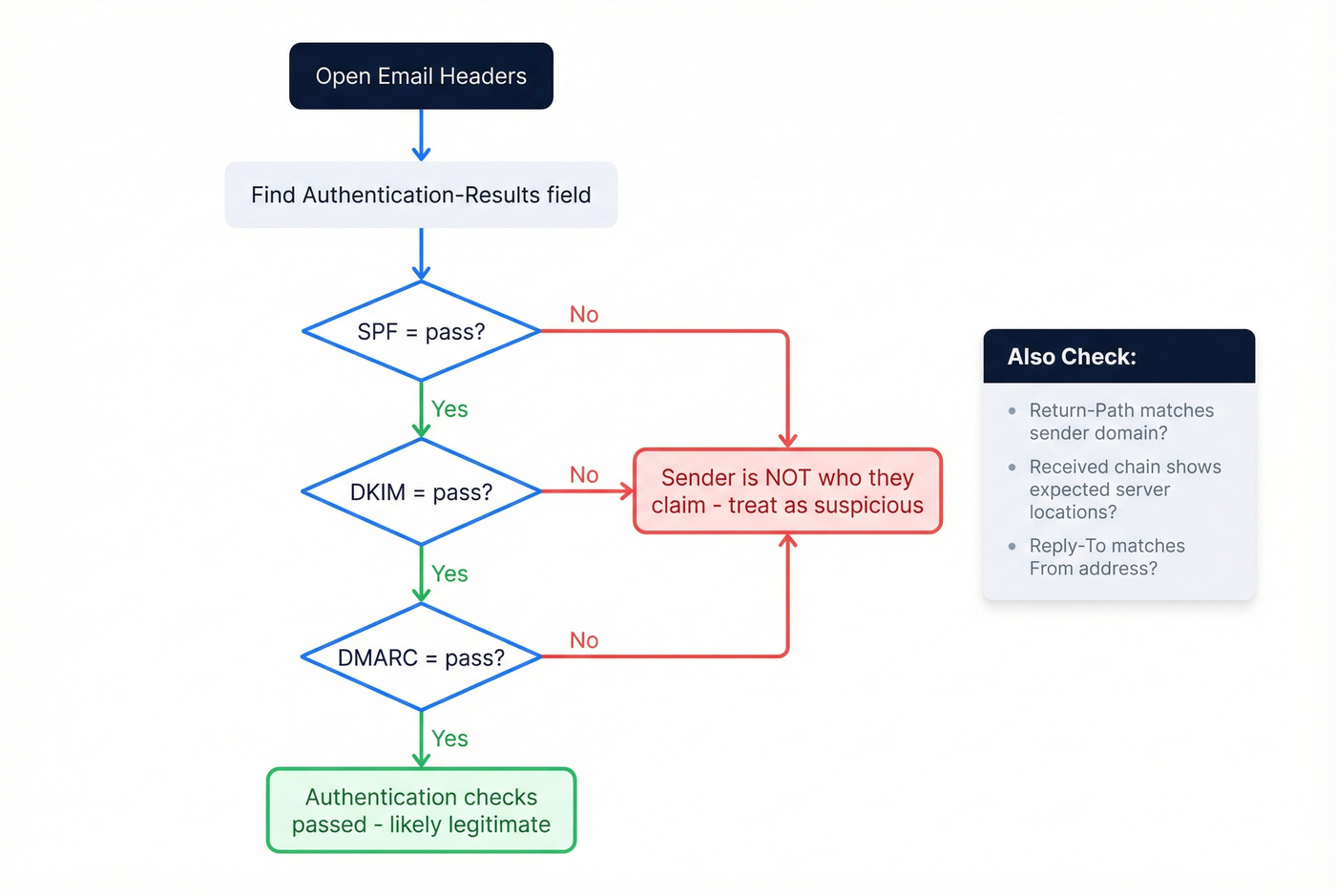
Headers don't lie. While everything else in an email can be faked - the display name, the logo, the body text - the authentication results in the headers are generated by the receiving mail server, not the sender.
How to access headers:
- Gmail: Click the three-dot menu → "Show original"
- Outlook: File → Properties → Internet headers
- Apple Mail: View → Message → All Headers
Once you're looking at the raw headers, find the Authentication-Results field.
| Header Field | What It Tells You |
|---|---|
| Return-Path | Real sending domain |
| Authentication-Results | SPF/DKIM/DMARC pass or fail |
| Received (chain) | Server hops, newest first |
| Message-ID | Unique ID from sending server |
If spf=fail or dkim=fail, the sender isn't who they claim to be. Full stop. A dmarc=fail confirms it. No amount of polished branding overrides a failed authentication check.
Also look at the Return-Path. In phishing emails, this often reveals the actual sending domain - completely different from the display "From" address. A legitimate email from Microsoft will have a Return-Path at a Microsoft domain. A phishing email will show something like bounce@cheap-hosting-provider.xyz.
The Received chain shows every server the email passed through, in reverse order. We've seen phishing emails that looked perfect in every way except the Received chain showed three hops through servers in countries where the supposed sender has no operations. Header analysis remains the most reliable way to verify a suspicious sender.
How to Verify an Address Is Real
This is the other half of the legitimacy question - confirming that an address actually exists and can receive mail. This matters for outreach teams, marketers, and anyone who needs to validate an email before sending.
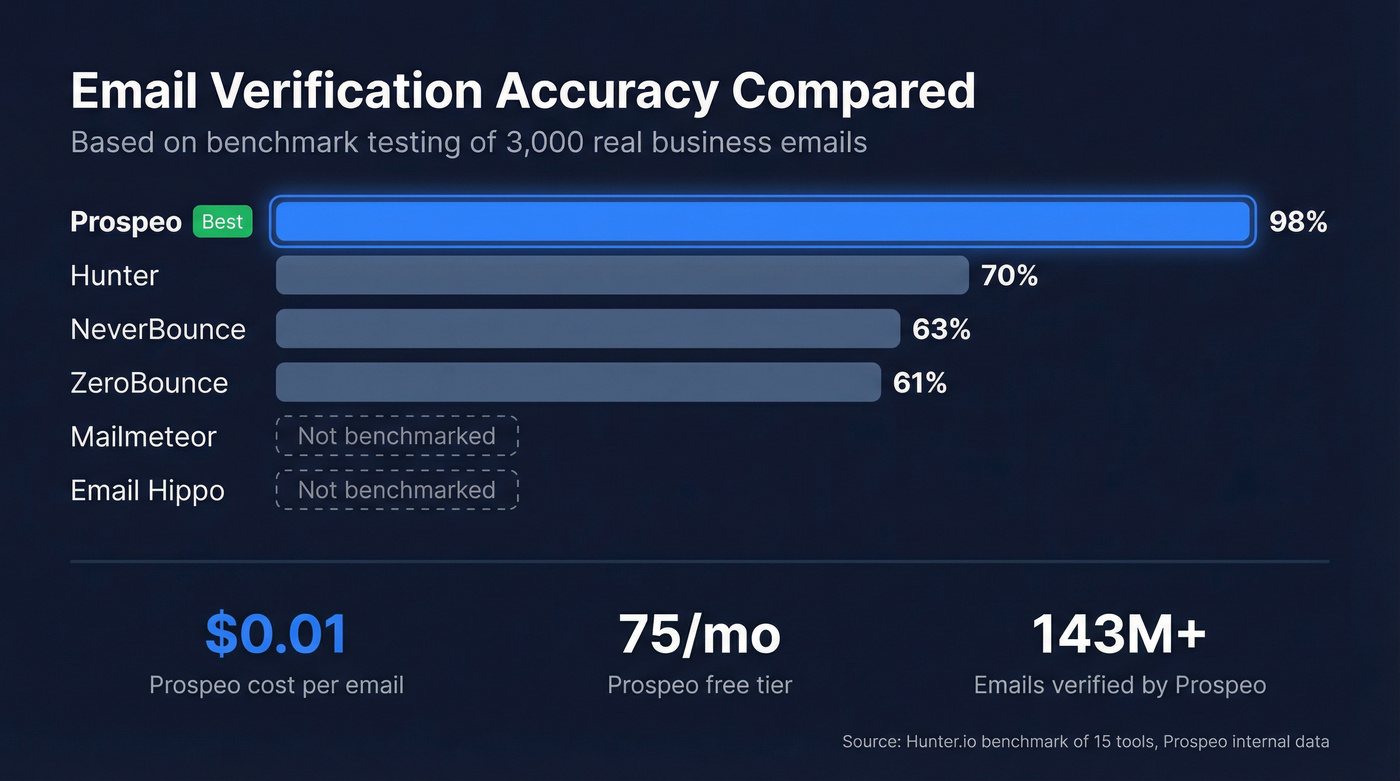
Email verification tools typically check syntax validation, domain/MX records, mail server response via SMTP, and database cross-referencing. Accuracy varies wildly. A benchmark of 15 email verification tools - run by Hunter, so factor in potential bias - tested 3,000 real business emails and found accuracy ranging from 31% to 70%. That spread is enormous.
Here's the thing: if your average deal size is modest and you're running outbound, bad email data will cost you more in domain reputation damage than the data itself costs to verify. Cheap verification is a false economy.
| Tool | Accuracy | Free Tier | Best For |
|---|---|---|---|
| Prospeo | 98% | 75 emails/mo | Business verification |
| Hunter | ~70% | 25/mo | B2B with database lookup |
| Mailmeteor | Not benchmarked | Unlimited singles | Quick one-off checks |
| Email Hippo | Not benchmarked | 100/day | Moderate daily volume |
| ZeroBounce | ~61% | Free tier available | List cleaning |
| NeverBounce | ~63% | Free tier available | Pay-as-you-go bulk |
| Verifalia | Not benchmarked | Free tier | API-first workflows |
Prospeo: Verification That Scales
Use this if you're verifying business emails before outreach and can't afford bounces wrecking your domain health. Prospeo runs a 5-step verification process - syntax check, MX validation, SMTP callback, catch-all handling, and spam-trap removal - that delivers 98% accuracy across 143M+ verified emails. That's not in the same league as tools clustering around 60-70%.
The infrastructure is proprietary, meaning verification doesn't rely on third-party email providers. The free tier covers 75 emails per month, and paid plans run about $0.01 per email. The workflow is straightforward: upload a CSV, get results in minutes, push clean contacts to your sequencer. Agencies like Stack Optimize maintain 94%+ deliverability and sub-3% bounce rates across all clients using this verification pipeline - which tells you more than any benchmark number can.
If you're comparing options, start with a dedicated list of email checker tools and prioritize accuracy over a flashy UI.
Hunter
A common question on r/coldemail is whether free verification tools are accurate enough for outbound. Hunter's verifier checks syntax, domain info, server response, and cross-references against their B2B database - a four-layer approach that landed at 70% accuracy in their own benchmark. That's the best result in the test they ran, but it still means roughly 30% of results are uncertain. The free tier gives you 25 verifications per month, and paid plans start at $49/month.
Skip this if you need near-perfect accuracy for high-volume outreach where every bounce counts.

Mailmeteor
Mailmeteor's email checker is the fastest way to check a single address. No signup, no account, no credit card. Paste an email, get a result. It runs 15+ checks on each address and works well for those "is this person's email real?" moments. No bulk capability, so it's purely a one-off tool.
Other Verification Tools
Email Hippo gives you 100 free verifications per day, plus useful extras like disposable email detection and domain age checking. Good for moderate daily volume without paying.
ZeroBounce scored ~61% accuracy in the Hunter benchmark but adds spam-trap detection and abuse email flagging. Pricing runs around $15-$25 for 2,000 credits depending on plan.
NeverBounce hit ~63% accuracy. Pay-as-you-go pricing typically lands around $0.006-$0.01 per email depending on volume, which makes it affordable for occasional bulk cleaning.
Verifalia is API-first verification with a free tier. Paid plans start around $10+/month. Best for developers building verification into their own workflows.
Security and Infrastructure Tools
These aren't email verification tools in the traditional sense, but they're essential for anyone trying to determine whether an email is legitimate.
MxToolbox is the go-to for checking your own domain's email authentication setup. Enter your domain and it instantly shows whether your SPF, DKIM, and DMARC records are properly configured. If any of these fail, your outbound emails land in spam or get flagged as phishing by recipients. Let's be honest - if you're sending cold email and haven't run your domain through MxToolbox, do it today. It takes five minutes and the results are often eye-opening. If you need the full setup, follow an SPF, DKIM, DMARC checklist before you scale volume.
Have I Been Pwned answers a different question: has your email address been exposed in a data breach? Paste any email address into the free search at haveibeenpwned.com and it checks against billions of breached records. If your email shows up, change those passwords immediately and enable two-factor authentication everywhere.
VirusTotal scans URLs and files against dozens of security engines simultaneously. Before clicking any link from a suspicious email, paste the URL into VirusTotal. It's free, takes seconds, and gives you a consensus verdict from many antivirus and security vendors.
Manual Verification Methods
For those who want to verify an address without a tool, you can query the domain's mail servers directly.
MX record lookup confirms the domain accepts email. On Windows, run nslookup -type=MX domain.com. On macOS or Linux, use dig MX domain.com. If MX records exist, the domain is configured to receive mail. No MX records? Any address at that domain is invalid.
SMTP callback goes further - you connect to the recipient's mail server and ask if a specific mailbox exists. A 250 response means the address is likely valid. A 550 means it's not. The catch: many servers are configured as catch-all domains, accepting mail sent to any address, even nonexistent ones.
Don't send test emails to verify addresses. Bounces and spam complaints damage your sending domain credibility, and recovery takes 15-45 days. One bad batch can tank deliverability for your entire domain. We learned this the hard way watching a client's sender reputation crater after a single unverified list import. If you're doing outreach at any scale, use an email verification for outreach workflow instead of guessing.
What to Do If an Email Isn't Legit
If you've determined an email is a phishing attempt, here's your action checklist:
- Don't click any links or download attachments. Hovering is fine - clicking is not.
- Report it. Gmail: three-dot menu → "Report phishing." Outlook: Report → Phishing. This trains the spam filter for everyone.
- Already clicked a link or entered credentials? Change your passwords immediately. Enable two-factor authentication on every account. Check Have I Been Pwned for breach exposure.
- Scan suspicious links or attachments with VirusTotal before opening.
- Block the sender. It won't stop a determined attacker using a new address, but it prevents repeats from the same source.
- For businesses: notify your IT or security team immediately. One compromised account can be the entry point for a much larger breach - BEC losses hit $2.77 billion in the U.S. in 2024 alone. If your domain reputation is already shaky, run a quick email deliverability checklist before sending anything else.
Whether you're trying to check if an email is legit because of a suspicious message or because you need clean data for outreach, the core principle is the same: verify before you act. Headers catch phishing. Verification tools catch bad addresses. Skipping either one costs you - in security breaches or domain reputation. If you're building a repeatable outbound motion, align your process with modern cold email tactics and keep your infrastructure clean.
Bad email data doesn't just bounce - it flags your domain as suspicious to the very recipients you're trying to reach. Prospeo refreshes 300M+ profiles every 7 days, so every address you pull is current, verified, and safe to send to.
Don't let stale data make your outreach look like phishing.
FAQ
How can I check if an email is legit without any tools?
Inspect the full sender address for domain misspellings, then open the email headers (Gmail → "Show original") and look for spf=fail or dkim=fail in the Authentication-Results field. A failed authentication means the sender is spoofed. You can also run dig MX domain.com in your terminal to confirm the sender's domain handles email at all.
Can I tell if an email is a scam from the sender address alone?
No. Attackers use typosquatting (swapping one character) and homograph exploits (substituting visually identical characters from other alphabets). Always check the full email header for SPF/DKIM/DMARC results - authentication fields are the only trustworthy indicator of sender identity.
What's the difference between email verification and phishing detection?
Email verification confirms whether an address exists and can receive mail - it's used before sending outreach. Phishing detection determines whether a specific inbound message is a scam, using header analysis and link scanning. You need both if you're running outbound campaigns and receiving inbound correspondence.
Are free email verification tools accurate enough for outreach?
For occasional one-off checks, free tiers work fine. But accuracy ranges from 31% to 70% across tools. Prospeo's free tier (75 emails/month) delivers 98% accuracy with catch-all handling - significantly better than most paid alternatives. For high-volume sending, the gap between 60% and 98% accuracy is the difference between healthy deliverability and a wrecked domain.
What does "catch-all domain" mean in email verification?
A catch-all domain accepts mail sent to any address, even nonexistent ones, so the server responds "yes" to every verification query. This makes individual mailbox confirmation impossible without specialized handling. Tools with catch-all detection flag these results separately so you can decide whether to risk sending to those addresses.