CRM Integration for Sales Automation: The Practitioner's Guide for 2026
You launched your first automated sequence last quarter. Personalized subject lines, multi-step cadence, the works. Then 34% of your emails bounced, your domain reputation tanked, and the "automation" you spent three weeks building actively hurt your pipeline. The problem wasn't the workflow. It was the data underneath it.
Sales reps spend just 28.5% of their time on revenue-generating activities - roughly 14 hours a week actually selling. The rest? Manual data entry, lead research, internal meetings, admin busywork. CRM integration sales automation exists to claw that time back, but only if the foundation is right. Most guides jump straight to workflow templates. This one starts where it matters: the data layer, the integration method, and the workflows that deliver results in the first 30 days.
What You Need (Quick Version)
Three things determine whether your CRM automation works or just creates faster chaos:
1. A CRM that matches your team size and budget
- Under 20 reps: HubSpot (free CRM, $90/user/mo for automation) or Zoho ($23-52/user/mo)
- 20-100 reps: HubSpot Sales Hub Enterprise or Salesforce Professional
- 100+ reps: Salesforce Enterprise + Einstein AI
2. An integration method you can maintain
- Non-technical teams: Zapier ($19.99-69/mo) or Make ($9-29/mo)
- Developer-led teams: n8n (free self-hosted, ~$20/mo cloud)
- Enterprise: Workato (~$10K+/year) or MuleSoft (~$50K+/year)
3. Clean, verified data before you automate anything
- This is the step everyone skips and everyone regrets. Automation on bad data doesn't save time - it scales mistakes.
If you remember nothing else: CRM + integration method + data quality. Get all three right and automation works. Get two out of three and you'll spend Q3 debugging instead of selling.
What CRM Integration for Sales Automation Actually Means
Most people use "CRM," "sales automation," and "integration" interchangeably. They're not the same thing, and confusing them is how teams end up buying the wrong tool.
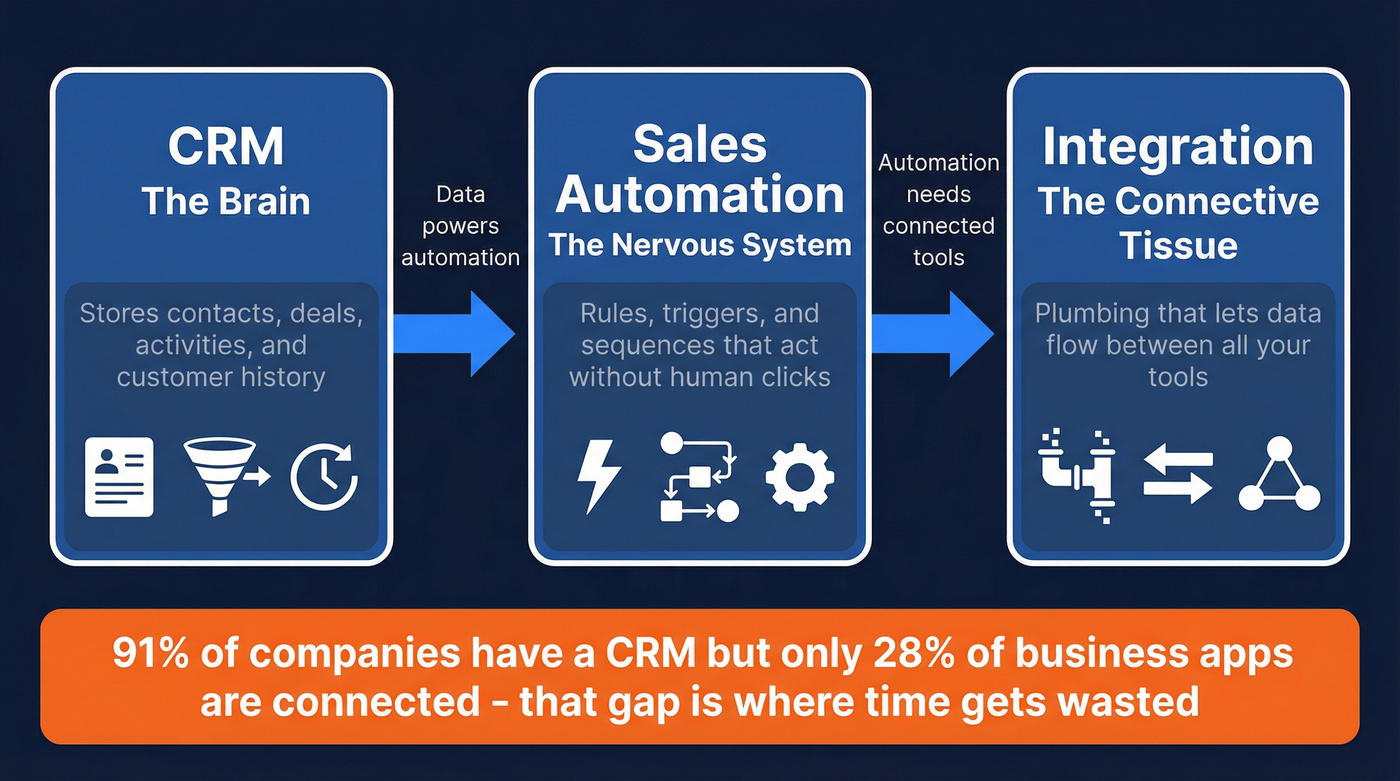
Your CRM is the brain - it stores contacts, deals, activities, and the history of every customer interaction. Sales automation is the nervous system - the rules, triggers, and sequences that make things happen without a human clicking buttons. Integration is the connective tissue, the plumbing that lets data flow between your CRM, your email tool, your dialer, your enrichment platform, and everything else in your stack.

Here's why the distinction matters: 91% of companies with 10+ employees use a CRM, but only 28% of business applications are connected. That gap - between having a CRM and having it actually talk to your other tools - is where most of the wasted time lives.
When a rep manually copies a lead's email from a spreadsheet into the CRM, then manually adds that same email to an Outreach sequence, then manually logs the call notes - that's a CRM without integration. When a new lead hits the CRM and automatically gets enriched with verified contact data, routed to the right rep, and enrolled in a personalized sequence based on their industry and title - that's what properly connected systems look like.
The difference isn't theoretical. It's the difference between reps spending 14 hours a week selling and spending 25+.
The Business Case - Why It Matters in 2026
"Automation saves time" isn't enough to get budget approval. Here's what does.

The ROI data on CRM investments is genuinely compelling: $8.71 returned for every $1 spent on sales CRM software. Most implementations hit positive ROI within 12-13 months. After implementation, teams see a 29% increase in sales revenue and a 34% boost in productivity. And 97% of businesses using CRM met or exceeded their sales goals - meaning the 3% who didn't were almost certainly dealing with adoption or data quality problems, not a CRM problem.
A few more numbers worth putting in front of your CFO:
- CRM can boost conversion rates by up to 300%
- Lead cost drops by up to 23% with CRM
- 42% improvement in sales forecasting accuracy
- 43% of businesses report CRM reduces employee workload by 5-10 hours per week
- Teams with automation make 23% more calls per day and close deals 25% faster
But here's the number that should change how you think about this: per Gartner's Future of Sales 2030 report, 70% of routine sales tasks will be automated by 2030. That's four years from now. Teams that haven't built the integration foundation by then won't be "behind" - they'll be structurally unable to compete.
The AI angle makes this even more urgent. Sellers who partner with AI sales tools are 3.7x more likely to meet quota. Companies using AI for lead qualification increase leads and appointments by more than 50%, with conversion rate improvements of 40% or higher. But AI doesn't work on messy, disconnected data. It amplifies whatever you feed it.
The 2026 math: A 10-rep team spending $50K/year on CRM + automation + data quality that generates a 29% revenue increase on a $2M pipeline adds $580K in revenue. That's not a cost center. That's the highest-ROI investment your sales org can make.

This article proves it: automation on bad data scales mistakes. Prospeo enriches your CRM contacts with 50+ data points at a 92% match rate, with emails verified at 98% accuracy and refreshed every 7 days - not the 6-week industry average. Native integrations with Salesforce and HubSpot mean your data stays clean automatically.
Stop automating bounces. Start automating pipeline.
The Data Quality Foundation (The Step Most Guides Skip)
Every CRM automation guide jumps straight to workflow templates. "Set up a lead routing rule! Build a follow-up sequence! Automate your pipeline stages!"

All of that is useless if your contact data is garbage.
Industry benchmarks show contact data decays 30-40% per year. People change jobs, companies get acquired, email addresses go stale. If you're automating sequences against a database you haven't cleaned in six months, you're automating bounces, wrong-person emails, and domain reputation damage at scale.

Before you configure a single automation workflow, run this checklist:
- Deduplication: Merge duplicate records. Most CRMs have native dedup tools - use them.
- Field standardization: Pick one format for job titles, industries, phone numbers. Enforce it.
- Email verification: Run every email through verification. Bounces above 5% will damage your sender reputation. (If you need a walkthrough, see how to verify an email address.)
- Enrichment: Fill in missing fields - direct dials, company size, industry, tech stack. Automation rules need data to trigger on. (Compare options in our lead enrichment tools guide.)
- Ongoing refresh: Data isn't a one-time project. Set up automated re-verification on a regular cycle. Use a CRM data clean process so decay doesn’t silently ruin performance.
As one Reddit user in r/CRM put it, tools claim CRM integration but it's "super shallow" - just basic contact sync, maybe an activity push, nothing with deep bidirectional data flow. The same applies to data: shallow data produces shallow automation. Verified, enriched, regularly refreshed data is the prerequisite for everything that follows.
Choosing Your CRM Integration Method
This is where most teams either overthink it or underthink it. There are three paths, and the right one depends on your budget, technical resources, and how many tools you're connecting.
Native Integrations
Quick to set up, limited in what they can do. Your CRM's built-in connections to tools like Gmail, Outlook, or specific marketing platforms. They're fine for basic syncing - contacts, activities, maybe deal stages.
The hidden cost most people miss: licensing fees for native connectors can reach $5,000-6,000/year per single connection. That adds up fast when you're connecting five or six tools. And you'll hit customization walls quickly - native integrations rarely support complex conditional logic or bidirectional data flows.
iPaaS Platforms (Zapier, Make, n8n, Workato)
This is where most teams in the 10-200 rep range should live. iPaaS (Integration Platform as a Service) tools let you build custom workflows between apps without writing code.
| Platform | Price | Integrations | Best For | Limitation |
|---|---|---|---|---|
| Zapier | $19.99-69/mo | 5,000+ | Non-technical teams | Expensive at scale |
| Make | $9-29/mo | 1,500+ | SMBs wanting power | Steeper learning curve |
| n8n | Free (self-host) / ~$20/mo cloud | 350+ nodes | Developer teams | Requires technical setup |
| Workato | ~$10K+/year | 1,000+ enterprise | Mid-large enterprise | Overkill for small teams |
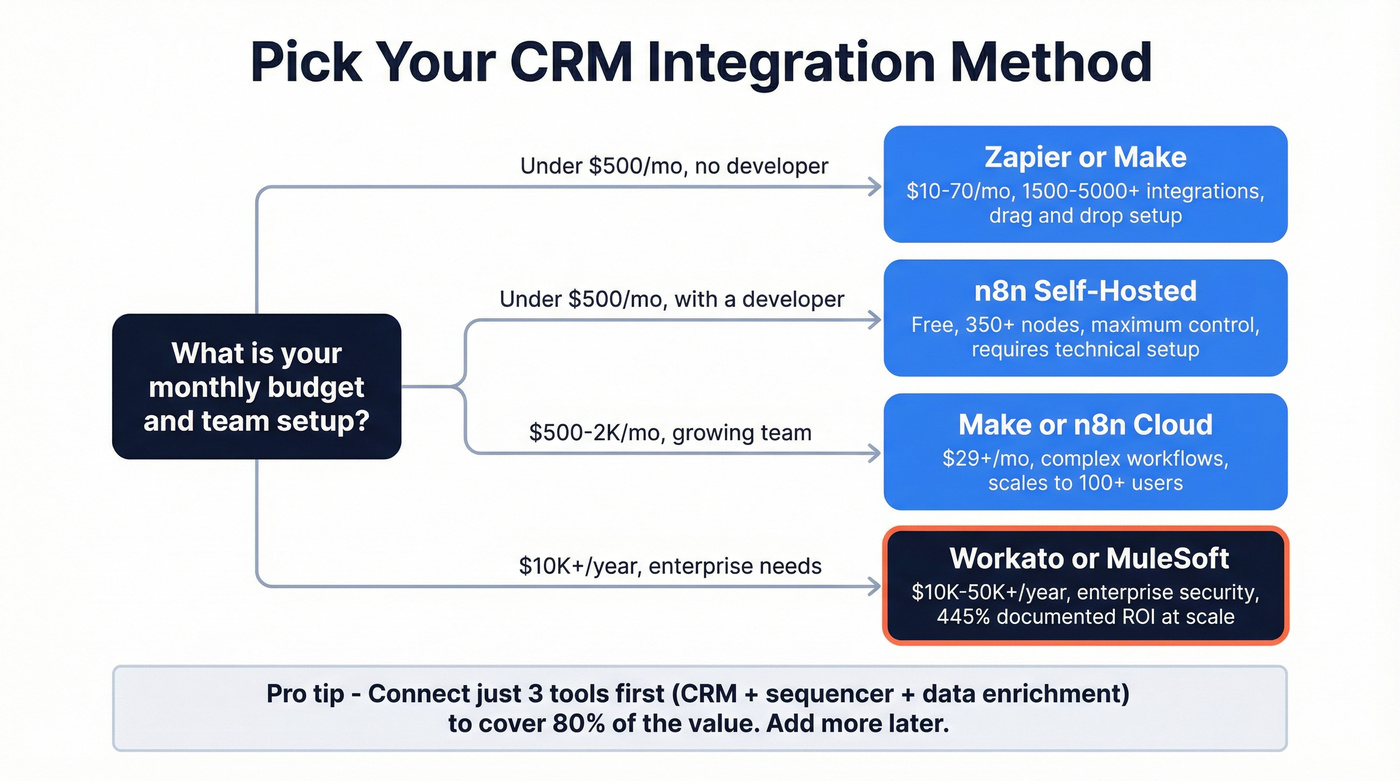
Here's the thing: stop trying to integrate everything. I've seen teams spend months connecting 12 tools into an elaborate automation web that breaks every time one vendor updates their API. Connect three tools - your CRM, your sequencer, and your data enrichment platform - and you'll cover 80% of the value. Add more later when you've proven the core workflows work. (If you’re doing this without engineering support, follow a no code sales automation approach.)
One pre-seed CTO on Reddit described the scaling problem perfectly: they started with Airtable + Make.com, and it worked great at 10 users. At 100+ users, the per-user pricing model made the whole setup unsustainable. Plan for where you'll be in 18 months, not where you are today.
Custom Code / API
Maximum flexibility, maximum cost. If you need deeply custom bidirectional syncs, real-time data transformations, or integrations with proprietary internal tools, custom code is the answer. But Gartner estimates that 70% of IT budgets go to maintaining existing systems. Custom integrations become maintenance burdens fast - especially if the developer who built them leaves.
MuleSoft is the enterprise standard here (~$50K+/year for mid-market implementations), and it delivers a documented 445% ROI for organizations with the scale to justify it.
Which Method Should You Pick?
- Budget under $500/mo, no developer: Zapier or Make
- Budget under $500/mo, with a developer: n8n (self-hosted)
- Budget $500-2K/mo, growing team: Make or n8n cloud with more complex workflows
- Budget $10K+/year, enterprise requirements: Workato or MuleSoft
- Unique data transformation needs: Custom API, but budget for ongoing maintenance
Ten Automated Workflows to Set Up This Week
Stop planning. Start with these. Each one follows a trigger-action-tool structure that works in any CRM.
1. Inbound Lead Routing
Trigger: New lead enters CRM from web form, chatbot, or import. Action: Auto-assign to rep based on territory, company size, or round-robin rules. Tool: Native CRM assignment rules (every major CRM has this).
This is the single highest-impact automation you can set up. Studies consistently show that responding within 5 minutes dramatically outperforms slower response times - in some cases by 10x on conversion rate. Don't let leads sit in a queue because someone forgot to check. (Benchmarks and SLAs: speed to lead metrics.)
2. New Prospect To-Do Templates
Trigger: Lead assigned to a rep. Action: Auto-create a task checklist: research company, check intent signals, personalize first touch, schedule follow-up. Tool: CRM task automation + template.
Keeps reps from skipping steps. Especially useful for new hires who don't have the muscle memory yet.
3. Follow-Up Email Sequences
Trigger: Lead hasn't responded in X days. Action: Send next email in sequence, then create a call task if no response after email #3. Tool: CRM + sequencer (Outreach, Salesloft, Instantly, Smartlead).
The "proposal stage 7-day" example is a classic: if a deal sits in "Proposal Sent" for 7 days with no activity, auto-send a check-in email, auto-create a call task, and if still no response, flag the deal for manager review. This is where connecting email automation to your CRM pays off most directly - reps stop losing deals to forgotten follow-ups. (If you want guardrails, use sales sequence best practices.)
4. Lead Scoring and Prioritization
| Approach | How It Works | Best For |
|---|---|---|
| Rule-based scoring | Assign points manually (e.g., +10 for pricing page visit, +20 for demo request) | Teams under 500 leads/month |
| AI scoring | Analyzes hundreds of data points, updates in real time, identifies hidden patterns | Teams with 6+ months of CRM data |
| Hybrid | Rules for known signals, AI for pattern detection | Most mid-market teams |
AI lead scoring can identify patterns humans would never catch - like prospects who visit your pricing page on mobile between 7-9 PM being 2x more likely to convert. After six months, the system understands your specific market better than any generic model.
Tool: CRM native scoring or AI scoring (HubSpot, Salesforce Einstein, Zoho Zia). (Deep dive: AI lead scoring vs traditional lead scoring.)
5. Deal Stage Triggered Actions
Trigger: Deal moves to a new pipeline stage. Action: Auto-send relevant content (case study at evaluation stage, ROI calculator at negotiation stage), update forecast, notify cross-functional team. Tool: CRM workflow automation + email templates.
6. Stalled Deal Alerts
Trigger: Deal hasn't moved stages in X days (customize by stage - discovery might be 5 days, negotiation might be 14). Action: Slack notification to rep and manager, auto-task to re-engage, optional auto-email to prospect. Tool: CRM + Slack integration via Zapier/Make.
7. Dormant Deal Re-Engagement
This is the workflow most teams forget to build and then kick themselves over.
Closed-lost deals aren't dead - they're sleeping.
Trigger: Closed-lost deal hits 90-day mark, or lost prospect shows new intent signals. Action: Enroll in re-engagement sequence with updated messaging. Auto-assign to original rep if still active. Tool: CRM + sequencer + intent data.
In SaaS, the win-back rate on 90-day re-engagement sequences runs 5-12% - free pipeline from deals you already paid to generate. Teams using structured re-engagement workflows shorten their sales cycles by 8-14 days.
8. Deal Won to Customer Handoff
Trigger: Deal marked "Closed Won." Action: Auto-create customer record, notify CS team, schedule onboarding kickoff, send welcome email, update revenue reporting. Tool: CRM + project management integration (Asana, Monday, Notion).
This is the handoff that breaks at most companies. One sales ops manager on Reddit described it perfectly: "The biggest pain point is the hand-off between sales and implementation. We constantly lose context and reporting accuracy." Automate it.
9. Win/Loss Follow-Up Analysis
Trigger: Deal closed (won or lost). Action: Auto-send feedback survey to prospect, log win/loss reason, update reporting dashboard, schedule rep debrief. Tool: CRM + survey tool (Typeform, Google Forms) via Zapier.

10. Data Enrichment Triggers
Trigger: New lead enters CRM from any source. Action: Auto-enrich with verified email, direct dial, company data, tech stack, and intent signals. Flag incomplete records for manual review. Tool: Prospeo enrichment via native CRM integration or API - 98% email accuracy, 83% enrichment match rate, and a 7-day refresh cycle that keeps records current.
This is the workflow that makes all the other nine work. Without verified contact data, your sequences bounce, your lead scoring has gaps, and your routing rules fire on incomplete records. Set this up first.
The #1 quick win most Reddit users agree on? Email and calendar auto-logging. It sounds basic, but having every interaction logged automatically saves hours of context-switching and ensures your CRM is a source of truth, not a graveyard of stale data. (Implementation options: CRM automatic email logging.)
Best CRM Platforms for Sales Automation in 2026
The CRM you pick determines what's possible. Here's the honest breakdown.
| Platform | Starting Price | AI Features | Automation Depth | Best For |
|---|---|---|---|---|
| Salesforce | $80-165/user/mo | Einstein AI (extra $) | Deep | 50+ rep orgs |
| HubSpot | Free / $90-150/user/mo | Built-in predictive | Strong | Under 20 reps |
| Zoho CRM | $23-52/user/mo | Zia AI included | Strong | Budget-conscious |
| Pipedrive | $24-129/user/mo | Sales Assistant AI | Moderate | Visual pipeline fans |
| Freshsales | $9-49/user/mo | Freddy AI | Moderate | Built-in comms |
| Keap | $299/mo (2 users) | Basic | Moderate | Solopreneurs |
| Creatio | $25-80/user/mo | AI agents included | Strong | Composable needs |
Salesforce
The most powerful CRM on the market. Also the most complex. Salesforce holds 21-26% market share for a reason - its AppExchange ecosystem, Einstein AI, and workflow automation depth are unmatched. Enterprise at $165/user/mo gives you everything, but Einstein AI features require additional licensing (~$50-75/user/mo on top).
Here's my honest take: Salesforce is overkill if you have fewer than 50 reps. The setup takes 8-12 weeks, you'll need a dedicated admin, and you'll pay for capabilities you won't use for years. But if you're scaling past 50 reps and need complex territory management, CPQ, and custom objects - nothing else comes close.
HubSpot
The fastest path from "we need a CRM" to "we're using a CRM." HubSpot's free CRM is genuinely useful (not just a lead-gen trap), and Sales Hub Professional at $90/user/mo unlocks the automation features most teams need. 180K+ customers and growing. HubSpot also excels at email automation within the CRM, making it straightforward to connect sequences, templates, and tracking without third-party middleware.
Skip this if you need deep customization or complex multi-object workflows. Choose this if you want your team adopting the tool within two weeks instead of two months.
Zoho CRM
Criminally underrated. Zoho's Enterprise plan at $40/user/mo includes Zia AI for sentiment analysis and deal predictions - features that cost extra at Salesforce. The internal app ecosystem (Zoho One) means you can run marketing, support, finance, and CRM from one vendor at a fraction of the cost.
The tradeoff: Zoho's UI isn't as polished as HubSpot's, and the third-party integration ecosystem is smaller. But for pure value? Hard to beat $23-52/user/mo with AI included.
Pipedrive
Visual Kanban pipeline that reps enjoy using. Sales Assistant AI helps prioritize deals. $24-129/user/mo depending on tier. Popular in real estate and consulting. Skip it if you need marketing automation or complex reporting.
Freshsales
Freddy AI for predictive lead scoring, plus built-in email, phone, and chat. Starting at $9/user/mo makes it the cheapest entry point with real automation. Best for SaaS companies that want a dialer and sequencer inside their CRM without buying separate tools.
Keap
All-in-one for solopreneurs and tiny teams. $299/mo for 2 users is steep per-head, but it includes CRM, email marketing, payments, and basic automation. Skip it if you have more than 5 reps - the per-user economics don't scale.
Creatio
The composable CRM. AI agents included at no extra cost - a genuine differentiator vs. Salesforce's add-on pricing. $25-80/user/mo depending on modules. The no-code workflow builder and included AI agents make it compelling for mid-market teams who want composable flexibility without Salesforce complexity.
AI-Powered CRM Automation - What's Working in 2026
AI in CRM falls into three categories. Knowing which one you need prevents you from paying for capabilities that sound impressive in demos but collect dust in production.
Predictive AI analyzes historical data to forecast outcomes. Lead scoring, deal probability, churn prediction, revenue forecasting. This is the most mature category and the one delivering the clearest ROI. Companies using AI for lead qualification increase leads and appointments by more than 50%, with conversion rate improvements of 40% or higher. Salesforce Einstein, HubSpot's predictive scoring, and Zoho Zia all do this well.
Generative AI creates content: email drafts, call summaries, proposal sections, meeting prep briefs. 65% of businesses have adopted CRM with generative AI, and those using it are 83% more likely to exceed sales goals. The practical win isn't replacing reps - it's eliminating the 20 minutes of writing time per prospect that kills outbound velocity.
Conversational AI handles chatbots, virtual assistants, and real-time coaching. 36% of sales teams with agents use them for coaching - surfacing talk-time ratios, objection handling suggestions, and next-best-action prompts during live calls.
Real talk: if your deals average under $15K, you don't need Salesforce Einstein or any enterprise AI add-on. HubSpot's built-in predictive scoring or Zoho Zia will give you 90% of the value at a fraction of the cost. The teams we've seen overspending on AI are almost always the ones whose data quality doesn't justify the investment. Fix the data first, then decide if you need the premium AI layer.
The caution: 26% of AI transformations fail. The failures almost always trace back to bad data. AI amplifies whatever it's trained on. Feed it clean, enriched, regularly refreshed CRM data and it performs. Feed it stale records with wrong emails and outdated titles, and it confidently recommends the wrong actions at scale.
A Note on Security and Compliance
51% of sales pros say data security concerns halt AI initiatives. If you're in a regulated industry - financial services, healthcare, government - your CRM integration stack needs to meet compliance requirements before you connect anything. Workato offers SOC 2, GDPR, and HIPAA compliance out of the box. Salesforce Shield adds encryption and audit trails. Whatever you choose, verify compliance certifications before signing, not after your legal team sends a panicked Slack message three months into implementation.
Eight Mistakes That Kill CRM Automation Adoption
I've watched teams invest six figures in CRM automation and get zero adoption. Every time, it traces back to one of these.
Too Many Fields at Launch
Your CRM doesn't need 47 required fields on day one. Reps will hate it, skip fields, or enter garbage data. Start with the 8-10 fields that drive your automation rules and reporting. Add more later.
Being Too Ambitious
"We'll automate the entire customer lifecycle across all four departments in Q1." No, you won't. Break it into phases. Start with one team, one workflow, one integration. Prove value, then expand.
Data Inconsistencies
If "VP of Sales," "VP Sales," "Vice President, Sales," and "Head of Sales" all mean the same thing but live as four different values in your CRM, your automation rules will break. Standardize fields before you automate on them.
Lack of Stakeholder Engagement
Identify your executive sponsor, product owner, and power users before you start. One Reddit user described their large company having "literally no enterprise-wide system for collating information regarding accounts... everyone doing their own thing, from Excel spreadsheets, hand-written diaries, relying on memory." That's what happens without buy-in.
No Defined Metrics
If you can't answer "how will we know this worked?" before go-live, you're not ready. Set KPIs: adoption rate, time-to-lead, sequence completion rate, bounce rate, pipeline velocity. Measure before and after.
No Change Management
Training isn't a one-hour webinar the week before launch. It's ongoing enablement, role-specific documentation, office hours, and - critically - rewarding early adopters who champion the new system. The frustration of watching a $100K CRM implementation fail because nobody budgeted for training is something I've seen too many times to stay quiet about.
No Mobile Access
65% of salespeople using mobile CRM meet quotas vs. only 22% who don't. If your CRM setup doesn't work on a phone, field reps won't use it. Period.
No Systems Integration
A CRM that doesn't connect to your email, calendar, sequencer, and enrichment tools isn't a system of record - it's a data island. Your CRM must connect to the tools your team uses every day, or it becomes another tab they ignore. Connecting email automation to your CRM isn't optional - it's the baseline for any team that wants reps selling instead of toggling between tabs.
Implementation Checklist - From Zero to Automated
Skip the 40-page implementation plan. Here's the phased approach that works.
Phase 1: Pre-Integration (Week 1-2)
- Define 3-5 specific goals (e.g., "reduce lead response time from 4 hours to 15 minutes")
- Identify stakeholders: executive sponsor, CRM admin, 2-3 power users per team
- Audit current data: how many duplicates, what's the bounce rate, which fields are empty
- Clean and enrich your database (deduplicate, verify emails, fill missing fields)
- Budget for licenses, integration tools, training, and ongoing support
Phase 2: Configuration (Week 2-4)
- Set up core CRM fields (keep it minimal - 8-10 required fields max)
- Configure your top 3 automation workflows (lead routing, follow-up sequences, enrichment triggers)
- Connect your integration platform (Zapier/Make/n8n) to CRM + sequencer + enrichment tool
- Build email templates and sequence frameworks
- Set up dashboards for your defined KPIs
Phase 3: Testing (Week 4-5)
- Run a pilot with 3-5 reps (pick your most tech-savvy and your most resistant)
- Test every workflow end-to-end: create a lead, watch it route, verify enrichment fires, confirm sequence enrolls
- Test on mobile
- Document bugs and edge cases
- Gather pilot feedback and iterate
Phase 4: Launch (Week 5-6)
- Roll out to full team in waves (not all at once)
- Run live training sessions - role-specific, not generic
- Reward early adopters publicly (Slack shoutouts, small incentives)
- Keep workflows simple initially - complexity comes later
- Have a dedicated Slack channel or help desk for questions
Phase 5: Optimization (Ongoing)
- Monitor adoption rates weekly for the first month
- Track KPIs against pre-launch baselines
- Review and refine automation rules monthly
- Add new workflows one at a time as the team gets comfortable
- Re-enrich your database quarterly (or set up automated refresh cycles)
The teams that succeed treat CRM integration and sales automation as an ongoing practice, not a one-time project. The system should get smarter and more automated every quarter.
Contact data decays 30-40% per year. That's why Prospeo refreshes 300M+ profiles every 7 days and runs 5-step verification with catch-all handling and spam-trap removal. Teams using Prospeo cut bounce rates from 35%+ to under 4% and tripled their pipeline. Your CRM integration deserves data that won't wreck your domain reputation.
Get the data foundation right - everything else follows.
FAQ
What is CRM integration in sales automation?
CRM integration connects your CRM to sequencers, enrichment platforms, dialers, and marketing tools so data flows automatically between them in real time. Instead of manually copying contact info or logging activities, integrations handle it instantly - eliminating duplicate entry, keeping records current, and enabling trigger-based workflows that automate repetitive tasks across your entire sales stack.
How long does it take to implement CRM automation?
Simple iPaaS setups (Zapier or Make connecting 2-3 tools) take 2-4 weeks from planning to launch. Enterprise Salesforce deployments with custom integrations and multi-department rollouts typically run 8-12 weeks. Start with one team and three core workflows, then expand once adoption is proven - phased rollouts consistently outperform big-bang launches.
What's the ROI of CRM sales automation?
CRM automation returns $8.71 for every $1 invested on average, with most implementations reaching positive ROI within 12-13 months. Teams report a 29% increase in sales revenue and 34% productivity boost. Even small teams see meaningful time savings in the first quarter - the integration ROI data is consistent across company sizes.
Do I need clean data before automating my CRM?
Yes - automation on bad data accelerates failure, not efficiency. If your database has stale emails, duplicates, or missing fields, every workflow amplifies those problems. Verify emails (keep bounces under 5%), deduplicate records, and enrich contacts before activating sequences. Teams that skip this step typically see 20%+ bounce rates that tank sender reputation.
What's the best integration platform for small sales teams?
Make hits the sweet spot for teams under 50 reps - comparable automation power to Zapier at $9-29/mo versus $19.99-69/mo, with 1,500+ app connections. For developer-led teams, n8n (free self-hosted) offers maximum flexibility. Zapier remains the easiest no-code option with 5,000+ integrations if budget isn't the primary constraint.