12 Intro Email Samples Backed by 5.5 Million Emails
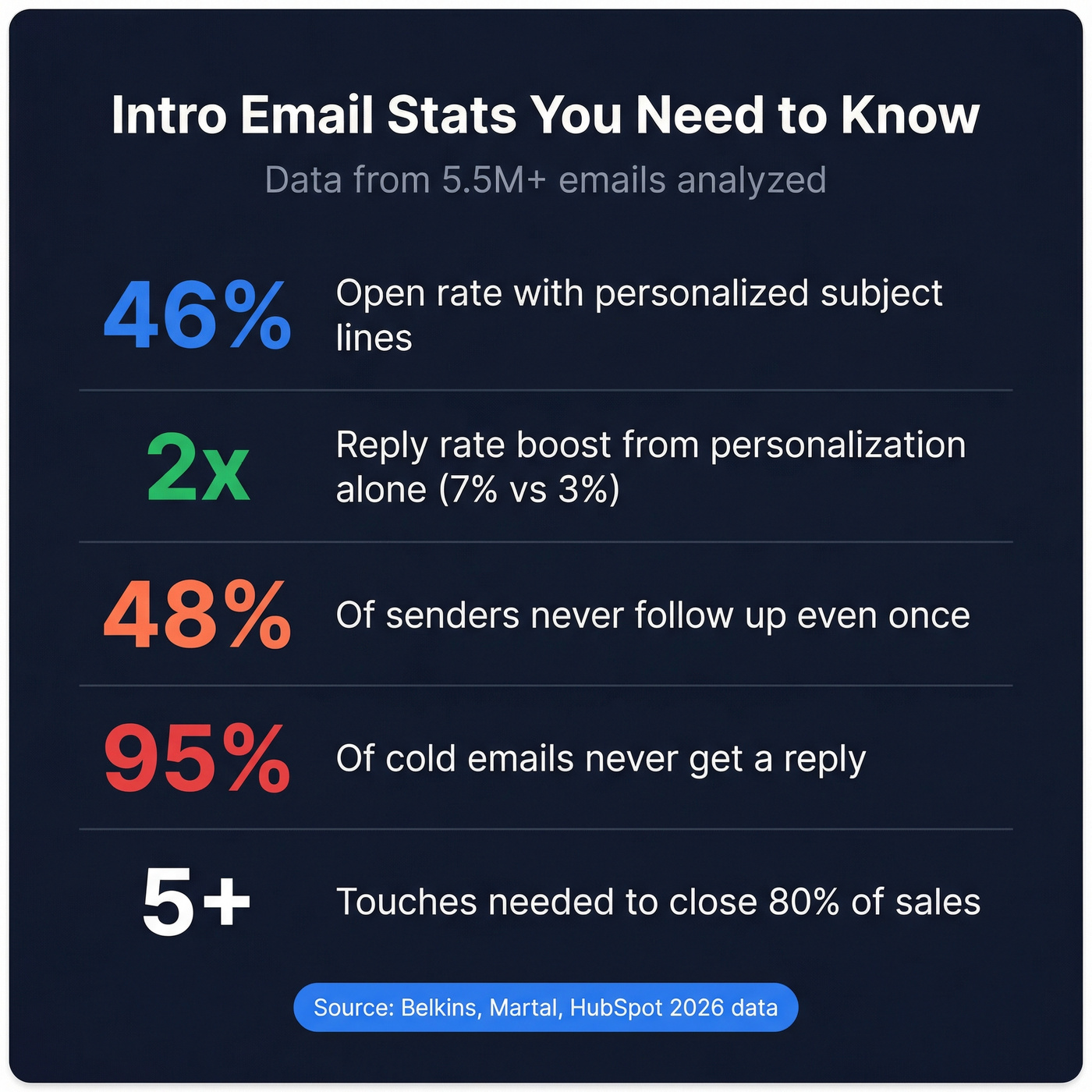
95% of cold emails never get a reply. The other 5% follow a pattern - short, specific, and structured around the reader's world instead of yours. Here are 12 intro email samples across five scenarios, plus the subject line data and follow-up cadence that separate emails that land from emails that rot in someone's inbox.
Personalized subject lines hit 46% open rates vs 35% without. Use the recipient's name or company. And the biggest killer? No follow-up. 48% of people never send a second email, yet 80% of sales require five or more touches.
Jump to your scenario: [Cold outreach](#cold-outreach - sales) | New job | [Networking](#networking - informational-interviews) | [Warm intro](#warm-intros - connecting-two-people) | Event follow-up
Why Most Introduction Emails Get Ignored
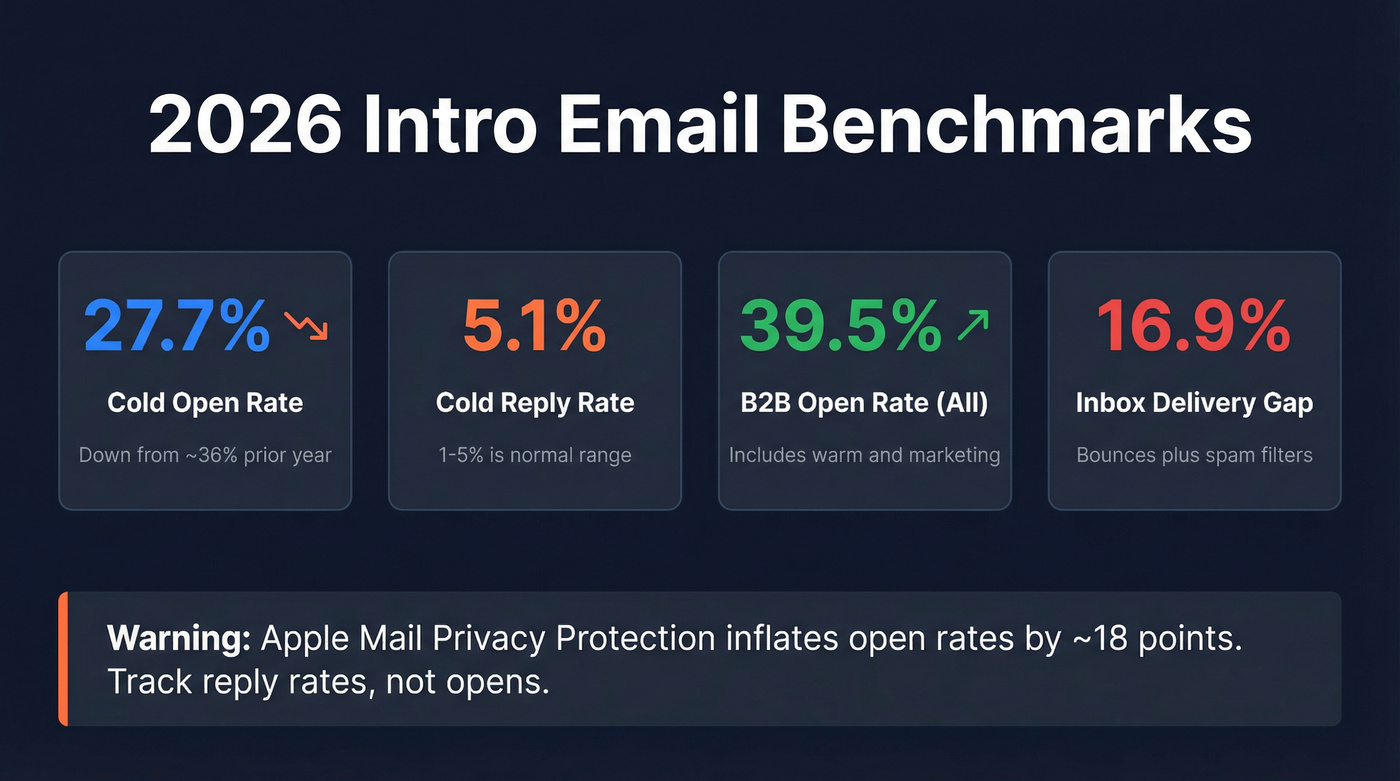
You spend 20 minutes crafting the perfect introduction email, hit send, and hear nothing. Not even a polite "no thanks." The average cold email reply rate sits at 5.1%, and roughly 16.9% of emails never even reach the inbox.
The problem isn't that people don't read email. It's that most intro emails read like they were written for the sender - opening with credentials, meandering through a company pitch, and closing with a vague "let me know if you'd like to chat." The templates below fix that by leading with the reader's context every time, whether you're writing a self-introduction email for a new role or a cold business introduction to a prospect.
2026 Intro Email Benchmarks
Before writing anything, know what "good" actually looks like:
| Metric | Benchmark | Notes |
|---|---|---|
| Open rate (cold) | 27.7% | Down from ~36% prior year |
| Reply rate (cold) | 5.1% | 1-5% is normal range |
| B2B open rate (all) | 39.5% | Includes warm/marketing |
| Inbox delivery gap | ~16.9% | Bounces + spam filters combined |
One caveat worth flagging: open rates are increasingly unreliable. Apple Mail Privacy Protection pre-loads tracking pixels, inflating open rates by roughly 18 points - and Apple Mail accounts for 46% of email clients. Track reply rates, not opens. Replies are the only metric a privacy feature can't fake.
If you want the full deliverability picture (not just opens), use an email deliverability checklist and monitor email deliverability tracking over time.
Subject Lines That Work
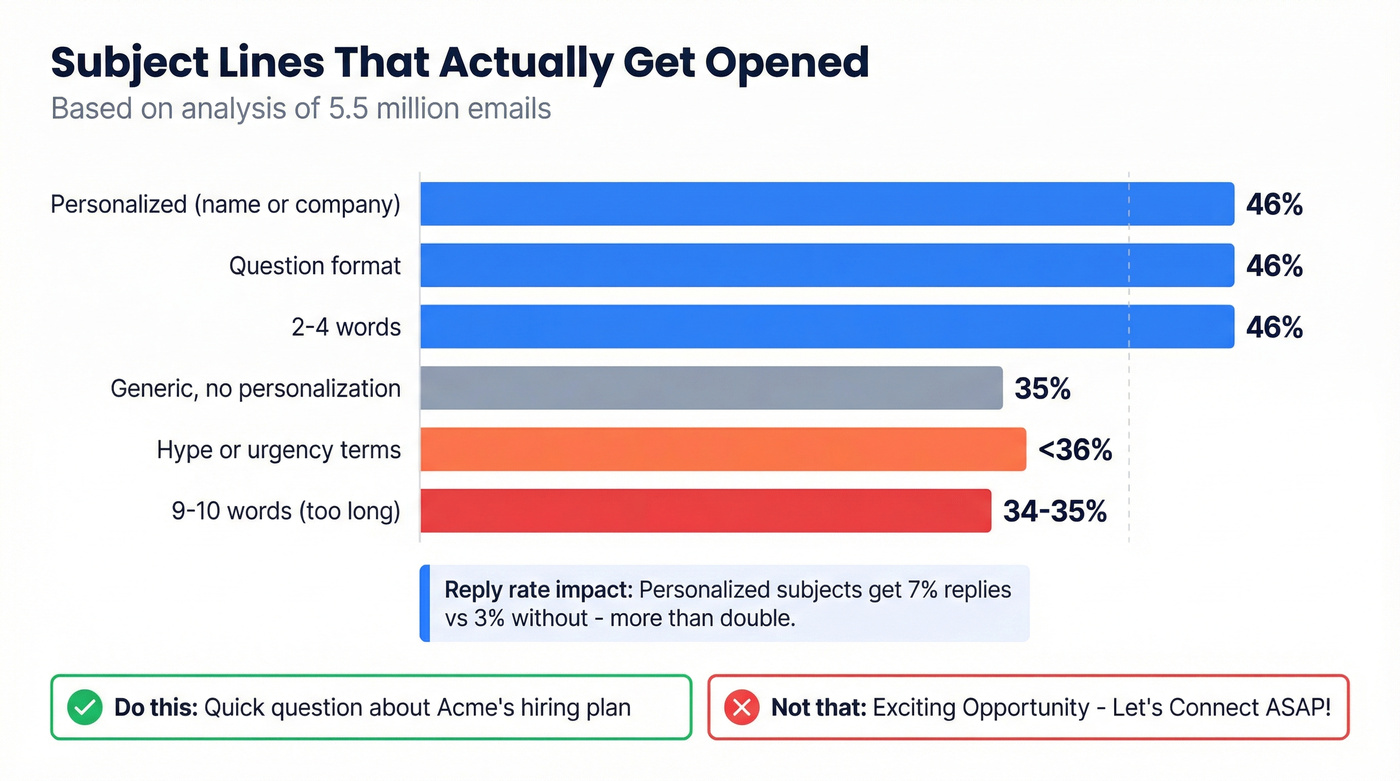
A Belkins analysis of 5.5 million emails gives us a clear picture of what actually drives opens.
| Subject Line Type | Open Rate | Example |
|---|---|---|
| Personalized (name/company) | 46% | "Quick question about [Company]'s Q1 pipeline" |
| Question format | 46% | "Struggling with [specific problem]?" |
| 2-4 words | 46% | "Your outbound strategy" |
| Generic / no personalization | 35% | "Introduction - let's connect" |
| Hype / urgency terms | <36% | "URGENT: Don't miss this opportunity" |
| 9-10 words | 34-35% | "I wanted to reach out and introduce myself..." |
Short, personalized, and question-based wins. Anything that reads like a marketing blast loses.
Do this: "Quick question about [Company]'s hiring plan" Not that: "Exciting Opportunity - Let's Connect ASAP!"
The reply rate gap is even starker. Personalized subject lines pulled a 7% reply rate vs 3% without - more than double, from a subject line change alone. Advanced personalization beyond just the name, like referencing a specific trigger event or pain point, can push reply rates up to 18%.
If you need more angles, borrow from these words to avoid in email subject lines and proven subject lines for follow-up emails.

Personalized subject lines double reply rates - but only if your email actually reaches the inbox. Prospeo's 98% email accuracy and real-time verification cut bounce rates from 35% to under 4%, so every intro email you craft hits a real person.
Stop perfecting emails that bounce. Verify every address before you hit send.
Anatomy of an Intro Email
Every effective introduction email follows the same six-part structure. The order matters.
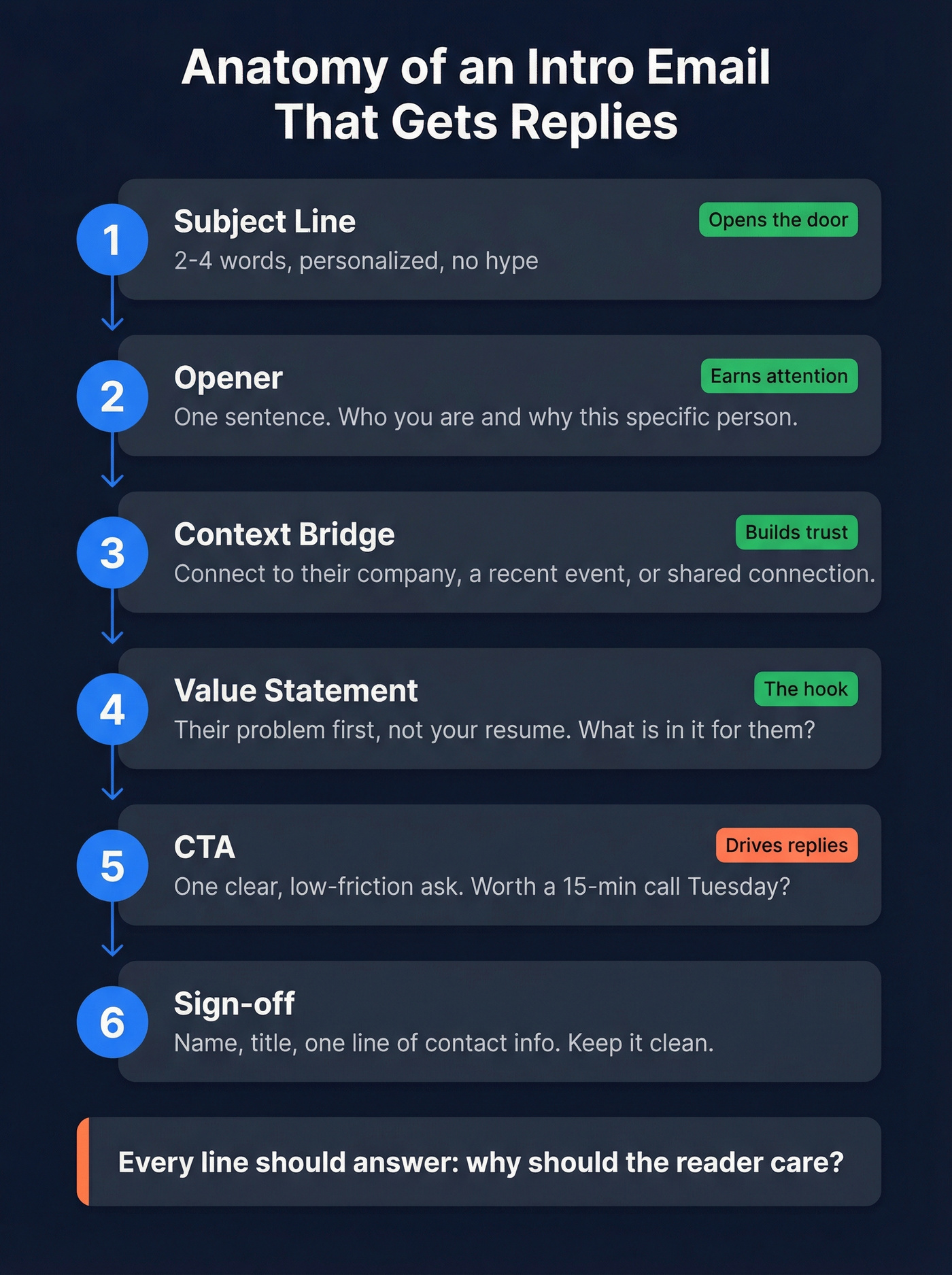
- Subject line - 2-4 words, personalized, no hype.
- Opener - One sentence. Who you are and why you're emailing this specific person.
- Context bridge - Connect to something the reader cares about: their company, a recent event, a shared connection.
- Value statement - What's in it for them? Lead with their problem, not your resume.
- CTA - One clear, low-friction ask. "Worth a 15-minute call Tuesday?" beats "Let me know your thoughts."
- Sign-off - Name, title, one line of contact info.
For more frameworks you can plug into this structure, see sales email structure and these cold email tactics.
Here's the thing: most people get the structure right but load the wrong content into each slot. They stuff credentials into the opener, a company pitch into the value statement, and a vague "let me know" as the CTA. Flip the lens. Every line should answer "why should the reader care?"
12 Samples by Scenario
Cold Outreach & Sales
Step zero before any cold outreach: verify the email address. A single bad batch can torch your deliverability for weeks. We've seen teams go from 35% bounce rates to under 4% just by running lists through real-time verification before hitting send.
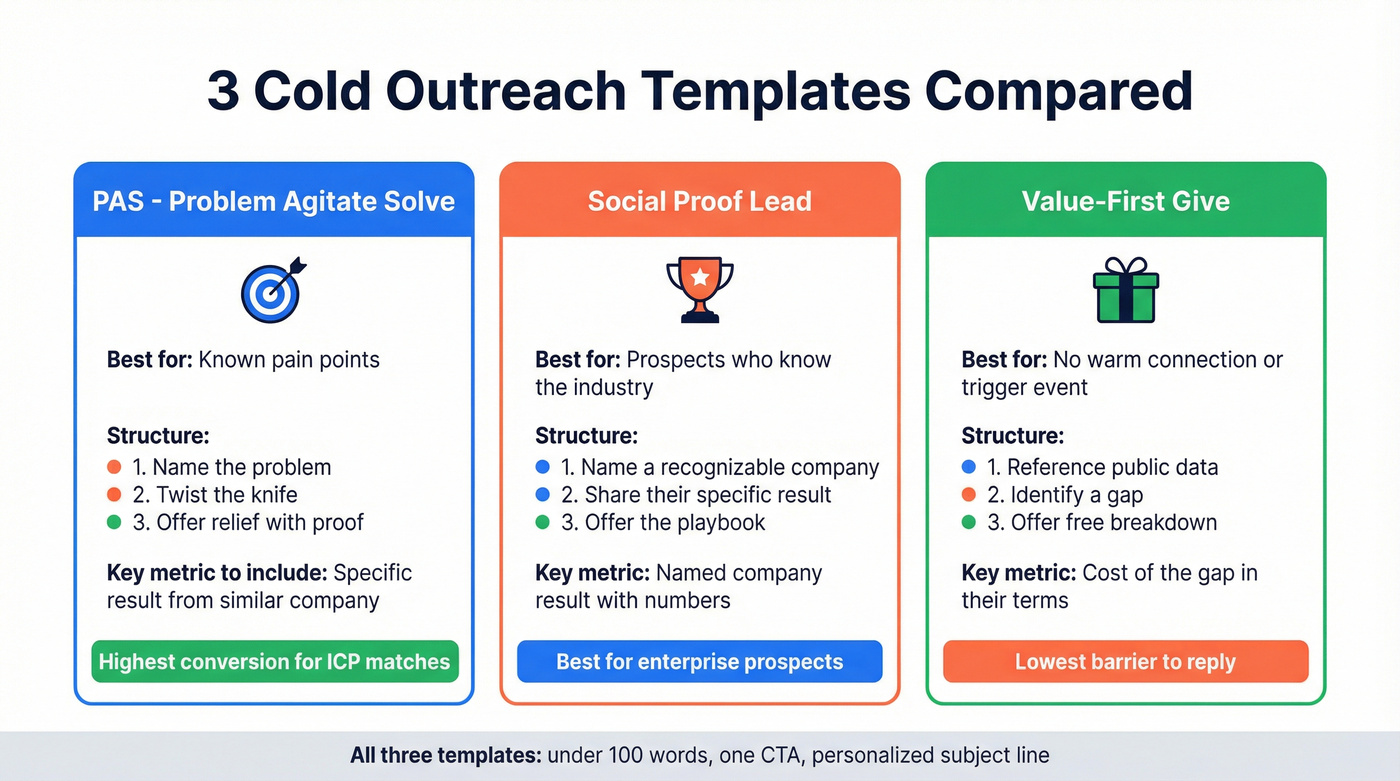
Template 1: PAS (Problem-Agitate-Solve)
In our experience, PAS outperforms generic pitches by a wide margin. Name a problem, twist the knife briefly, then offer relief.
Subject: [Company]'s outbound reply rates
Hi [First Name],
Most outbound teams at [Company]'s stage are seeing reply rates under 3% - which means reps burn 80% of their week on sequences that go nowhere.
The issue usually isn't volume. It's targeting the wrong accounts with generic messaging.
We helped [Similar Company] lift reply rates from 2.4% to 8.1% in 6 weeks by rebuilding their ICP filters. Worth a 15-minute call Thursday?
[Your name]
Why it works: Names a specific, quantified pain. The agitation reframes the problem - it's not effort, it's targeting. The solve includes a concrete metric from a peer company.
Template 2: Social Proof
Subject: How [Known Company] cut their sales cycle by 30%
Hi [First Name],
[Known Company]'s VP of Sales was dealing with the same pipeline stall your team posted about in [Company]'s last earnings call - long cycles, low close rates on enterprise deals.
After implementing [your solution], they shortened their average cycle from 94 to 66 days and added $2.1M in pipeline last quarter.
I can share the exact playbook in 15 minutes. Does Tuesday work?
[Your name]
Why it works: Leads with a recognizable name and a specific result. References something public about the prospect's company to prove you did homework.
Template 3: Value-First
This is the template I reach for when there's no warm connection and no obvious trigger event - just a prospect who fits the ICP.
Subject: Quick audit of [Company]'s [specific area]
Hi [First Name],
I pulled [Company]'s [public data point - job postings, tech stack, recent funding] and noticed a gap in [specific area] that's costing companies like yours 15-20% in [metric].
I put together a 2-minute breakdown - no strings. Want me to send it over?
[Your name]
Why it works: Gives before asking. The "2-minute breakdown" is low-commitment and signals you've already done work for them.
Using the recipient's name in the subject line alone lifts open rates by 26%. Combine that with a company reference and you're well above the 46% threshold.
If you're building a full sequence (not just the first touch), start with a proven outreach email template and a deliverability-first outbound email campaign.
New Job Introductions
Send individual emails - not a mass BCC. People can tell, and it undercuts the personal connection you're trying to build.
Template 4: Close Teammate
This is the email that sets the tone for your working relationship, so make the ask specific. Send it on day one.
Subject: New [Your Title] on the [Team Name] team
Hi [Name],
I'm [Your Name], the new [Title] reporting to [Manager]. I'll be working closely with you on [project/area], and I'm looking forward to getting up to speed.
Would love to grab coffee - or a virtual one - this week to hear how things work from your perspective. What day works?
Best, [Your Name]
Why it works: Mentions the manager and project by name, signaling you've done your homework before day one. The specific ask ("this week") is easy to say yes to.
Template 5: Cross-Functional Team
Subject: Intro - new [Title] in [Department]
Hi [Name],
I just joined as [Title] on the [Department] team. I know our teams collaborate on [specific area], and I want to make sure that handoff stays smooth.
I'll send a calendar invite for a quick intro in my first two weeks - feel free to suggest a better time.
[Your Name]
Template 6: Client Handoff
This one matters more than most people realize. Clients get nervous during transitions, and a confident, specific handoff email prevents churn before it starts.
Subject: Your new point of contact at [Company]
Hi [Client Name],
I'm [Your Name], taking over [Predecessor]'s role as your [Title] at [Company]. [Predecessor] spoke highly of your partnership, and I've reviewed our recent work together on [project].
I'd like to schedule a 20-minute call to introduce myself and make sure nothing falls through the cracks. Does [day] work?
Best, [Your Name]
Why it works: Acknowledges the predecessor, references a specific project, and proactively owns the transition. The client feels handled, not handed off.
Template 7: Predecessor
Subject: Taking over [Role] - quick question
Hi [Predecessor Name],
I'm [Your Name], stepping into the [Role] you held at [Company]. I've been getting up to speed on [specific project/process], and I'd really appreciate any tips on [specific area] - especially anything that isn't in the documentation.
Would you be open to a 15-minute call sometime this week?
Thanks, [Your Name]
Networking & Informational Interviews
Keep networking emails to 4-5 sentences with a single specific ask. The more vague your request, the less likely you'll hear back.
Template 8: Mutual Connection
Lead with the mutual contact's name - it's the single strongest trust signal in a warm introduction email.
Subject: [Mutual Contact] suggested I reach out
Hi [Name],
[Mutual Contact] mentioned you'd be a great person to talk to about [specific topic]. I'm currently [brief context - your role/situation], and I'm exploring [specific area].
Would you have 15 minutes for a quick call? I have two specific questions about [topic] and promise to keep it tight.
Thanks, [Your Name]
Why it works: The mutual contact in the subject line alone gets this opened. Promising "two specific questions" signals you won't waste their time.
Template 9: Cold Networking
Subject: Your [talk/article/post] on [topic]
Hi [Name],
I read your [specific piece of content] and it changed how I think about [specific takeaway]. I'm working on [related project/challenge] and would love to hear how you approached [specific question].
Any chance you'd have 15 minutes this month? Happy to work around your schedule.
[Your Name]
Warm Intros - Connecting Two People
Always use the double opt-in approach. Don't share someone's contact info without asking first.
Template 10: Permission Email (Double Opt-In)
Subject: Intro to [Person B] - okay to connect you?
Hi [Person A],
I know someone who'd be a great fit for [specific reason]. [Person B] is [brief description] and is working on [relevant project]. I think you two would have a lot to talk about around [topic].
Mind if I make the intro?
[Your Name]
Template 11: The Actual Introduction
Subject: Intro: [Person A] <> [Person B]
Hi [Person A] and [Person B],
Connecting you two. [Person A] - [Person B] is [one-line description + why they're relevant]. [Person B] - [Person A] is [one-line description + why they're relevant].
I think you'd both benefit from a conversation about [specific topic]. I'll let you take it from here.
[Your Name]
Event Follow-Up
Template 12: Post-Event
Subject: Great talking [specific topic] at [Event]
Hi [Name],
Really enjoyed our conversation about [specific detail from the event - not just "your talk"]. Your point about [specific insight] stuck with me, especially given what we're working on at [Your Company].
Would love to continue the conversation. Free for a quick call next week?
[Your Name]
Why it works: Referencing a specific detail proves you actually talked. Generic "great meeting you" emails get deleted.
When They Don't Reply
80% of sales require five or more follow-ups, but 48% of people quit after one attempt. That math is brutal.
If your deal size is above $5k, you should be following up at least five times. The average cold email conversion rate is roughly 0.2% - one deal per 500 emails. You can't afford to leave touches on the table.
| Touch | Timing | What to Send |
|---|---|---|
| Initial email | Day 0 | Your intro email |
| Follow-up 1 | Day 3 | New angle - share a relevant insight or resource |
| Follow-up 2 | Day 7 | Social proof - brief case study or metric |
| Follow-up 3 | Day 14 | Trigger event - reference something new about their company |
| Follow-up 4 | Day 21 | Breakup - "closing the loop" with a final value add |
Each follow-up must add new value. "Just checking in" and "bumping this to the top of your inbox" are the fastest way to get marked as spam. Share a relevant article, a competitor insight, a quick benchmark - something that justifies the reader's attention even if they never reply.
Let's be honest about multichannel, too: combining email with phone and social touches can boost results by up to 287%. Even if you stick to email-only sequences, the cadence above still outperforms the one-and-done approach by an order of magnitude.
Contrarian timing: Midweek mornings are crowded. VanillaSoft's research shows off-peak windows perform better - Monday afternoons after 2 PM, Friday mornings, and Sunday evenings for executives. Send at odd minutes (10:07, not 10:00) so your emails don't look automated.
If you want a tighter system for timing and messaging, use a proven sales cadence example and this SDR follow-up strategy.
Mistakes That Kill Intro Emails
Too long. If your email needs scrolling on mobile, it's too long. Aim for 50-125 words in the body. Cut ruthlessly.
Vague CTA. "Let me know your thoughts" isn't a CTA. Try: "Does Thursday at 2 PM work for a 15-minute call?"
No personalization. Generic emails get silence. Reference their company, role, or a recent event. Personalization alone can move reply rates from 3% to 7% with just a subject line change.
Sending to unverified addresses. 16.9% of cold emails never reach the inbox. Before any outreach campaign, run your list through Prospeo's real-time verification - it catches invalid addresses and spam traps with 98% accuracy and flags catch-all domains so you can decide whether to risk the send. (If you’re comparing tools, start with this list of the best email checker tool options.)
Over-formal tone. "I hope this email finds you well" signals "I copied this from a template." Write like you'd talk to a colleague. If you want better openers, use these alternatives to I hope this email finds you well.
No follow-up plan. Sending one email and waiting isn't a strategy. Build your cadence before you send the first touch, and start warming up at 10-20 emails per day to protect your sender reputation.
FAQ
How long should an intro email be?
50-125 words in the body. Anything longer gets ignored on mobile. The templates above average 75 words, which is the sweet spot for cold and warm introductions alike.
What's the best time to send an introduction email?
Monday afternoons after 2 PM, Friday mornings, and Sunday evenings outperform crowded midweek slots. Send at odd minutes like 10:07 to avoid looking automated. And track replies, not opens - Apple Mail inflates open data by ~18 points.
How many follow-ups should I send?
Three to five for most scenarios. For sales outreach with deal sizes above $5k, send at least five - 80% of deals close after five or more touches. Space them 3-7 days apart and add new value each time.
Should I use a template or write from scratch?
Start with a template, then personalize two to three details per recipient. The template gives you structure; the personalization gives you replies. Every intro email sample in this guide is designed to be customized - swap in real names, real metrics, and real context before hitting send.
Skip templates entirely if...
...you're emailing someone you've already met in person. In that case, a two-sentence email referencing your conversation will outperform any template. Templates are scaffolding for cold and semi-warm outreach, not a replacement for genuine rapport.
The templates above work. Bad data doesn't. Teams using Prospeo send 4x the volume with bounce rates under 4% - because every email is verified through a 5-step process with catch-all handling and spam-trap removal. At $0.01 per email, bad data is a choice.
Find and verify your prospect's real email in one click with 40,000+ other users.