How to Run an Outbound Email Campaign That Gets Replies in 2026
You launched an outbound email campaign last Tuesday - 200 emails from a fresh domain. Zero replies. A 14% bounce rate. Google's now flagging your sending domain.
The campaign didn't fail because your copy was bad. It failed because you skipped the infrastructure. Most outbound results come down to technical setup and list quality first, copy second - and most guides get that backwards. We've watched teams rewrite subject lines for weeks while their domain reputation quietly tanks from unverified data, and it's frustrating every time.
Here's what actually moves the needle:
- Infrastructure first. SPF + DKIM + DMARC, 4-6 weeks of warm-up, every email verified before you hit send.
- Keep it short. 6-8 sentences per email, 3 follow-ups max, send on Thursdays.
Technical Setup Before You Send
Google, Yahoo, and Microsoft all enforce similar baseline requirements in 2026: SPF, DKIM, and DMARC authentication on every sending domain. For bulk sending, you also need RFC 8058 one-click unsubscribe headers, spam complaints under 0.3%, and bounces under 2%, plus ongoing monitoring with email deliverability tracking with seed tests targeting 80%+ inbox placement.
CAN-SPAM compliance also requires a clear, visible opt-out mechanism in every commercial email. Miss the mailbox-provider requirements and your emails land in spam - or don't land at all. Getting this infrastructure right saves you from burning domains later.
Use a secondary domain - something like yourcompany.co instead of yourcompany.com. This protects your primary domain's reputation while you build sending history.
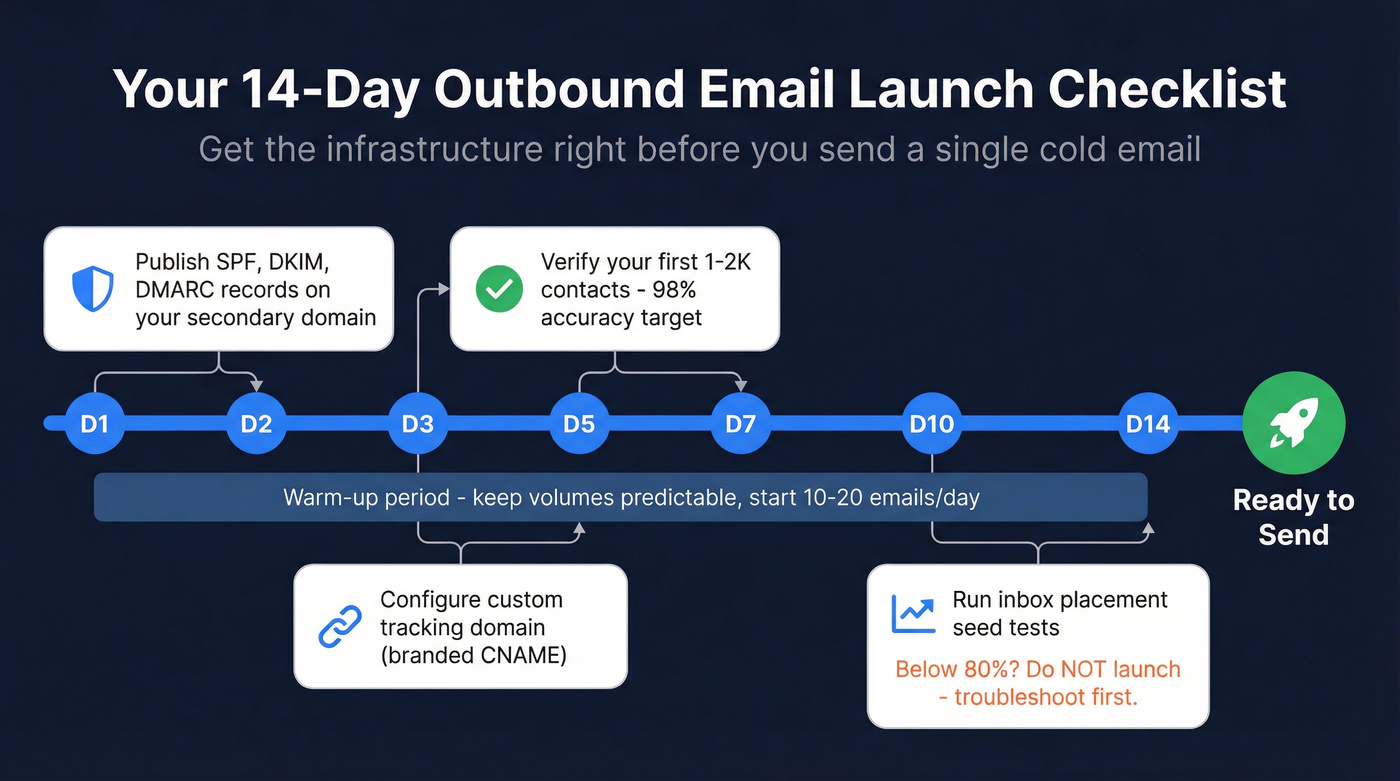
Warm-up schedule: Start at 10-20 emails/day in week one. Ramp to 20-40/day in week two. Once seed tests show 80%+ inbox placement, push to 40-50/day. This takes 4-6 weeks. Don't rush it. Set up a custom tracking domain (a branded CNAME) to stay off shared tracking-domain reputation pools. If you want the full playbook, follow an email deliverability checklist and a dedicated guide to automated email warmup.
Your 14-day launch checklist:
- Days 1-2: Publish SPF, DKIM, and DMARC records on your secondary domain.
- Days 1-14: Begin warm-up. Keep volumes predictable.
- Days 3-5: Configure your custom tracking domain.
- Days 3-7: Verify your first 1-2K contacts.
- Days 10-14: Run inbox placement tests. Below 80%? Don't launch - troubleshoot first.
Building a Prospect List That Won't Burn Your Domain
Bad data kills campaigns before copy ever matters. If your bounce rate crosses 2%, mailbox providers start throttling you - and recovering a burned domain takes weeks. (If you're already seeing issues, start with a hard bounce triage.)
Let's be honest: buying lists is almost always a waste of money. We've seen teams dump $2,000 on a purchased list only to bounce 15% on the first send and torch a domain they spent a month warming up. Build your own list, verify every address, and target narrowly. A study of 16.5M cold emails from Belkins found that emailing 1-2 contacts per company yields a 7.8% reply rate, while blasting 10+ contacts at the same company drops to 3.8%. Precision beats volume - especially for B2B outbound email campaigns where each contact represents a real buying decision. (More on this in B2B contact data decay.)
Prospeo's 5-step verification - including catch-all handling, spam-trap removal, and honeypot filtering - delivers 98% email accuracy at roughly $0.01/email. Stack Optimize built from $0 to $1M ARR running client campaigns through Prospeo, maintaining 94%+ deliverability and sub-3% bounce rates with zero domain flags across all clients. If you're comparing vendors, see our breakdown of the best email ID validators.


You just read why reply rate beats open rate. But replies require reaching real inboxes first. Prospeo's 5-step verification delivers 98% email accuracy at $0.01/email - keeping your bounce rate under 2% so mailbox providers never throttle your campaigns.
Build outbound lists that protect your domain, not destroy it.
Writing Emails That Get Replies
The 16.5M-email dataset is clear on copy length: 6-8 sentences hit a 42.67% open rate and 6.9% reply rate. Stay under 200 words. Some practitioners push for under 100 words on cold intros - worth testing for your audience. Half of recipients delete emails that aren't optimized for mobile, so short paragraphs and a single CTA aren't optional. They're structural requirements. If you need examples, start with an outreach email template.
Here's the thing about open rates: they're a vanity metric in 2026. Apple Mail Privacy Protection and bot pre-fetching inflate the numbers to the point of uselessness. Track reply rate instead. Killing pixel tracking produced a ~3% improvement in response rates across the same dataset. That's a meaningful lift for zero effort. Whether you're running cold outreach sequences or warm re-engagement flows, reply rate is the metric that actually correlates with pipeline. (Related: does open tracking hurt cold email.)
Stack Optimize scaled to $1M ARR running outbound email campaigns on Prospeo data - 94%+ deliverability, sub-3% bounce, zero domain flags. With 300M+ profiles and a 7-day data refresh cycle, your sequences hit real inboxes with fresh contact data every week.
Stop rewriting subject lines. Fix your list quality instead.
Sequence Strategy and Follow-Up Cadence
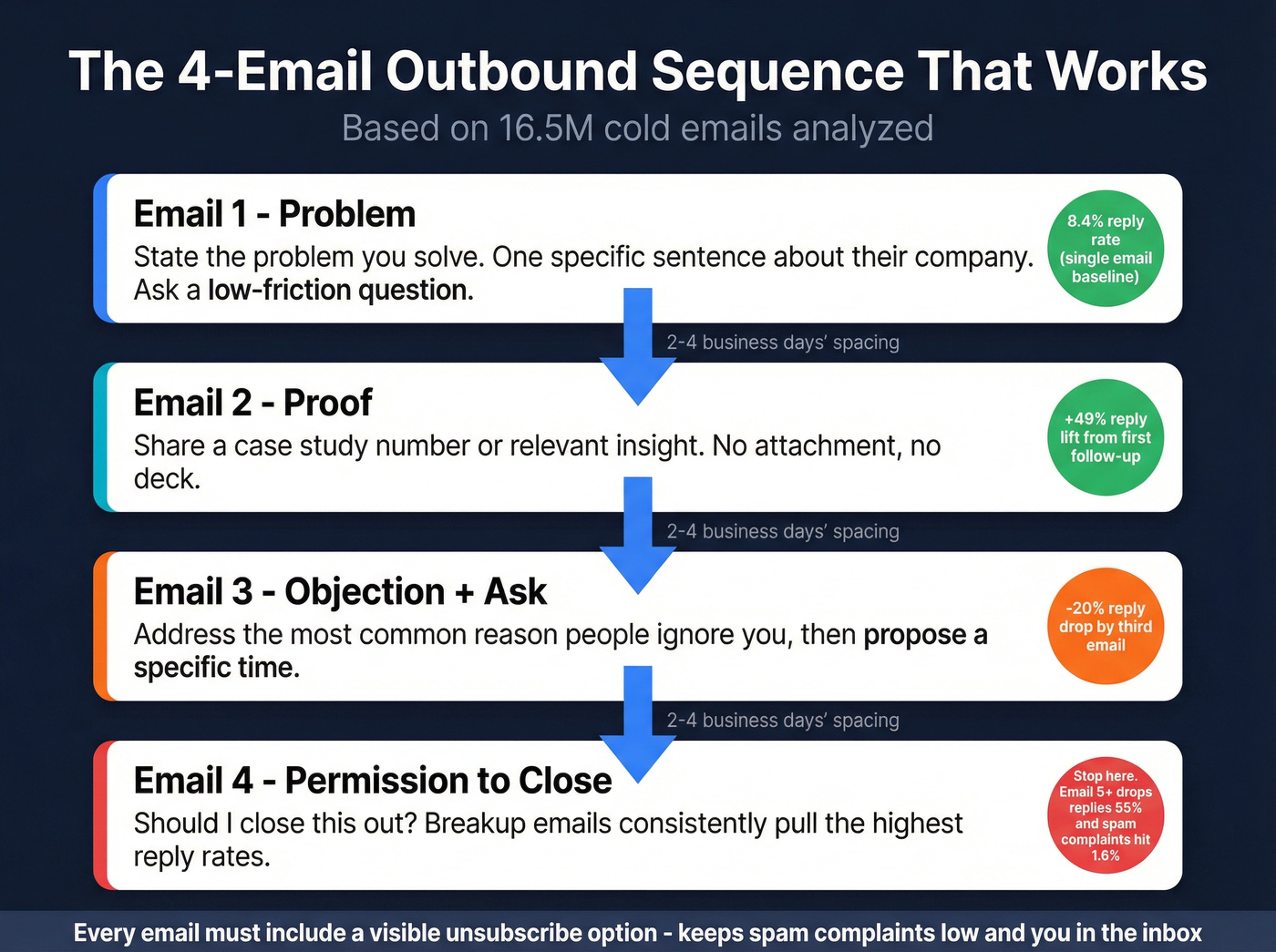
A single email has the highest raw reply rate at 8.4%. But a well-timed first follow-up increases replies by up to 49%. The third email drops responses by 20%. By the fifth, you're down 55% and spam complaints have climbed from 0.5% to 1.6%. Unsubscribes hit 2% by round four.
You don't need 7 follow-ups. You need 3, maybe 4. (For more benchmarks and fixes, see follow-up email reply rate.)
Recommended structure: 3-4 touchpoints, spaced 2-4 business days apart. Each email takes a different angle - don't repeat the same pitch with a "just bumping this up" wrapper.
- Email 1 - Problem: State the problem you solve. One specific, relevant sentence about their company. Ask a low-friction question.
- Email 2 - Proof: Share a case study number or relevant insight. No attachment, no deck.
- Email 3 - Objection + ask: Address the most common reason people don't reply, then propose a specific time.
- Email 4 - Permission to close: "Should I close this out?" In our experience, this consistently outperforms aggressive follow-ups. The consensus on r/sales backs this up - breakup emails routinely pull the highest reply rates in threads about cold outreach.
Every email should include a visible unsubscribe option. Beyond compliance, it keeps spam complaints low - which keeps you in the inbox.
Timing and Scheduling
Thursday is the best send day, with a 6.87% reply rate across the 16.5M-email dataset. Monday is the worst at 5.29%.
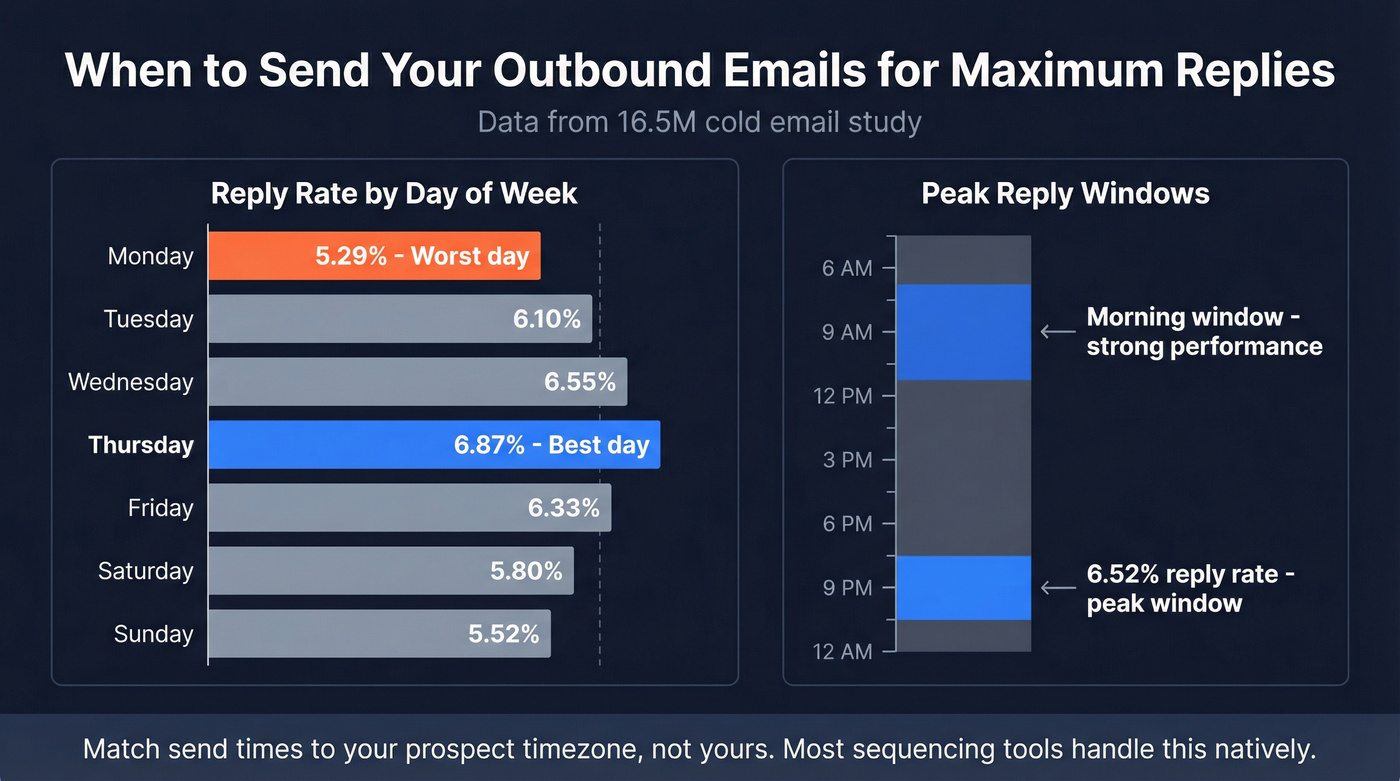
The peak reply window is 8-11 PM at 6.52%, though mornings from 7-11 AM also perform well. Match your send times to your prospect's timezone, not yours. Most sequencing tools handle timezone-aware scheduling natively, so there's no reason to be manually adjusting every batch. If you want a deeper breakdown, see the best time to send prospecting emails.
Best Tools for Outbound Email Campaigns
You need two things: a way to find and verify contacts, and a way to send sequences. The right stack simplifies pipeline management from first touch to booked meeting without forcing you into a bloated platform. If you're evaluating options, compare against our list of cold email marketing tools.
| Tool | Best For | Starting Price | G2 Rating |
|---|---|---|---|
| Prospeo | Email verification & list building | Free; ~$0.01/email | - |
| Instantly.ai | Sequence automation | $30/mo | 4.9/5 (1,200+) |
| Apollo | All-in-one + free tier | Free; $59/mo paid | - |
| Smartlead | Multi-inbox rotation | $39/mo | 4.6/5 (420+) |
| GMass | Gmail-native outreach | $25/mo | - |
| Woodpecker | Agency sequences | $49/mo | 4.5/5 (310+) |
A note on Apollo: it's been associated with data-sourcing controversy in the outbound space. Worth checking their current compliance posture before committing. Instantly and Smartlead both integrate natively with Prospeo, so contacts flow straight from verification into sequences without CSV gymnastics.
Skip the $15,000/year all-in-one platform if your average deal size is under $10k. A verification tool plus a dedicated sequencer will outperform a bloated suite you'll use 20% of.
DIY vs. Hiring an Agency
Agency retainers run $2,000-$15,000/month, with most B2B outbound email campaigns landing in the $4,000-$8,000 range. Setup fees add $1,500-$5,000. Pay-per-lead models charge $200-$500 per qualified lead. Hidden costs - extra domains, tool subscriptions, data enrichment - can add 30-50% to the base retainer.
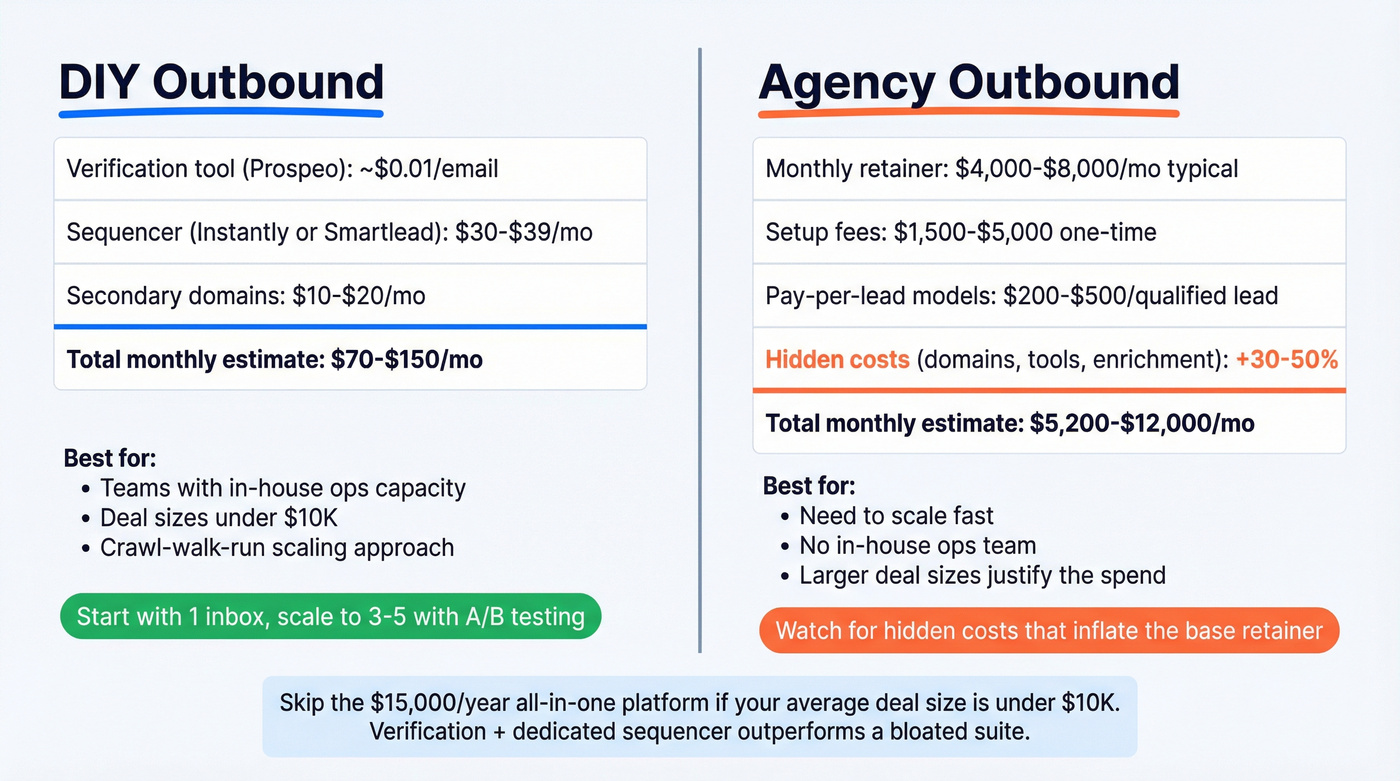
If you're starting from scratch, think crawl-walk-run: one inbox with manual QA first, then scale to 3-5 inboxes with A/B testing, then full rotation with auto-pauses. Agencies make sense when you need to scale fast or lack in-house ops capacity. But for teams running campaigns themselves, the crawl-walk-run approach keeps you from burning infrastructure before you've dialed in your messaging. I've watched too many teams jump straight to 10 inboxes and wonder why deliverability cratered in week two.
FAQ
How many cold emails should I send per day?
Start at 10-20 per day per inbox during warm-up. After 4-6 weeks with 80%+ inbox placement, scale to 40-50/day. Three inboxes at 50/day gives you 150 sends without stressing any single domain.
What's a good reply rate for cold outbound?
The most recent large-scale study - 16.5M cold emails across 2024 - found a 5.8% average reply rate. Top campaigns hit 8-10%. Below 3%, check list quality and deliverability before rewriting copy.
Do I need a separate domain for cold email?
Yes. Use a secondary domain to protect your primary domain's reputation. Set up SPF, DKIM, and DMARC before sending a single email. Warm it up for 4-6 weeks. Non-negotiable.
What's the cheapest way to verify emails before sending?
Prospeo offers 75 free email credits per month with full 5-step verification at 98% accuracy. Paid plans run roughly $0.01/email - significantly cheaper than ZoomInfo or Apollo while delivering higher accuracy.
How is outreach email different from spam?
Legitimate outreach targets a specific, researched audience with relevant messaging, includes a clear opt-out, and respects sending limits. Spam blasts unverified lists with no personalization. The technical and strategic discipline covered above - verification, warm-up, sequence limits - is what separates the two.