

The 10 Best Cold Email Marketing Tools in 2026
GlockApps' Q4 2025 data puts Gmail inbox placement at 56.97%. Outlook is worse - 45.06%. That means nearly half your outbound never gets seen, and the problem starts upstream with bad data feeding bad sends. The cold email marketing tools you pick matter, but the data you feed them matters more.
We tested 10 tools across automation, deliverability, analytics, integrations, and data quality. Here's what's actually worth your money.
Our Picks (TL;DR)
- Prospeo - Best for verified data that actually reaches inboxes. 98% email accuracy at ~$0.01/email. Free tier available. Pair it with any sending tool on this list.
- Instantly - Best for sending at scale. Unlimited email accounts and warmup from $47/mo ($37.60 billed annually). You'll need a separate data source.
- Woodpecker - Best for SMBs who want simplicity. Pricing based on contacted prospects, not seats. Starts at $24/mo with free catch-all verification built in.
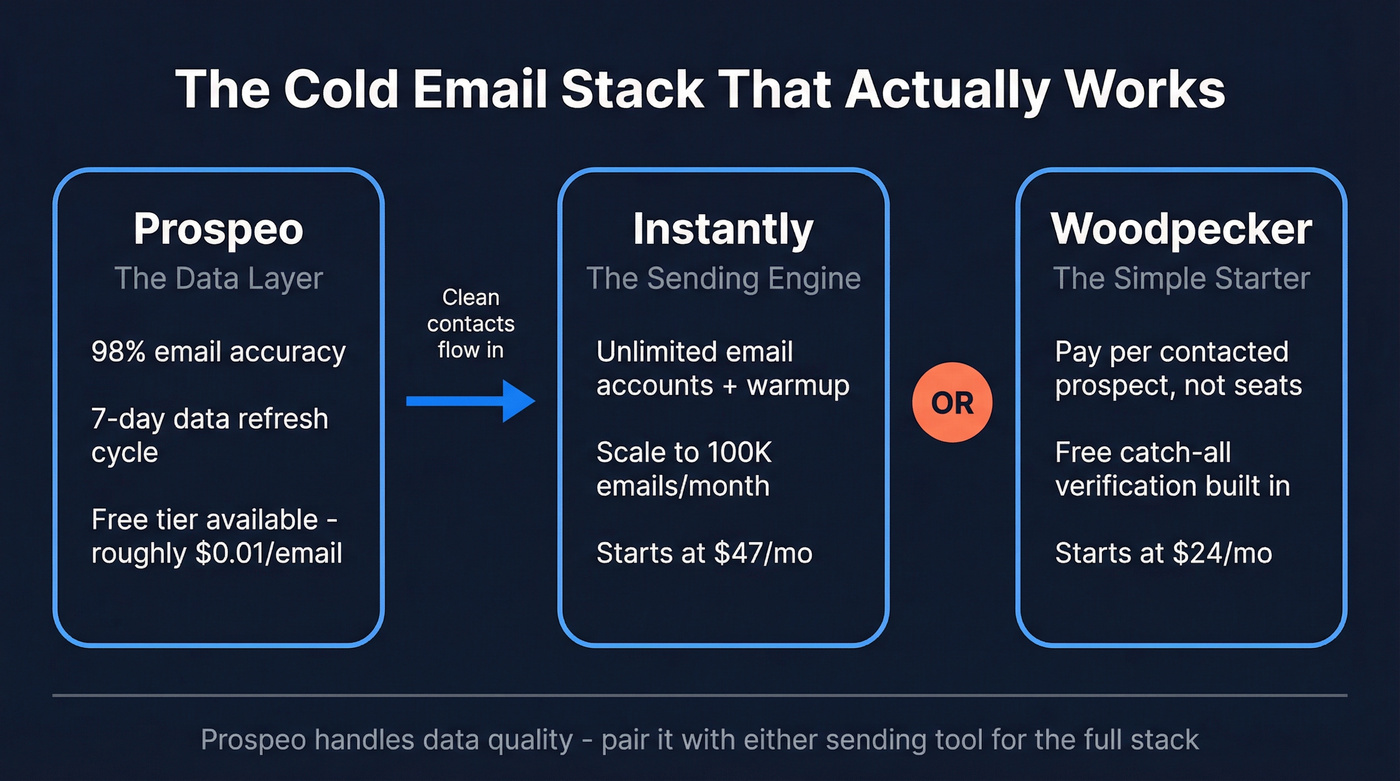
These three cover most use cases. The rest of the list fills specific gaps - multichannel, AI-assisted outreach, budget constraints, or Gmail-native workflows.
Deliverability Reality Check
Here's the number that determines your cold email ROI: inbox placement rate. GlockApps' Q4 2025 benchmarks show Gmail at 56.97%, Office365 at 67.95%, and Outlook lagging at 45.06%.
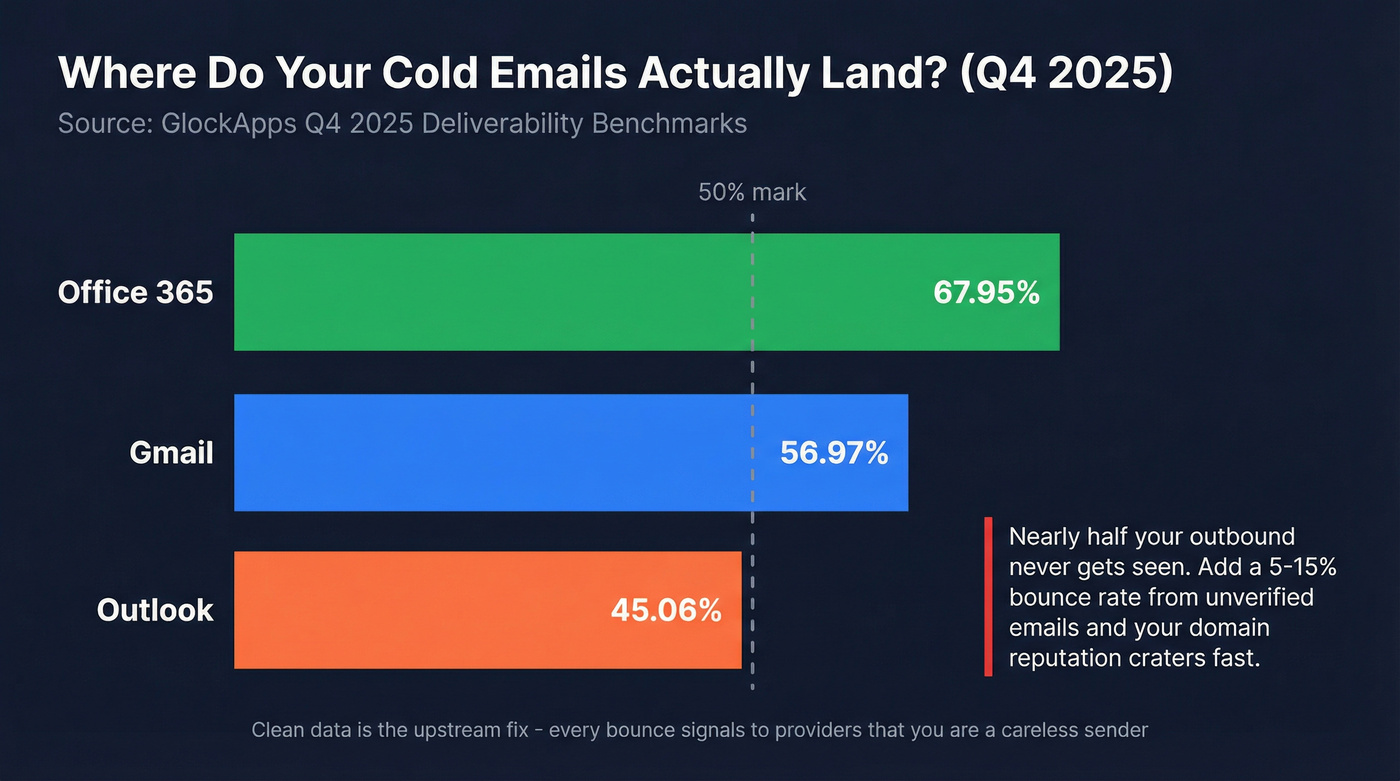
Those numbers assume clean sending practices. Layer a 5-15% bounce rate from unverified emails on top, and every bounce signals to inbox providers that you're a careless sender - or worse, a spammer. The damage compounds fast. A couple of bad campaigns can crater a domain's reputation for months.

Data quality isn't optional. It's the upstream dependency everything else rests on. The sending tool handles the last mile, but if the first mile is broken, nothing downstream can fix it.
How We Evaluated
We borrowed Zapier's four criteria - automation, deliverability, analytics, and integrations - and added a fifth that most listicles ignore:
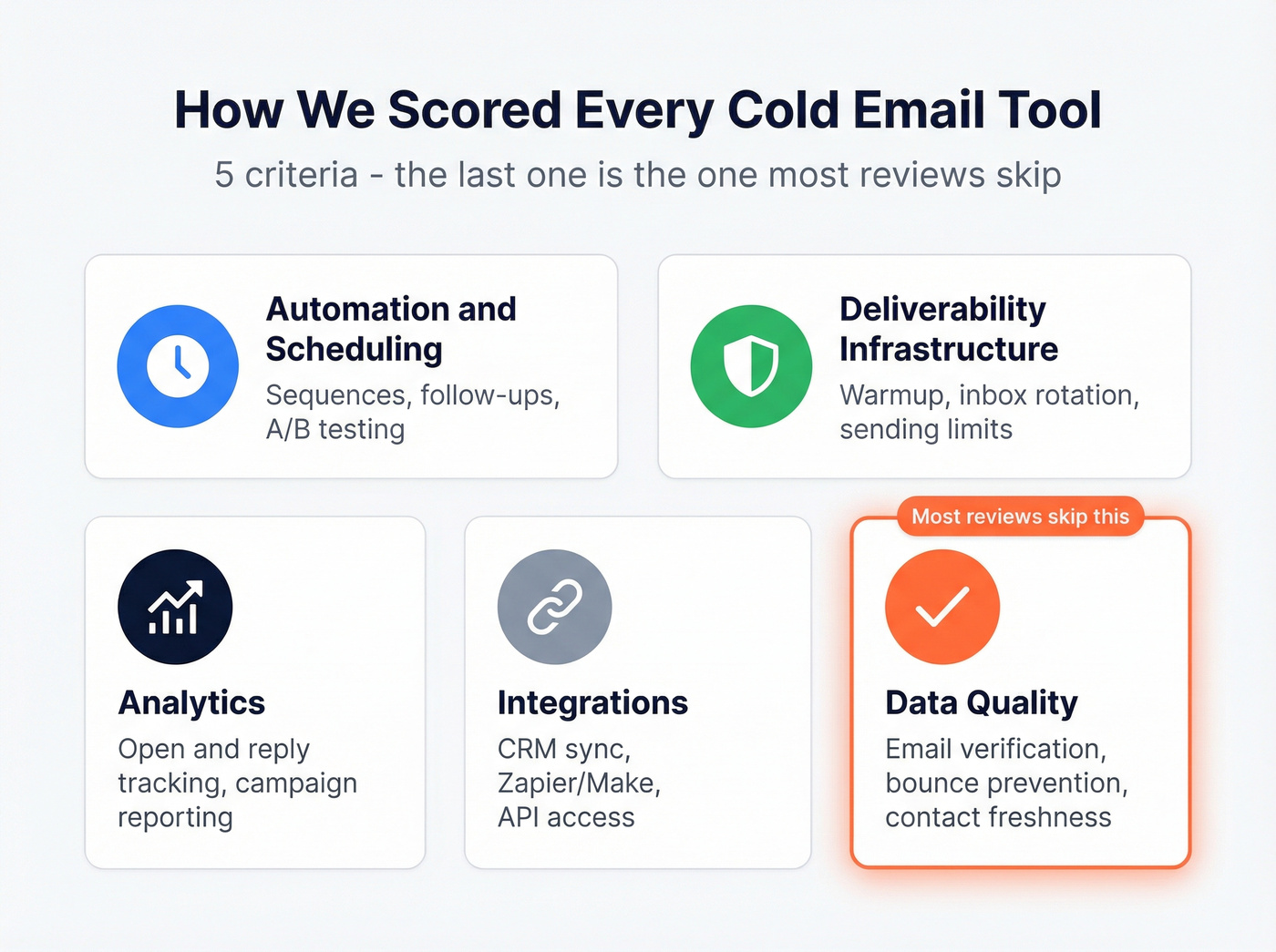
- Automation & scheduling - sequences, follow-ups, A/B testing (see split testing)
- Deliverability infrastructure - warmup, inbox rotation, sending limits (use an email deliverability checklist)
- Analytics - open/reply tracking, campaign-level reporting (read open rate vs click rate)
- Integrations - CRM sync, Zapier/Make, API access
- Data quality - email verification, bounce prevention, contact freshness (compare email checker tools)
We set up test campaigns in each tool and tracked onboarding time, UX friction, and deliverability outcomes. Woodpecker had us sending in under an hour with almost no setup friction. Smartlead took longer to get fully dialed in, partly due to a UI that feels like it was designed by committee - too many menus, not enough clarity on what goes where.

GlockApps says nearly half your emails never reach the inbox. Bad data makes it worse - every bounce tanks your domain reputation. Prospeo's 98% email accuracy and 7-day refresh cycle mean your sending tools get clean, current contacts instead of job-changers and dead addresses.
Fix the first mile so your sending tool can handle the last.
Comparison Table
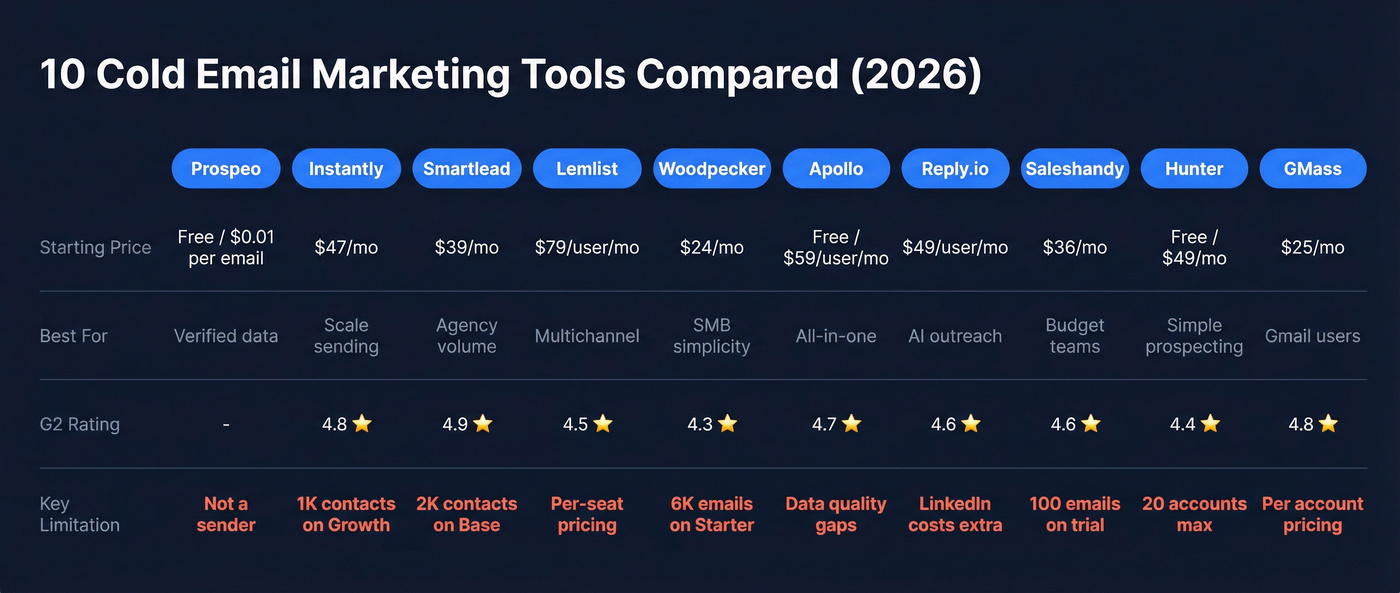
| Tool | Starting Price | G2 Rating | Best For | Key Limit |
|---|---|---|---|---|
| Prospeo | Free / ~$0.01/email | - | Verified data & accuracy | Data platform, not a sender |
| Instantly | Free trial / $47/mo | 4.8 (3,802) | Scale sending | 1,000 uploaded contacts on Growth |
| Smartlead | $39/mo | 4.9 | Agency volume | 2,000 contacts on Base |
| Lemlist | $79/user/mo | 4.5 (265) | Multichannel | Per-seat pricing adds up |
| Woodpecker | $24/mo | 4.3 (110+) | SMB simplicity | 6,000 emails on Starter |
| Apollo | Free / $59/user/mo | 4.7 (9,125) | All-in-one | Jack of all trades |
| Reply.io | $49/user/mo | 4.6 (1,486) | AI-assisted outreach | LinkedIn costs extra |
| Saleshandy | $36/mo | 4.6 (680+) | Budget teams | 100 emails on trial |
| Hunter | Free / $49/mo | 4.4 (550+) | Simple prospecting | 20 email accounts max (Business) |
| GMass | $25/mo | 4.8 (1,100+) | Gmail power users | Priced per email account |
The 10 Best Outreach Platforms Reviewed
Prospeo - Best for Data Accuracy
Use this if: You need verified contact data that won't destroy your sender reputation.
Skip this if: You only need a sender - Prospeo is a data platform, not a sending tool. You'll pair it with one of the senders below.
The database covers 300M+ professional profiles with 143M+ verified emails and 125M+ verified mobile numbers. That 98% email accuracy rate isn't a marketing number - Stack Optimize built from $0 to $1M ARR using Prospeo data, maintaining 94%+ deliverability and sub-3% bounce rates across every client campaign with zero domain flags.

The 7-day data refresh cycle is the real differentiator. Most providers refresh around 6 weeks, which means you're emailing people who changed jobs a month ago. A weekly refresh catches job changes, company moves, and email invalidations before they become bounces. Native integrations push verified contacts directly into Instantly, Smartlead, Lemlist, HubSpot, and Salesforce - so the data flows straight into your sending tool without manual exports. (If you're fighting decay, start with B2B contact data decay.)
Pricing: Free tier gives you 75 verified emails + 100 Chrome extension credits per month. Paid plans run ~$0.01/email with no contracts. Self-serve onboarding, no sales calls required.
Instantly - Best for Scale
The verdict first: Instantly is the best pure sending engine on this list. Just budget for the full stack, not just the outreach plan.
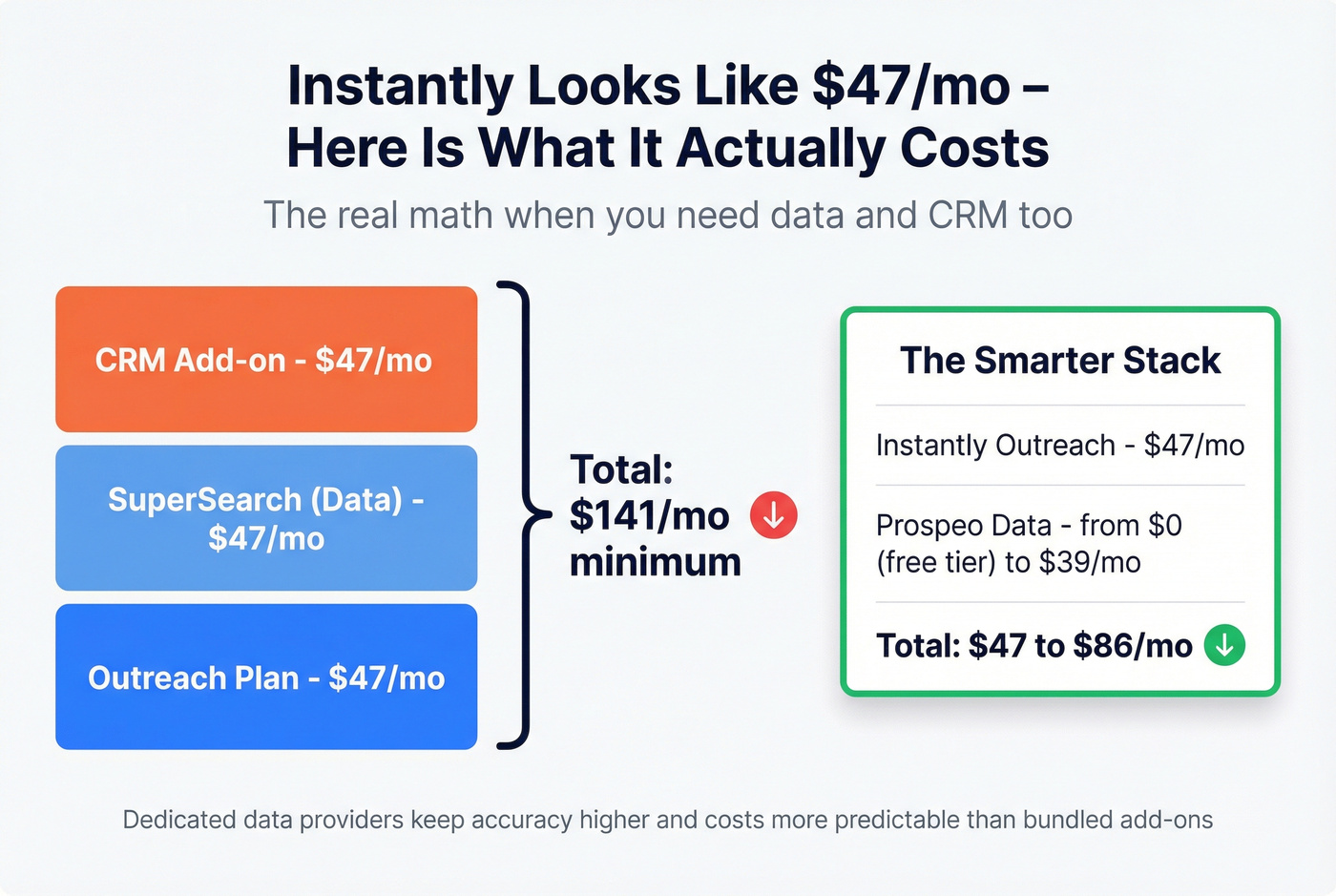
The Growth plan starts at $47/mo ($37.60/mo billed annually) for 1,000 uploaded contacts and 5,000 emails/month with unlimited email accounts and warmup. Hypergrowth jumps to $97/mo ($77.60 annually) for 25K contacts and 100K emails. The unlimited accounts + warmup combo is genuinely hard to beat for teams scaling sender infrastructure. If you're pushing volume, follow cold email volume best practices.
Here's the thing: that $47/mo number is misleading if you need data too. SuperSearch costs another $47/mo. Add the CRM at $47/mo and you're at $141/mo minimum before you've sent a single email. We've found that pairing Instantly with a dedicated data provider - rather than relying on SuperSearch - keeps data accuracy higher and total costs more predictable.
Smartlead - Best for Agencies
Smartlead's Base plan looks attractive at $39/mo ($32.50/mo billed annually) for 2,000 contacts and 6,000 email sends/month. But agencies rarely stop at the base subscription. SmartServers run $39/server/month. SmartDelivery ranges from $49 to $599/mo. Mailbox provisioning can hit $4.50/mailbox/month.
The platform supports unlimited email accounts and warmup on every plan, which is the core appeal. Multichannel support covers SMS, Twitter/X, and WhatsApp. A common agency criticism - and one we've heard echoed on r/coldemail - is that Smartlead can feel buggy or slow compared to simpler senders. That matters when you're juggling dozens of client campaigns. If you're building repeatability, use an outbound sales engine approach.
Verdict: Powerful at scale, but budget well beyond the base price once you add infrastructure and deliverability tooling.
Lemlist - Best for Multichannel
Use this if: You're running email + LinkedIn + phone sequences from one platform and want the tightest multichannel workflow available.
Skip this if: You're a solo founder watching every dollar. Per-seat pricing gets expensive fast.
Lemlist raised prices in early 2026 - Email Pro went from $69 to $79/user/mo ($63 annually), Multichannel Expert from $99 to $109/user/mo ($87 annually). A 5-person team on Email Pro runs $395/mo. Need extra senders beyond the 3 included per user? Each additional sender costs $9/mo, pushing a 5-person team with 2 extra senders each to $485/mo before any other add-ons.
The 14-day free trial gives full Multichannel Expert access with no credit card required - genuinely generous. The multichannel inbox that unifies email, LinkedIn, and phone replies in one view is where Lemlist earns its premium. 200 free enrichment credits per user per month on Email Pro (400 on Multichannel Expert) help offset data costs, though we'd still recommend verifying contacts through a dedicated data provider before they enter any sequence.
Verdict: The best multichannel UX on this list, but do the seat math before you commit.
Woodpecker - Best for SMBs
Woodpecker is the tool I'd hand to a friend who said "I need to start sending cold emails this afternoon." Straightforward, fast to set up, and hard to mess up.
The pricing model is refreshingly different: you pay by contacted prospects, not seats. Starter runs $24/mo for 6,000 emails and 2,000 stored prospects with 2 free warm-ups included. The standout feature is free catch-all email verification powered by Bouncer, built right into the platform - a nice touch that most competitors charge extra for. If you want a deeper shortlist, see email outreach tools for small business.
The agency panel at $27/client/month is competitively priced for smaller agencies. LinkedIn automation runs $29/mo per connected account. The 7-day free trial includes all features - or 50 contacted prospects, whichever comes first.
Verdict: Perfect for teams under 5 reps. The simplest path from zero to sending.
Apollo - Best All-in-One
Apollo's G2 rating of 4.7 across 9,125 reviews tells you it's broadly liked. The free plan with 100 credits/mo is a real starting point, and paid plans start at $59/user/mo. The database, sequencer, and lightweight CRM all live in one UI, which reduces tool sprawl.
Think of Apollo as 70% good at five things instead of 95% good at one. In our experience, teams tend to outgrow Apollo's data quality within 6 months - the all-in-one convenience comes at the cost of depth in any single capability. If you're sending fewer than 500 emails a month, it's fine. Past that, you'll start feeling the gaps.
Verdict: Best for teams that want one tool and can tolerate "good enough" data quality.
Reply.io - AI-Assisted Outreach
Reply.io's Email Volume plan starts at $49/user/mo. Multichannel jumps to $89/user/mo. The headline feature is Jason AI SDR at $300/mo - an AI agent that handles prospecting, sequence creation, and reply handling. LinkedIn automation costs an additional $69/account, pushing a single multichannel seat to $158/mo before data.
The AI features are genuinely useful for teams without dedicated copywriters. Jason AI produces serviceable first drafts that need light editing rather than full rewrites. Price accordingly - this is a premium tool.
Saleshandy - Budget Pick
Saleshandy starts at $36/mo with a 7-day free trial capped at 100 emails. The lookalike domains add-on at $4/mo is a nice touch for sender reputation management. It won't win any feature comparisons against Instantly or Lemlist, but for teams that just need to send sequences reliably without breaking the budget, it does the job. It's the Honda Civic of cold email software - nothing flashy, everything works.
Hunter - Simple Prospecting
Hunter offers a free plan with 25 searches and 50 verifications per year - barely enough to test. Paid plans start at $49/mo, with the Business tier at $499/mo capping at 20 email accounts. Best for teams that need basic email finding and simple campaigns without the complexity of a full outbound stack. If you're sending fewer than 1,000 emails/month and want minimal setup, Hunter gets the job done.
GMass - Gmail Power Users
GMass runs entirely inside Gmail, which is either its biggest strength or its biggest limitation depending on your workflow. Plans start at $25/mo per email account, with a Teams plan at $120/mo for 5 users.
One thing competitors don't mention: GMass requires extensive Gmail permissions to function, which means you're granting a third party deep access to your inbox. For some teams that's a dealbreaker. For teams whose entire outbound operation lives in Gmail, the simplicity is hard to beat - just go in with eyes open on the permissions tradeoff.
What Cold Email Actually Costs
Base prices are misleading. Here are three common stacks and what you'll actually pay once you include the pieces that matter.
| Stack | What's Included | Typical Monthly Cost |
|---|---|---|
| Smartlead (starter + infra) | Smartlead Base + 1 SmartServer + SmartDelivery Growth | $39 + $39 + $49 = $127/mo (plus mailboxes) |
| Lemlist (3 seats) | Lemlist Email Pro x 3 users | $79 x 3 = $237/mo (plus any extra senders/add-ons) |

The Prospeo + Instantly stack can look more expensive at first glance, but you're getting 98% verified data baked in. With Smartlead or Lemlist, you're either using built-in enrichment at lower accuracy or adding a separate data provider anyway. Factor in the cost of bounced emails - damaged domains, wasted sends, re-warmup time - and the verified-data stack pays for itself within a few campaigns. (If you're troubleshooting bounces, start with hard bounce.)
Let's be honest: if your average deal size is under $5K, you probably don't need the most expensive stack on this list. A lean data + Instantly setup will outperform an expensive Lemlist deployment with bad data every single time. The bottleneck is never the sending tool. It's whether your emails reach a human inbox.
How to Choose the Right Tool
Your stack depends on three things: team size, budget, and whether you need multichannel. Each recommendation below assumes a verified data layer feeding the sending tool - without that, none of these stacks perform.
Solo founder on a budget: GMass at $25/mo for Gmail-native sending. Simple, cheap, gets the job done.
SMB team with 2-5 reps: Woodpecker or Instantly for reliable sending infrastructure. Budget $70-150/mo total.
Agency managing multiple clients: Smartlead for client separation and volume. Budget $150-600+/mo depending on infrastructure, deliverability add-ons, and mailbox costs. The consensus on r/coldemail is that Smartlead's agency panel is worth the complexity if you're managing 5+ client accounts.
Multichannel team running email + LinkedIn + phone: Lemlist or Reply.io for the sending layer. Verified data ensures every contact is clean before it enters a campaign.
Separating your data provider from your sending tool is one of the simplest ways to keep deliverability stable as you scale. Pick your sending tool based on workflow preferences. Pick your data tool based on accuracy. They're separate decisions. If you want a step-by-step build, use a B2B sales stack blueprint.
Instantly, Smartlead, Lemlist - great senders, but none of them fix bad data. Stack Optimize built a $1M agency on Prospeo data with sub-3% bounce rates and zero domain flags across every client. 143M+ verified emails at ~$0.01 each, no contracts.
Pair Prospeo with any sender on this list and stop burning domains.
FAQ
Do I need a separate email warmup tool?
Most tools on this list include warmup - Instantly, Smartlead, and Woodpecker all bundle it in. You only need a standalone warmup tool if you're using GMass or sending through raw SMTP. For everyone else, built-in warmup is sufficient for maintaining sender reputation across new domains.
What's a good bounce rate for cold email?
Under 3% is the target. Above 5% and you're actively damaging your domain reputation with every send. The fix is upstream: verify every email before it enters a sequence. Stack Optimize maintained sub-3% bounce rates across all client campaigns by verifying contacts through a dedicated data provider before any sends went out.
Can I use these tools and stay GDPR compliant?
Yes, but compliance is on you, not the tool. Include opt-out links in every email, honor unsubscribe requests within 10 business days, and document your legitimate interest basis. CAN-SPAM requires a physical mailing address in every message. These tools typically include unsubscribe management - just make sure it's turned on.
How many emails should I send per day per mailbox?
Start at 20-30/day for new domains and ramp up over 2-4 weeks. Sending 200+ from a single mailbox is a fast path to spam folders. This is why Instantly and Smartlead support unlimited email accounts - you scale by adding mailboxes, not by blasting more from one.
Should I automate cold email or send manually?
Manual outreach stops scaling past about 50 emails per day. Automation handles sequencing, follow-ups, inbox rotation, and reply detection - tasks that would eat hours if done by hand. Once you're sending at any real volume, the time savings alone justify the cost. The key is pairing automation with verified data so you're not scaling bad sends.