Split Testing Cold Emails: What Actually Moves the Needle (With Data)
You've been testing subject lines for three months. Questions, first names, emojis, lowercase, ALL CAPS. Your reply rate hasn't budged - still sitting at 2.8%, and your sequences are burning through lists faster than you can build them.
Here's the uncomfortable truth most guides on split testing cold emails skip: the biggest lever isn't your copy. It's your list.
Get the Hierarchy Right First
Before you run another test, nail the priority order.
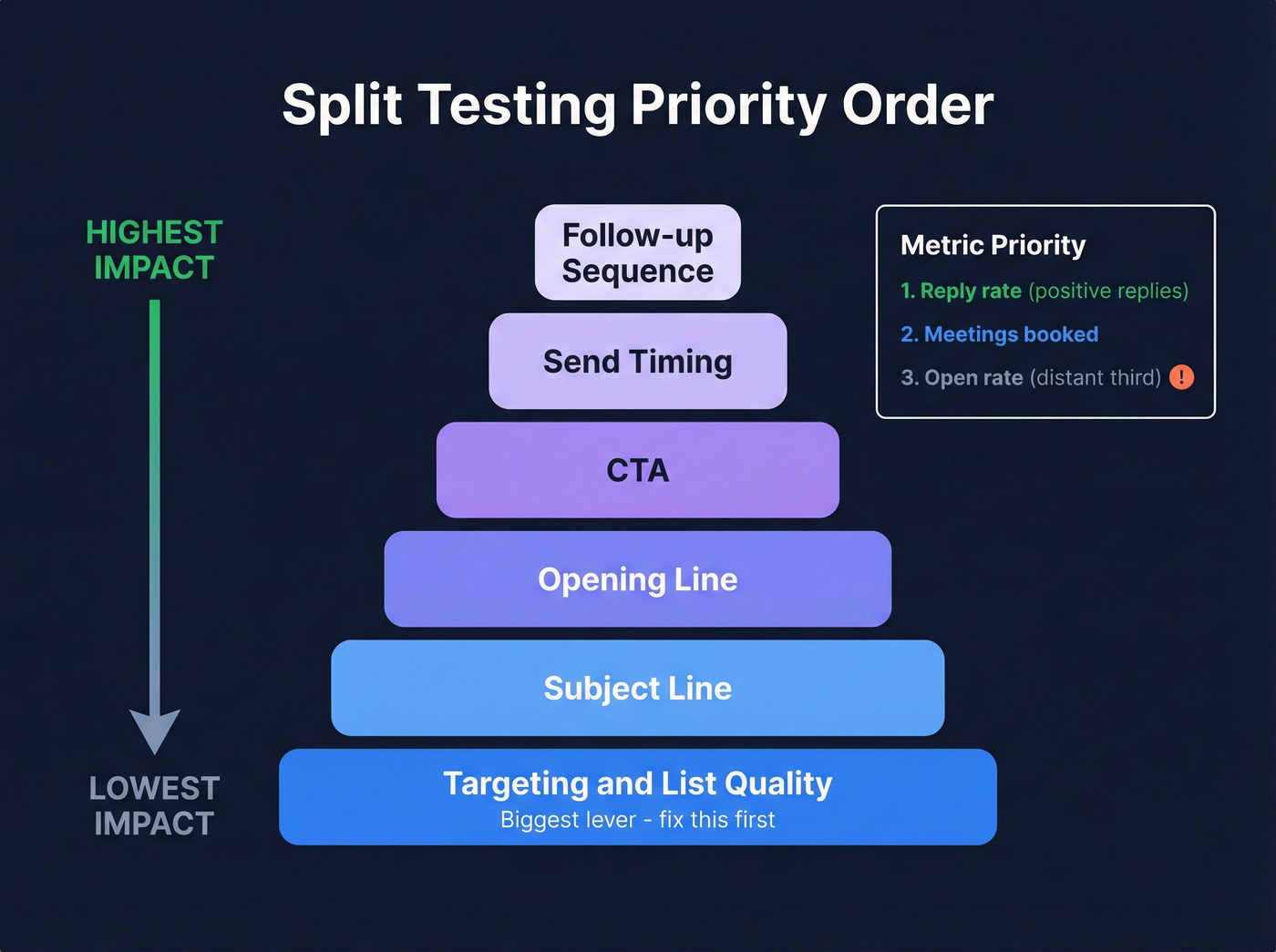
Testing priority, top to bottom:
- Targeting and list quality
- Subject line
- Opening line
- CTA
- Send timing
- Follow-up sequence
Metric priority:
- Reply rate - positive replies if you can segment (see Positive reply rate)
- Meetings booked
- Open rate, a distant third
If your list bounces above 5%, nothing else matters. You're testing deliverability, not messaging.
Cold Email Benchmarks for 2026
Let's ground this in real numbers. Instantly's 2026 benchmark report analyzed billions of cold email interactions across thousands of active workspaces:
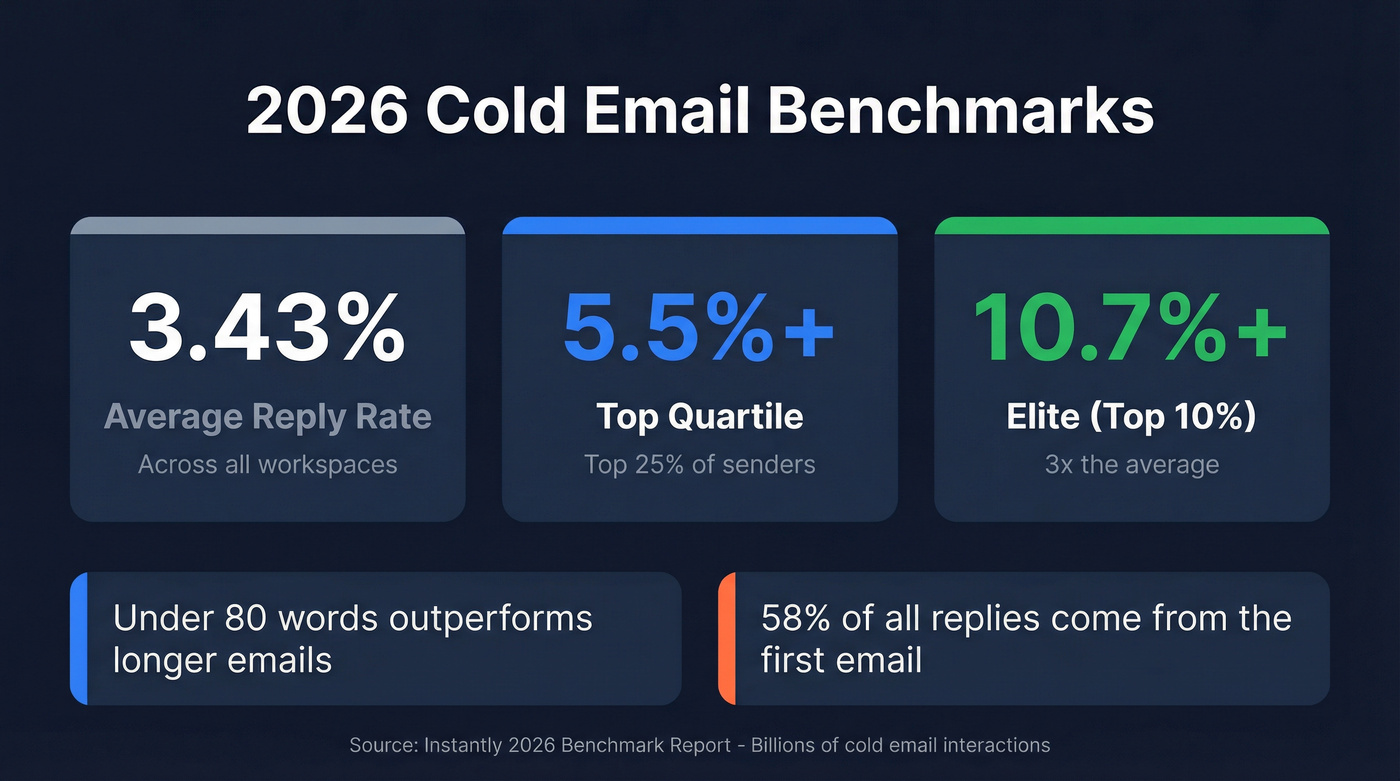
| Tier | Reply Rate |
|---|---|
| Average | 3.43% |
| Top quartile | 5.5%+ |
| Elite (top 10%) | 10.7%+ |
Emails under 80 words consistently outperform longer ones. And 58% of all replies come from Step 1 - the first email in your sequence. Follow-ups matter, but that initial touch carries the majority of the weight.
If you're at 3.4%, you're average. The gap between average and elite is a 3x multiplier, and systematic A/B testing is how you close it.
Stop Optimizing for Open Rates
Open rates in cold email are broken.
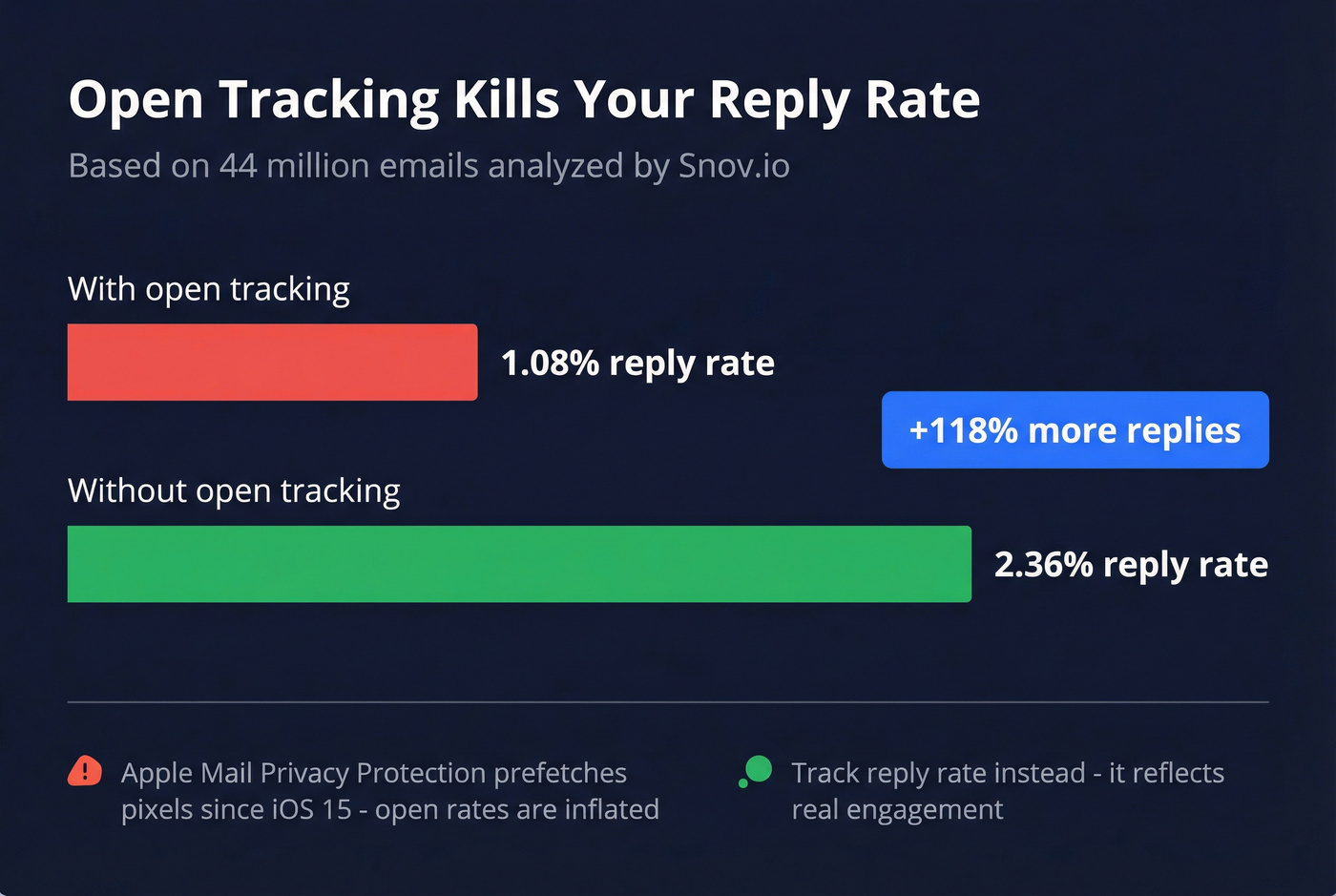
Apple Mail Privacy Protection has been prefetching tracking pixels via proxy servers since iOS 15 in 2021. When Apple Mail downloads your pixel automatically, it registers as an "open" even if the recipient never saw your email. This affects anyone using the Apple Mail app - regardless of whether their address is Gmail, Outlook, or anything else.
Snov.io analyzed 44 million emails sent through their platform and found that turning off open tracking more than doubled reply rates: 2.36% vs 1.08%. Removing open tracking often improves results, and it makes your reporting less dependent on distorted signals.
Track reply rate instead. Positive reply rate is even better if your platform supports it. Meetings booked is the ultimate downstream metric, but it introduces too many variables for a clean split test.

You just read it: list quality is the #1 testing variable. Prospeo delivers 98% email accuracy with a 7-day refresh cycle, so every split test measures your messaging - not your deliverability. One agency kept bounce rates under 3% across every client account using Prospeo-verified data.
Stop testing your bounce rate. Start testing your copy.
What to Test (In This Order)
Targeting and List Quality
This is the variable most teams skip because it doesn't feel like "testing." But a mediocre email to the right 200 people outperforms a brilliant email to the wrong 2,000. We've tested this across dozens of campaigns - the hierarchy holds every time.
Before you test a single subject line, verify your list. One agency we've worked with kept deliverability above 94% with bounce rates under 3% across every client account - zero domain flags. If a quarter of your list is bouncing, you're not running a split test. You're running a deliverability lottery (use an email verifier and follow an email deliverability checklist).
Tightening your ICP from "VP of Marketing at SaaS companies" to "VP of Marketing at Series B SaaS companies with 50-200 employees who just hired their third SDR" will move your reply rate more than any subject line ever will.
Subject Lines
Subject lines are the highest-leverage copy variable because they gate everything else. No open, no reply.
A Belkins study of 5.5 million emails found personalized subject lines hit a 46% open rate and 7% reply rate, compared to 35% open and 3% reply without personalization. That's a 133% reply-rate lift from personalization alone.
Other patterns from the same dataset: 2-4 word subject lines performed best at 46% open rate, and question-style subject lines topped the format breakdown. Numbers in subject lines actually performed slightly worse - 27% open rate vs 28% without. Keep it short, make it personal, ask a question (and avoid subject line spam).
Opening Line and Body Copy
The Instantly benchmark data is clear: emails under 80 words outperform longer ones. Don't test body length and opening line simultaneously - that's two variables, and you won't know which one moved the needle.
Test the first sentence in isolation. A personalized observation about the prospect's company versus a pain-point lead is a meaningful test (more on personalization in outbound sales). Once you've found a winning opener, then test body length.
CTA, Send Timing, and Follow-Ups
Lower-leverage individually, but they compound. A few anchors:
Timing: Tuesday and Wednesday show peak reply rates, with Wednesday slightly ahead. A common cadence is launch Monday, follow up Wednesday, triage Friday (see best time to send prospecting emails).
Sequence length: The sweet spot is 4-7 touchpoints. Beyond 7, you hit diminishing returns unless each touch adds genuinely new value (use these best sales sequences as a baseline).
Follow-up style: Follow-ups that read like casual replies outperform formal ones by roughly 30%. "Hey - did this land at a bad time?" beats "I wanted to follow up on my previous email regarding our solution for..." every single time.
58% of replies come from Step 1, but that means 42% come from follow-ups. Don't abandon your sequence after one send.
Sender Identity (The Variable Nobody Tests)
Most teams obsess over subject lines and ignore who the email is from. The sender name, email format, and even the sender's job title in the signature all influence reply rates.
In our experience, swapping the sender from a generic "sales@" address to a founder's name has moved reply rates by 40%+ on multiple campaigns. This is especially worth testing if you're running outbound for multiple team members. It's one of those changes that feels trivial but consistently produces outsized results - and the consensus on r/coldemail backs this up.

How to Read Your Results
Here's where things get tricky. You're not an e-commerce site with 50,000 visitors a day. Most outbound teams work with lists of 200-2,000 contacts.
A practical minimum is 200 contacts per variant - 400 total for an A/B test (if you want the math, see how to A/B test reply rates). At 100 per side you'll only detect very large differences, which limits what you can learn.
As a rule of thumb, with fewer than 500 contacts per variant, you need a 20%+ relative difference to trust the result. If Variant A gets a 3.5% reply rate and Variant B gets 3.8%, that's noise. You need Variant B hitting 4.2%+ before you can start to trust it.
For small lists, 90% confidence is a practical threshold. You'll have slightly more false positives, but you'll actually learn from your data instead of declaring everything "inconclusive."
Set your sample size before you start, and don't peek mid-test. Checking results after every 50 sends and stopping when something "looks good" is the fastest way to fool yourself. The peeking problem inflates your false positive rate dramatically. Decide upfront: "I'll evaluate after 400 sends, period."
Six Mistakes That Invalidate Tests
1. Testing on a dirty list. If your bounce rate is above 5%, your test results are meaningless. You're measuring deliverability variance, not copy performance. One customer saw bounce rates drop from 35% to under 4% after switching to Prospeo for verification - that's the difference between a valid test and noise.
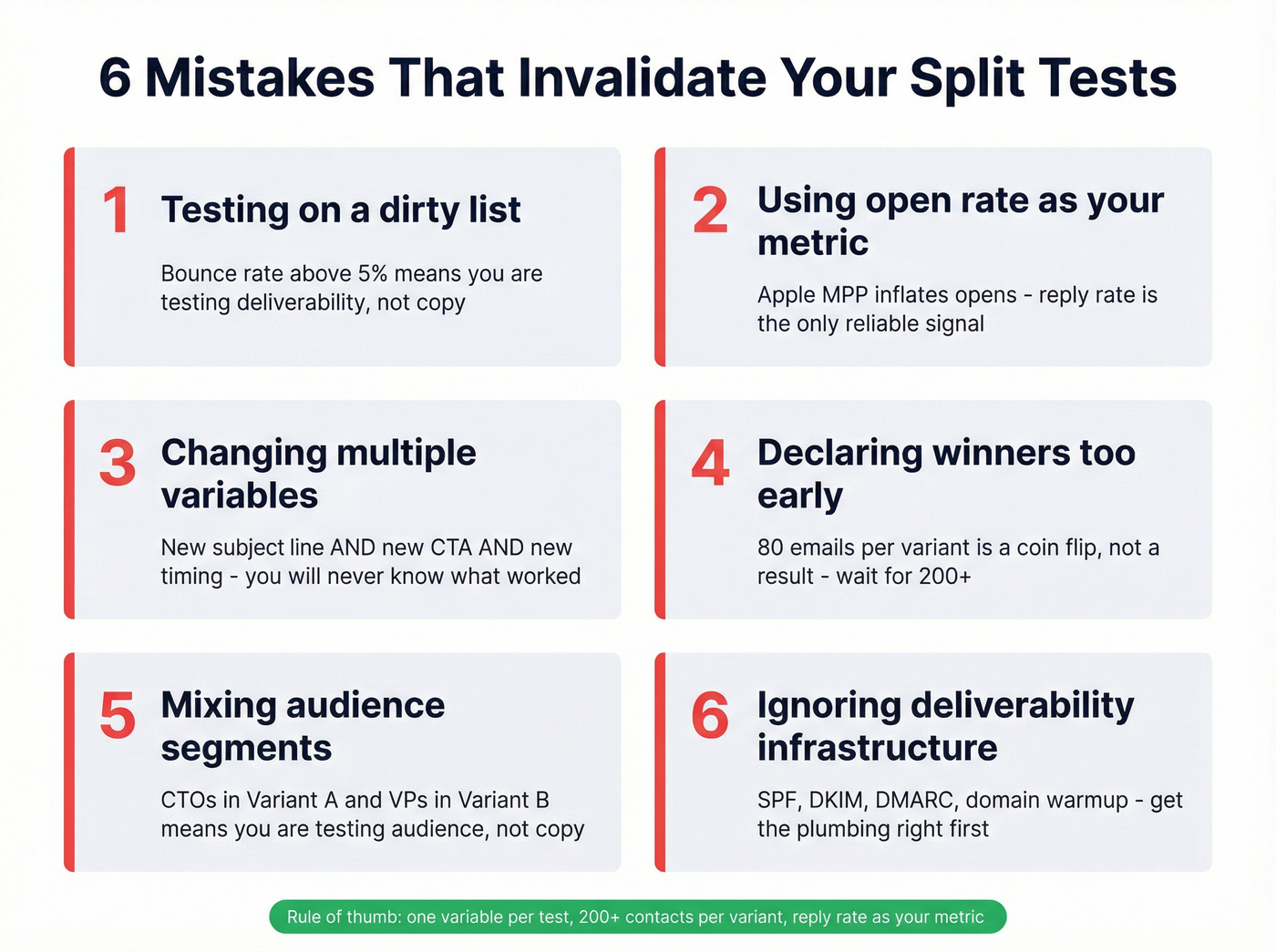
2. Using open rate as your primary metric. Apple MPP has made open tracking unreliable since 2021. Optimize for reply rate.
3. Changing multiple variables at once. New subject line AND new CTA AND different send time? You'll never know what worked. One variable per test. Always.
4. Declaring winners too early. You sent 80 emails per variant and Variant B has a 1% higher reply rate. That's not a winner - that's a coin flip. Wait for your full sample size.
5. Mixing audience segments in the same test. If Variant A goes to CTOs and Variant B goes to VPs of Marketing, you're testing audience, not copy. Split randomly across a homogeneous group.
6. Ignoring deliverability infrastructure. Domain warmup, inbox rotation, SPF/DKIM/DMARC - if these aren't dialed in, your split test is measuring inbox placement, not copy resonance. Get the plumbing right first.
Tightening your ICP is the highest-leverage move in cold email testing. Prospeo's 30+ search filters - buyer intent, technographics, headcount growth, funding stage - let you go from 'VP of Marketing at SaaS' to exactly the 200 prospects worth testing. At $0.01 per email, a 400-contact A/B test costs $4.
Build split-test-ready lists in minutes, not hours.
A Practical Testing Framework
Look, I know frameworks can feel formulaic. But this one works because it forces discipline on the parts where most teams get sloppy.
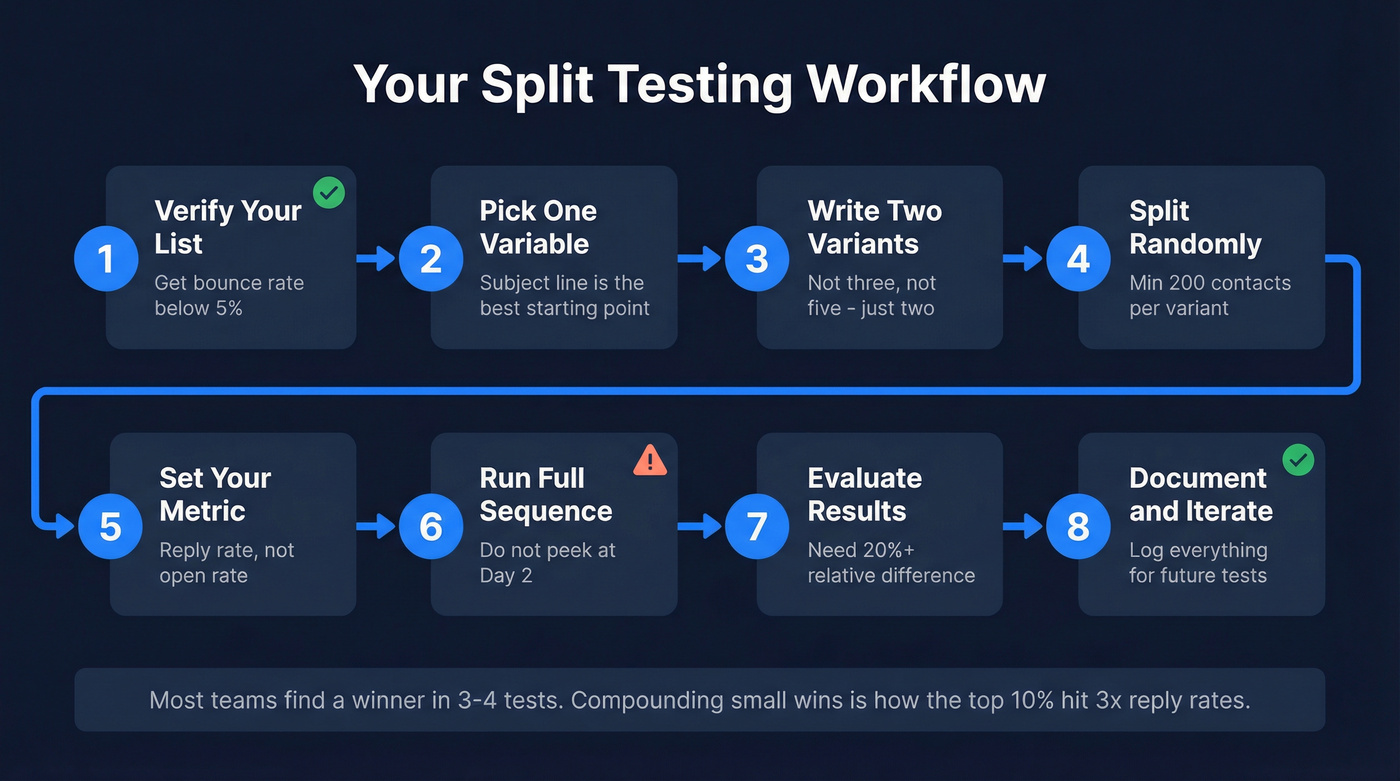
- Verify your list. Get bounce rate below 5% before you send a single test email.
- Pick one variable. Subject line is the best starting point for most teams.
- Write two variants. Not three, not five. Two.
- Split randomly. Minimum 200 contacts per variant across a homogeneous audience segment.
- Set your metric. Reply rate. Not open rate.
- Run the full sequence. Don't peek at Day 2 and call it.
- Evaluate after your full sample. Look for a 20%+ relative difference before declaring a winner.
- Document and iterate. Log what you tested, the sample size, and the result.
Here's a strong opinion: if your deals average under $15k, you probably don't need more than two rounds of split tests. Get your list right, find a subject line that works, and spend the rest of your time on volume and follow-up (see cold email volume best practices). Obsessive optimization is a luxury for teams with $50k+ deals where a single extra meeting per month changes the quarter.
Most teams run 3-4 tests before finding something that meaningfully moves the needle. That's normal. The compounding effect of multiple small wins is what separates elite senders from average ones - and it's why the top 10% hit reply rates 3x higher than everyone else.
FAQ
How many emails do I need per variant?
Aim for 200+ contacts per variant - 400 total minimum. At 100 per side you'll only detect large differences of 20%+ relative lift. Use reply rate as your metric since open rate is unreliable due to Apple's Mail Privacy Protection.
Should I test subject lines or body copy first?
Subject lines first. The Belkins data across 5.5 million emails shows a 133% reply-rate lift from personalization alone. If nobody opens your email, body copy doesn't matter. Once you've found a winning subject line, move to opening line, then CTA.
What tools help with cold email A/B testing?
Most outbound platforms - Instantly, Smartlead, Lemlist - have built-in A/B testing that rotates variants automatically. The tool matters less than the methodology. What matters more is starting with verified contact data so you're measuring copy performance, not bounce-rate variance. Prospeo's 98% email accuracy and spam-trap removal keep bounce rates under 5%, which is the baseline for any valid test.
Skip this if...
You're sending fewer than 100 emails a month. At that volume, you won't have enough data to draw meaningful conclusions from any split test. Focus on list quality and personalization instead, and revisit testing once you're consistently sending 400+ emails per campaign.