Cold Email Marketing for Beginners: Your First 30 Days
You wrote the perfect cold email. Personalized opener, clear CTA, compelling value prop. You hit send on 500 contacts and... 458 of them never see it. Across 12 million outreach emails, only 8.5% get a response. That's not a copywriting problem. It's an infrastructure problem.
Most beginner guides jump straight to templates and subject lines. We're not doing that. The first half of this guide is about the boring stuff - DNS records, domain warm-up, data verification - because that's where 90% of first campaigns actually fail.
What You Need Before Sending a Single Email
Before you write anything, nail these three fundamentals:
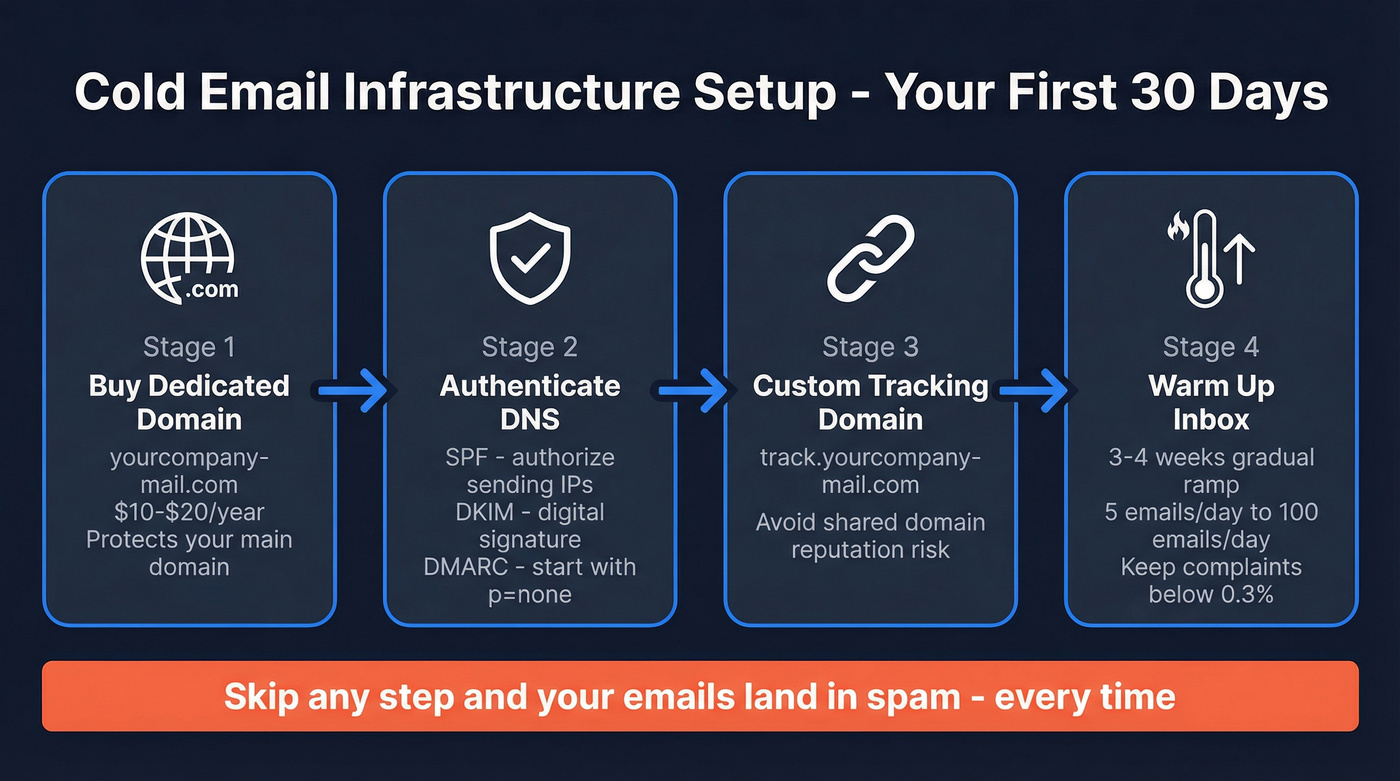
Infrastructure first. A dedicated sending domain with proper authentication (SPF, DKIM, DMARC) and a 3-4 week warm-up period. Skip this and your emails land in spam. Every time. If you want the full technical checklist, use this email deliverability checklist.
Verified data. Bad emails bounce, bounces tank your domain reputation, and a tanked domain means even brilliant emails go nowhere. This is the death spiral that kills most beginner campaigns. (More on hard bounces and why they matter.)
Follow-ups planned in advance. 42% of replies come from follow-up emails, not the first touch. If you're only sending one email per prospect, you're leaving nearly half your potential replies on the table. For a deeper cadence breakdown, see how many touchpoints before a sale.
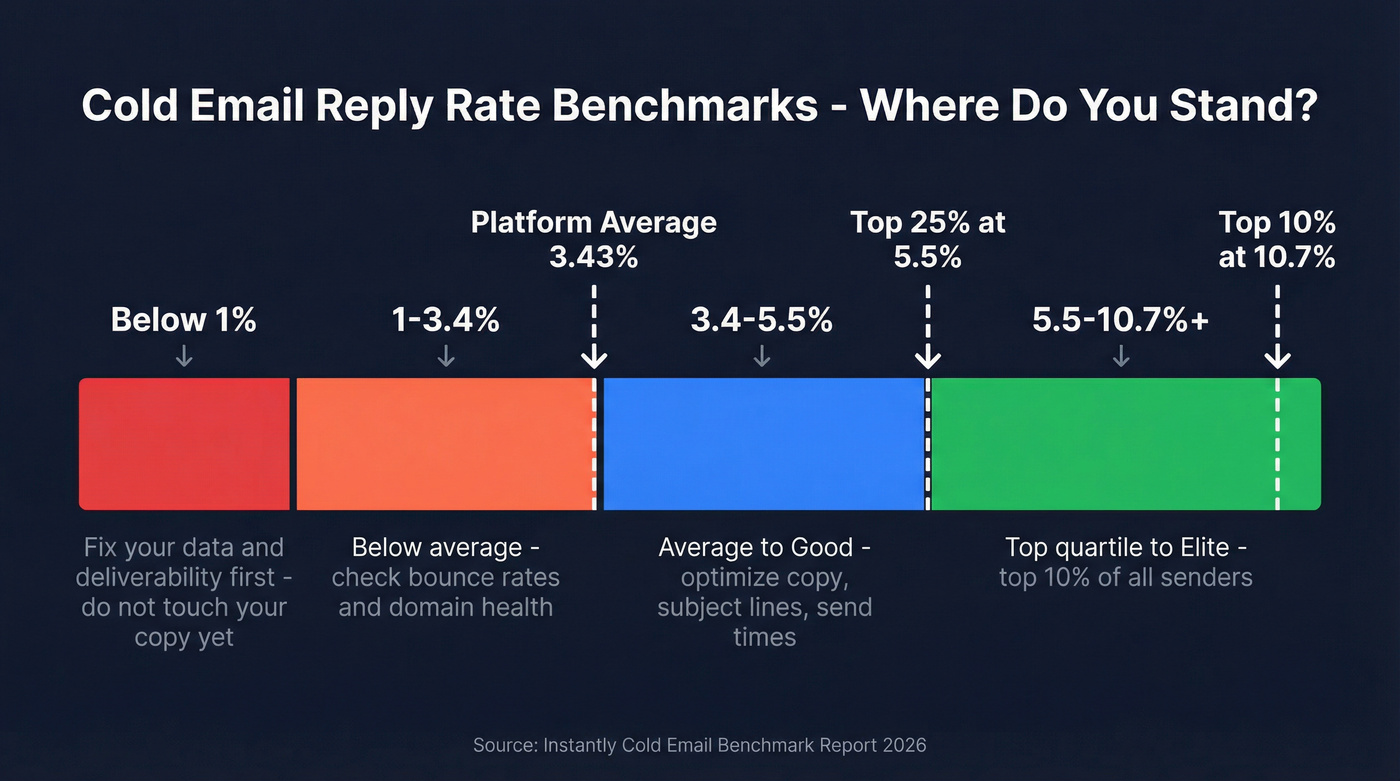
Cold email also works for partnerships, backlink outreach, and recruiting - not just closing deals. But whatever the goal, the platform-wide average reply rate sits at 3.43%. That's not bad. That's normal. You optimize from there.
Set Up Your Infrastructure First
We've watched beginners skip straight to writing emails, blast 200 contacts from their primary domain, and destroy their sender reputation in a single afternoon. Don't be that person. If you want the bigger picture, start with email sending infrastructure.
Buy a Dedicated Domain
Never send cold emails from your primary company domain. Buy a secondary domain - something like yourcompany-mail.com - for $10-$20/year. If something goes wrong (and with beginners, something usually does), your main domain stays clean.
Authenticate Your Domain
Three DNS records. All non-negotiable:
SPF tells receiving servers which IPs can send on your behalf. Add the include strings for your email provider and sending tool. DKIM adds a digital signature proving your emails are legit - your email provider generates the key, you add it as a DNS record. DMARC ties it together; start with p=none to monitor, then tighten to p=quarantine once you're confident. If you want a step-by-step walkthrough, use this SPF, DKIM, DMARC explained.
Set up a custom tracking domain (e.g., track.yourcompany-mail.com) instead of using your sending tool's shared one. Shared tracking domains expose you to other senders' reputation issues, so isolating your tracking protects deliverability. (Related: does open tracking hurt cold email.)
Warm Up Your Inbox
A fresh inbox sending 100 emails on day one is a massive spam signal. Ramp gradually over 3-4 weeks. If you're using a tool, follow this automated email warmup guide:
| Week | Daily Volume | Notes |
|---|---|---|
| 1 | 5-10 | Engage with replies, mark as important |
| 2 | 15-25 | Mix warm-up + real sends |
| 3 | 30-50 | Monitor bounce/complaint rates |
| 4 | 50-100 | Full volume if metrics are clean |
Keep your spam complaint rate below 0.3%. Above that, inbox providers throttle you hard.
Build a Verified Prospect List
Here's the thing: bad data is the #1 campaign killer for beginners. You upload an unverified list, 15-30% of emails bounce, your sending domain gets flagged, and even your good emails start landing in spam. A flagged domain can take weeks to recover - if it recovers at all. Your campaign dies before your copy ever gets tested.
The fix is simple. Verify every email before it enters your sequence. If you want to compare options, start with these email ID validators.
Prospeo runs a 5-step verification process with catch-all handling, spam-trap removal, and honeypot filtering, delivering 98% email accuracy. You can search by job title, industry, company size, or any of 30+ filters in the B2B database, export your list, and every email comes back verified. Stack Optimize built their agency to $1M ARR using this approach - maintaining 94%+ deliverability and under 3% bounce rates across all clients with zero domain flags. The free tier gives you 75 verified emails per month, enough to run your first campaign before spending a dollar.

Write Emails That Actually Get Replies
Subject Lines
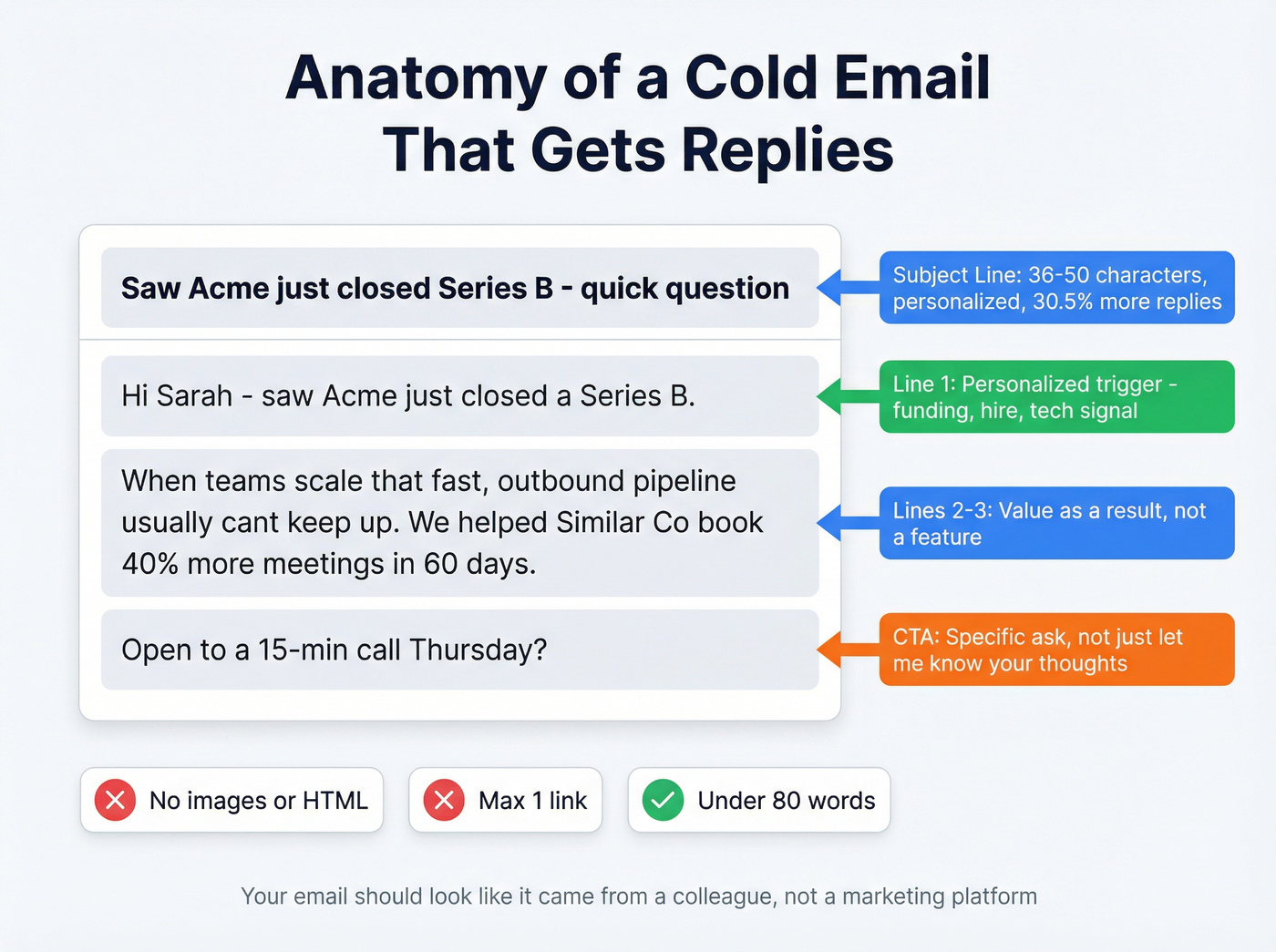
Keep them between 36-50 characters - long enough to convey value, short enough to display fully on mobile. Personalized subject lines boost response rates by 30.5%, so include the prospect's company name, a recent trigger event, or a specific metric. "Quick question about {{company}}'s Q1 pipeline" beats "Introduction" every single time. If you want more examples, use these outreach email templates.
Body Copy
Top performers keep cold emails under 80 words. Here's the structure that works:
Line 1: Why you're reaching out - a personalized trigger like a hire, funding round, or tech stack signal. Lines 2-3: The value you deliver, framed as a result, not a feature. Line 4: One clear CTA. Not "let me know your thoughts" - something specific like "open to a 15-min call Thursday?" (More CTA phrasing ideas: how to ask for a meeting via email.)
Here's what that looks like filled in:
Hi Sarah - saw Acme just closed a Series B. When teams scale that fast, outbound pipeline usually can't keep up. We helped [similar company] book 40% more meetings in 60 days by fixing their prospecting data. Open to a 15-min call Thursday?
Plain text beats heavy HTML for deliverability. No images, minimal links (one max), no fancy formatting. Your email should look like it came from a colleague, not a marketing platform.
Let's be honest about volume: sending 500 generic emails will always lose to 50 highly relevant ones. If your average deal size is modest, you don't need a massive database. You need 30 well-researched prospects per week and emails that prove you did your homework.
Timing
Wednesday consistently shows the highest reply rates across both the Backlinko study and Instantly's benchmark data. Tuesday is a close second. Avoid weekends entirely - Saturday is the worst-performing day by a wide margin. For a deeper breakdown, see the best time to send prospecting emails.

This guide exists because bad data destroys first campaigns. Prospeo's 5-step verification delivers 98% email accuracy with catch-all handling and spam-trap removal - so your emails actually land.
Get 75 verified emails free and launch your first campaign today.
Follow Up (Most Replies Come Here)
Most beginners send one email and wait. That's leaving money on the table.
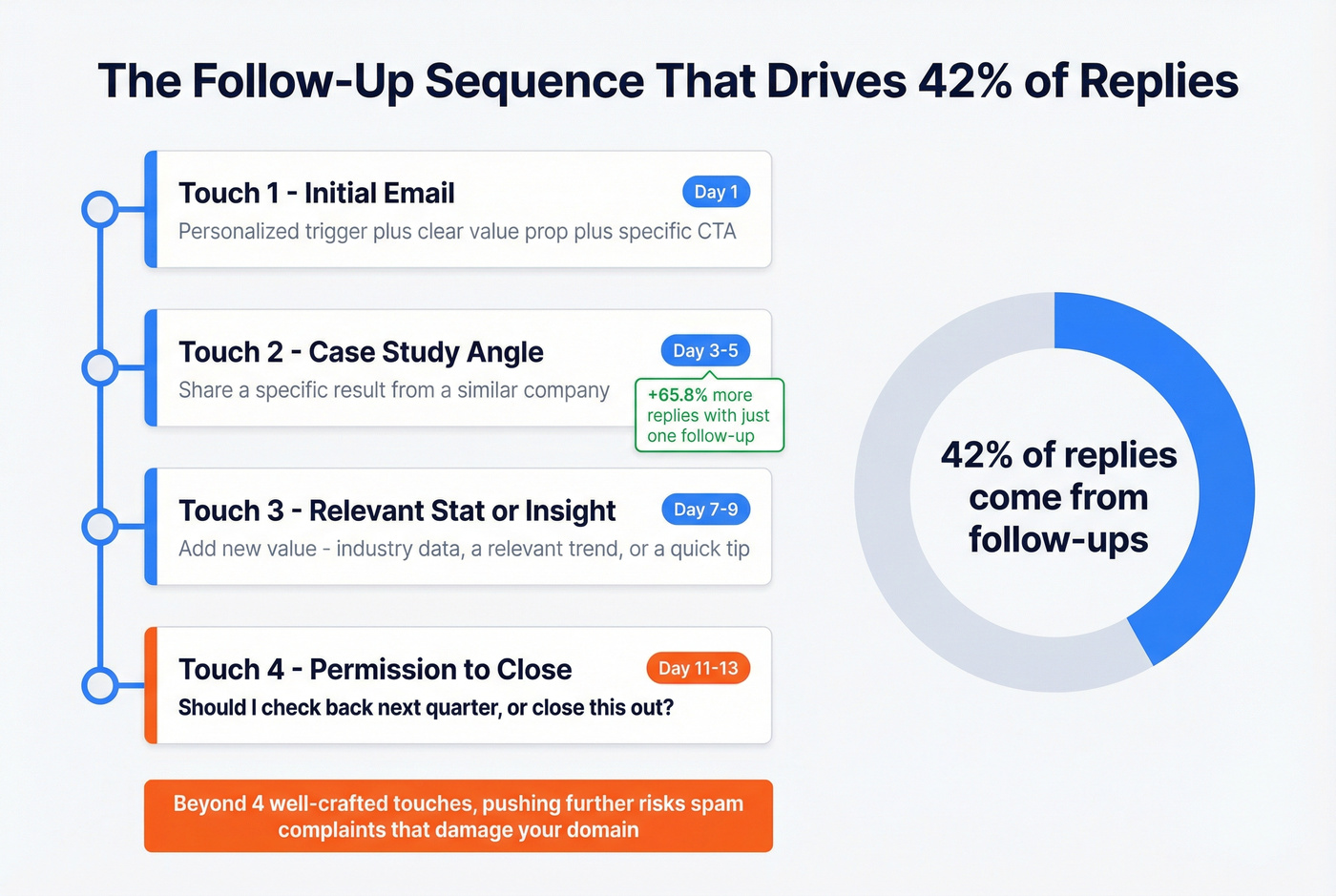
One additional follow-up boosts replies by 65.8%. Across Instantly's dataset, 42% of all replies come from follow-ups, not the initial email. Plan 3-4 touchpoints spaced 2-4 business days apart. Some campaigns extend to 7 touches, but beyond that, returns diminish sharply. If you need help structuring this, use a sales cadence example.
Each follow-up needs a new angle - never "just bumping this up." Add a case study in touch two, a relevant stat in touch three, and a permission-to-close in the final email: "Seems like the timing isn't right - should I check back next quarter, or close this out?"
In our experience, if someone hasn't replied after four well-crafted touches, they aren't interested. Move on. Pushing further risks annoying prospects into marking you as spam, which actively damages your domain for future campaigns.
Know Your Benchmarks
These numbers define performance tiers for cold email campaigns:
| Tier | Reply Rate | What It Means |
|---|---|---|
| Average | 3.43% | Normal - most senders land here |
| Good | 5.5%+ | Top quartile performance |
| Elite | 10.7%+ | Top 10% of all senders |
Below 1%? Don't touch your copy yet. Fix your data quality and deliverability first. If you're at 3-5%, that's where copy optimization, subject line testing, and send-time adjustments start moving the needle.
Stay Legal
Cold email isn't illegal, but doing it wrong can get expensive fast.
| CAN-SPAM (US) | GDPR (EU/UK) | |
|---|---|---|
| Consent | Opt-out model | Opt-in or legitimate interest |
| Penalties | Up to $50,120 per email | EUR 5.88B in total fines to date |
| Unsubscribe | Within 10 business days | Immediate/prompt |
Both frameworks require a clear, working unsubscribe in every email. Google and Yahoo now enforce this at the platform level for bulk senders. Include it in your email body and List-Unsubscribe header - no exceptions. For the outbound-specific view, see GDPR for sales and marketing.
Best Cold Email Tools for Beginners
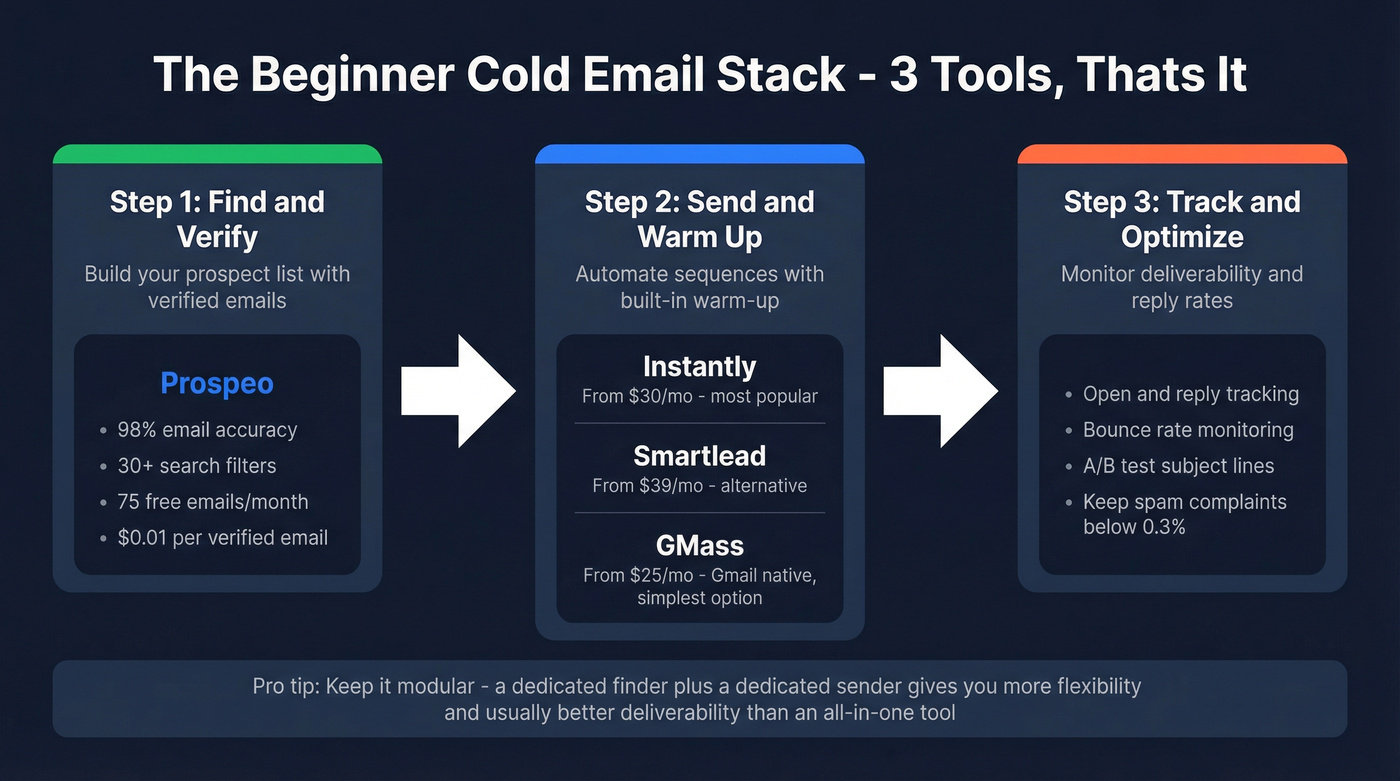
You don't need ten tools. You need three, maybe four. If you want a longer shortlist, see our cold email marketing tools roundup:
| Tool | Purpose | Starting Price |
|---|---|---|
| Instantly | Sending + warm-up | ~$30/mo |
| Smartlead | Sending + warm-up (alternative) | ~$39/mo |
| GMass | Gmail-native sending | $25/mo |
| Apollo | All-in-one (database + sending) | Free / $59/mo per user |
Pair a verification tool with Instantly or Smartlead for sending and warm-up. GMass is the simplest option if you live in Gmail and want zero learning curve. Apollo offers an all-in-one approach with a free tier, but the UI can feel overwhelming for beginners and lower-tier inbox limits get restrictive quickly.
Skip Apollo if you want to keep things modular - a dedicated finder plus a dedicated sender gives you more flexibility and usually better deliverability, since you can swap components without rebuilding your whole stack.
The r/coldemail subreddit is worth browsing if you want to see how practitioners actually think about copy, offers, and deliverability day to day.
Follow-ups drive 42% of replies, but only if your emails reach the inbox. Prospeo gives you verified contacts from 300M+ profiles with 30+ filters - so every touchpoint hits a real person.
Stop wasting follow-ups on dead addresses at $0.01 per verified email.
The Bigger Picture
Cold email marketing for beginners often gets framed as a lead gen tactic, but the impact runs deeper than that. Startups use it to land their first 50 paying customers. Agencies fill their pipeline without spending a dollar on ads. Consultants book discovery calls with decision-makers they'd never reach through inbound alone.
The compounding effect is real: every campaign teaches you what messaging resonates, which ICPs convert, and where your offer needs refinement. We've seen teams go from zero outbound to a predictable, repeatable pipeline in 90 days - not because they found some magic template, but because they got the fundamentals right and iterated from there.
FAQ
How many cold emails should a beginner send per day?
Start with 5-10 during warm-up week one, then ramp to 50-100 over four weeks. Blasting hundreds from a fresh inbox triggers spam filters and can blacklist your domain permanently.
What's a good reply rate for cold email?
The platform-wide average is 3.43%. Above 5.5% puts you in the top quartile, and top performers hit 10%+. Below 1%, fix deliverability and data quality before touching your copy.
Do I need to verify emails before sending?
Always. Unverified lists routinely cause 15-30% bounce rates, which destroy your domain reputation within days. Tools like NeverBounce, ZeroBounce, or Prospeo's built-in verification all handle this - the important thing is that you verify every address before it enters a sequence.