Does Open Tracking Hurt Cold Email in 2026? (Yes - Here's Why)
$15k worth of pipeline "opened" your email... and nobody replied. Then you check the timestamps and half the opens happened 3 seconds after send. That's 2026 cold email analytics in a nutshell, and it's exactly why people keep asking: does open tracking hurt cold email?
Yes. It can hurt deliverability.
And it always hurts decision-making, because "opens" stopped being a human signal a while ago.
What you need (quick version)
Do this (2026-safe)
- Turn off open tracking for cold outbound by default. Period.
- Write emails like a human: plain text, no images, minimal formatting.
- Track positive replies + meetings booked as your real success metrics (see Sales Sequence Metrics for a KPI list that actually predicts revenue).
- Keep bounce rate under 2% (under 1% is even better) by using a proper Email Verification List SOP.
- Run weekly checks: Google Postmaster Tools, bounce/complaint trends, and a small inbox placement test.
- Fix list quality first: verify before you send. Fewer bounces means better deliverability.
Don't do this
- Don't use opens to decide who's "hot." Opens aren't a human metric in 2026.
- Don't A/B subject lines based on open rate. You'll optimize for Apple and security bots (use a reply-first framework from A/B Testing Lead Generation Campaigns instead).
- Don't add tracking + links + images in the first touch and then wonder why Gmail hates you.
- Don't treat "80% open rate" as good news. It's usually a measurement bug.
When tracking is acceptable (and when it isn't)
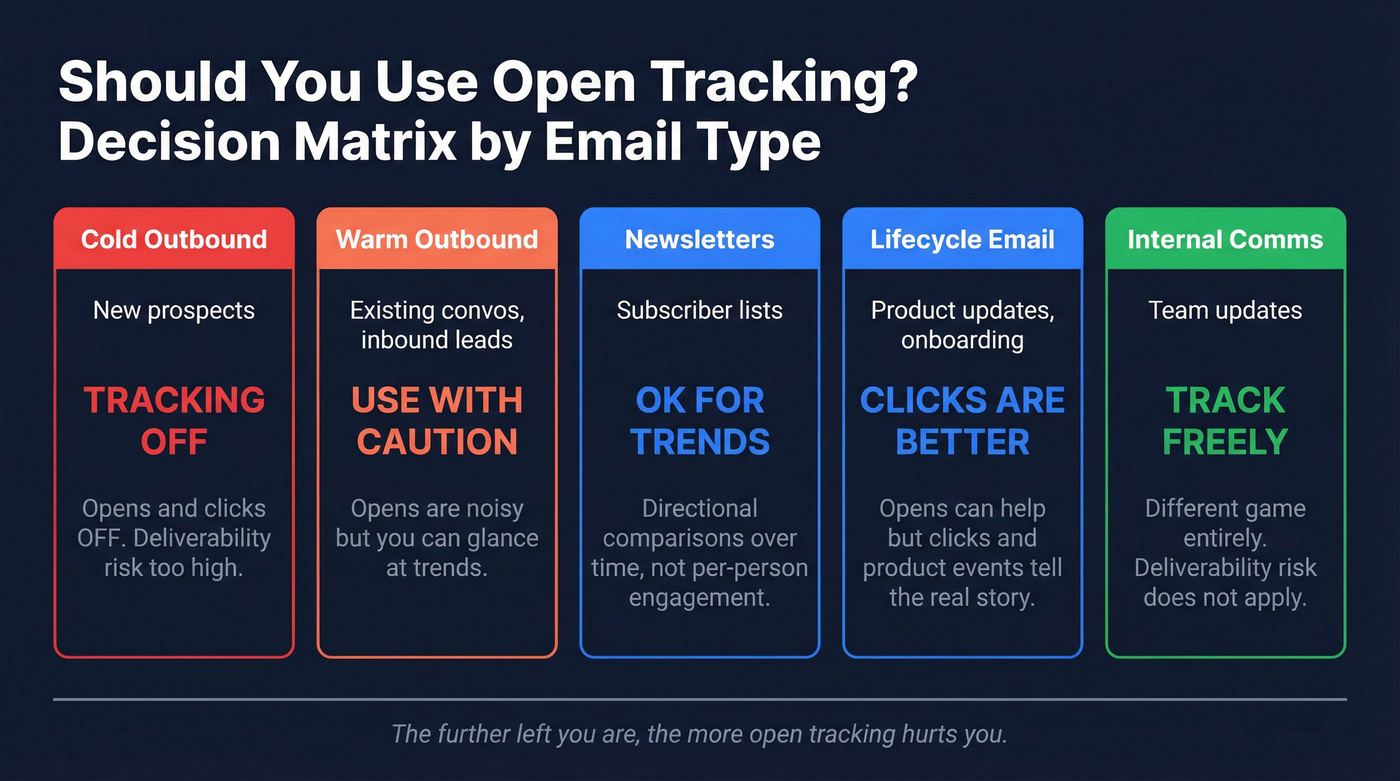
- Cold outbound to new prospects: tracking OFF (opens and clicks).
- Warm outbound (existing conversations / inbound leads): opens are still noisy, but you can glance at trends.
- Newsletters: opens are fine for directional comparisons over time, not for "who's engaged."
- Lifecycle email to known users (product updates, onboarding): opens can help, but clicks + product events are better.
- Internal comms: track whatever you want. Deliverability risk is a different game.
The practical impact (realistic estimate)
Disabling open tracking often produces a +2-10 percentage point inbox-placement lift on cold outbound. The exact number varies by sender reputation and list quality, but the direction stays consistent: removing remote content and third-party requests makes your email look more like a normal 1:1 message.
The direct answer: does open tracking hurt cold email?
Yes. Here's the thing: open tracking gives you the worst trade in outbound - a little "visibility" that isn't real, in exchange for extra deliverability risk and bad automation decisions.
Open tracking works by loading a tiny invisible image (a pixel) from a tracking server. That forces HTML and a third-party request into an email you're trying to pass off as personal. Filters don't need to "detect a pixel" to downgrade you. They just need to see enough patterns that correlate with bulk mail - exactly the kind of signals an email filter is designed to score.
There's no controlled, public pixel-on vs pixel-off inbox-placement A/B test we can cite. What we do have is the mechanism, large-scale correlation, and operator consensus from people who live in deliverability dashboards and have the scars to prove it.
Hunter's "State of Cold Email" analysis (11 million cold emails sent in 2026) shows tracking pixels are negatively associated with reply rates. That's the only number that matters in cold outbound.
Operator rule: If your sequencer uses opens to trigger follow-ups, disable that automation. You're letting Apple and Microsoft write your sequences.

Open tracking is broken, but your list quality doesn't have to be. The article says keep bounces under 2% - Prospeo's 5-step verification and 7-day data refresh deliver 98% email accuracy, so every send hits a real inbox instead of feeding spam filters.
Fix deliverability at the source: start with data that doesn't bounce.
Why open rates are broken in 2026 (it's not you)
If you're still running cold outbound like it's pre-MPP--"optimize opens, then clicks, then replies"--you're optimizing the wrong thing.

The latest published Litmus snapshot (Dec 2026, based on over 1.1 billion opens) shows how lopsided the ecosystem is: Apple 60.6%, Gmail 29.10%, Outlook desktop 4.02%. Apple's share matters because Apple's privacy model intentionally breaks open tracking, and that reality bleeds into every dashboard your team stares at.
Now layer in Gmail's image proxy behavior and Microsoft's security scanning. Your "open rate" becomes a blended soup of:
- machine prefetches
- security sandbox fetches
- proxy image requests
- your own sent-folder opens
- and, somewhere in there, a few humans
So when someone says "my open rate dropped from 70% to 12%," the right question isn't "did your subject line get worse?" It's "what changed in tracking, filtering, or inbox placement?"
We've tested this across outbound programs where nothing changed except tracking settings, and the story repeats: opens swing wildly, replies barely move, and the teams that stop chasing opens ship better campaigns faster.
Apple Mail Privacy Protection (MPP) = machine opens by design
Apple says it plainly in its Mail Privacy Protection documentation: remote content is downloaded in the background when you receive a message, not when you read it. That means the pixel can fire even if the person never opens the message.
SendGrid's guide to MPP events adds the operational detail: Apple uses prefetching and caching, inflating unique opens and making repeat opens unreliable. They even expose a machine-open field to help you separate noise from reality.
Net: if your list has Apple Mail usage (it does), open rate is a vanity metric.
Gmail image proxy = "opens within seconds" noise
Gmail can fetch images through proxies, and those requests can happen fast, sometimes right after delivery.
I've watched teams celebrate a "crushing" 78% open rate on a new domain, only to realize the next day they had two replies total and a bunch of opens clustered at the exact same second. That wasn't interest. That was plumbing.
A rule that holds up in real campaigns:
- Ignore any "open" that happens < 1 minute after send.
- Only treat opens > 1 minute as possibly human, and even then, don't bet your sequence on it.
Microsoft 365 Defender scanning = fake opens/clicks (B2B-heavy lists)
If you sell B2B, you hit Microsoft 365. And Microsoft 365 means security tooling.
Suped's deliverability explainer lays it out: Defender for Office 365 (Safe Links / Safe Attachments) generates automated opens and clicks that look like humans. Safe Attachments can open content in a sandbox and trigger tracking pixels, creating false opens. Microsoft's own Q&A guidance also confirms that clicks from Microsoft IPs are frequently automated scanning.
Implication: in Microsoft-heavy segments (IT, finance, enterprise ops), opens and even clicks are polluted.
Does open tracking hurt cold email deliverability? (deliverability vs analytics)
Two problems get mashed together:

- Deliverability: does tracking change where your email lands?
- Analytics: does tracking change what you think is happening?
Both matter. Analytics damage is guaranteed. Deliverability damage is common enough that it's not worth the risk.
In Unspam.email's 2026 deliverability report (based on millions of tests), the baseline is already ugly: 60% visible inbox / 36% spam / 4% blocked. That's before you add anything "extra" to your message.
They also found poor HTML structure correlates with an 18-25% higher likelihood of spam placement. Open tracking is almost always implemented as HTML plus remote image content, so you're walking straight into the risk zone.
| Deliverability risk | Analytics damage | |
|---|---|---|
| Open pixel | Adds HTML + remote fetch; raises risk profile | MPP/proxies/scanners inflate opens |
| Link tracking | URL rewriting + redirects look sketchy | Security bots click links |
| No tracking | Lowest risk profile | Forces better KPIs (replies/meetings) |
How pixels change the message fingerprint
Cold email deliverability is pattern recognition. A plain-text note with no remote assets looks like a normal email. A message with HTML wrappers, tracking pixels, and redirect links looks like marketing automation, even if your copy is "personalized."
You don't need to believe in a single "pixel detector" for this to matter. You just need to accept the obvious: more moving parts means more ways to look like bulk.
How tracking creates a false "low open rate" panic
Tracking breaks in both directions:
- Inflated opens: Apple, Gmail proxies, and security scanners make you think people are reading when they aren't.
- Undercounted opens: when images are blocked, your pixel never loads, even if the person reads the email.
That's how teams end up rewriting perfectly fine copy because "opens look low," when the real issue is spam placement, list quality, or authentication.
How it breaks sequencing logic (this is the silent killer)
The worst damage isn't the metric. It's what you do with it.
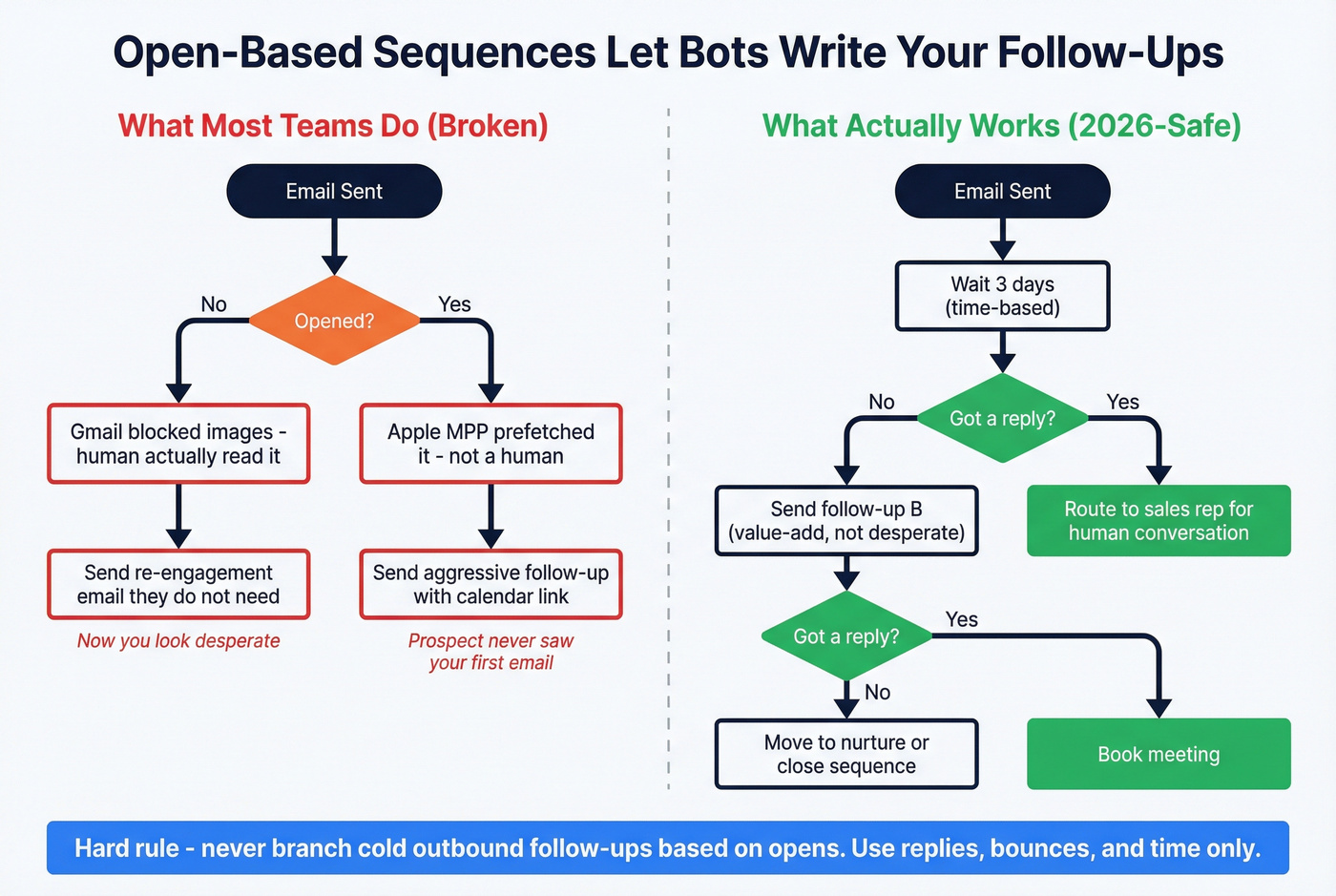
If your sequence says:
- "If opened, send follow-up A"
- "If not opened, send follow-up B"
- "If opened twice, send a calendar link"
...then you're not running a sales motion. You're running a bot-detection lottery.
Hard stance: for cold outbound, never branch follow-ups based on opens. Use replies, bounces, and time-based follow-ups only (see Conditional Sequences for safer branching logic).
Does the Gmail "images are hidden... suspicious or spam" warning mean your pixel got detected?
No. That warning is Gmail saying: "I don't trust this sender/message yet."
Suped's guidance is the practical framing: it's driven by trust, sender reputation, authentication, and content quality, not "Gmail caught your pixel." And when images are blocked, your pixel won't load, so your open rate gets undercounted even if the email is read.
What to check instead:
- Authentication: SPF, DKIM, DMARC aligned (and stable) - use SPF DKIM & DMARC Explained as your checklist.
- Reputation trend: review Google Postmaster Tools weekly (domain/IP reputation, spam rate).
- Content: keep first-touch emails plain, low HTML, no heavy formatting.
- List hygiene: remove bounces fast; don't keep hammering dead addresses.
What to track instead (a measurement stack that works without opens)
If you remove opens, you don't lose visibility. You stop lying to yourself.

Hunter's benchmark across 11M cold emails puts average reply rate at 4.1%. Smaller campaigns do better: 5.8% for under 50 recipients, and 2.1% once you're sending to 1,000+. That's the reality check: cold email is a game of marginal gains, not magic subject lines.
Your north star metrics:
- positive reply rate
- meeting rate
- bounce rate
The 3 KPIs to run cold outbound by
- Positive reply rate: replies that move the deal forward (not "remove me").
- Meeting rate: meetings booked per delivered email (or per unique account touched).
- Bounce rate: hard bounces / sent. This is a deliverability KPI wearing a data hat.
Secondary metrics (useful, not obsessive):
- Complaint rate (spam complaints)
- Inbox placement tests (seed tests or panel-based) - if you need a primer, start with What Is a Seed List?
- Time-to-first-positive-reply (speed matters for iteration)
The weekly operator checks (so you don't need opens)
- Google Postmaster Tools: check reputation + spam rate weekly (don't stare daily).
- Inbox placement test: run a small test when you change anything major (domain, copy style, volume).
- Bounce + complaint review: tag root causes (bad data vs blocked domain vs throttling).
- Segment performance: by persona, industry, and mailbox provider (Gmail vs Microsoft).
List quality is a deliverability metric (not a data task)
Cold email deliverability is reputation math. Bounces and complaints tell mailbox providers you're not trustworthy.
Look, if you can't keep bounces under 2%, you don't have a "copy problem." You've got a data problem, and scaling volume will punish you for it.
In our experience, the fastest way to stop the bleeding is boring: verify, suppress risky addresses, and refresh lists before they rot (see B2B Contact Data Decay for why this happens so fast).
A simple workflow that works:
- Build your target list (ICP filters, job role, company signals) - use Ideal Customer if your ICP is fuzzy.
- Verify emails in bulk.
- Export only verified contacts to your sequencer/CRM.
- Re-verify weekly for any list you're still working.

When open tracking is acceptable (and when to allow it)
Sometimes you're forced into tracking. A boss wants "engagement." A stakeholder wants a dashboard. Fine. Just don't let it drive actions.
Decision tree (use this, don't debate it)
- Cold outbound to new prospects: no opens, no clicks. Track replies/meetings/bounces.
- Cold outbound but boss demands opens: allow opens only with a custom tracking domain + machine-open filtering; never branch sequences on opens.
- Warm outbound (active conversations): opens are optional, but don't overreact to them.
- Newsletter: opens are acceptable for trendlines; judge success by clicks and downstream conversions.
- Lifecycle/product email: opens can help, but product events and clicks are stronger.
- High-security industries (Microsoft-heavy): assume opens/clicks are polluted; prioritize replies and booked meetings.
Tracking choice vs risk vs when to use
The last two rows assume you're tracking; they're configuration choices.
| Tracking choice | Deliverability risk | Data accuracy | Best use case | Recommendation |
|---|---|---|---|---|
| No tracking | Low | High | Cold outbound | Best default |
| Open pixel only | Medium | Low | Warm lists | Skip for cold |
| Link tracking | High | Medium | Content-led | Use sparingly |
| Open + link | Highest | Low | Newsletters | Not for cold |
| Custom domain OFF | Higher | Low | Quick setup | Skip |
| Custom domain ON | Medium | Low-medium | If unavoidable | Only option |
Filter machine opens (MPP), scanner activity, and self-opens
If you insist on looking at opens, clean the data first:
- Ignore opens < 1 minute after send. Treat them as proxy/scanner noise.
- Flag Apple MPP opens using a machine-open indicator (SendGrid-style "machine open" separation is the right model).
- De-weight Microsoft-heavy domains. If you see opens/clicks from Microsoft IP ranges, assume automation unless paired with a reply.
- Stop self-opens. Your own sent-folder views, QA checks, and internal forwarding can fire pixels. Some platforms prevent pixels from firing on sent copies; use it if it's available, especially on smaller sends.
Use a custom tracking domain (only if tracking's unavoidable)
A custom tracking domain won't save bad sending behavior, but it does prevent you from inheriting reputation problems from shared tracking domains.
High-level setup:
- Create a subdomain like
tracking.example.comorclick.example.com - Point it to your sending/tracking provider via the required DNS record(s)
- Verify it in the platform so SSL gets issued and links/pixels resolve cleanly
Mailmeteor's custom tracking domain guide is a solid reference if you need a step-by-step.
Monday-morning cold email settings checklist (2026)
1) Domain + infrastructure (set it up like an adult)
- One domain = one purpose: keep cold outbound separate from your main corporate domain, and separate again from transactional/product email.
- SPF/DKIM/DMARC aligned and stable: don't "tweak" DNS weekly. Stability builds trust.
- Consistent From identity: don't rotate names and addresses like you're evading someone. That's a spammer pattern.
- Ramp volume deliberately: week 1 low, week 2 moderate, week 3 scale. Sudden spikes get throttled (use Email Pacing and Sending Limits to set guardrails).
- Mailbox provider mix: if your list is Microsoft-heavy, expect more scanner noise and stricter filtering. Plan for it.
2) Sending behavior (this is what reputation's made of)
- Keep daily volume sane per inbox. A practical ceiling many operators use is ~30 cold + ~10 warm/day per account.
- Reply handling matters: respond fast to real replies. Ignoring replies (even "not interested") is a reputation smell.
- Stop sending to non-responders eventually: endless follow-ups to silent inboxes is how you earn spam placement.
- Don't "fix" deliverability by blasting more inboxes. More accounts just spreads the damage.
3) List rules (where most teams lose)
- Bounce rate target: <2% (ideal <1%). If you miss it, pause scaling and fix data.
- Suppress risky addresses: role accounts (info@, sales@), generic inboxes, and anything that bounced recently.
- Deduplicate aggressively: duplicates inflate volume and complaints.
- Refresh stale lists: job changes and org churn are constant; last quarter's list is already decaying.
4) Copy rules (simple wins)
- First email: no links, no images, minimal formatting.
- One clear ask. One CTA. No "calendar link + deck + case study" pile-on.
- Personalization must be real: role pain, trigger, relevant context. If it reads like a template, it performs like a template.
- Never A/B subject lines on open rate in cold outbound. Test on reply rate only.
5) Tracking rules (keep it boring)
- Open tracking OFF for cold outbound.
- If tracking's required: custom tracking domain ON, and filter machine opens.
- Don't use click tracking in the first touch unless you're fine with security scanners "clicking" everything.
FAQ
Should I turn off open tracking for cold outbound?
Yes. In 2026, opens are polluted by Apple MPP, Gmail proxies, and Microsoft scanners, and pixels add unnecessary risk. Turn opens off and optimize for positive replies, meetings, and bounce rate.
Are "opens within seconds" real people?
No. Opens that fire within seconds are usually proxies, prefetching, or security scanning. Ignore opens < 1 minute after send and don't let opens drive follow-up logic.
Is link tracking worse than open tracking?
Yes. Link tracking adds redirects and URL rewriting, which looks sketchier to filters and gets clicked by security bots. Keep first-touch emails link-free and measure replies and meetings.
If I stop tracking opens, how do I improve deliverability and replies (tools included)?
Run outbound on reply/meeting/bounce KPIs, monitor Google Postmaster Tools weekly, and keep bounces under 2%. For list hygiene, Prospeo's real-time verification and 98% email accuracy help you suppress risky addresses before you send.
Closing
So, does open tracking hurt cold email? In practice, yes: it's noisy, it pushes you toward the wrong optimizations, and it adds risk for a metric that isn't human anymore, especially as privacy and security behavior keeps tightening across Apple, Google, and Microsoft.
Skip open tracking for cold outbound. If someone on your team insists on it, don't let it touch sequencing logic.
You just learned opens are noise. Replies and meetings booked are the only metrics that matter - and those depend on reaching real people at verified addresses. Prospeo gives you 143M+ verified emails at $0.01 each, with catch-all handling and spam-trap removal built in.
Ditch vanity metrics. Reach real buyers with verified contact data.