How to Create a Sales Workflow in 2026 (7 Steps)
It's Monday morning. A new SDR starts, opens the CRM, and asks: "So... what do I do first?" Nobody has a good answer. There's a spreadsheet somewhere, a few Loom videos from 2023, and a Slack thread that contradicts both. Salesforce data shows reps spend only [28% of their week](https://www.salesforce.com/news/stories/sales-research-2023/) actually selling - the rest disappears into admin, guesswork, and context-switching.
That's not a people problem. That's a workflow problem.
What You Need (Quick Version)
Every functional sales workflow rests on three things:
- A reverse-engineered stage map built from your own closed deals - not a template you grabbed off someone's blog.
- Automation logic with exit criteria at every stage, so deals don't rot in your pipeline.
- Verified contact data so your sequences don't bounce and torch your domain (see B2B contact data decay).
The tool stack is simpler than most guides make it. You need a CRM (HubSpot or Pipedrive), a sequencing tool (Apollo, Outreach, or Salesloft), and a data provider for verified emails and direct dials (see direct dial). Three tools, not thirteen. Let's build the workflow.
Workflow vs. Process vs. Pipeline
These terms get used interchangeably, and it causes real confusion:
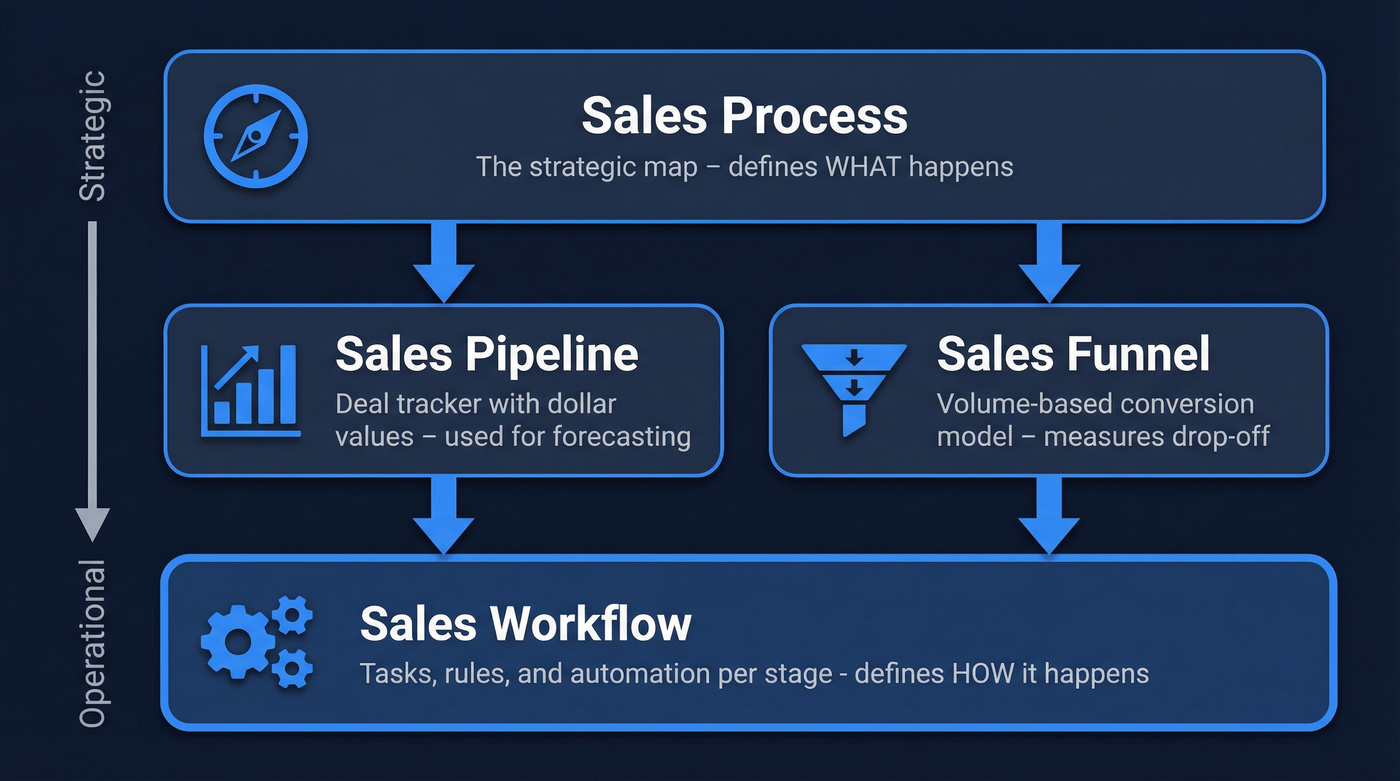
| Term | What It Is | What It's For |
|---|---|---|
| Sales Process | Strategic stages (prospect to close) | Defining what happens |
| Sales Workflow | Tasks, rules, and automation per stage | Defining how it happens |
| Sales Pipeline | Deal tracker with dollar values | Forecasting revenue (see deal forecast accuracy) |
| Sales Funnel | Volume-based conversion model | Measuring drop-off rates |
As Streak's breakdown explains, the pipeline is a working tool for tracking and forecasting; the process is the reference map that informs it. The workflow sits underneath both - it's the operational layer that makes everything function day to day.
Why Most Sales Workflows Fail
Three root causes kill workflows before they produce results.
Built without rep input. A VP designs a 12-stage pipeline in a conference room. Reps ignore it by week two because it doesn't match how deals actually move. We've seen this pattern over and over: managers want the workflow for bottleneck diagnosis, reps need it for task execution, and if you design only for one audience, the other abandons it. Workflows need to be reverse-engineered from real deals, not imposed top-down.
No exit criteria. Without clear rules for when a deal moves forward or gets killed, opportunities sit in "Negotiation" for 90 days. 72% of reps don't expect to hit quota. Stale pipelines are a big reason why (see sales pipeline challenges).
Bad data breaks every downstream step. Your automation is only as good as the contact data feeding it. If 30%+ of your emails bounce on the first sequence, you're not just wasting effort - you're damaging your sender domain. And once that reputation tanks, even your good emails land in spam (see email deliverability checklist).

Bad data breaks every downstream step in your sales workflow. Prospeo's 5-step verification delivers 98% email accuracy and 125M+ verified mobile numbers - refreshed every 7 days, not every 6 weeks. One customer dropped bounce rates from 35% to under 4%.
Stop building workflows on data that bounces.
7 Steps to Build Your Sales Workflow
Step 1: Audit Your Last 10 Closed Deals
Stop copying someone else's process. Open your CRM and pull the last 10 deals you actually closed. For each one, document:
- How the lead entered your pipeline
- How long each stage took
- Where deals stalled and what unstuck them
- What triggered the close
- Which channels reps used at each stage
This audit gives you the real shape of your sales motion. The Dropbox framework nails the principle: don't leave any step open to interpretation. If you can't describe what happens inside a stage, the stage doesn't exist yet.
Step 2: Map the Buyer Journey
57% of the buying journey is completed before a prospect ever talks to your team. Your stages should reflect where the buyer is, not just what the rep does.
Most B2B teams end up with 5-8 stages: Lead Identified, Qualified (SQL), Discovery Completed, Demo/Proposal, Negotiation, Closed Won/Lost, and Post-Close Nurture. Fewer stages for transactional sales, more for enterprise deals with multiple stakeholders and procurement loops.
Here's the thing - don't stop at "Closed Won." The post-close workflow matters just as much: automated handoff to CS, onboarding sequence triggers, and renewal reminders at 90/60/30 days before contract end. Skipping this stage is how you win deals and lose customers.
Step 3: Define Exit Criteria and SLAs
Every stage needs a gate. Without one, deals pile up and your pipeline becomes fiction.
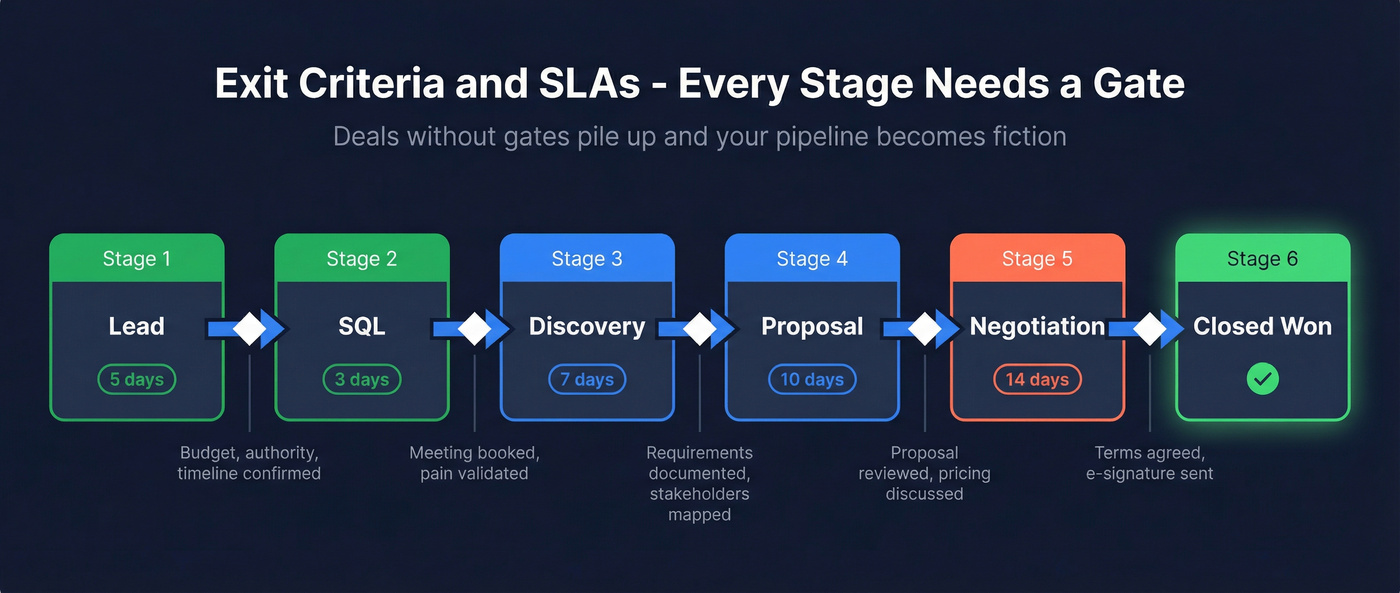
| Stage | Exit Criteria | Max Time |
|---|---|---|
| Lead to SQL | Budget, authority, timeline confirmed | 5 days |
| SQL to Discovery | Meeting booked, pain validated | 3 days |
| Discovery to Proposal | Requirements documented, stakeholders mapped | 7 days |
| Proposal to Negotiation | Proposal reviewed, pricing discussed | 10 days |
| Negotiation to Close | Terms agreed, e-signature sent | 14 days |
Leads contacted within 5 minutes are 21x more likely to convert than those contacted after 30 minutes. Build that SLAs into your inbound workflow - it's the single highest-leverage rule you can set. And at the finish line, trigger your e-signature request automatically from the CRM (see DocuSign alternatives). Document friction in the final stage kills more deals than pricing objections do.
Step 4: Choose a Qualification Framework
Match the framework to your sales motion (see lead qualification framework):
| Framework | Best For | Core Question |
|---|---|---|
| BANT | Transactional, shorter cycles | Can they buy now? |
| MEDDIC | Enterprise, multi-stakeholder | Who decides and how? |
| CHAMP | Product-led, bottom-up | What's the challenge? |
BANT is fast and works well for lower-ACV deals with shorter cycles. MEDDIC adds rigor for six-figure enterprise sales where you need to map the entire decision process, identify champions, and understand procurement timelines. CHAMP flips the script by leading with the prospect's challenge - useful when you're selling into teams that found you through a free tier or community recommendation.
Step 5: Design Your Outreach Cadence
Plan for 10-14 days and aim for 8-12 touches across multiple channels (see sales cadence example):
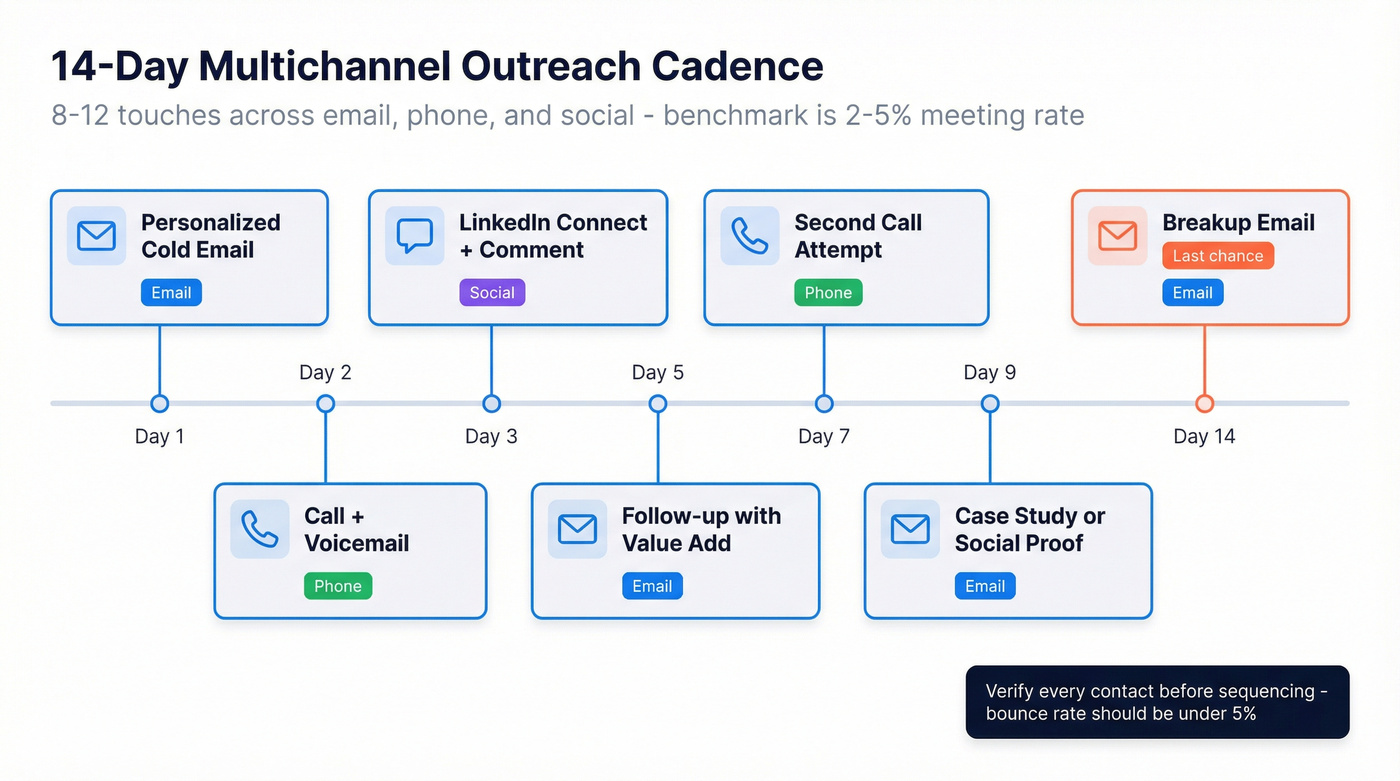
| Day | Channel | Action |
|---|---|---|
| 1 | Personalized cold email | |
| 2 | Phone | Call + voicemail |
| 3 | Social | Connect + comment |
| 5 | Follow-up with value add | |
| 7 | Phone | Second call attempt |
| 9 | Case study or social proof | |
| 14 | Breakup email |
Outbound meeting conversion runs 2-5% from initial contact. That's the benchmark - don't panic if you're not booking 20% of your list. But none of this works if your data is bad. Verify every email and phone number before it enters your sequence (see email verification for outreach). Meritt, a Prospeo customer, dropped their bounce rate from 35% to under 4% after switching their verification layer. That's the difference between a sequence that builds pipeline and one that burns your domain.
Step 6: Add Automation Logic
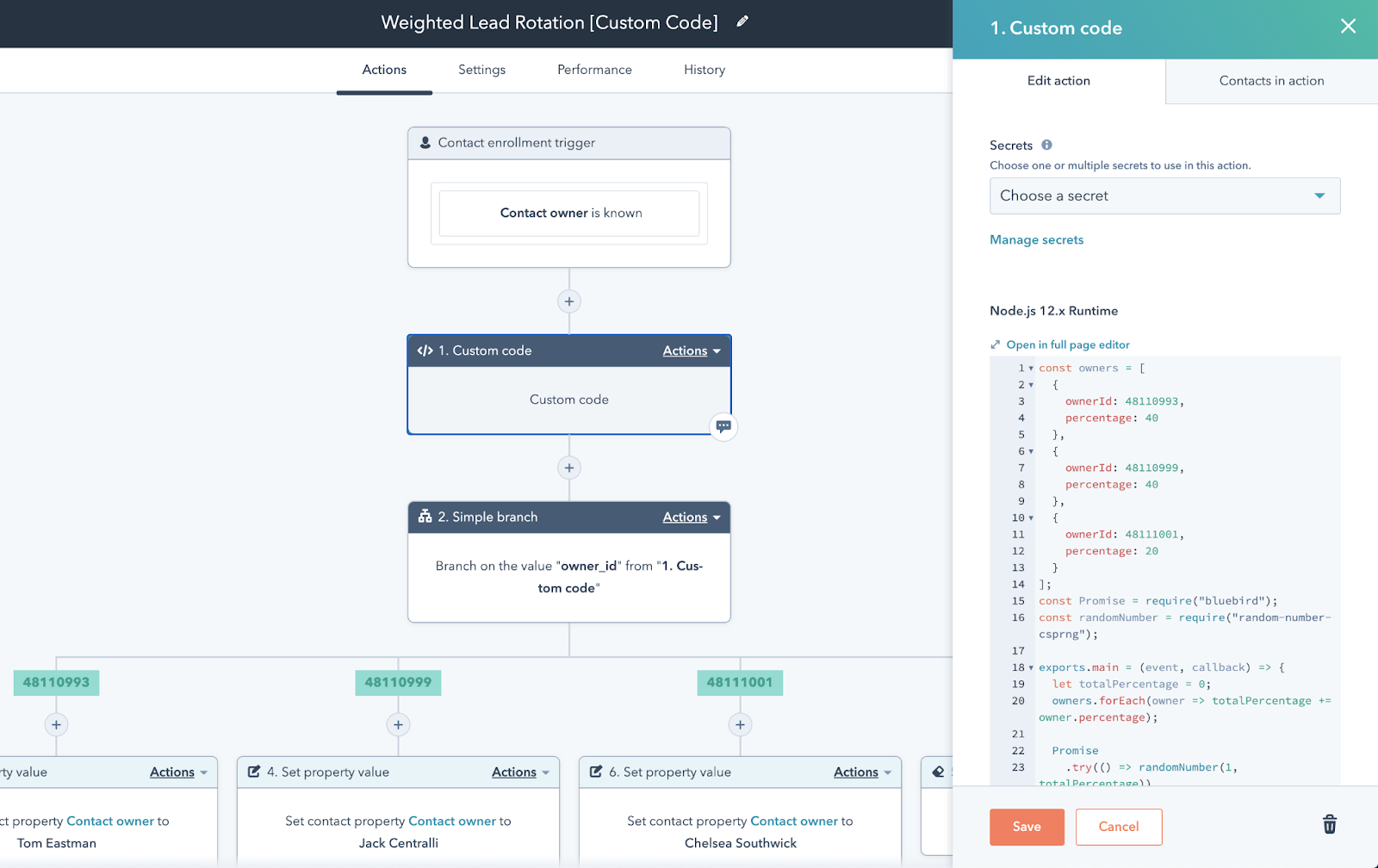
Automation eliminates the manual steps between decisions and turns each sales task workflow into a repeatable system. Here's a concrete sequence (see automated sales process):
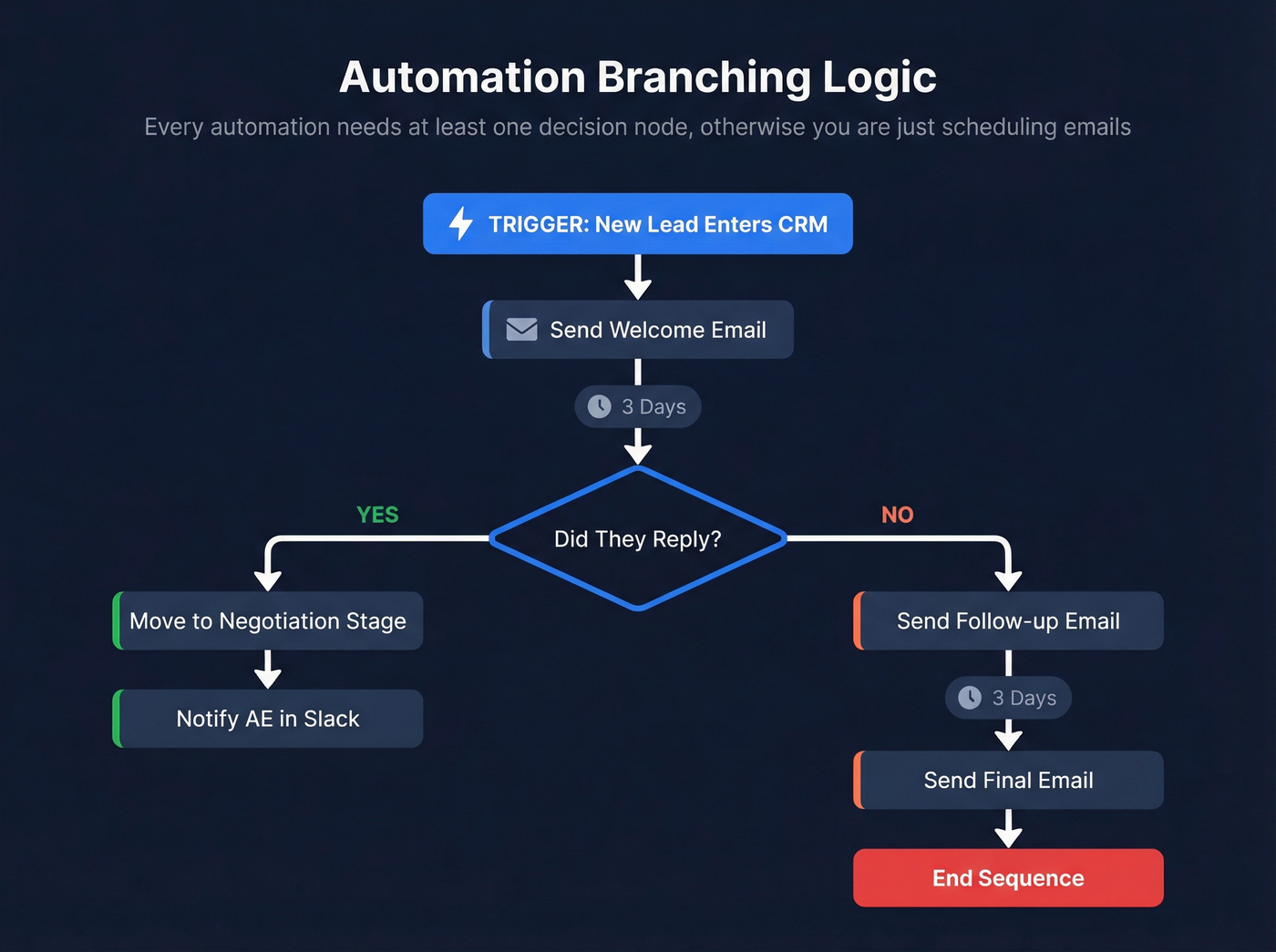
Trigger: New lead enters CRM -> Action: Send welcome email -> Wait: 3 days -> Branch: Did they reply?
- Yes -> Move to "Negotiation" stage, notify AE in Slack
- No -> Send follow-up email, wait 3 days, send final email, end sequence
The key is the branching logic. Every automation needs at least one decision node - otherwise you're just scheduling emails, not building a workflow. For complex workflows, use a SIPOC diagram to map inputs and outputs or a RACI matrix to clarify ownership at each stage. A whiteboard sketch takes 20 minutes and saves weeks of rework.
Don't forget post-sale automation either. An onboarding sequence - login details, a "need help?" check-in, a trial-end nudge - keeps new customers from churning before they've even started using the product.
Step 7: Set Benchmarks and Review
You can't improve what you don't measure:
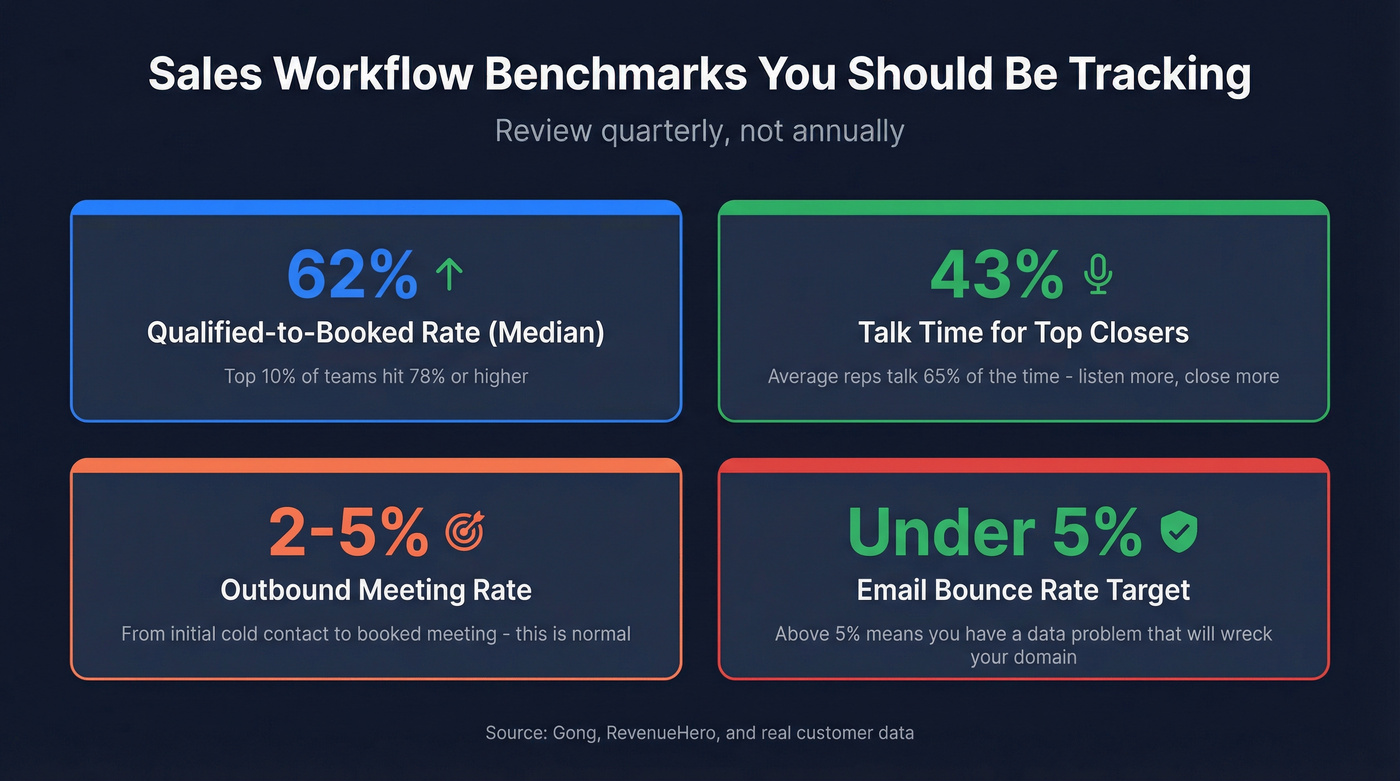
- Qualified-to-booked rate: Median is 62%, top 10% hit 78%+
- Talk/listen ratio: Top closers speak 43% of the time vs. 65% for average reps - Gong data that should change how you coach
- Outbound reply rate: 2-5% to meeting from cold outreach
- Stage velocity and bounce rate: Under 5%, or you've got a data problem (see CRM hygiene)
Review quarterly, not annually. Markets shift, your ICP evolves, and what worked in Q1 can be dead by Q3. I've seen teams run the same cadence for 18 months without checking conversion rates - by the time they looked, their domain reputation was wrecked and reply rates had cratered to near zero.
Inbound vs. Outbound Workflows
Inbound and outbound aren't just different channels. They need different workflows entirely (see inbound vs outbound sales).
| Dimension | Inbound | Outbound |
|---|---|---|
| Trigger | Form fill, demo request | Signal-based or list-based |
| SLA | 5-minute response | 24-48 hours from signal |
| Cadence length | 3-5 touches | 8-12 touches over 10-14 days |
| Conversion benchmark | ~62% qualified-to-booked | 2-5% to meeting |
Let's be honest: if your outbound still starts with a static list of 10,000 contacts, you're doing 2019 outbound. The SalesMotion framework breaks signal-driven triggers into tiers that actually work in 2026:
Tier 1 - act immediately: Job posts for a role your software replaces, an exec mentions your category as a priority, M&A creating vendor consolidation.
Tier 2 - nurture: New exec hires (VPs review their stack within 90 days), funding rounds.
Tier 3 - monitor: Trend report mentions, blog engagement, non-decision-maker activity.
Signal-driven triggers let you reach prospects when they're actually in-market, and that changes conversion rates dramatically. Layering buyer intent data directly into your outbound workflow - tracking topics like "CRM evaluation" or "sales automation" - beats guessing who's ready to buy every time.
Sales Workflow Tools and Pricing
You need three tools, not thirteen. Here's what's worth your time:
| Tool | Category | Starting Price | Best For |
|---|---|---|---|
| HubSpot Sales Hub | CRM + Automation | Free; ~$15/user/mo | First-time workflow builders |
| Pipedrive | CRM | ~$14-29/user/mo | SMB teams wanting simplicity |
| Close | CRM + Calling | ~$49-99/user/mo | Heavy phone workflows |
| Apollo | Sequencing + Data | Free; ~$49/user/mo | Prospecting + outreach combo |
| Outreach / Salesloft | Sales Engagement | ~$100-150/user/mo | Scaling teams, complex cadences |
| Prospeo | Data + Verification | Free; ~$0.01/email | Clean emails + dials, self-serve |
Most teams overspend on tools and underspend on data quality. In our experience, a $15/mo CRM with clean, verified contacts outperforms a $150/mo platform fed by stale data. The difference isn't the software - it's whether the emails and phone numbers entering your workflow are current or six weeks old.
Templates You Can Steal
Don't build a monolithic workflow from scratch. Think in modules - small, reusable blocks you can combine. Based on Kissflow's template categories, every sales org needs at least these three running:
Lead assignment workflow. Route inbound leads by territory, deal size, or round-robin. Automate it - manual assignment is where leads go to die. Here's a simple structure you can copy into any CRM:
Trigger: New lead created -> Check: Lead source + company size -> Route: Enterprise (500+ employees) to AE team, Mid-market to SDR pool (round-robin), SMB to automated nurture sequence -> SLA: Assignment must complete within 2 minutes.
Automated email sequence. Your outreach cadence from Step 5, built into your sequencer with branching logic for replies, opens, and no-engagement paths. Skip this if you're running fewer than 50 outbound touches per week - at that volume, manual follow-up is fine and you'll learn more from doing it yourself.
Pipeline hygiene check. Weekly automated flags for deals that have exceeded their stage SLA. If a deal's been in "Proposal" for 21 days, someone needs to know. Build from there as needed: NDA request workflows, RFP approval chains, renewal triggers.
Your outreach cadence in Step 5 means nothing if 30% of your emails never arrive. Prospeo gives you verified emails at $0.01 each and direct dials with a 30% pickup rate - so every touch in your sequence actually reaches a real person.
Verify every contact before it enters your sequence.
FAQ
What's the difference between a sales workflow and a sales process?
A sales process defines the strategic stages from prospect to close. A sales workflow is the operational layer underneath - specific tasks, automation rules, exit criteria, and tools that execute each stage. The process defines what happens. The workflow defines how, who does it, and when.
How many stages should a sales workflow have?
Most B2B workflows run 5-8 stages. Transactional sales with shorter cycles can get away with fewer; enterprise deals with multiple stakeholders and procurement reviews need more. The right number comes from auditing your own closed deals, not copying a generic template.
How do I keep workflow data accurate?
Contact data decays roughly 30% per year as people change jobs and emails go stale. Use a verification tool to validate emails and phone numbers before they enter any automated sequence. Bad data breaks every downstream step - and once your sender domain takes a hit, recovery takes months.
Can a sales workflow increase revenue?
Yes, and the mechanism is straightforward. A well-designed workflow compresses stage velocity, enforces follow-up SLAs, and eliminates admin that keeps reps from selling. Snyk's 50-person AE team saw AE-sourced pipeline jump 180% after tightening their data and workflow layers together - that's the kind of result that comes from fixing the system, not just hiring more reps.