

How to Build an Automated Sales Process (Without Automating Failure)
You bought the sales engagement platform. You set up the sequences. Your reply rate is 1.2%. The automated sales process works perfectly - it's automating outreach to the wrong people with stale emails. Reps still spend roughly 30% of their time actually selling, and the other 70% disappears into data entry, CRM hygiene, and chasing contacts who left their company six months ago. 73% of teams report tool overlap wasting $2,340/rep/year on redundant features nobody asked for.
The recurring complaint isn't tool scarcity. It's data rot and integration brittleness. Teams don't need more software - they need fewer manual steps between the software they already have.
The problem isn't automation itself. It's automating before you've fixed the inputs. Here's a practical framework for building a sales process that moves smarter, not just faster.
The Quick-Start Stack
Before the full framework, here's the three-layer stack that works:
- A CRM you'll actually use. HubSpot for SMBs, Salesforce for enterprise. Don't overthink this.
- A data layer that stays fresh. Prospeo gives you 98% email accuracy across 143M+ verified emails and 125M+ verified mobiles, with a 7-day refresh cycle that keeps your sequences from bouncing.
- An automation connector. Zapier or Make to glue everything together without writing code.
Most teams see ROI in 45-90 days when they start with the right bottleneck instead of trying to automate everything at once.
What Sales Process Automation Actually Means
An automated sales process isn't "sending emails automatically." It's connecting prospecting, qualification, outreach, follow-up, and CRM updates into a system that runs with minimal manual intervention - where data flows between tools and triggers the next step without a rep copying and pasting between tabs.
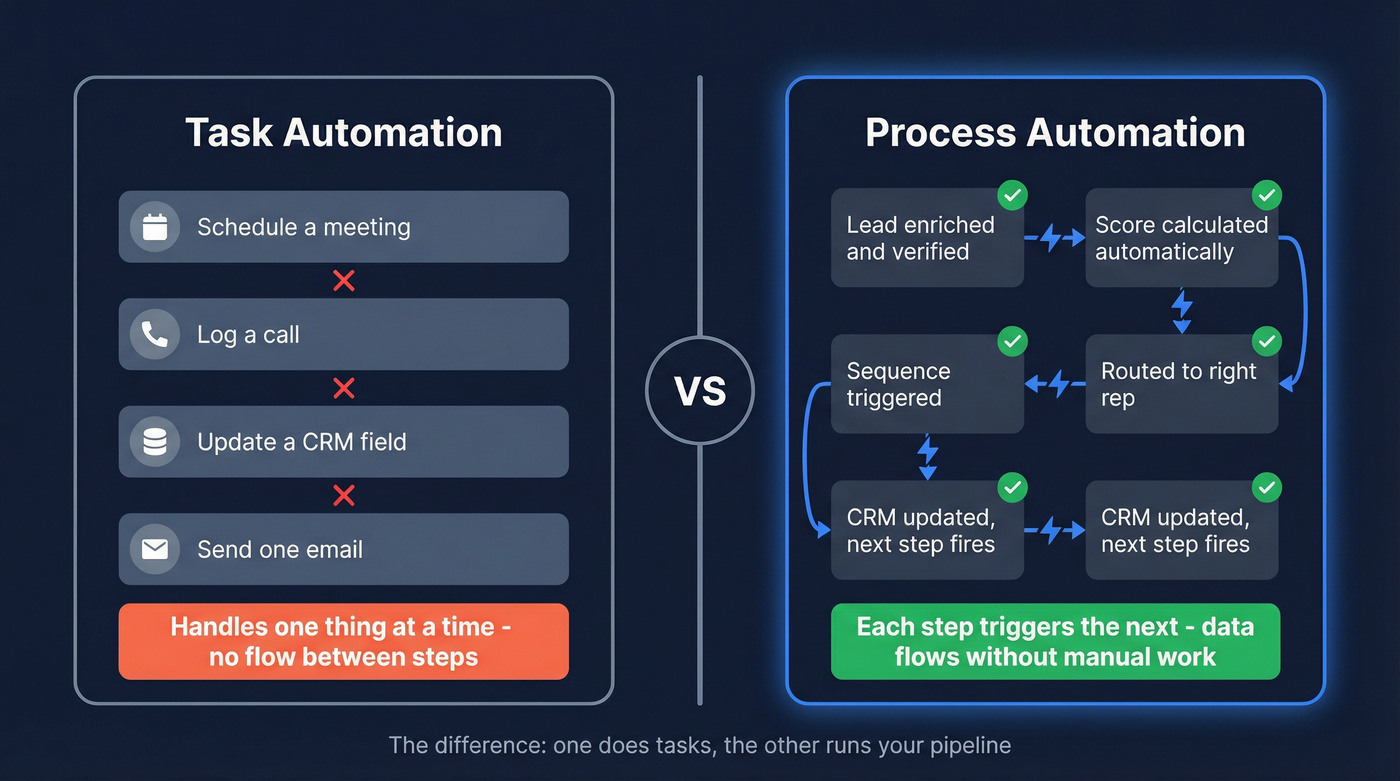
Task automation handles one thing: scheduling a meeting, logging a call. Process automation connects those tasks into a workflow where each completed step fires the next. That distinction matters.
The market validates it. The global sales force automation software market was valued at $12.8B in 2024 and is projected to reach $31.9B by 2032 - a 12.1% CAGR driven by AI, cloud adoption, and the reality that manual processes simply don't scale.
Why Automate Now
The investment wave is real. Deloitte's 2025 Tech Value Survey found that 74% of organizations invested in AI and generative AI over the past year. Technology budgets jumped from ~8% of revenue to ~14% - nearly doubling in a single year.
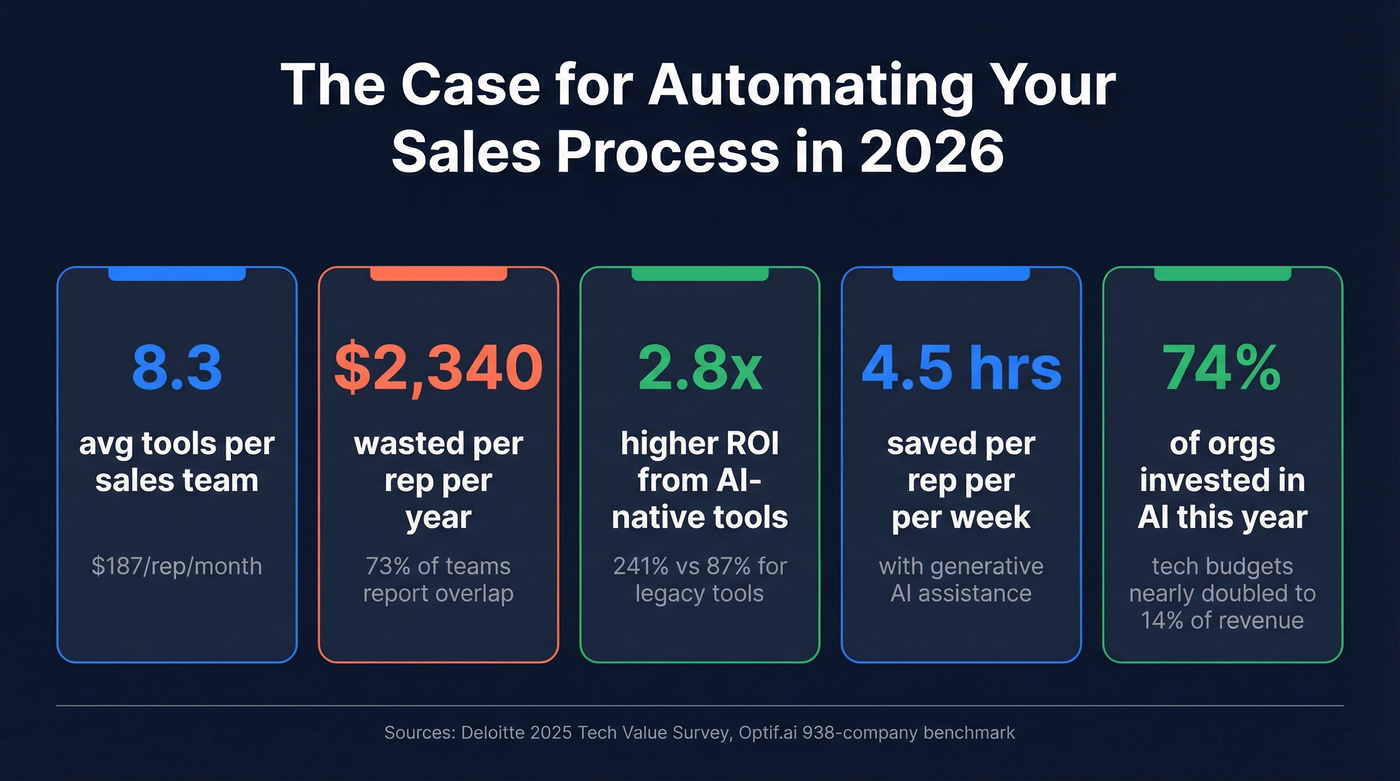
The average B2B sales team runs 8.3 tools at $187/rep/month across a 938-company benchmark, and 73% of teams report tool overlap wasting an additional $2,340/rep/year. Fragmented systems don't just waste money - Outreach estimates they cost organizations 20-30% of annual revenue in lost productivity and missed deals.
Here's the kicker: tools with high AI-native capabilities deliver 2.8x higher ROI than legacy alternatives (241% vs. 87%), according to that same 938-company study. The window for competitive advantage is narrowing. 39% of organizations are already investing in agentic AI - reasoning engines that adapt to context rather than follow rigid rules. Sales professionals believe generative AI can save them an average of 4.5 hours per week, and that time compounds fast when your competitors operationalize it and you don't.
Rules-Based vs. Agentic AI
Traditional sales automation runs on predefined sequences. If lead score > 80, send email A. If no reply in 3 days, send email B. Rigid, predictable, effective for repeatable workflows.
Agentic AI is different. These systems perceive signals, reason about context, and adapt their actions. Instead of following a fixed sequence, an agent notices a prospect just raised a Series B, adjusts the messaging angle, and prioritizes that account - all without a rep intervening. Gartner projects that by end of 2026, 40% of enterprise applications will feature agents, up from less than 5% in 2025. That's not a gradual shift.
You don't need to go full agentic today. But your automation architecture should be flexible enough to layer agents in when you're ready.
What to Automate (and What Not To)
Automating the wrong moments actively hurts your pipeline. Impersonal automation experiences reduce customer loyalty by 62%. Let's be honest - most teams automate too much, not too little.
| Automate This | Keep This Human |
|---|---|
| Email sequences & follow-ups | Discovery calls & demos |
| Data entry & CRM updates | Complex objection handling |
| Lead scoring & routing | Negotiation & pricing |
| Meeting scheduling | Relationship-building calls |
| Activity logging | Strategic account planning |
| Pipeline stage updates | Executive sponsor engagement |
| Proposal generation (drafts) | Final proposal customization |
| Lead enrichment & verification | Referral asks |
The pattern is clear: automate the repetitive, data-heavy tasks. Keep humans on anything that requires empathy, judgment, or creative problem-solving. A bot can schedule the meeting. It shouldn't run the meeting.
Building Your Workflow - Step by Step
Step 1 - Find Your Bottleneck
Don't buy software before identifying what's broken. Survey your reps. Audit CRM logs. Where are deals stalling? Where are reps spending time on non-selling activities? The answer is rarely "we need more tools." It's usually "we need fewer manual steps between the tools we have."
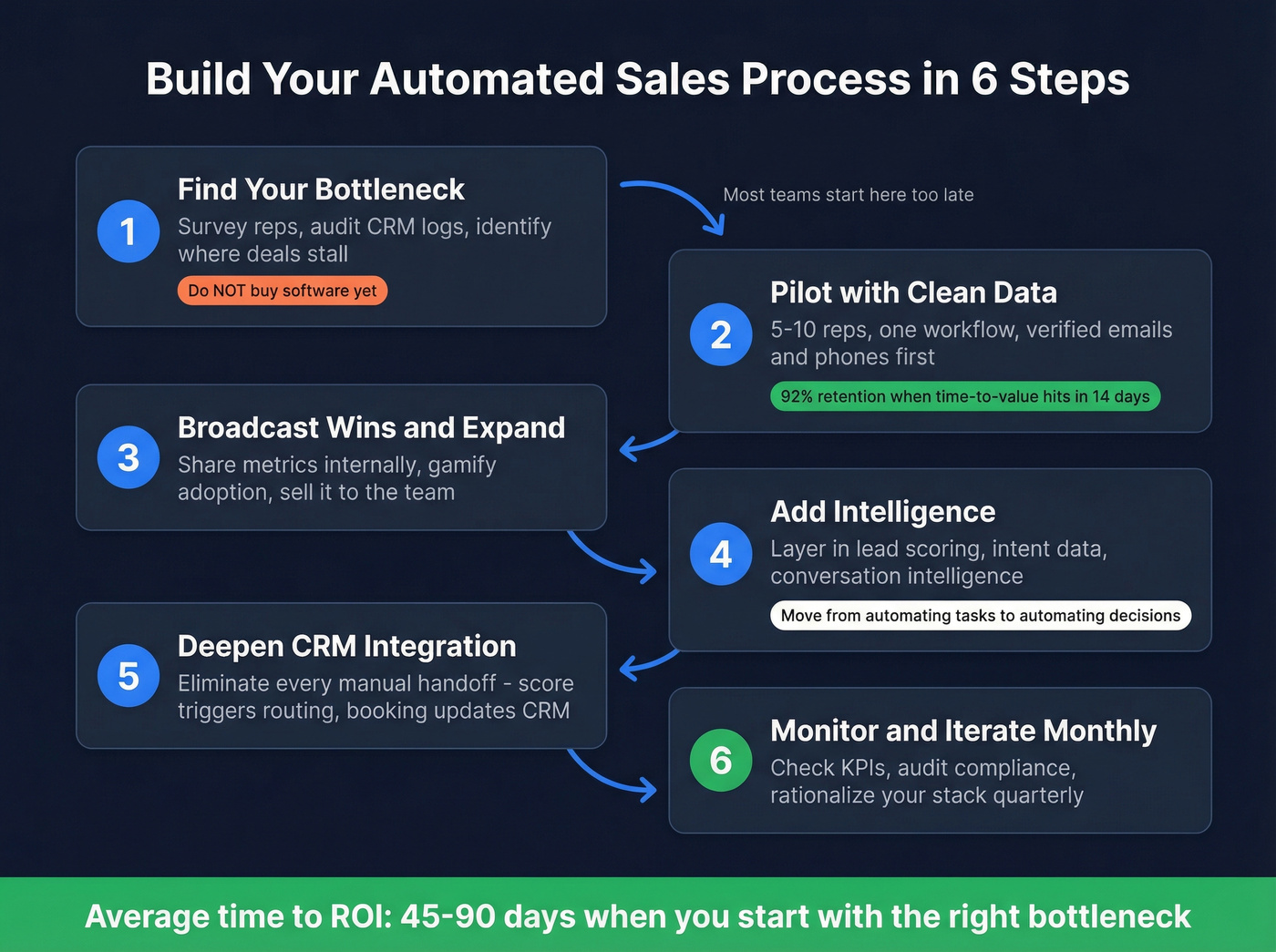
Step 2 - Pilot with Clean Data
Start your pilot with 5-10 reps and one specific workflow. But before you build a single automation, clean your data. Upload your target account list, verify every email and phone number, and remove duplicates.
We've seen pilots fail in the first week because the team automated outreach to a list with a 30% bounce rate. That's not an automation problem - it's a data problem wearing automation's clothes. Clean data first, automate second. Teams that hit time-to-value within 14 days retain tools at 92% vs. 67% for slower rollouts, so a focused pilot with verified data gets you there.
Step 3 - Broadcast Wins and Expand
Once your pilot group shows results, don't just roll out - sell it internally. Share specific metrics: "Pilot reps booked 40% more meetings in 3 weeks." Gamify adoption. Teams that treat rollout like an internal launch get faster adoption than those who just flip a switch and send a Slack message.
Step 4 - Add Intelligence
With the foundation working, layer in lead scoring, intent data, and conversational intelligence. This is where you move from "automating tasks" to "automating decisions." Intent signals tell you who's in-market. Lead scoring tells you who to prioritize. Conversation intelligence tells you what's working in calls. At this stage, your process flow starts to resemble a true decision engine rather than a glorified email scheduler.
Step 5 - Deepen CRM Integration
Eliminate every manual handoff between tools. When a lead hits a score threshold, it should route automatically. When a meeting is booked, the CRM should update without a rep touching it. When a deal moves to negotiation, the next sequence should trigger on its own. Every manual step is a place where data breaks.
Step 6 - Monitor and Iterate Monthly
Set a monthly review cadence. Check KPIs, audit compliance (two-party consent laws in states like CA, FL, and IL apply to recorded calls), and rationalize your stack. Tools creep in. Overlap builds. A quarterly stack audit is one of the simplest ways to claw back that overlap waste hitting most companies.

You just read that pilots fail when teams automate outreach to lists with 30%+ bounce rates. Prospeo's 5-step verification delivers 98% email accuracy across 143M+ verified emails - refreshed every 7 days, not 6 weeks. Clean data first, automate second.
Stop automating failure. Start with data that actually connects.
The Data Quality Problem
Here's the uncomfortable truth about sales automation: it amplifies whatever you feed it. Good data in, more meetings out. Bad data in, burned domains and wasted rep time - at scale.
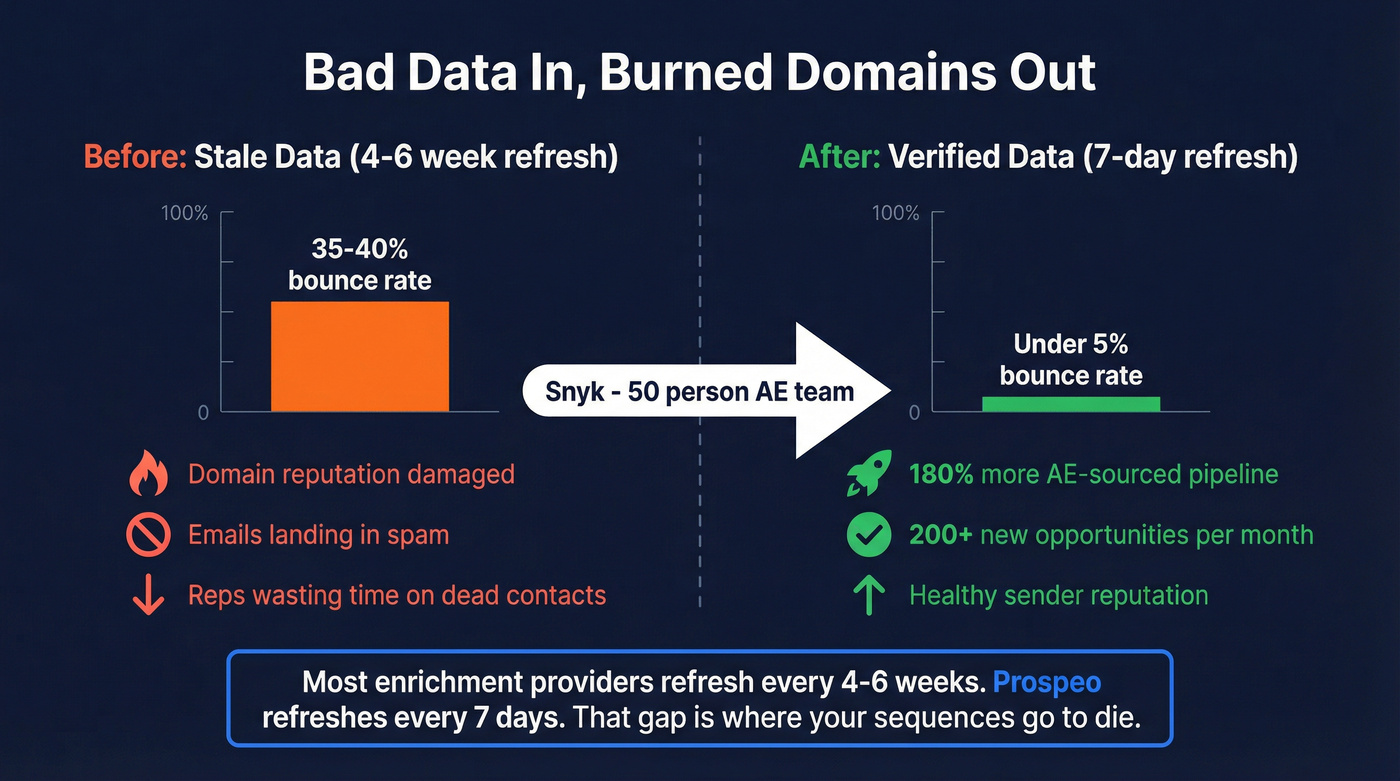
Most enrichment providers refresh their databases every 4-6 weeks. In that window, people change jobs, companies get acquired, and email addresses go dead. Your "verified" list decays by the day.
The proof is in the numbers. Snyk's 50-person AE team was running bounce rates of 35-40% before they fixed their data layer. After switching to a provider with weekly refresh cycles, bounces dropped under 5%, and AE-sourced pipeline jumped 180% - over 200 new opportunities per month.

If your average deal size is under $10k, you probably don't need a $30k/year data platform. But you absolutely need verified data. The difference between a 5% bounce rate and a 35% bounce rate isn't a rounding error - it's the difference between a healthy domain and one that lands in spam.
Sales Automation Tools - Costs
The average B2B team spends $187/rep/month across 8.3 tools. A lean, well-chosen stack can cut that in half.
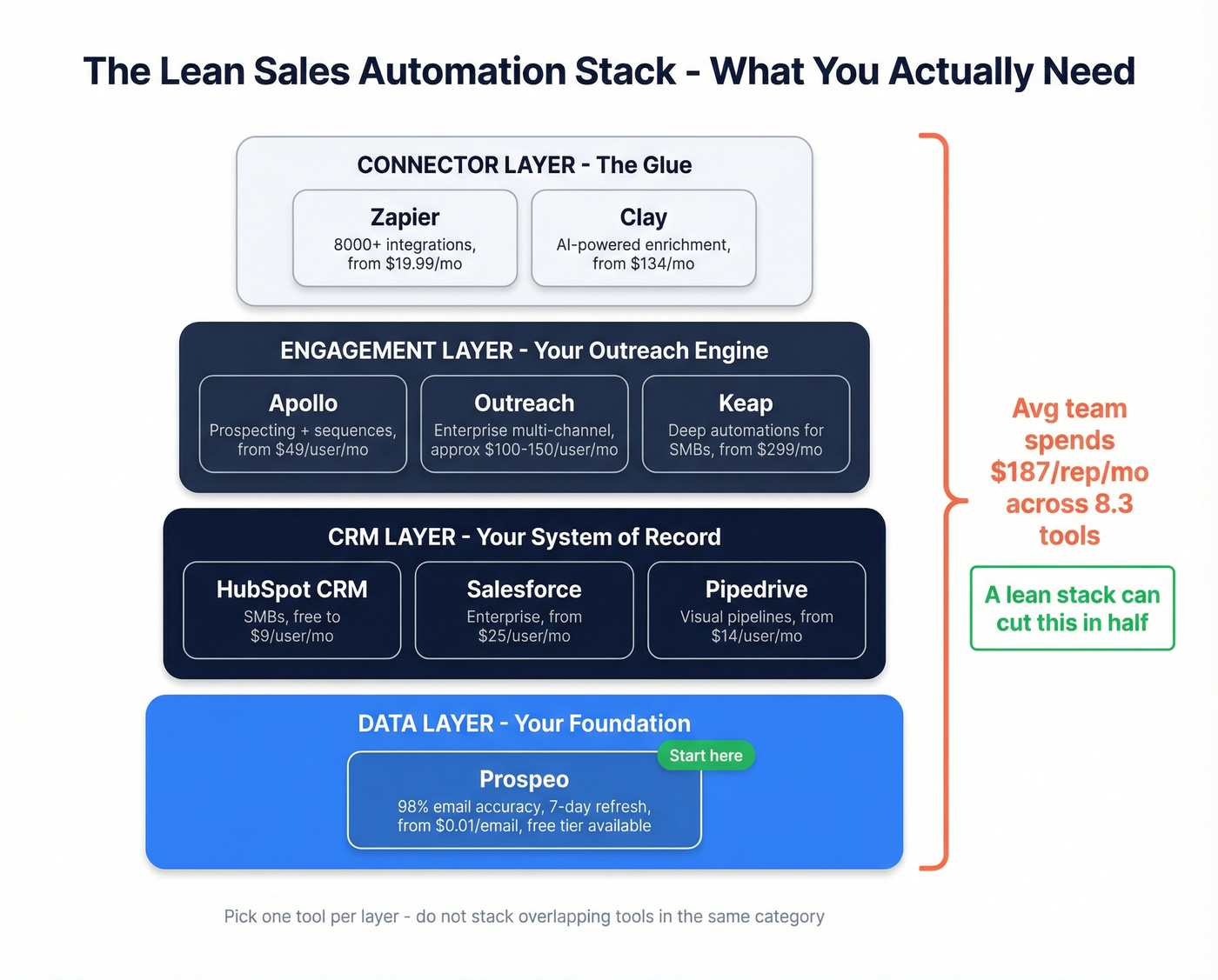
| Tool | Best For | Starting Price | Key Differentiator |
|---|---|---|---|
| Prospeo | Verified emails & mobiles | Free; ~$0.01/email | 98% accuracy, 7-day refresh |
| HubSpot CRM | Sales + marketing (SMBs) | Free; from $9/user/mo | All-in-one with sequences |
| Salesforce | Enterprise CRM + automation | From $25/user/mo | Deepest ecosystem |
| Pipedrive | Visual pipeline automation | From $14/user/mo | Drag-and-drop workflows |
| Zapier | Connecting your stack | Free; from $19.99/mo | 8,000+ integrations |
| Clay | Lead research + enrichment | Free; from $134/mo | AI-powered "Claygent" agent |
| Apollo | Prospecting + sequences | Free; from $49/user/mo | Large DB + built-in sequencing |
| Outreach | Enterprise engagement | ~$100-150/user/mo | Multi-channel orchestration |
| Keap | Deep CRM automations | From $299/mo | Advanced builder for SMBs |
Prospeo is the data accuracy layer - it doesn't try to be your CRM or sequencer. It makes sure every email and phone number feeding your automations is verified and fresh. With a 5-step verification process that includes catch-all handling, spam-trap removal, and honeypot filtering, you're not just checking if an email exists - you're checking if it's safe to send to. At ~$0.01 per email with a free tier of 75 emails/month plus 100 Chrome extension credits/month, it's the cheapest insurance against bounced sequences and burned domains. Native integrations with Salesforce, HubSpot, Lemlist, Instantly, Smartlead, Clay, Zapier, and Make mean verified data flows directly into your automation stack.
HubSpot is the obvious starting point for teams under 50 reps who want CRM, sequences, and marketing in one platform. The free tier is genuinely useful. Paid plans scale reasonably, though enterprise pricing gets steep fast.
Salesforce is the enterprise default for a reason - the ecosystem is unmatched. But implementation takes months, not days. Skip it if you're under 20 reps unless you're already in the Salesforce orbit.
Pipedrive wins on simplicity - visual pipeline management with drag-and-drop automation that non-technical reps actually adopt. Zapier is the bridge between everything, connecting 8,000+ apps when native integrations don't exist. Clay is the power-user enrichment tool, best for teams that want to build complex research workflows with AI agents.
Mistakes That Kill Automation ROI
1. Automating without identifying the bottleneck first. Teams buy tools before diagnosing problems. You end up automating a process that was broken to begin with - just faster.
2. Over-automating human-touch moments. Impersonal experiences reduce customer loyalty by 62%. Automated demos, robotic follow-ups after a live conversation, templated responses to specific objections - these destroy trust. I watched a team automate their post-demo follow-up and kill their close rate by a third before anyone noticed.
3. Running email-only sequences. 72% of buyers prefer multichannel engagement. If your automation only sends emails, you're ignoring how people actually buy. Layer in calls, social touches, and direct mail triggers.

4. Stacking tools without rationalizing overlap. Do you really need three tools that all do lead scoring? The consensus on r/sales is that most teams are paying for features they've never configured. Audit quarterly.
5. Ignoring data decay. This is the silent killer. Your automation runs perfectly - to email addresses that bounced three weeks ago. If you're not verifying data on at least a weekly cycle, your automation ROI is leaking every single day.
Building a Strategy That Lasts
Choosing tools is the easy part. The harder work is designing execution workflows that hold up as your team scales.
Recurring task automation should be your first priority - things like CRM field updates, activity logging, and lead routing that eat hours every week without generating pipeline. Document your process flow before you build it. Map every trigger, condition, and action in a shared doc so new reps understand the logic, not just the output. And revisit your automated workflow quarterly. What worked for a 10-rep team breaks at 40 reps. Triggers fire too often, routing rules conflict, and sequences overlap. Treat your automation like code - it needs maintenance.
If you're tightening the stack, use a sales tools checklist so you don't pay twice for the same feature.
Measuring Success
Track these KPIs monthly to know if your automated sales process is actually working:
| KPI | Target Benchmark |
|---|---|
| Email bounce rate | Under 5% |
| Reply / engagement rate | 3-8% for cold outreach |
| Pipeline velocity | Improving quarter over quarter |
| Time saved per rep | 5-10 hrs/week on admin tasks |
| Revenue per rep | Increasing with same headcount |
| Data accuracy rate | 95%+ across active lists |
Quick wins like routing, sequencing, and enrichment typically show ROI in 45-90 days. Full process re-architecture - rebuilding CRM workflows, integrating intent data, deploying agents - takes 6-12 months for enterprise teams. Start with the quick wins to build internal momentum, then tackle the structural changes.
If you want a deeper blueprint for the stack itself, start with a modern B2B sales stack and then add automation.
Building an automated sales process means eliminating manual steps between tools. Prospeo plugs directly into HubSpot, Salesforce, Clay, Zapier, and Make - enriching every lead with 50+ data points at a 92% match rate. No copy-pasting between tabs.
Automate the data layer for $0.01 per verified email.
FAQ
What's the difference between sales automation and marketing automation?
Sales automation targets pipeline activities - prospecting, follow-ups, CRM updates, and deal progression. Marketing automation handles demand generation: email nurture, ad retargeting, and lead scoring before handoff. They overlap at lead scoring and the marketing-to-sales handoff, but the tools and teams are typically separate.
How long does it take to see ROI from sales automation?
Most teams see measurable ROI in 45-90 days when starting with a focused pilot of 5-10 reps tackling one specific bottleneck. Full process re-architecture for enterprise teams typically takes 6-12 months, including CRM integration, agent deployment, and cross-team workflow alignment.
What's the biggest mistake teams make with sales automation?
Automating before fixing data quality. If your contact data is stale, automation just sends emails to dead addresses faster and burns your sender reputation at scale. A weekly data refresh cycle and 98%+ accuracy rate are the baseline - anything less and you're building on sand.
How much does it cost to run an automated sales process?
The average B2B sales team spends $187/rep/month across 8.3 tools. A lean stack - CRM plus verified data provider plus automation connector - can start around $30-$50/rep/month. The real cost driver is overlap waste at $2,340/rep/year, not the tools themselves.
Can small teams benefit from sales automation?
Small teams benefit the most because automation eliminates the manual work that keeps 2-5 person teams from scaling outbound. Start with CRM automation and verified contact data, then layer in sequencing and enrichment as pipeline grows. Even basic task automation - auto-logging calls and updating deal stages - can free up 5-10 hours per week that small teams can't afford to lose.