Sales Tools Checklist (2026): What to Buy, What to Skip, and Why
Most sales stacks don't have a tooling problem.
They've got an order-of-operations problem.
Buy the wrong thing first (or buy the same workflow twice), and you end up with a pricey pile of logins that reps dodge, RevOps babysits, and leadership blames when pipeline stalls.
The average B2B sales stack runs 8.3 tools at $187 per rep per month. And 73% of teams still pay an overlap tax worth $2,340 per rep per year. That's not "optimization." That's budget leakage.
This sales tools checklist fixes the two things that break stacks: buying in the wrong order, and paying twice for the same workflow.
Why you need a checklist (tool sprawl kills ROI)
Most stacks don't fail because the tools are bad. They fail because nobody owns the architecture, so every new problem gets "solved" by adding another app.

Optif.ai's benchmark puts numbers on what RevOps already knows: the average sales stack is 8.3 tools, costing $187 per rep per month, and overlap waste hits $2,340 per rep per year for most teams.
Salesforce's State of Sales numbers explain why this hurts in real life: reps spend 60% of their time on non-selling tasks. Then leadership wonders why pipeline's flat while the stack budget climbs. It gets worse: 51% say tech silos delay or limit AI initiatives, leaders estimate 19% of company data is inaccessible, and teams using AI prioritize data hygiene (74%).
AI doesn't fix messy stacks. It amplifies them.
If your contact object's duplicated, your stages aren't enforced, and sequences run from three places, your "AI insights" turn into confident nonsense that wastes time and burns trust.
Your checklist is your stack's constitution:
- one system of record per object,
- one execution layer,
- one source of truth for reporting,
- and a ruthless bias toward fewer tools.
The one-page inventory table (copy/paste)
Use this as a printable, one-page inventory. The stages follow the backbone most teams actually run: prospecting → qualification → engagement → negotiation → close → post-sale.
How to fill this in (so it's more than a spreadsheet)
Assign an owner per tool (a person, not a department). If nobody owns it, nobody fixes it.
Pick one KPI that proves value (not "usage"). Examples:
- Data provider → bounce rate + match rate + meetings booked per 1,000 contacts
- Sequencer/SEP → tasks completed/day + reply rate + meeting set rate
- Dialer → connect rate + calls/hour + logged activity accuracy
- CI → coaching actions/week + win-rate lift on coached reps
- Enablement → content usage on won deals + time-to-productivity
- Declare the system of record (SoR) per object:
- Contacts/Accounts → usually CRM
- Activities (emails/calls) → usually SEP/dialer, synced into CRM
- Revenue numbers → CRM, then warehouse/BI for reporting
Write down what the tool's allowed to change (and what it must never touch). Example: "Routing tool can update owner + lifecycle stage; it can't overwrite lead source."
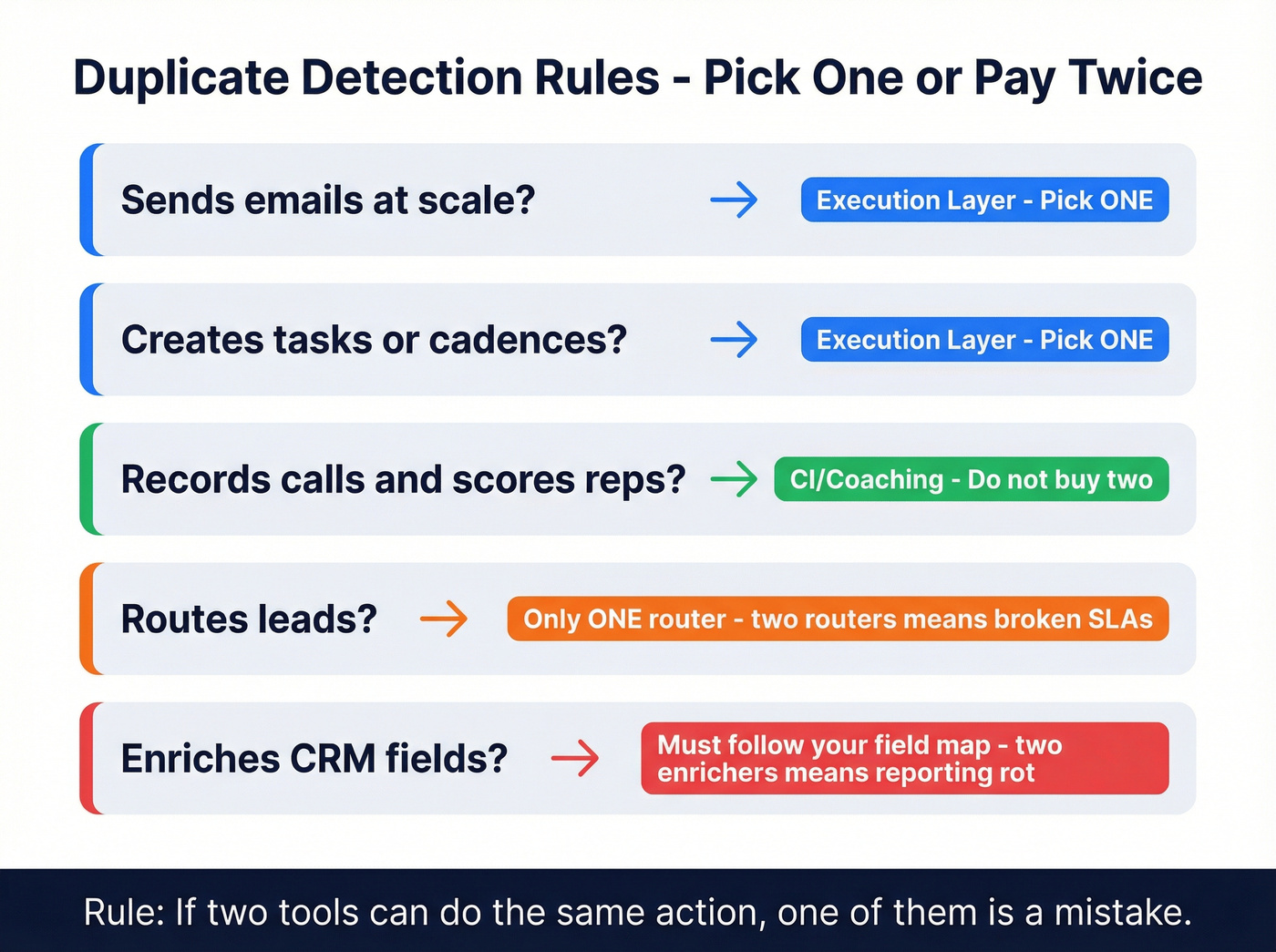
Decide your duplicate rule before you buy anything else: if two tools can do the same action, one of them's a mistake.
Duplicate detection rules of thumb (fast, brutal, accurate)
- If it sends emails at scale, it's part of the execution layer. Pick one.
- If it creates tasks/cadences, it's part of the execution layer. Pick one.
- If it records calls and scores reps, it's CI/coaching. Don't buy two.
- If it routes leads, it must be the only router. Two routers = broken SLAs and finger-pointing.
- If it enriches CRM fields, it must follow your field map. Two enrichers writing the same fields = reporting rot.
Minimum fields to capture for every tool (so audits take minutes, not weeks)
| Field | What to write |
|---|---|
| Tool + category | "Sales engagement (SEP)", "Data enrichment", etc. |
| Owner | Name + role |
| Renewal date + term | Month + annual/monthly |
| Seats purchased | # paid licenses |
| Active users | # weekly active (or DAU) |
| Primary workflow | "Sequences + tasks", "Inbound routing", "Call recording" |
| System-of-record object | Contact / Account / Activity / Opportunity |
| Data written | Which fields/objects it updates |
| Sync direction | Tool → CRM, CRM → tool, or bi-directional |
| Integrations | CRM, email, dialer, warehouse, Slack, etc. |
| KPI | One metric that proves it earns its keep |
One-page inventory table
| Sales stage | Category | What's it for | Do you need it? | Typical price range |
|---|---|---|---|---|
| Prospecting | Prospect data + enrichment | Build lists, enrich leads | Yes (outbound) | $0-$300/rep/mo |
| Prospecting | Prospecting data + verification (example: Prospeo) | Verified emails + mobiles | Yes (outbound) | Free; ~$39-$249/mo |
| Prospecting | Intent / ABM signals | Prioritize accounts | Optional | $500-$8k/mo |
| Prospecting | Social selling | Targeted outreach + account mapping | Usually | $99-$169/seat/mo |
| Qualification | CRM (system of record) | Pipeline + fields + reporting | Yes | $25-$200/seat/mo |
| Qualification | Lead routing | Speed-to-lead + SLAs | If inbound | $50-$500/mo |
| Engagement | Sales engagement / sequencing | Email + tasks + cadences | Usually | $50-$200/seat/mo |
| Engagement | Sending infra (domains/inboxes) | Scale outbound safely | If outbound | $20-$200/mo |
| Engagement | Email warmup + rotation | Protect reputation | If outbound | $30-$300/mo |
| Engagement | Email verification (2nd verifier) | Reduce bounces | Yes | $10-$500/mo |
| Engagement | Dialer / calling | Call workflows + logging | If calling | $30-$150/seat/mo |
| Engagement | Scheduling | Booking links | Yes | $0-$20/seat/mo |
| Engagement | Conversation intelligence | Recording + coaching | Nice-to-have early | $100-$300/seat/mo |
| Negotiation | Proposals | Interactive docs | If complex | $35-$100/seat/mo |
| Negotiation | E-signature | Close faster | Usually | $10-$40/seat/mo |
| Negotiation | CPQ / CLM | Pricing + legal workflow | Only if needed | $10k-$150k/yr |
| Close | Forecasting / rev intel | Predict + inspect pipeline | Mid-market+ | $50-$250/seat/mo |
| Post-sale | CS platform | Renewals + expansion | If CS team | $50-$200/seat/mo |
| Post-sale | Enablement | Plays + training + content | If scaling | $15k-$150k/yr |
| Cross-stage | Data warehouse / BI | Single reporting layer | If messy data | $0-$3k/mo |
| Cross-stage | DAP (digital adoption) | In-app guidance | Optional | $10k-$100k/yr |
Minimum viable stack by team stage (solo → SMB → mid-market)
Look, most teams should run 8 tools or fewer. If you're above that, you're either (a) enterprise with real governance, or (b) paying an overlap tax.
Optif.ai's average of $187/rep/month is a useful sanity anchor. Plenty of teams spend more, but if you're spending 2-3x that without a clear throughput gain, you've built a museum, not a machine.
Minimum viable stack (by stage)
| Team stage | Stack goal | Tool count target | Budget band | What to avoid early |
|---|---|---|---|---|
| Solo/founder | Ship meetings fast | 4-6 | $150-$600/mo | Big suites + intent |
| SMB (5-25 reps) | Repeatable outbound | 6-8 | $150-$250/rep/mo | Duplicate sequencers |
| Mid-market (25-150 reps) | Governance + scale | 7-10 | $200-$450/rep/mo | "AI" point tools |
Common stack archetypes (so you don't copy the wrong playbook)
1) Founder-led outbound (speed > governance)
Tool count: 4-6.
Must-haves: CRM, data + verification, sequencer, scheduling, basic inbox/domain setup.
Skip: CI, forecasting, enablement platforms (you don't have enough volume to justify them).
2) PLG inbound (routing + lifecycle discipline wins)
Tool count: 5-7.
Must-haves: CRM, product analytics, lead routing, scheduling, lightweight enrichment, support/CS tooling.
Skip: heavy outbound suites until you've proven outbound is a real channel (not a "we should do outbound" wish).
3) Mid-market SDR/AE split (handoffs are the risk)
Tool count: 7-10.
Must-haves: CRM governance, SEP, dialer, routing, CI, enrichment, BI/warehouse.
Non-negotiable: one definition of "qualified," one handoff workflow, one place where activities live.
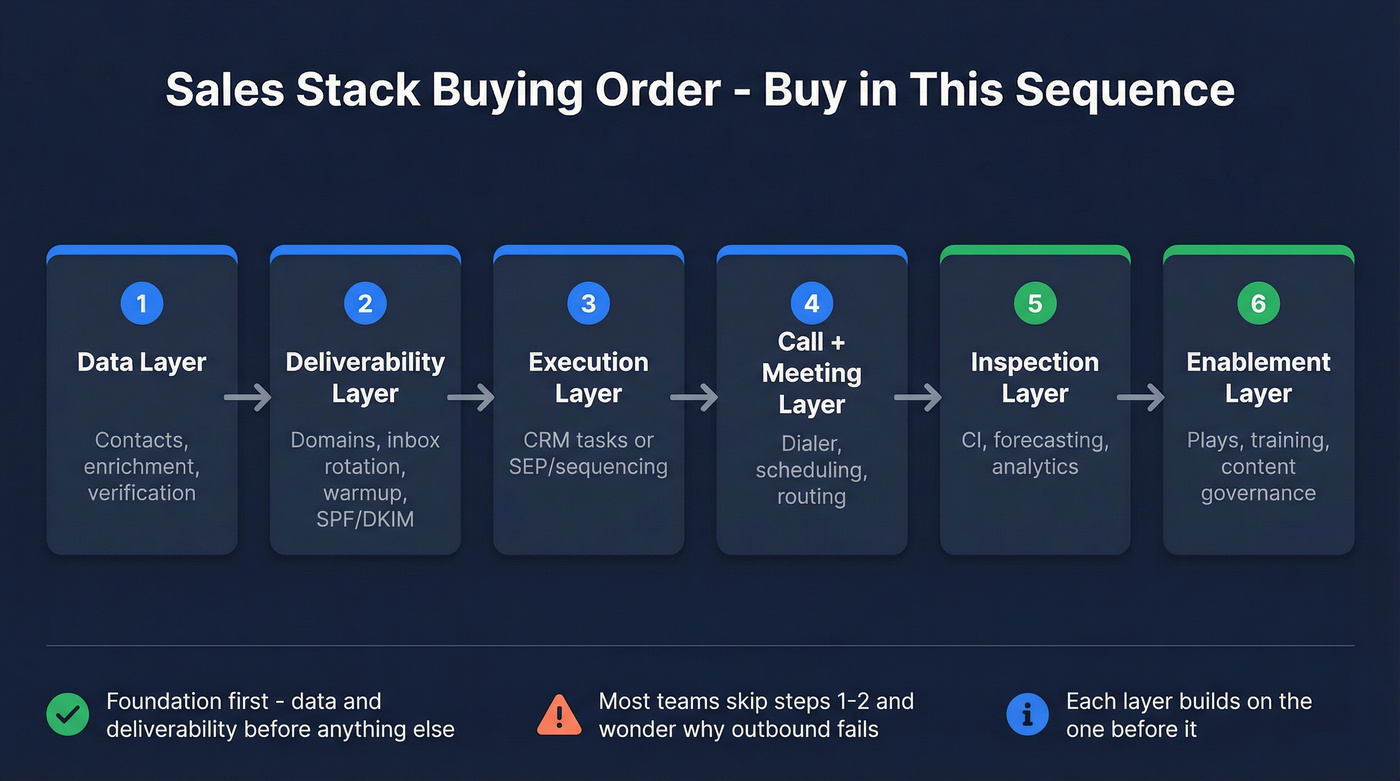
Buying order checklist (printable)
- Data layer (contacts + enrichment + verification)
- Deliverability layer (domains, inbox rotation, warmup, SPF/DKIM)
- Execution layer (CRM tasks or SEP/sequencing)
- Call + meeting layer (dialer, scheduling, routing)
- Inspection layer (CI, forecasting, analytics)
- Enablement layer (plays, training, content governance)
ZoomInfo reality check: it's a strong database, but it's also a $20k+/year decision for a lot of teams. If your average deal size is small and you're still iterating on ICP and messaging, you don't need ZoomInfo-level contract gravity. Start with a self-serve data layer you can implement in an afternoon, then upgrade when you've earned the complexity.

Your checklist says pick one tool for prospect data, verification, and enrichment. Prospeo covers all three - 300M+ profiles, 98% email accuracy, 125M+ verified mobiles, and CRM enrichment - so you eliminate the overlap tax instead of paying for it.
Replace three prospecting tools with one. Start free with 100 credits.
Outbound infrastructure checklist (before you buy more tools)
If outbound's part of your motion, deliverability's your real platform. Everything else is decoration.
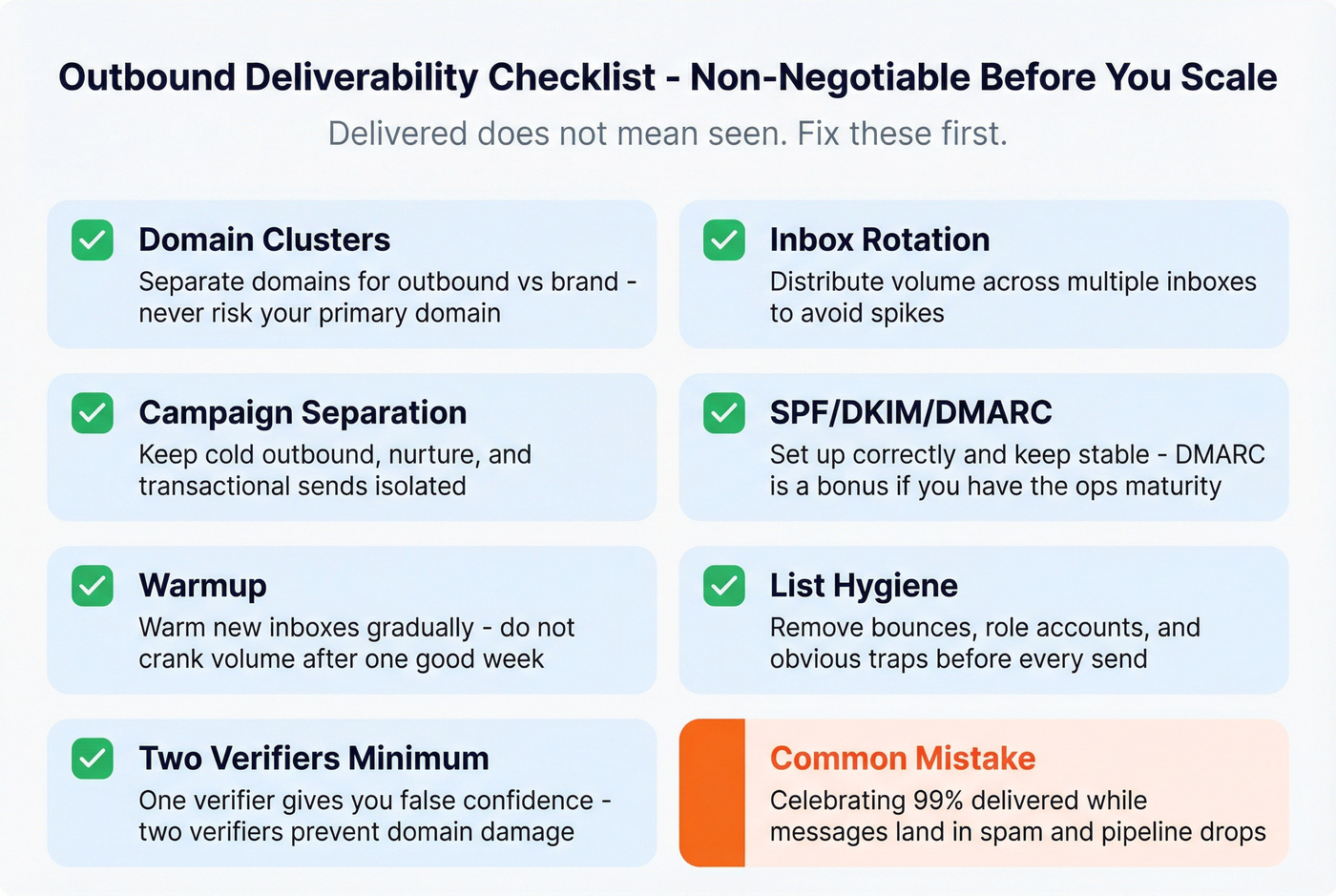
I've watched teams celebrate "99% delivered" while pipeline fell off a cliff because the domain reputation was cooked and messages were landing in spam/promotions or getting throttled. Delivered just means the receiving server accepted it. It doesn't mean a human ever saw it.
Deliverability essentials (non-negotiable)
- Domain clusters: separate domains for outbound vs brand. Don't risk your primary domain.
- Inbox rotation: distribute volume across multiple inboxes to avoid spikes.
- Campaign separation: keep cold outbound, nurture, and transactional sends isolated.
- SPF/DKIM: set them up correctly (and keep them stable). DMARC's a bonus if you've got the ops maturity.
- Warmup: warm new inboxes gradually, and don't "turn it to 11" after a good week.
- List hygiene: remove bounces, role accounts, and obvious traps.
- Two verifiers minimum: one verifier is how you get false confidence. Two is how you avoid domain damage.
Under-the-radar outbound ops tools (optional, examples)
If you're scaling volume and you've already nailed the basics, these categories can save you weeks of ops pain:
- Inbox provisioning / diversification (e.g., Puzzle Inboxes)
- Inbox rotation + deliverability ops (e.g., ReachInbox)
- List slicing + segmentation utilities (e.g., Slicey)
- Multi-inbox sequencing at scale (e.g., ManyReach)
- Calling ops / parallel dialing experiments (e.g., Vox Labs)
Use/skip guidance (so you don't overbuy)
Use:
- inbox rotation + sending infrastructure tools when you're scaling volume,
- verification tools even at low volume (it's cheaper than burning a domain),
- routing tools when inbound starts to matter.
Skip:
- intent platforms until you've proven you can convert the leads you already have,
- all-in-one outbound suites that bundle sending + sequencing + data if you can't clearly explain how they protect reputation.

Don't buy duplicates: CRM vs SEP vs point tools (taxonomy that prevents overlap)
Most overlap waste comes from one mistake: buying multiple execution layers.
Outreach's SEP taxonomy is a clean way to think about it:
- CRM-based: execution bolted onto CRM. Good for governance, often clunky for reps.
- Task-first: deep in one area (forecasting, CI, coaching). Great depth, but fragments workflows.
- Workflow-first: guided execution across steps (tasks, sequences, handoffs). Best for repeatability.
Your rule: pick one primary execution layer for sequences/tasks. Then let everything else plug into it.
Overlap traps that burn budgets:
- CRM sequences + Outreach/Salesloft + a "light" sequencer inside your data tool
- A dialer that also does coaching + Gong + manager coaching in your enablement tool
- Forecasting add-ons inside CRM + a standalone forecasting platform
If you can do the same action in two places, reps'll pick the easier one, and your reporting'll lie.
Stage-by-stage evaluation (what to check + pricing ranges)
Below are the categories that matter, with criteria that prevent regret and pricing ranges you can budget around.
Prospecting & lead sourcing (data + enrichment)
What it does
Turns your ICP into a list: companies, contacts, verified channels (email/mobile), and enrichment fields you can route and personalize on.
Implementation tip (do this first) Before you import anything, define your "golden fields" (persona, seniority, department, employee band, region) and lock the picklists in CRM. Enrichment should fill your schema, not invent its own, because once three tools start writing three versions of "persona" your reporting's basically done.
Must-have criteria
- Accuracy you can measure (bounce rate, match rate, refresh cycle)
- Clear enrichment coverage (job title, department, firmographics, technographics)
- Export + CRM sync that doesn't create duplicates
- A way to handle job changes and stale records
Red flag If the tool can't tell you how often it refreshes records, assume you're buying staleness.
Typical pricing
- Self-serve data tools: $39-$300/mo (often credit-based)
- Mid-market data: $300-$1,500/mo
- ZoomInfo: $20k+/year in practice, climbing with seats/modules
- Clay: from $134/mo and scales quickly with usage (powerful, not a cheap habit)
- Apollo: typically $49-$99/seat/mo for paid tiers
Email verification & data hygiene (non-negotiable)
What it does Prevents bounces, protects domain reputation, and keeps your CRM from turning into a graveyard.
Best for / Skip if
- Best for: any team sending cold email (even low volume)
- Skip if: you literally never send outbound email (rare)
Must-have criteria
- Catch-all handling (not just "unknown")
- Bulk verification + API
- Bounce rate trending under ~3-5% on cold sends
- Two verifiers for outbound at scale (Kickbox is a common second verifier)
What to avoid
- Verifying once and reusing lists for months (stale data is how you get burned)
- Letting reps upload CSVs straight into CRM without hygiene rules
Typical pricing
- Verification: $10-$500/mo depending on volume Per-email pricing often lands from fractions of a cent to a few cents; the real cost is domain damage, not the tool.
Social selling (Sales Navigator + light automation)
What it does Gives reps a clean way to map accounts, track job changes, and run targeted outreach that complements email/calling.
In our experience Treat this as a must-have for outbound teams that sell to knowledge workers. It's the fastest way to find the right person and the right moment, especially when your ICP shifts mid-quarter and you need to re-map 30 accounts without losing a week.
Typical pricing
- Sales Navigator: usually $99-$169/seat/mo depending on tier and contract
Compliance note Skip spray-and-pray automation if your brand or region has strict compliance risk. Light, human-paced workflows beat account bans and reputation damage every time.
Sales engagement / sequencing (execution layer)
What it does Runs sequences, tasks, and multichannel touches with reporting and governance.
If you run two sequencers, you don't have options. You have broken attribution.
Must-have criteria
- One place reps live daily (tasks + sequences + templates)
- CRM sync that's predictable (fields, activities, ownership)
- Team controls (guardrails, approvals, shared templates)
- Deliverability-friendly sending options if it's sending emails
Best for / Skip if
- Best for: teams with repeatable outbound motions and managers who inspect activity
- Skip if: you don't have defined stages/fields yet. Start with CRM tasks and a lightweight sender, then graduate once the process is real.
Typical pricing
- SMB sequencing tools (Instantly/Lemlist/Smartlead): $30-$100/seat/mo depending on volume and inboxes
- Outreach/Salesloft: contract reality is ~$12k-$60k/year for smaller teams, and $75k-$250k+/year at scale once you include platform fees and add-ons
Dialer & calling workflows
What it does Improves call throughput, logging, and connect rates when you've got decent numbers and a real calling motion.
Red flag If your dialer can't reliably log activities to the right contact/account/opportunity, it'll quietly destroy your reporting. "We'll fix it later" never happens.
Must-have criteria
- Local presence (if relevant)
- Power dialer + dispositioning
- Clean CRM activity logging
- Coaching hooks (optional) without forcing a full CI suite
Typical pricing
- Dialers: $30-$150/seat/mo
Connect-rate reality: if your data's weak, you'll just dial faster into voicemail.
Scheduling & routing
What it does Books meetings and routes inbound leads fast.
Implementation tip Write routing rules like product requirements: "If lead is X, route to Y within Z minutes." Then alert on SLA breaches in Slack/email. Routing without monitoring is theater.
Must-have criteria
- Routing rules (round robin, territories, account ownership)
- Buffer rules and meeting types
- CRM writeback (meeting booked → lifecycle updates)
Typical pricing
- Scheduling: $0-$20/seat/mo
- Routing add-ons: $50-$500/mo depending on complexity
Conversation intelligence & coaching
What it does Records calls, extracts insights, supports coaching, and improves consistency.
Here's the thing: CI without coaching is expensive storage.
Best for / Skip if
- Best for: teams with enough call volume to coach weekly
- Skip if: managers won't coach. Buy a dialer that logs cleanly and spend the money on manager training instead.
Must-have criteria
- Reliable recording + transcription
- Searchable library + snippets
- Coaching workflows managers'll actually use
- CRM association that's accurate (contact/account/opportunity mapping)
Typical pricing
- CI typically lands $100-$300/seat/mo, often annual
- Gong is often quoted around ~$250/user/month plus platform fees (varies by contract)
Proposals, CPQ, CLM, e-signature (late-stage)
What it does Moves deals through pricing, approvals, legal, and signature.
What to avoid Buying CPQ/CLM because "enterprise teams have it" is one of my least favorite self-inflicted wounds in RevOps. Only buy it when complexity demands it: multiple SKUs, discounting rules, legal redlines, procurement cycles, and a real approvals chain that people follow.
Typical pricing
- Proposal docs (Qwilr): from $35/mo
- E-signature: $10-$40/seat/mo
- CPQ/CLM: $10k-$150k/year depending on complexity and seats
Forecasting & revenue intelligence
What it does Improves forecast accuracy and pipeline inspection.
Reality check Forecasting tools don't fix pipeline. They expose pipeline. If your stage definitions are mushy, the tool'll just produce prettier confusion, and you'll still be arguing about whether "verbal yes" belongs in Commit.
Must-have criteria
- Clear definitions (stages, exit criteria, close date rules)
- Rep workflow that doesn't add admin
- Manager inspection views that map to your process
Typical pricing
- Salesforce Revenue Intelligence is often packaged around ~$250/user/month (varies by edition and contract)
- Forecasting platforms: $50-$200/seat/mo, sometimes plus platform fees
Enablement (content + training + deal support)
What it does Makes reps faster and more consistent if it's run like an operating system, not a folder.
Skip this if you can't commit an owner and a monthly governance cadence (retire content, update plays, train managers). A messy enablement platform is worse than a messy drive because it creates false confidence: reps think they're "following the play" while everyone actually freelances.
Typical pricing
- Enablement platforms: $15k-$150k/year depending on seats and scope Training budgets are usually 2-5% when 15-20% is what it takes to make change stick.
When a DAP (digital adoption platform) is worth it
A DAP (think WalkMe-style) becomes worth real money when you have process complexity + turnover and you're tired of retraining the same workflows every quarter. It helps by adding in-app guidance ("click here, fill this field, then do X"), reducing training burden by standardizing workflows inside CRM/SEP, and preventing tribal knowledge from becoming your operating model.
If you're under ~25 reps and your process changes weekly, skip it. If you're 50+ seats with consistent workflows and constant onboarding, it pays for itself fast.
The data quality layer we'd implement first (accuracy, freshness, self-serve)
If you fix one layer first, fix data quality. It's the upstream dependency for deliverability, routing, personalization, and reporting, and it's the easiest place to accidentally light money on fire because bad records look fine right up until your bounce rate spikes and your domain reputation tanks.
Prospeo ("The B2B data platform built for accuracy") is a strong fit here because it gives you 300M+ professional profiles, 143M+ verified emails, and 125M+ verified mobile numbers on a 7-day refresh cycle (the industry average is 6 weeks), with 98% email accuracy, 92% API match rate, and enrichment that returns 50+ data points per contact.
A concrete scenario we've seen: a team imports a "clean" list, runs a two-week outbound push, and suddenly deliverability falls apart; the post-mortem shows the list was verified once, never re-verified, and then re-used across multiple inboxes while two different tools enriched the same CRM fields with different values. Fixing it wasn't fancy: one system of record, one field map, and verification as a recurring step, not a one-time checkbox.

Run a sales tools audit in 2 hours (Keep / Consolidate / Sunset)
This is the fastest way to stop paying the overlap tax without starting a six-month "transformation."
The 2-hour audit SOP
Catalog everything List every tool, owner, seats, renewal date, monthly cost, and the one sentence job-to-be-done. Take screenshots of critical settings (routing rules, sync settings, dedupe rules).
Map data flows Draw where contacts/companies/deals originate and where they get updated. Pick a system of record per object (contact/company/deal). If two systems "own" the same field, you've found future reporting pain.
Inspect core systems Start with HubSpot/Salesforce and the tools that write into them. Check duplicate rules, validation rules, assignment rules, and sync direction/frequency.
Simulate real journeys
Run a test: new lead → routed → sequenced → meeting booked → opp created → stage changes → forecast → closed. Log every break, manual step, and "we export CSVs here."
- Prioritize fixes
Group into: quick wins, foundation fixes, and scale projects. Assign a single owner per process.
Governance + integration rules (the stuff that prevents quiet breakage)
- Field naming: pick one convention (e.g.,
Lifecycle Stage,Lead Source,Persona) and ban duplicates likeLead_SourcevsLeadSource. - Sync direction: for every integration, decide source of truth and lock it. Bi-directional sync is how you get ping-pong updates.
- UTM + consent capture: standardize UTM fields and consent flags at the CRM level so every tool writes to the same place.
- Dedupe rules: decide your unique keys (email for contacts, domain for accounts) and enforce them before imports.
- Sandbox changes: test routing, enrichment mappings, and activity logging in a sandbox first. Production isn't your QA environment.
Stat callout (why consolidation pays)
Outreach's research on tool sprawl is blunt: enterprises can run 342 applications across the business, RevOps teams often manage 15-30 specialized tools, and consolidation programs can drive 30-40% TCO reduction and eliminate $313,000 of waste over two years.
You don't need a transformation. You need ownership, rules, and a kill list.
Consolidation triggers (simple thresholds)
- Tools under 70% license utilization are consolidation candidates.
- 50%+ feature overlap is a bright red flag.
Scorecard (Keep / Consolidate / Sunset)
Score each tool 0-100. Be ruthless.
| Dimension | Weight | Scoring prompt |
|---|---|---|
| Utilization | 25 | % licensed users active |
| Workflow criticality | 25 | Does revenue stop without it? |
| Data integrity | 20 | Improves or harms hygiene |
| Overlap | 15 | Unique vs duplicated value |
| Admin load | 15 | Hours/week to maintain |
Decision buckets:
- Keep: >75
- Consolidate: 50-75
- Sunset: <50
Rollout guidance (so change sticks)
- Pilot with 5-10 cross-functional people (reps + managers + RevOps).
- Run old and new in parallel 2-4 weeks minimum.
- Expect a real rollout to take 5-12 months end-to-end (pilot → expansion → global).
Reps hate tool changes that add clicks, and managers hate tools that don't match the CRM. The fastest way to lose adoption is to ship a "better" stack that makes the rep workflow slower.
90-day success metrics (how you prove the stack's working)
If you can't prove impact in 90 days, you're heading into shelfware.
90-day checklist
- Define 3-5 stack outcomes (not features).
- Set adoption targets per tool (daily active usage, sequence usage, call logging).
- Fix the top 3 data hygiene issues that break reporting.
- Run weekly office hours for reps for the first month.
- Publish a one-page "how we sell here" workflow (where each action happens).
KPI table (inputs → execution → outcomes)
| Layer | Metric | 90-day target |
|---|---|---|
| Enablement | Time-to-answer | <30 seconds |
| Adoption | Daily active usage | >70% of reps |
| Execution | Tasks completed/day | Up +15-30% |
| Data hygiene | Bounce rate (cold) | <3-5% |
| Pipeline | Stage conversion | Up 5-15% |
| Velocity | Sales cycle length | Down 5-10% |
| Outcomes | Win rate | Up 2-5 pts |
| Ramp | Time-to-productivity | Down 10-30% |
Outreach's adoption warning label still applies: 70% of adoption initiatives fail, and training budgets sit at 2-5% when 15-20% is what it takes.
FAQ
How many sales tools should a team have in 2026?
Most teams should run 8 tools or fewer in 2026. The average stack's already 8.3 tools, and overlap waste hits $2,340 per rep per year. If you're above 10 tools, you need enterprise-grade governance, or you're paying for duplicates and admin time.
What sales tools should I buy first for outbound?
Buy in this order: data quality (contacts + enrichment) → deliverability (domains, inbox rotation, SPF/DKIM) → one execution layer (sequencing/tasks) → scheduling/dialer → analytics/coaching. Outbound fails more from bad data and cooked domains than from not having enough features.
What's a realistic sales tech stack budget per rep?
A realistic budget is about $187 per rep per month as a baseline, with lean teams often landing $150-$250/rep/month and mid-market stacks $200-$450/rep/month. If you're far above that, you should be able to point to measurable throughput gains (meetings, conversion, velocity).
How do I know if my data provider's hurting deliverability?
If cold bounce rates are consistently above 3-5%, reply rates are collapsing despite stable messaging, and you're seeing more spam flags or throttling, your data hygiene's hurting deliverability. Run two verifiers, refresh lists frequently, and stop sequencing contacts that haven't been re-verified recently.
What's a fast way to get verified emails without an annual contract?
Prospeo's a fast option: self-serve, starts free (75 emails + 100 extension credits/month), and delivers 98% accurate emails on a 7-day refresh. Filter prospects, verify in real time (including catch-alls), then export or enrich your CRM and sequencer.
The average team wastes $2,340/rep/year on duplicate workflows. Prospeo replaces your data provider, email verifier, and enrichment tool at ~$0.01/email with a 7-day refresh cycle. That's fewer logins, cleaner CRM fields, and one KPI to track: under 4% bounce rate.
Stop paying the overlap tax. One data layer, zero duplicate tools.
Summary: use this sales tools checklist to stay lean
If you want a stack that performs in 2026, follow three rules: fix data quality first, protect deliverability before scaling volume, and refuse duplicate execution layers.
Run the one-page inventory, do the 2-hour audit, and keep your tool count lean unless you've got real governance. That's the whole point of a sales tools checklist: fewer tools, cleaner workflows, and reporting you can trust.