

B2B Sales Process Examples You Can Copy (Built for 2026 Buying)
Most B2B deals don't "lose." They just sit there until everyone forgets why they started.
These b2b sales process examples are built to prevent that. Not by adding more stages, but by forcing proof: buyer actions, shared artifacts, and a couple of metrics that make stalls obvious before forecast week.
And yes, I'm going to be blunt: if your process is basically "call, email, update CRM," you're not running a sales process. You're running a diary.
What you need (quick version)
If you only fix six things, fix these:
- One canonical 8-stage process that fits most deals
- Exit criteria written as VCAs (verifiable customer actions)
- A Mutual Action Plan (MAP) for multi-stakeholder deals
- A lightweight MEDDICC that changes next steps
- A multi-thread plan (buying groups are political)
- Stage conversion + time-in-stage so stalls show up early
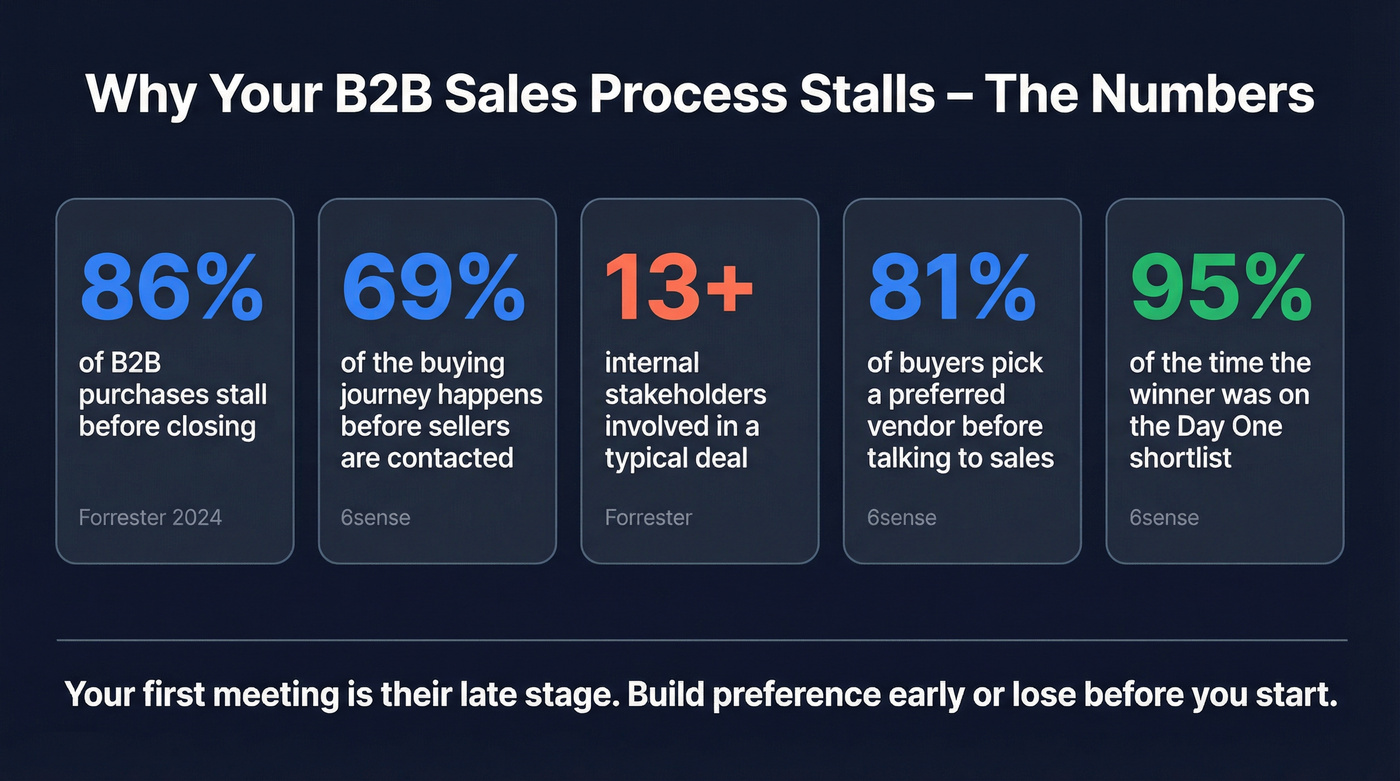
Two reality anchors: Forrester found 86% of B2B purchases stall, and 6sense (n=2,509) found 69% of the process happens before buyers engage sellers.
What a "B2B sales process" means in 2026 (and why yours stalls)
A B2B sales process in 2026 isn't "the steps your reps follow." It's the steps your buyers can actually complete, with you reducing risk, compressing internal alignment, and making the decision defensible for whoever has to explain it in a meeting they didn't ask to attend.
Most sales processes fail because they're written from the seller's perspective: log call, send follow-up, update CRM. Buyers don't care. Those activities don't move the decision forward, and they definitely don't help a champion win an internal argument.
The stall drivers are structural:
- Buying groups are crowded. Forrester's benchmarked view of modern buying shows decisions routinely involve 13 internal stakeholders and nine external influencers, and 89% of purchases involve two or more departments.
- Procurement isn't "the last step." Procurement is a decision-maker in 53% of buying cycles and engages early. Treating them like a discount gate is a self-inflicted wound.
- Your "first meeting" is late-stage. 6sense found 81% of buyers pick a preferred vendor and 85% establish requirements before talking to sales.
Here's the thing: if your average deal is small, you don't need a 12-stage enterprise process. You need ruthless VCAs, a tight evaluation plan, and the spine to disqualify fast.
B2B sales process examples: the canonical 8-stage model (with VCAs)
We've tested a bunch of variations across different motions, and the 8-stage model is the sweet spot: enough resolution to manage security/legal/procurement without turning your CRM into a choose-your-own-adventure novel.
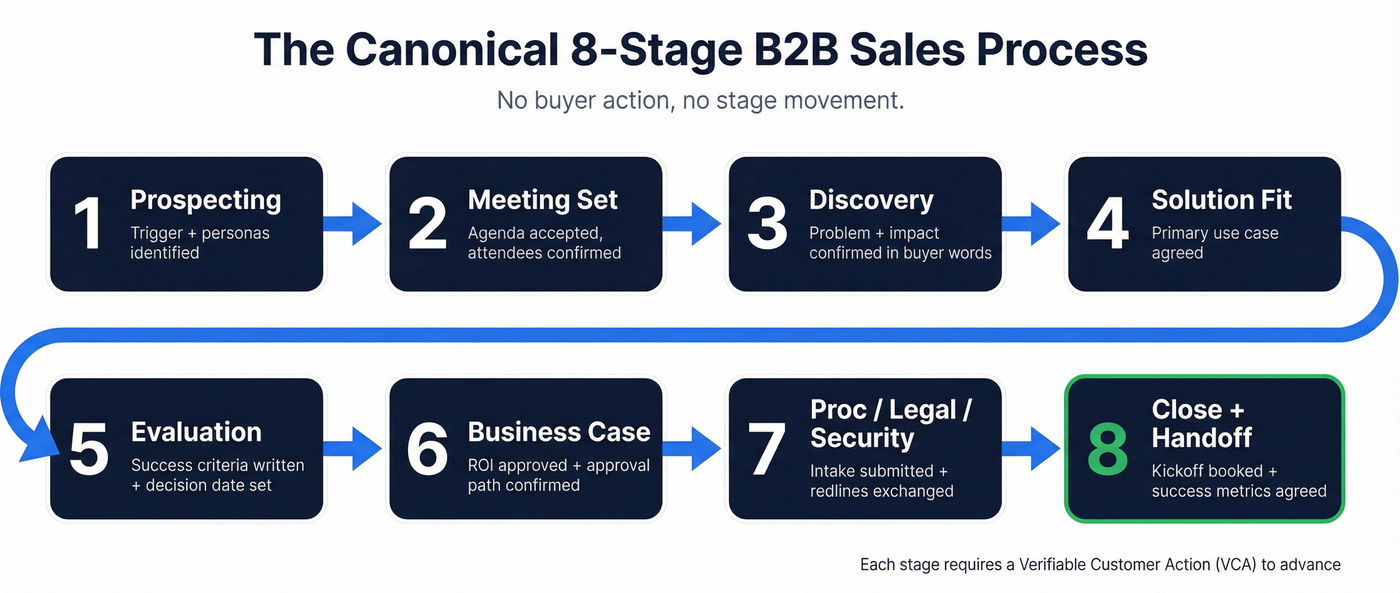
The rule is simple: you only advance a stage when the buyer does something verifiable. No buyer action, no stage movement.
6sense data also forces urgency: point of first contact happens at 61% of the journey, and 95% of the time the winning vendor is already on the Day One shortlist. That means Stage 1-2 can't be "warm them up." It's where you create preference.
1) Prospecting & targeting (ICP + triggers)
This stage isn't "build a list." It's "pick winnable accounts with a reason right now."
Exit criteria (VCA): you can name (1) the trigger, (2) the likely owner, (3) the likely blocker, and (4) the first proof you'll lead with.
Artifacts: ICP notes, trigger list, persona map, and a one-sentence point of view ("teams like you lose money when X happens").
Execution tip: in Salesforce or HubSpot, make "Trigger" + "Primary persona" required fields before a record can enter Stage 2. If reps can skip the thinking, they'll skip the thinking.
List-quality rule (opinionated, because I've watched this go wrong): don't launch outbound until you've verified the contacts. One bad list can burn a domain for months, and the "fix" always costs more than doing it right the first time. (If you need a workflow, start with this email verification guide.)
2) First contact & meeting set
The goal isn't "book a meeting." The goal is "earn a meeting that survives calendar triage."
Exit criteria (VCA): the buyer accepts a written agenda and confirms attendees (or routes you to the actual owner).
Artifacts: a 5-bullet agenda, a 2-3 sentence pre-read, and a single "why now" trigger.
Non-negotiable: if you can't explain why this is worth 15 minutes this week, you don't deserve the meeting.
3) Discovery & problem validation
Discovery is where deals either become real or become "nice chats."
Exit criteria (VCA): the buyer confirms the problem statement in their words and agrees on impact (money, time, risk, or strategic cost).
Artifacts: a written recap email, a simple impact model (even directional), and a stakeholder hypothesis ("who else will care and why").
If your discovery call ends without a written problem statement, you didn't do discovery. You did rapport. (Use a deal qualification scorecard to keep it honest.)
4) Solution fit (demo/workshop)
A demo is a trap when it's feature tourism. A workshop wins because it's anchored to the buyer's workflow.
Exit criteria (VCA): the buyer agrees on one primary use case and says, "This would work here because..." tied to their process.
Artifacts: workshop doc, current-state vs future-state workflow, and a "not now" list to prevent scope creep.
Practical move: keep the demo to 12-15 minutes, then spend the rest mapping their workflow. The workflow is what gets repeated internally, and it's what your champion will copy into a slide when they're trying to get air cover from finance.
5) Evaluation (trial/POC/RFP)
Evaluation exists to remove risk. If you don't define success, the buyer defines it for you, and you won't like the definition.
Exit criteria (VCA): success criteria are written down, owned by the buyer, and attached to a decision date.
Artifacts: trial/POC plan, KPI list, data/access checklist, and a results recap template.
Forrester's benchmark makes the point: 60%+ of buyers use a trial to evaluate solutions. That doesn't mean you should run freemium. It means buyers expect hands-on proof, even if it's a guided POC with tight scope and a hard stop.
6) Business case & proposal
This stage is where "I like it" becomes "I can defend it."
Exit criteria (VCA): the buyer has an internal-ready business case and confirms the approval path (who signs, what they need, and when).
Artifacts: ROI/risk one-pager, proposal aligned to procurement format, and a mutual timeline.
Tooling that helps: PandaDoc is excellent here for proposals, versioning, and redlines without email chaos. (If you're comparing stacks, see DocuSign vs PandaDoc.)
7) Procurement / legal / security
Treat this as a project, not a waiting room.
Exit criteria (VCA): security intake submitted, legal redlines exchanged, and procurement confirms the PO path (vendor setup steps + timeline).
Artifacts: security packet, redline tracker, and a MAP with explicit gates.
Hard truth: if you enter this stage without an exec sponsor and a decision date, you're volunteering for redline limbo.
8) Close + handoff to onboarding
Close isn't "signature received." Close is "success is scheduled."
Exit criteria (VCA): kickoff is booked, onboarding owner is named, and success metrics are agreed.
Artifacts: onboarding plan, kickoff agenda, and success KPI doc. (For a ramp-ready handoff, borrow a sales onboarding plan structure.)
If you "close" without a kickoff date, you didn't close. You delayed churn.
The proof-based table (stage -> VCA -> artifact -> metric)
| Stage | Goal | VCAs (short) | Artifact | Metric |
|---|---|---|---|---|
| 1) Prospecting | Pick targets | Trigger + personas set | ICP + trigger list | % w/ trigger |
| 2) Meeting set | Earn convo | Agenda + attendees ok | Calendar + agenda | Meet set rate |
| 3) Discovery | Validate pain | Problem + impact ok | Recap + impact | Disco->next % |
| 4) Solution fit | Prove fit | Use case agreed | Workshop doc | Demo->eval % |
| 5) Evaluation | De-risk | Success criteria signed | POC plan | Eval pass % |
| 6) Business case | Justify | ROI + approval path | ROI 1-pager | Proposal->proc % |
| 7) Proc/Legal/Sec | Clear gates | Intake + redlines moving | MAP + tracker | Time-in-stage |
| 8) Close/Handoff | Start success | Kickoff booked | Onboarding plan | Time-to-kickoff |

To make the table operational, add these stage notes to your CRM (not hidden in rep brains):
- Stage 1 must include: trigger, primary persona, and "first proof" (case, benchmark, or teardown).
- Stage 3 must include: quantified impact or a documented reason it can't be quantified.
- Stage 5 must include: success criteria + decision date, or the deal stays in Stage 4.

Stage 1 fails without verified contacts. One bad list burns your domain and stalls every stage after it. Prospeo's 5-step verification delivers 98% email accuracy and 125M+ verified mobiles - so your reps prospect with confidence, not guesswork.
Stop stalling at prospecting. Start with data that survives every stage.
Templates you can copy (MAP, MEDDICC, VCAs)
Most posts give you stage names. Stage names don't prevent stalls.
Artifacts prevent stalls.
Mutual Action Plan (MAP) - filled table
A MAP is a shared roadmap with actions, milestones, responsibilities, and dates to reach a decision and kickoff. It works because it turns "next steps" into commitments the buyer can forward internally without rewriting your email into something their boss won't roll their eyes at.

Copy/paste this and edit the brackets:

Mutual Action Plan - Example (Mid-market SaaS, security review required)
| Milestone | Owner | Dependencies | "Done" definition | Target window | Comms |
|---|---|---|---|---|---|
| Use case locked | Buyer + AE | Discovery complete | 1-page use case approved | Week 1 | Email recap |
| Stakeholders mapped | AE | Champion aligned | Names + roles + influence | Week 1 | Shared doc |
| Workshop completed | Buyer team | Right attendees | Workflow validated live | Week 2 | 30-min sync |
| Trial success criteria | Buyer | Workshop notes | 3 KPIs + data needed | Week 2 | MAP update |
| Security intake submitted | Buyer IT | Vendor docs | Ticket opened + ETA | Week 3 | Weekly check |
| Legal first pass | Buyer legal | MSA sent | Redlines returned | Week 4 | Email thread |
| Pricing/package aligned | Buyer + AE | Budget owner | SKU + term agreed | Week 4 | Call + recap |
| Exec signoff | Buyer exec | Business case | "Yes" + signer named | Week 5 | Exec call |
| Procurement PO path | Buyer procurement | Vendor setup | PO steps confirmed | Week 6 | MAP comment |
| Kickoff scheduled | CSM + Buyer | Signature | Date + attendees | Week 6 | Calendar |
Two MAP rules that keep it sharp:
- Seller does 80% of the work (draft it, maintain it, chase dependencies).
- Every milestone has a give-to-get: "We'll extend the trial if the exec sponsor joins the success criteria review."
Business case one-pager - copy/paste template
This is the artifact that gets forwarded. Make it skimmable, defensible, and specific.
Business case (1 page) - Template
- Decision: Approve [Product/Service] for [team] to solve [problem].
- Current cost of doing nothing: [$/month] or [hours/week] or [risk exposure].
- Target outcome (90 days): [metric] improves from [baseline] -> [target].
- How we'll measure: [data source], [owner], [cadence].
- Scope: Included [A, B, C]. Not included (yet) [D, E].
- Implementation plan: Week 1 [x], Week 2-3 [y], Week 4 [z].
- Dependencies: [SSO/security], [data access], [IT owner].
- Commercials: [$] ARR, term [12/24] months, start date [date].
- Risks + mitigations: [risk] -> [mitigation].
- Approval path: [names/titles], signer [name], target date [date].
If you can't fill this in, you're not in Stage 6. You're still in Stage 4 wearing a proposal costume.
Security/legal kickoff checklist (so Stage 7 doesn't explode)
This is the fastest way I've seen teams cut "surprise requirements" in half.
Security + legal kickoff checklist (copy/paste)
- Security
- Do you require SOC 2 / ISO / pen test summary? Which versions are acceptable?
- Do you require SSO/SAML? Any specific IdP constraints?
- Data residency requirements? Subprocessors approval process?
- Security intake form link + SLA + ticket owner name
- Required artifacts list (DPA, architecture diagram, encryption details)
- Legal
- Contracting preference: MSA + Order Form, or MSA + SOW?
- Required clauses: indemnity, limitation of liability, insurance, audit rights
- Redline process: who redlines, how versions are tracked, turnaround SLA
- Procurement
- Vendor setup steps + PO requirements
- Payment terms + invoicing requirements
- Target signature date and "drop-dead" date
- Decision control
- Who can block the deal? Name them.
- What's the escalation path if a gate slips?
Run this as a 20-minute call right after Stage 5 success criteria are approved. It saves weeks.
MEDDICC - filled example (anonymized)
MEDDICC works when it changes what you do next. It fails when it becomes CRM theater.
Copy/paste this "minimum viable MEDDICC" and fill it like a real deal:
Deal: Workflow automation platform - 450-employee logistics firm - $72k ARR
- Metrics (M): Reduce manual order exceptions by 35%; cut SLA breaches from 4.2% -> <2%; save 1.5 FTE in ops.
- Economic buyer (E): VP Operations (budget owner), CFO signs. Next step: CFO review of ROI model on Feb 28.
- Decision criteria (D): SOC 2, SSO, API coverage for ERP, time-to-value <45 days, reference in logistics.
- Decision process (D): Ops workshop -> 2-week trial -> security review -> CFO/VP Ops approval -> procurement.
- Identify pain (I): SLA penalties + overtime spikes; ops team drowning in exceptions.
- Champion (C): Director of Ops Excellence. Power: can pull IT/security into meetings; wants promotion tied to SLA improvement.
- Competition (C): Incumbent spreadsheet process + one niche vendor. Risk: "good enough" inertia.
The only MEDDICC fields I'd force in CRM: economic buyer named, decision process steps + dates, champion strength, and one quantified metric. Everything else belongs in notes.
Stage exit criteria library (VCAs)
Steal these VCAs. They're customer-observable, not rep opinions:
- Buyer accepts a written agenda and confirms attendees (Stage 2 exit)
- Buyer confirms problem statement in their words in writing (Stage 3 exit)
- Buyer shares current-state workflow (screenshare, doc, or sample data) (Stage 3 exit)
- Buyer agrees on one primary use case and one "not now" use case (Stage 4 exit)
- Buyer approves success criteria with KPIs + timeline (Stage 5 exit)
- Buyer introduces procurement/security and shares intake steps (Stage 6-7 bridge)
- Buyer shares a redlined version of MSA/SOW (Stage 7 exit signal)
- Buyer books kickoff with implementation owner + success metrics (Stage 8 exit)
Sales playbooks by motion/industry (5 complete examples)
These are meant to be copied into your CRM stage notes or enablement wiki. Each one includes: buyer action, artifact, KPI, plus what to steal.
1) Trial-led SaaS (SMB/mid-market) process example
Best for: product-led or trial-forward SaaS where the buyer wants proof fast and the deal dies the second it feels "heavy."
Stages (what actually happens):
- Trigger outreach -> meeting
- Discovery -> confirm use case + success metric
- Guided trial kickoff (30 minutes)
- Mid-trial review (day 5-7)
- Business case + package
- Close + kickoff
VCAs that matter:
- Buyer agrees to one use case and one metric before trial access is granted.
- Buyer assigns an internal owner for the trial (not "we'll poke around").
- Buyer books the mid-trial review on the kickoff call.
Artifacts to use:
- 1-page trial plan (success criteria, data needed, timeline)
- "Day 1 setup" checklist
- Results recap email template with screenshots
KPIs to track:
- Trial kickoff held rate
- % trials with success criteria documented
- Trial -> paid conversion
- Time from trial start -> decision
What to steal: the mid-trial review booking rule. In our experience, if you don't get that meeting on the calendar up front, the trial turns into a silent churn machine where the buyer "means to test it" right up until they ghost.
2) Enterprise SaaS (security/legal/procurement) process example
Best for: $25k+ ARR deals with real gates: security review, legal redlines, procurement process, and multiple departments.
Stages (enterprise reality, no fantasy):
- Target + multi-thread early
- Discovery with champion + adjacent stakeholders
- Workshop (not a demo)
- Evaluation plan + success criteria
- Security/legal kickoff (early)
- Business case + exec sponsor alignment
- Procurement + contracting
- Close + implementation launch
VCAs that matter:
- Buyer introduces security owner before the POC starts (or during week 1).
- Buyer confirms approval path (names + sequence) before proposal.
- Buyer agrees to a MAP with dates, even if they're "targets."
Artifacts to use:
- MAP (shared doc)
- Security packet + intake tracker
- Redline tracker (version, owner, date, status)
- Business case one-pager
KPIs to track:
- Time-in-stage for procurement/legal/security
- % deals with exec sponsor identified by Stage 6
- Proposal -> procurement conversion
- Slip rate vs MAP dates
A scenario I've seen too many times: the champion loves you, the team loves you, the POC "goes great," and then security shows up with a 40-question intake form nobody warned you about, legal asks for a DPA addendum, and procurement says vendor setup takes 30 days. If you don't run Stage 7 like a project with owners and dates, you're stuck. (This is also why enterprise sales needs different rules than SMB.)
3) Manufacturing RFQ/CPQ process example
Best for: manufacturers selling configurable products, custom quotes, or anything where engineering, lead times, and terms can kill a deal.
Stages:
- Qualify RFQ (fit + capacity + timeline)
- Requirements lock (specs, volumes, tolerances)
- Quote build (CPQ/engineering)
- Technical review + samples (if needed)
- Commercials + terms
- PO + production schedule
VCAs that matter:
- Buyer provides complete spec pack (or you agree on what's missing and by when).
- Buyer confirms decision date tied to their production schedule.
- Buyer agrees to quote assumptions in writing (lead time, MOQ, incoterms, warranty).
Artifacts to use:
- RFQ intake checklist
- Quote assumptions page (this prevents "you never told us" fights)
- Production timeline doc
KPIs to track:
- RFQ -> quote rate
- Quote cycle time
- Quote -> PO conversion
- Margin vs quoted assumptions changes
Skip this if: you sell simple, non-configurable SaaS. This motion is a different animal, and forcing it into a generic SaaS pipeline just creates bad forecasts and angry ops teams.
4) Distribution/wholesale reorder + terms process example
Best for: distributors where speed, availability, and terms matter as much as product.
Stages:
- Account targeting (fit + buying pattern)
- Terms + credit setup
- First order (small, fast)
- Reorder motion (repeatability)
- Expansion (new categories, better pricing tiers)
VCAs that matter:
- Buyer confirms reorder trigger (inventory threshold, seasonality, promo calendar).
- Buyer agrees to terms and credit process early.
- Buyer shares top SKUs and expected monthly volume.
Artifacts to use:
- SKU shortlist + availability sheet
- Terms/credit checklist
- Reorder calendar
KPIs to track:
- Time to first order
- Reorder rate within 60-90 days
- Gross margin by account
- Expansion rate by category
What to steal: treat the first order like a pilot. Keep it small, ship it fast, then use reorder behavior as your real qualification signal.
5) Professional services (SOW/MSA) process example
Best for: agencies, consultancies, implementation partners, and any services sale where scope control is the whole game.
Stages:
- Discovery (problem + constraints)
- Diagnostic (paid or time-boxed) or workshop
- Scope lock + success definition
- SOW + MSA
- Kickoff + delivery plan
VCAs that matter:
- Buyer agrees to a scope boundary ("what we're not doing").
- Buyer confirms internal owner and access to stakeholders.
- Buyer signs off on success criteria that aren't vibes.
Artifacts to use:
- Scope doc with assumptions + exclusions
- Delivery plan (first 30 days)
- Change request process (simple, but explicit)
KPIs to track:
- Discovery -> SOW rate
- Time from SOW sent -> signature
- Change request frequency (early warning for bad scoping)
- Gross margin by project
Real talk: if you don't write exclusions, you're agreeing to them anyway. You're just letting the buyer decide later.
Outreach sequence example + the list-quality rule that makes it work
A good sequence isn't clever. It's consistent, specific, and aimed at a real trigger.
Here's a simple 10-business-day sequence you can copy. It's built for a "trigger + point of view + proof" approach, not generic personalization theater. (If you want variations, start with a B2B cold email sequence.)
Day 1 (email): Trigger + POV + proof
- Subject: "[trigger] -> quick question"
- Body: 3-5 sentences: what changed, what it usually breaks, one proof point, one question.
Day 3 (call + voicemail): One sentence on trigger, one sentence on outcome, ask for the right owner.
Day 4 (email): "Worth a look?" + 3-bullet agenda
- Bullet 1: confirm if [problem] exists
- Bullet 2: show how teams fix it
- Bullet 3: decide if it's worth an evaluation
Day 6 (call): Ask for a redirect if not the owner. Don't pitch.
Day 8 (email): "Not now" close-the-loop
- Give them an easy out and a clean re-open path: "If timing's bad, should I circle back in [month] or is this a non-issue?"
Day 10 (optional): Short bump with a relevant artifact (1-page teardown, benchmark, or checklist).
The list-quality rule that makes this work: only send this to verified contacts. If your bounce rate spikes, deliverability drops, and then even the good prospects never see your message. (More on why this happens in B2B contact data decay.)
We've watched teams "fix messaging" for weeks when the real issue was a dirty list.
Execution callout: make the sequence work with verified, fresh contact data (Prospeo)
If you're building outbound lists, Prospeo is the tool I'd put in the process because it's built for accuracy and freshness: 98% email accuracy, 7-day refresh, 30+ search filters, and 15,000 intent topics.
Use it for search + verification before you ever hit "launch." Start with the email verification workflow here: https://prospeo.io/email-finder
For pushing clean data into your stack, use the integrations page: https://prospeo.io/integrations
Native integrations include Salesforce, HubSpot, Outreach, Salesloft, Smartlead, Instantly, Lemlist, Clay, Zapier, n8n, and Make.
Your VCAs mean nothing if reps are chasing bounced emails and dead phone numbers. Prospeo refreshes 300M+ profiles every 7 days - not 6 weeks - so your pipeline reflects reality, not last quarter's org chart.
Fix the data layer and watch your 8-stage process actually convert.
Metrics that matter by stage (and how to spot stalls early)
If you only track two things, track stage conversion and time-in-stage. Everything else is commentary. (If you want a full KPI set, see B2B sales pipeline management.)
A simple stage-level dashboard that works:
- Stage 1 -> 2: meet set rate, % records with trigger filled
- Stage 2 -> 3: meeting held rate (calendar acceptance isn't enough)
- Stage 3 -> 4: discovery -> workshop rate, % with quantified impact
- Stage 4 -> 5: workshop -> evaluation rate
- Stage 5 -> 6: evaluation pass rate, % with written success criteria
- Stage 6 -> 7: proposal -> procurement rate
- Stage 7 -> 8: time-in-stage, redline cycle time, security SLA adherence
- Post-close: time-to-kickoff, time-to-first-value
One metric I love (because it ends arguments fast): % of deals with a MAP by Stage 5. If it's low, your "next steps" aren't real. They're wishes. (Related: sales pipeline challenges.)
Common failure modes (and fixes) in real teams
Failure mode 1: Stages are rep activities, not buyer progress.
Fix: rewrite exit criteria as VCAs. If you can't observe it on the buyer side, it doesn't count.
Failure mode 2: Discovery doesn't produce a decision.
Fix: end every discovery with a written problem statement, impact, and a proposed evaluation plan. If the buyer won't confirm any of it, disqualify or downgrade the deal.
Failure mode 3: The demo becomes the product strategy meeting.
Fix: cap the demo, run a workflow workshop, and create a "not now" list. Scope creep is just churn arriving early.
Failure mode 4: Procurement shows up late and resets the clock.
Fix: run the security/legal kickoff checklist right after success criteria are approved, then put the gates into the MAP with owners and dates.
Failure mode 5: Single-threading.
Fix: build a multi-thread plan in Stage 2-3. If your champion gets pulled into a fire drill and you're stuck, that's on you. (If you need the mechanics, use an ABM multi-threading playbook.)
And yes, it's frustrating: a lot of teams have the talent to win deals, but their process is basically "hope the buyer stays excited." Hope isn't a strategy.
Wrap: pick one playbook and ship it this week
If you want fewer stalls, stop "improving your stages" and start improving your proof.
Pick one of the b2b sales process examples above, paste the VCAs into your CRM, ship a MAP on your next real deal, and track time-in-stage like your forecast depends on it. It does.
FAQ
What's the best B2B sales process in 2026?
The best process is the one that matches your deal motion and forces buyer proof. For most teams, an 8-stage process with VCAs, a MAP for complex deals, and stage-level time-in-stage tracking beats a longer pipeline with vague definitions.
What are B2B sales process stages?
Common B2B sales process stages are: prospecting, meeting set, discovery, solution fit, evaluation, business case/proposal, procurement/legal/security, and close/handoff. The stage names matter less than the exit criteria you enforce.
What are stage exit criteria (VCAs)?
VCAs are verifiable customer actions. Examples: "buyer approves written success criteria," "buyer introduces security owner," or "buyer books kickoff." They prevent reps from advancing stages based on optimism.
When should you use a Mutual Action Plan?
Use a MAP anytime there are multiple stakeholders, formal evaluation steps, or procurement/security gates. If a deal can stall, it needs a MAP.
How do you use MEDDICC without turning it into CRM theater?
Keep it minimal and action-driven: economic buyer named, decision process with dates, champion strength, and at least one quantified metric. If a MEDDICC field doesn't change your next step, it doesn't belong in required fields.