Cold Email Cadence Templates: 3 Data-Backed Sequences You Can Steal Today
Every cold email cadence template article gives you emails but not cadences. That's ingredients without a recipe. You can write the perfect cold email, send it once, and watch it disappear into a void - because a single email isn't a strategy. The average rep sends 344 cold emails to land one meeting, and reply rates have cratered from 8.5% in 2019 to roughly 5% today.
The biggest lie in cold email is "more follow-ups = more meetings." An analysis of 16.5M cold emails found that single-email sequences actually pulled an 8.4% reply rate - the highest of any sequence length. By the 4th follow-up, response rates dropped 55% and spam complaints tripled.
So what works? Not more emails. Better-designed cadences with tighter targeting, smarter spacing, and copy that doesn't pitch on the first touch.
The Quick Cheat Sheet
Before you scroll to the templates:

- Cadence length: 4-5 emails over 10-14 days. That's the sweet spot for most B2B teams. Going longer increases spam complaints without proportionally increasing replies.
- The counterintuitive finding: More follow-ups don't equal more meetings. Reply rates peak at the first email and decline with every subsequent touch.
- Three prerequisites before you launch anything:
- A verified list (bounce rate must stay under 2% - one bad list kills your domain)
- A warmed sending domain (3-4 weeks minimum)
- A clear, single CTA per email (not "let me know if you'd like to chat or if there's someone else I should reach out to or if you want to see a demo")
- Three ready-to-use cadences below: a 4-step starter, an 8-touch multi-channel sequence, and a 30-day cluster cadence for enterprise accounts.
Cold Email Benchmarks - What "Good" Actually Looks Like in 2026
You can't optimize what you don't measure. And you can't measure without knowing what "good" looks like.
The Decline Is Real
Cold email reply rates have been sliding for years. The trend is unmistakable:

| Metric | 2019 | 2023 | 2026 (Latest) |
|---|---|---|---|
| Avg reply rate | 8.5% | ~7.0% | ~5% |
| B2B average | - | ~6.8% | 4.0% |
| Top campaigns | - | - | 10-15% |
The B2B average sits at 4.0%. Anything above 5% is good. Top-performing campaigns still hit 10-15%, but those teams are doing everything right - targeting, copy, deliverability, timing. Below 1%? Something's fundamentally broken. Usually the list.
Industry and Region Matter More Than You Think
| Segment | Reply Rate |
|---|---|
| Technology | 7.8% |
| Healthcare | 5.2% |
| North America | 4.1% |
| Europe | 3.1% |
Tech companies average 7.8% - nearly double the 4.1% North American average and well above Europe's 3.1%. If you're selling into EMEA from a US domain, expect lower baselines and plan accordingly.

The Gap Between Top Reps and Everyone Else
Here's the thing: top reps book 8.1x more meetings than average reps from cold email. They get 4.2x more replies and 2.1x more opens. Same tools, same market - wildly different results.
The difference isn't magic. It's cadence design, list quality, and subject line discipline.

Every cadence template above assumes one thing: your emails actually land. With a bounce rate above 2%, your domain is toast - no template saves you. Prospeo's 5-step verification delivers 98% email accuracy, so your 4-step starter cadence hits real inboxes, not spam folders.
Bad data killed more cadences than bad copy ever will.
Anatomy of a High-Performing Cold Email Sequence
Before copying any template, you need to understand the structural components that make a cadence work. Riva's framework breaks it down into six elements: buyer persona, channel mix, number of attempts, cadence duration, touchpoint spacing, and content design. Each matters. But the data points to three that matter most.
Targeting density per account. Reaching 1-2 contacts per company yields a 7.8% reply rate. Blast 10+ contacts at the same company and that drops to 3.8%. Spray-and-pray doesn't just feel lazy - it measurably underperforms.
Spacing logic. Space your touches 3-5 business days apart. Tighter spacing (like 1, 3, 5, 8, 13 days) makes prospects think they're on a marketing drip. Consistent 3-5 day gaps feel human.
Passing two filters. Every email has to pass a literal spam filter (technical - SPF, DKIM, link count, tracking pixels) AND a mental spam filter (the human scanning their inbox in 2 seconds). Most cadences fail the second filter because they read like marketing, not conversation.
- Each email needs a single, interest-based CTA. Not a hard sell.
- Plain text beats HTML every time in cold outreach.
- One link max per email. Zero links in your first touch.
- Remove bulky signatures - they trigger spam filters and look corporate.
3 Cold Email Cadence Templates You Can Copy Today
The 4-Step Starter Cadence (10 Days, Email Only)
This is the cadence we recommend for anyone testing cold email for the first time - or anyone who wants a clean baseline before adding channels. A B2B sales consultant tested it across 300 cold emails and reported an 8% reply rate, 2.33% meeting rate, and a $15 cost per meeting.
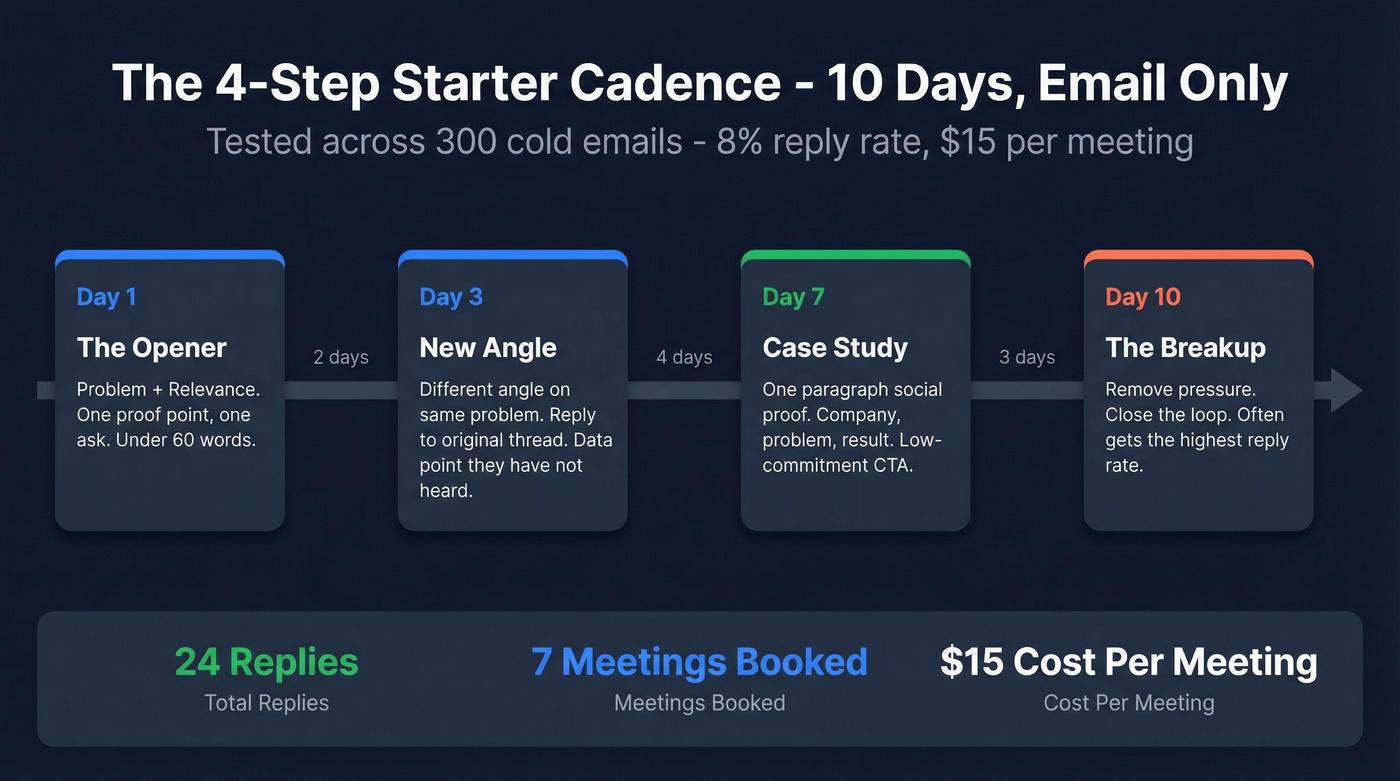
The structure follows a proven progression: initial value, new angle, social proof, breakup.
Day 1 - The Opener (Problem + Relevance)
Subject: {{pain point in 2-3 words}}
Hi {{first name}},
{{One sentence about a specific problem their role/company faces - reference something real: a job posting, a recent hire, a product launch.}}
We helped {{similar company}} {{specific result - e.g., "cut their list-building time from 15 hours to 3 hours a week"}}.
Worth a 15-minute call this week?
{{Your name}}
No pitch. No feature dump. One problem, one proof point, one ask. Under 60 words.
Day 3 - The New Angle
Subject: re: {{original subject}}
{{First name}}, quick thought --
{{Different angle on the same problem. If Day 1 was about time savings, Day 3 is about revenue impact or risk.}}
{{One sentence with a specific data point or insight they haven't heard.}}
Would it make sense to compare notes?
This is a reply to your original thread - same subject line, no new formatting. It should feel like a natural follow-up, not a new campaign email.
Day 7 - The Case Study
Subject: re: {{original subject}}
{{First name}},
{{One-paragraph case study. Company name, problem, result. Keep it under 50 words.}}
Example: "{{Company}} was dealing with {{problem}}. After {{timeframe}}, they {{result}}."
Happy to share how - want me to send over the details?
Social proof does the heavy lifting here. The CTA is low-commitment: "want me to send details" is easier to say yes to than "book a call."
Day 10 - The Breakup
Subject: re: {{original subject}}
{{First name}}, I'll keep this short.
I've reached out a few times about {{problem}}. If the timing's off, no worries - I'll close the loop on my end.
If anything changes, I'm here: {{calendar link}}.
Best, {{Your name}}
The breakup email works because it removes pressure. It signals you're not desperate. And counterintuitively, it often gets the highest reply rate in the sequence - people respond when they feel the window closing.
Why this cadence works: Four emails, 10 days, each touch adds new value. No "just following up." No feature lists. The practitioner who shared this reported 24 replies from 300 emails, 7 meetings booked, and a cost per meeting of just $15.
The 8-Touch Multi-Channel Cadence (12 Days)
Skip this if you're a solo founder sending 50 emails a week. Multi-channel cadences take real effort - dedicated SDRs, a clear ICP, and the discipline to work three channels simultaneously. Stick with the 4-step email-only cadence until you have the bandwidth.

Still here? Good. Email-only cadences leave meetings on the table. Roughly two-thirds of B2B teams now run multi-channel sequences, and the data supports it. Adding calls and social touches creates multiple entry points for the same prospect.
| Day | Channel | Action |
|---|---|---|
| 1 | Problem + proof + question | |
| 2 | Call | 15-sec voicemail mirroring email |
| 3 | Specific customer outcome | |
| 5 | Social | Engage with their content + DM |
| 7 | Send asset (60-sec video or screenshot) | |
| 9 | Call | Reference asset, offer scheduling |
| 11 | Handle common objection | |
| 12 | Graceful close with practical tip |
Day 1 email template:
Subject: {{their industry}} + {{your category}}
Hi {{first name}},
{{Specific observation about their company - a job posting, tech stack signal, or recent news.}} That usually means {{pain point}}.
We helped {{similar company}} {{result}} in {{timeframe}}.
Is this on your radar for Q{{current quarter}}?
Day 2 voicemail script (15 seconds max):
"Hi {{first name}}, it's {{your name}} from {{company}}. I sent you a note about {{pain point}} - just wanted to put a voice to the email. If it's relevant, I'd love 15 minutes. My number's {{number}}."
That's it. Fifteen seconds. Don't pitch. Don't ramble. Voicemails over 20 seconds don't get listened to.
Stop rules that save your reputation:
- Any reply = pause all channels immediately. If someone responds on email, don't call them the next day. Acknowledge the reply and let the conversation happen naturally.
- "Not now" doesn't mean "never." Snooze the account for 60-90 days and re-enter with a fresh cluster.
- 3+ opens, zero replies = pick up the phone. They're interested but haven't committed. That's your signal to call, not send another email.
Key timing rules:
- Best email windows: 9-11 AM in the prospect's local time zone (see time zones if you sell globally)
- Trigger-based timing beats day-of-week timing. If someone visits your pricing page on a Wednesday, that's your Day 1 - regardless of what the calendar says
- Thursday has the highest reply rate at 6.87%. Avoid Mondays
The Cluster Cadence for Enterprise Accounts (30 Days)
Enterprise deals don't close from a 10-day email sequence. The buying committee has 6-10 people, the sales cycle is months long, and your emails are competing with 50 other vendors.

The cluster cadence, pioneered by Justin Michael and detailed on GTMnow, takes a fundamentally different approach: 12 emails over 30 days, organized into 4 clusters of 3. (If you're running true enterprise sales, this structure maps better to buying committees.)
How it works:
Each cluster is a burst of 3 emails: one standalone email with a fresh subject line, followed by 2 bumps on consecutive days (replies to the same thread). Then a 48-hour gap before the next cluster. Each cluster has its own narrative theme:
- Cluster 1 (Days 1-3): Case studies - left-brain, data-driven
- Cluster 2 (Days 8-10): Multimedia - right-brain, visual (Venn diagrams, GIFs, short videos)
- Cluster 3 (Days 15-17): Stories - emotional, narrative-driven
- Cluster 4 (Days 22-24): ROI/testimonials - back to data, close the loop
The left brain/right brain alternation keeps the sequence from feeling repetitive. Each cluster stands alone - if a prospect only sees Cluster 3, it still makes sense.
Critical rules for enterprise cadences:
- Use the Prospect Pyramid. Reduce contact frequency at the C-level, increase toward operational and user-level contacts. VPs get 2 clusters. Directors get all 4.
- Every touch must stand alone. Don't reference previous emails. Each email should work as if it's the first one they've seen.
This cadence isn't for everyone. It requires strong copywriting across multiple formats and a deep understanding of the account. But for deals worth $50k+, it's the most methodical cold email architecture I've come across.
The Rules - Subject Lines, Email Body, and Follow-Ups
Subject Line Rules (From 85M+ Emails)
Gong analyzed 85M+ emails for subject line performance. Some findings are counterintuitive:
1-4 words is ideal. "Quick question" beats "Quick question about your Q2 pipeline strategy." (If you want swipeable options, pull from these cold email subject lines.)
All lowercase outperforms. Drop the title case. "meeting thursday" beats "Meeting Thursday." It looks like a real email from a real person.
Numbers and questions reduce performance. "3 ways to improve..." and "Are you struggling with...?" both underperform plain statements. They pattern-match to marketing emails.
Empty subject lines are a trap. They boost open rates by 30% (curiosity) but tank reply rates by 12%. Opens without replies is vanity.
Salesy techniques reduce open rates by 17.9%. Urgency words, ALL CAPS, exclamation marks - they all hurt.
The apology opener works. "Sorry" or "my mistake" in a subject line triggers curiosity and disarms the reader. Use it sparingly - once per sequence at most - but it consistently outperforms generic openers.
What actually works: Pervasive problems ("pipeline accuracy"), industry trends ("hiring freeze"), and 1-2 word pattern interrupts ("wrong person?" or "quick thought"). The best subject lines sound like something a colleague would type.
Email Body Rules
Do this:
- Keep it to 50-125 words. Three to four sentences. Six-to-eight sentence emails can hit 6.9% reply rates, but shorter still wins for cold outreach where you have zero relationship.
- Single interest-based CTA. "Worth a 15-minute call?" Not "Would you like to see a demo, or should I send a case study, or would you prefer to loop in your team?" (More examples: sales CTA.)
- Plain text. No HTML templates. No CTA buttons. No header images.
- One link maximum. Zero links in your first email.
- Match your subject line keywords to your body content. This improves inbox placement.
Skip this:
- Pitching in the first email. Gong's data is brutal: pitching drops reply rates by 57%. Your first email earns the right to a conversation. It doesn't close the deal.
- HTML signatures with logos, social icons, and legal disclaimers. They add weight that spam filters detect. Use a plain text signature: name, title, phone number. Done.
- Opening with "Hope this email finds you well." It's the cold email kiss of death. Your first sentence needs to earn the second sentence. Lead with a specific observation about their company, role, or industry. (Use these email opener examples if you need fresh first lines.)
Follow-Up Best Practices - When to Push and When to Stop
The data on follow-ups is genuinely conflicted.
On one hand: the first follow-up boosts replies by 40-49%. That's massive. About 60% of replies come after the first follow-up. And the classic stat holds that 80% of sales occur between the 5th and 12th contact.
On the other hand: by the 4th follow-up, response rates drop 55%. Spam complaints escalate from 0.5% on the first email to 1.6% by the fourth. Unsubscribe rates jump from 0.1% to 2%.
Here's the resolution: 3-5 emails is the sweet spot for email-only cadences. Multi-channel extends the runway because you're distributing touches across email, phone, and social - the prospect doesn't feel bombarded on a single channel. (For more timing guidance, see when to follow up with prospects.)
Real talk: if you're closing deals under $10k, four emails is plenty. The math doesn't support a 12-touch sequence for a $5k deal. Save the elaborate cadences for enterprise accounts where one meeting can be worth $50k+ in pipeline. For SMB deals, a tight 4-step cadence with a clean list will outperform a bloated 8-step sequence with mediocre data every single time.
The critical rule: each follow-up must add new value. A new angle, a case study, a relevant data point, a resource. "Just following up on my previous email" is the laziest sentence in sales. It tells the prospect you have nothing new to say - so why would they reply?
If you've sent 4 emails with no response and no opens, stop. The prospect either isn't seeing your emails (deliverability problem) or isn't interested (targeting problem). More emails won't fix either one.
Before You Hit Send - Deliverability Setup That Protects Your Domain
You can write the perfect cadence and still land in spam. Deliverability is the unsexy foundation that makes everything else work. Skip this section at your own risk.
Authentication Is Non-Negotiable
Set up SPF, DKIM, and DMARC on your sending domain before you send a single email. Start DMARC at p=none to monitor, then move to quarantine and eventually reject as you gain confidence. (If you want the full setup breakdown, use this SPF/DKIM/DMARC guide.)
Use a dedicated sending domain. Don't send cold emails from your primary domain. If yourcompany.com gets flagged, your entire organization's email reputation tanks. Use something like mail.yourcompany.com or outreach.yourcompany.com.
The Warm-Up Ramp
New domains need 3-4 weeks of warm-up before full-volume cadences:
| Week | Daily Volume | Notes |
|---|---|---|
| 1 | 30-50 | Plain text only, no images, no trackers |
| 2 | 50-80 | Add 1 link max, monitor bounce codes |
| 3 | 80-120 | Begin cadence sends, stagger batches |
| 4 | 120-150 | Full volume if bounce <2%, complaints <0.1% |
Stagger sends in small batches - 20-40 emails every 10-15 minutes. Nine-to-fourteen minute gaps between emails mimic natural sending patterns. Blasting 150 emails at 9:00 AM sharp looks like a bot, because it is. (More detail: how to warm up an email address.)
Tracking Pixels Are Hurting You
Turning off open-tracking pixels improves response rates by about 3%. One practitioner tested this with 487 cold emails: 99% deliverability, 6% reply rate, 50% positive - with tracking completely off.
Open tracking adds invisible pixels that spam filters detect. On a new or low-reputation domain, that's enough to tip you into the promotions tab or spam folder. Turn it off for at least the first 4 weeks. (If you still need tracking, compare options in best email open tracker.)
Your List Is the #1 Cadence Killer
Look, none of this matters if your list is garbage. A bounce rate over 2% triggers ISP throttling. Over 3%, you're looking at domain reputation damage that takes weeks to recover from.
Every email address in your cadence needs to be verified before it touches your sending tool. Not "probably valid." Verified. That means catching invalid addresses, spam traps, honeypots, and catch-all domains that silently bounce. (Use a repeatable email verification list SOP if you run volume.)
We've seen this play out firsthand. Stack Optimize built their agency to $1M ARR by verifying every client list through Prospeo before loading it into a sending tool: 94%+ deliverability, bounce rates under 3%, zero domain flags across all clients. The 5-step verification process - catch-all handling, spam-trap removal, honeypot filtering - delivers 98% email accuracy on a 7-day data refresh cycle. The free tier gives you 75 email verifications per month to test it.
Threshold Rules
- Bounce rate over 3%: pause immediately, remove the bad segment, re-verify, cool down 48-72 hours
- Spam complaints over 0.1%: same - pause, investigate, fix
- Honor unsubscribes within 2 business days (this is both a legal requirement and a deliverability signal)
- Bounce code
5.1.1(user unknown): remove that address permanently - Bounce code
4.7.650(rate limited): slow down your sending volume (common fixes in 550 recipient rejected)
Mistakes That Kill Your Cadence
1. Sending to stale or unverified lists. This is mistake zero. Everything downstream - your copy, your timing, your cadence structure - is irrelevant if 10% of your list bounces.
2. "Just following up on my previous email." The most common follow-up opener and the least effective. It tells the prospect you have nothing new to offer. Every follow-up needs a new angle, a new data point, or a new resource.
3. No warm-up process. Sending 100 cold emails from a brand-new domain on Day 1 is like sprinting a marathon. You'll burn out before mile 2.
4. Sounding too salesy. Hype language, urgency tactics, and desperation ("I'd really love to connect!") destroy credibility. Write like a peer, not a vendor.
5. No clear CTA. Every email needs exactly one ask. Not two. Not "let me know your thoughts." A specific, low-commitment action: "Worth 15 minutes Thursday?" or "Want me to send the case study?"
6. Boring openers. "Hope this email finds you well" is the cold email kiss of death. Lead with a specific observation about their company, role, or industry.
7. Fake personalization. First name + company name isn't personalization. It's mail merge. Real personalization has three tiers: business-personal (reference their role or career move), business-business (reference their company's situation - a funding round, a job posting, a product launch), and fully personalized (reference something specific to them - a podcast appearance, a post they wrote). Tier 1 is table stakes. Tier 2 is where reply rates start climbing. Tier 3 is what top reps do.
8. Blasting 10+ contacts at the same company. Targeting 1-2 contacts per company yields 7.8% reply rates. Ten or more drops to 3.8%. Plus, people talk internally. If three VPs all get the same email, you look like spam - because you are.
9. Ignoring bounce codes. A 5.1.1 bounce means that email address doesn't exist. Remove it immediately. A 4.7.650 means the receiving server is rate-limiting you. Slow down. These aren't suggestions - they're signals that your domain reputation is at risk.
How to Test and Iterate Your Cadence
Don't launch a cadence to 5,000 contacts and hope for the best. That's how you burn a domain.
Start with small, focused lists of 100-300 leads sharing the same industry, persona, and company size. Run the cadence for 2 weeks. Measure what matters:
- Reply rate: Are people responding? (Target: 5%+)
- Positive reply rate: Are they interested, or just telling you to stop? (Target: 50%+ of replies)
- Meeting rate: Are replies converting to calls? (Target: 2%+)
- Bounce rate: Is your list clean? (Must be under 2%)
- Spam complaints: Are you damaging your domain? (Must be under 0.1%)
If bounce rate exceeds 3% or complaints exceed 0.1%, stop sending and fix the list. No amount of copy optimization overcomes bad data.
Smaller campaigns under 100 recipients yield the best reply rate at 5.5%. Tight targeting beats volume every time.
The tool stack that makes this work: A sending tool (Instantly at ~$30-97/mo, Smartlead at ~$39-79/mo, or Lemlist at ~$39-99/mo) + verified contact data from Prospeo (free tier to start, paid plans from ~$39/mo) + your CRM (HubSpot free tier or Salesforce). Total cost for a solo operator: under $150/month.
Test one variable at a time. Subject line A vs. B. Four-step cadence vs. five-step. Morning sends vs. evening sends. Run each test for a full 2-week cycle before drawing conclusions. I've seen teams change three variables at once and then have no idea what actually moved the needle.
That 8% reply rate from the 4-step cadence? It started with a clean list of 300 contacts. Prospeo gives you 300M+ profiles with 30+ filters - buyer intent, job changes, technographics - so every slot in your sequence targets someone who actually fits your ICP.
Stop sending perfect emails to the wrong people.
FAQ
How many emails should be in a cold email cadence?
Three to five emails over 10-14 days works best for most B2B teams. A 16.5M-email study found reply rates drop 55% by the 4th follow-up while spam complaints triple. Start with 4 emails and expand only if your data supports it - multi-channel cadences can go longer since touches are spread across email, phone, and social.
What's a good reply rate for cold email in 2026?
The B2B average is roughly 4-5%. Anything above 5% is good; top-performing campaigns hit 10-15%. Below 1% signals a fundamental problem with targeting, deliverability, or list quality. Technology companies average 7.8%, while healthcare sits around 5.2% - your benchmark depends on industry and region.
What's the best cold email cadence template for B2B?
For most teams, the 4-step email-only sequence (problem, new angle, case study, breakup over 10 days) is the strongest starting point - simple, proven, and easy to measure. Teams with dedicated SDRs and deal sizes above $15k should graduate to the 8-touch multi-channel cadence. For enterprise accounts worth $50k+, the 30-day cluster cadence is worth the extra effort.
How do I stop my cold emails from going to spam?
Set up SPF, DKIM, and DMARC authentication on a dedicated sending domain, then warm it over 3-4 weeks following a gradual volume ramp. Keep bounce rates under 2% by verifying every address before sending. Limit links to one per email and disable tracking pixels for at least your first month.
Should I use open tracking in my cold email cadence?
No - disabling open-tracking pixels improves response rates by roughly 3%. Tracking pixels embed invisible code that spam filters detect, hurting deliverability on new or low-reputation domains. Skip open tracking for at least your first month of sending, and rely on reply rate as your primary engagement metric instead.