How to Grab Attention in an Email: A Data-Backed Playbook
Thirty percent of emails are viewed for less than two seconds. Not skimmed - viewed. If you're trying to figure out how to grab attention in an email, understand the odds you're fighting: your prospect's eyes land on the sender name, flick to the subject line, and the message is already in the trash. Multiply that across the 121 emails hitting the average inbox daily, and you start to see the game you're playing.
We've sent thousands of cold emails and watched teams send millions more. Here's what no other guide will tell you: the biggest attention killer isn't your copy - it's sending to the wrong people. But we'll get to that. First, let's fix everything between your subject line and your CTA.
The Quick Version
- Rewrite your subject lines to 2-4 words and personalize them. Personalized subject lines hit 46% open rates vs 35% without - a 31% improvement.
- Kill generic openers. Replace "Hope this email finds you well" with a specific, research-backed hook. Templates below.
- Verify your list before you send anything. Emails that bounce don't grab anyone's attention - they destroy your sender reputation.
The Email Attention Chain
Every email passes through five gates. Each one earns the next click or kills the message:
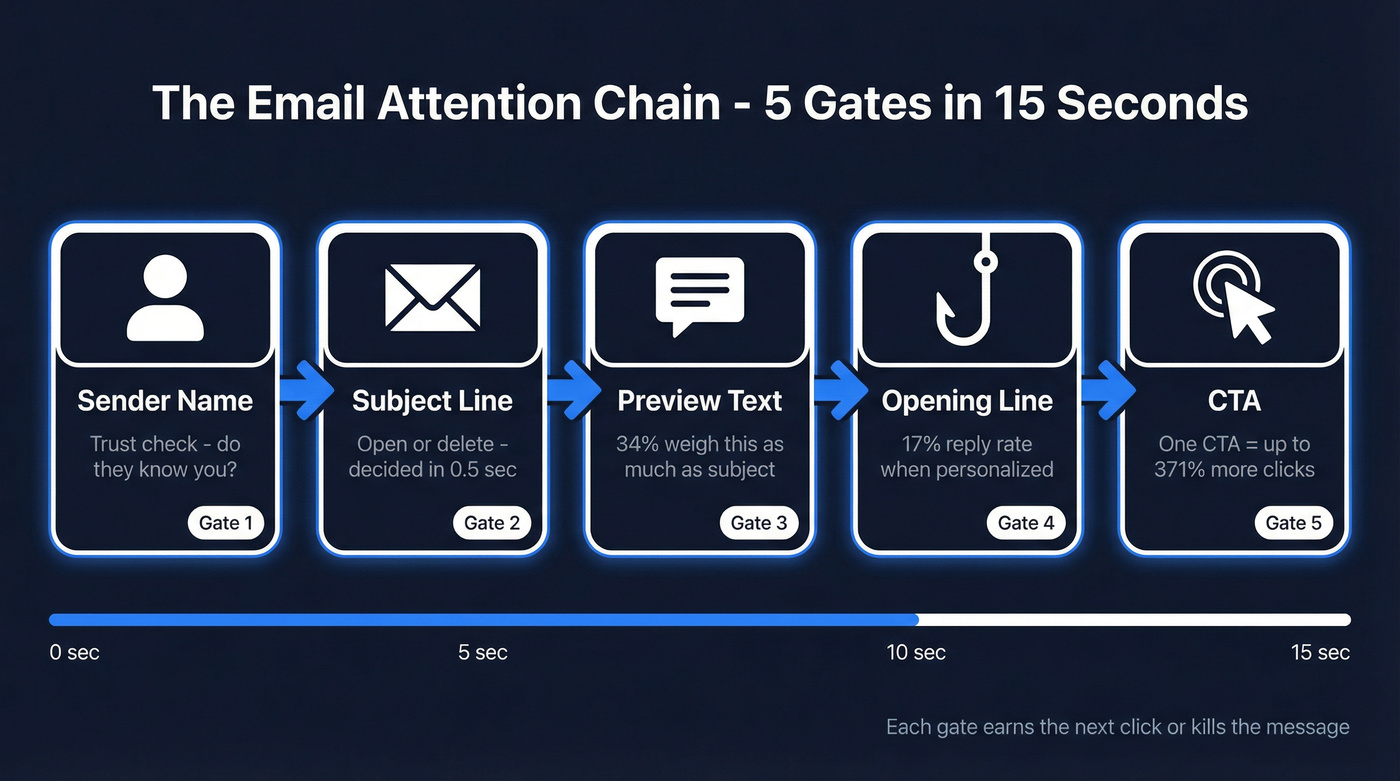
Sender name -> Subject line -> Preview text -> Opening line -> CTA.
You've got 10-15 seconds total. Each gate eats into that budget. Most people obsess over body copy and ignore the first three gates entirely - which is like rehearsing a speech nobody will hear because you forgot to turn on the microphone.
Subject Lines That Get Opened
69% of recipients decide to mark an email as spam based on the subject line alone. That single line of text does more work than your entire email body.
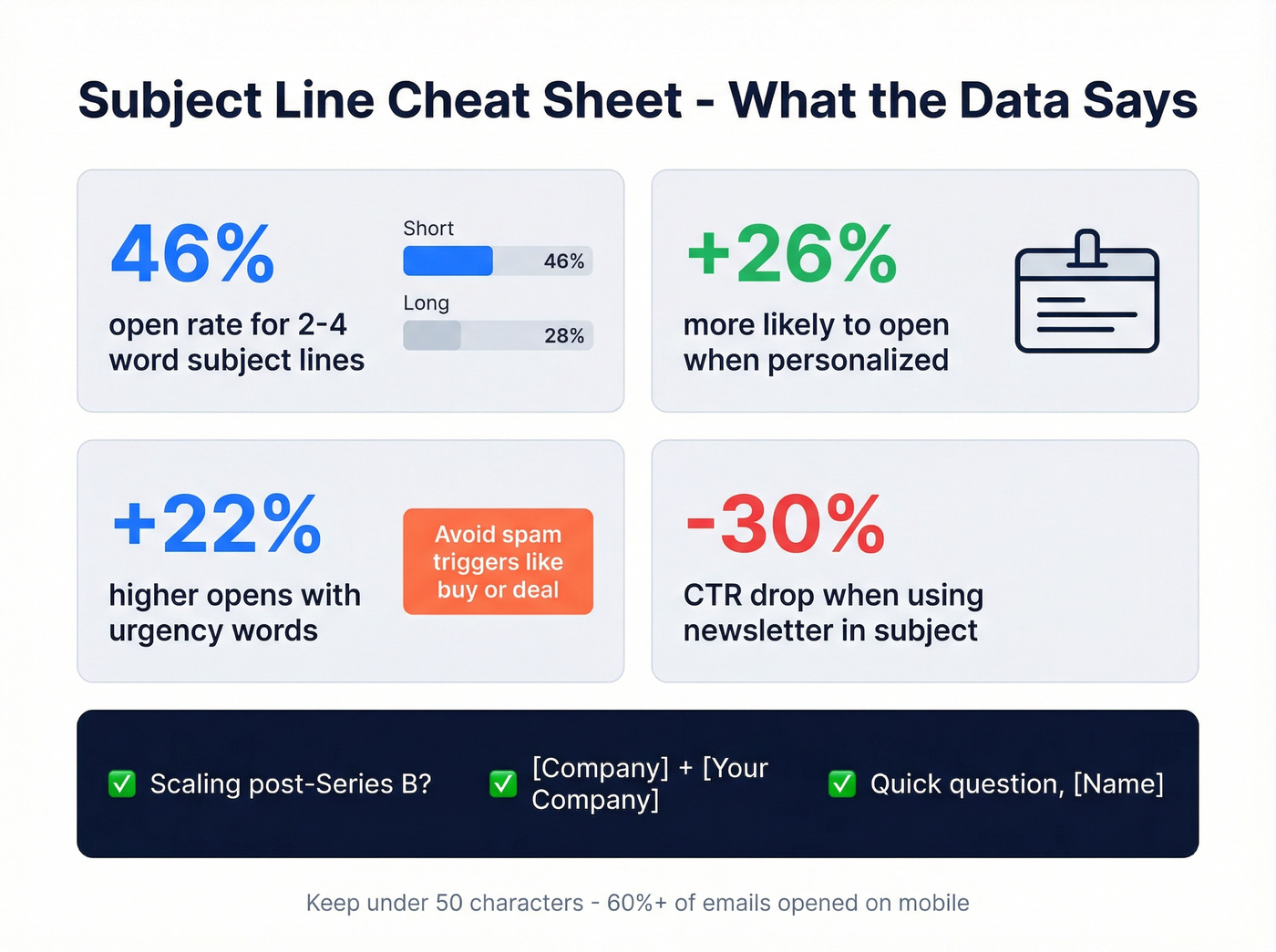
Keep it to 2-4 words. Short subject lines consistently hit 46% open rates. "Quick question" outperforms "I'd love to connect about your Q3 pipeline strategy" every time. Drop in the recipient's name or company - personalized subject lines are 26% more likely to be opened. Ask a question. "Scaling CS internationally?" beats "Our solution for international CS teams." In our experience, the question format holds up across every industry we've tested.
Add urgency carefully - it drives 22% higher open rates, but avoid spam-trigger words like "buy" or "deal." And stay under 50 characters. Over 60% of emails are opened on mobile, and long subject lines get cut off mid-thought.
Skip this: Using "newsletter" in your subject line drops CTR by 30%. Vague teasers like "You won't believe this" get ignored. And broken personalization tokens? Nothing kills credibility faster than "Hi {First_Name}."
Subject lines that work:
Scaling post-Series B?[Company] + [Your Company]Quick question, [Name]

You just learned that personalized subject lines lift open rates by 26%. But personalization only works when you're reaching real inboxes. Prospeo's 5-step verification delivers 98% email accuracy across 143M+ verified addresses - so every subject line you craft actually lands.
Stop perfecting emails that bounce. Verify your list first.
Preview Text - The Easiest Win
Preview text is the snippet next to your subject line in the inbox. 34% of recipients weigh it almost as heavily as the subject line when deciding whether to open. Personalized preview text lifts open rates by 29.3%.
Here's the thing: preview text is the single easiest win in this entire article. If you don't set it deliberately, your email client pulls whatever it finds first - often an unsubscribe link or raw HTML. Autoplicity saw an 8% increase in open rates just by adding intentional preview text. WeddingWire tested it and saw a 30% jump in click-through rates. Fix this before you touch anything else.
Opening Lines That Hook
The email's open. You've got roughly six seconds.
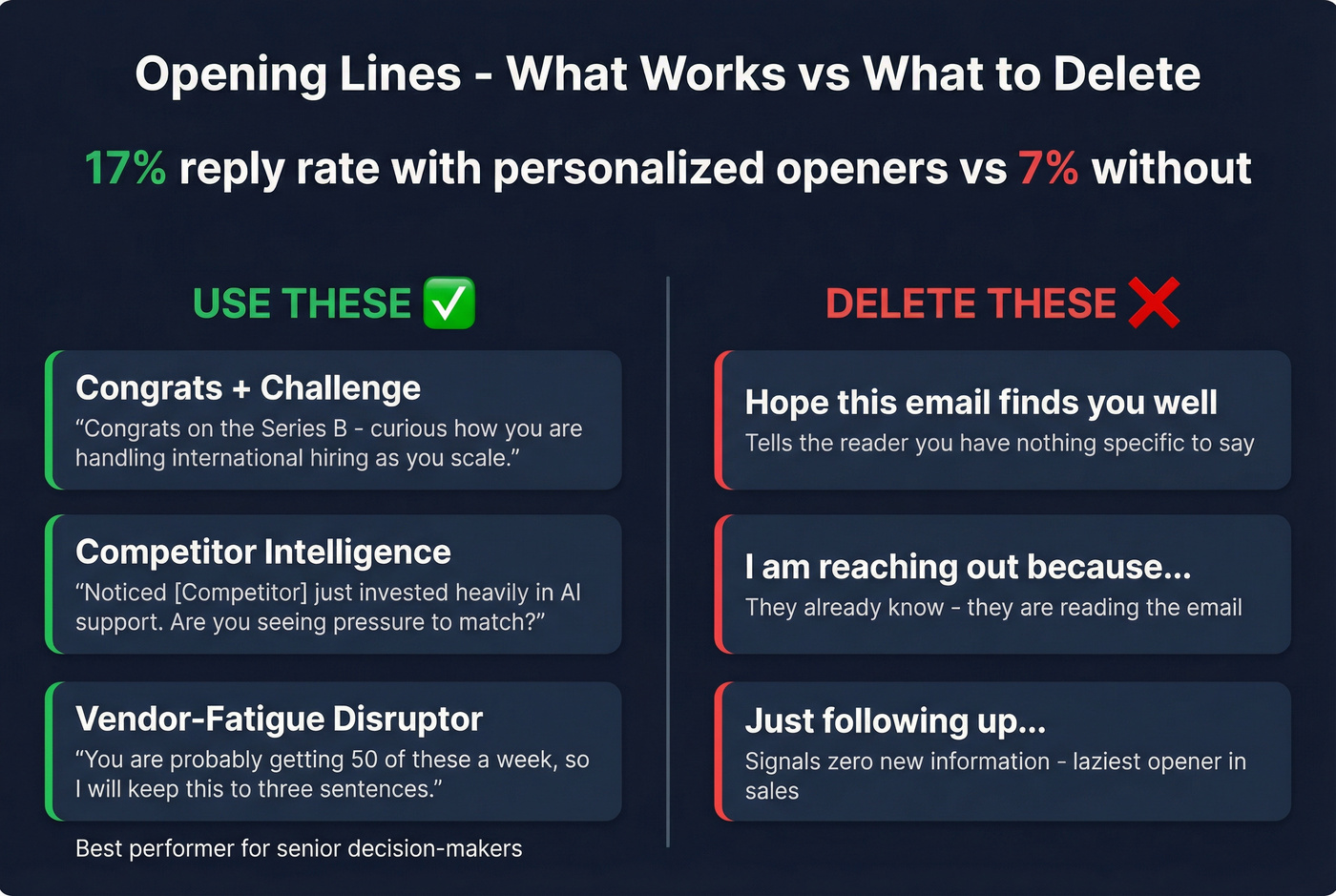
Personalized opening lines generate a 17% reply rate vs 7% without, per Woodpecker's analysis of 20M+ emails. That's not marginal - it's the gap between a campaign that works and one that doesn't.
Copy-paste frameworks:
- Congrats + challenge tie-in: "Congrats on [specific achievement] - curious how you're handling [related challenge] as you scale."
- Competitor intelligence hook: "Noticed [competitor] just invested heavily in [area]. Are you seeing pressure to do the same?"
- Vendor-fatigue disruptor: "You're probably getting 50 of these a week, so I'll keep this to three sentences."
The vendor-fatigue opener works better than any other framework for senior decision-makers. I've seen it double reply rates for founder-level outreach because it immediately signals self-awareness. Each of these can be adapted to your industry - the key is specificity over cleverness.
Delete these from your vocabulary:
- "Hope this email finds you well" - tells the reader you have nothing specific to say.
- "I'm reaching out because..." - they already know. They're reading the email.
- "Just following up..." - the laziest opener in sales. It signals zero new information.
The consensus on r/sales is pretty clear: reps who spend 30 seconds researching the prospect before writing the opener outperform template-blasters by a wide margin. Specificity beats cleverness every single time.
Body, CTA, and Timing
Once you've earned the open and hooked them with the first line, keep it tight.
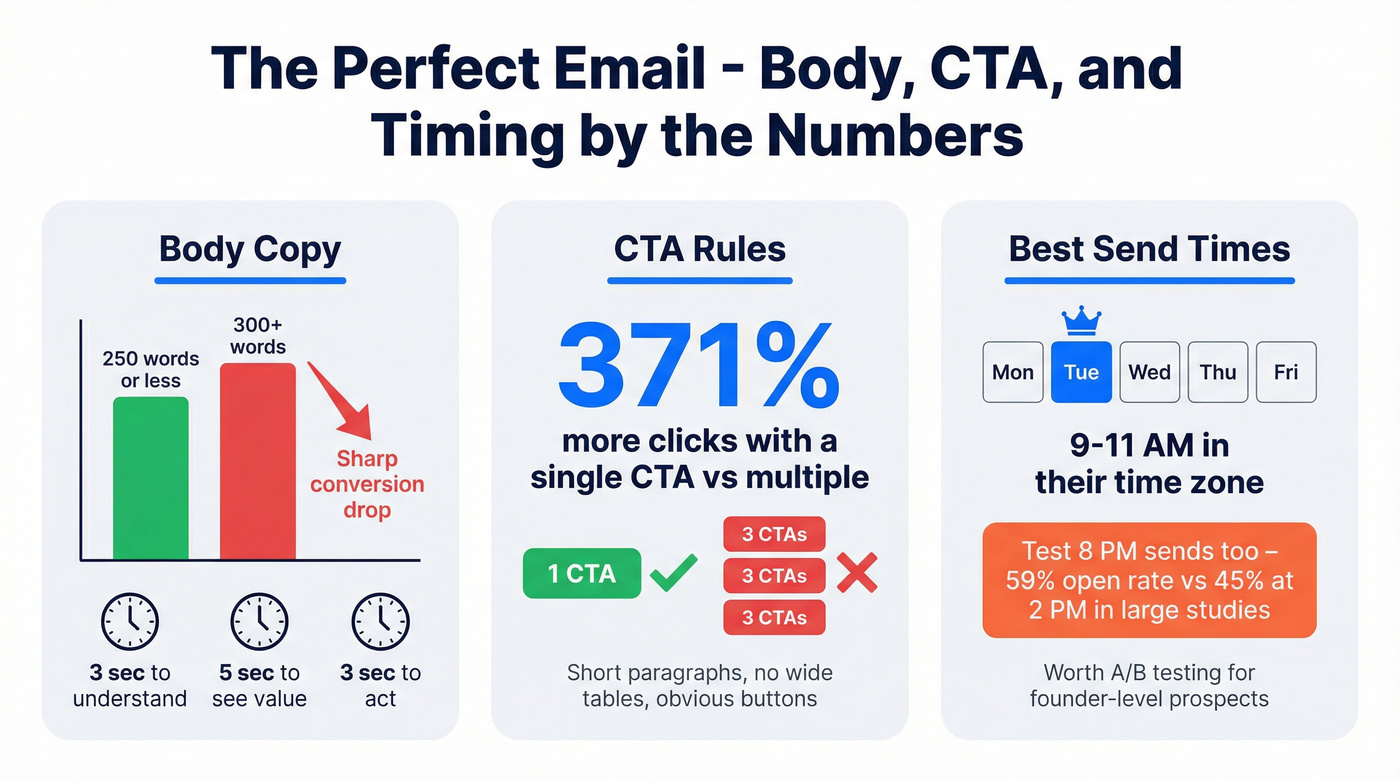
Emails longer than 300 words see a dramatic drop in conversions. Stay under 250 and think of it as three beats: three seconds to understand, five seconds to see the value, three seconds to act. Use a single CTA - emails with one call-to-action increase click-through rates by as much as 371% compared to multiple CTAs. Format for mobile: short paragraphs, no wide tables, obvious buttons.
Tuesday consistently delivers the highest open rates across multiple 2026 studies. For B2B, the sweet spot is 9-11 AM in the recipient's time zone. But test evening sends too - Omnisend found that 8 PM sends hit a 59% open rate vs 45% for 2 PM. Worth an A/B test for founder-level prospects who clear their inbox after hours.
The Step Everyone Skips: Clean Data
Every guide tells you to write better subject lines. Nobody tells you to verify your list first.
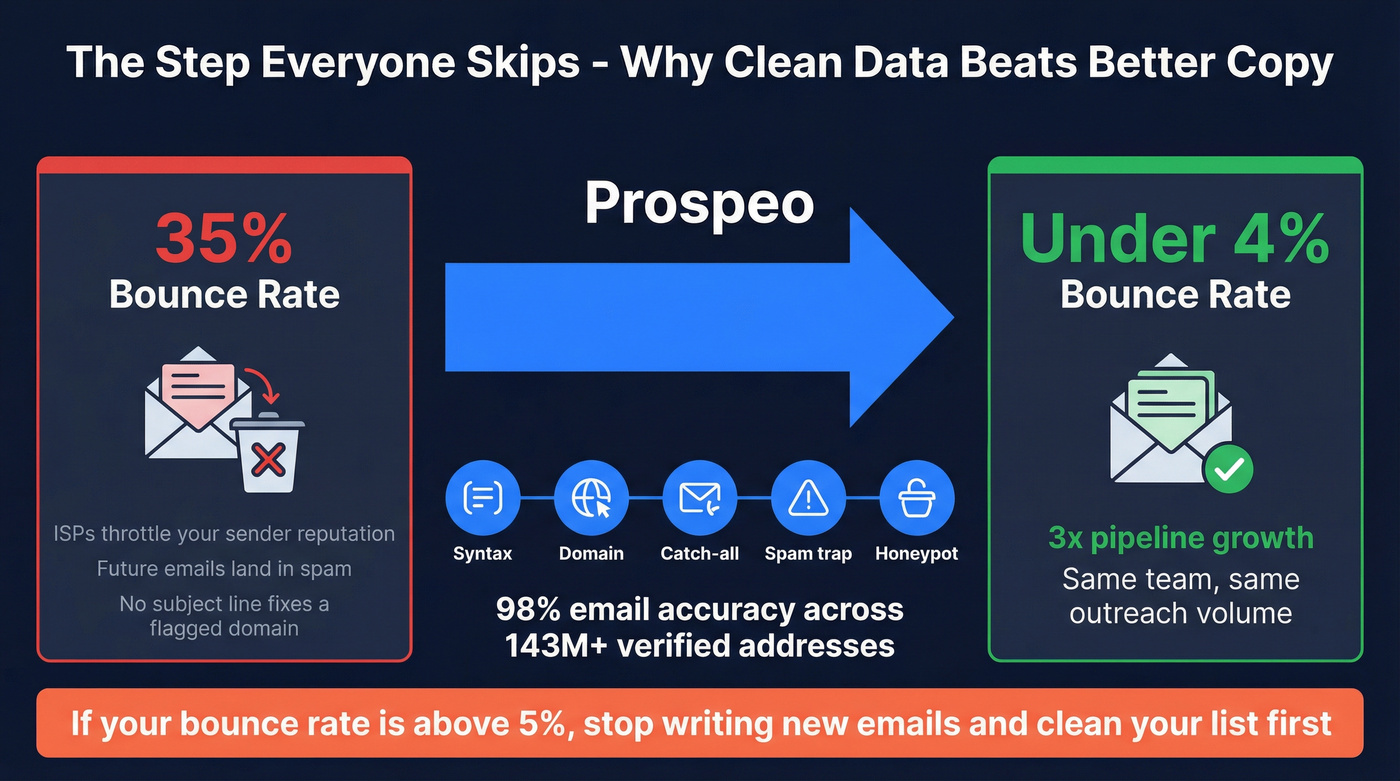
If your bounce rate is above 5%, stop writing new emails and clean your list. Nothing else matters. ISPs throttle your sender reputation once bounces climb, and future emails - even perfectly crafted ones - land in spam. No subject line fixes that. You're competing against 121 other emails, and you won't even make it to the inbox if your domain is flagged.
Meritt dropped their bounce rate from 35% to under 4% after switching to Prospeo's verification, tripling their pipeline in the process. The platform runs a 5-step verification process with catch-all handling, spam-trap removal, and honeypot filtering - 98% email accuracy across 143M+ verified addresses. The free tier gives you 75 emails per month plus 100 Chrome extension credits, enough to test before you commit.
All the copywriting advice above is useless if half your list is dead addresses. Verify first, then write.

Clean data is the step between writing great copy and booking meetings. Meritt cut their bounce rate from 35% to under 4% with Prospeo and tripled their pipeline to $300K/week - same team, same outreach volume. At $0.01 per email, list verification costs less than a single wasted send.
Fix your list before you rewrite another subject line.
FAQ
How long should a cold email be?
Under 250 words. Emails exceeding 300 words see sharp conversion drops. Structure for speed: three seconds to understand, five to see value, three to click.
Do emojis in subject lines help or hurt?
One emoji can lift unique open rates by up to 56% depending on the audience. Use a single relevant emoji - three or more triggers spam filters and erodes trust with B2B recipients.
What's the best day and time to send emails?
Tuesday between 9-11 AM in the recipient's time zone is the most consistent performer. Evening sends around 8 PM have hit 59% open rates in large-scale studies - worth A/B testing for senior decision-makers.
Does email verification improve deliverability?
Yes. High bounce rates damage sender reputation, pushing future emails to spam regardless of content quality. Catch invalid addresses, spam traps, and honeypots before they tank your domain. Clean your list first, then optimize copy.