
DocuSign vs PandaDoc: Which eSignature Platform Fits in 2026?
Most people searching "docusign vs pandadoc" aren't asking which tool can collect a signature. They're asking which one will get expensive (and annoying) first once the team scales and the edge cases show up.
Here's the real split: DocuSign makes you think in envelopes and plan gates. PandaDoc makes you think in documents (on Free/Launch) and seats (on Starter/Business and up).
And yes, those counting units end up driving almost every buying regret.
In practice, two things decide the outcome: (1) the unit that hits your budget (envelopes vs docs vs seats) and (2) whether your compliance/API requirements collide with reality (especially QES under eIDAS). We'll map your send volume to each vendor's counting unit, then cover the QES and API constraints that break implementations.
30-second verdict: who should pick what in 2026
Use DocuSign if...
- You're in a regulated environment and need enterprise governance (org controls, audit posture, procurement comfort).
- Legal/IT's involved and you want the "default" that sails through vendor reviews.
- You expect to grow into CLM / agreement workflows and want the broader agreement-platform direction.
Skip DocuSign if...
- You're a sales-led team where the bottleneck is proposal velocity and you refuse to babysit envelope allowances.
- You need "sales doc" features (templates, content blocks, approvals, payments) to close faster.
Use PandaDoc if...
- You want proposal -> sign -> payment in one flow, with engagement analytics that help reps follow up at the right moment.
- You prefer seat-based predictability over envelope math.
- You're fine treating QES as a specialized workflow with real constraints.
Skip PandaDoc if...
- You need QES + API-created documents (PandaDoc QES can't be performed on API-created docs).
- You're building a heavy integration layer and don't want production access gated behind Enterprise.
One more thing.
DocuSign vs PandaDoc: side-by-side comparison table
DocuSign's the enterprise signing standard with envelope limits baked into self-serve plans and heavier "contact sales" gates for advanced controls. PandaDoc's a sales-document workflow product that includes eSignatures, with doc caps on Free/Launch and per-seat pricing with unlimited document uploads and e-signatures on Starter/Business.
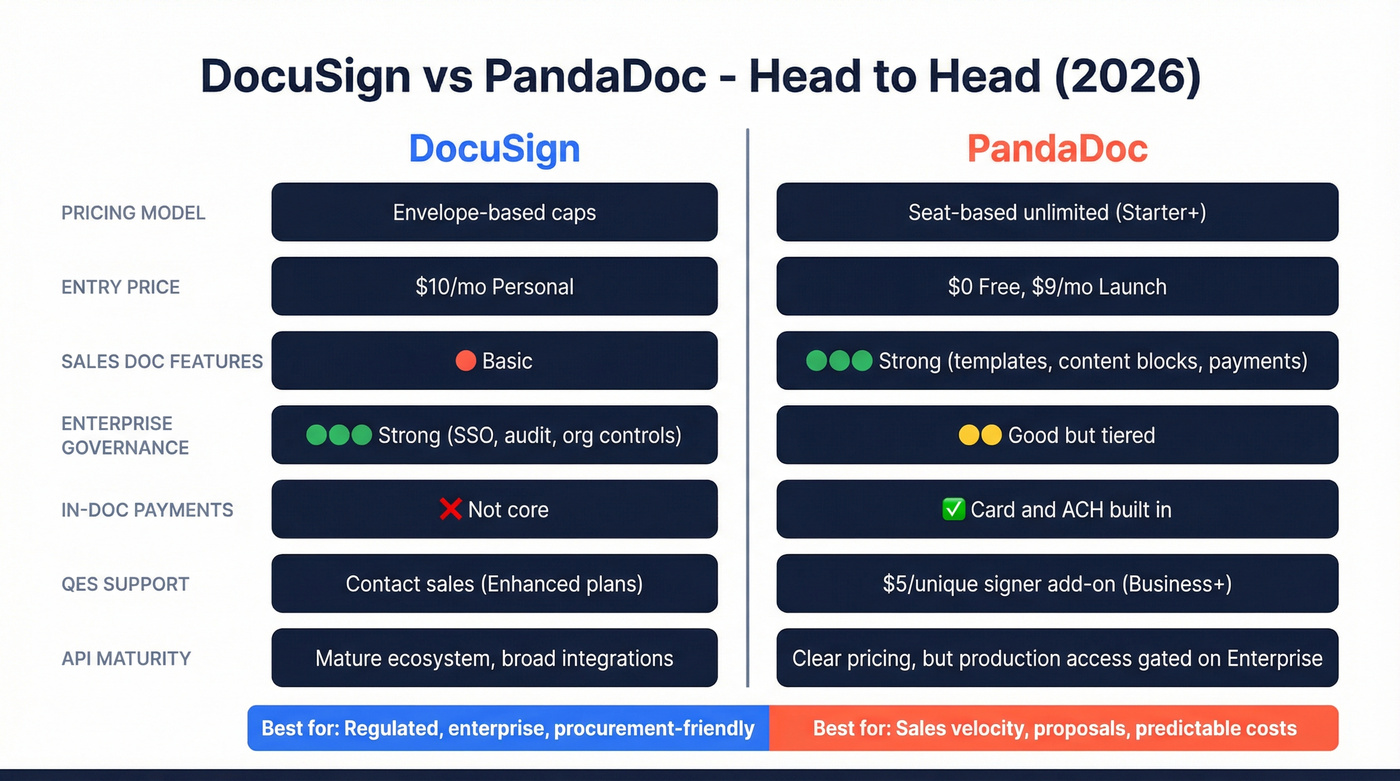
| Category | DocuSign | PandaDoc | Who wins |
|---|---|---|---|
| Entry price | $10 Personal | $0 Free / $9 Launch | PandaDoc |
| Allowance unit | Envelopes | Documents (Free/Launch), Seats (Starter+) | Depends |
| Included limits | 5 env/mo (Personal) | 60 docs/yr (Free/Launch) | PandaDoc |
| SMB scaling | Envelope caps | Seat-based | PandaDoc |
| Enterprise controls | Strong | Good (tiered) | DocuSign |
| QES | Enhanced (contact sales) | Add-on $5/unique signer (Business/Enterprise) | Depends |
| Sales docs | Basic | Strong | PandaDoc |
| Payments | Not core | In-doc payments | PandaDoc |
| API | Mature ecosystem | Clear pricing | Depends |
Published plan signals (the ones buyers actually compare):
- DocuSign: $10/month Personal (5 envelopes/month), $25/user/month Standard (100 envelopes/user/year), $40/user/month Business Pro (100 envelopes/user/year) (annual billing shown on the pricing page).
- PandaDoc: Free (60 docs/year), Launch $9/month (60 docs/year + $3/doc overage), Starter $19/seat/month, Business $49/seat/month.
What the table doesn't show (but your budget will):
- DocuSign's self-serve envelope allowances are easiest to live with when your send volume's low or you're ready to negotiate a higher-volume agreement.
- PandaDoc's "unlimited" story is basically Starter+ (unlimited document uploads and e-signatures). Launch is fine for dabbling; it's a bad long-term plan for any active sales team.
If neither fits: other credible options include Adobe Acrobat Sign, Dropbox Sign, SignNow, OneSpan Sign, and GetAccept.

You're comparing DocuSign and PandaDoc to send contracts faster. But the real bottleneck isn't the signing tool - it's finding the right signer's verified email in the first place. Prospeo gives you 98% accurate emails from 300M+ profiles so every envelope and document reaches a real decision-maker, not a dead inbox.
Stop burning envelopes on wrong contacts. Verify before you send.
Pricing & true cost: envelopes vs documents (with scenarios)
Both tools look cheap until you map them to (a) your send volume and (b) your failure modes: wrong signer, stalled approvals, resend loops, seat sprawl.
DocuSign pricing mechanics: envelopes, monthly vs annual caps, and the "sent" rule
DocuSign's self-serve plans revolve around sent envelopes.
Key mechanics to understand before you buy:
- Once an envelope's sent, it counts toward your allowance even if nobody signs or the envelope never completes.
- Monthly vs annual caps differ. If you pay monthly, the cap's up to 10 sent envelopes/user/month. On annual self-serve plans, you'll often see 100 envelopes/user/year on Standard and Business Pro.
- Use "correct in flight" to avoid waste. DocuSign lets you correct an envelope in flight before completion without consuming additional allowance. That's the move: edit the recipient/fields instead of recalling and resending.
DocuSign also enforces a Reasonable Use Policy as a backstop against high-volume sending on low tiers. Translation: if you try to run scaled ops on a plan built for light usage, you'll get friction.
Overages (real-world estimate): DocuSign doesn't publish a simple public "$ per envelope" rate on the main pricing page. In practice, extra envelopes commonly land around $0.50-$2.00 per envelope depending on volume and contract structure. If you're sending thousands per month, you're not "buying overages" - you're negotiating a different agreement.
Here's the thing: envelope math becomes a weekly argument the moment your process isn't tight.
I've seen teams burn 15-20% of their allowance on resend loops alone because reps kept guessing who the signer was, sending it, getting ignored, then recalling and starting over.
What you actually pay extra for in DocuSign (plan gating that matters)
DocuSign's pricing pain isn't just the envelope count. It's the feature gates that show up mid-rollout, right after you've already trained the team and built templates.
The gates that change buying decisions:
- Bulk Send: included in Business Pro (and higher).
- PowerForms: included in Business Pro (and higher).
- SSO (SAML), advanced org management, and centralized governance: contact-sales territory (Enhanced plans).
- Data residency requirements: contact-sales territory.
- HIPAA BAA workflows: contact-sales territory (confirm during security review).
- FedRAMP needs: contact-sales territory.
- 21 CFR Part 11 (life sciences / regulated e-records): contact-sales territory.
PowerForms, explained (because it's a real differentiator): PowerForms are on-demand, self-service documents for signature generated from templates. You can share a URL or embed it so recipients can initiate signing without you creating a new envelope each time, which is exactly what you want for web-to-sign flows like intake, authorizations, and standard requests.
PandaDoc pricing mechanics: documents on Launch, then seat-based "unlimited"
PandaDoc has two pricing personalities:
- Free / Launch: 60 docs/year included. Launch is $9/month, then $3 per additional doc.
- Starter ($19/seat/month) and Business ($49/seat/month): the pricing language is explicit: unlimited document uploads and e-signatures.
The practical reality: Launch is a teaser tier. The moment you have consistent outbound (or more than a couple reps), you move to Starter or Business.
Scenario math: ~30 sends/month (early-stage sales team)
Assume ~30 signature requests per month (360/year).
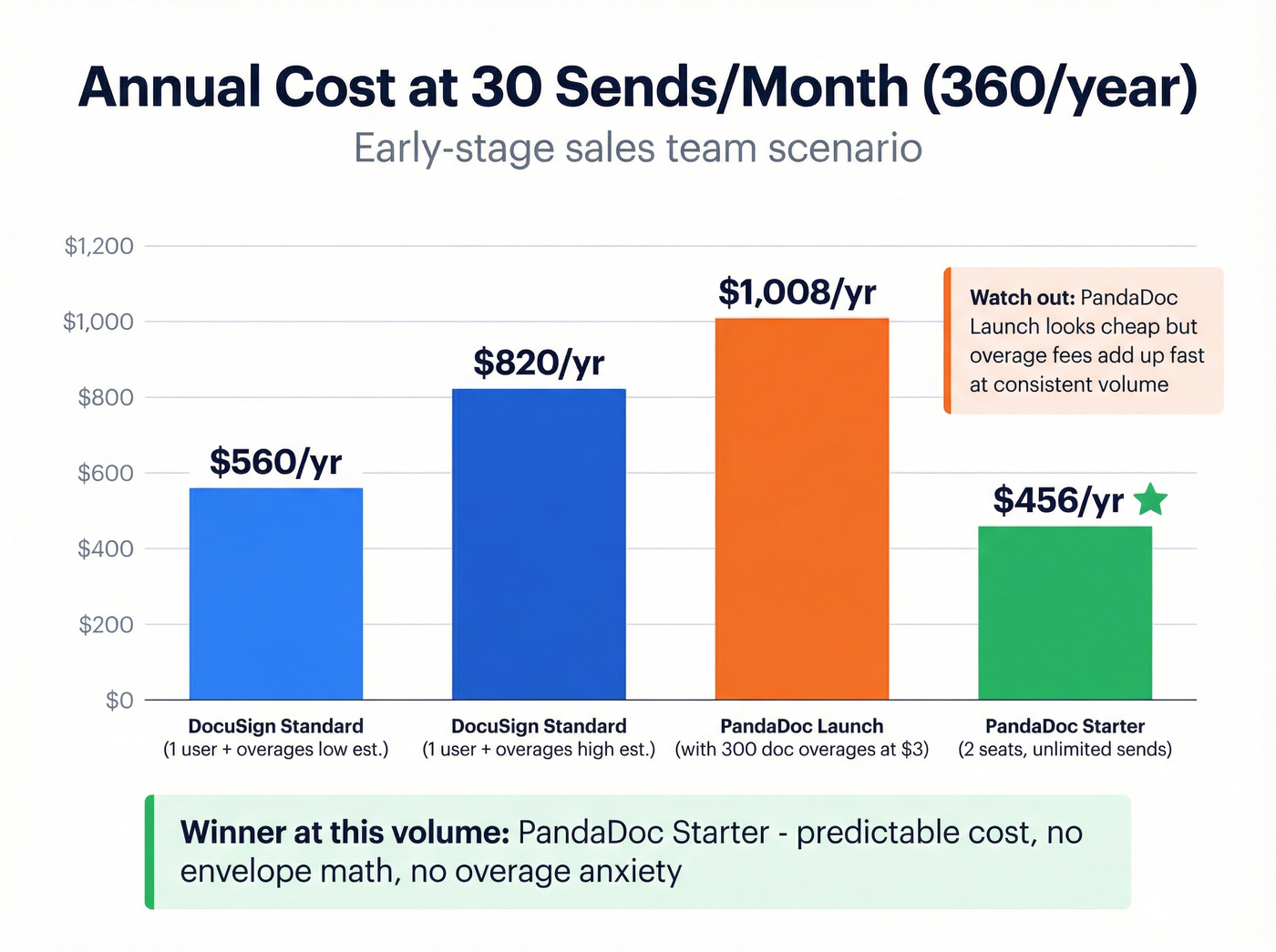
DocuSign path
- Standard ($25/user/month) includes 100 envelopes/user/year on annual.
- With 1 user, you're short 260 envelopes/year.
- With 3 users, you're at 300 envelopes/year - still short.
You either add seats just to increase allowance or buy extra envelopes. Using the overage estimate:
- 260 extra envelopes x $1 ~= $260/year
- 260 extra envelopes x $2 ~= $520/year
That sounds manageable until you realize many sales orgs also want Bulk Send or PowerForms, which pushes you toward Business Pro or beyond.
PandaDoc path
- Launch: 360 - 60 = 300 overages x $3 = $900/year, plus $108/year base = $1,008/year
- Starter: 2 seats = $19 x 2 x 12 = $456/year (and you stop thinking about doc counts)
What breaks first at ~30 sends/mo?
- DocuSign: allowance planning becomes a recurring RevOps chore.
- PandaDoc: Launch becomes irrational; Starter is the clean upgrade.
Scenario math: ~300 sends/month (scaled outbound + CS + renewals)
Now you're at 3,600 sends/year.
DocuSign
- Self-serve allowances (100/user/year) don't map to this reality.
- You're negotiating a higher-volume agreement and likely bundling governance/security requirements.
DocuSign can still be the right answer here, especially in regulated environments, but budget for it like an enterprise platform, not a $25/month tool.
PandaDoc
- On Starter/Business, cost scales with seats, not sends.
- 10 seats on Business: $49 x 10 = $490/month (~$5,880/year)
- 20 seats: $980/month (~$11,760/year)
If your send volume's high and your team's sales-heavy, PandaDoc's predictability is hard to beat.
The "sent but not signed" tax vs the "seat sprawl" tax
- DocuSign punishes messy processes: wrong signer, resend loops, stalled approvals (because "sent" still counts).
- PandaDoc punishes org sprawl: every team that wants templates, approvals, and integrations wants seats.
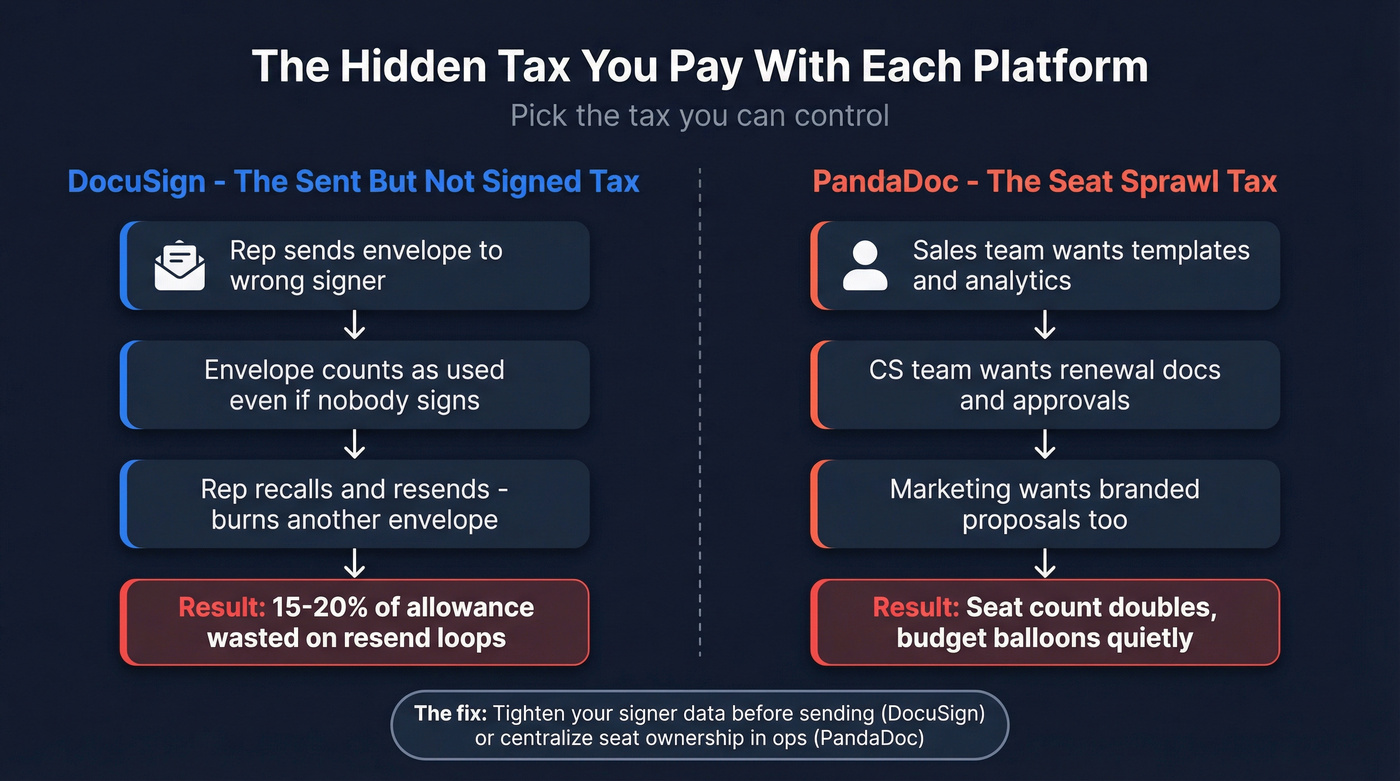
Pick the tax you can control.
Workflow fit: sales docs vs regulated signing (features that actually change outcomes)
Most comparisons list 40 features that don't move the needle. These do.
PandaDoc (sales velocity): a quick use-case scorecard
Choose PandaDoc when your workflow looks like:
- Proposal creation's part of the job (not a one-time template).
- You want pricing tables, content blocks, approvals, and consistent branding across reps.
- You close faster when you can take payment immediately.
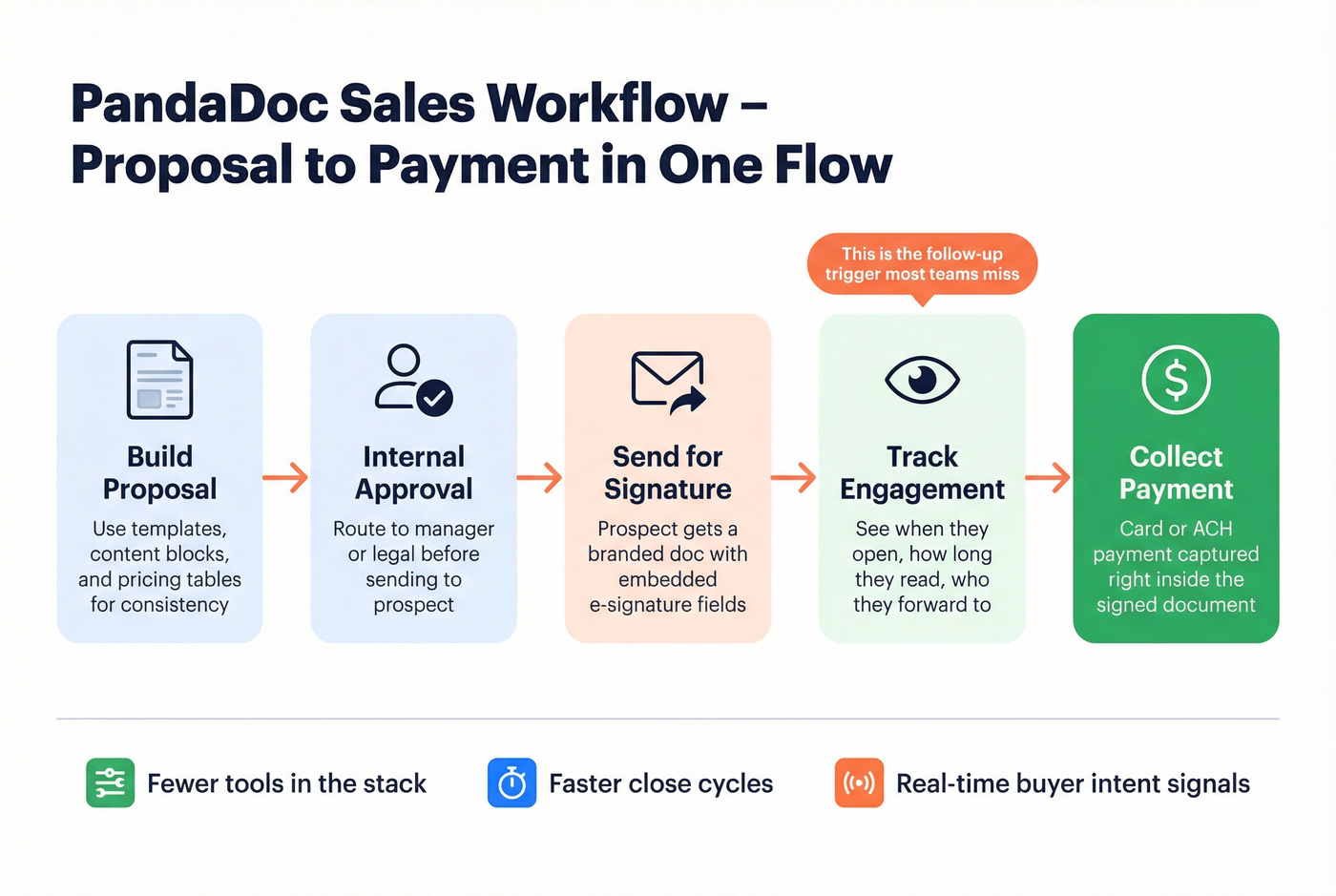
Why it works
- Payments inside docs: if you can close with card/ACH, this is a real conversion lever.
- Engagement analytics: reps follow up when the doc's opened/forwarded/stalled.
- Proposal creation muscle: templates + blocks + approvals keep the team consistent.
Skip it when:
- You're legal-first and need deep centralized governance.
- You need QES on API-created documents (hard stop).
DocuSign (governance): where it earns its reputation
Choose DocuSign when your workflow looks like:
- Security reviews are normal.
- You need centralized policy enforcement and audit posture.
- You want a platform that procurement already trusts.
Why it works
- Enterprise controls and governance: org management, policy enforcement, audit trails, and the "this passes vendor review" effect.
- Agreement platform direction: if you're thinking beyond signatures, DocuSign's built to expand.
Skip it when:
- Your sales org iterates fast and hates envelope allowances.
- You need sales-doc creation and payment collection as first-class features.
Real talk: buying DocuSign because "it's the standard" is how you end up with a standard tool that nobody wants to use.
I've watched sales orgs do exactly that, then quietly route proposals through a different tool because reps hated the workflow and managers got tired of policing envelope usage.

Compliance & eIDAS reality check (SeS/AeS/QeS + QES gotchas)
If you sell in the EU (or into regulated industries), "we need QES" gets thrown around like it's a toggle. It isn't.
Quick checklist: do you actually need QES?
You probably don't need QES if:
- You're doing standard commercial agreements where SeS/AeS is accepted.
- Your risk's more about audit trail and identity confidence than strict legal form.
You might need QES if:
- A regulator, statute, or internal policy explicitly requires it.
- You're dealing with high-stakes agreements where repudiation risk is the whole game.
You definitely need QES if:
- Your legal team has a written requirement tied to eIDAS Qualified signatures for specific document types.
Mini decision tree: QES + API + embedded signing
Need QES?
- No -> choose based on workflow + cost mechanics.
- Yes -> next question.
Need to generate documents via API (or embed signing in-product)?
- Yes -> avoid architectures where QES can't apply to API-created docs.
- No -> you can evaluate QES as a mostly operational workflow.
PandaDoc QES: pricing + constraints you must accept
PandaDoc QES is a paid add-on available on Business and Enterprise:
- $5 per unique signer
- Credits expire each billing cycle
- Bundles can multiply cost if credits are charged per signer for each document in the bundle
The workflow constraints are the bigger deal:
- Signing order's forced and can't be disabled
- No public links, no CC recipients, no recipient groups, no forwarding
- QES can be enabled only in a document (not in a template or form)
- PandaDoc QES can't be performed on API-created documents
If your roadmap is "generate docs via API, embed signing, require QES," don't fight the tool. Pick a platform that matches the requirement.
DocuSign compliance posture: why enterprises default to it
DocuSign's compliance stack is built to win security checklists. Their posture includes ISO 27001:2022, SOC 1 Type 2, SOC 2 Type 2, PCI-DSS, 21 CFR Part 11, and HIPAA.
That's why DocuSign's the default in life sciences, healthcare, finance, and any environment where audits are routine: it reduces friction with security, legal, and procurement.
Balanced note on PandaDoc: PandaDoc supports HIPAA workflows via a BAA for ePHI use cases (typically in an Enterprise context). If HIPAA/BAA's mandatory, confirm plan availability and contract terms early, not during the final security review when everyone's already emotionally committed.
Integrations & API: ecosystem claims vs what you can ship
Integrations pages are marketing. The only question that matters: can you ship the workflow you want without building a brittle mess that breaks the next time a vendor changes a permission scope?
DocuSign: "1,000+ integrations" vs what you actually see
DocuSign markets 1,000+ cloud-based integrations. On DocuSign's integrations page, the directory snapshot view shows "74 results" and "34 extension apps" in that view.
That's not a contradiction. It's categorization: "integrations" includes multiple buckets (connectors, partner apps, extension apps, ecosystem listings) that don't all appear in one filtered directory view.
What to validate before you sign (DocuSign edition):
- CRM integration depth (object support, field mapping, sandbox behavior) - see CRM integration for sales automation.
- SSO and org management requirements (often contact-sales tiers)
- Bulk send and web-form workflows (Bulk Send and PowerForms are common gates)
- Data residency and regulated requirements (often contact-sales tiers)
PandaDoc API: transparent pricing, clear gates, and one QES collision
PandaDoc's API story is unusually explicit:
- API Developer Plan: $40/month includes 40 docs/month, then $4 per additional doc
- Sandbox key limit: 10 requests per minute per endpoint
- Production key requires an Enterprise account
- With production access: up to 300 documents created per minute
That's enough for most embedded signing and doc-generation use cases.
The non-negotiable constraint: PandaDoc QES can't be performed on API-created documents. If QES is a requirement, treat that as an architecture decision, not a footnote.
A simple "don't get surprised" integration rubric
Pick the path that matches your reality:
Rubric A - Sales-led rollout (fastest time-to-value)
- Choose the tool your reps'll actually use.
- Pilot with 10 real deals.
- Lock templates + approvals.
- Integrate CRM last (after the workflow's stable).
Rubric B - Product-led / embedded signing
- Confirm production-key gating in writing.
- Load test doc creation and signing throughput.
- Decide how you'll handle identity verification and audit requirements.
- If QES is required, validate it end-to-end before you write a line of integration code.
Rubric C - Regulated enterprise
- Start with security/compliance requirements (SSO, data residency, audit, BAAs).
- Confirm which requirements are contact-sales gates.
- Only then evaluate UX and templates.
Setup, admin, support & user sentiment (G2/Capterra)
G2 and Capterra are still the fastest "what will my team complain about?" signal, if you read them with context.
G2 head-to-head snapshot
- DocuSign: 4.5/5 (2,562 reviews)
- PandaDoc: 4.7/5 (3,372 reviews)
PandaDoc also wins the operational scores that matter for sales rollouts:
- Ease of setup: 8.5 vs 9.1
- Ease of admin: 8.4 vs 9.1
- Quality of support: 8.3 vs 9.1
Capterra snapshot (the story flips)
- DocuSign: 4.7/5 (9,192 reviews)
- PandaDoc: 4.5/5 (1,235 reviews)
That mismatch isn't "someone's lying." It's audience mix and review volume:
- DocuSign has heavier enterprise penetration and a massive installed base, which tends to inflate total review count and normalize ratings.
- PandaDoc's reviewer base skews more SMB/sales-led, and those users reward speed and usability (and punish friction fast).
Recurring complaint themes (useful, not dramatic):
- DocuSign: cost/billing friction and support escalation pain show up often; envelope allowances also create internal "why can't we just send more?" debates.
- PandaDoc: signature workflow edge cases and "missing features" complaints usually map to enterprise governance expectations.
My opinion after multiple rollouts: the tool choice is rarely the failure. The failure's ownership. Nobody owns templates, permissions, and approvals, so everything turns into a one-off and then people blame the software.
Decision checklist + "skip both if..." (where Prospeo fits)
Use these mini decision trees to decide fast.
Decision tree #1: What's your primary job-to-be-done?
- "Close deals faster with better proposals" -> PandaDoc.
- "Pass security reviews and standardize agreement governance" -> DocuSign.
Decision tree #2: Are you going to hit limits?
- High send volume + small team (lots of sends, few seats)
- PandaDoc Starter/Business usually wins on predictability.
- Lower send volume + heavy compliance needs
- DocuSign's the safer default.
Decision tree #3: QES and API (the dealbreaker combo)
- Need QES + API-created docs -> pick DocuSign (or another QES-compatible architecture). Don't force PandaDoc into this.
- Need API/embedded signing but not QES -> PandaDoc's API plan is straightforward; just plan for the Enterprise production-key gate.
Where Prospeo fits (the part teams ignore)
Most "signature delays" aren't about the signing UI. They're about humans: the request goes to the wrong person, the approver's unreachable, or the signer changed roles and nobody updated the workflow.
Prospeo is the companion layer that fixes that. It's "The B2B data platform built for accuracy" with 300M+ professional profiles, 143M+ verified emails at 98% accuracy, and 125M+ verified mobile numbers with a 30% pickup rate, refreshed every 7 days (industry average: 6 weeks). If your process breaks because you can't reliably reach the right signer, this is the cleanest fix I've used: enrich the contact, confirm the approver, then send once. (If bounced emails are part of the problem, start with a verification workflow and a clean-list SOP.)
If you're already happy with DocuSign or PandaDoc, keep them. Just stop wasting cycles chasing the wrong inbox. If you're trying to find the right signer faster, use a B2B email lookup tool and keep an eye on contact data decay.

Whether you pick DocuSign's envelope model or PandaDoc's seat-based pricing, wasted sends on bad contact data inflate your costs. Prospeo's 7-day data refresh and 5-step email verification mean your proposals land with the actual signer - cutting resend loops and protecting your allowance.
Kill the resend loop. Start with contacts you can trust at $0.01 each.
FAQ: DocuSign vs PandaDoc (2026)
Are DocuSign and PandaDoc legally binding (ESIGN/UETA)?
Yes. Both are legally binding for most US business use cases under ESIGN and UETA when you capture intent, consent, and an audit trail. The practical difference is governance and workflow: DocuSign tends to win security reviews, while PandaDoc tends to win sales-document speed with templates, approvals, and payments.
What counts as a DocuSign envelope vs a PandaDoc document?
A DocuSign envelope is the sending container; once it's sent, it counts against your allowance even if nobody signs. A PandaDoc document is the unit you create/send; Free and Launch include 60 docs/year, while Starter/Business shift to per-seat plans with unlimited document uploads and e-signatures.
When do you actually need QES under eIDAS-and what breaks in PandaDoc QES?
You need QES when a regulation, statute, or internal policy explicitly requires a Qualified signature for specific document types. With PandaDoc QES, flexibility drops: signing order's forced, and you can't use public links, CC recipients, recipient groups, or forwarding, plus QES can't be used on API-created documents.
Is there a good free tool to speed up approvals when the signer is hard to reach?
Summary: what to choose in 2026
If you're deciding between "docusign vs pandadoc" in 2026, start with your constraint: pick DocuSign for regulated governance and procurement comfort, and pick PandaDoc for proposal-to-sign-to-payment speed with predictable seat-based scaling (as long as QES + API-created docs isn't a requirement). Then fix the human bottleneck - reaching the actual signer - so deals don't stall after the document's sent. (If your pipeline is stalling at the signature stage, it's usually a sales pipeline challenge, not an eSignature feature gap.)