How to Find Email Addresses on a Domain (2026 Guide)
Your boss wants 50 target accounts sourced by Friday. There's no data budget. You've got a list of company domains and a deadline.
Here's the thing: learning how to find email addresses on a domain is one of the most solved problems in B2B - if you know which methods actually work. Pick the wrong tool, though, and 30 emails bounce on your first sequence, your ESP flags your sending domain, and the campaign dies before it ramps. Accuracy matters more than database size. Let's break down everything that actually works.
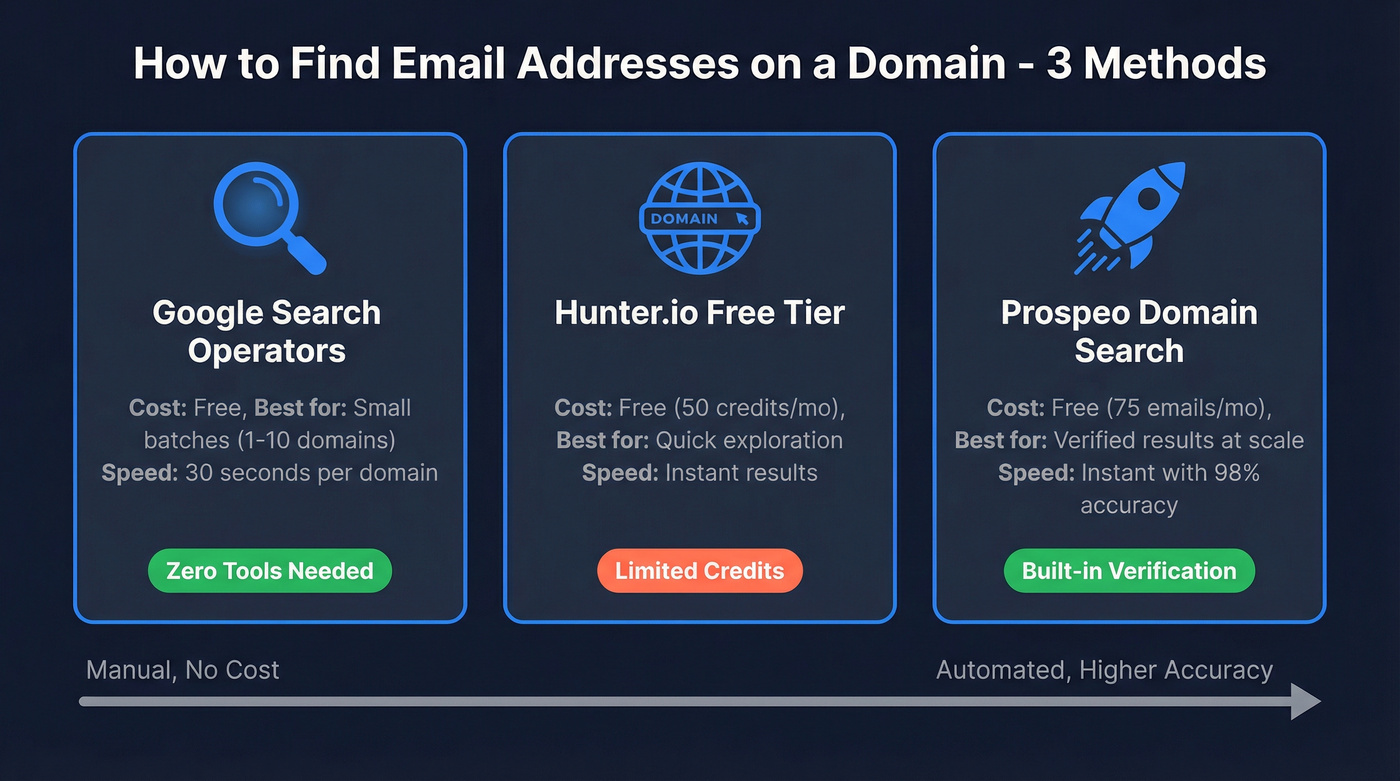
Three Fastest Methods
- Free, zero-tool approach: Google advanced search operators against the target domain. Costs nothing, works well for small batches.
- Largest free tier for exploration: Hunter.io - 50 credits/month, the most recognized name in domain email search.
Free Ways to Find Emails on a Domain
Paid tools shine at scale, but you should know the free methods first. They're unlimited, they cost nothing, and for a handful of domains they're often faster than signing up for anything.
Company Contact and Blog Pages
Hit the company's Contact, About, and Team pages. Many companies list department emails (sales@, press@, support@) directly. Blog author bios are another goldmine - writers at smaller companies often include their work email in their byline. This takes 30 seconds per domain and catches the easiest wins before you burn a single credit.
Google Advanced Search
Google indexes more than companies realize. If you want to search a domain for email addresses without paying for a tool, try queries like:
site:targetdomain.com "email" "contact"
"@targetdomain.com"
"firstname lastname" "@targetdomain.com"
The "@domain.com" query surfaces pages, PDFs, and press releases where someone's email leaked into public content. Not comprehensive, but free and occasionally turns up direct emails that no tool has indexed.
Email Pattern Guessing
Most companies follow a consistent format: firstname.lastname@domain.com, first@domain.com, or flastname@domain.com. Find one confirmed email from a domain via a contact page or Google, infer the pattern, and generate likely addresses for other employees.
The catch: you must verify these before sending. Guessing without verification is how you end up with a 25% bounce rate and a flagged domain.
If you want a safer workflow, follow a dedicated guessing process that includes verification and catch-all checks.
theHarvester (OSINT CLI)
For the technically inclined, theHarvester is a Python-based OSINT tool that pulls emails, subdomains, and hosts from passive sources like Bing, DuckDuckGo, SecurityTrails, and Shodan.
theHarvester -d targetdomain.com -l 50 -b securityTrails
Install via Homebrew ([brew install theharvester](https://formulae.brew.sh/formula/theharvester)), Docker, or pip. You'll need API keys for some backends, stored in api-keys.yaml. Overkill for one-off lookups, but powerful when running recon across dozens of domains.
Best Domain Email Extractor Tools
Manual methods hit a wall around 10-20 domains. After that, you need a dedicated tool to extract emails from a domain at scale.
If you're comparing options, this roundup of email hunter tools is a good starting point.
Prospeo
Prospeo's domain search pulls from 300M+ professional profiles and runs every result through a proprietary 5-step verification process - catch-all detection, spam-trap removal, honeypot filtering - delivering 98% email accuracy. The verification infrastructure is built in-house rather than outsourced to the same third-party validators everyone else uses, which is why the number holds up in production rather than just on a marketing page.
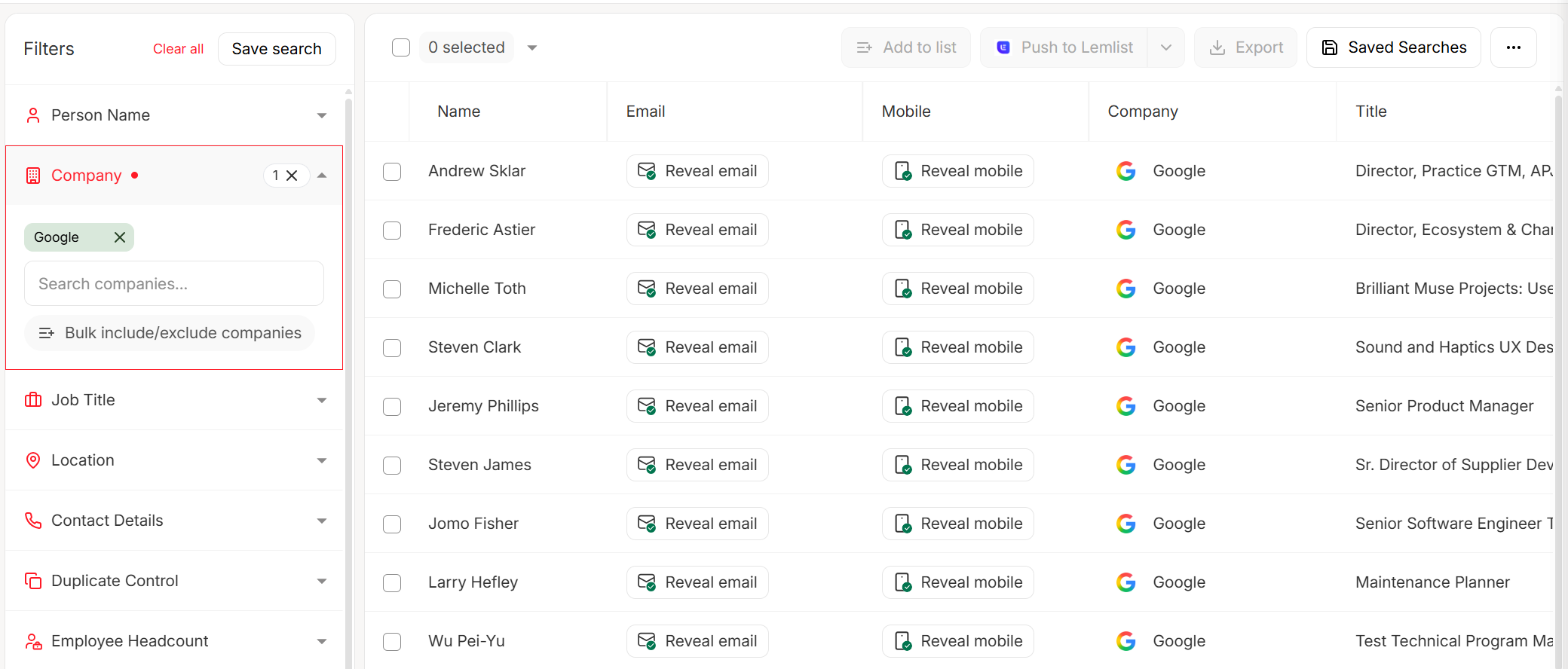
The free tier gives you 75 emails/month, enough to test accuracy yourself. Paid plans are credit-based at roughly $0.01 per email with no annual contract. The Chrome extension (40,000+ users) lets you pull verified contacts directly from company websites and professional profiles. Data refreshes every 7 days - the industry average is 6 weeks.
If you’re running outbound, pair finding with email verification for outreach to protect deliverability.
Hunter.io
Hunter is the tool most people think of first when they hear "domain email search," and for good reason - the UX is dead simple. Type in a domain, get a list of emails with confidence scores.

The free plan includes 50 credits/month. Paid plans start at $49/mo for 2,000 credits ($34/mo billed annually). Bulk Domain Search uses 1 credit for up to 10 emails found, and verification costs 0.5 credit per email.
The tradeoff: a vendor-published benchmark showed an 11.2% hard bounce rate. That means roughly 1 in 9 emails will bounce. For high-volume outbound, you'll want a dedicated verification layer on top.
Snov.io
Skip Snov.io if you only need email finding - you're paying for outreach features you won't use. Use it if you want prospecting and sending in one dashboard without spending $150+/mo on separate tools.
Snov.io bundles email finding with outreach sequences, warm-up, and a basic CRM. The trial plan gives you 50 credits/month. Paid starts at $29.25/mo (annual) for 1,000 credits and 5,000 email recipients. Unused credits roll over with autorenewal, which is a nice touch. LinkedIn automation is an add-on at $69/mo per slot - a hidden cost that matters if you're budget-conscious.
Tomba
The credit math is what makes Tomba interesting. Domain searches cost 1 request per 10 emails returned, so a domain with 176 results only burns 18 credits. Plans start at $441/year for 2,500 monthly searches and 2,500 verifications. If you're pulling every contact from a domain in bulk, Tomba's per-email cost drops fast at higher tiers and beats per-email models handily.
Anymail Finder
Anymail Finder charges only for valid emails - you don't pay for "not found" results. Plans start at $14/month, and the Pro plan is $49/month for 1,000 verified emails.
The tradeoff: a 15.8% hard bounce rate in independent testing, the highest among major tools in that benchmark. Use it as a supplementary source, not your primary.
Apollo.io
Apollo's domain search is a small piece of a much larger GTM platform. The free tier is generous, and paid plans start around $49/mo per user. In our experience, the email data is decent for US contacts but accuracy drops noticeably for EMEA and APAC. If you're already in Apollo's ecosystem, use the domain search. If you just need emails, it's more tool than you need.
Pricing Comparison
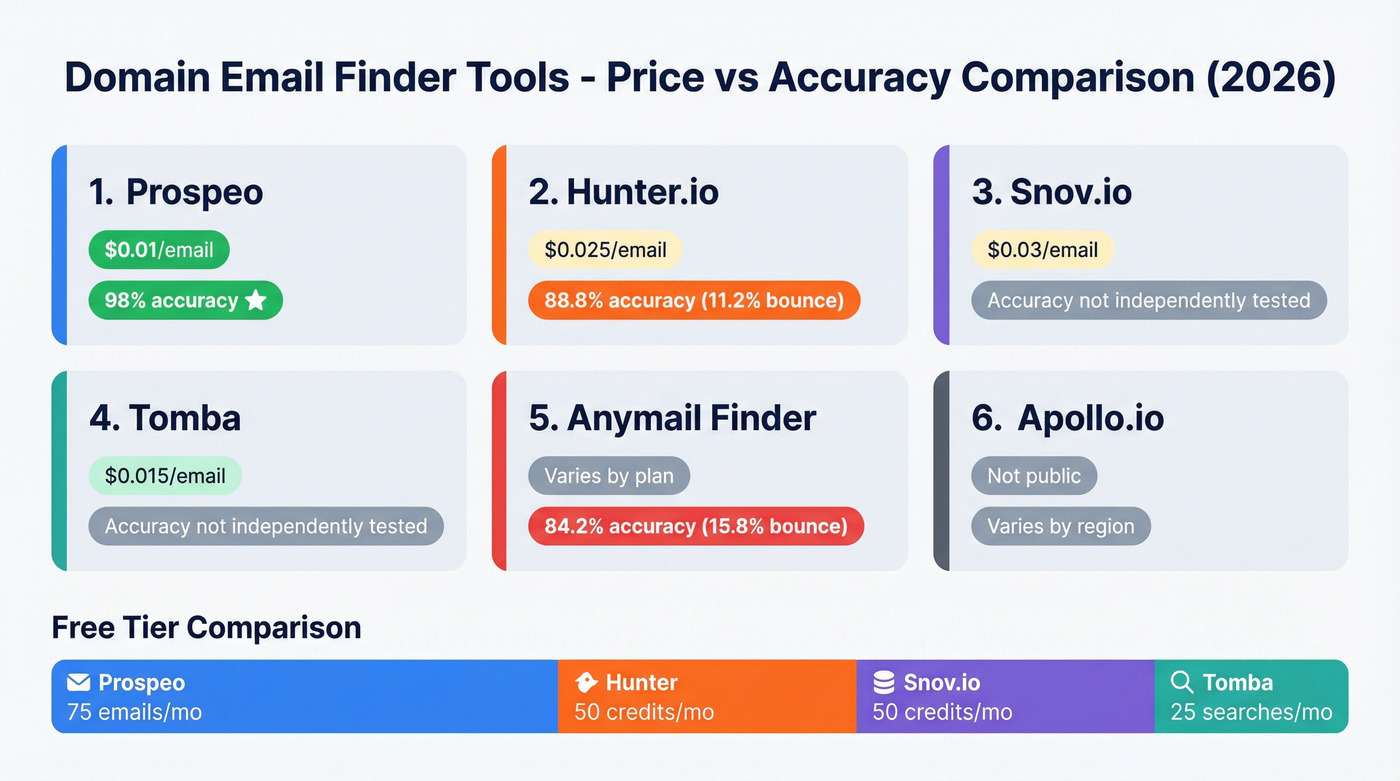
| Tool | Free Tier | Starter Price | Credits Incl. | Cost/Email | Verification? |
|---|---|---|---|---|---|
| Prospeo | 75 emails/mo | Credit-based | 75 free, then pay-per-use | ~$0.01 | Yes (5-step) |
| Hunter.io | 50 credits/mo | $49/mo | 2,000/mo | ~$0.025 | Yes (0.5 credit) |
| Snov.io | 50 credits/mo | $29.25/mo | 1,000/mo | ~$0.03 | Yes |
| Tomba | 25 searches/mo | $441/yr | 2,500/mo | ~$0.015 | Yes |
| Anymail Finder | Limited | $14/mo | Varies by plan | Varies | Yes (pay only for valid) |
| Apollo.io | Limited | ~$49/mo/user | Per-seat allocation | Not public | Partial |

You just read about tools with 11-15% bounce rates. Prospeo's proprietary 5-step verification - catch-all detection, spam-trap removal, honeypot filtering - delivers 98% email accuracy on every domain search. Data refreshes every 7 days, not 6 weeks. 75 free emails/month, no credit card required.
Enter any domain and get verified contacts in seconds.
At $0.01 per verified email, you can extract every contact from 50 target domains for less than the cost of lunch. Prospeo pulls from 300M+ profiles with built-in verification - no extra credits for validation, no separate tool required. One search, verified results, zero bounced-email surprises.
Source all 50 accounts by Friday without torching your sender reputation.
What Benchmarks Actually Show
Every email finder claims 97%+ accuracy on their marketing page. Independent testing tells a different story.
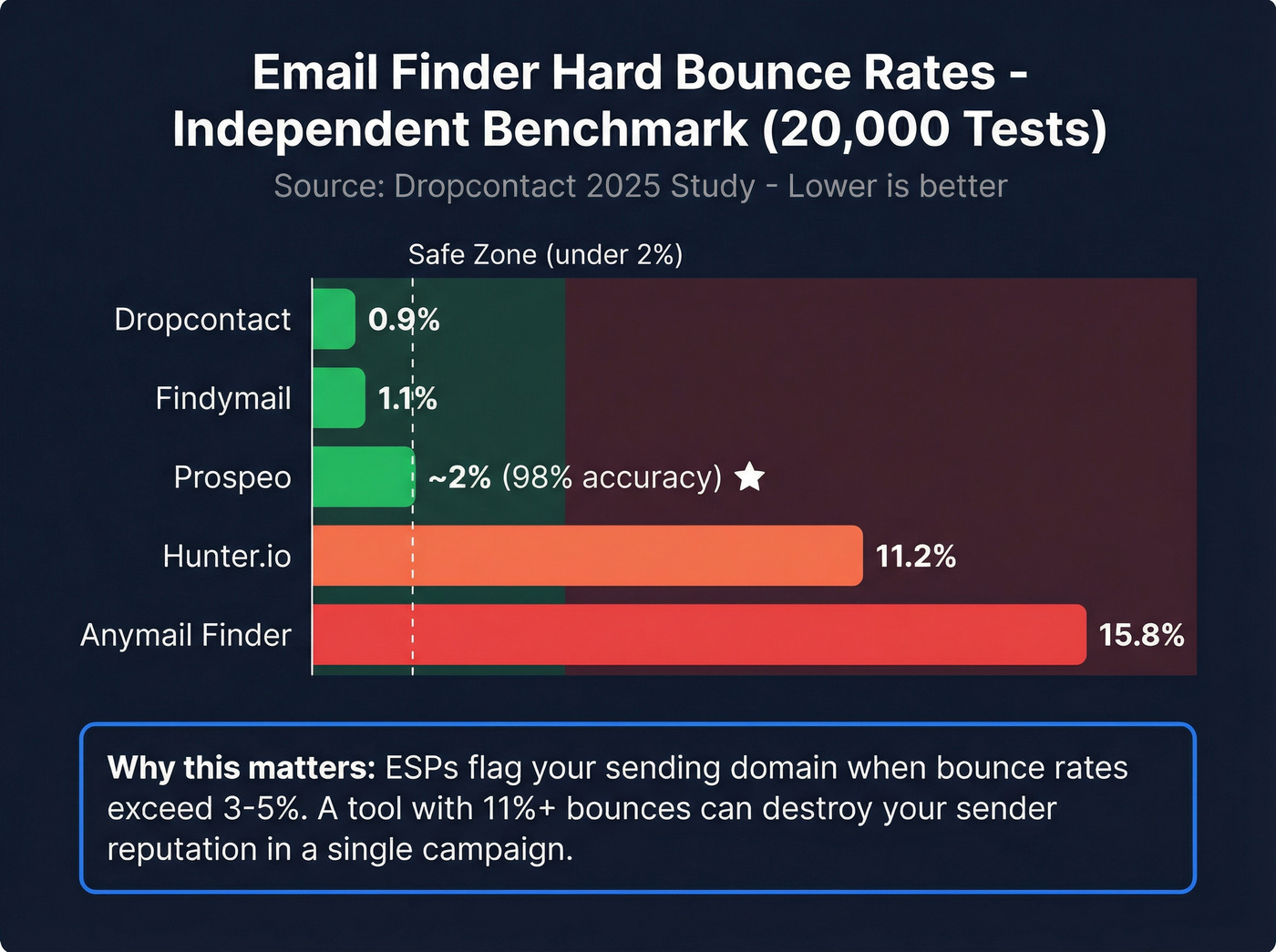
The most rigorous public benchmark comes from Dropcontact's 2025 study: 20,000 real-world tests across 15 tools. Hunter.io hit an 11.2% hard bounce rate. Anymail Finder came in at 15.8%. The best performers - Findymail at 1.1%, Dropcontact at 0.9% - stayed under 2%.

Most people miss the catch-all problem. Between 15-28% of B2B domains are catch-all, meaning they accept email sent to any address - even totallynotreal@company.com. Basic verification tools mark these as "valid," and your bounce rate pays the price. We've seen tools with dedicated catch-all detection consistently outperform those without it by 8-12 percentage points on bounce rate alone.
Stop comparing database sizes. A database of 500M unverified emails is worth less than 50M verified ones. If 30 emails bounce on your first sequence and your ESP flags your account, the "bigger database" just cost you your sending reputation. Bounce rate is the only metric that matters - track and reduce hard bounce rates before scaling.
Waterfall Enrichment
No single tool finds every email. Waterfall enrichment - running unfound contacts through multiple tools sequentially - yields roughly 30% more valid emails than relying on a single provider. The consensus on r/sales is that stacking two or three finders with a verification layer is how serious outbound teams operate, and our testing confirms it.
If you’re building a stack, compare waterfall enrichment options and workflows before you commit.
Here's how it works in practice:
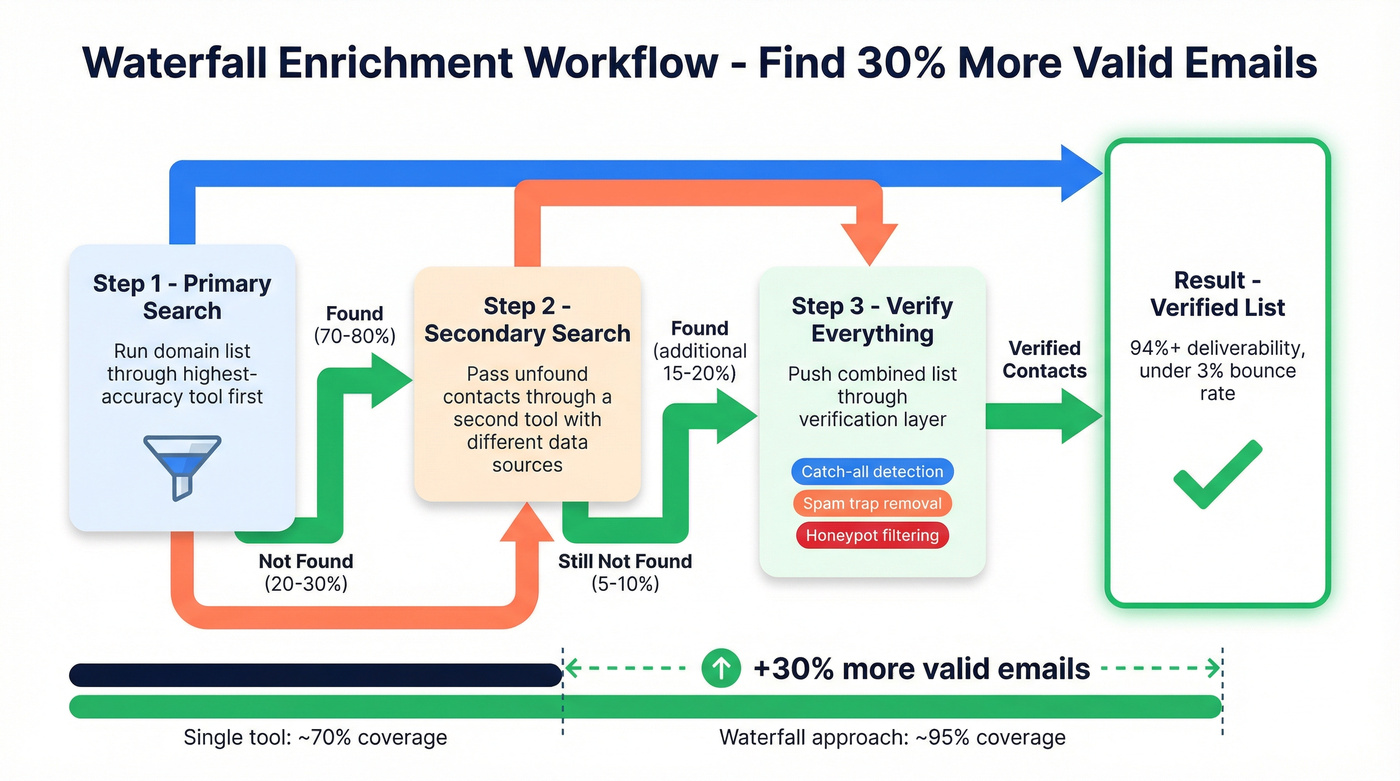
- Primary search: Run your domain list through your highest-accuracy tool first.
- Pass unfound contacts: Export the "not found" results and run them through a second tool with a different data source.
- Verify everything: Push the combined list through a dedicated verification layer to catch catch-all false positives, spam traps, and honeypots.
Different tools pull from different data sources. An email that Tool A can't find might be in Tool B's index. One of our agency customers, Stack Optimize, built their entire workflow this way and maintains 94%+ deliverability with bounce rates under 3% across all their clients.
Bulk Domain Search Workflow
When you're working with 50+ domains, the manual approach breaks down fast.
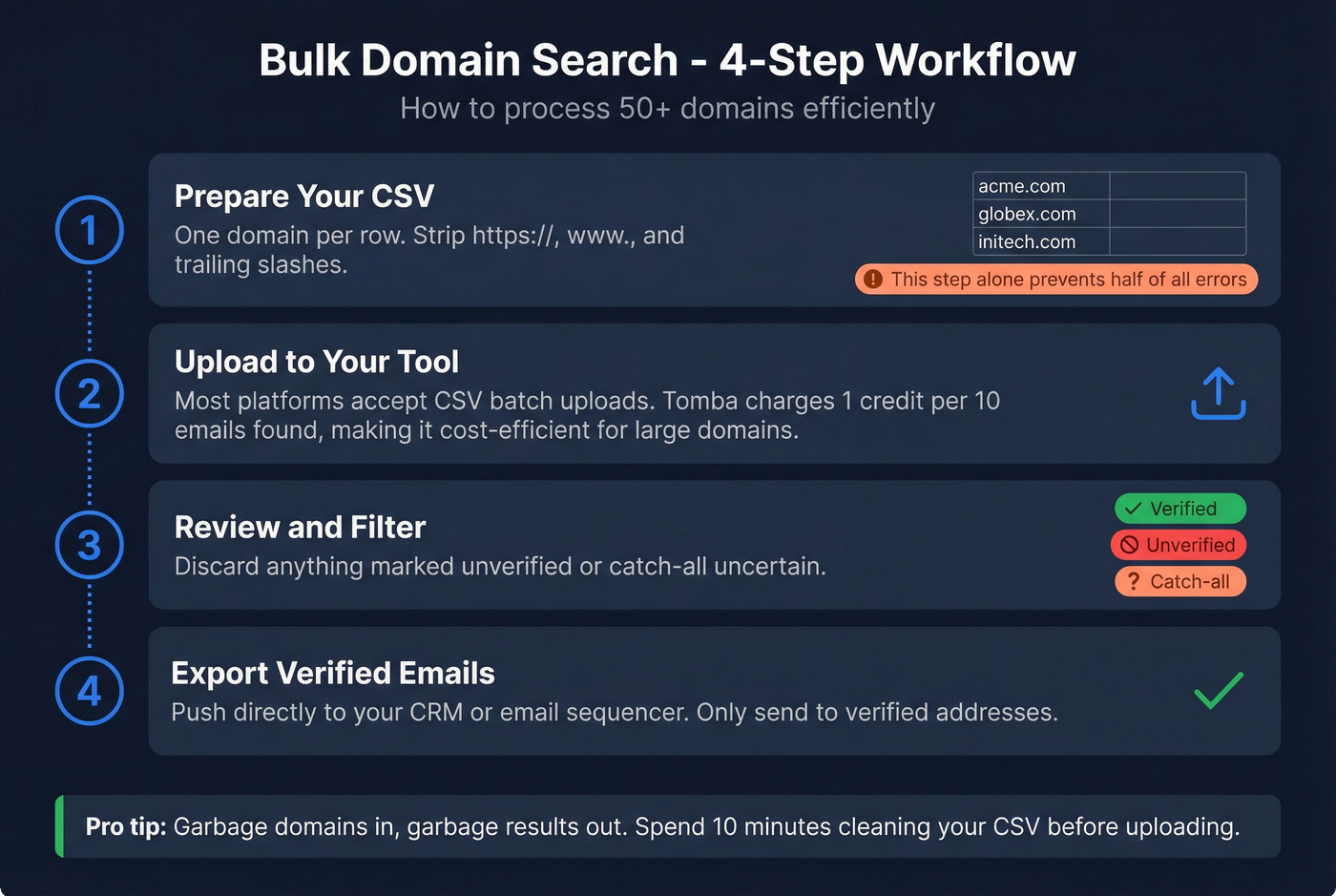
- Prepare a CSV with one domain per row. Strip
https://,www., and trailing slashes - this step alone prevents half the errors we see. - Upload to your tool. Most platforms accept CSV uploads for batch processing. Tomba's "1 request per 10 emails" model makes it particularly cost-efficient for large domains.
- Review and filter. Discard anything marked unverified or catch-all-uncertain.
- Export verified emails directly to your CRM or sequencer.
The prep step matters more than the tool. Garbage domains in, garbage results out.
If you’re operationalizing this, use a repeatable prospecting workflow so list-building doesn’t become a weekly fire drill.
Legal Compliance
Finding emails is legal. Spamming them isn't.
GDPR (EU/UK): Fines up to EUR 20M or 4% of global revenue. You need a legitimate interest basis for B2B outreach. Enforcement is real - Meta got hit with a EUR 1.2B fine for data transfer violations.
CAN-SPAM (US): Penalties up to $46,517 per email. Every commercial email must include a physical address, clear unsubscribe mechanism, and accurate headers. Honor opt-outs within 10 business days.
State privacy laws: Eight new comprehensive state privacy laws took effect in 2025, adding consent and disclosure requirements beyond federal CAN-SPAM. The IAPP maintains a tracker if you want to stay current.
For a practical outbound view, see GDPR for Sales and Marketing and how teams document legitimate interest.
The legal risk isn't in finding the email - it's in what you do with it afterward. A verified list sent with proper opt-out mechanisms is standard B2B practice. A scraped list blasted without unsubscribe links is how you get fined.
FAQ
Is it legal to find email addresses from a company's domain?
Yes. Finding publicly available business emails is legal in most jurisdictions. Legal obligations kick in when you email those contacts - GDPR requires legitimate interest, CAN-SPAM requires an unsubscribe mechanism and physical address. Include opt-out links and honor them within 10 business days.
How can I find all email addresses on a domain for free?
Prospeo offers 75 free emails/month with built-in verification. Hunter.io gives 50 free credits/month. Google dorks ("@domain.com") are unlimited but slow. Combining multiple free tiers through waterfall enrichment maximizes coverage without spending a dollar.
What's a catch-all domain and why does it matter?
A catch-all domain accepts email sent to any address, even nonexistent ones. Between 15-28% of B2B domains work this way. Basic verification marks fake addresses as "valid" on these domains, inflating bounce rates and damaging sender reputation. Use tools with dedicated catch-all detection to avoid this.
What's waterfall enrichment?
Running unfound contacts through multiple email-finding tools sequentially, then verifying the combined results. It yields roughly 30% more valid emails than a single tool because different providers index different data sources.