Google Maps Email Scraper: Best Tools for 2026 (and How to Actually Get Emails)
Google Maps is great at showing you who exists in a niche.
It's awful at giving you how to reach them.
If you're shopping for a "google maps email scraper", you're really shopping for a workflow: pull businesses from Maps, grab the website, extract emails from the site, then verify before you send. Do that well and you'll have a list you can actually use. Do it poorly and you'll end up with duplicates, bounces, and a domain reputation problem you didn't ask for.
Why "Google Maps email scraping" is usually a 2-step process
Google Maps (and Google Business Profiles) are discovery tools, not an email directory. Most listings show a phone number, address, hours, maybe a booking link. Emails are inconsistent, and in plenty of categories they're basically nonexistent.

So the workflow that works in real life looks like this:
- Step 1: Extract places (name, category, phone, website, address, place_id)
- Step 2: Crawl the business website to find emails (contact page, footer, privacy policy, staff page)
- Step 3: Verify + enrich so you don't torch deliverability
We've run this across SMB niches where you'd expect emails to be everywhere, and the range still swings hard: ~30-70% of SMB websites publish an email somewhere. The rest require a finder/enrichment step, or you settle for contact forms and phone calls.
What data you should export (so your list doesn't fall apart later)
Exporting "name + phone" is how you end up with a spreadsheet you can't use. A good Google Maps export should include:

- place_id / CID / KGMID (your dedupe key; non-negotiable)
- Business name
- Primary category (and ideally secondary categories)
- Website / domain (this is how you get emails)
- Phone
- Full address + city + postal code
- Lat/long (for territory logic and tiling)
- Rating + review count (quick quality filter)
- Business status (open/closed, if available)
- Google Maps URL (for QA and manual spot checks)
Common failure modes (and how to avoid them)
- Duplicate chaos: If your tool doesn't preserve stable IDs, you'll re-contact the same business 3-10 times. Fix: dedupe by place_id.
- Missing websites: Many listings have no site. Fix: run a second pass with different keywords/categories; don't pay for "contact scrape" on records without websites.
- JavaScript-heavy contact pages: Some sites hide emails behind scripts. Fix: use a crawler that can render JS (or accept that you'll miss some).
- Catch-all domains: Catch-all isn't "valid," it's "unknown." Fix: segment catch-all and send slower with higher personalization.

Best tools for a google maps email scraper workflow (quick picks)
If I had to trial three tools for a real pipeline: Outscraper, Apify, and Prospeo. That covers extraction at scale, website contact scraping, and a deliverability-grade verification/enrichment gate.
Look, if your average deal is in the low five figures (or less), you probably don't need an "enterprise lead database" contract to sell to local businesses. You need coverage, clean exports, and emails you can actually send to.

You scraped 5,000 places from Google Maps. Now what? Without verification, you're one blast away from torching your domain. Prospeo enriches your exported CSV with 98% accurate emails on a 7-day refresh cycle - so your list doesn't rot between scrape and send.
Stop guessing which emails are real. Verify before you send.
Google Maps email scraper comparison table (pricing + email source)
If you need emails you can actually send to, optimize for cost per verified email, not cost per place.

| Tool | Pricing model | Email source | Verifies? |
|---|---|---|---|
| Prospeo | ~$0.01/email | Finder + DB | Yes (98%) |
| Outscraper | $/1k modules | Site crawl | Yes (add-on) |
| Apify | Pay-per-event | Site scrape add-on | No (pair verifier) |
| PhantomBuster | $69/$159/$439 | Site scrape | Limited |
| G Maps Extractor | $39/$99 mo | Listing + site | No |
| gosom/google-maps-scraper | Free (+infra) | -email crawl |
No |
| n8n | Free/+cloud | Regex from crawls | No |
| MapsLeads | ~$10-$50/mo | Bing-focused | No |
A few pricing details that actually change your math:
- Apify events (typical): $0.004/place, $0.002/place for contact details, $0.001/filter/place, $0.007/run. If you pull reviews/images, it adds up fast at about $0.0005 per review and $0.0005 per image.
- Outscraper modules: Maps $3/1,000, Domains/contacts $3/1,000, Verify $3/1,000 after free tiers; at 100k+/month, it drops to roughly $1/1,000.
- PhantomBuster: subscription pricing is simple, but usage is governed by execution time, CAPTCHA credits, and email credits.
The best Google Maps email scraper tools in 2026
Prospeo (Tier 1): best for verified, send-ready emails (and skipping a lot of scraping)
Prospeo is "The B2B data platform built for accuracy". In a Maps workflow, it's the send-ready gate: you take the domains you extracted, append contacts, and only export emails that are safe to send, with 98% verified email accuracy and a 7-day data refresh cycle (so your list doesn't rot between scrapes and sends).

In our experience, this is where most teams either get disciplined or get punished. They scrape 5,000 places, feel productive, then blast unverified addresses and spend the next month wondering why replies died and bounces spiked. Verification isn't a nice-to-have. It's the difference between "pipeline" and "we just burned a domain."
If you don't want to scrape at all, you can also start from Prospeo's database: 300M+ professional profiles, 143M+ verified emails, 125M+ verified mobile numbers, 30+ search filters, and intent data across 15,000 topics, used by 15,000+ companies and 40,000+ Chrome extension users.
Best for
- Teams that care about accuracy and freshness, and want self-serve pricing instead of contracts
- Anyone running outbound at scale who can't afford bounce-driven deliverability issues
Skip if
- You only need a one-time list of 50 businesses and you're fine calling phones
What it does in a Maps pipeline
- Extracts places: No
- Crawls websites for emails: Yes (finder workflows)
- Verifies emails: Yes (this is the point)
A workflow that stays clean
- Scrape Google Maps and export a CSV with business name, website/domain, category, city, phone, and place_id.
- Enrich and verify the file in Prospeo Data Enrichment: https://prospeo.io/b2b-data-enrichment
- Export only Valid emails; keep Catch-all in a separate, slower sequence.
For email discovery specifically: https://prospeo.io/email-finder
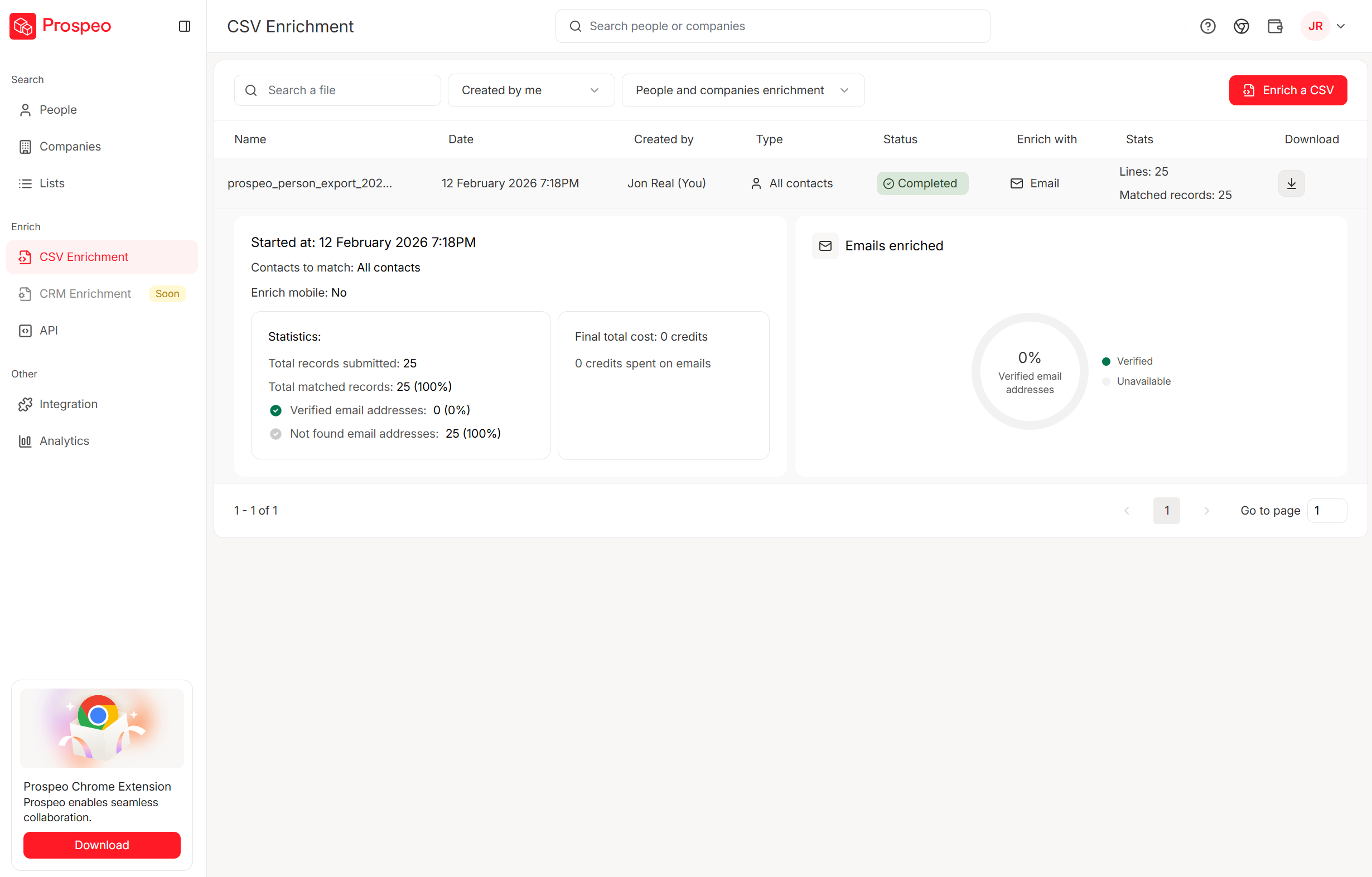
Pricing signal: free tier included; paid plans typically start around $39/mo. Pricing: https://prospeo.io/pricing
Outscraper (Tier 1): best pay-as-you-go Maps exports with clean IDs
Outscraper is the most straightforward "I need a lot of places, fast" option without committing to a big monthly plan. It's modular: scrape Maps, optionally crawl domains for contacts, optionally verify.
Here's the thing: Outscraper's biggest win isn't some secret feature. It's that the exports behave like a dataset you can maintain, refresh, and dedupe without losing your mind, because the identifiers stay consistent and the column set is practical.
Best for
- Agencies and ops teams that want predictable exports and pay-as-you-go scaling
Skip if
- You hate modular billing and want one flat subscription no matter what you turn on
Pros
- Strong, consistent identifiers (great for dedupe and refreshes)
- Modular add-ons (Maps -> domains/contacts -> verification)
- Output is configurable, so you can avoid collecting junk columns you don't need
Cons
- Cost jumps if you enable every add-on without modeling the funnel first
What it does
- Extracts places: Yes
- Crawls websites for emails: Yes (Emails & Contacts Scraper)
- Verifies emails: Yes (Email Verifier module)
Fields you actually get (the useful ones)
- place_id / cid / kgmid
- name
- website
- phone
- full address + postal code
- categories
- latitude/longitude
- hours + timezone
- rating + reviews count
- Google Maps URL
That field set is why Outscraper is so good for territory logic and deduping. It's not just "a CSV." It's a list you can keep clean month after month.
Pricing (practical signal)
- Free tiers, then typically $3 per 1,000 for Maps and $3 per 1,000 for domains/contacts modules
- At 100k+/month, it drops to roughly $1 per 1,000
User sentiment Outscraper sits at 4.7/5 on Trustpilot (218 reviews). People praise responsiveness and "it just works" exports; the most common complaint is surprise spend when multiple modules run without a cost model.
Compared to enterprise databases: Outscraper wins on local coverage and cost control for SMB lists. It's not trying to be an org-chart platform. It's trying to get you the right businesses, fast.
Apify (Tier 1): best for scale, geo coverage, and API-first scraping
Apify is what you use when extensions stop cutting it and you want a real scraping platform. The Compass Google Maps Scraper actor is widely used and sits at 4.7/5 (869 reviews) on its listing.
If you're doing multi-city, multi-country, or you need repeatable jobs with real inputs/outputs, Apify is the grown-up option. You'll also feel the billing model if you aren't careful, because every "nice extra" (filters, contact details, reviews, images) has a price tag attached.
Best for
- Data teams that want APIs, repeatable runs, and serious geo coverage
Skip if
- You want a one-click Chrome extension and never want to think about events, runs, or add-ons
Pros
- Scales cleanly and exports structured data (JSON/CSV)
- Predictable pricing once you model events
- Great for tiling and multi-location coverage
Cons
- Add-ons (contact details, filters, reviews/images) can quietly become the real bill
- You still need a dedicated verification step before outreach
What it does
- Extracts places: Yes
- Crawls websites for emails: Yes (contact details scrape add-on)
- Verifies emails: No (treat outputs as "found," not "send-ready")
Cost trap to watch Apify's pay-per-event pricing is the key:
- $0.004 per place (about $4 per 1,000)
- $0.002 per place for contact details (emails/socials from the website)
- $0.001 per filter per place
- $0.007 per run
- Pulling reviews/images adds about $0.0005 per review and $0.0005 per image
Pro tip: categories hide businesses If you only run one category, you'll miss a chunk of the market. Run multiple related categories/keywords (for example, "HVAC contractor," "air conditioning contractor," "heating contractor"), merge results, then dedupe by place_id.
That single change usually increases coverage more than switching tools.
Compared to enterprise databases: Apify isn't a database. It's an extraction engine. It wins when you need "businesses in this radius" with custom geo logic and repeatable jobs.

PhantomBuster (Tier 1): best for guided workflows (use it for discovery, not verification)
PhantomBuster is the "I want automation, but I don't want to code" pick. It's also the tool that looks cheap until you hit the ceilings: execution time, CAPTCHA credits, and email credits.
Real talk: PhantomBuster is fun for experiments and small repeatable runs. It's not what I'd build a high-volume Maps pipeline on unless you've already accepted that you'll be babysitting runs and rationing credits.
Best for
- Lightweight, repeatable automations across web sources when you can live within resource limits
Skip if
- You need high-volume scraping every day or you hate managing credits and run time
Pros
- Lots of ready-made recipes and scheduling
- Good for quick experiments and repeatable small runs
- Pricing is per workspace (not per seat), and resources can be shared across up to 100 members
Cons
- Resource ceilings are the product: you'll feel them
- Email extraction isn't a last-mile deliverability solution
What it does
- Extracts places: Yes (via workflows)
- Crawls websites for emails: Yes (contact extraction flows)
- Verifies emails: Limited (don't trust it as your final gate)
Pricing: $69 / $159 / $439 per month (Start/Grow/Scale). Email credits are typically 500 / 2,500 / 10,000 per month, plus CAPTCHA credits and execution time.
Blunt recommendation: use PhantomBuster to discover emails; don't use it as your last-mile verifier before you send.
Compared to enterprise databases: PhantomBuster is a workflow tool, not a data platform. It wins when you need automations; databases win when you need clean, ready-to-contact records.
G Maps Extractor (Tier 2): best lightweight Chrome extension for quick CSVs
G Maps Extractor is the "just give me a CSV" option. It's fast to install, easy to understand, and perfect for small batches when you're not trying to build a pipeline.
Best for: small local lists and quick one-off exports Skip if: you need reliable dedupe keys, refresh workflows, or serious scale
Pros
- Very fast time-to-first-export
- Simple CSV/Excel output for non-technical users
Cons
- Verification isn't part of the product
- Free-tier messaging is inconsistent (trial friction)
What it does
- Extracts places: Yes
- Crawls websites for emails: Sometimes
- Verifies emails: No
Pricing signal: typically $39/mo (Professional) and $99/mo (Business).
gosom/google-maps-scraper (Tier 2): best free option for engineers
If you've got a technical teammate (or you are the technical teammate), gosom's open-source scraper is the best "no SaaS bill" option. It supports CLI/Web UI/REST API, proxy rotation, and outputs to CSV/JSON/Postgres/S3.
I've seen this work beautifully for internal tooling... right up until Google changes something and it becomes someone's "Friday night emergency." If nobody owns it, it rots.
Best for: engineers who want control and don't mind maintenance Skip if: you need something that never breaks and you don't want to manage proxies
Pros
- Free software; flexible outputs
- Can be fast with concurrency tuned
Cons
- Proxies and blocking become your real cost
- You own maintenance when Google changes things
What it does
- Extracts places: Yes
- Crawls websites for emails: Yes (use the -email flag)
- Verifies emails: No
Pricing signal: tool is free; budget $50-$300/mo for proxies if you're doing volume.
n8n "Maps -> crawl -> regex emails" workflow (Tier 2): best automation skeleton you can actually run
n8n is plumbing, and that's why it's powerful. If you're tired of one-off scrapes, build a pipeline that runs every day, retries failures, and writes clean rows to a table your team already uses.
Best for: ops teams that want a continuously running pipeline with batching + retries Skip if: you want a single SaaS UI that does everything without maintenance
Pros
- Full control: batching, retries, rate limits, routing
- Easy to push outputs into Sheets/Airtable/CRMs
- Self-hostable (cheap at scale)
Cons
- Templates break when page structures change
- You still need a verifier before outreach
What it does
- Extracts places: Yes (HTTP steps / integrations)
- Crawls websites for emails: Yes
- Verifies emails: No
A concrete n8n skeleton (the one that holds up)
- Trigger: Cron (daily)
- Input: Google Sheet "Search Terms" (keyword + city + lat/long tile)
- HTTP Request: call your scraper (Apify/Outscraper/self-hosted)
- Split in Batches: 50 places per batch (keeps rate limits sane)
- IF:
website exists-> only then crawl for emails - HTTP Request: fetch
/contact,/about, homepage (3 URLs max) - Code node: regex extract emails + normalize (lowercase, trim, remove trailing punctuation)
- Dedup: by
place_id+ email - Retry logic: on 429/5xx, wait 60-180s and retry up to 3 times
- Output: Airtable/Sheets "Leads" table with status fields (
needs_verify,verified,do_not_contact)
Pricing signal: $0 if self-hosted (plus infra), or roughly $20-$100/mo on cloud plans, plus proxy/scraper costs.
MapsLeads (Tier 3): Bing-only alternative
MapsLeads extracts from Bing Maps, not Google Maps. Expect typical extension pricing around $10-$50/mo.
Skip this if your whole plan depends on Google categories and Google review signals. Bing can still be useful for certain verticals, but it's not a drop-in replacement.
Skip the scraping entirely. Prospeo's database covers 300M+ profiles with 143M+ verified emails and 30+ filters - including industry, headcount, and intent data across 15,000 topics. Build your local business list without stitching together three different tools.
Get send-ready emails at $0.01 each - no scraper required.
Cost math: what 1,000 places really costs (to get verified emails)
Most teams budget for "scraping." The bill shows up when you try to turn scraped places into verified emails you can safely send to.
Here's a funnel model you can steal.
Assumptions (typical SMB local niches):
- 1,000 places scraped
- 65% have websites -> 650 domains
- 45% of those sites show an email somewhere -> ~293 emails found
- 85-95% verify (depends on your verifier + catch-all policy) -> ~250 verified emails
| Stage | Count (example) |
|---|---|
| Places scraped | 1,000 |
| Websites found | 650 |
| Emails found | 293 |
| Verified emails | 250 |
Apify worked example (events-based)
Using Apify's typical pricing model:
- Places: 1,000 x $0.004 = $4.00
- Contact scrape: 1,000 x $0.002 = $2.00
- 2 filters: 1,000 x 2 x $0.001 = $2.00
- Run fee: $0.007/run
Total: $8.007 to process 1,000 places (for that configuration). If you also pull reviews/images, add incremental event costs. Great for research, unnecessary for most outbound.
Outscraper "3-step bill" (modular)
Outscraper's model is basically three line items:
- Maps scrape: $3/1,000 (after free tier)
- Domains/contacts scrape: $3/1,000 domains (after free tier)
- Verification: $3/1,000 emails (after free tier)
So for 1,000 places, you're often around $9 for the full pipeline stages. At serious volume (100k+/month), the per-1k rate can drop to around $1/1,000, which is why agencies like it.
Verification/enrichment unit economics (the part that saves your domain)
Even "cheap" scraping gets expensive if it creates bounces, spam complaints, and burned domains. Budget for verification like it's insurance, because it is.
One more thing: if you're emailing local businesses, you don't need 10,000 raw places. You need 500-1,000 clean, verified contacts that match your ICP, and you need them to stay clean when you refresh the list next month.

How to get past Google Maps' ~120 results cap (without missing leads)
The UI cap is why this category exists. Google shows you the "top" results and hides the long tail.
The two tactics that work in production are tiling and splitting. Use both.
Checklist: tiling (coordinates + zoom)
- Pick a city/area and define a bounding box.
- Generate a grid of coordinates (lat/long points).
- Run the same query at each point with a consistent zoom.
- Consolidate results into one dataset.
- Dedupe by place_id (non-negotiable).
- Re-run tiles that underperform (blocked, timeouts, or sparse results).
Pseudo-logic for dedupe:
unique_places = uniqBy(results, r => r.place_id)
Opinion from painful experience: the "best scraper" is the one that preserves stable IDs and exports cleanly. Everything else is noise.
Checklist: splitting by ZIP (coverage hack)
Instead of "plumbers in Manhattan," run "plumbers in 10001," "plumbers in 10002," etc. You're forcing Google to re-rank locally, which surfaces businesses that never show up in the generic query.
A Datablist example shows 560 vs 187 results for "plumbers in Manhattan" when splitting by ZIP codes. The exact numbers vary, but the direction stays the same: splitting beats scrolling.
The third tactic people forget: multi-category merging
Google's category system is messy. Two identical businesses can be labeled differently, and a single category query will miss them.
Run 3-8 related categories/keywords, merge, then dedupe by place_id. It feels redundant. It produces coverage.
Deliverability + compliance (don't burn your domain)
Scraping is the easy part. Sending is where teams get punished.
Do this:
- Verify before outreach. Treat "found email" as untrusted until it's verified.
- Use suppression lists like a grown-up. Suppress existing customers, prior opt-outs, competitors, and internal domains. Keep one master suppression list across every tool.
- Include identity + a real address. Use a consistent "from" identity, a legitimate reply-to, and a physical mailing address in your footer.
- Throttle new domains. Ramp volume gradually; don't go from 0 to 2,000/day on a fresh domain.
- Segment catch-all domains. Catch-all gets a slower sequence and higher personalization. If you blast catch-all, you're choosing pain.
Don't do this:
- Don't email without an unsubscribe.
- Don't keep emailing after an opt-out.
- Don't rotate domains to dodge opt-outs. That's how you earn spam complaints.
CAN-SPAM is clear on one operational requirement: you must provide an opt-out mechanism and honor opt-outs within 10 business days. FTC guidance: https://consumer.ftc.gov/consumer-alerts/2023/08/ftc-lawsuit-reminds-businesses-can-spam-means-cant-spam
Recommended stacks by scenario (pick 2-3 tools max)
Most teams don't need five tools. They need a reliable extractor, a repeatable workflow, and a fallback plan for when scrapers break, because they do.
We've tested enough of these setups to say it plainly: if you don't have a plan for duplicates, retries, and verification, you're not building a lead engine. You're collecting trivia.
| Scenario | Stack (2-3 tools) | Winner outcome |
|---|---|---|
| Solo operator | G Maps Extractor + verifier | Fastest to launch |
| Agency | Outscraper + verifier | Best cost control |
| Data team | Apify + n8n + verifier | Most resilient |
Solo operator (speed > perfection) Use a Chrome extractor to pull a list quickly, then verify before you send. You'll spend your time writing offers instead of debugging proxies.
Agency (repeatability + cost control) Outscraper for Maps exports and domain/contact scraping. Keep your funnel math tight so modular add-ons don't surprise you.
Data team (scale + resilience) Apify for extraction, n8n for orchestration (batching, retries, Sheets/Airtable), and a dedicated verification step before anything hits your sequencer.
FAQ
Can you scrape emails directly from Google Maps?
Not reliably. Most listings don't publish emails, so you usually extract the website first and then crawl that site for contact details. In practice, expect 30-70% of SMB sites to show an email somewhere, then verify before sending to keep bounces under control.
How do you get more than 120 results from a Google Maps search?
Use multiple geo-specific queries instead of scrolling the UI: run coordinate/zoom tiling plus ZIP-based splitting, then merge and dedupe by place_id. Teams typically see 2-4x more unique businesses once they tile a city and run 3-8 related categories.
What's the cheapest way to get verified emails from Maps leads?
Model it as a funnel: scrape places -> keep only rows with websites -> find emails on those domains -> verify and suppress risky addresses. For many local niches, 1,000 places turns into about ~250 verified emails, and verification is the step that prevents costly bounce-driven deliverability damage.
Is Prospeo a good option for this workflow?
Yes. It's strongest as the "send-ready" gate after you collect domains: enrich a CSV with an 83% enrichment match rate, export only Valid emails with 98% verified email accuracy, and rely on a 7-day refresh cycle so your list stays fresh between campaigns.
Summary: pick a google maps email scraper workflow, not just a tool
A google maps email scraper only works when you treat it like a pipeline: extract places with stable IDs, crawl websites selectively, then verify before outreach.
If you want the cleanest path to send-ready contacts, pair a strong extractor (Outscraper or Apify) with a verification/enrichment layer, and keep your cost model tied to verified emails, not raw places.