

How to Add an Email Extractor to Chrome (And Which One to Pick)
Your team is manually copying emails from company websites - highlighting, right-clicking, pasting into a Google Sheet, then doing it 200 more times. That's not prospecting. That's data entry.
Add an email extractor to Chrome and the whole setup takes about 90 seconds. Email marketing still returns $36-$42 for every dollar spent, but only if the emails you're sending to actually exist. Here's the thing: half the extensions in the Chrome Web Store will flood your list with garbage addresses that torch your sender reputation before your first campaign even finishes sending.
Scrapers vs. Database Finders
This distinction will save you from burning your domain on day one.
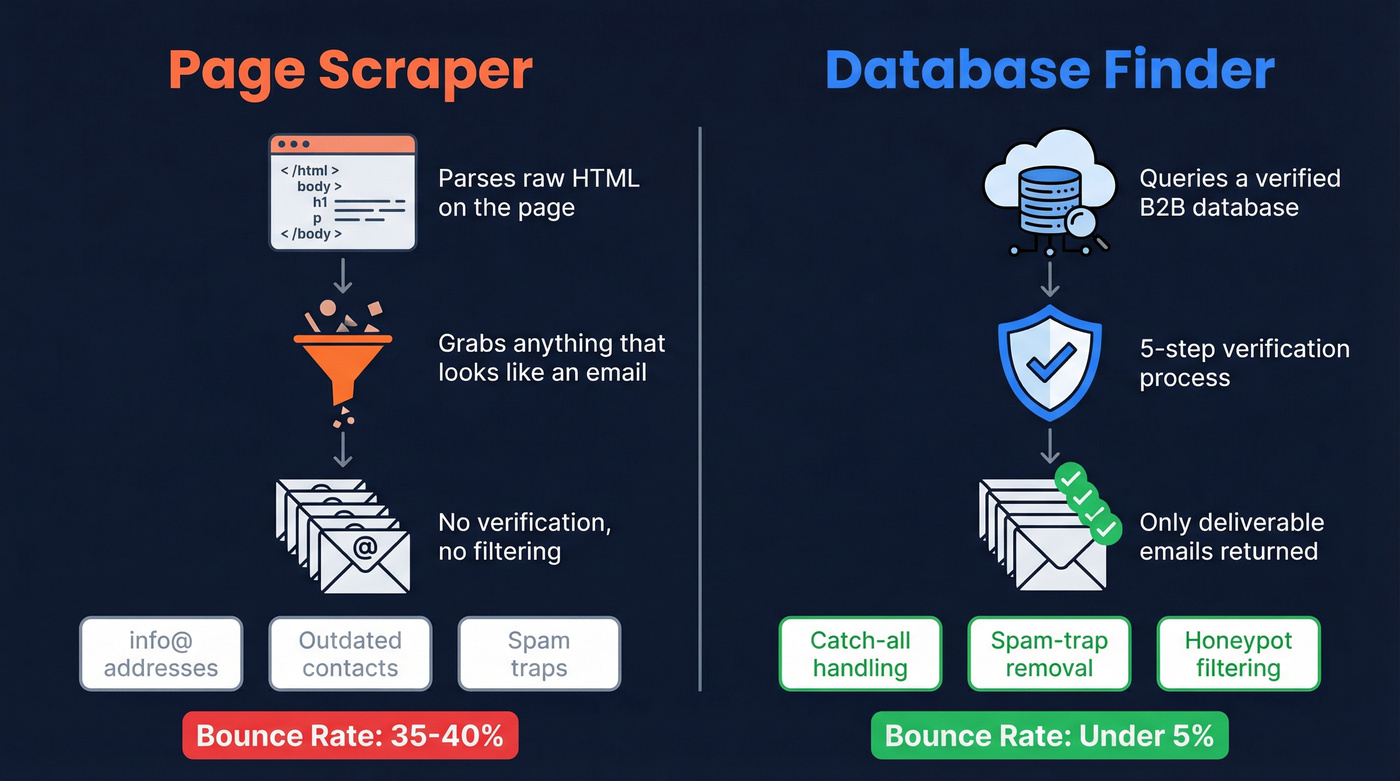
A page scraper parses the HTML of whatever site you're viewing, grabbing every mailto: link and text pattern that looks like an email. No verification, no filtering - you get info@ addresses, outdated contacts, and anything else that matches the regex. It's fast and free, but you're on your own when it comes to data quality.
A database finder works differently. Tools like Prospeo and Hunter query a verified B2B database instead of parsing raw HTML. Hunter's extension page explicitly states it doesn't scrape email addresses from the pages you visit - it matches the domain to its own indexed dataset. Prospeo does the same, pulling from 143M+ verified emails and running every address through a 5-step verification process before it ever reaches you.

Why does this matter? Bad emails drive bounces, and bounces hurt deliverability fast. We've seen teams go from 35-40% bounce rates to under 5% just by switching from scraped lists to verified data - that's the difference between landing in inboxes and watching campaigns die in spam. (If you want the deeper playbook, start with email deliverability and hard bounce.)
How to Install an Email Extractor Extension
Five steps. Under a minute.
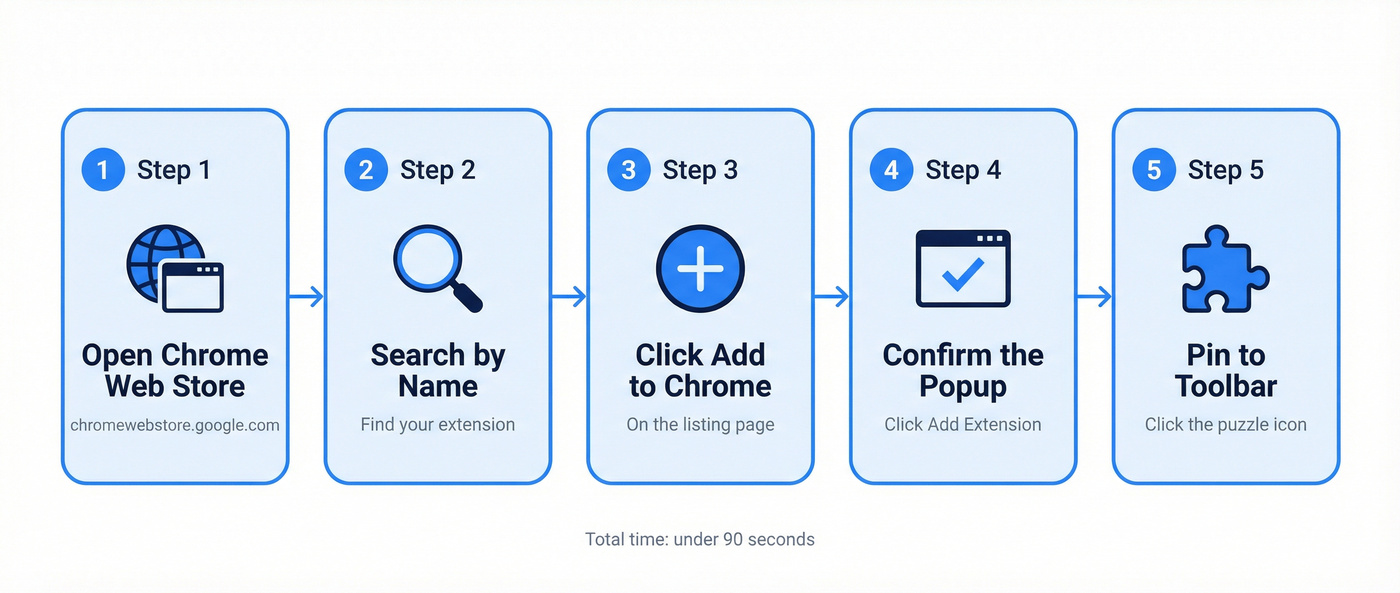
- Go to chromewebstore.google.com
- Search for the extension by name
- Click "Add to Chrome" on the listing page
- Confirm by clicking "Add extension" in the popup
- Click the puzzle-piece icon in the top right to pin it to your toolbar
To manage or remove extensions later, visit chrome://extensions. One safety note: avoid extensions not listed in the Chrome Web Store. Unlisted extensions require Developer Mode and skip Google's review - a red flag for data collection you didn't sign up for.

Most Chrome email extractors pull raw, unverified addresses that spike your bounce rate and tank your domain reputation. Prospeo's extension queries 143M+ verified emails refreshed every 7 days - not stale HTML. At 98% accuracy and $0.01 per email, you get database-quality contacts without leaving the page you're browsing.
Install it in 90 seconds. Get 100 free credits every month.
Best Email Extractors for Chrome in 2026
Prospeo
Use this if you need verified B2B emails with near-zero bounce rates and don't want to burn credits on bad data.
Prospeo's Chrome extension pulls from 143M+ verified emails, running every address through a 5-step verification process that includes catch-all handling, spam-trap removal, and honeypot filtering. The result is 98% email accuracy - the highest we've seen from any extension in this category. The database refreshes every 7 days (the industry average is 6 weeks), so you're not pulling contacts who changed jobs two months ago. That weekly refresh cycle matters more than most people realize: stale data is the silent killer of outbound campaigns, and it's the reason so many teams blame their copy when the real problem is their list. (If you're building a full stack, see our picks for cold email marketing tools.)
The extension works on company websites and professional profiles, surfacing verified emails and 40+ data points per contact. The free tier gives you 75 emails plus 100 Chrome extension credits per month - enough to test it properly. Paid plans run about $0.01 per email with no contracts.
Hunter
Hunter has 6M+ users and is one of the best-known email finder extensions. The free plan gives you 50 credits per month. Each search returns emails associated with a domain, tagged with public sources, discovery dates, and either a "Verified" badge or a confidence score.
Credits work like this: 1 credit per email found, 0.5 per verification. Bulk Domain Search can return up to 10 emails for 1 credit, and duplicate searches are counted once per calendar month.

Paid plans start at $34/mo billed annually for 2,000 credits. It carries a 4.4 on G2 and 4.6 on Capterra. The tradeoff: Hunter doesn't publish a verification rate. But the integrations with HubSpot, Salesforce, and Sheets are strong, and the brand recognition is hard to beat.
Skrapp
Skrapp works on professional profiles and company websites, with 200K+ extension users and a 92% email search success rate. The free tier includes 100 credits per month with rollover, meaning unused credits carry forward - a nice touch for teams with uneven prospecting schedules. You're only charged for emails marked "Valid" or "Catch-all," not for invalid or unknown results. Paid plans start at $30/mo for 1,000 credits. Skip this if you need phone numbers alongside emails. Skrapp is email-only.
Email Extractor
Free page scraper with an AutoVisit feature that crawls up to 1,000 URLs automatically. Exports to TXT or CSV, removes duplicates, and can store results in the cloud when using its AutoSave workflow. 400K+ users. Best for bulk raw extraction from public directories where emails sit in plain text - think association member pages, conference speaker lists, that kind of thing.
Email Extractor Lite
Completely free, no account required. It stores extracted emails in the browser and doesn't send personal data to external servers, which makes it a reasonable choice for GDPR-conscious teams. Exports TXT, CSV, or JSON. Best for lightweight, one-off extraction when you don't need verification.
Let's be honest: if your average deal is under $5k, you probably don't need a database finder at all. A free scraper plus a $20/mo verification tool will get you 80% of the way there. But the moment you're sending more than 200 cold emails a week, bad data costs more than good tools. (If you're comparing options, start with email ID validators and a simple email validity check.)
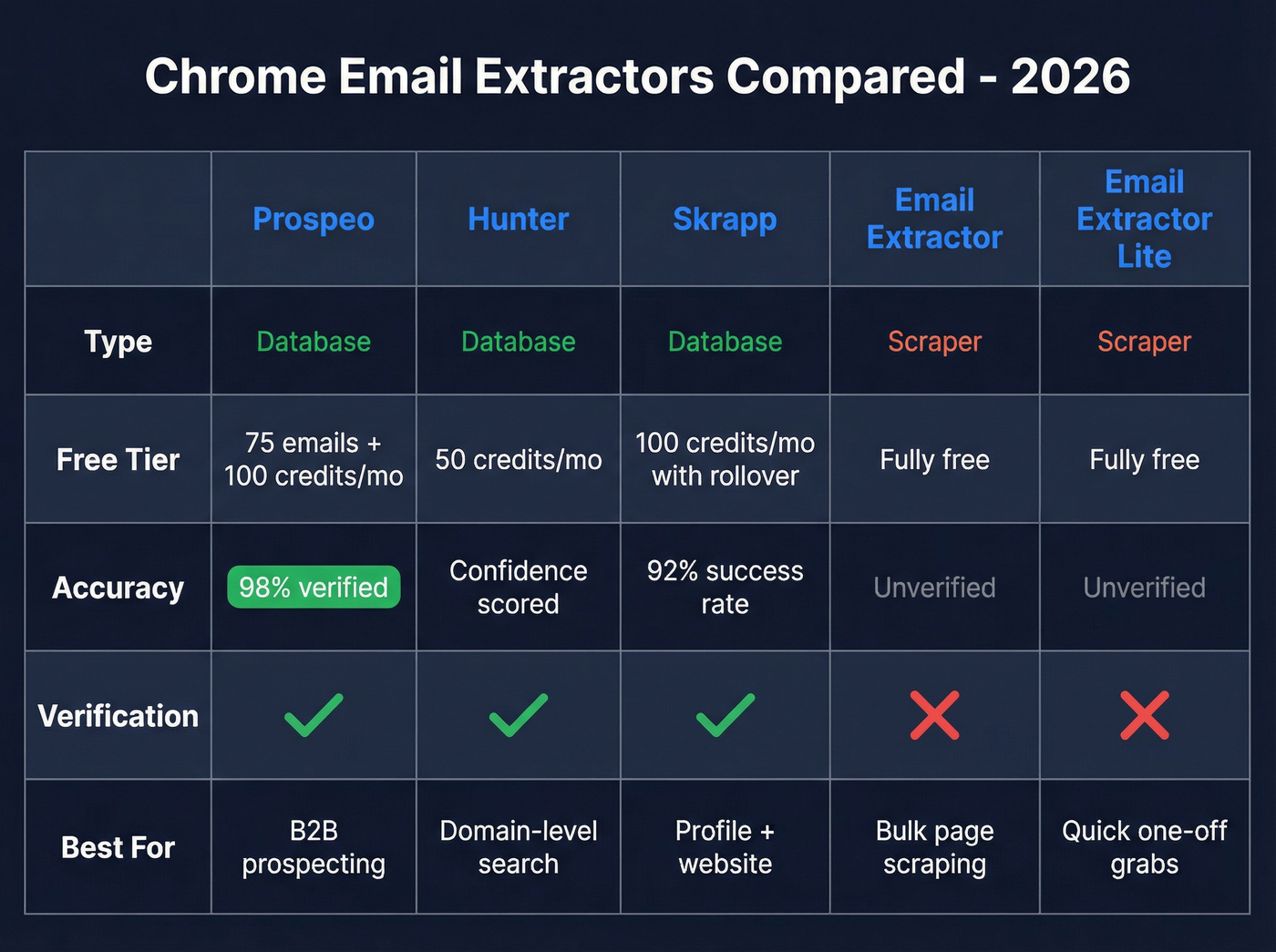
| Tool | Type | Free Tier | Accuracy | Best For |
|---|---|---|---|---|
| Prospeo | Database | 75 emails + 100 credits/mo | 98% verified | B2B prospecting |
| Hunter | Database | 50 credits/mo | Confidence scored | Domain-level search |
| Skrapp | Database | 100 credits/mo (rollover) | 92% success rate | Profile + website prospecting |
| Email Extractor | Scraper | Fully free | Unverified | Bulk page scraping |
| Email Extractor Lite | Scraper | Fully free | Unverified | Quick one-off grabs |
Teams using scraped email lists see 35-40% bounce rates. Teams using Prospeo's verified Chrome extension see under 5%. The difference isn't effort - it's data quality. 40,000+ users already extract verified emails, direct dials, and 40+ data points per contact from any website or professional profile.
Your sender reputation is too valuable for unverified data.
Permissions and Privacy
Not every Chrome extension deserves your trust. A Georgia Tech study analyzing 100,000+ browser extensions found over 3,000 that automatically collect user-specific data, with 200+ uploading sensitive information to external servers without clear disclosure. Separately, DuckDuckGo's research found 85% of emails contain hidden tracking pixels - the extensions you install matter as much as the emails you extract.
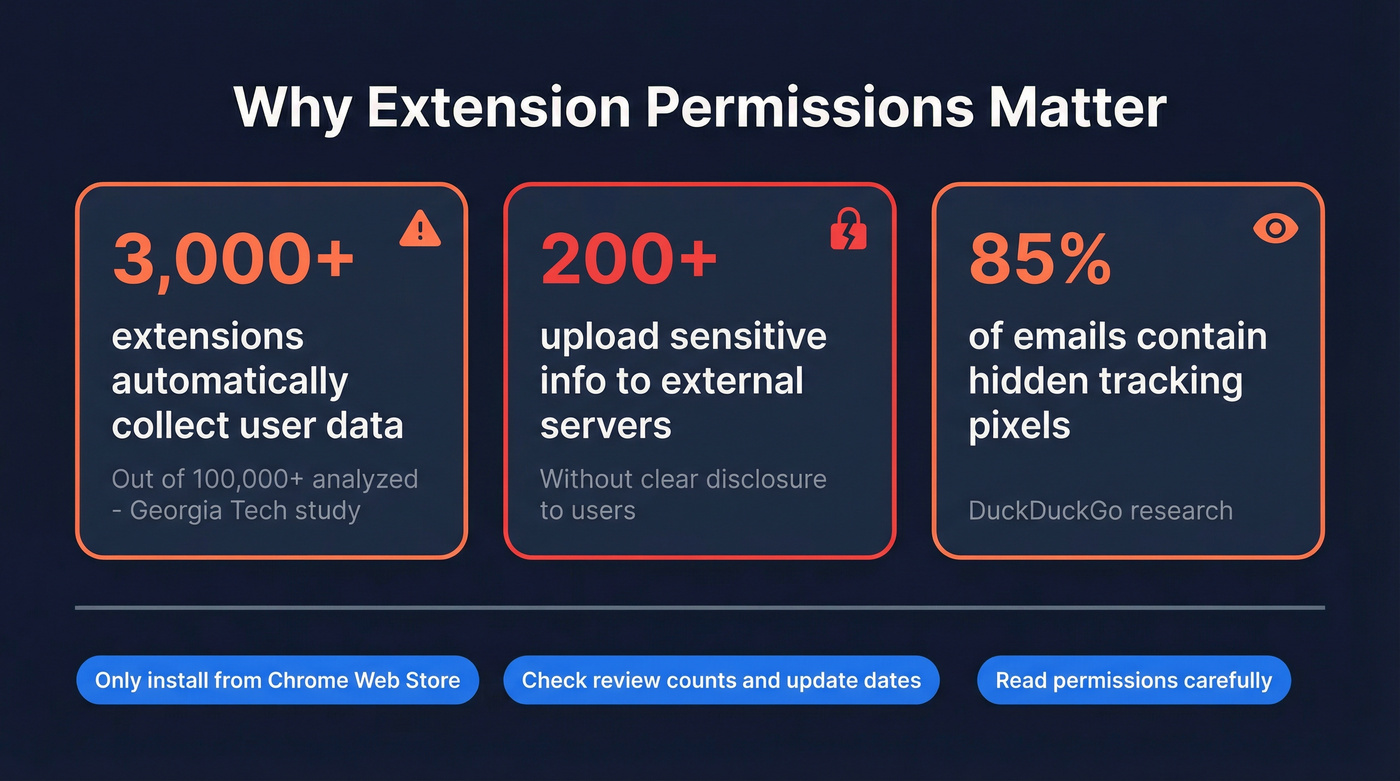
Protect yourself with a few rules. Only install from the Chrome Web Store. Check review counts and last-update dates. Read permissions carefully. If a simple email finder asks to "Read and change all your data on all websites," that's disproportionate - skip it. (For compliance, see GDPR for Sales and Marketing.)
Not Working? Quick Fixes
- Refresh the page after installing. Most extensions inject on page load.
- Check site access permissions - click the extension icon and confirm it has access to the current site.
- JS-heavy sites built with React or Angular often don't expose emails in raw HTML. Page scrapers won't find anything here. Switch to a database finder.
- Disable conflicting extensions - ad blockers and privacy tools sometimes block extension scripts.
- Reset via chrome://extensions - toggle off and back on, or remove and reinstall.
We ran into this ourselves testing scrapers on single-page apps: the extension would show zero results on a company's "About" page because the contact info loaded dynamically after the initial HTML render. Database finders sidestep this entirely since they're not reading the page at all.
FAQ
What's the difference between an email scraper and an email finder?
A scraper parses visible HTML for anything resembling an email address - no verification, no filtering. A finder queries a verified database and returns emails matched to the domain or person. For B2B outreach where deliverability matters, a finder is the better choice.
Are Chrome email extractor extensions safe?
Reputable extensions from the Chrome Web Store are generally safe, but always check permissions, review counts, and last-update dates before installing. Avoid unlisted extensions that require Developer Mode - they skip Google's security review entirely.
How do I add an email extractor to Chrome?
Visit the Chrome Web Store, search for the tool you want, and click "Add to Chrome." Confirm the permissions popup, then pin the extension to your toolbar using the puzzle-piece icon. The entire process takes under a minute.
Which free email extractor for Chrome is most accurate?
For verified B2B emails, Prospeo's free tier delivers 98% accuracy with 75 emails and 100 Chrome extension credits per month. For raw page scraping without verification, Email Extractor is the most popular free option with 400K+ users.