

How to Build a "Book a Demo" Page That Actually Converts
Companies with embedded scheduling after their demo form convert at 66.7%. The industry average sits around 30%. That gap isn't academic - it's the difference between a pipeline that compounds and one that quietly bleeds out.
To put it in dollars: if 500 people hit your demo page this month and you're converting at 30%, that's 150 booked meetings. Fix your scheduling flow and you're looking at 333. Same traffic, same ad spend, same page - 183 more conversations with buyers who raised their hand. We've audited dozens of demo pages across B2B SaaS, and the pattern is always the same: the page copy is fine, the scheduling flow is broken.
Yet only 8% of top B2B SaaS companies actually embed scheduling on their demo pages. The rest dump visitors onto a "thanks, we'll be in touch" dead-end and wonder why pipeline stays flat.
The fix isn't complicated. It's a handful of structural decisions - CTA wording, form length, scheduling flow, and knowing when a demo page is the wrong move entirely.
The Quick Version
If you're short on time, here's the playbook:
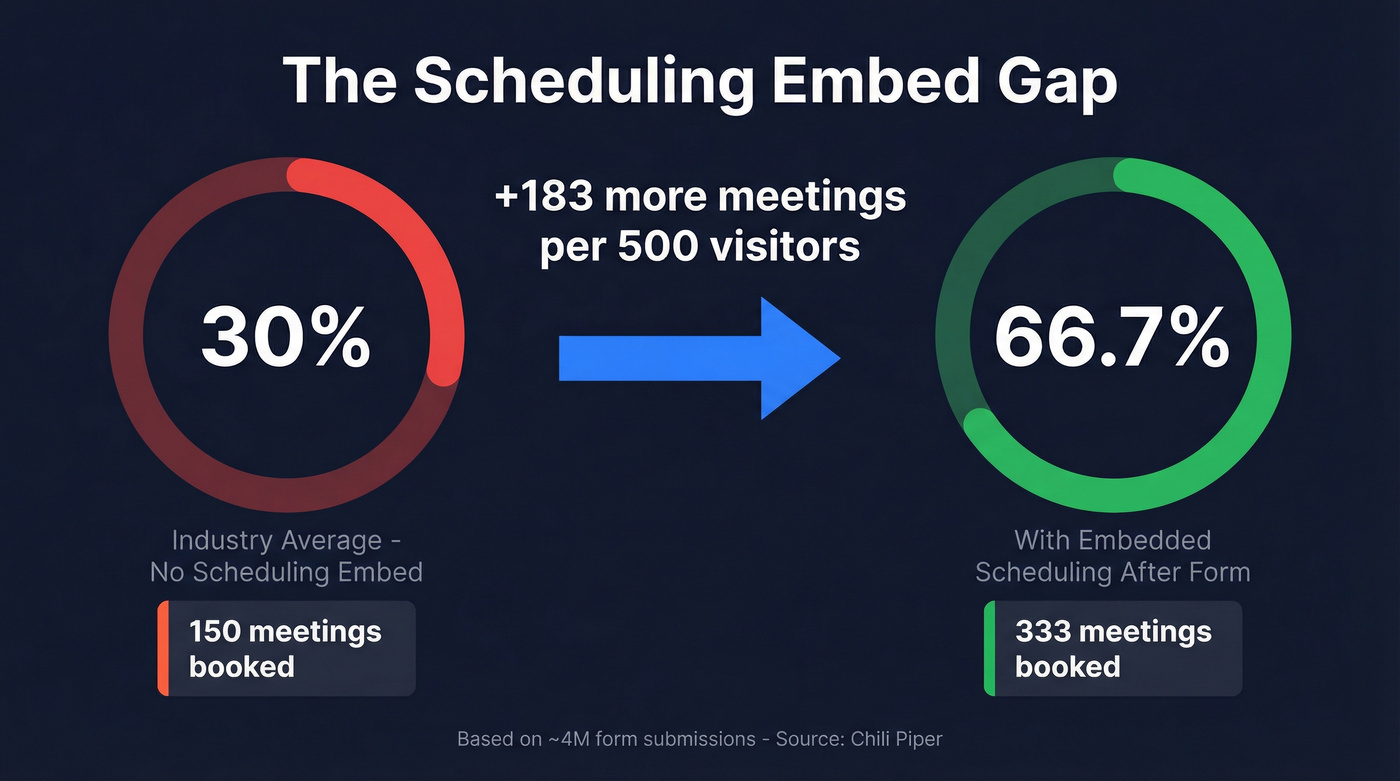
- Embed scheduling directly after form submit. This single change doubles conversion from ~30% to 67%. Don't send people to a confirmation page.
- Keep your form to 3-5 fields, add social proof and an FAQ, and tell visitors exactly what the demo covers. High-intent visitors tolerate qualification questions, but every unnecessary field adds friction.
- If your average deal is under $5K, consider skipping the demo gate entirely. Offer a free trial, interactive tour, or self-serve signup instead.
"Book" vs "Schedule" - Which CTA Wins
The words on your button matter more than most teams realize.
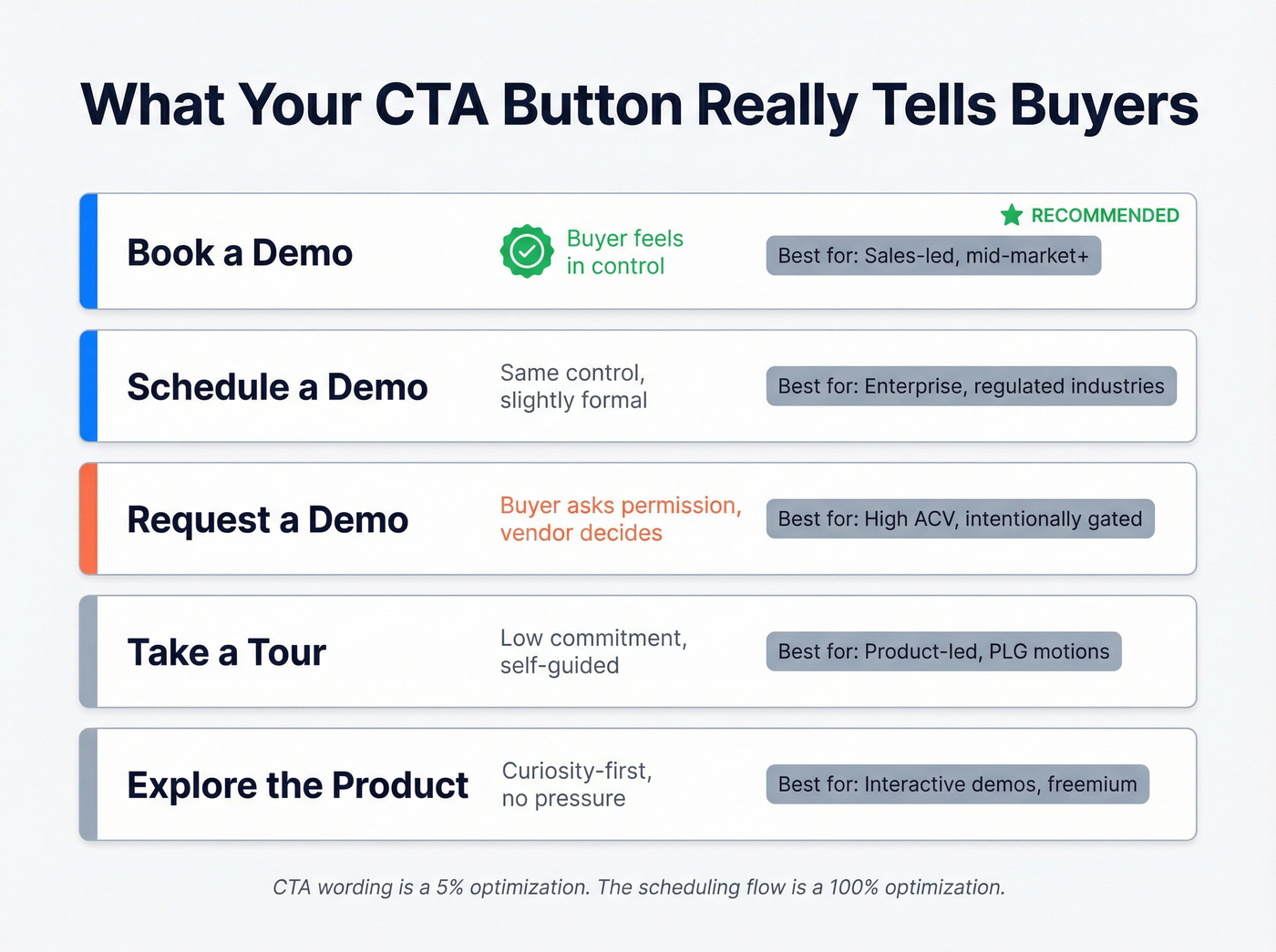
| CTA Wording | What It Signals | Best For |
|---|---|---|
| Book a demo | Buyer picks the time, feels in control | Sales-led, mid-market+ |
| Schedule a demo | Same control signal, slightly formal | Enterprise, regulated industries |
| Request a demo | Buyer asks permission, vendor decides | High-ACV, intentionally gated |
| Take a tour | Low commitment, self-guided | Product-led, PLG motions |
| Explore the product | Curiosity-first, no pressure | Interactive demos, freemium |
For most B2B SaaS companies, "Book a demo" is the default winner. "Request" implies you're asking the vendor for something. "Book" and "Schedule" imply you're in control - you're picking a time, not waiting for someone to get back to you. That psychological difference matters.
Use "Take a tour" only if you're offering a self-guided experience. Navattic's analysis of 40,000 demos found that "Take a tour" (28% of CTAs) and "Product tour" (14%) drive the highest engagement and completion rates for interactive experiences.
Here's the thing: the CTA wording debate is a 5% optimization. The scheduling flow after the click is a 100% optimization. Spend your energy accordingly.
When the Demo Gate Is Wrong
Not every product needs a demo-gated motion. The decision is simpler than most teams make it.
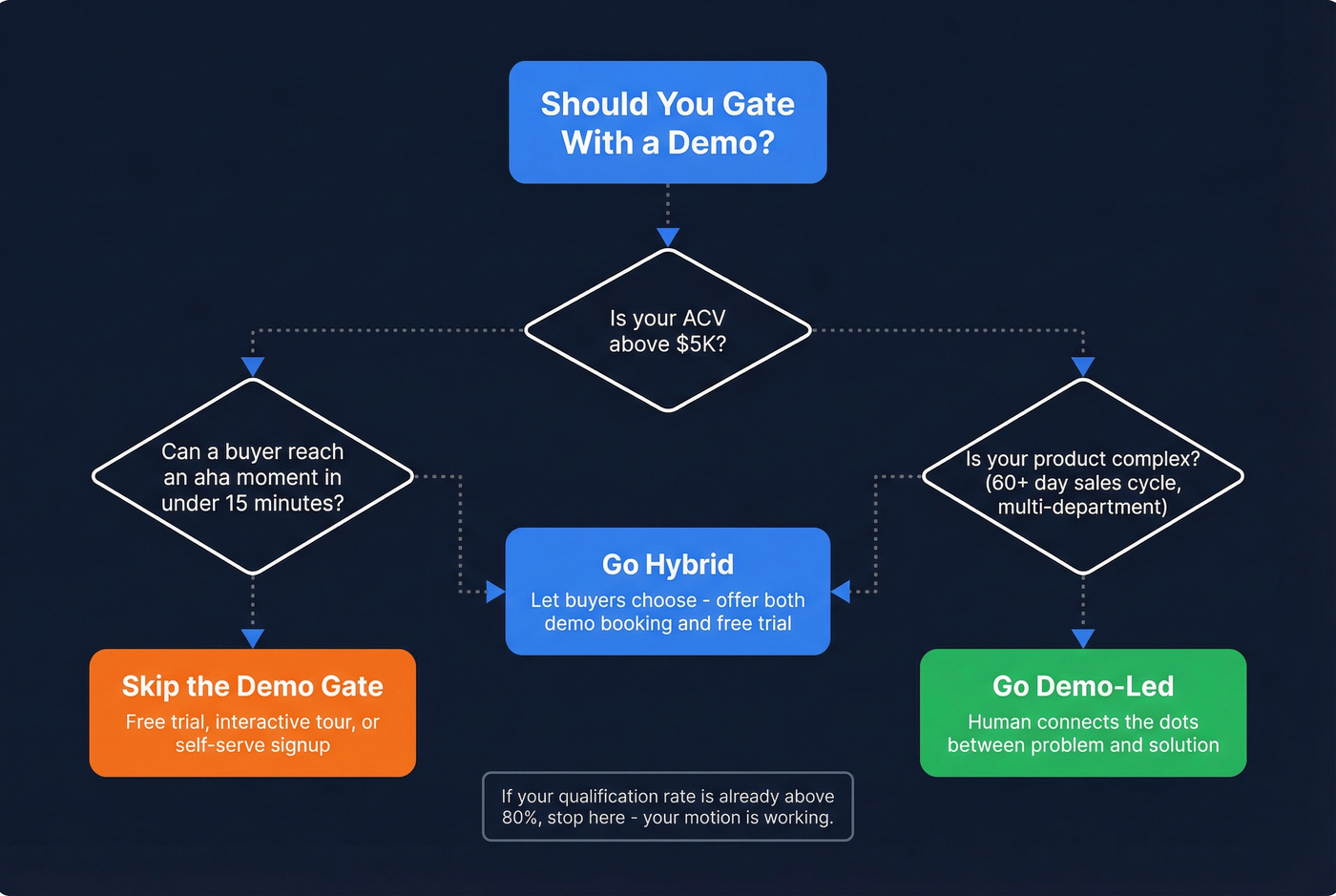
Go demo-led if your product is complex, your ACV is high, and buyers genuinely need a human to connect the dots between their problem and your solution. Think multi-department platforms, compliance-heavy tools, or anything with a 60+ day sales cycle.
Go free trial or self-serve if your product is straightforward, your deal size is under $5K, and a motivated buyer can reach an "aha moment" within 15 minutes. Demos add friction without value here - you're forcing a 30-minute call on someone who just wants to poke around. Prospeo takes this approach with a free tier (75 emails/month) and no sales calls required, because the product speaks for itself once you're inside it.
Go hybrid if you're mid-market with moderate complexity. Let the buyer choose their path. ActiveCampaign offers both a demo booking and a 14-day free trial. Monograph, an architecture project management tool, replaced their demo page with a 4-minute product video. These aren't random choices - they're deliberate responses to how buyers actually want to evaluate software.
Skip this if your qualification rate is already above 80%. You don't need to rethink your motion. But if it's below 60%, stop optimizing your page copy and fix your routing. No amount of headline testing will compensate for a broken scheduling flow.
Demo Conversion Benchmarks
Good benchmarks depend on where you measure. RevenueHero's funnel analysis breaks the demo funnel into two stages:
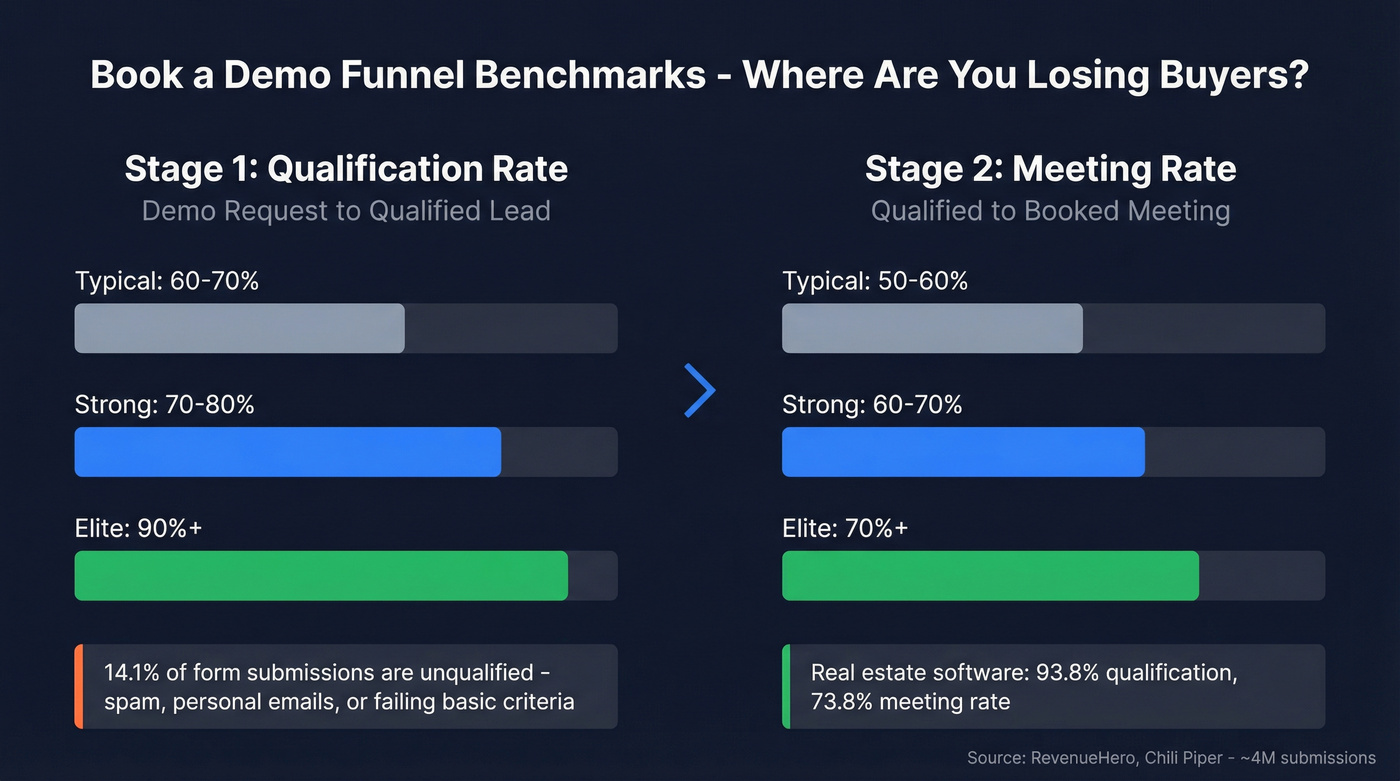
Qualification rate (demo request to qualified lead): typical is 60-70%, strong is 70-80%, and elite teams hit 90%+.
Meeting rate (qualified to booked meeting): typical is 50-60%, strong is 60-70%, elite is 70%+.
The variance across segments is massive. Real estate software companies see 93.84% qualification rates and 73.78% meeting conversion. Healthcare software? Just 52.11% qualified, though 61.26% of those do book. Your benchmarks depend heavily on your ICP and how much unqualified traffic hits your demo page.
Data across ~4 million form submissions found that 14.1% of people who fill out demo forms aren't qualified - spam, personal emails, or failing basic criteria. That's not a small number. If you're not routing and qualifying before the calendar appears, you're wasting rep time on junk leads.
If fewer than 60% of your qualified submissions are booking meetings, your scheduling flow has a problem. Fix the plumbing before you optimize the page copy.

Optimizing your demo page doubles conversions. But what if your reps could skip the wait entirely? Prospeo gives sales teams 300M+ verified contacts with 98% email accuracy - self-serve, no demo required. At $0.01/email, your pipeline compounds before the first call.
Stop gating your pipeline behind a scheduling link.
Anatomy of a High-Converting Page
Above the Fold
The first screen needs to do three things: establish trust, communicate what the demo covers, and present the form.
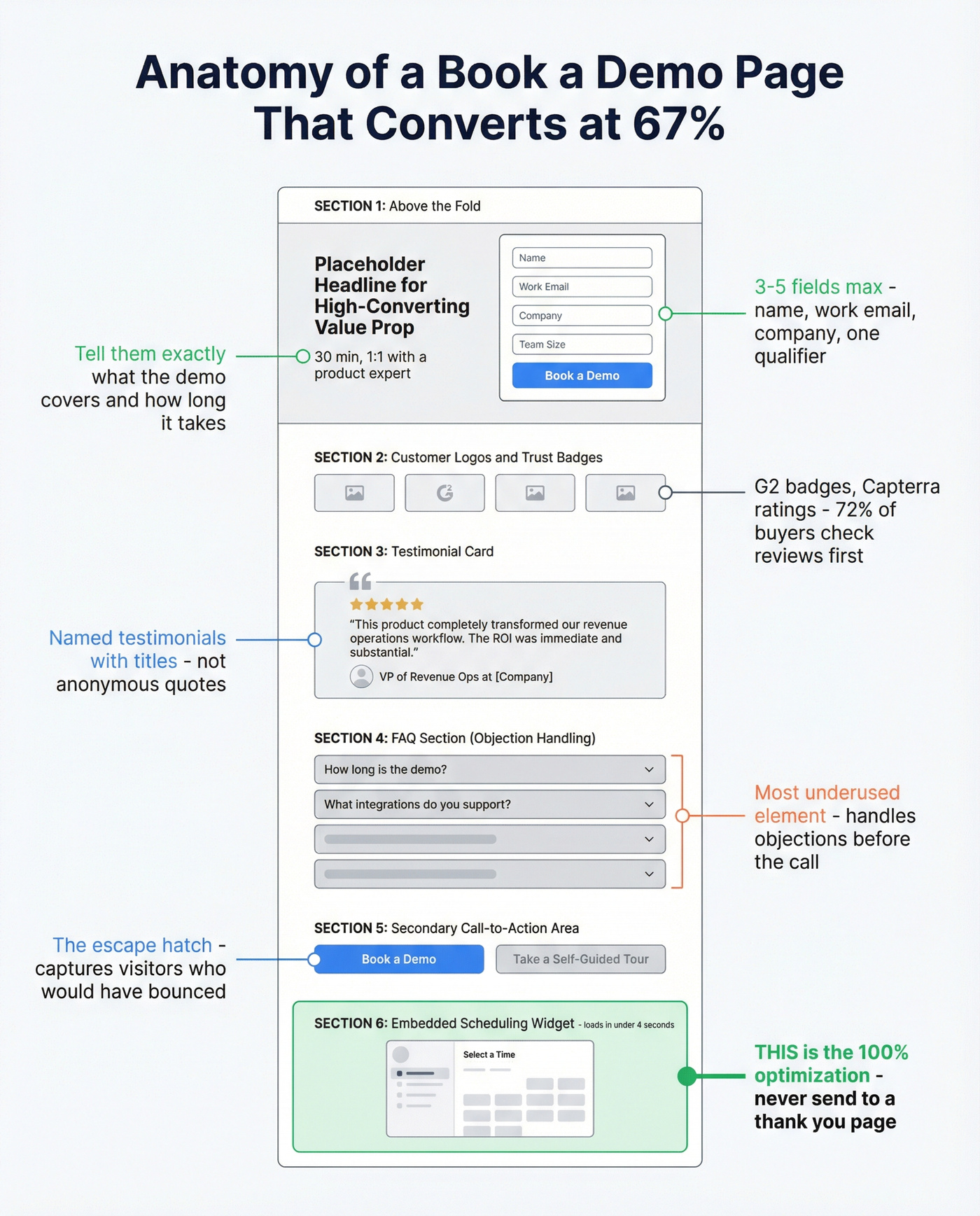
Tell visitors what they're signing up for. Deel specifies "30 minutes." Lattice says "1:1 with an expert, no strings attached." Hootsuite uses a 5-field form with an option to prefill via social login to reduce typing friction, while Remote uses a popup form with just 4 fields. These small details reduce anxiety - a visitor who knows the demo is 30 minutes with a product specialist is far more likely to commit than one staring at a form with zero context.
Keep the form to 3-5 fields. Name, work email, company, and one qualifying question (team size or use case) is the sweet spot. We've seen teams add 8-10 fields and wonder why conversion tanks. Visitors who click the CTA have typically done their due diligence already - they'll tolerate a qualifying question or two, but they won't fill out a census form.
Social Proof That Works
WebEngage's demo page interleaves social proof sections between product USPs - testimonials, trust badges, G2 ratings, and customer logos. Distributing social proof throughout the page reinforces credibility at every scroll depth, not just above the fold.
Named testimonials with titles outperform anonymous quotes every time. A quote from "VP of Revenue Operations at [Company]" carries weight. "Happy Customer" does not. Add G2 or Capterra badges if your ratings are strong - they're instant credibility shortcuts that 72% of B2B buyers check before engaging with a vendor.
The FAQ Section
Let's be honest: the FAQ on a demo page is the most underused element we see. Guidebook addresses ease of use for non-technical users, human support availability, and integrations. Craver uses their FAQ to preempt repetitive sales questions, which reduces friction and shortens the sales cycle.
Strong FAQ questions for a demo page: "How long is the demo?" "Do I need to prepare anything?" "What integrations do you support?" "Is there a free trial?" These aren't afterthoughts - they're objection handlers disguised as helpfulness.
The "Not Ready?" Escape Hatch
Not every visitor is ready to talk to a human. Give them an alternative path: an interactive tour, a product video, or a free trial. Ctrl Hub places a 1-minute product video at the top of their demo page for visitors who want a quick preview before committing. ActiveCampaign offers both a demo booking and a 14-day trial on the same page.
This isn't diluting your conversion. It's capturing visitors who would've bounced entirely. In our experience, the escape hatch picks up a significant share of visitors who want to explore before committing to a call. Without it, those people just leave.
How to Fill Your Calendar Without Cold Calling
Most scheduling mistakes come down to one thing: making the visitor wait.
Double form fill is the worst offender. Visitor submits a form, then gets sent to another form to pick a time. Data across millions of submissions shows this drops conversion by ~50%. Embed scheduling immediately after the first form.
Slow calendar load is the silent killer. If your scheduling widget takes 30-45 seconds to load, you've already lost the visitor. Aim for 3-4 seconds max. Test this on mobile, too - we've seen pages that load fine on desktop but choke on a phone, which is where a surprising number of demo requests originate.
No scheduling embed at all is the most common failure. "Thanks, we'll be in touch within 24 hours" is a conversion graveyard. The visitor's intent peaks at the moment they click "submit." Every hour of delay erodes it.
Interactive Demos - The Rising Alternative
Interactive demos are the fastest-growing alternative to traditional demo pages. About 18% of B2B SaaS websites now feature one, up from 12% in 2024.
The data on gating is clear: 66% of top-performing interactive demos are ungated, and ungated demos see +6% engagement and +7% completion versus gated ones. Of the top demos that do gate, 75% collect only a single field, and 45% place the form as the last step - after the visitor has already experienced the product.
Structure matters. Multi-flow demos where users choose their own path achieve 48% higher completion rates than single-flow demos. The optimal length is 5-13 steps, though the highest completion rates come from flows of 1-6 steps. Keep copy tight - about 25-30 words per dialog step, with CTAs appearing every 1-2 steps.
Storylane, Navattic, Walnut, and Tourial are the most commonly cited platforms for building these. Start ungated with a short flow and measure completion before adding complexity.
Tools to Power Your Demo Flow
Scheduling Tools
For most teams, the scheduling tool is the linchpin. Calendly is the default - it integrates with everything and your prospects already know how to use it. Cal.com is the pick if you want open-source control and self-hosting options.
| Tool | Starting Price | Best For |
|---|---|---|
| Calendly | Free / $12/user/mo | Most teams (default choice) |
| Cal.com | Free / $15/user/mo | Open-source flexibility |
| SavvyCal | $12/user/mo | Overlay scheduling UX |
| zcal | $9.50/user/mo | Budget-conscious teams |
| Sidekick | $5/user/mo | Cheapest paid option |
| Reclaim | $10/user/mo | AI-driven scheduling |
Form Routing and Instant Booking
For teams running high demo volume with complex routing rules - round-robin by territory, account-based routing, lead qualification before calendar display - you need a dedicated tool. Chili Piper runs $30-150/user/mo and is the market leader for instant form-to-meeting conversion. RevenueHero offers similar functionality at $15-50/user/mo and is gaining traction with mid-market teams. Both eliminate the double form fill problem and route leads to the right rep automatically.
Interactive Demo Platforms
| Platform | Starting Price | Notes |
|---|---|---|
| Storylane | Free / $40/mo | Best entry point |
| Navattic | ~$500-1,500/mo | Strongest analytics |
| Walnut | ~$500-2,000/mo | Sales demo focus |
| Tourial | ~$500-1,500/mo | Multi-flow builder |
Prospect Data for Outbound
Your demo page handles inbound. For outbound, you need verified contact data to schedule meetings proactively - and bad data will tank your outreach before anyone sees your beautifully optimized page. Prospeo covers 300M+ professional profiles with 98% email accuracy and a 7-day data refresh cycle, with native integrations into Salesforce, HubSpot, Smartlead, Lemlist, and Clay so verified contacts flow directly into your sequences.
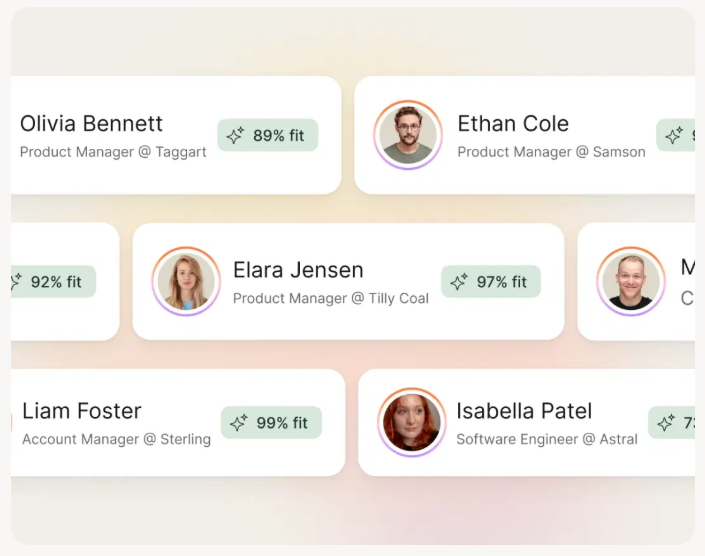
You're fixing your demo page to book 183 more meetings a month. Now make sure reps walk into those calls with verified direct dials and buyer intent data. Prospeo's 125M+ mobile numbers hit a 30% pickup rate - 3x the industry average - so every booked demo actually connects.
Give every booked demo a direct line to the decision-maker.
FAQ
What's the best CTA wording for a demo page?
"Book a demo" works best for sales-led motions because it implies the buyer controls the timing. "Take a tour" wins for product-led experiences. Avoid "Request a demo" - it frames the buyer as asking permission, which adds psychological friction to an already high-commitment action.
How many form fields should a demo page have?
Three to five fields is the sweet spot: work email, name, company, and one qualifying question. Every unnecessary field beyond five measurably increases drop-off, even among high-intent visitors who've already researched your product.
What's a good demo-to-meeting conversion rate?
Sixty to seventy percent of qualified submissions booking a meeting is strong. Below 50% signals friction in your scheduling flow - likely a missing calendar embed, slow load times, or a "we'll get back to you" dead-end that lets buyer intent decay.
Should I gate my interactive demo?
No. Sixty-six percent of top-performing interactive demos are ungated, and ungated demos see 6% higher engagement and 7% higher completion. If you do gate, collect one field max and place the form at the end of the experience.
How do I fill my demo pipeline with outbound leads?
Outbound pipeline comes from cold outreach, event follow-ups, and referral networks. For cold outreach at scale, you need verified contact data - tools like Prospeo find verified emails and direct dials with a 7-day refresh cycle that keeps you from emailing people who changed jobs last month. Pair accurate outbound data with a high-converting inbound page to build pipeline from both directions.