Email Provider Checker: How to Identify Any Domain's Mail Host
You need to know where a domain's email lives, and you need to know fast. Run an MX lookup, match the hostname to a known provider, move on. DNS makes this almost trivially easy - until security gateways, custom hostnames, and missing records throw a wrench in the process.
Here's the thing: about 1 in 5 enterprise domains won't give you a straight answer from MX records alone, because a security layer like Mimecast or Proofpoint sits in front of the real provider. We've spent enough time chasing down these edge cases to know the workarounds cold, and that's what this guide covers - the fast path and the messy path.
Quick Version
- Run an MX lookup on the domain and match the hostname to a provider using the reference table below.
- If MX shows a security gateway, check SPF records or historical DNS to find the real provider underneath.
What Does an Email Provider Checker Actually Do?
Three different things get called "email checking." They're not the same.
Provider checking identifies which email hosting service handles a domain's mail - Google Workspace, Microsoft 365, Zoho, ProtonMail, and so on. You're answering one question: "where does mail for this domain go?"
Email validation checks whether an address could exist. Proper syntax, valid format, no obvious typos. It's a structural check, nothing more. If you're comparing tools, see our guide to the best email ID validators.
Email verification confirms whether a mailbox actually exists and can receive mail. It pings the SMTP server and checks for bounces, catch-all domains, and spam traps. Hunter's verification guide breaks down these distinctions well. If you need a deeper workflow, our email verification for outreach guide covers the practical steps.
A provider lookup tool does only the first job. It won't tell you if john@acme.com is real - it tells you that Acme's mail runs through Google Workspace. If you're looking for an email finder to locate individual addresses, that's a different category entirely (start with our email hunter tools roundup).
How MX Records Reveal the Provider
Every domain that receives email has MX (Mail Exchange) records in its DNS, containing two pieces of information: a hostname where mail should be delivered and a priority number where lower means higher priority.
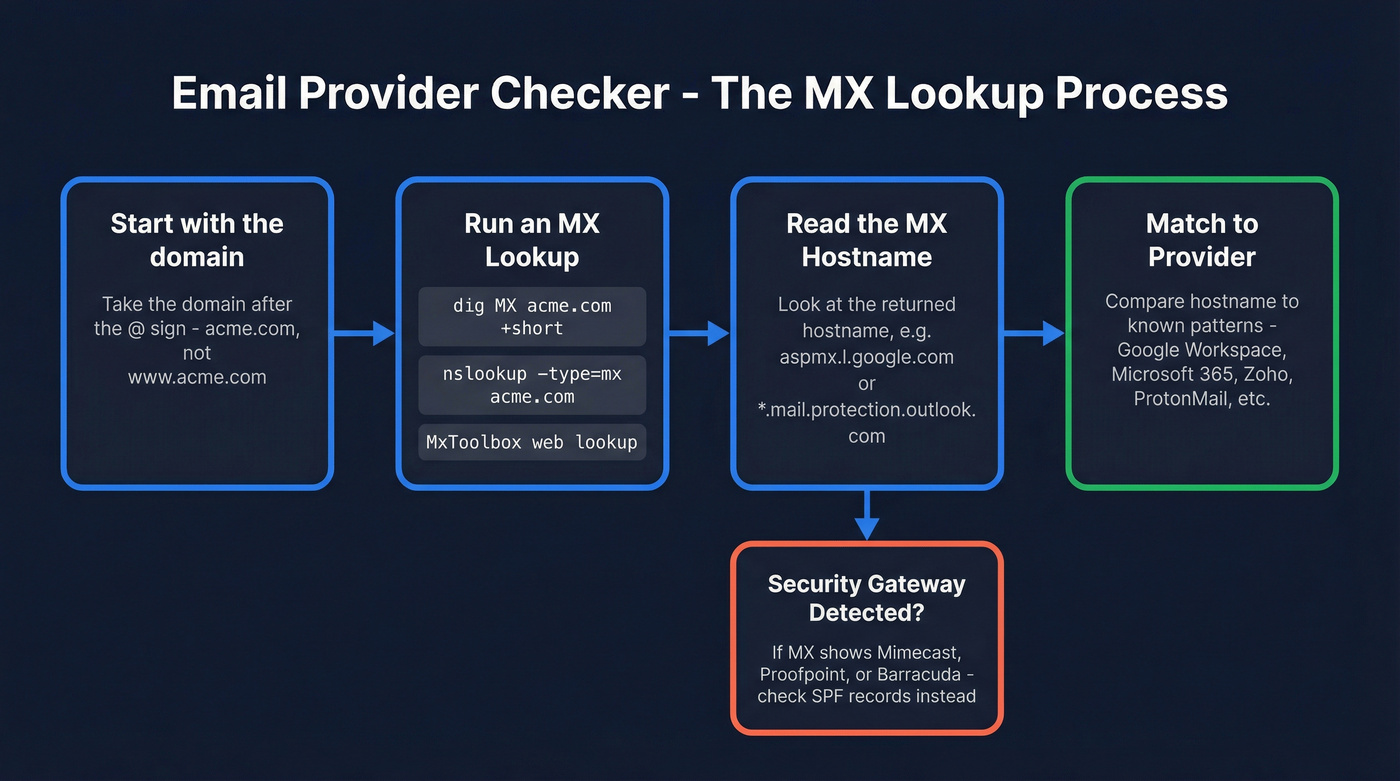
Take the domain portion of the email address - acme.com, not www.acme.com. Run an MX lookup using any DNS tool: MxToolbox, dig, nslookup, or a dedicated API. Read the returned hostname. If it says aspmx.l.google.com, that's Google Workspace. If it says acme-com.mail.protection.outlook.com, that's Microsoft 365. Simple.
On Windows, open Command Prompt:
[nslookup -type=mx](https://learn.microsoft.com/en-us/troubleshoot/exchange/mailflow/get-internet-mx-record-smtp-domain-with-nslookup) acme.com
On Mac or Linux:
[dig MX acme.com +short](https://manpages.debian.org/bullseye/bind9-dnsutils/dig.1.en.html)
Example output:
10 aspmx.l.google.com.
20 alt1.aspmx.l.google.com.
30 alt2.aspmx.l.google.com.
That's Google Workspace - multiple MX records with incrementing priorities. Zoho shows mx.zoho.com; ProtonMail often shows mail.protonmail.ch. Once you know the patterns, mail server identification takes seconds.
MX-to-Provider Reference Table
| Provider | Common MX Hostnames | Notes |
|---|---|---|
| Google Workspace | aspmx.l.google.com |
Multiple backup MXs at alt1-4.aspmx.l.google.com |
| Microsoft 365 | *.mail.protection.outlook.com |
Often tenant-specific: domain-com.mail.protection.outlook.com |
| Zoho Mail | mx.zoho.com (pri 10), mx2.zoho.com (pri 20), mx3.zoho.com (pri 50) |
Regional variants exist for EU, IN, AU |
| ProtonMail | mail.protonmail.ch, mailsec.protonmail.ch |
Standard ProtonMail MX patterns |
| Fastmail | in1-smtp.messagingengine.com |
Shared infrastructure hostname |
| Amazon SES | inbound-smtp.{region}.amazonaws.com |
Region-specific, e.g. us-east-1 |
| Rackspace | mx1.emailsrvr.com, mx2.emailsrvr.com |
Legacy hosting customers |
| GoDaddy | mailstore1.secureserver.net |
Often bundled with domain registration |
| iCloud Mail | mx1.mail.icloud.com |
Rare for business domains |
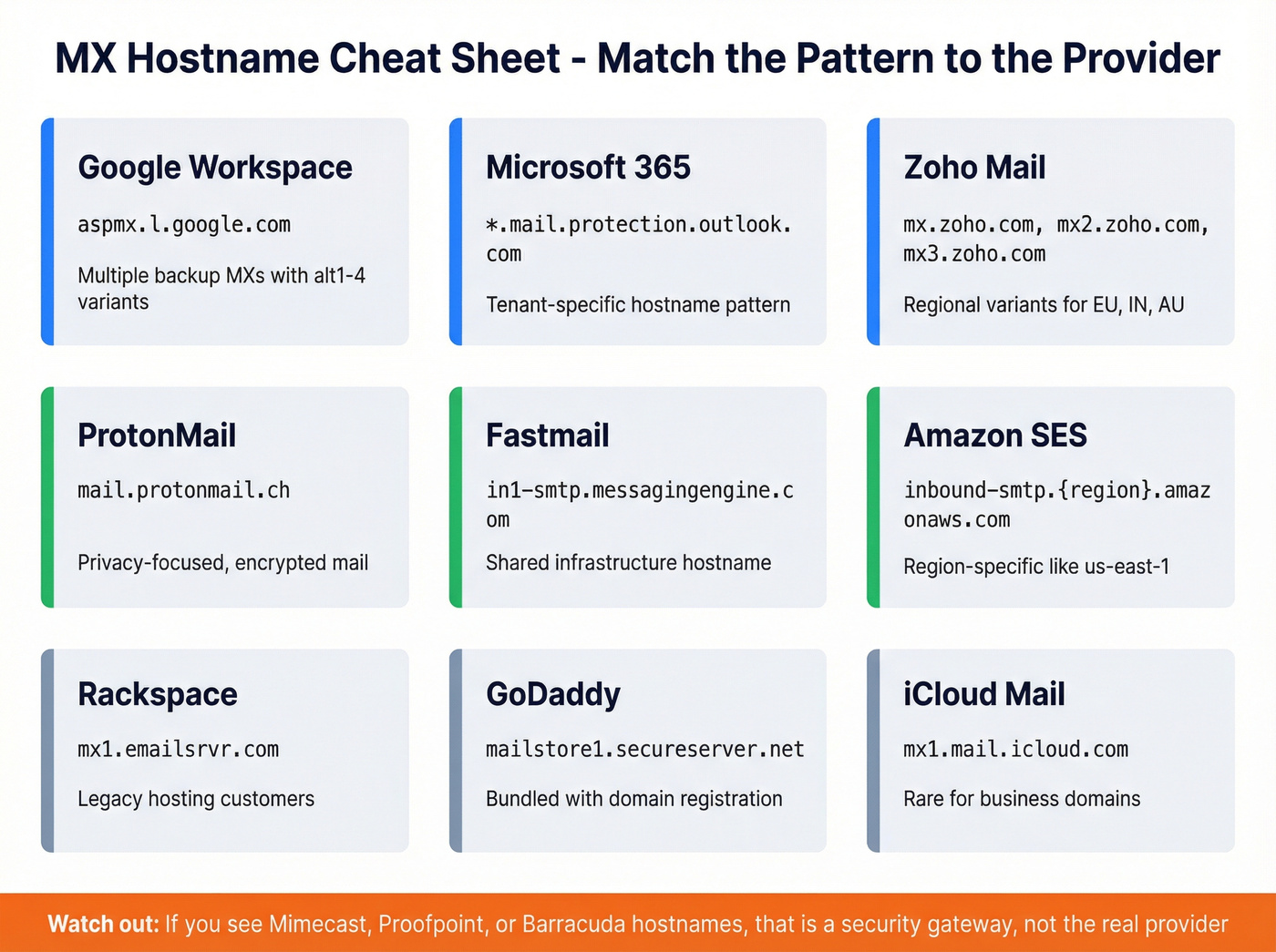
Google Workspace uses multiple backup MX records with incrementing priority numbers. Microsoft 365 uses tenant-specific hostnames, which makes identification fast even across thousands of domains.

Identifying a domain's email provider is useful - but what you really need is verified contact data behind it. Prospeo's 5-step verification checks MX records, catch-all domains, spam traps, and honeypots to deliver 98% email accuracy across 300M+ profiles.
Stop at the MX lookup and you're only halfway there.
When MX Records Lie
MX records only show you the inbound mail handler. For a growing number of companies, that's a security gateway - not the actual email hosting provider.
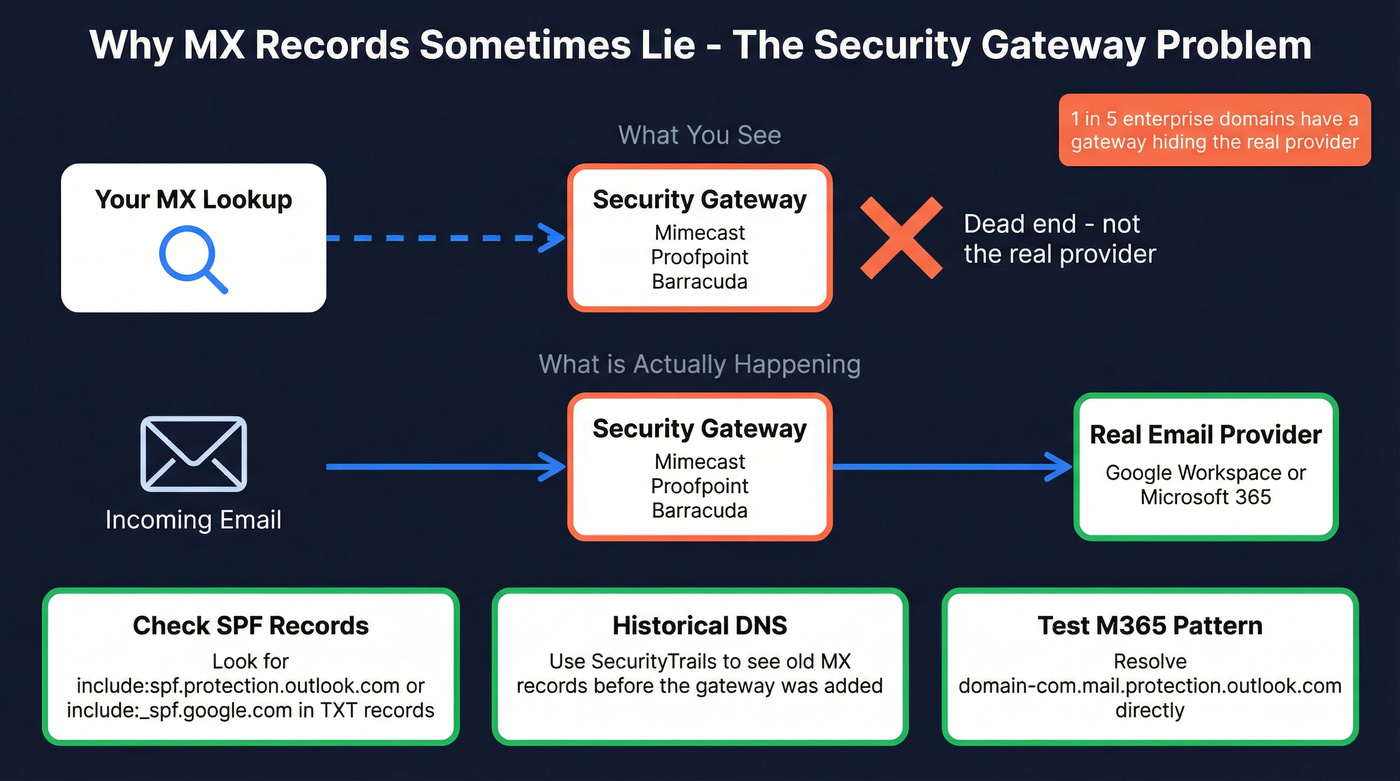
If you see us-smtp-inbound-1.mimecast.com, mx1.emailsecurity.proofpoint.com, or *.barracudanetworks.com in the MX records, you've found the security layer, not the mailbox provider. Let's break down three ways to uncover what's actually underneath.
Check SPF Records
The domain's TXT records often include include:spf.protection.outlook.com or include:_spf.google.com, revealing the sending infrastructure even when MX points to a gateway. This is the fastest workaround and works the majority of the time. If you need the full authentication picture, see our SPF, DKIM, DMARC explainer.
Look at Historical DNS
Tools like SecurityTrails show previous MX records. Before the company added Mimecast, their MX probably pointed directly to Google or Microsoft. Historical DNS is your time machine.
Test the Microsoft 365 Tenant Pattern
Try resolving domain-com.mail.protection.outlook.com. If it resolves, that's a strong indicator they use Microsoft 365 even if the current MX points to a gateway.
We recently checked a prospect's domain and saw Mimecast in the MX records. A quick SPF lookup revealed include:spf.protection.outlook.com - they were on Microsoft 365 behind the gateway. The whole process took under a minute.
One more wrinkle worth knowing: an APNIC 2023 study analyzing 200M+ domains found that 58% had no MX record at all. Per RFC 5321, mail servers fall back to the domain's A record in that case, which makes provider identification significantly harder - you'd need to check SPF/TXT records or test SMTP connectivity directly. For deeper investigation, tools like Censys can surface mail-related hostnames exposed on a domain's infrastructure.
Handling Custom MX Hostnames
Sometimes the MX lookup returns something like smtp.example.com - a custom hostname that doesn't map to any known provider. The workaround is straightforward:
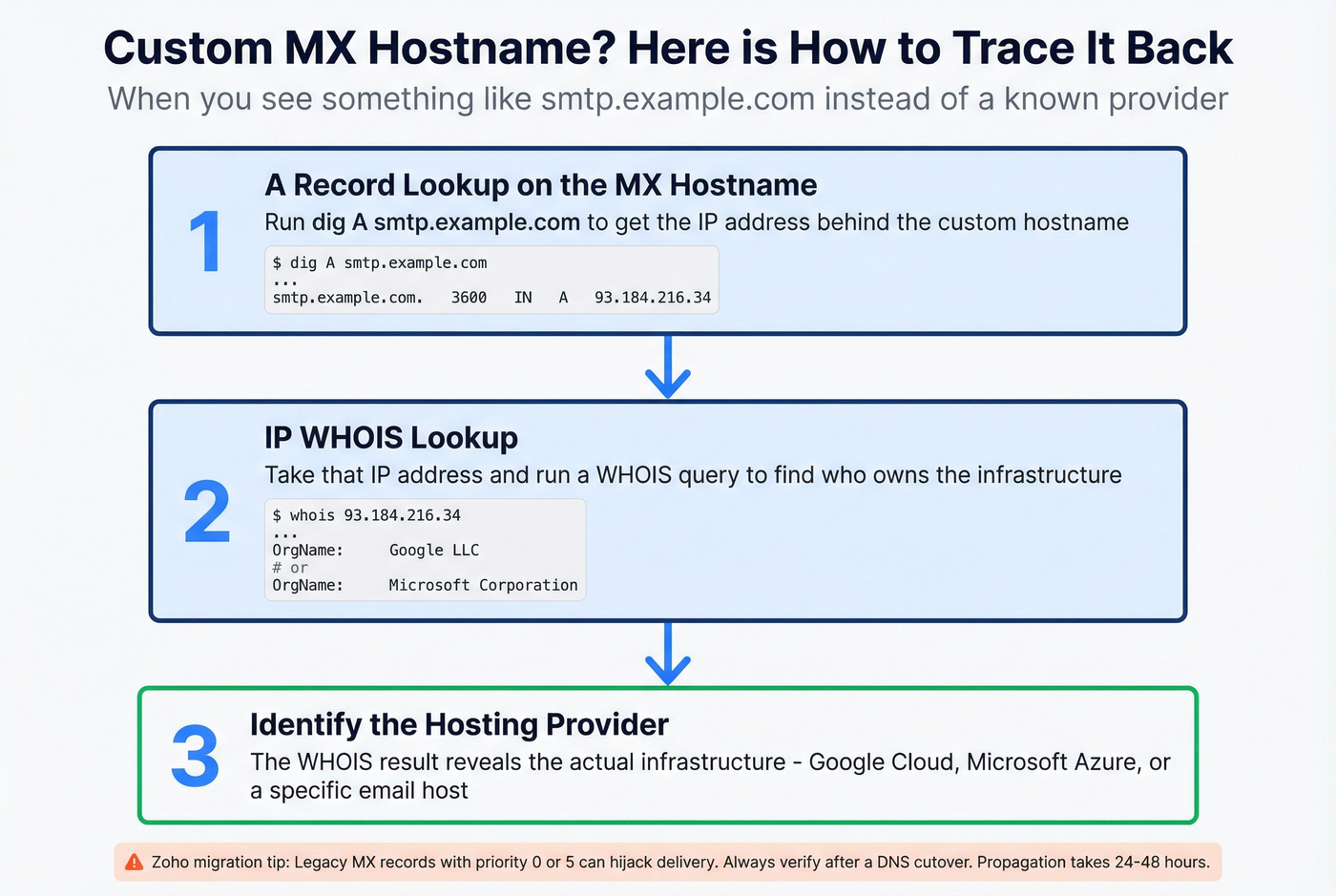
- Run an A record lookup on the MX hostname itself:
dig A smtp.example.com. - Take the returned IP address and run an IP WHOIS lookup.
- The WHOIS result identifies the hosting company - often Google Cloud, Microsoft Azure, or a specific email provider's infrastructure.
This three-step process handles the vast majority of custom hostname scenarios. It's the same workflow Misk documents for ambiguous MX results.
Watch out for Zoho migrations specifically. Legacy MX records with priority 0 or 5 can hijack delivery away from the intended Zoho servers if you don't clean them up. DNS propagation for MX record changes typically takes 24-48 hours, so always verify after a cutover.
Best Tools for Checking Email Providers
For one-off lookups, MxToolbox is the default. For programmatic detection at scale, Email Provider Lookup API is a strong free option. If you're building a broader stack, our list of cold email marketing tools can help you compare options.

Email Provider Lookup API
Use this if you're a developer building routing logic or automating provider detection at scale. Skip this if you just need to check one domain manually.
Free, no signup, no API keys. The endpoint returns the provider name plus a login URL directly - no MX interpretation needed: GET https://api.emailproviderlookup.com/v1/lookup?email=example@gmail.com. Rate limit is 100 requests per minute per IP. It uses MX lookups, TXT records, and fallback mechanisms under the hood, so you don't have to build that logic yourself. For teams processing thousands of domains daily, this is the obvious starting point before you consider building anything custom.
MxToolbox
Use this if you want a visual interface for MX lookups plus blacklist checking and DNS diagnostics. Skip this if you want automatic provider labeling - MxToolbox shows you the raw MX hostnames, and you interpret them yourself using the reference table above.
We've used MxToolbox for years as a quick sanity check during email migrations. It's reliable and fast. The free tier handles individual lookups well; paid monitoring plans start around $100+/mo for teams that need ongoing DNS health checks.
DNSChecker
Free, runs lookups from multiple resolver locations worldwide. Useful for confirming DNS propagation after a migration, but it doesn't label providers automatically. Think of it as a second opinion when MxToolbox results look inconsistent.
EmailListVerify ESP Finder
Free for individual lookups, with bulk verification starting around $0.001-$0.01/email. Identifies the ESP for marketing senders specifically - more useful for deliverability teams than for sales prospecting.
Why the Provider Matters
Knowing which email hosting provider a domain uses feeds directly into real workflows.
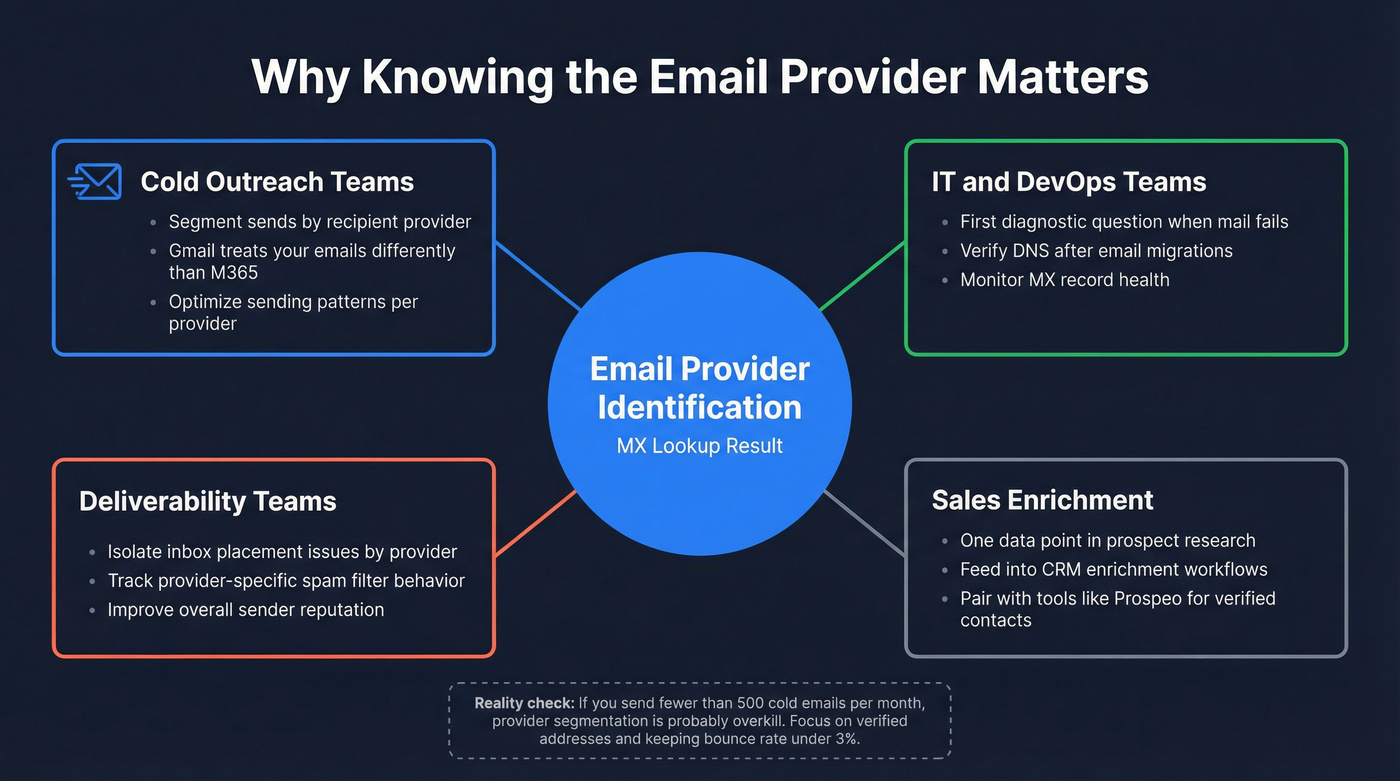
Say you're running cold outreach and seeing low inbox placement. Segmenting sends by recipient provider helps you isolate the problem, because Gmail treats your emails differently than Microsoft 365 does. For IT teams, the first diagnostic question when mail delivery fails is always "where is this domain's mail supposed to go?" MX lookups answer that instantly.
For sales teams, knowing a prospect's provider helps you optimize sending patterns and avoid provider-specific spam filters. It's one data point in a larger enrichment picture (pair it with data enrichment for cold email to make it actionable).
Look, if your deal sizes are under five figures and you're sending fewer than 500 cold emails a month, you probably don't need to segment by provider at all. Just focus on sending to verified addresses and keeping your bounce rate under 3%. The consensus on r/coldemail tends to agree - provider segmentation is overkill until you're at real volume. If you're scaling, use an email deliverability checklist to keep the basics tight.

You just learned how security gateways hide the real mail host. Prospeo's proprietary email infrastructure cuts through that noise - verifying deliverability at the mailbox level, not just the DNS level. 143M+ verified emails, refreshed every 7 days.
Skip the DNS detective work and go straight to verified contacts.
FAQ
Can I check the provider for a single email address?
The provider is determined by the domain portion after the @. Run an MX lookup on that domain - acme.com, not the full address. Every mailbox on the same domain uses the same hosting provider, so the individual address doesn't change the result.
What if a domain has no MX record?
Per RFC 5321, mail servers fall back to the domain's A record. An APNIC 2023 study found that 58% of 200M+ analyzed domains had no MX record at all. Check SPF/TXT records or test SMTP connectivity directly to identify the mail handler.
How do I verify emails after identifying the provider?
Use a verification tool that confirms whether the mailbox actually exists - not just whether the domain receives mail. You want real-time verification with catch-all handling and spam-trap removal as the baseline. Prospeo offers 75 free lookups per month with 98% accuracy and 5-step verification, enough to validate a target account list before launching outreach.
Is there a free email provider checker API?
Email Provider Lookup API (emailproviderlookup.com) is completely free with no signup required. It returns the provider name and login URL for any domain at 100 requests per minute. For bulk workflows beyond that, combine dig MX commands with a simple hostname-matching script using the reference table above.