


10 DocuSign Alternatives That Won't Nickel-and-Dime You
You just opened the renewal email. $40 per user per month on annual billing for Business Pro - and somehow your team still ran out of envelopes in October. The CFO wants to know why you're paying for a signing tool that charges extra when someone fixes a typo. You're not alone, and there are better options that won't punish you for it.
We tested all ten of these tools and dug into real pricing, community complaints, and compliance specs. Here's what we found - honest opinions included, plus a framework for picking the right one without a three-month evaluation cycle.
Our Top Picks (TL;DR)
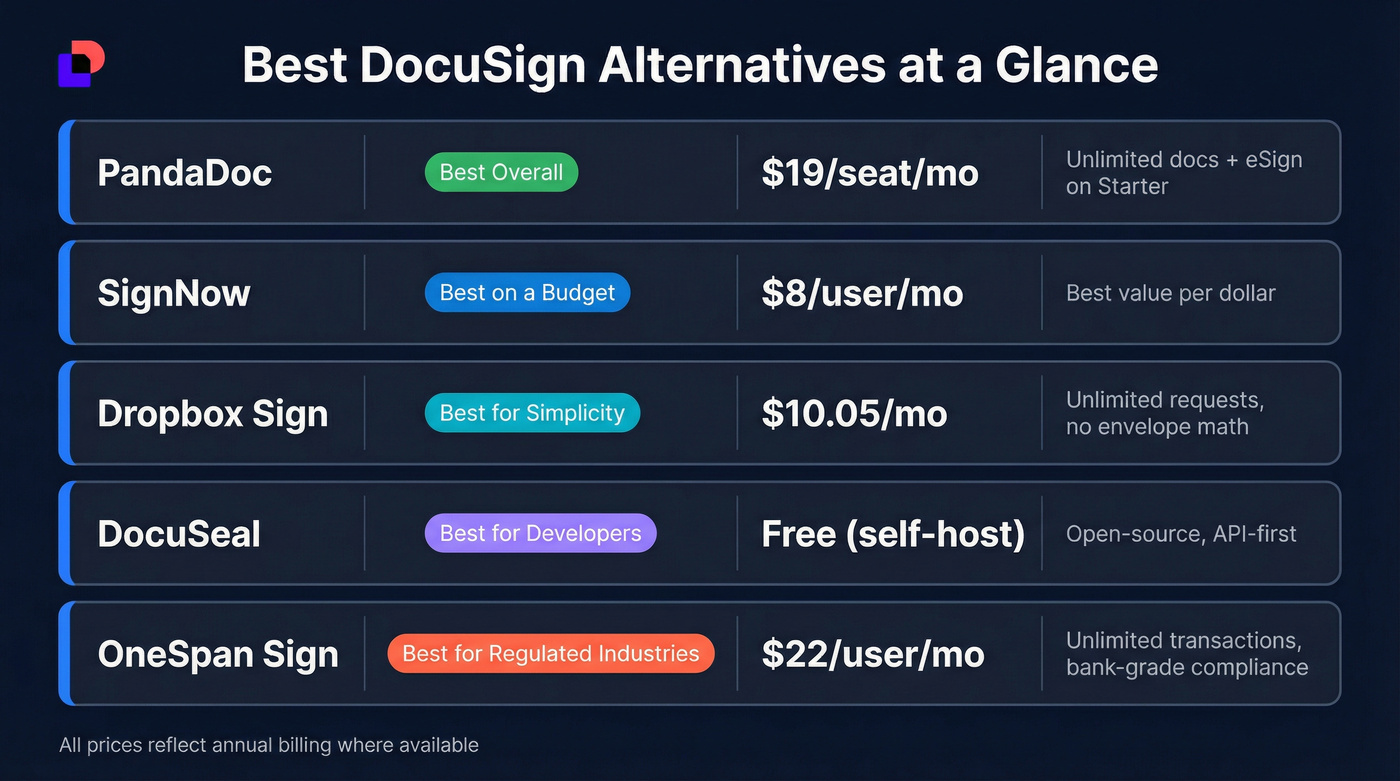
| Use Case | Pick | Why |
|---|---|---|
| Best overall | PandaDoc | Unlimited documents + eSignatures on Starter, doc creation + signing |
| Best on a budget | SignNow | $8/user/mo annually, most of the core DocuSign workflow |
| Best for simplicity | Dropbox Sign | Unlimited requests, clean UX, no envelope math |
| Best for developers | DocuSeal | Open-source, API-first, self-host for ~$10-$20/mo |
| Best for regulated industries | OneSpan Sign | Unlimited transactions, bank-grade compliance |
Each gets a full breakdown below.
Why People Leave DocuSign
DocuSign's Trustpilot page tells the story: 1.4 out of 5 across 1,143 reviews. That's not a rounding error. The complaints cluster around three themes, and they're remarkably consistent.
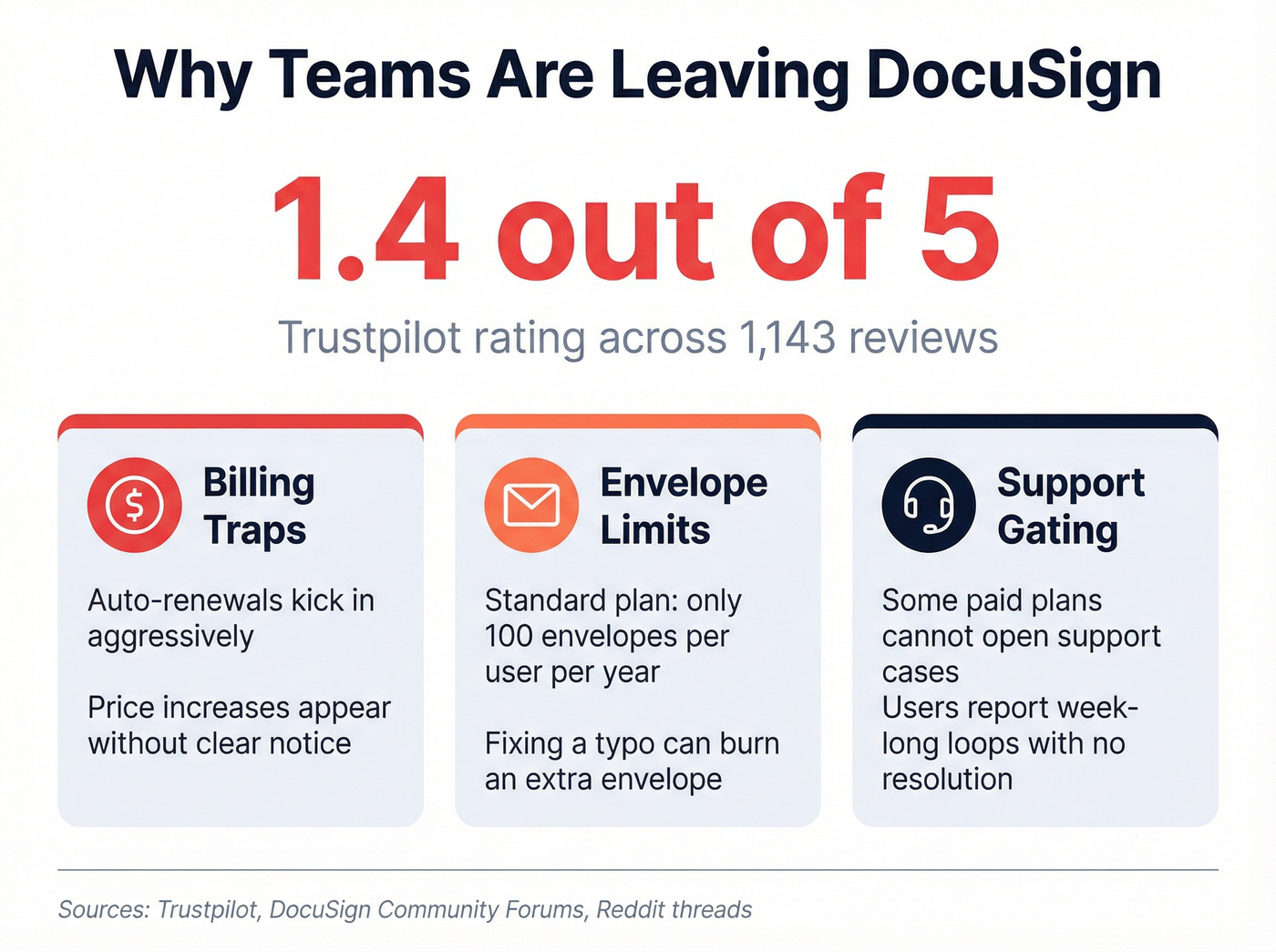
Billing traps come first. Auto-renewals kick in aggressively, cancellation flows are buried, and users report price increases that appear without clear notice. One community forum user described watching their plan drift from "$15 per month to $400 a year" without explanation. The pattern is familiar to anyone who's dealt with enterprise SaaS billing - except DocuSign applies it to plans as small as Personal.
Envelope limits come second. DocuSign's Standard plan includes 100 envelopes per user per year. That sounds reasonable until you do the math: roughly 8 envelopes per month. And here's the part that catches people off guard - a correction can burn another envelope if you have to resend. Fix a misspelled name, resend, and you've used two envelopes on one agreement. Overages get billed via pay-as-you-go, but DocuSign doesn't publish the per-envelope overage rate on its pricing page. That's a red flag.
Support gating is the third trigger. On DocuSign's own community forum, a user who'd upgraded to Business Pro reported hitting this error when trying to open a support case: "Your Docusign plan does not support opening cases... learn how to upgrade your plan to access Support." Another user described a loop where the support login failed, the UI told them to contact support, and they couldn't access support to do so. Seven days later, the billing issue was still unresolved. In the same thread, one member pointed out that realtors already have access to Authentisign for free through their association - making DocuSign entirely redundant for that niche.
Every tool has unhappy users. But when the complaints are this consistent - billing, limits, and the inability to get help - it's a structural problem, not a vocal minority.
Best eSignature Tools to Replace DocuSign
PandaDoc
Use this if you need document creation and signing in one platform. PandaDoc isn't just a signing tool - it's a document workspace where you build proposals, quotes, and contracts, then send them for signature without switching apps. PandaDoc lists SOC 2 Type II, eIDAS, and GDPR in its security/compliance grid, with some items gated by plan or annual billing. It carries a 4.7/5 on G2 across 3,215 reviews, which is unusually high for this category.
Skip this if you're on the Launch plan and create more than 60 documents a year. That plan caps at 60 docs with a $3/doc overage - fine for a solo consultant, painful for a growing team.
Pricing: Launch is $9/mo with unlimited seats but that 60-doc cap. Starter runs $19/seat/mo with unlimited documents and eSignatures - that's the plan most teams actually want. Business is $49/seat/mo for advanced workflows.
SignNow
SignNow is the most underrated tool in this category. In our testing, it delivered the best value per dollar of any paid option on this list.
Use this if budget is the primary constraint and you need a real signing platform, not a toy. At $8/user/mo on an annual plan, it delivers most of what DocuSign covers for day-to-day sending and signing at a fraction of the cost. The Business Premium tier ($15/user/mo annually) adds branding, advanced authentication, and compliance features. The consensus on r/smallbusiness threads is that SignNow handles 90% of what DocuSign does - the other 10% is brand recognition you don't need.
Skip this if you need branding and compliance controls on day one without upgrading. Lower tiers gate those behind higher plans, so know your requirements before you commit.
Pricing: $20/user/mo monthly or $8/user/mo annually for Business. Business Premium drops from $30 to $15 annually. Enterprise is $50/user/mo monthly or $30/user/mo on annual billing. There's also a Site License option at $1.50 per signature invite for teams that prefer pay-per-invite pricing.
Dropbox Sign
Use this if you never want to think about envelope math again. Dropbox Sign's headline feature is simple: unlimited signature requests on every plan, no hidden fees. For teams burned by DocuSign's per-envelope billing, this is the most straightforward fix.
The UX is clean and minimal - closer to a consumer app than an enterprise platform. SOC 2 Type II, ISO 27001, eIDAS, and GDPR compliance are all covered, with AES 256-bit encryption at rest and 2FA.
Skip this if you have more than 5 users. At that point, Dropbox pushes you to Premium, which requires a sales conversation. That's fine for mid-market teams, but it breaks the self-serve simplicity that makes the product appealing in the first place.
Pricing: Essentials is $15/mo ($10.05/mo annually). Standard is $25/user/mo ($17.50 annually). Premium is custom - expect around $25-$40/user/mo based on team size and volume.
OneSpan Sign
Use this if you're in banking, insurance, or any regulated industry where compliance gets audited, not marketed. OneSpan Sign includes unlimited transactions at the Professional tier and positions itself squarely for enterprises that need bank-grade security, white labeling, and API access.
Skip this if you're a 5-person startup. The feature set is overkill, and the Enterprise tier requires a sales conversation.
Pricing: Professional is $22/user/mo billed yearly, with unlimited transactions included. Enterprise is volume-based - expect $35-$60/user/mo depending on transaction volume and integrations. Developer tooling includes a public REST API with .NET, Java, and APEX SDKs.
Zoho Sign
Use this if your team already lives in the Zoho ecosystem. Zoho Sign plugs directly into Zoho CRM, Zoho Books, and the rest of the suite with zero friction. The free tier gives a single user 5 envelopes per month - enough for a freelancer or micro-business. The Enterprise tier adds 21 CFR Part 11 controls and blockchain timestamping for regulated workflows.
Skip this if you're not a Zoho shop. The standalone product is solid but unremarkable compared to PandaDoc or SignNow.
Pricing: Free for one user (5 envelopes/mo). Standard is ~$10-$12/user/mo with 25 envelopes/user/month. Professional is ~$15-$22/user/mo with unlimited envelopes. Enterprise pricing scales from there.
Adobe Acrobat Sign
Use this if your team already runs on Adobe Document Cloud and Microsoft 365. The integration depth is genuine - signing workflows live inside the tools people already use daily. Adobe Acrobat Sign also supports HIPAA-ready workflows with a BAA on eligible business plans, which matters for healthcare teams.
Let's be honest: skip this if you want transparent pricing. Adobe's pricing page uses dynamic tokens that don't always render, making it genuinely difficult to figure out what you'll pay. For a company this size, the pricing opacity feels unnecessary and frustrating.
Pricing: Expect ~$20-35/user/mo depending on tier and contract terms. Annual billing required for most plans.
DocuSeal
Use this if you're a developer team that wants full control over your signing infrastructure without vendor lock-in. DocuSeal is the most feature-complete open-source eSignature platform available right now. Templates, multi-party signing, custom fields, API and webhooks, white-labeling, audit trails - it's all there. It supports PostgreSQL and MySQL, and you can self-host it on any cloud provider.
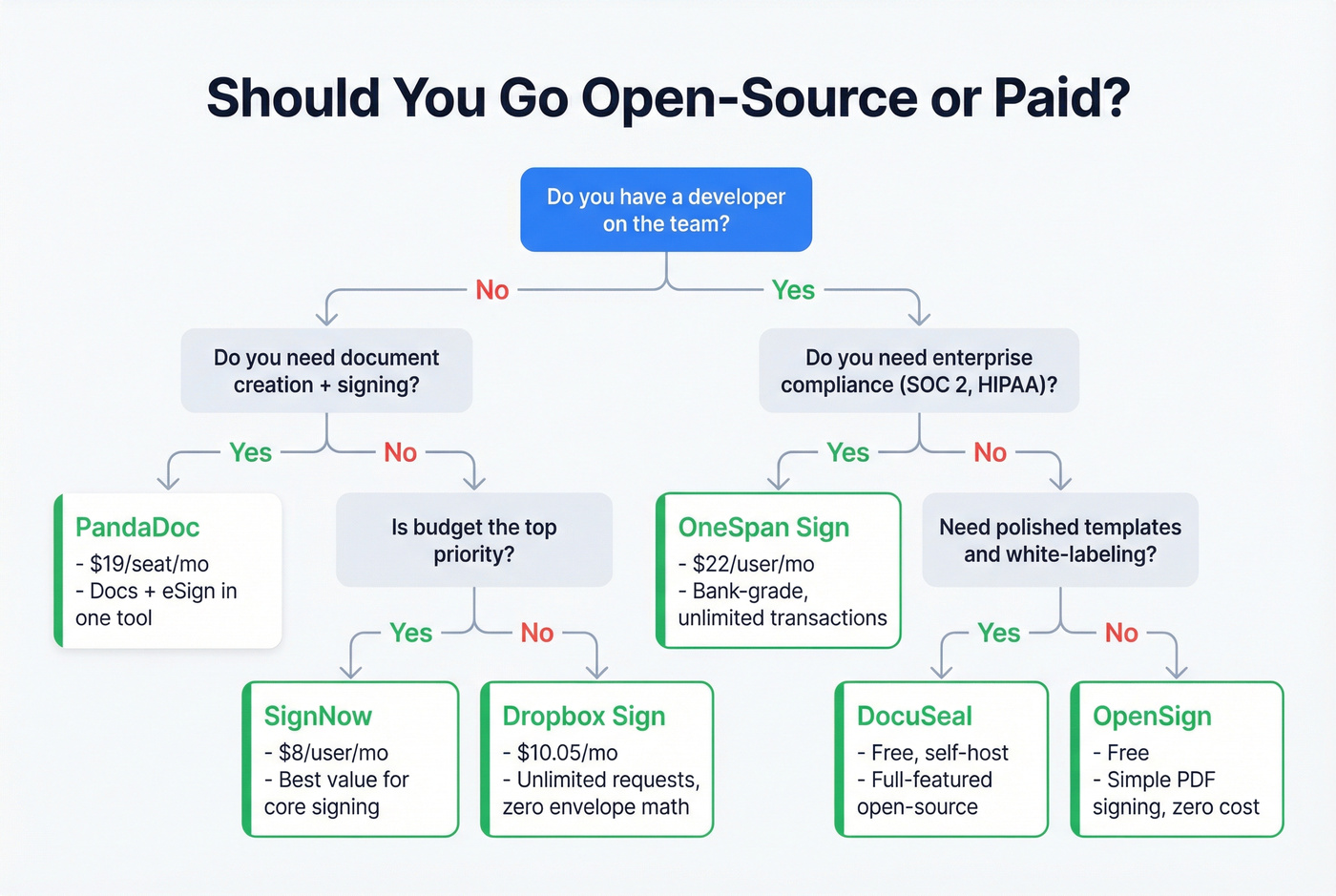
Skip this if you need a polished, no-code experience out of the box. DocuSeal requires technical comfort to deploy and maintain. If the phrase "Docker Compose" makes you nervous, look elsewhere.
Pricing: Free and open-source. Self-hosting runs roughly $10-$20/month in infrastructure costs.
OpenSign
Completely free, completely open-source, unlimited e-signatures. OpenSign is simpler than DocuSeal - PDF signing, templates, multi-party support, and audit logs. For an individual or a tiny team that doesn't need enterprise compliance, this is the zero-cost option that actually works.
SignWell
The best option for freelancers who send a handful of agreements each week. The free tier gives you 3 documents per month. Paid plans start at $12/mo for unlimited documents with a clean, intuitive interface. Compared to Signaturely at the same price point, SignWell gives you far more on the free tier and doesn't gate basic functionality behind $50/mo plans.
Signaturely
Signaturely carries a 4.8/5 rating from users who love the simplicity, but the lower tiers are hard to justify. The free tier is limited to 1 signature request per month - barely functional. Personal is $20/mo for 5 requests, Business is $50/mo for unlimited.
At $20/mo for 5 requests, you're paying $4 per request. The Business tier is where the value starts, but by then you're competing against PandaDoc and SignNow, which offer more for less.

Tired of getting nickel-and-dimed? We get it. While you're cutting bloated SaaS costs, make sure your sales data isn't bleeding budget too. Prospeo delivers 98% verified emails at $0.01 each - no envelope limits, no hidden overages.
Stop overpaying for data the same way you overpaid for signatures.
Pricing Comparison
Here's every tool side by side, with DocuSign as the baseline. Annual discounts vary widely - SignNow offers 60% off, Dropbox Sign roughly 33%, and most others fall in the 15-25% range.
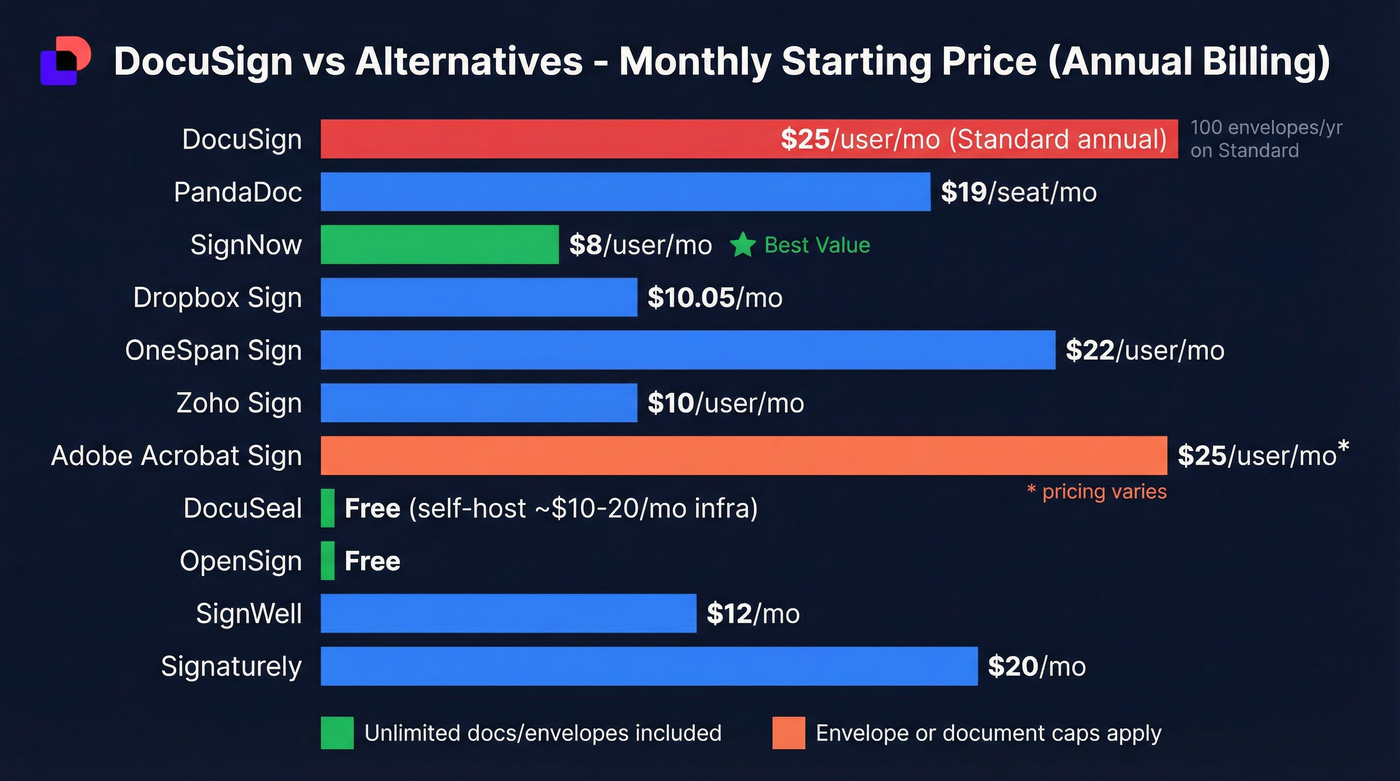
| Tool | Starting Price | Doc/Envelope Limits | Free Tier | Unlimited Option |
|---|---|---|---|---|
| DocuSign | $10/mo | 5/mo (Personal); 100/yr (Standard) | No | Business Pro Unlimited (annual) |
| PandaDoc | $9/mo | 60/yr (Launch) | No | Starter ($19/seat) |
| SignNow | $8/user/mo | Not capped | No | All paid plans |
| Dropbox Sign | $10.05/mo | Unlimited | No | All plans |
| OneSpan Sign | $22/user/mo | Unlimited | No | Professional+ |
| Zoho Sign | ~$10-$12/user/mo | 25/user/mo (Std) | Yes (5/mo) | Professional+ |
| Adobe Sign | ~$20-35/user/mo | Varies by tier | No | Higher tiers |
| DocuSeal | ~$10-20/mo hosting | Unlimited | Yes (OSS) | Self-hosted |
| OpenSign | Free | Unlimited | Yes | All (free) |
| SignWell | $12/mo | Unlimited (paid) | Yes (3/mo) | Paid plans |
| Signaturely | $20/mo | 5/mo (Personal) | Yes (1/mo) | Business ($50) |
The pattern is clear: most alternatives either offer unlimited signing or set limits high enough that you'll never notice them. DocuSign's 100 envelopes per user per year is the outlier.
API Pricing for Developers
If you're embedding eSignatures into your own product, per-seat pricing is irrelevant. What matters is per-transaction cost and API reliability. Here's the thing: this information should be easy to find, and it isn't.
| Provider | API Pricing Model | Cost | Subscription Required |
|---|---|---|---|
| Zoho Sign | Per envelope | ~$0.20/envelope | No (min 500 credits) |
| BoldSign | Per request | $0.75/signature | No (99.99% SLA) |
| Dropbox Sign | Monthly + requests | $75/mo for 50 requests | Yes |
| DocuSign | Contact sales | Not published | Unknown |
Zoho's API-only plan is the cheapest option at roughly $0.20 per envelope with no monthly commitment - just buy credits. BoldSign charges more per transaction but includes SOC 2, HIPAA, and GDPR compliance with a 99.99% uptime SLA. Dropbox Sign's API starts at $75/mo for 50 requests, which works out to $1.50 per signature if you use all 50.
DocuSign's API pricing? Contact sales. For a product that markets itself to developers, the lack of transparent pricing is a miss.
Compliance Quick Reference
If you're in healthcare, financial services, or life sciences, compliance isn't a checkbox - it gets audited. HIPAA alone demands encryption in transit and at rest, signer authentication, tamper-proof audit trails, and a signed Business Associate Agreement. Penalties range from $100 to $50,000 per incident, with annual maximums up to $1.5 million per violation category.

For teams that need 21 CFR Part 11 for FDA-regulated environments, the shortlist narrows fast. Zoho Sign Enterprise is one of the few plans that explicitly includes 21 CFR Part 11 controls and blockchain timestamping.
How to Switch from DocuSign
Switching signing tools is simpler than switching CRMs, but a few things trip teams up. We've watched enough migrations to know the pattern that works.
Step 1: Audit your contact database. Before you send a single agreement through a new platform, make sure the email addresses you're sending to are still valid. Contracts sent to bad emails bounce regardless of which tool you use. Prospeo verifies emails in real time with 98% accuracy across 300M+ professional profiles - the free tier gives you 75 verified emails per month, enough to audit your active pipeline before switching. No contract, no sales call required.
Step 2: Export templates and check integrations. Most tools let you rebuild templates in under an hour. The real friction is integration compatibility - if your current DocuSign setup connects to Salesforce, HubSpot, or a custom workflow via Zapier or Make, verify that your new tool supports the same connections before committing. Most tools on this list offer Zapier support; DocuSeal supports Zapier, Make.com, n8n, and Power Automate.
Step 3: Run a parallel trial. Almost every alternative on this list offers a free tier or trial. Run your new tool alongside DocuSign for 2-3 weeks. Send real agreements through both. Compare deliverability, signer experience, and admin workflow. We ran this exact process when evaluating tools for our own internal agreements, and the side-by-side comparison made the decision obvious within a week.
Step 4: Migrate and cancel. Once you're confident, move the team over and cancel DocuSign. Cancel before your renewal date - DocuSign's auto-renewal is aggressive, and multiple users on their community forum have reported difficulty canceling after the renewal window closes.
If you're also tightening the rest of your stack, use a sales tools checklist to spot other hidden-cost subscriptions.
New signing tool picked out? Now fill the pipeline with contacts who'll actually use it. Prospeo's 300M+ profiles and 30+ filters help you reach buyers actively evaluating software - with emails verified every 7 days, not every 6 weeks.
Send contracts to real buyers, not dead inboxes.
FAQ
What is a DocuSign envelope?
An envelope is DocuSign's billing unit - the electronic container holding one or more documents sent for signature. It counts once when sent, but corrections that require resending burn a second envelope. On the Standard plan's 100 envelopes per user per year, that adds up fast.
Are free eSignature tools legally binding?
Yes. Electronic signatures are legally binding in the US under the ESIGN Act and UETA, and in the EU under eIDAS. Free tools like OpenSign and DocuSeal are legally valid as long as they capture signer intent and provide a tamper-proof audit trail.
Which DocuSign alternative is cheapest?
OpenSign is completely free with unlimited signatures. For a paid tool, SignNow at $8/user/mo on annual billing is the best value - it delivers most of DocuSign's core functionality at roughly 80% less cost.
Is DocuSign HIPAA compliant?
Yes, DocuSign offers HIPAA-ready workflows with a signed BAA on higher-tier plans. PandaDoc, Dropbox Sign, and Adobe Acrobat Sign also provide BAAs. Always confirm the BAA is available on your specific plan tier before assuming compliance.
How do I verify contacts before sending contracts?
Use a real-time email verification tool before migrating to a new signing platform. Prospeo verifies emails with 98% accuracy across 300M+ profiles - the free tier handles 75 verifications per month, enough to clean your active pipeline without a paid commitment.
Look, DocuSign is still the most recognized name in eSignatures. But recognition isn't value. If your average deal size is under $5,000, you're almost certainly overpaying for a brand name when SignNow or PandaDoc will do the job better and cheaper. Pick one of these DocuSign alternatives, run a trial, and stop paying for envelopes. That renewal email doesn't have to win.