The Best Email Warm Up Tools for Agencies in 2026 (With Real Cost-at-Scale Math)
It's Monday morning. Your Slack lights up: "Hey, client X's open rates dropped from 62% to 11% over the weekend. What happened?" You check the inbox. Promotions tab. You check another client. Spam folder. A third - bouncing at 9%. Gmail filters 99.9% of spam before it reaches users, and right now, your client campaigns are on the wrong side of that filter.
This is the reality of running outbound at agency scale. You're not warming up one inbox - you're warming up 20, 50, sometimes 100+ across a dozen clients. One bad weekend can torch a quarter's pipeline and cost you the account. The email deliverability market hit $1.24 billion in 2026 for a reason: everyone's fighting for the inbox, and the email warm up tools for agencies you pick determine whether you win or lose that fight.
Here's the thing most "best warmup tools" articles won't tell you: the cost difference between the cheapest and most expensive option at 50 inboxes is 160x. Not a typo. $30/month versus $4,800/month for essentially the same outcome. The tool you choose matters less than most vendors want you to believe, but the price you pay matters enormously.
We've run warmup across every major platform on this list. The math is what separates the agencies that scale profitably from the ones bleeding cash on per-inbox fees.
Our Picks (TL;DR)
Best overall value: Instantly - unlimited warmup on all plans, $30/mo on annual billing. At 50 inboxes, that's $0.60/inbox. Nothing else comes close on pure cost.

Best dedicated warmup: MailReach - ~$15.60/inbox on annual billing with a premium Google Workspace and Office 365 warmup network. If warmup quality matters more than bundled outreach, this is the one.
Best for data quality (the upstream fix): Prospeo - 98% email accuracy with spam-trap removal and honeypot filtering. Warmup repairs your sender reputation; Prospeo prevents the damage that kills it. Native integrations with Instantly and Smartlead mean your lists are clean before they ever hit an inbox.
The contrarian take: most agencies don't need a standalone warmup tool. You don't need 10 options to evaluate. You need two questions answered: Are you already paying for an outreach platform with built-in warmup? And is your prospect data clean enough to protect the reputation you're building? Answer those, and the right tool picks itself.
Choosing the Right Warmup Approach: Standalone vs. Built-In
Before you evaluate any tool, answer one question: are you already paying for an outreach platform with built-in warmup?
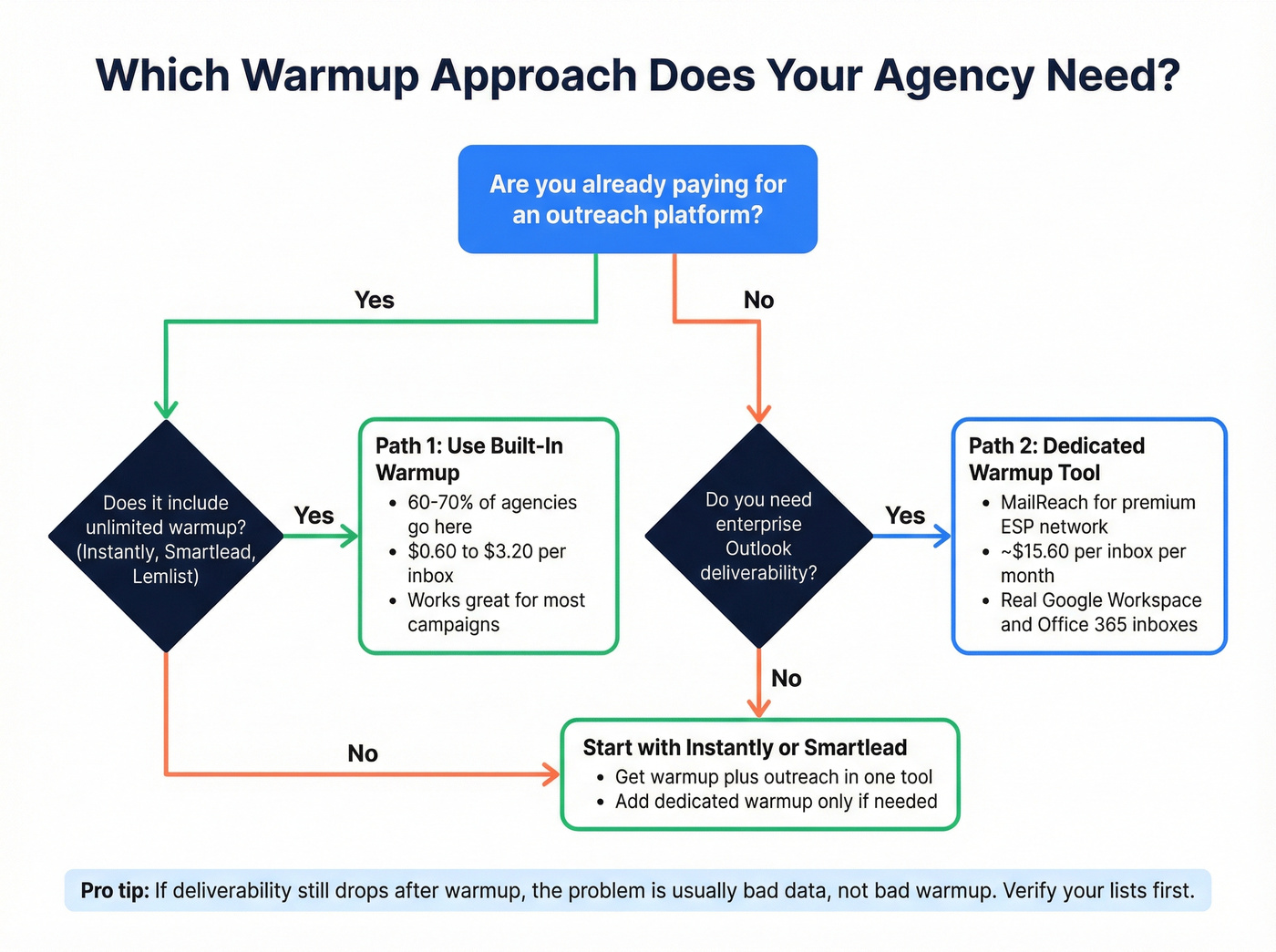
If yes - and you're on Instantly, Smartlead, or Lemlist - you've already got warmup included. One Reddit user was paying $25/mo for MailReach to warm up a single mailbox, then realized Smartlead and Instantly offer unlimited warmup in their cheapest plans at $32-39/mo. That's warmup plus sequencing, plus lead management, plus analytics. The standalone tool suddenly looks like a bad deal.
Path 1: Built-in warmup (60-70% of agencies) You're on Instantly or Smartlead. Warmup is unlimited and free with your subscription. The tradeoff: these warmup pools run on custom SMTP inboxes, not real Gmail or Outlook accounts. For most campaigns, this works fine. For premium deliverability into enterprise Outlook environments, it's a known weakness.
Path 2: Dedicated warmup tool (30-40% of agencies) You're either on a different outreach stack (Outreach, Salesloft, a custom setup), or you need ESP-specific warmup quality that built-in tools can't match. MailReach's Google Workspace and Office 365 network is the main reason agencies go this route.

The answer for most agencies: if you're starting from scratch, pick Instantly or Smartlead and use the built-in warmup. Add a dedicated tool only if you're seeing deliverability issues that warmup alone can't fix - which usually means your data quality is the real problem, not your warmup tool.

Warmup tools repair sender reputation. Prospeo prevents the damage that kills it. With 98% email accuracy, spam-trap removal, and honeypot filtering, your agency's campaigns start clean - before they ever hit an inbox.
Stop warming up inboxes just to send to bad data.
The Best Email Warm-Up Tools for Agencies in 2026
Instantly - Best Overall Value for Agencies
Use this if: You want unlimited warmup bundled with outreach at the lowest possible price. At $30/mo on annual billing (Growth plan), you get unlimited email accounts, unlimited warmup, and 5,000 emails/month. Scale to 50 inboxes and your warmup cost is $0.60 per inbox per month. That number is absurd compared to everything else on this list.

Skip this if: You need an agency dashboard, per-client workspaces without upcharges, or deliverability monitoring beyond basic metrics. Instantly wasn't built for agencies - it was built for individual senders who scale. There's no centralized client management, and client portals require separate subscriptions.
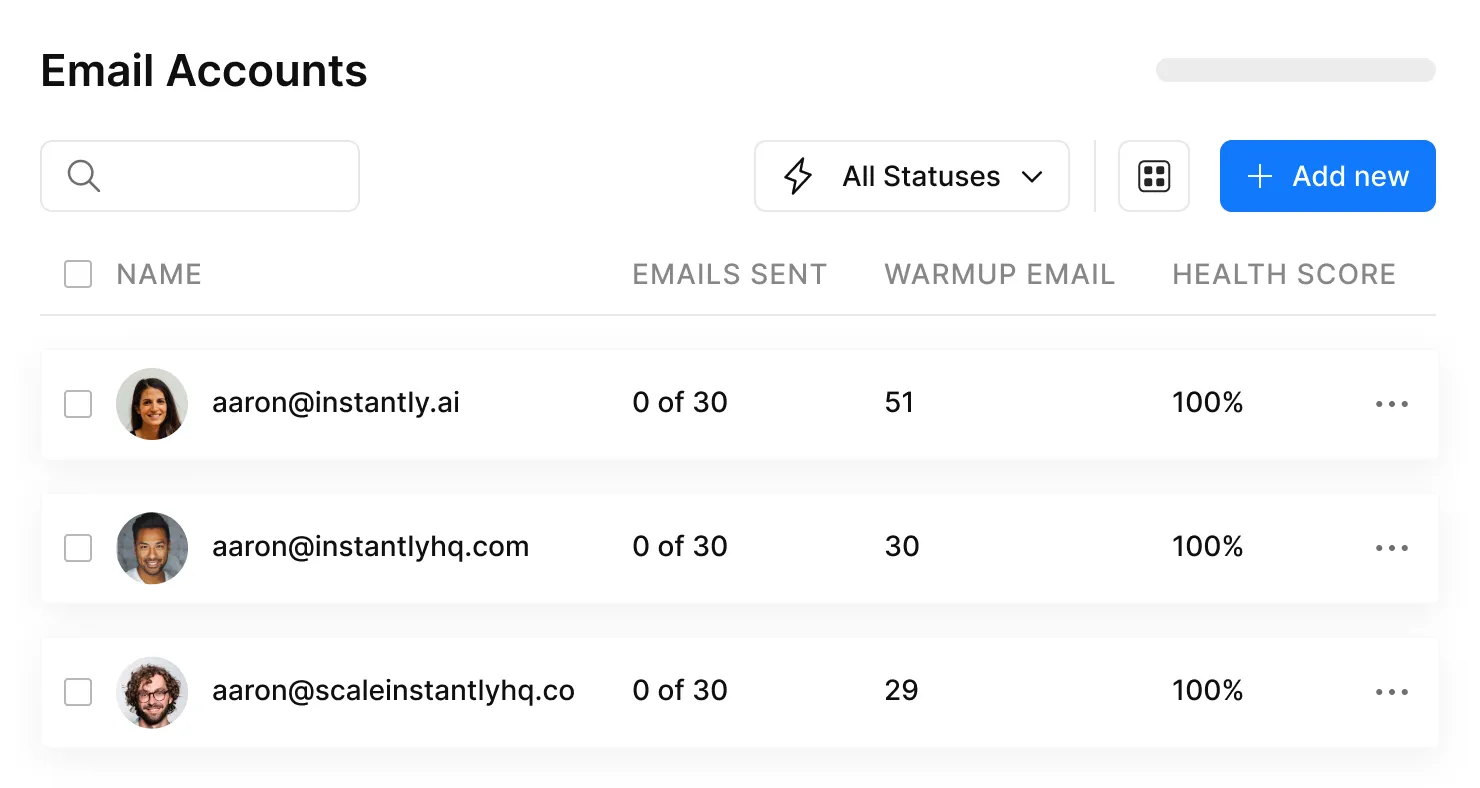
The warmup pool is large but runs primarily on custom SMTP inboxes rather than real Gmail or Outlook accounts. For most cold email campaigns, this doesn't matter. The Smart Focus feature lets you target specific ESPs - useful if you know a client's prospects are primarily on Outlook.
Pricing: Growth at $30/mo annual, Hypergrowth at $77.60/mo, Light Speed at $286.30/mo. All include unlimited warmup. The Hypergrowth plan at 25,000 contacts and 100,000 emails/month is the sweet spot for most agencies.
Smartlead - Best for White-Label Agency Operations
Use this if: You need white-label capabilities, multi-channel outreach (SMS, WhatsApp), and client workspaces with role-based access. Smartlead is purpose-built for agencies in a way Instantly isn't. Auto-mailbox rotation pauses blocked accounts and switches to healthy ones automatically - a lifesaver when you're managing 50+ inboxes across clients.
Skip this if: You hate hidden costs. Here's the math that matters: the Smart plan runs $144.50/mo on annual billing, but each client workspace costs an additional $39/mo. Ten clients on Smart = $144.50 + ($39 x 10) = $534.50/mo.
That "unlimited warmup" suddenly has a very real price tag attached. White-label is available via the SmartDelivery add-on ($49-$599/mo extra). The platform has a reputation for being buggy, and there are no native integrations - everything runs through Zapier. But for agencies that need the white-label and multi-channel stack, nothing else at this price point does what Smartlead does.
Pricing: Base at $32.50/mo annual, Pro at $78.30/mo, Smart at $144.50/mo, Prime at $314.60/mo. Add $39/workspace per client on Smart, $29/workspace on Prime.
MailReach - Best Dedicated Warmup Tool
Use this if: You want the highest-quality warmup network available. MailReach's key differentiator is a premium pool of real Google Workspace and Office 365 inboxes - not custom SMTP. This matters when you're warming up inboxes that need to land in enterprise Microsoft environments.
Skip this if: You're already on Instantly or Smartlead and your deliverability is fine. Paying per-inbox on top of your outreach platform subscription only makes sense if built-in warmup isn't cutting it.
Every plan includes 20 spam test credits, AI warming algorithms, multi-ESP warmup, and domain health checks. Custom agency pricing is available at 100+ mailboxes. MailReach reports 67% average open rates for customers - strong for a warmup-focused tool.
At 50 inboxes on annual billing (~$15.60/mailbox/month), you're looking at ~$780/mo. Not cheap, but you're paying for network quality that built-in warmup tools can't match.
Warmbox - Best for Granular Warmup Control
Warmbox is the power user's warmup tool. Four warmup recipes (Grow Progressive, Flat, Randomized, Custom) give you control no other tool offers. Want to fine-tune exactly how your warmup behaves - progressive ramp, flat volume, randomized patterns? This is where you go.
| What works | What doesn't |
|---|---|
| GPT-4 generated warmup content that reads like real emails | Per-inbox pricing adds up fast |
| 35,000-inbox network - larger than most dedicated tools | Custom pricing required beyond 6 inboxes |
| Supports Gmail, Outlook, Yahoo, SendGrid, Mailgun, Amazon SES, any SMTP | No unlimited plan exists |
Pricing: Solo at $15/mo (1 inbox), Start-up at $69/mo (3 inboxes), Growth at $139/mo (6 inboxes). Based on the per-inbox rate at the Growth tier (~$23/inbox), expect ~$575 for 25 inboxes and ~$1,150 for 50 inboxes on custom plans.
Lemwarm - Great Tech, Brutal Agency Pricing
The Smart Cluster feature targets warmup by industry - your warmup emails come from domains in your prospect's vertical. That's genuinely differentiated, and the 20,000+ healthy domain network is solid. Free with any active Lemlist subscription, and the 0-100 deliverability score makes monitoring dead simple.
The problem: $24-40/inbox/month. At 50 inboxes, you're paying $1,200-2,000/mo just for warmup. Only makes financial sense if Lemlist is already your outreach platform.
Warmup Inbox - Solid Standalone With Free Trial
The 7-day free trial with no credit card required is rare in this space, and $15/inbox/month on Basic annual is competitive for standalone warmup. The 20,000+ inbox network includes reputation scoring and drop alerts. The Pro plan's ESP-specific warmup ($49/inbox) didn't perform well for Outlook in independent testing, and some users reported domains getting blocked within a week. At 50 inboxes on Basic: $750/mo.
Mailwarm - Limited Scale for Agencies
Mailwarm's Scale plan covers only 10 accounts at $479/mo, running on the smallest network in this comparison at 2,000 mailboxes. Agencies managing more than 10 inboxes need custom pricing, and the per-interaction cost model ($0.02/interaction) makes budgeting unpredictable. Expect $1,000-1,500/mo for 25-50 inboxes based on the per-interaction model. Not where I'd put agency budget.
Warmy.io - Enterprise Pricing, Not Agency-Friendly
Warmy runs $49-279/mailbox/month with no annual discounts and no free trial. The Starter plan at $49/mailbox puts 10 inboxes at $490/mo; the Business plan at $129/mailbox puts 10 inboxes at $1,290/mo. The 4.8/5 G2 rating across 486 reviews is impressive, but the pricing structure is built for enterprises warming a handful of high-value domains, not agencies managing dozens.
Folderly - Premium Positioning With Deal-Breaking Flaws
At $96/mailbox/month on annual billing, Folderly is the most expensive warmup tool on this list. Twenty inboxes = $1,920/mo.
The deal-breaker: Folderly sends warmup emails on weekends, which users report tanks deliverability. The seed list is limited to just 4 ESPs. For that price, the limitations are hard to justify.
Agency Cost-at-Scale Comparison
This is the table no competitor publishes. Most "best warmup tools" lists are published by warmup tool vendors - Saleshandy, Snov.io, Mailwarm, and Warmy all rank their own products first. This article isn't selling a warmup tool.

We're not publishing deliverability test results because warmup performance varies by ESP, domain age, and sending patterns - anyone claiming a single deliverability percentage for a tool is oversimplifying. What doesn't vary is the price you pay. All prices below reflect annual billing where available.
| Tool | Model | 10 Inboxes | 25 Inboxes | 50 Inboxes |
|---|---|---|---|---|
| Instantly | Unlimited | $30 | $30 | $30 |
| Smartlead | Unlimited | $32.50 | $32.50 | $32.50 |
| Warmbox | Per inbox | ~$232* | ~$575* | ~$1,150* |
| Warmup Inbox | Per inbox | $150 | $375 | $750 |
| MailReach | Per inbox | $156 | $390 | $780 |
| Lemwarm | Per inbox | $240 | $600 | $1,200 |
| Mailwarm | Per account | $479 | ~$1,000* | ~$1,500* |
| Warmy.io (Starter) | Per mailbox | $490 | $1,225 | $2,450 |
| Folderly | Per mailbox | $960 | $2,400 | $4,800 |
*Estimates based on published per-inbox rates; custom pricing required at these tiers.
Look at the bottom of that table. Folderly at 50 inboxes costs $4,800/mo. Instantly costs $30/mo. That's 160x for a tool category where the output - improved inbox placement - is largely the same.
Per-inbox pricing is a tax on agencies. The math isn't close, and it never will be. If you're managing more than 5 inboxes, unlimited models save you thousands per year. The only reason to pay per-inbox is if the warmup network quality (MailReach's Google Workspace/Office 365 pool) justifies the premium for your specific use case.
I've seen agencies burn $2,000+/month on Lemwarm or Warmy because "it's the best quality" without ever testing whether Instantly's built-in warmup produces meaningfully different results. Test first. The expensive tool isn't always the better tool.
Real talk: if your agency's average client deal size is under $25k, you have no business spending more than $100/mo on warmup. Put the savings into data quality and send volume. The ROI math on premium warmup tools only works when a single booked meeting is worth thousands.
If you're testing warmup before committing budget, WarmySender and Mailflow offer free tiers - limited, but enough to validate the concept before scaling.
Why Agency Warmup Fails - The Data Quality Problem Nobody Talks About
You fixed the warmup. Open rates climbed back to 55%. The client's happy. Then three weeks later, the same inboxes get flagged again. Spam folder. Bounce rate spiking. You check the warmup dashboard - everything looks healthy.
The problem was never the warmup.
Here's what actually happens: warmup builds your sender reputation by generating positive engagement signals - opens, replies, emails moved out of spam. But every time you send a campaign to a bad email address, you're undoing that work. A bounce tells Gmail and Outlook that you don't know who you're emailing. A spam trap tells them you're using scraped or purchased lists. A honeypot address tells them you're a spammer. One bad batch can erase weeks of careful reputation building in a single afternoon.
The thresholds are well-established: keep bounce rates under 2%, spam complaints under 0.1%. Exceed those and no amount of warmup will save your sender reputation. You're filling a bucket that your own campaigns are drilling holes in.
This is where most agency warmup strategies fail. They invest in the inbox warming tool but ignore the data feeding their campaigns. Bad prospect data is the #1 reason warmup "stops working." (If you need a broader rundown, start with email deliverability basics.)

Prospeo's 5-step verification process catches invalid addresses, spam traps, and honeypots before they ever reach your outreach platform - 98% email accuracy across 143M+ verified emails, with catch-all domain verification included and data refreshed every 7 days instead of the 6-week industry average that lets contacts go stale between campaigns.
The proof is in production: Stack Optimize built from $0 to $1M ARR using Prospeo as their data layer, maintaining 94%+ deliverability, bounce rates under 3%, and zero domain flags across all clients. That's not a warmup story. That's a data quality story.
At agency scale, one bad list torches a client's domain. Prospeo's 5-step verification catches spam traps and honeypots that other providers miss. Native integrations with Instantly and Smartlead mean verified contacts flow straight into your sequences.
Bounce rates under 3% start with data, not warmup.
The Agency Warmup Playbook - Setup to First Campaign
Step 1: Clean Your Data Before You Warm Up
This comes first for a reason. Run your prospect list through bulk email verification before loading contacts into any outreach platform. Removing invalid addresses, spam traps, and honeypots upfront means your warmup progress won't get torpedoed by your first campaign. No warmup tool will deliver lasting results if the underlying data is rotten.
Step 2: Set Up DNS Authentication
SPF, DKIM, and DMARC records are non-negotiable. Domains missing these authentication records see deliverability drop by up to 30%. This is the single highest-impact action you can take, and it costs nothing.
For every client domain:
- Add SPF records to authorize your sending IPs
- Configure DKIM for email signing
- Set DMARC policy (start with p=none, move to p=quarantine as you build confidence)
Document the setup for client reporting. Agencies that skip this step waste weeks of warmup progress. (If you want the exact record mechanics, see SPF, DKIM, and DMARC.)
Step 3: Configure Domain Rotation
Use 5-10 domains per client account with 1-2 inboxes per domain. This gives you rotation capability and keeps daily volume per inbox under the safe ceiling. If one domain gets flagged, the others keep running.
Name your domains close to the client's primary domain - variations, not random strings. yourcompany.io, yourcompany.co, getyourcompany.com. Anything that looks like a real business.
Step 4: Start the Warmup Ramp
Begin at 2-3 emails per day per inbox. Increase volume by roughly 20% daily. Here's the ramp:
- Days 1-3: 2-3 emails/day
- Days 4-7: 5-8 emails/day
- Days 8-14: 10-25 emails/day
- Days 15-21: 25-40 emails/day
- Day 21+: Cap at 50 emails/day per inbox
Never exceed 50 emails per day from a single inbox. This is the safe sending ceiling that analysis of 1M+ cold emails consistently supports. (For deeper limits and pacing, use this sending limits guide.)
Step 5: Wait the Full 14 Days (Minimum)
Fourteen days is the absolute minimum warmup period. Three to four weeks is ideal.
I've watched agencies blow up client domains by launching campaigns after 5 days of warmup because the client was impatient. Don't do it. The two extra weeks save you months of reputation repair.
Step 6: Launch Campaigns Alongside Warmup
When you start sending real campaigns, don't pause warmup. Split your 50 daily emails roughly 25 warmup + 25 outreach. Pausing warmup between campaigns lets sender reputation decay - and rebuilding is slower than maintaining.
Multi-touch sequences (3-5 emails over 2 weeks) double reply rates compared to single-touch sends. Short, curiosity-driven subject lines outperform generic ones by 20%. Build these into your campaign design from day one. (If you need structure, start with a cold email sequence.)
Step 7: Optimize Send Timing
Best send times: Tuesday through Thursday, 9-11am in the recipient's time zone.
Avoid weekends entirely - this is one reason Folderly's inability to control weekend sending is such a problem. (More nuance here: cold email time zones.)
Step 8: Document Everything for Client Reporting
Track warmup progress, inbox placement rates, bounce rates, and domain health per client. Agencies that can show clients a clear deliverability dashboard retain those clients longer. Tools like GlockApps ($59/mo) give you the placement testing data to back up your reports.
How to Test If Your Warmup Is Working
Don't trust the warmup tool's own dashboard as your only signal. Use an independent placement tester.
GlockApps at $59/mo is the standard for agencies. It checks inbox placement across all major ISPs, monitors against 50+ blacklists, and includes DMARC monitoring with 10,000 free messages/month.
The metrics that matter:
- Reply rates: 5% minimum, 15% with best practices
- Bounce rate: under 2%, non-negotiable
- Spam complaints: under 0.1%
- Inbox placement: 96-98% is the benchmark for domains following all best practices
One data point worth noting: MaestroSites measured inbox placement climbing from 60% to 82% over 4 weeks using Warmbox. That's a realistic trajectory - don't expect overnight results.
If your numbers aren't hitting these benchmarks after 3-4 weeks of warmup, the problem is almost certainly upstream: bad data, missing DNS records, or sending volume that's too aggressive. Fix those before blaming the warmup tool.
FAQ
How long does email warmup take before I can start campaigns?
Fourteen days minimum, three to four weeks ideal. Start at 2-3 emails/day, increase 20% daily, and cap at 50/day per inbox. Rushing this is the most common mistake agencies make - and the most expensive one.
Should I use a standalone warmup tool or the one built into my outreach platform?
If you're on Instantly or Smartlead, their built-in warmup handles 80% of use cases. Add a dedicated tool like MailReach only if you need premium ESP-specific warmup networks or you're running a different outreach stack entirely. Don't pay twice for the same outcome.
How many email inboxes does an agency need per client?
Five to ten domains per client with one to two inboxes per domain, totaling 10-20 inboxes for a typical mid-size engagement. This gives you domain rotation capability and keeps daily volume per inbox under 50 emails - the safe sending ceiling supported by deliverability research.
Why do emails still land in spam after warmup?
Warmup fixes sender reputation, but bad prospect data destroys it just as fast. If your bounce rate exceeds 2%, list quality is the problem. A tool like Prospeo catches invalid addresses, spam traps, and honeypots before sending - maintaining 98% accuracy across 143M+ verified emails. Clean data is the difference between holding inbox placement and watching it collapse.
Can I run warmup and real campaigns at the same time?
Yes, and you should. Keep warmup running alongside campaigns - split your 50 daily emails roughly 25 warmup and 25 outreach. Pausing warmup between campaigns lets sender reputation decay. Continuous warmup is maintenance, not just setup.