Outbound Email Spam Prevention: The Practitioner's Guide for 2026
Half your team's emails are bouncing. Two reps got restricted overnight. Your domain reputation is tanking, and the VP of Sales wants answers by end of day. This isn't a hypothetical - it's a Tuesday for SDR managers who haven't locked down outbound email spam prevention. With 122 billion spam emails sent daily and 80%+ of phishing emails now containing AI-generated text, mailbox providers aren't giving anyone the benefit of the doubt.
What You Need (Quick Version)
Three things prevent 80% of outbound spam problems:
- Set up SPF, DKIM, and DMARC - move past p=none to actual enforcement. (If you need the full setup path, use this SPF, DKIM, and DMARC guide.)
- Verify every email address before it enters a sending sequence. Bad data creates deliverability problems faster than most teams realize. (If you're comparing vendors, start with email ID validators.)
- Monitor complaint rates in Google Postmaster Tools and stay below 0.10%.
That's it. Everything below explains how.
What Is Outbound Email Spam?
Outbound spam isn't the Nigerian prince emails hitting your inbox. It's spam leaving your network - and it comes from three vectors.
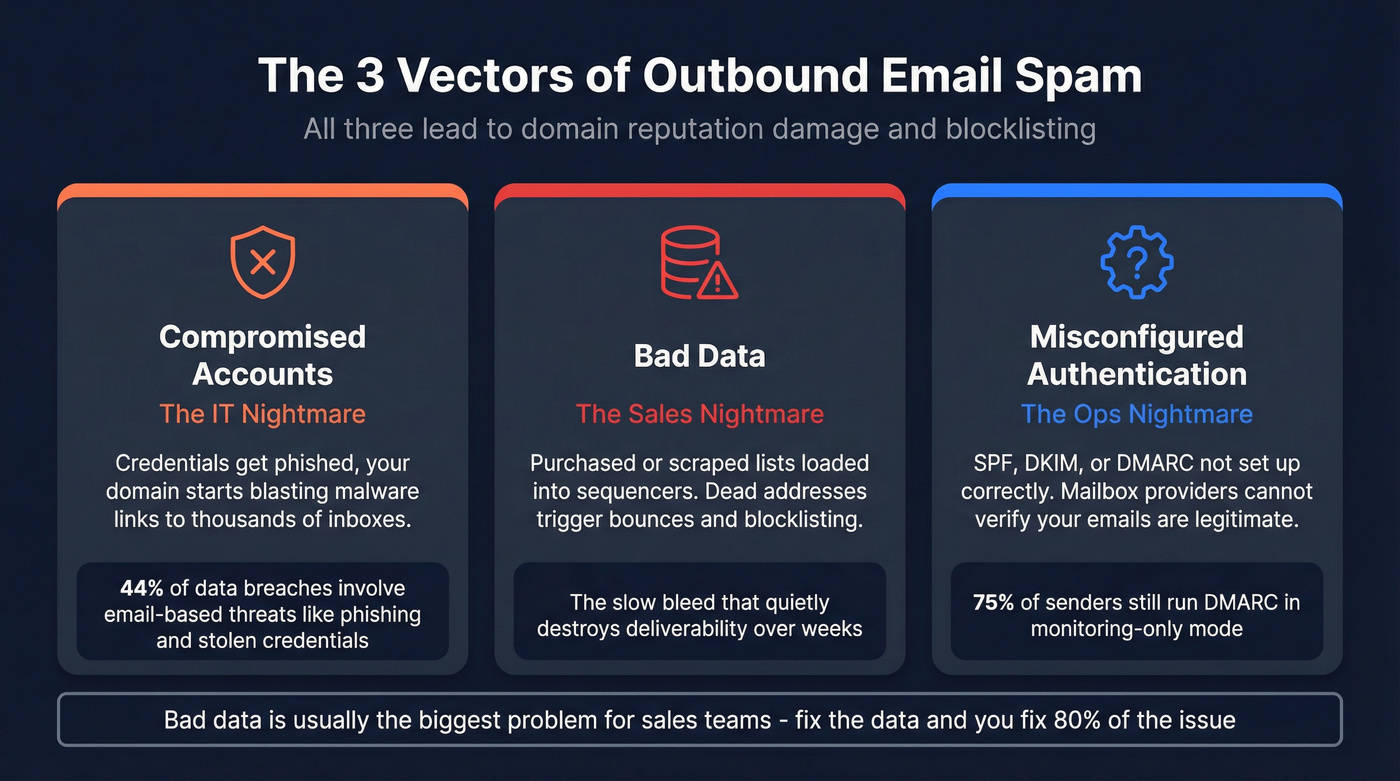
Compromised accounts are the IT nightmare. Someone's credentials get phished, and suddenly your domain is blasting malware links to 50,000 inboxes. Email-based threats like phishing and stolen credentials account for 44% of data breaches, and that number is climbing as AI-generated phishing gets harder to spot.
Bad data is the sales nightmare. Reps load purchased or scraped lists into their sequencer, half the addresses are dead, and the bounce rate triggers blocklisting. For any team running b2b spam prevention seriously, list quality is the first thing to audit.
Misconfigured authentication is the ops nightmare. SPF, DKIM, or DMARC isn't set up correctly, so mailbox providers can't verify your emails are legitimate. (If you're building this from scratch, start with email sending infrastructure.)
All three vectors lead to domain reputation damage and blocklisting. Compromised accounts make headlines, but in outbound sales, bad data is usually the slow bleed that quietly destroys deliverability over weeks.
The Enforcement Timeline
The outbound email rules changed fast, and they're only getting stricter.
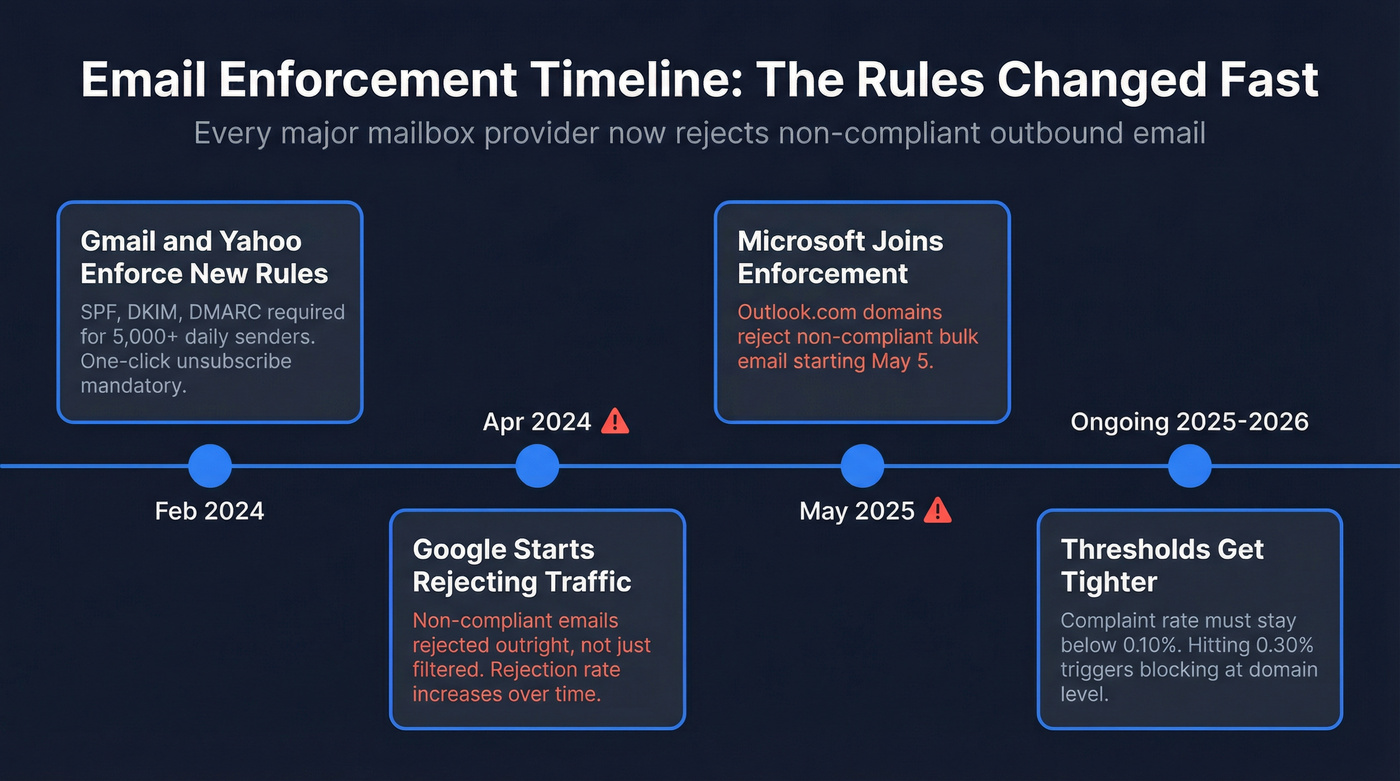
February 2024: Gmail and Yahoo enforced new requirements for bulk senders - anyone sending 5,000+ messages/day to their recipients. Domain-level SPF, DKIM, and DMARC authentication became mandatory. One-click unsubscribe via RFC 8058 headers was required, with opt-outs processed within 2 days. Google initially allowed a functional footer unsubscribe link as a temporary workaround through June 2024, then enforced the header requirement.
April 2024: Google started rejecting non-compliant traffic outright - not just filtering it - and ramped up the rejection percentage over time.
May 2025: Microsoft joined the party, enforcing outright rejection starting May 5 for Outlook.com domains.
The complaint rate thresholds are tight: stay below 0.10%, never hit 0.30%. These apply at the domain level, meaning your marketing campaigns, sales sequences, and automated notifications all share the same reputation. One bad campaign from any team tanks deliverability for everyone. (For a broader playbook, see our email deliverability checklist.)
Authentication Setup
Authentication is table stakes, not a competitive advantage. Yet ~75% of senders still run DMARC in monitoring-only mode. That's like installing a security camera but never turning on the alarm.
SPF Configuration
Publish one TXT record per hostname - never two. Multiple SPF records cause failures. The critical constraint: SPF has a 10 DNS lookup limit. Exceed it and you trigger an SPF PermError, which can cause DMARC to fail. In our experience, this is the single most common authentication failure we see - teams using multiple SaaS tools hit the limit without realizing it. Flatten your SPF record or consolidate services. (If you want the cold-outreach-specific version, use this SPF DKIM DMARC setup for cold email guide.)
DKIM Setup
Publish your public key at selector._domainkey.yourdomain.com. Use 2048-bit keys - Google recommends them, and there's no reason to use anything weaker. The failure point is usually forgetting to publish the record in DNS or publishing it with a typo. Double-check the record, then check it again.
DMARC Rollout Strategy
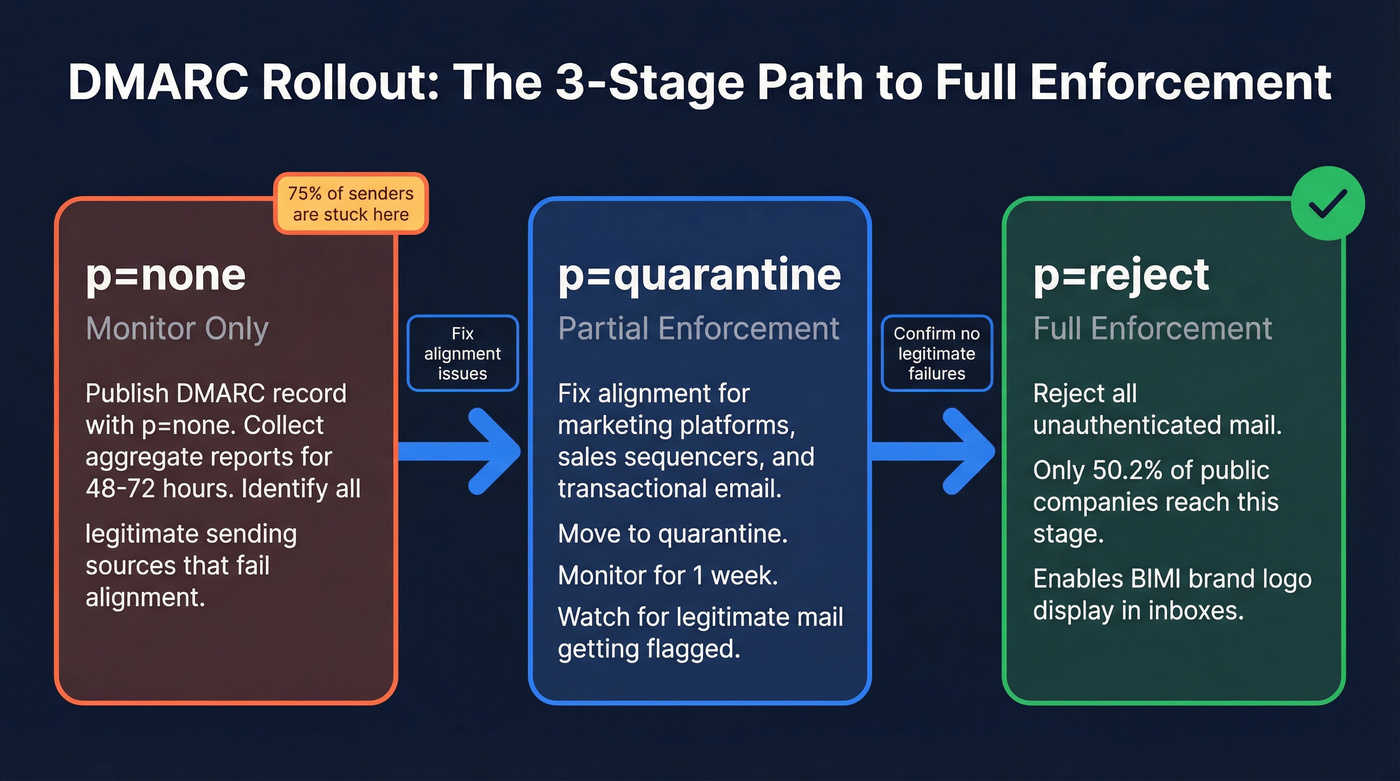
The rollout path is p=none -> quarantine -> reject. Don't jump straight to enforcement. Start with:
v=DMARC1; p=none; rua=mailto:dmarc@yourdomain.com; ruf=mailto:dmarc@yourdomain.com; pct=100
Wait 48-72 hours for aggregate reports. Identify legitimate sending sources that aren't passing alignment - your marketing platform, transactional email service, sales sequencer. Fix those. Move to quarantine, monitor for a week, then enforce with reject.
Only 50.2% of public companies have reached full enforcement. Don't be in the other half.
Once you're at p=reject, consider BIMI - it displays your brand logo in supported inboxes and requires full DMARC enforcement to activate.

Authentication keeps you compliant. Clean data keeps you out of spam. Prospeo's 5-step verification catches spam traps, honeypots, and dead addresses before they touch your sending infrastructure - 98% accuracy across 143M+ verified emails, refreshed every 7 days.
Stop bleeding domain reputation. Verify every address for $0.01.
List Hygiene and Verification
Here's the thing: preventing outbound spam isn't primarily a security problem. It's a data quality problem. Fix the data and you fix 80% of the issue. (If you want to operationalize this across systems, start with CRM hygiene.)
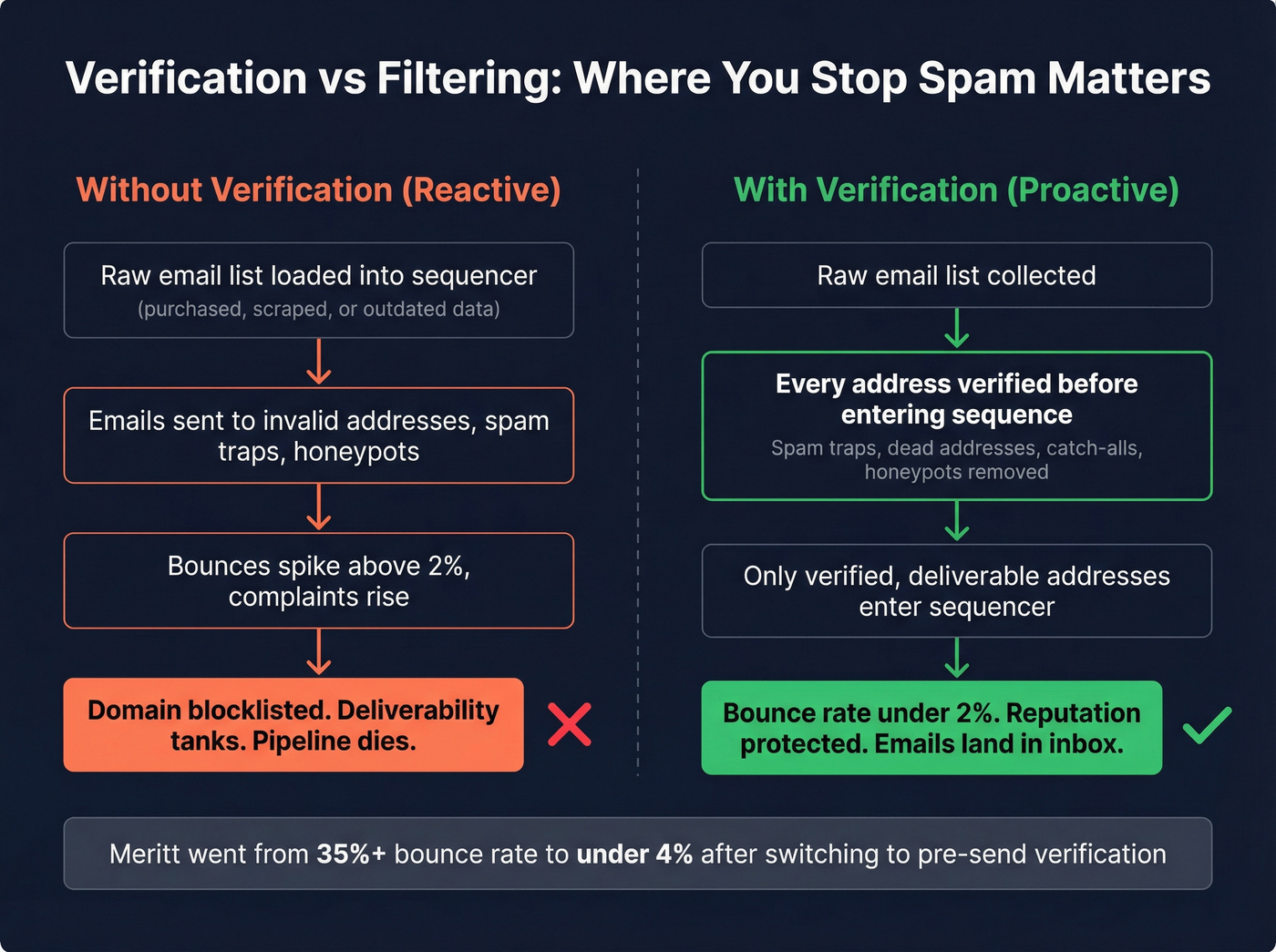
Bad addresses lead to bounces, which lead to reputation damage, which leads to spam classification. Keep hard bounces below 2%. Never buy, rent, or scrape email lists - Twilio's deliverability team calls harvesting a direct path to the spam folder, and they're right. Use double opt-in where applicable. Set sunset policies for unengaged contacts. (If bounces are your main issue, read our hard bounce breakdown.)
The real lever is real-time verification before emails ever enter your sequences. Filtering tools catch spam after it's sent. Verification prevents it from being sent in the first place. (For outreach-specific workflows, see email verification for outreach.)
Prospeo runs every address through a 5-step verification process that catches spam traps, dead addresses, catch-all domains, and honeypots before they touch your sending infrastructure - 98% email accuracy across 143M+ verified addresses at ~$0.01 per email. Meritt dropped their bounce rate from 35%+ to under 4% after switching. Stack Optimize maintains 94%+ deliverability across all their clients with zero domain flags.
Verification costs a fraction of what a blocklisted domain costs in lost pipeline.
Volume Management and Warm-Up
New domains and mailboxes need a ramp period. Start at 20-50 emails per day per mailbox and increase volume by 20-30% per week. Full sending capacity takes 4-6 weeks. (If you want a deeper warm-up playbook, use our automated email warmup guide.)
This isn't arbitrary caution. Mailgun's research on 1,000+ email accounts found that spammers start sending sooner and send faster than legitimate accounts. Mailbox providers use these behavioral signals in their detection models. A sudden volume spike from a new domain looks exactly like a compromised account - and gets treated like one.
We've seen teams burn brand-new domains in under 48 hours by skipping warm-up. Verify every address before it enters your sequence during this critical window when reputation is most fragile. (If you're scaling, follow cold email volume best practices.)
Monitoring and Complaints
Set up Google Postmaster Tools immediately. It's free, and it's the only way to see your actual complaint rate with Gmail recipients.
Complaint rate: Stay below 0.10%. If you're at 0.28%, you're 0.02 percentage points from the 0.30% ceiling - treat it as an emergency. Pull back volume, scrub your list, and figure out which sequences are generating complaints.
Denylist monitoring: Check Spamhaus, Barracuda, and SORBS weekly. MXToolbox automates this. (If you need a triage flow, see blacklist alert.)
Feedback loops: Register with major ISPs for complaint notifications on specific emails.
Outbound spam reports: On Microsoft 365, review Defender's outbound detection reports regularly. These show you exactly which accounts are triggering outbound spam flags.
Compromised Account Response
When an account gets compromised, speed matters. Here's the remediation checklist, based on Microsoft's documented process:
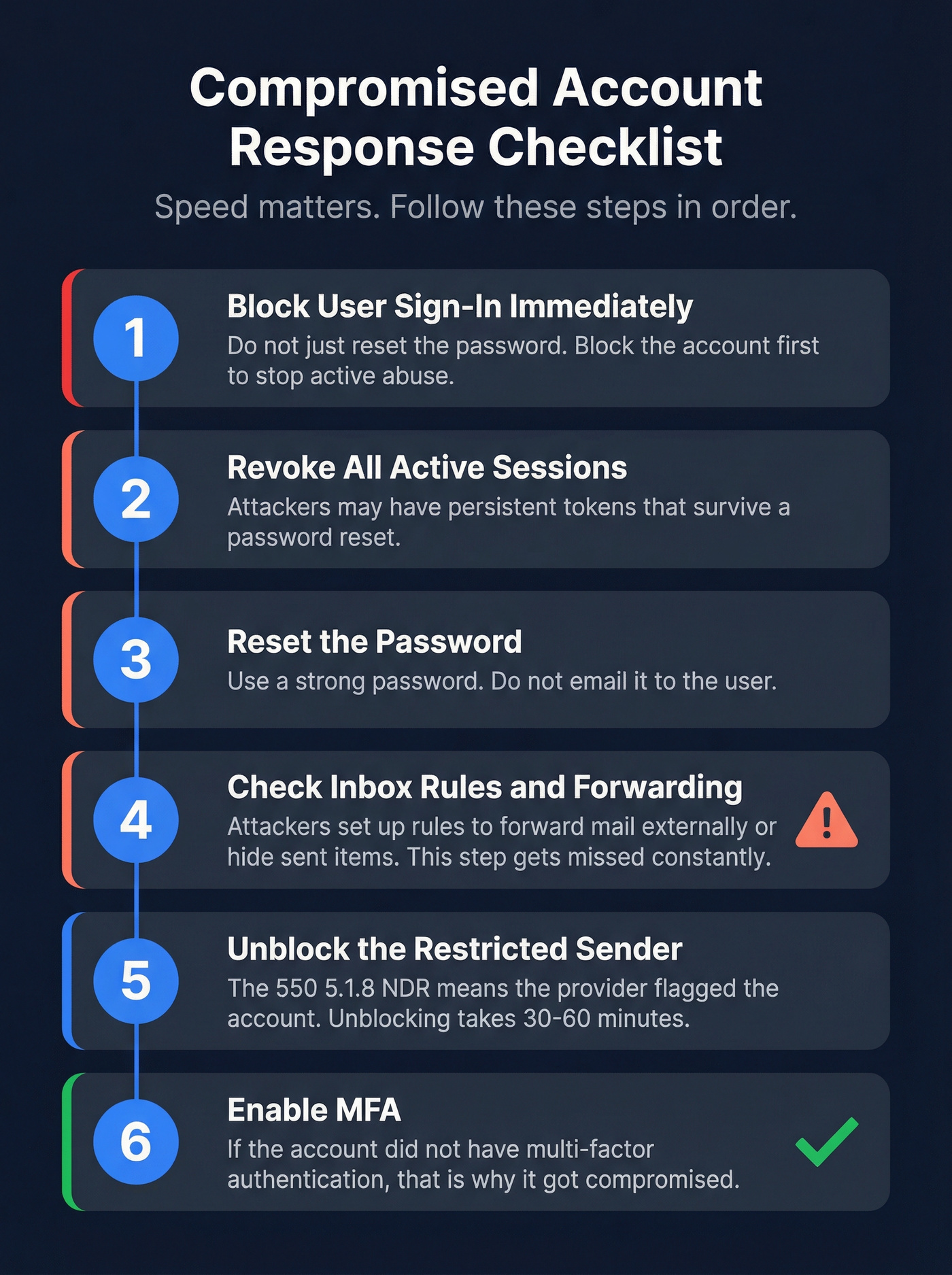
- Block user sign-in immediately. Don't just reset the password - block the account first.
- Revoke all active sessions. The attacker may have persistent tokens.
- Reset the password and don't email it to the user.
- Check for unknown inbox rules and forwarding. Attackers set up rules to forward mail externally or hide sent items. This step gets missed constantly.
- Unblock the restricted sender in Microsoft's portal. The
550 5.1.8NDR means Microsoft has already flagged the account. Unblocking takes 30-60 minutes. - Enable MFA. If the account didn't have multi-factor authentication, that's why it got compromised.
Outbound Spam Prevention Tools
Most of these tools focus on filtering - catching spam after it's sent. They're necessary for compromised account scenarios, but they don't solve the data quality problem that causes most outbound spam issues for sales teams.
Let's be honest: if your average deal size is under $15k and your main outbound problem is bounces and spam folder placement, you probably don't need a $5/user/month filtering tool. You need verified data. Spend the money on verification first, add filtering when you're sending enough volume to justify it. (If you're evaluating platforms, start with cold email marketing tools.)
| Tool | Best For | Starting Price | Key Differentiator |
|---|---|---|---|
| MS Defender 365 | Microsoft shops | ~$2/user/mo | Native M365 integration |
| Proofpoint | Large orgs | $1.65/user/mo | Granular policy control |
| SpamTitan | SMBs / MSPs | ~$1.95/user/mo | 99.9% spam detection rate |
| Cisco Secure Email | Enterprise | ~$1.90/user/mo | Threat intelligence |
| Coro | Mid-market | ~$9.50/user/mo | All-in-one security |
| Barracuda | Hybrid environments | Not public | Cloud + on-prem options |
Microsoft Defender for Office 365 is the obvious pick if you're already in the Microsoft ecosystem. At ~$2/user/month, it's the cheapest path to outbound scanning with native integration. The reporting for tracking outbound spam patterns is solid.
For multi-tenant MSP environments where per-client policy control matters, SpamTitan hits the sweet spot at ~$1.95/user/month.
Proofpoint is a different animal entirely. Defender's reporting is competent, but Proofpoint's policy granularity is in a different league - Core Email Protection tiers run from $1.65 to $5.86/user/month, justified for organizations with complex mail flows and compliance requirements. Skip it if you're a 20-person startup.
Other options worth knowing: N-able Mail Assure is popular with MSPs, and DuoCircle focuses specifically on outbound filtering as a service.
Stack Optimize built a $1M agency with zero domain flags. Meritt cut bounce rates from 35% to under 4%. The difference wasn't better sequences - it was verified data. Prospeo's proprietary email infrastructure removes spam traps and catch-all risks before your first send.
Every bounced email costs you reputation. Fix the data first.
FAQ
What's the difference between inbound and outbound spam filtering?
Inbound filters block spam coming into your mailbox. Outbound filters detect spam leaving your network - protecting domain reputation when accounts are compromised or lists contain bad data. Most organizations need both, but outbound filtering is what prevents your domain from getting blocklisted.
How fast can a domain get blocklisted?
Within hours. A single blast to an unverified list can trigger blocklisting the same day, and recovery takes days to weeks. Verifying addresses before sending at ~$0.01 per email is far cheaper than rebuilding a burned domain.
Do spam policies apply to cold sales emails?
Yes. Gmail, Yahoo, and Microsoft enforce the same authentication and complaint-rate thresholds regardless of whether you're sending marketing blasts or one-to-one sales sequences. If you're sending at scale, you're subject to bulk sender rules - ignoring them means rejection or spam folder placement.
Can email verification replace an outbound spam filter?
They solve different problems. Verification prevents bounces and spam-trap hits - the most common cause of deliverability damage for sales teams. Outbound filters catch compromised accounts sending malicious content. Most teams need both layers working together.