UTM Tracking for Sales Emails: What Every Guide Gets Wrong
Your SDR team sent 3,000 cold emails last month. Reps booked 14 meetings, and a handful of prospects clicked through to your pricing page before those calls. But when you open Google Analytics 4, every one of those clicks shows up as "Direct" traffic - indistinguishable from someone typing your URL into a browser.
That's not a minor reporting gap. That's your entire outbound team's web influence, invisible.
Here's how to fix it with UTM tracking for sales emails - not the newsletter-focused advice that dominates every other guide out there.
The Framework in Five Bullets
- Use
utm_medium=cold_email(not justemail) to separate outbound from marketing newsletters in GA4. - Automate UTM tagging inside your sales engagement tool - if reps build links manually, the system's already broken.
- Use GA4's Traffic acquisition report filtered by
/ emailto see what's actually driving engagement. - Enforce lowercase and hyphens as naming conventions across the entire team. No exceptions.
- Verify your prospect list before sending. Tracking parameters on bounced emails track nothing.
Why Sales Emails Need Different UTMs
Every UTM guide on the internet assumes you're a marketer tagging newsletter links. That's a completely different problem.
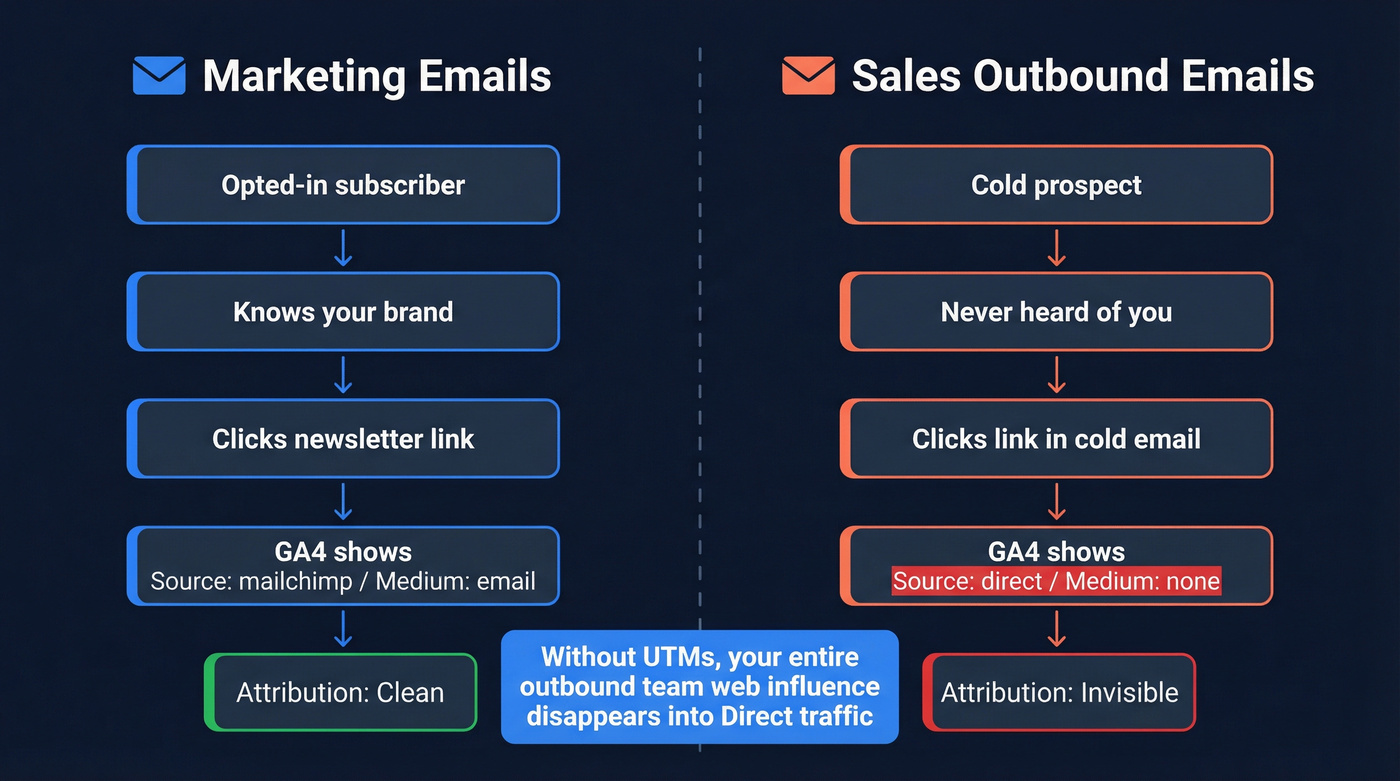
Marketing emails go to opted-in subscribers who already know your brand. Outbound sales emails go to cold prospects who've never heard of you, and the attribution chain looks nothing alike. The outbound funnel runs from touch sent to engagement (a click, a site visit) to outbound-qualified lead to SAL to opportunity created to revenue sourced. Without UTMs, outbound clicks show up as "Direct" in analytics, which means marketing gets credit for the traffic, sales gets nothing, and the CFO wonders why you're paying for a 6-seat Outreach license.
Here's the thing: 61% of B2B buyers now prefer a rep-free buying experience. The clicks your SDRs generate on pricing pages and case studies may matter more than the meetings they book. Tag every link in every outbound email with UTM parameters that distinguish cold outreach from broadcast campaigns.
The Five UTM Parameters
| Parameter | What It Captures | Sales Email Example |
|---|---|---|
| utm_source | Platform/tool | salesloft, outreach, apollo |
| utm_medium | Channel type | cold_email, sdr_outreach |
| utm_campaign | Campaign name | q1-ent-pipeline, abm-finance |
| utm_content | Link/email variant | email-3-case-study, jsmith-cal |
| utm_term | Audience segment | vp-marketing, series-b-fintech |
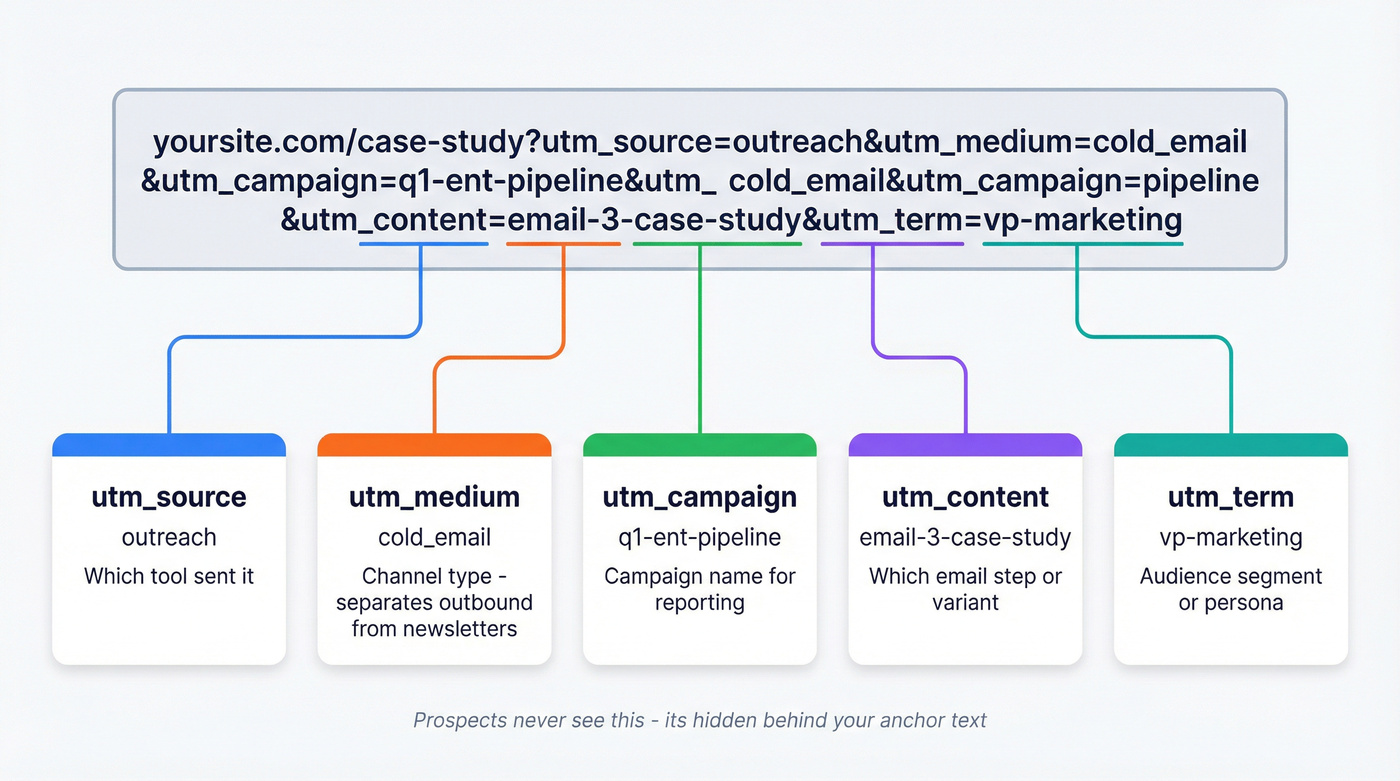
A fully tagged URL looks like this:
https://yoursite.com/case-study?utm_source=outreach&utm_medium=cold_email&utm_campaign=q1-ent-pipeline&utm_content=email-3-case-study&utm_term=vp-marketing
Your prospects never see the raw URL - it's behind the anchor text in your email. You can also add custom parameters like utm_rep or utm_region for richer segmentation, but GA4 requires you to set up custom dimensions to capture anything beyond the standard five. If you're building these links from scratch, the Google Campaign URL Builder is the fastest way to generate consistently formatted tags before pasting them into templates.
Automating UTMs in Sales Tools
If your UTM strategy depends on individual reps manually building tagged links, it's already dead. Reps won't do it. They'll forget, they'll misspell parameters, and your data will be garbage within a week.
SalesLoft + the GTM Workaround
Salesloft appends an sbrc query parameter to links when Live Website Tracking is enabled. That's a half-measure - sbrc isn't a standard UTM field, so GA4 won't treat it like campaign/source/medium unless you map it.
We've tested this across multiple Salesloft instances, and the fix is straightforward. In Google Tag Manager, create URL query variables for sbrc and each standard UTM param. Build Custom JavaScript variables that override values when sbrc exists. Then set your GA tag's campaign fields - campaignMedium, campaignSource, campaignName, campaignContent - to use those modified variables. It's a quick setup that pays for itself immediately.
Outreach and Apollo
In Outreach, build UTM-tagged links into your templates and set defaults at the template level so reps don't have to think about it. In Apollo, do the same at the sequence level: standardize the tagged links once, then reuse them across steps so UTMs stay consistent.
If you're standardizing templates, it also helps to keep a library of proven Outreach email templates so reps aren't reinventing copy and links every time.
Instantly and Smartlead
Teams on Instantly and Smartlead typically build tagged URLs into templates directly. This works fine as long as you're using a shared UTM builder or spreadsheet to generate consistent links. Don't let each rep freestyle their own parameters.

You just built a UTM system to track every outbound click. But tagged links on bounced emails track exactly nothing. Prospeo's 5-step email verification delivers 98% accuracy - so your carefully tagged sequences actually reach inboxes and generate the GA4 data you need.
Stop tagging links that bounce. Start with emails that land.
UTM Naming Conventions
Let's be honest: if you don't enforce naming conventions centrally, your GA4 data will be unusable within a quarter. UTM parameters are case-sensitive. utm_source=LinkedIn and utm_source=linkedin create two separate rows in GA4. Multiply that across 10 reps and 6 months of campaigns, and you've got a mess that no amount of regex can untangle.
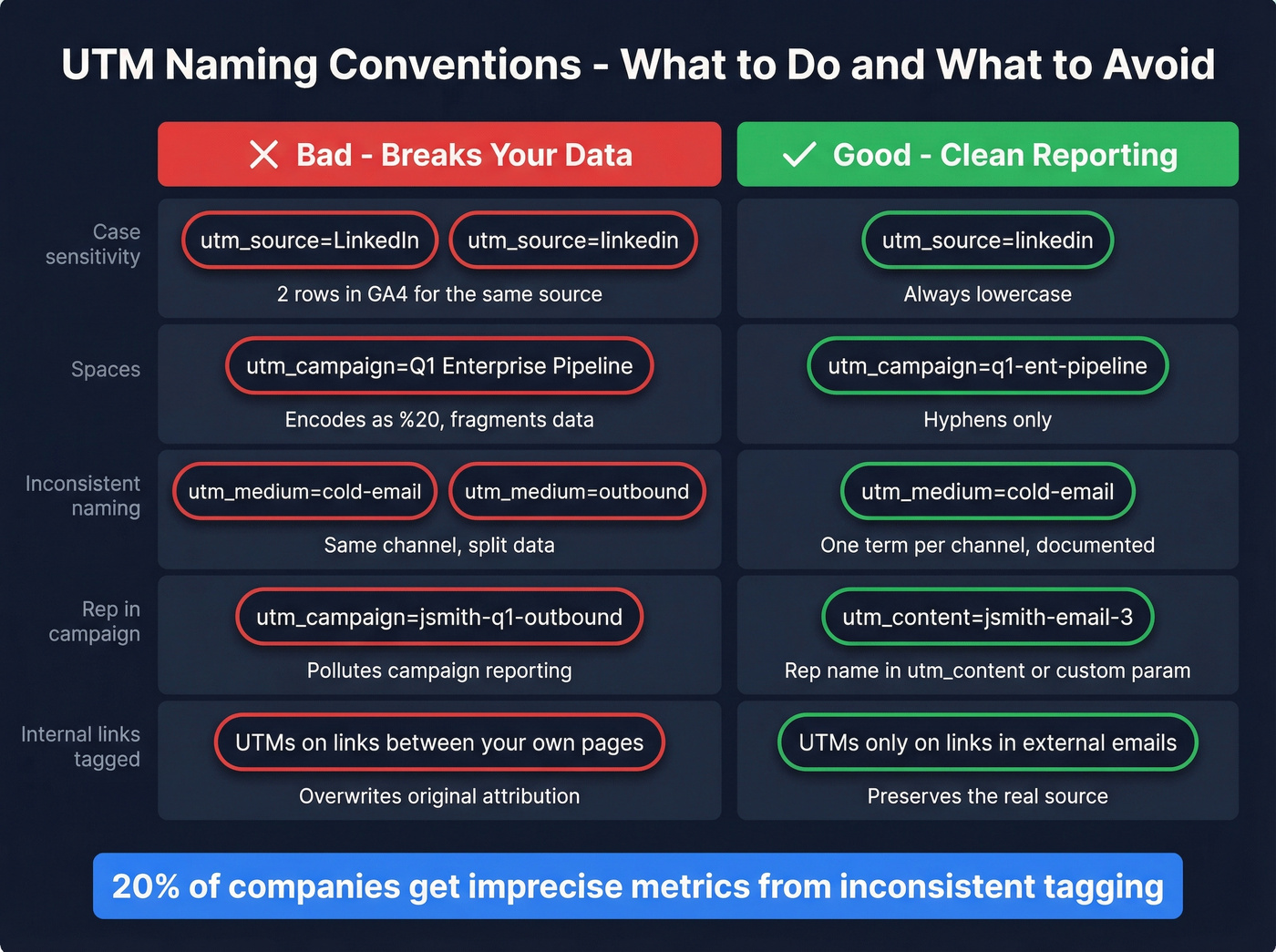
A 2026 UTM tagging guide from UTM.io confirms what we've seen firsthand: roughly 20% of companies receive imprecise metrics due to inconsistent tagging.
Here's the checklist:
- All lowercase, always
- Hyphens instead of spaces or underscores
- One shared naming doc for the team
- Rep name encoded in
utm_contentor a custom param - never inutm_campaign - Monthly review of UTM data for rogue entries
Some teams adopt a key-value naming model like src-outreach_med-cold-email_cmp-q1-pipeline because it's self-documenting. Reps can read the URL and understand what each piece means without a lookup table. Whatever model you pick, a shared spreadsheet is the minimum viable governance.
Reading UTM Data in GA4
Start in GA4 at Reports > Acquisition > Traffic acquisition. Switch the primary dimension to Session source / medium (not Default channel group). Filter or search for / email - this isolates all traffic tagged with an email-related medium.
For campaign-level breakdowns, click the "+" button next to Session source/medium and choose Session campaign. Now you can see which outbound campaigns are driving visits.
For utm_content breakdowns - which email step, which rep - use the Session manual ad content dimension. For deeper analysis, build an Exploration: go to Explore > Blank, create a session segment where Session medium exactly matches cold_email. This gives you a clean, filterable view of outbound email traffic separate from everything else, and it's the report we keep bookmarked for weekly pipeline reviews.
Does Click Tracking Hurt Deliverability?
This question comes up constantly on r/coldemail and sales communities, and the answer is more nuanced than a simple yes or no.
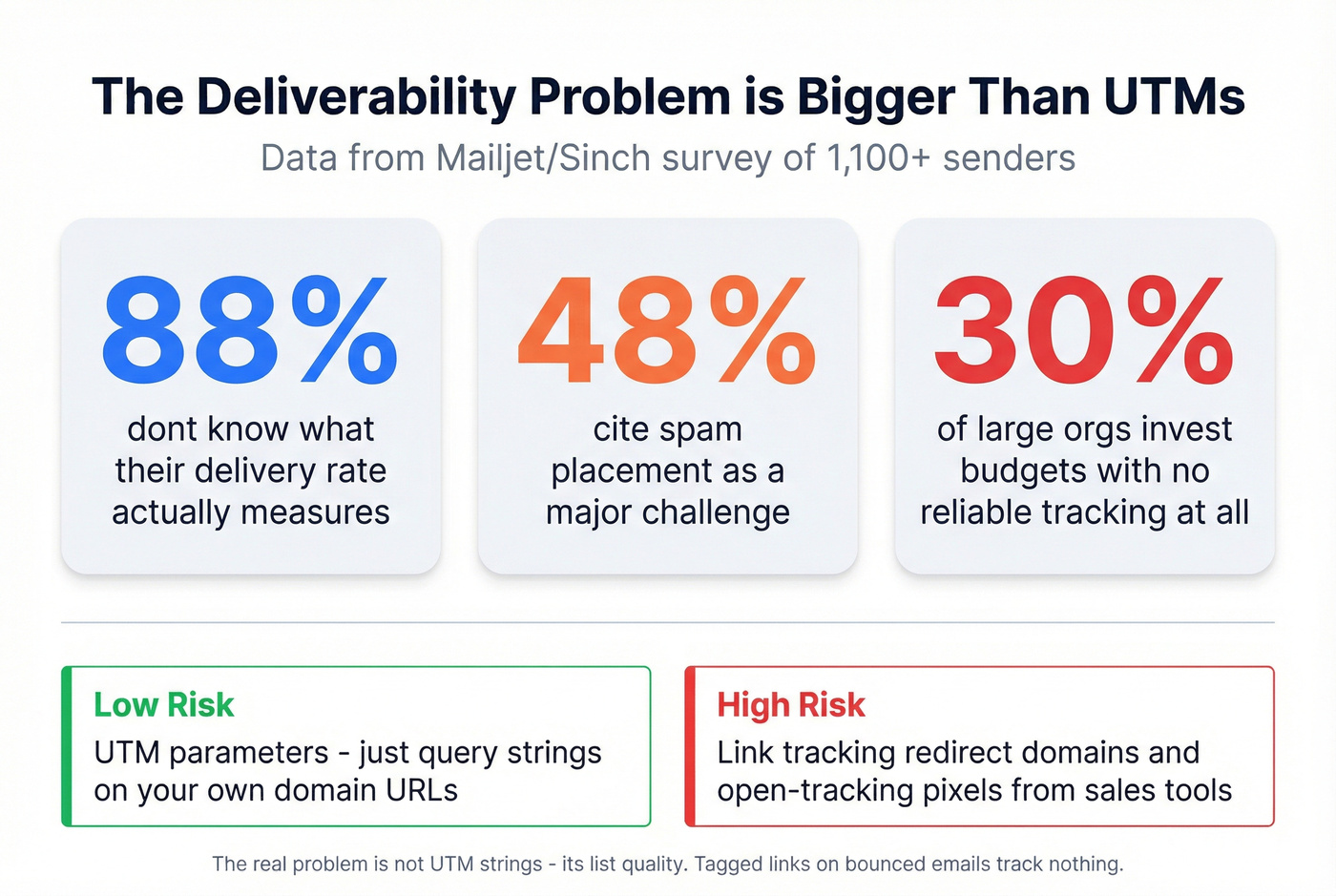
UTMs are just URL parameters appended to a link on your own domain. They carry virtually zero deliverability risk by themselves. The real deliverability risks come from link tracking redirect domains - the ones your sales engagement tool uses to count clicks - and open-tracking pixels. Those redirect domains are what spam filters scrutinize, not the query strings on your URLs.
Quick distinction worth knowing: delivery means the ISP accepted your message; deliverability means it actually hit the inbox instead of spam.
A Mailjet/Sinch survey of 1,100+ senders found that 88% don't even know what their delivery rate measures, 48% cite spam as a major challenge, and 70% aren't monitoring their reputation with major mailbox providers like Gmail. 30% of large organizations invest budgets without any reliable tracking at all. Those numbers are staggering.
The real problem isn't UTM strings. It's list quality. UTM parameters on bounced emails track nothing.
If you want the full deliverability picture (beyond UTMs), use an email deliverability checklist and keep your email sending infrastructure clean.
Connecting UTMs to Pipeline
UTMs get clicks into GA4. But the real value is connecting those clicks to pipeline and revenue in your CRM.
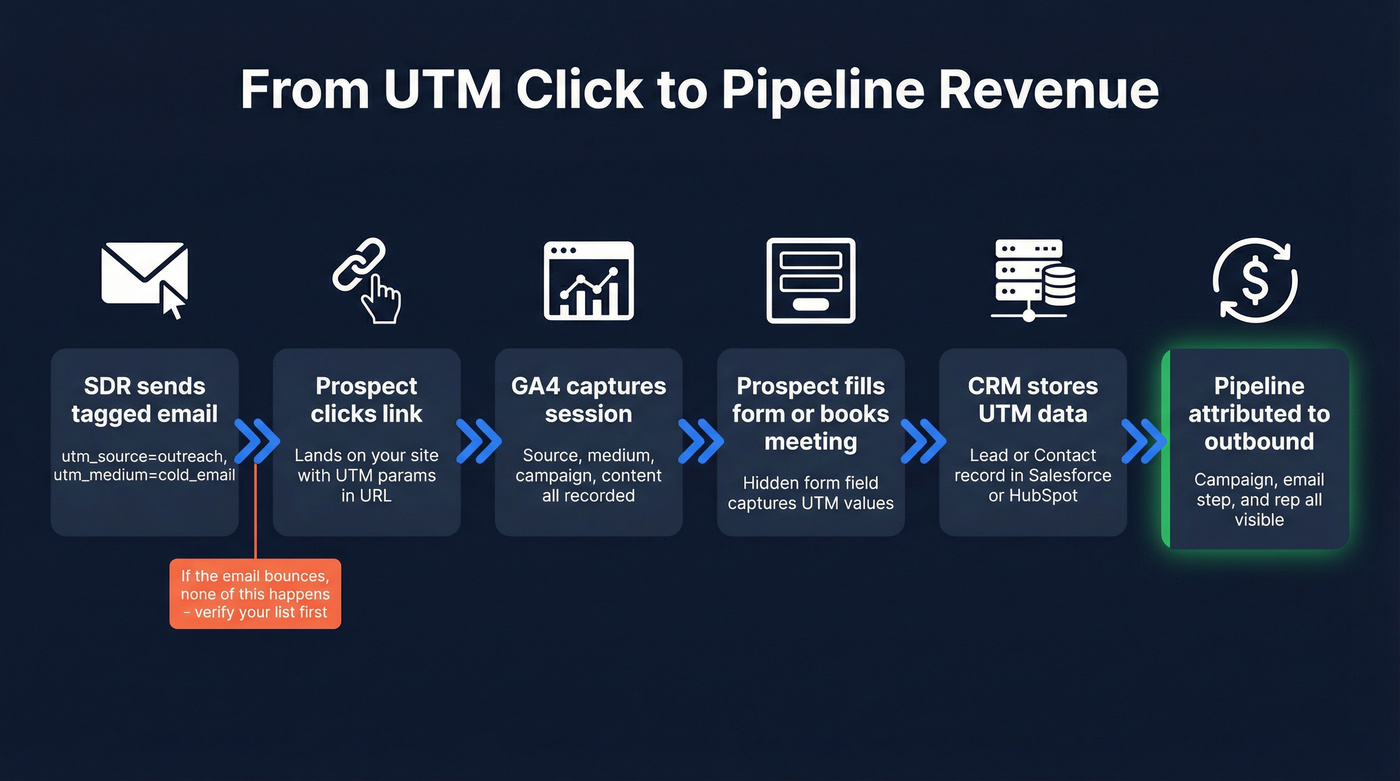
A prospect clicks a tagged link, lands on your site, and eventually fills out a form or books a meeting. A hidden form field captures the UTM values, which get stored on the Lead or Contact record in Salesforce or HubSpot. When that lead converts to an Opportunity, the UTM data copies over - and now you can attribute pipeline to specific outbound campaigns, specific email steps, even specific reps.
If you need a clean implementation in your CRM, set up consistent CRM lead source tracking so UTMs map to fields your team actually reports on.
Some teams go further with smart links - personalized, trackable URLs that combine UTM data with prospect-level context, routing individual prospects to personalized landing pages or tracking which specific accounts engage with which content assets. When you measure smart link click-through rate alongside your standard UTM data, you get a much richer picture of which messages actually resonate with cold prospects.
For outbound sourcing credit, first-touch attribution is the cleanest model. For influence reporting across longer B2B sales cycles with multiple stakeholders, multi-touch gives you a more complete picture.
Here's where the whole system breaks down: bad data. You send 10,000 outbound emails, 2,800 bounce, and your UTM tracking only captures engagement from the 7,200 that actually landed. Your attribution data is skewed from the start, and your domain reputation degrades with every campaign. We've watched teams spend weeks building beautiful UTM dashboards only to realize their bounce rate was so high that the data was meaningless.
Prospeo fixes this upstream. With 98% email accuracy, a 7-day data refresh cycle, and 143M+ verified emails, the contacts you pull actually exist when you hit send. Snyk's sales team cut their bounce rate from 35-40% to under 5% after switching, generating 200+ new opportunities per month.
If you're diagnosing why lists go bad so fast, start with B2B contact data decay and tighten your CRM hygiene process.
You're sending sequences through Outreach, Salesloft, Instantly, or Smartlead with perfect UTM conventions. But if 30% of your list is bad data, a third of your attribution is dead on arrival. Prospeo refreshes 300M+ profiles every 7 days and keeps bounce rates under 4%.
Clean data is the prerequisite for clean attribution.
Common Mistakes That Break UTM Data
Case sensitivity splitting data. LinkedIn vs linkedin creates duplicate rows. Lowercase everything.
Spaces in parameter values. URLs break or encode as %20, fragmenting your reports. Use hyphens.
Inconsistent naming across reps. One rep uses cold-email, another uses outbound. Same channel, different data. This is the most common failure we see, and it's entirely preventable with a shared naming doc.
Tagging internal links. Adding UTMs to links between your own pages inflates campaign data and overwrites the original source. Only tag links in emails and external channels.
Redirects stripping parameters. Some URL shorteners and redirects drop UTM strings. Test your links before launching any sequence.
Forgetting GA4 custom dimensions. Custom parameters like utm_rep won't appear in reports unless you configure matching dimensions in GA4's admin settings. Skip this step and you'll wonder why your custom data never shows up.
FAQ
Do UTM parameters affect email deliverability?
No. UTMs are static URL parameters on your own domain and carry virtually zero deliverability risk. Issues stem from sender reputation, authentication failures, list quality, and third-party tracking redirect domains - not the query strings appended to your links.
What's the best utm_medium for cold outreach?
Use cold_email or sdr_outreach - not just email. This separates outbound sales traffic from marketing newsletters in GA4 so you can attribute pipeline to the right team. Consistent naming across all reps is critical.
Can I track which rep generated a site visit?
Yes. Encode the rep name in utm_content (e.g., jsmith-email-3) or use a custom parameter like utm_rep=jsmith. You'll need to configure a matching custom dimension in GA4 to surface it in reports.
How do I make sure my prospect data is clean enough for tracking to matter?
Verify emails before sending. If your bounce rate exceeds 5%, your UTM data is unreliable - you're measuring a fraction of actual outreach while your domain reputation degrades. Tools like Prospeo deliver 98% email accuracy with a 5-step verification process, and the free tier includes 75 verified emails per month.
Should I use the Google URL builder or automate inside my sales tool?
Both. The Google URL builder is useful when creating one-off tagged links or building your initial template library. For day-to-day sending, automate UTMs at the template level inside Outreach, Salesloft, Apollo, or Instantly so reps never touch a parameter manually.