CRM Lead Source: How to Track It Without Wrecking Your Data
Your CMO asks which channel drove the most pipeline last quarter. You pull the report. 35% of leads are tagged "Web." 20% are tagged "Other." You know the data is wrong, but you can't prove where it broke.
That's the CRM lead source problem - and it's almost always a setup problem, not a strategy problem.
Quick version: Lead source = the first touchpoint where a prospect found you. Track it with two CRM fields (Original Source + Latest Source), lock down the original, use strict picklists, and verify your contact data so your reports actually mean something.
What Is a Lead Source in CRM?
A lead source is the first touchpoint where a prospect discovers your business. Not what campaign they clicked, not which rep touched them - just the origin channel.
Don't confuse it with related concepts. Lead channel is the broader category like "Paid Search." Lead source is more specific: "Google Ads - Brand Campaign." Lead method describes the tactic, like "Webinar registration form." Most CRM data problems start when teams mash all three into a single field and hope for the best.
Common Lead Source Types
A clean taxonomy is the foundation here. This template drops straight into Salesforce or HubSpot:
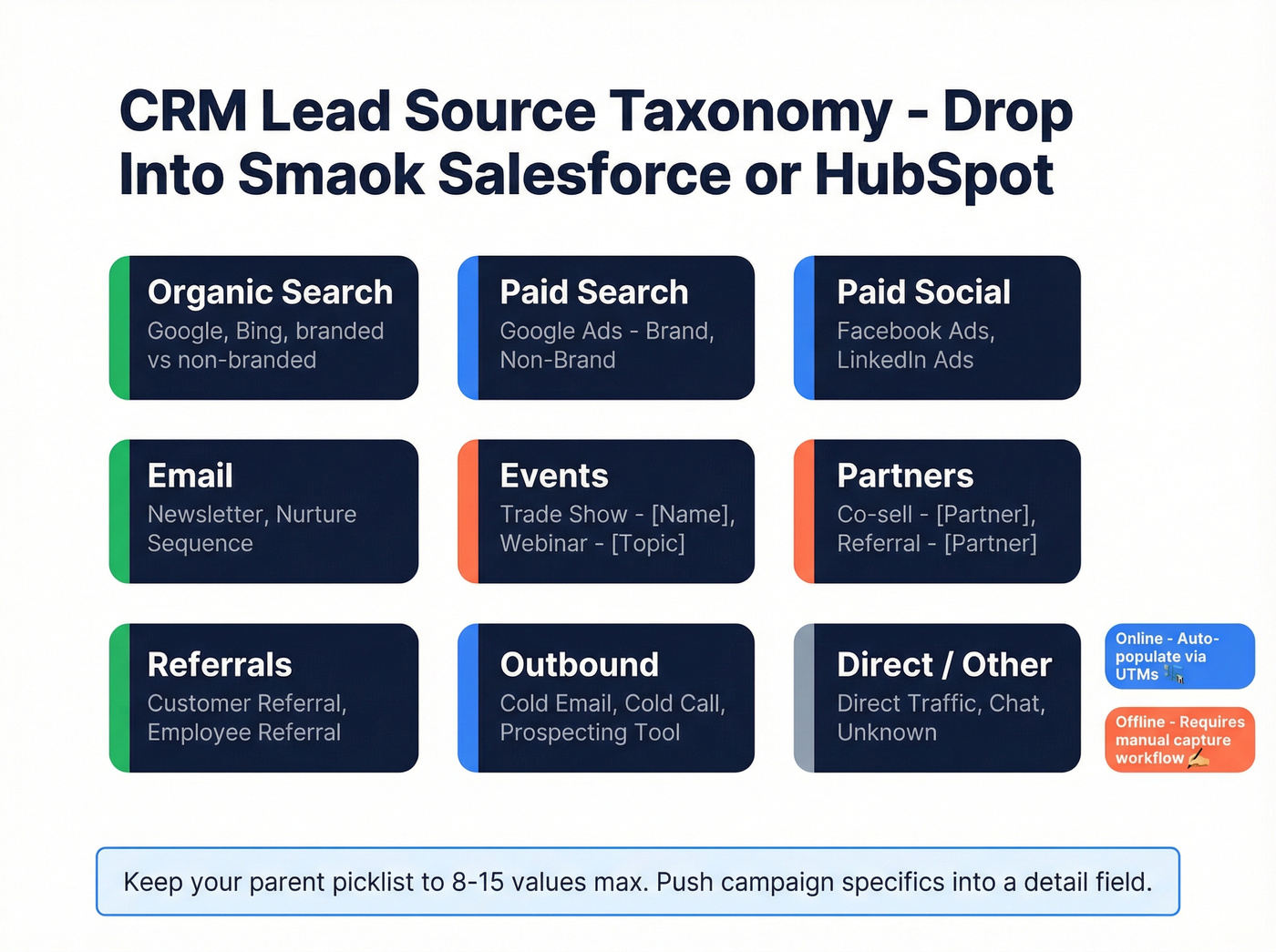
| Parent Source (Picklist) | Example Sub-Details |
|---|---|
| Organic Search | Google, Bing, branded vs. non-branded |
| Paid Search | Google Ads - Brand, Non-Brand |
| Paid Social | Facebook Ads, LinkedIn Ads |
| Newsletter, Nurture Sequence | |
| Events | Trade Show - [Name], Webinar - [Topic] |
| Partners | Co-sell - [Partner], Referral - [Partner] |
| Referrals | Customer Referral, Employee Referral |
| Outbound | Cold Email, Cold Call, Prospecting Tool |
| Direct / Other | Direct Traffic, Chat, Unknown |
Online sources auto-populate through UTMs and form integrations. Offline sources - trade shows, conferences, field events - require deliberate capture workflows. Contacting event leads within one hour makes you roughly 7x more likely to qualify them, per a widely cited InsideSales benchmark. That urgency only works if the badge scan actually lands in your CRM with the right source tag attached.

Your lead source reports are only as good as the contact data behind them. When emails bounce, every source bucket looks worse than it actually is - and your attribution model lies to you. Prospeo enriches CRM records with 98% email accuracy on a 7-day refresh cycle, so your source tracking reflects real channel performance.
Stop blaming the channel when the problem is stale data.
How to Set Up Lead Source Tracking
This is where most teams go wrong. Not because the concept is hard, but because the default CRM setup is insufficient and nobody fixes it until the data's already corrupted.
The Two-Field Model
One field isn't enough. You need two:
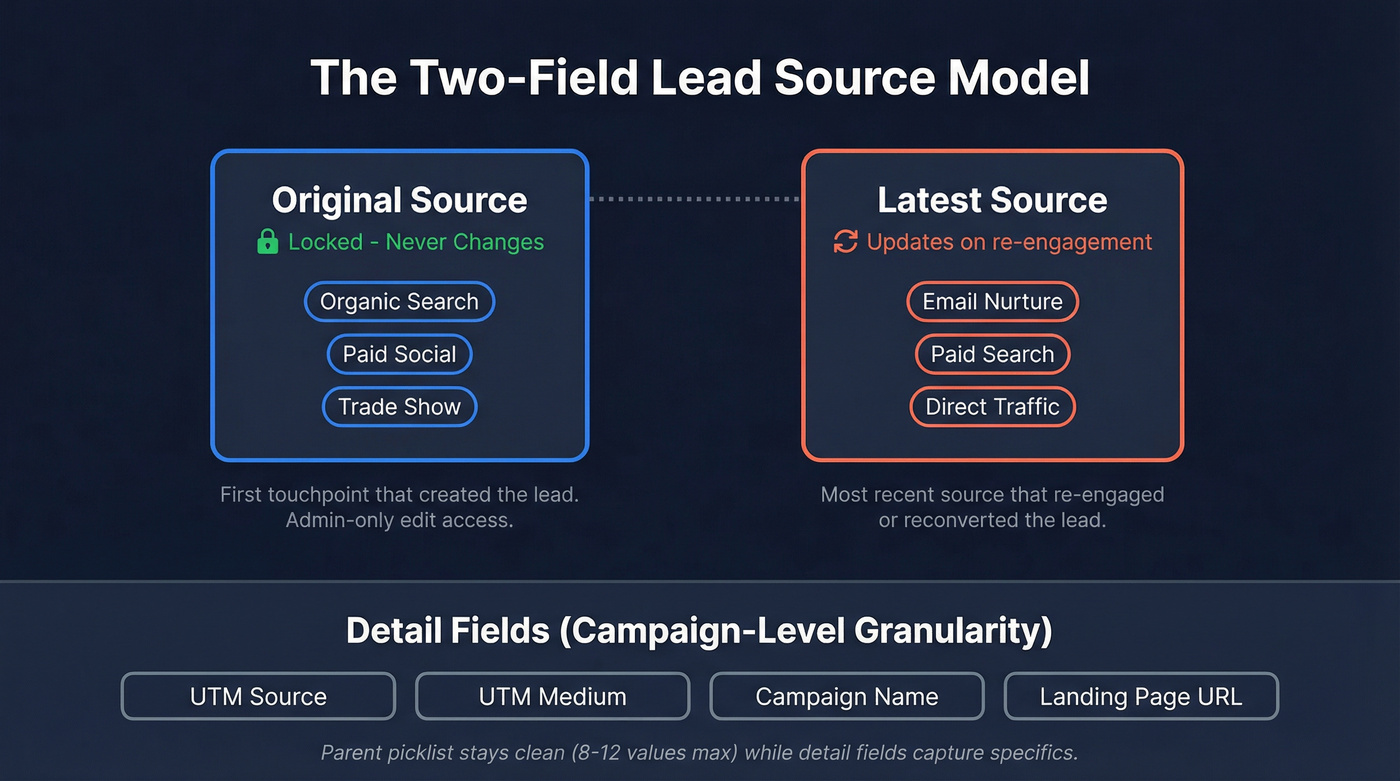
- Original Source - the first known source that created the lead. This never changes.
- Latest Source - the most recent source that re-engaged or reconverted the lead.
Store specifics in separate detail fields: UTM source, UTM medium, campaign name, landing page URL. Capture UTMs through hidden form fields that auto-populate from URL parameters - your marketing automation platform handles this natively. The parent picklist stays clean for reporting with 8-12 values max, while the detail fields give you campaign-level granularity.
This two-field framework prevents the single biggest attribution failure: overwrites that erase the original touchpoint.
Here's the thing: most teams don't have an attribution problem. They have a CRM hygiene problem. Fix the two-field model, lock down Original Source, and 80% of your "attribution project" is done before you ever evaluate a multi-touch tool.
Salesforce Lead Source Setup
Salesforce ships with a default picklist out of the box - values like Web, Phone Inquiry, Partner Referral, Trade Show, and Other. These defaults are a starting point, not a finished taxonomy.
The conversion inheritance rules trip people up. When you convert a Lead, Account Source inherits Lead Source only if the Account Source field is blank. The bigger gotcha: creating an Opportunity from the Account page instead of the Contact page can leave Opportunity Lead Source completely blank. And you can't add Opportunity Lead Source to the "Leads with Converted Lead Information" report type - you need an Opportunity report for that field. Train your reps on both, or automate them away with a flow.
Use a "Lead Source Detail" field with field dependencies to constrain sub-values based on the parent picklist. This prevents reps from tagging a lead as "Paid Search" with a detail value of "Webinar Q3." Proper configuration at this stage saves you from months of cleanup later.
HubSpot-Salesforce Sync
HubSpot holds roughly 37% of the CRM market. Salesforce holds about 38%. That makes HubSpot-to-Salesforce one of the most common dual-system setups - and one of the most common ways to corrupt lead source data.
Set field-level sync direction rules. "Prefer Salesforce unless blank" is the safest default for source fields. Use inclusion filters so not every HubSpot contact syncs to Salesforce - you don't want marketing-only contacts cluttering your sales CRM.
Know what doesn't sync automatically: historical data won't backfill, deleted records in one system won't delete in the other, and Salesforce campaign members can only be created through HubSpot workflows, not native sync. We've seen teams lose months of attribution data because they assumed the integration handled field mapping on its own. It doesn't. Test with sandbox records before you flip the switch.
Mistakes That Corrupt Your Data
Field overwrites from bulk imports are one of the fastest ways to destroy lead source integrity - especially when teams import CSVs without strict mapping rules. Without disciplined source management, even a well-designed taxonomy falls apart in weeks.
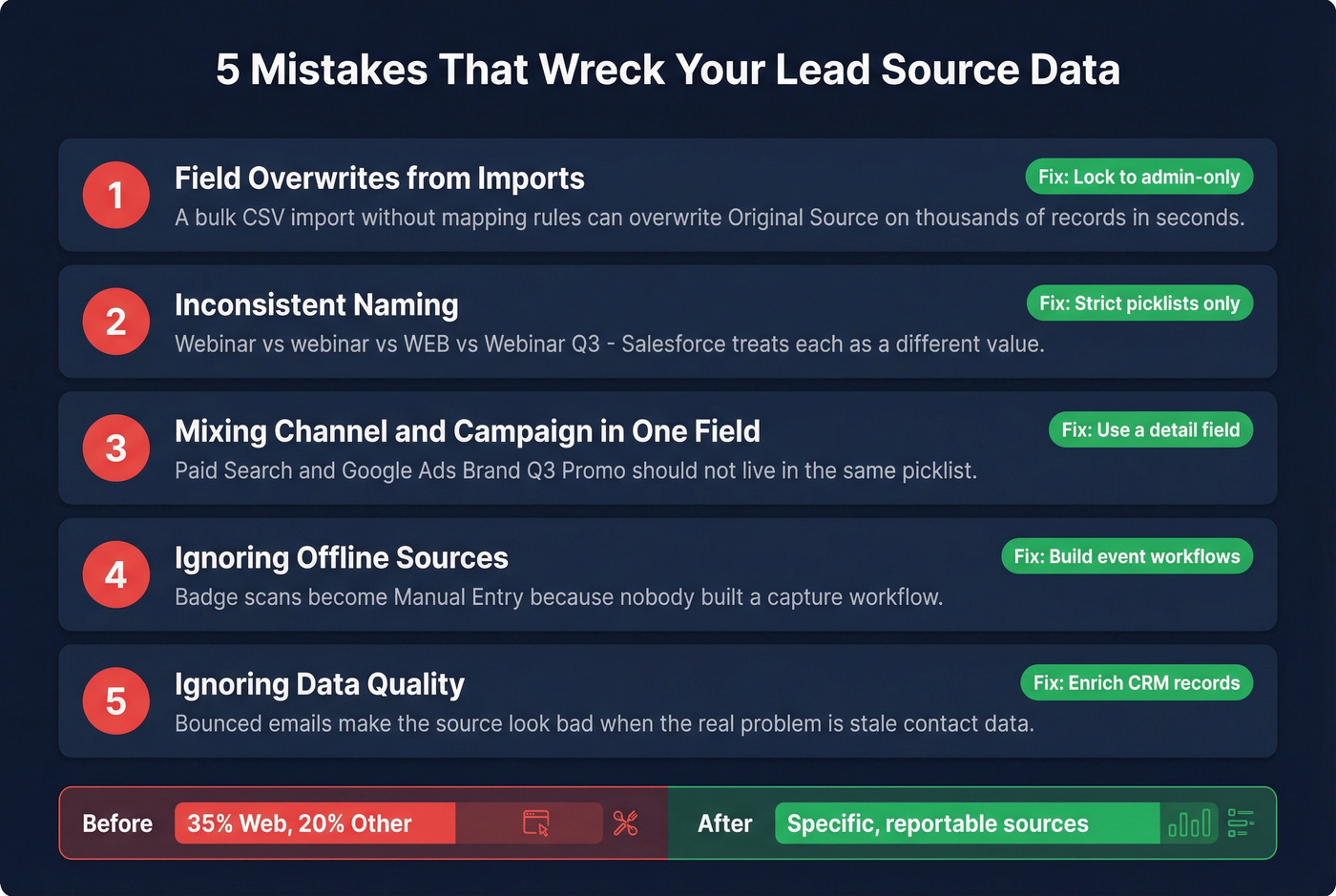
These are the five failures we see most often:
1. Field overwrites from imports. A bulk CSV import without field-mapping rules can overwrite Original Source on thousands of records in seconds. Lock Original Source to admin-only edit access.
2. Inconsistent naming. "Webinar" vs. "webinar" vs. "WEB" vs. "Webinar - Q3" - Salesforce treats these as different values. Use strict picklists, not free text. Ever.
3. Mixing channel and campaign data in one field. "Paid Search" and "Google Ads - Brand Q3 Promo" shouldn't live in the same picklist. That's what the detail field is for.
4. Ignoring offline sources. A badge scan at a trade show becomes "Manual Entry" in the CRM because nobody built a capture workflow. Now your event ROI report is useless.
5. Ignoring data quality. If a big chunk of emails in a source bucket bounce, that source looks terrible in your reports - but the real problem is stale contact data, not the channel. Enriching CRM records in bulk with tools like Prospeo (98% email accuracy, 83% match rate on a 7-day refresh cycle) means your source reports reflect actual channel performance instead of bad data dragging down the numbers.
Before fixing the two-field model: 35% "Web," 20% "Other." After: most leads carry a specific, reportable source. The difference isn't strategy. It's discipline.

You just locked down your two-field model and built a clean taxonomy. Now make sure the contacts inside those source buckets are actually reachable. Prospeo's CRM enrichment returns 50+ data points per record at an 83% match rate - bulk-enriching your Salesforce or HubSpot contacts so your lead source ROI reports tell the truth.
Clean sources deserve clean contacts. Enrich at $0.01 per email.
When You've Outgrown Lead Source
A single CRM lead source field is single-touch attribution in its simplest form. It works when your sales cycle is short and linear. Once you're dealing with cycles over 30 days and three or more touchpoints, it breaks down.
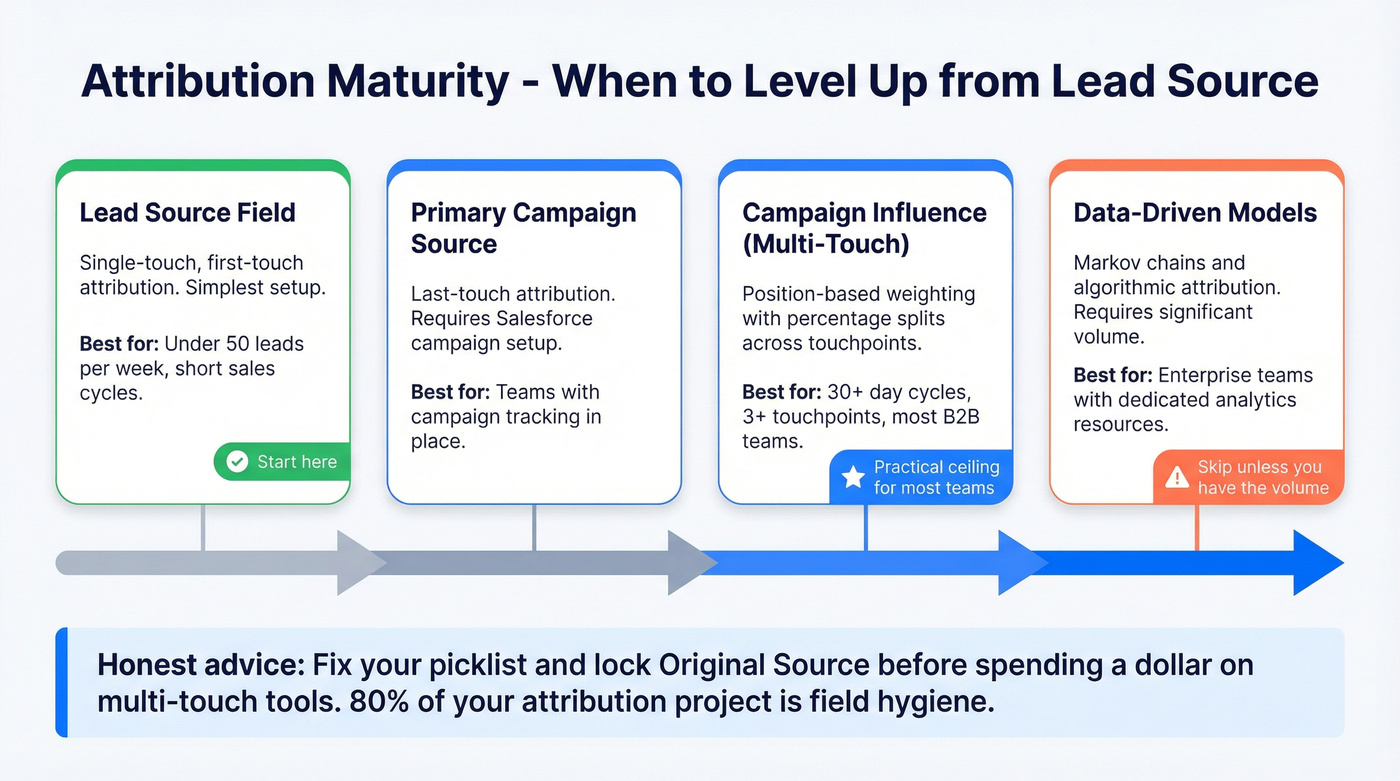
The natural progression in Salesforce: Lead Source (simplest, most error-prone) to Primary Campaign Source (last-touch, requires campaign setup) to Customizable Campaign Influence with multi-touch percentage splits. For most B2B teams, multi-touch campaign influence with position-based weighting is the practical ceiling. Data-driven models like Markov chains require significant volume and dedicated analytics resources that most teams simply don't have.
Let's be honest - skip the multi-touch rabbit hole entirely if your team is under 50 leads per week. Fix your picklist, lock your Original Source field, and revisit attribution modeling once you have the volume to make it statistically meaningful.
FAQ
What's the difference between lead source and lead channel?
Lead source is the specific origin: "Google Ads - Brand Campaign." Lead channel is the broader category: "Paid Search." Use a parent picklist for channels and a dependent detail field for sources to keep reporting clean at both levels.
How many lead source values should my picklist have?
Keep it to 8-15 parent categories. More than 15 and reps won't pick the right one, turning dashboards into noise. Push campaign-level specifics into a separate detail field.
How do I stop bad data from skewing source reports?
Verify contact data before it enters your CRM. Bounced emails mean leads never convert, and the source gets blamed for what's really a data quality problem. Running enrichment through your CRM integration - returning 50+ data points per contact at a 92% API match rate - catches this before it corrupts your reporting.
How do I configure lead source in Salesforce correctly?
Customize the default picklist to match your actual channels - remove generic values like "Other" and replace them with specific categories. Add a dependent "Lead Source Detail" field, lock Original Source from rep edits using field-level security, and build a validation rule that requires a source on every new Lead record.