

CRM and SFA: The Differences That Still Matter (and the Ones That Don't)
Your VP of Sales just asked you to evaluate SFA tools. You pull up a dozen vendor pages, and every single one looks like a CRM. That's not a coincidence - it's the market telling you something. CRM and SFA aren't separate categories anymore for most B2B teams. They're converging, and the real question isn't which one to buy - it's whether your data is clean enough to make either of them work.
The Short Version
SFA automates the sales process: pipeline management, forecasting, cadences, activity tracking. CRM manages the full customer relationship: support, retention, upsell, interaction history. In 2026, most CRMs include SFA as a built-in module.
Quick picks by use case:
- Enterprise: Salesforce Sales Cloud - a perennial leader, if you can afford the admin overhead
- SMB / mid-market: HubSpot Sales Hub (free-to-paid path) or Pipedrive (pipeline-obsessed teams)
- Data quality layer: Prospeo - 98% email accuracy, 7-day refresh, native CRM integrations
What Is CRM?
CRM - customer relationship management - is the system of record for every interaction your company has with a customer or prospect. It's the full lifecycle view: from first touch through closed deal, onboarding, support, renewal, and expansion.
The core capabilities haven't changed much in two decades, but the execution has gotten dramatically better. Contact and account management gives you centralized profiles with interaction history across email, calls, meetings, and support tickets. Customer profiling covers purchase history, engagement scoring, and segmentation for marketing and CS teams. Support ticketing tracks complaints, queries, and resolution timelines. And retention workflows fire automated triggers based on usage patterns, contract dates, or satisfaction scores.
CRM is relationship-centric. It cares about the full customer, not just the deal. That's why marketing, customer success, and support teams all live inside the CRM alongside sales.
What Is Sales Force Automation?
Sales force automation is narrower and more tactical. It exists to make reps more efficient at the specific job of selling - moving leads through a pipeline, closing deals, and hitting quota.
The need is real. Reps spend roughly 30% of their time actually selling, with the rest consumed by admin work like data entry, lead prioritization, and quote generation. A well-implemented sales force management system targets that other 70% directly.
Here's what SFA covers:
- Lead management and scoring - routing inbound leads, prioritizing outbound targets
- Pipeline and opportunity management - visual deal stages, probability weighting, stale-deal alerts
- Sales forecasting - roll-up projections by rep, team, territory, and product line
- Activity tracking - logging calls, emails, and meetings automatically instead of relying on reps to update records
- Sales cadences and sequences - multi-step outreach workflows triggered by lead behavior or time intervals
SFA is process-centric. Managers love it because they can finally see what reps are actually doing.
Key Differences Between CRM and SFA
Here's where these two diverge - and where the line has blurred beyond recognition.
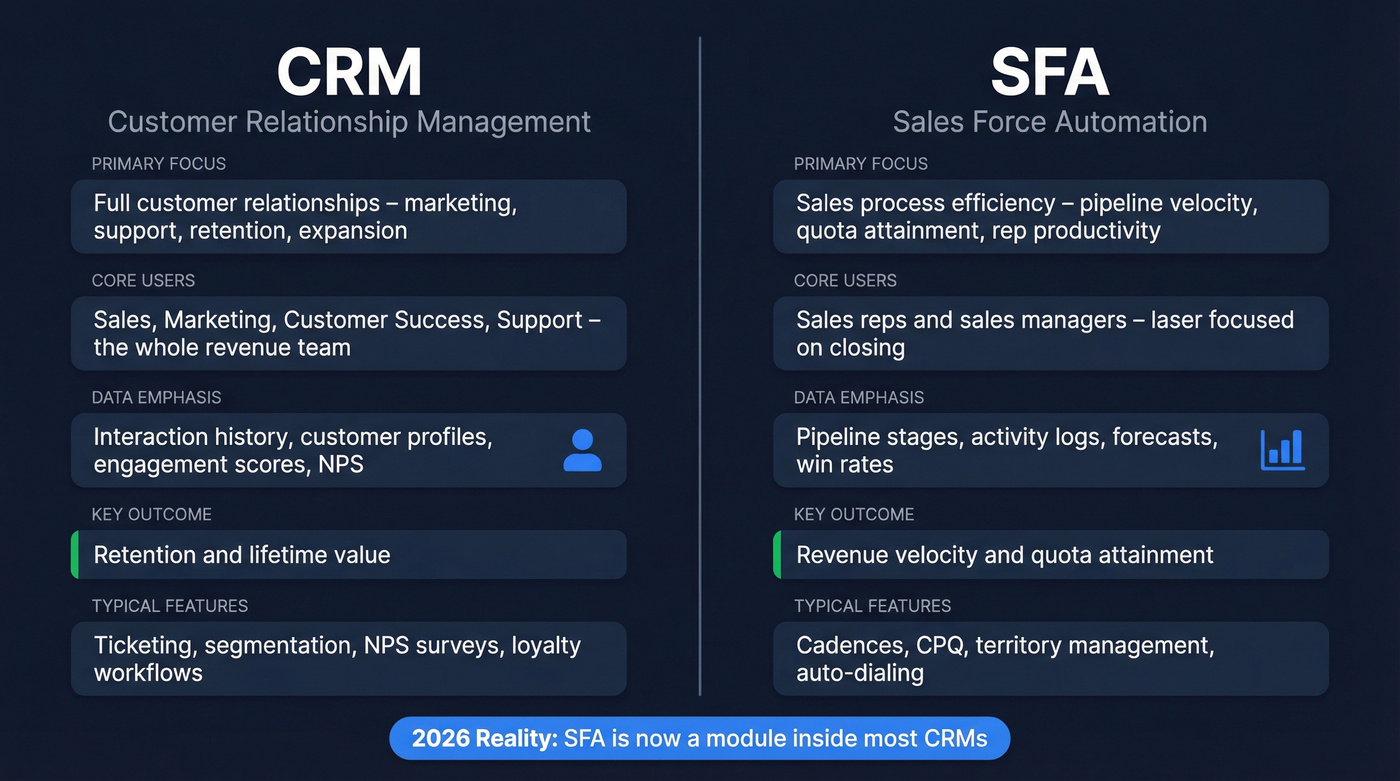
| Dimension | CRM | SFA |
|---|---|---|
| Primary focus | Customer relationships | Sales process efficiency |
| Core users | Sales, marketing, CS, support | Sales reps + managers |
| Data emphasis | Interaction history, profiles | Pipeline, activities, forecasts |
| Key outcome | Retention + lifetime value | Revenue velocity + quota |
| Typical features | Ticketing, segmentation, NPS | Cadences, CPQ, territory mgmt |
The table looks clean, but here's the reality: SFA is increasingly a module within CRM, not a separate purchase. Salesforce Sales Cloud is a CRM that includes world-class sales force automation. HubSpot Sales Hub is the same story. Even Zoho bundles SFA features into its core CRM offering.
The conceptual split - CRM for retention and relationships, SFA for acquisition and process - still holds as a mental model. As a purchasing decision, though, most B2B teams should treat SFA as part of the CRM evaluation, not a separate category.
Let's be honest: if you're a B2B SaaS company debating "CRM vs SFA," you're asking the wrong question. You need a CRM with strong SFA capabilities. Full stop.
The SFA Market in 2026
Even as sales force automation merges into CRM, the market itself is booming. The global SFA market is projected at $12.5 billion in 2026, growing to $22.7 billion by 2033 at an 8.9% CAGR. That's not a dying category - it's a category being absorbed into larger platforms while the underlying spend accelerates.
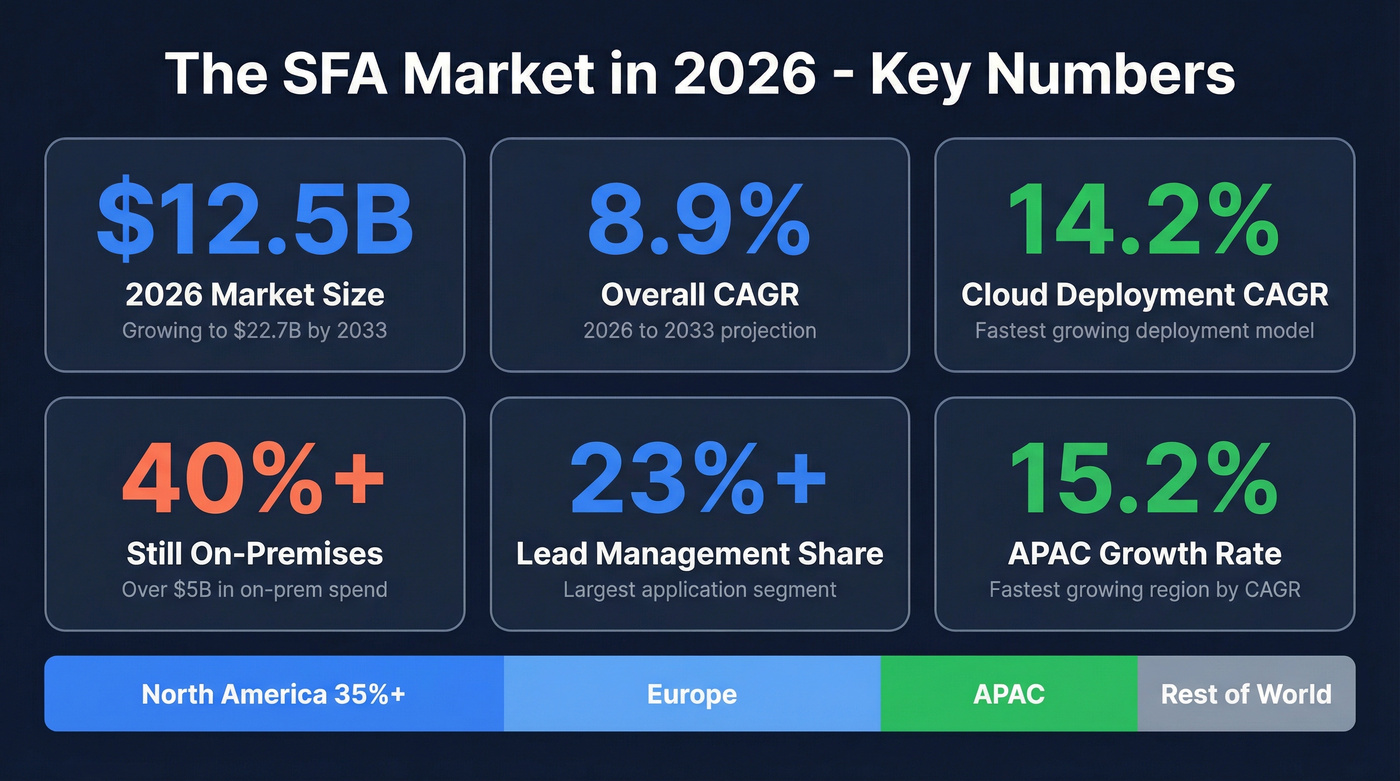
The money tells the story. Cloud deployment is growing at 14.2% CAGR, but on-premises still holds 40%+ share, valued at over $5 billion. Lead management is the largest application segment at 23%+ of the market, while analytics and reporting is the fastest-growing at 13.4% CAGR. North America dominates at 35%+ share, but APAC is accelerating at 15.2% CAGR.
On the vendor side, the 2026 Gartner Magic Quadrant for SFA kept the same three Leaders: Salesforce, Microsoft, and Oracle. The interesting movements happened below them - SugarCRM dropped from Challenger to Niche Player, Freshworks fell off the matrix entirely, and Monday.com entered as a new player. That last one signals how far "SFA" has stretched as a category definition.

SFA automates your sales process. CRM tracks every relationship. But both collapse when reps work off stale contacts and dead emails. Prospeo refreshes every record on a 7-day cycle and delivers 98% email accuracy - so your pipeline stays clean and your cadences actually land.
Stop letting bad data sabotage the tools you're already paying for.
What Modern SFA Actually Does
The SFA feature set has expanded well beyond pipeline management and activity logging.
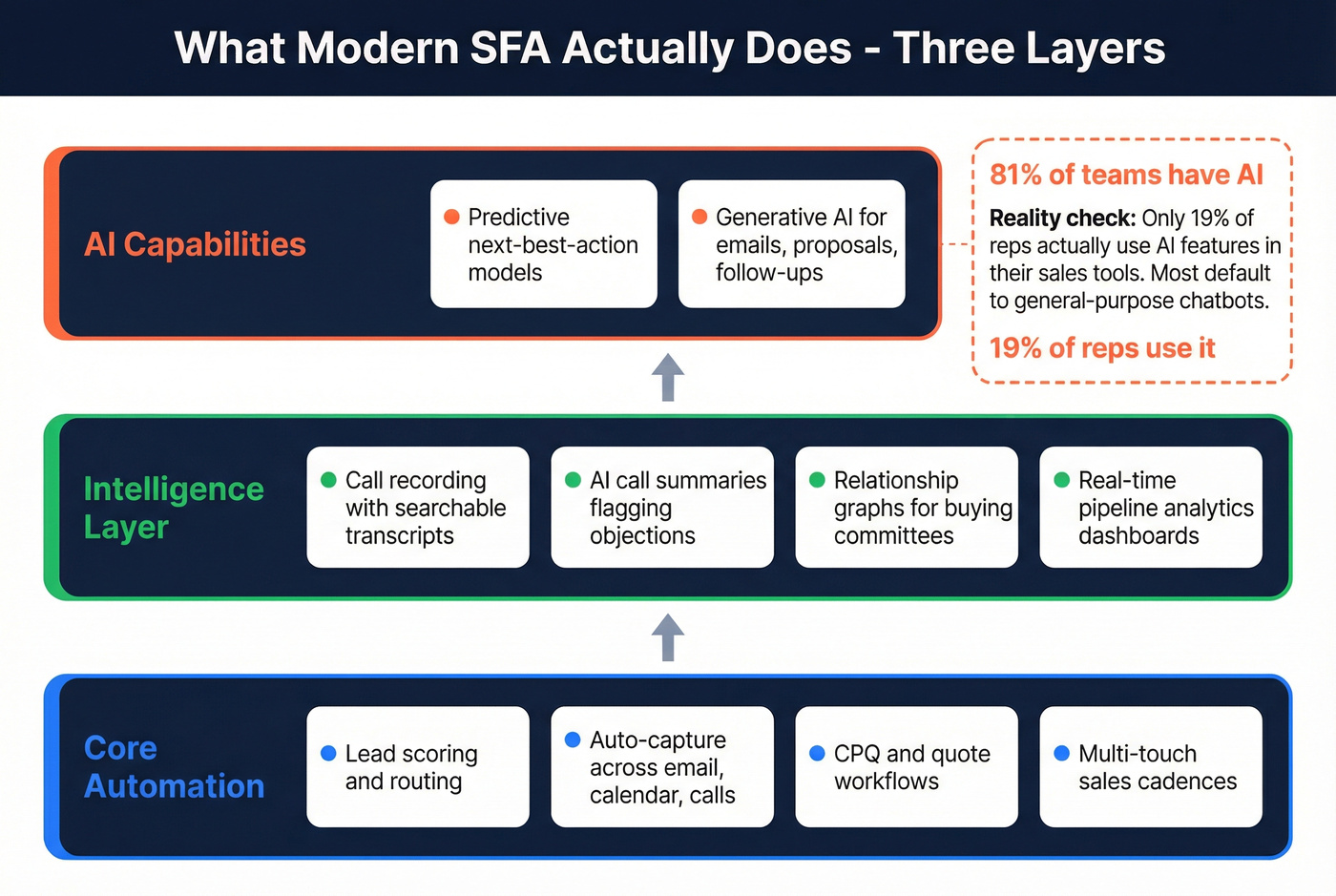
Core automation includes lead and opportunity prioritization with scoring and routing, auto-capture and sync of contact data across email, calendar, and calls, CPQ and quote workflows with approval chains, and multi-touch sales cadences across email, phone, and social.
The intelligence layer adds call recording with searchable transcription libraries, AI-generated call summaries that flag competitor mentions and objections, relationship graphs showing buying committee connections, and real-time pipeline analytics dashboards.
AI capabilities round it out with predictive models that recommend best next actions and generative AI that drafts emails, proposals, and follow-up messaging from existing data.
The AI angle deserves a reality check, though. 81% of sales teams are working with AI in some form - 41% fully implemented, 40% experimenting. Teams using AI effectively see 83% revenue growth rates versus 66% for those without. Sounds great. But only 19% of reps actually use AI features inside their sales tools. Most default to general-purpose chatbots instead.
AI in SFA is overhyped in marketing and underused in practice. The technology works. The adoption doesn't. If you're evaluating platforms partly for their AI capabilities, ask the vendor what their actual feature adoption rate looks like - not what the feature can theoretically do.
Which Do You Need?
Your answer depends on three things: company size, sales model, and industry.
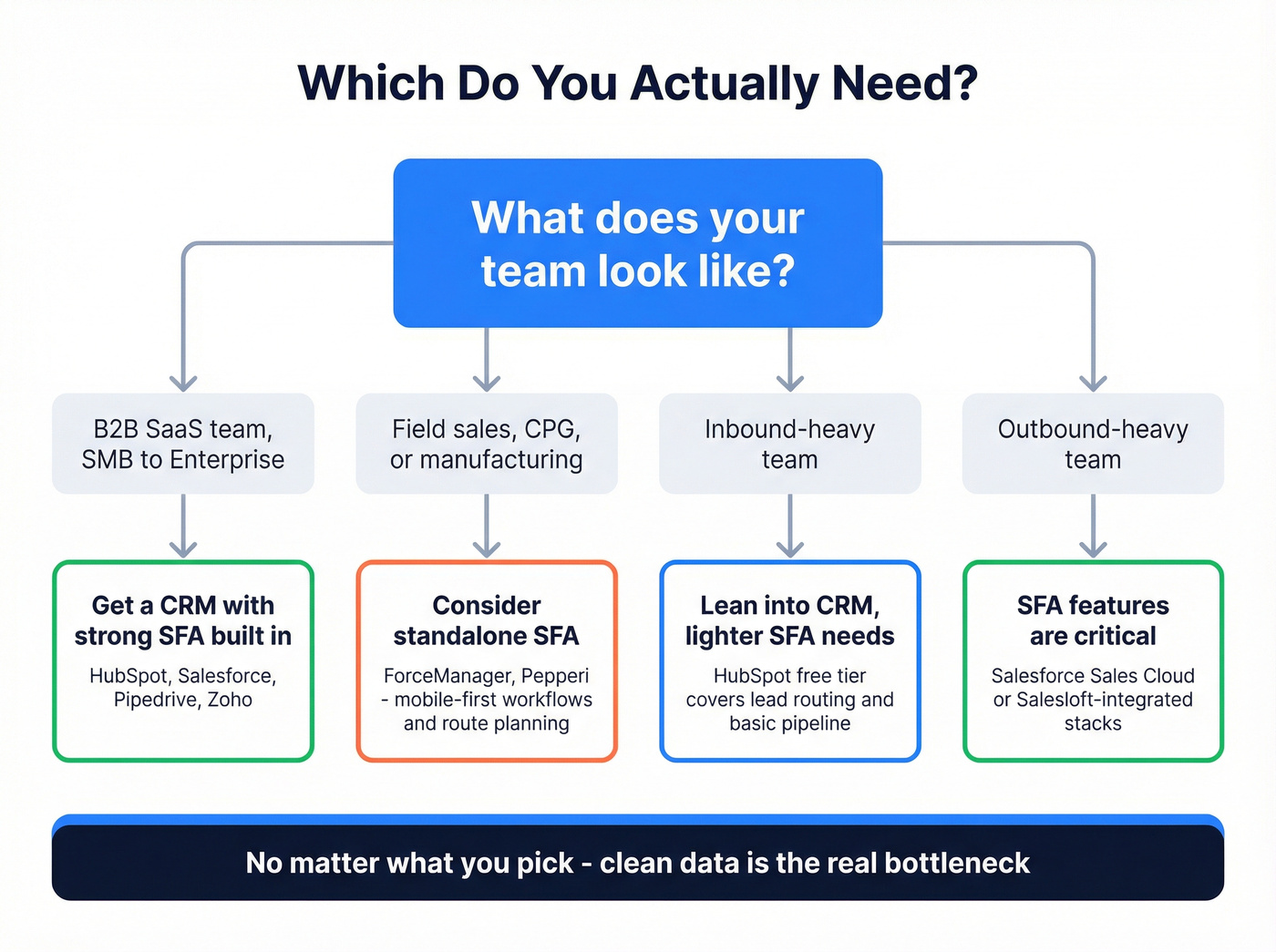
Most B2B SaaS teams, SMB through enterprise: You need a CRM with strong SFA capabilities. Not a separate SFA tool. HubSpot, Salesforce, Pipedrive, Zoho - they all bundle sales force automation into the CRM. Buy one platform and configure it well.
Field sales orgs, CPG, manufacturing: This is where standalone SFA still makes sense. You need mobile-first workflows, route planning, and order capture that sales teams in these industries prioritize. Dedicated tools like ForceManager or Pepperi exist for this reason.
Inbound-heavy teams: Lean into CRM. Your SFA needs are lighter - lead routing, basic pipeline management, maybe sequences for follow-up. HubSpot's free tier covers this surprisingly well.
For outbound-heavy teams, SFA features matter more. You need cadences, auto-dialing, activity tracking, and pipeline analytics. Salesforce Sales Cloud or Salesloft-integrated stacks shine here. But the data feeding those cadences matters even more than the cadence tool itself.
The signal-based selling trend reinforces this. Signal-qualified leads - prospects showing intent, job changes, or funding events - convert 47% better and produce 43% larger deals. The SFA platform executes the workflow, but the data layer identifies the signals. Without clean, fresh data, your automation is just scaling noise.
Here's the thing: if your deals average under $15K, you probably don't need Salesforce-level SFA. A well-configured HubSpot or Pipedrive with clean data will outperform an enterprise platform that your reps refuse to use. The consensus in RevOps communities on r/salesoperations is the same - the CRM-vs-SFA debate is a distraction. The real bottleneck is always data quality.
Data Quality: The Foundation Neither Can Work Without
We've seen teams invest heavily in Salesforce Sales Cloud, spend months configuring lead scoring and cadences, then watch the whole thing underperform because a huge chunk of their contact data was stale or wrong. Buying an SFA platform without clean data is like buying a Ferrari and filling it with cooking oil.
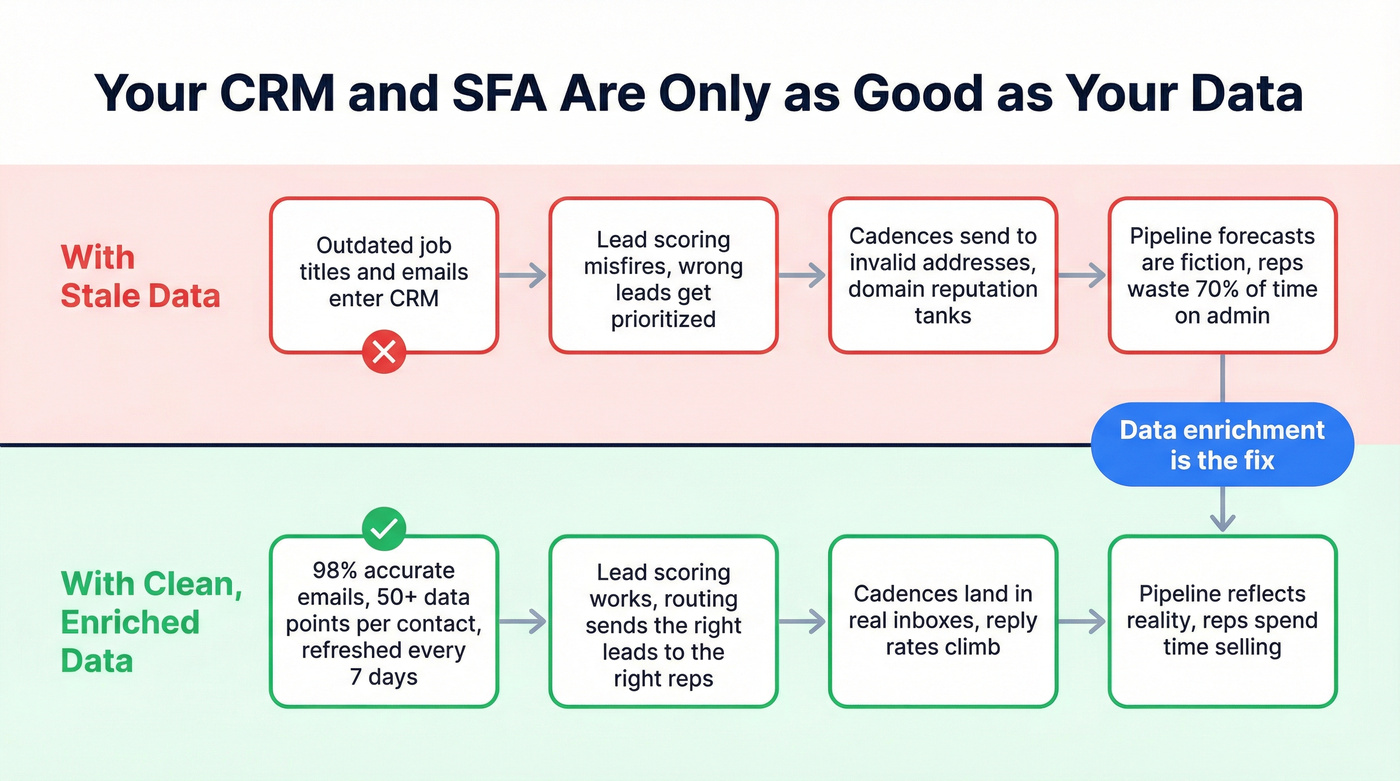
Lead routing breaks when job titles are outdated. Scoring models misfire when emails bounce. Cadences burn your domain reputation when you're sending to invalid addresses. Every SFA workflow depends on accurate, fresh contact data.
There's a compliance dimension too. GDPR penalties reach EUR20M or 4% of annual revenue, making data hygiene a regulatory requirement, not just a performance one.
The common refrain in sales ops communities captures it perfectly: "Your CRM is only as good as what reps put into it." Automated enrichment removes the human bottleneck entirely. Prospeo keeps the data layer healthy with 98% email accuracy, a 7-day refresh cycle versus the 6-week industry average, and CRM enrichment that returns 50+ data points per contact at an 83% match rate. It plugs directly into Salesforce and HubSpot, so enrichment runs automatically - no manual CSV exports, no engineering time.

Your CRM enrichment is the invisible layer that decides whether reps spend time selling or chasing bounced emails. Prospeo's native Salesforce and HubSpot integrations enrich contacts with 50+ data points at a 92% match rate - for roughly $0.01 per email.
Feed your CRM data it can actually use. Start in under two minutes.
Top Platforms to Evaluate
For most B2B teams, HubSpot Sales Hub offers the best balance of SFA features, ease of use, and price. Enterprise teams with complex processes should default to Salesforce.
| Platform | Best For | SFA Strength | Starting Price |
|---|---|---|---|
| Salesforce Sales Cloud | Enterprise | Full SFA + AI (Einstein) | ~$25+/user/mo |
| HubSpot Sales Hub | SMB / free-to-paid | Pipeline + sequences | Free, then paid tiers |
| Dynamics 365 Sales | Microsoft-stack orgs | Office 365 integration | ~$65+/user/mo |
| Zoho CRM | Mid-market value | Strong SFA, affordable | Free, then paid tiers |
| Pipedrive | Pipeline-focused teams | Visual pipeline, fast | ~$14+/user/mo |
| Oracle NetSuite CRM | ERP-integrated sales | Finance + sales unified | Custom pricing |
Salesforce Sales Cloud
A consistent Leader in the Gartner Magic Quadrant, with one of the deepest SFA feature sets on the market and an ecosystem of integrations that nothing else matches. The tradeoff is real, though - if you don't have a dedicated Salesforce admin, you'll underutilize it badly.
HubSpot Sales Hub
Think of HubSpot as the anti-Salesforce: fast to set up, genuinely useful at the free tier, and strong enough for most SMB and mid-market teams. Sequences, pipeline management, forecasting, and meeting scheduling all work well out of the box. Where it falls short is advanced territory management and CPQ at the enterprise level.
Microsoft Dynamics 365 Sales
Skip this if you're not already running Outlook, Teams, and SharePoint. The Office 365 integration is genuinely deep - reps can work deals without leaving their email. Otherwise, the UI feels dated and implementation complexity rivals Salesforce.
Zoho CRM
Best value in the category, period. Lead scoring, pipeline management, and forecasting come at a fraction of Salesforce pricing, and the free tier supports three users. It won't win beauty contests, but the ROI math is hard to beat for cost-conscious mid-market teams.
Pipedrive
Pipeline-first design with the fastest setup time on this list. Reps love the visual Kanban pipeline. Skip this if you need deep reporting, AI-powered insights, or enterprise-grade territory management - Pipedrive keeps things deliberately simple.
Oracle NetSuite CRM
Best when sales needs to live inside your ERP. If your finance team already runs NetSuite, adding CRM keeps revenue data unified across quoting, invoicing, and forecasting. Enterprise-only - expect to talk to sales.
Rolling Out SFA Without Killing Productivity
Enterprise SFA deployments typically take 6-12 months, and organizations commonly see a 15-25% productivity decline during the transition. That's the cost of change management, data migration, and training happening simultaneously.
The three failure modes we see over and over:
Dirty data migration. Teams dump their existing CRM data into the new platform without auditing it first. Duplicates, outdated contacts, and missing fields carry over and immediately corrupt lead routing and scoring. Run a full data audit before migration. Do a test upload with a subset before going live.
Lack of training. Reps get a 30-minute demo, then they're expected to use the tool. Within two weeks, they're back in spreadsheets. Create role-based training plans and appoint user champions on each team who can answer questions in real time.
Underestimated requirements. The sales team wanted "a simple CRM." Six months later, they need CPQ, territory management, and custom reporting. Scope the full requirements upfront, even if you phase the rollout. It's cheaper to plan for complexity than to re-implement.
Real talk: the tool matters less than the implementation. A well-configured HubSpot will outperform a poorly implemented Salesforce every single time. I've watched it happen at three different companies.
FAQ
Is SFA part of CRM?
Usually, yes. Most modern CRMs - Salesforce, HubSpot, Zoho, Dynamics 365 - include SFA as a built-in module covering pipeline management, forecasting, and cadences. Standalone SFA tools still exist for field sales and CPG, but they're the exception in B2B.
What's the ROI of sales force automation?
Expect a 10-20% productivity lift and faster lead response times once adoption stabilizes. Teams using AI-powered SFA see 83% revenue growth rates versus 66% without. The caveat: ROI depends entirely on data quality and rep adoption, not the platform itself.
How does AI change SFA in 2026?
Predictive AI prioritizes leads and recommends next actions. Generative AI drafts emails and proposals. But only 19% of reps actually use AI inside their sales tools - adoption is the bottleneck, not the technology. Don't buy a platform for AI features your team won't use.
How do I keep my CRM and SFA data clean?
Automate enrichment with a tool that refreshes data weekly and verifies emails before they enter your workflows. Schedule quarterly audits to catch decay, and make sure your enrichment tool integrates natively with your CRM so reps never have to think about it.