The AI SDR Onboarding Plan That Prevents the 88% Failure Rate
A RevOps lead we know deployed an AI SDR on a Monday. By Friday, it had emailed a churned customer about an upsell, referenced a deprecated product feature, and CC'd someone who'd unsubscribed - all in the same thread. The platform worked exactly as configured. Nobody had configured it properly.
88% of AI SDR pilots stall before reaching production. That's not a technology problem. It's an onboarding problem, and here's the plan that keeps you in the other 12%.
The 6-Week Deployment Plan (Quick Version)
If you're short on time, here's the compressed playbook:
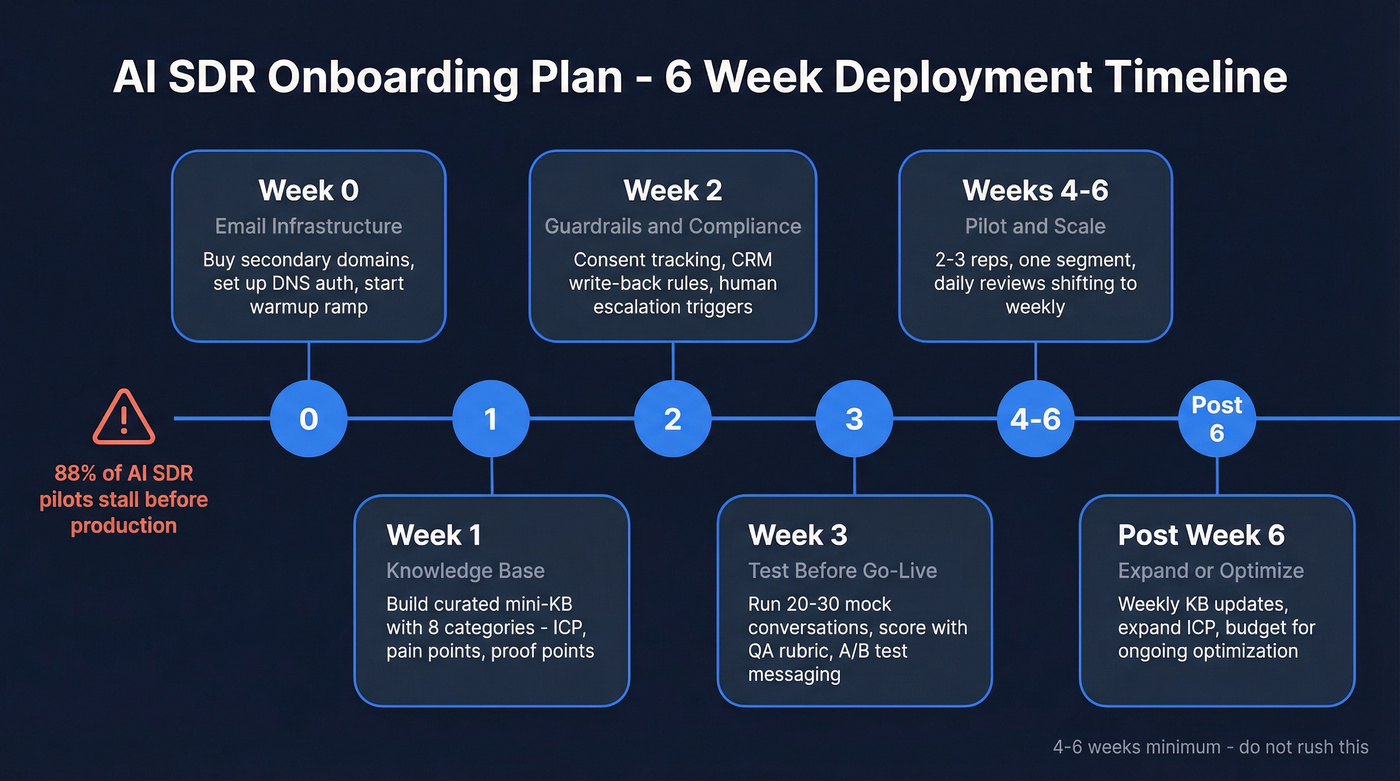
- Budget 4-6 weeks, not 5 minutes. Rushed onboarding is why most pilots stall. Vendors pitch "launch in minutes," but real deployments live or die on setup quality.
- Set up email infrastructure first. Domains, warmup, DNS authentication - all before you touch the AI SDR platform.
- Build a curated knowledge base. Not your entire wiki. Just the 8 things your AI needs to sound human.
- Pilot narrow for 30 days, then scale. Two to three reps, one segment, tight feedback loops.
Why Most AI SDR Deployments Fail
The numbers are brutal. A UserGems survey of 100+ B2B revenue leaders found that 97% plan to increase AI spend - but only 7% report measurable ROI. Nearly half see limited or uncertain value from what they've already deployed. Meanwhile, 22% of sales teams have fully replaced human SDRs with AI, which proves successful deployment is possible. Most teams just aren't getting there.
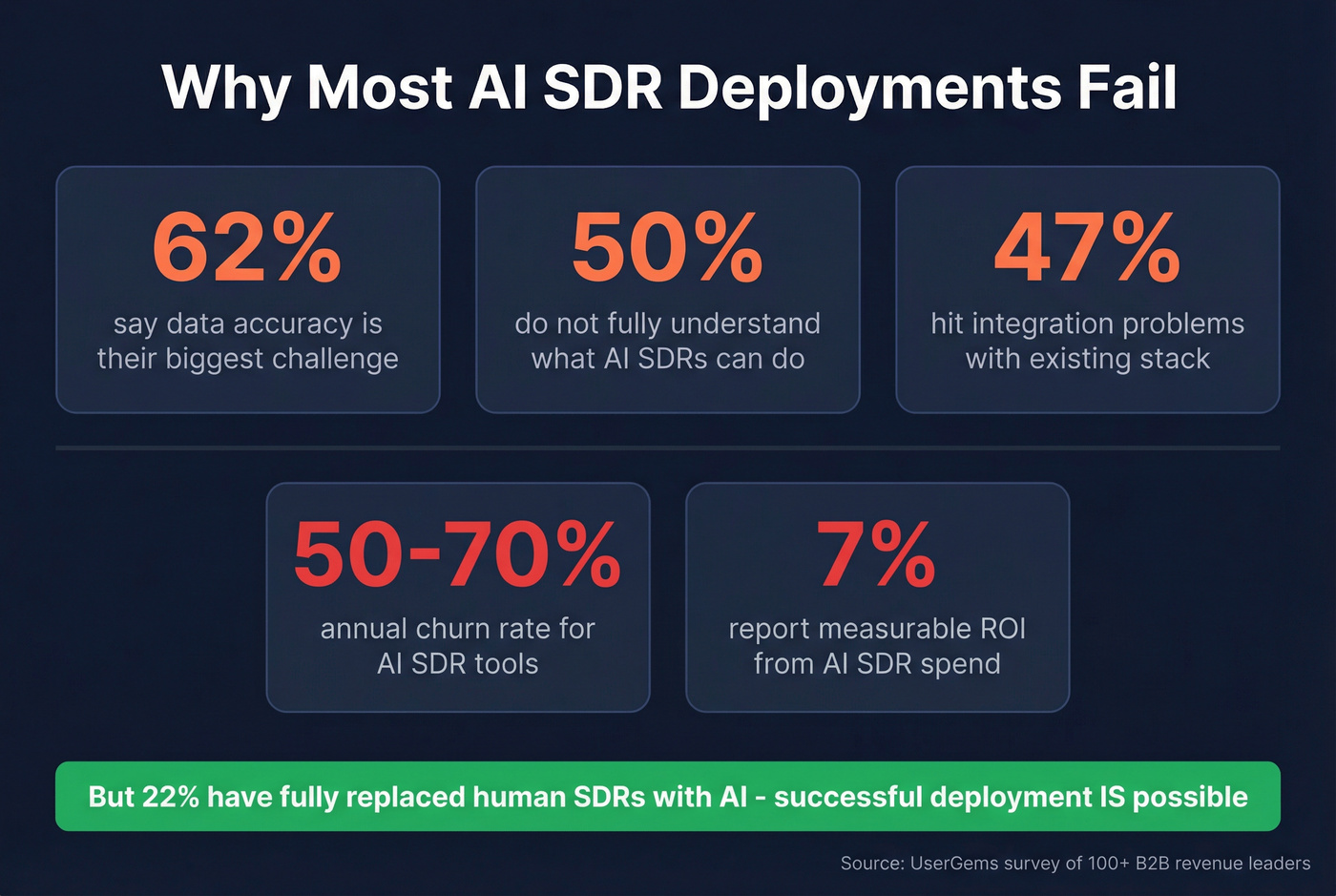
The top barriers aren't mysterious: 62% say data accuracy is their biggest challenge, 50% don't fully understand what AI SDRs can actually do, and 47% hit integration problems with their existing stack. These aren't edge cases. They're the norm.
Here's the thing: AI SDR tools churn at 50-70% annually. The tools aren't failing because the technology is bad - they're failing because teams skip the onboarding work that makes the technology useful. Months post-implementation, reps still manually double-check AI-drafted emails. Prospects correct wrong job titles. The AI pulls stale data from a CRM nobody cleaned. We've seen this pattern play out across dozens of teams, and it almost always traces back to the same root cause: the preparation was rushed or skipped entirely.
Pre-Launch: Data Audit & Budget
Before evaluating any AI SDR platform, you need two things: clean data and a realistic budget. Getting this right is the fastest way to reduce ramp-up time. Skipping it is the fastest way to waste your investment.
Year-1 costs for an AI SDR versus a human SDR break down like this:
| Cost Category | AI SDR | Human SDR |
|---|---|---|
| Platform / Salary + Commission | $18K-$96K | $65K-$95K |
| Setup / Recruiting + Training | $2K-$10K | $10K-$20K |
| Email Infrastructure | $2K-$5K | $1K-$3K |
| Data Enrichment | $3K-$12K | $3K-$12K |
| Optimization / Mgmt | $6K-$24K | $15K-$25K |
| Total Year 1 | $31K-$147K | $110K-$168K |
One thing the table doesn't capture: AI SDR tools churn at 50-70% annually, meaning replacement costs are real. Factor potential replacement spend into your planning.
The cost advantage is real, but only if the AI SDR actually works. And it won't work if you feed it garbage data.
Your data audit before launch: remove duplicates, flag records older than 90 days, fill missing fields like title, company, and industry, and verify every email address. Meritt dropped from a 35% bounce rate to under 4% after switching to verified data - that's the difference between building pipeline and destroying sender reputation.

Week 0 - Email Infrastructure
Don't skip this. Your AI SDR's sending reputation is built or destroyed in the first two weeks, and there's no undo button.
Domain Strategy
Never use your main corporate domain for outbound. Buy secondary domains - getcompany.io, trycompany.ai, meetcompany.com - and warm each individually. If you need 500 emails per day, that's 100/day across 5 domains, not 500 from one.
DNS Authentication
Every sending domain needs three records configured correctly:
| Record | Key Detail |
|---|---|
| SPF | One record per domain, max 10 DNS lookups including include and redirect mechanisms. Multiple SPF records confuse receiving servers. |
| DKIM | Generate and publish the key pair for each domain-provider combination. |
| DMARC | Start with p=none for monitoring, then tighten to quarantine or reject as you gain confidence. |
Gmail, Yahoo, and Microsoft require bulk senders (over 5,000 messages/day) to authenticate, and even sub-threshold senders benefit from it. Unauthenticated emails increasingly land in spam regardless of volume.
If you need a deeper walkthrough, follow a dedicated SPF, DKIM, DMARC setup guide before you scale volume.
Warmup Ramp Schedule
| Week | Daily Volume | Notes |
|---|---|---|
| Week 1 | 10-20/day | Replies only, no cold |
| Week 2 | 20-40/day | Mix warm + light cold |
| Week 3 | 40-60/day | Monitor bounce/spam |
| Week 4 | 60-80/day | Full cold if clean |
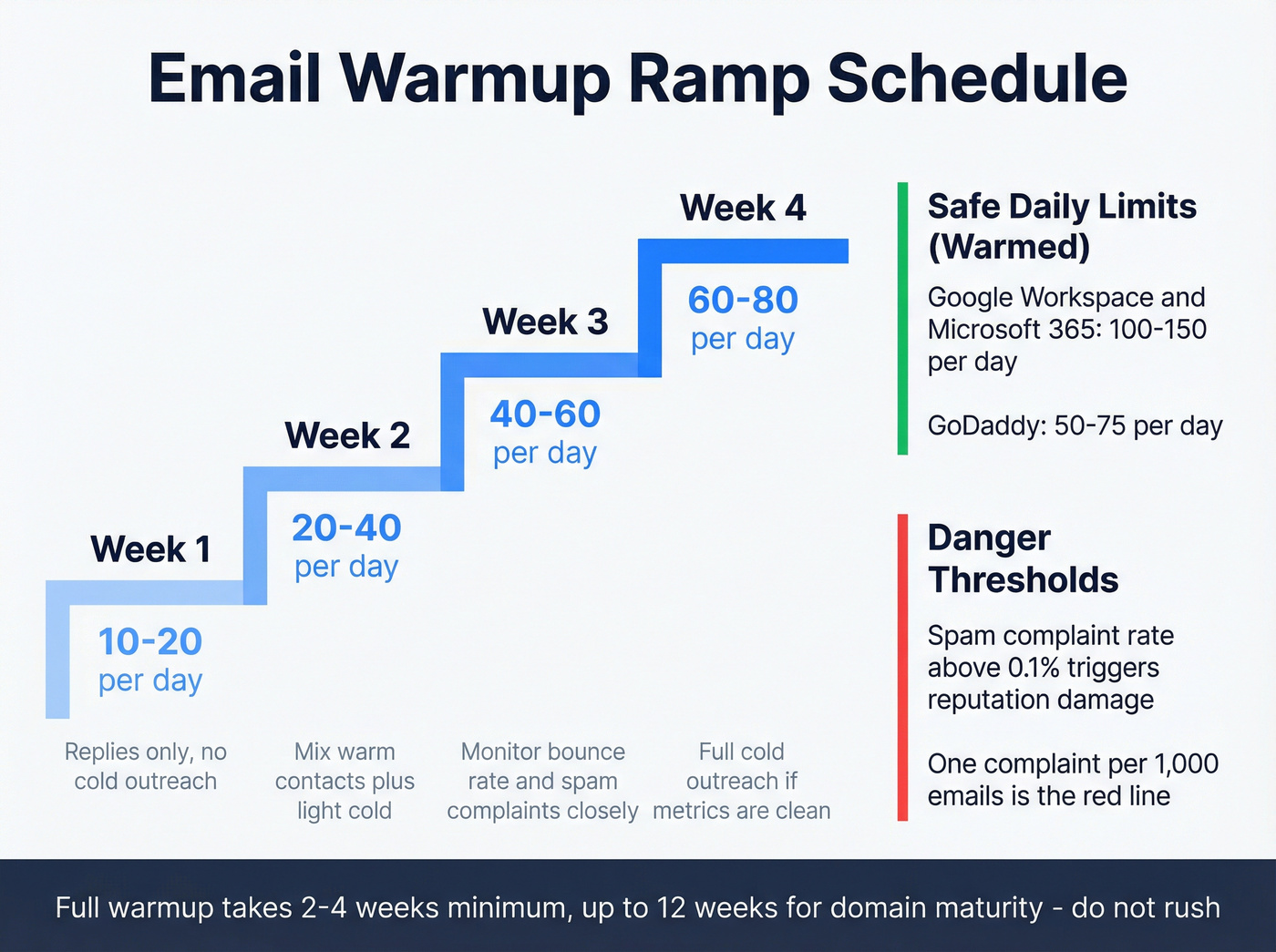
Warmup takes 2-4 weeks minimum, and can stretch to 12 weeks for a domain to fully mature. Safe daily limits once warmed: 100-150/day for Google Workspace and Microsoft 365, 50-75/day for GoDaddy.
The 0.1% spam complaint threshold is real. One complaint per 1,000 emails triggers reputation damage. This is why data quality matters so much - bounces and spam traps compound fast.

Your AI SDR is only as good as the data feeding it. 62% of teams cite data accuracy as their top barrier - Prospeo solves that with 98% email accuracy, a 7-day refresh cycle, and 5-step verification that catches spam traps and honeypots before they torch your sender reputation.
Stop debugging bad data. Start your AI SDR on a clean foundation.
Week 1 - Build the Knowledge Base
Your AI SDR doesn't need your entire wiki. It needs a curated mini-KB with exactly the information required to hold a credible conversation. The principle comes from Luru's training framework: give it conversational prompts and context, not scripts.
Here's the template we use internally. Build entries for each of these eight categories, and don't overthink it - a strong first draft beats a perfect one that takes three weeks.
| Category | What to Write |
|---|---|
| Company one-liner | What you do, for whom, in one sentence |
| Top 3 pain points | Problems your buyers actually have, in their language |
| Key benefits | Outcomes, not features. "Cut prospecting time by 60%" beats "AI-powered search" |
| Competitor comparisons | 2-3 sentences per competitor. Where you win, where they win |
| Proof points | Case snippets with numbers. "Customer X went from Y to Z in N months" |
| Objection handling | Empathize, reframe, ask. Cover 3-5 common objections |
| Handoff process | When and how the AI passes to a human. Clear triggers, no ambiguity |
| Next-step language | What the AI proposes based on conversation stage - demo, call, or resource |
ICP Definition
Map your ICP tightly before the AI touches a prospect. Define by title, seniority, company size, industry, and - if possible - intent signals. The narrower your initial ICP, the faster you'll learn what works.
Week 2 - Guardrails & Compliance
This is the week most teams skip. It's also the week that prevents the nightmare scenarios.
What to Do vs. What to Avoid
| Do | Don't |
|---|---|
| Automate consent tracking from day one | Assume your CRM suppression list is current |
| Set hard topic boundaries (pricing, legal, roadmap) | Let the AI improvise on sensitive topics |
| Write only structured, validated data back to CRM | Allow free-text AI summaries in contact records |
| Define explicit human escalation triggers | Trust the AI to "know when" to hand off |
| Launch at "basic safeguards" per Knock-AI's compliance framework | Wait until post-launch to think about GDPR/CCPA |
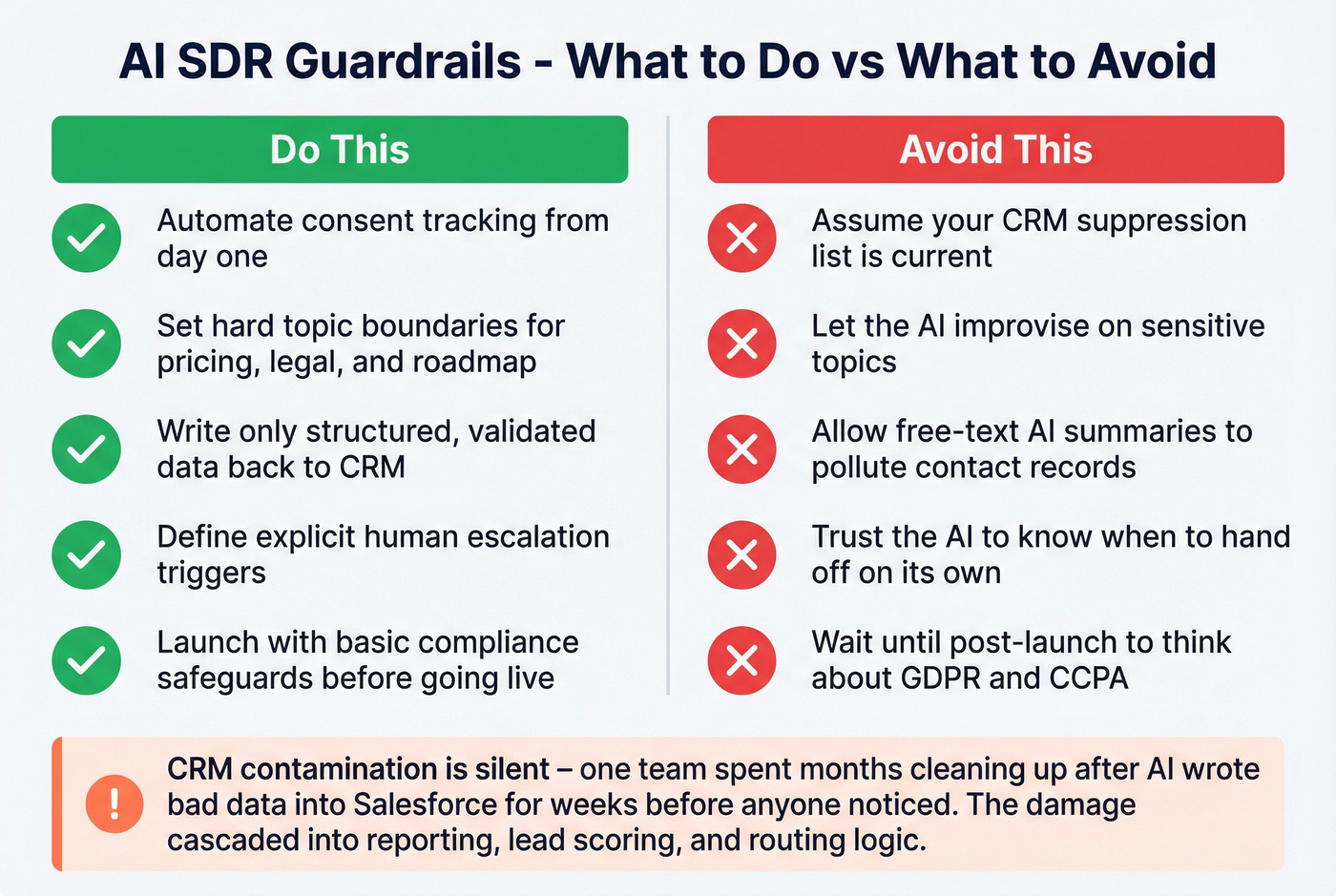
Your AI SDR needs to operate within GDPR, CCPA, and CAN-SPAM from day one. That means automated consent tracking, suppression list propagation, and opt-out handling that actually works across every channel.
CRM Contamination Is Silent
CRM write-back rules deserve special attention. Only structured, validated data should flow back - no free-text AI summaries polluting contact records, no unverified fields overwriting human-entered data. We've seen teams spend months cleaning up after an AI SDR wrote bad data into Salesforce for weeks before anyone noticed. By the time they caught it, the damage had cascaded into reporting, lead scoring, and routing logic. That kind of cleanup isn't a weekend project.
If you want a concrete process for keeping records clean, use a CRM hygiene checklist before you turn on write-back.
Human Escalation Triggers
Define exactly when the AI hands off: prospect asks for pricing, mentions a competitor by name, expresses frustration, requests legal or security info, or hits any topic boundary. No ambiguity. If the AI isn't sure, it escalates.
Week 3 - Test Before Go-Live
Remember the story we opened with? The wrong job title, the deprecated feature, the unsubscribed CC? That happens when teams skip QA.
Simulated Conversations
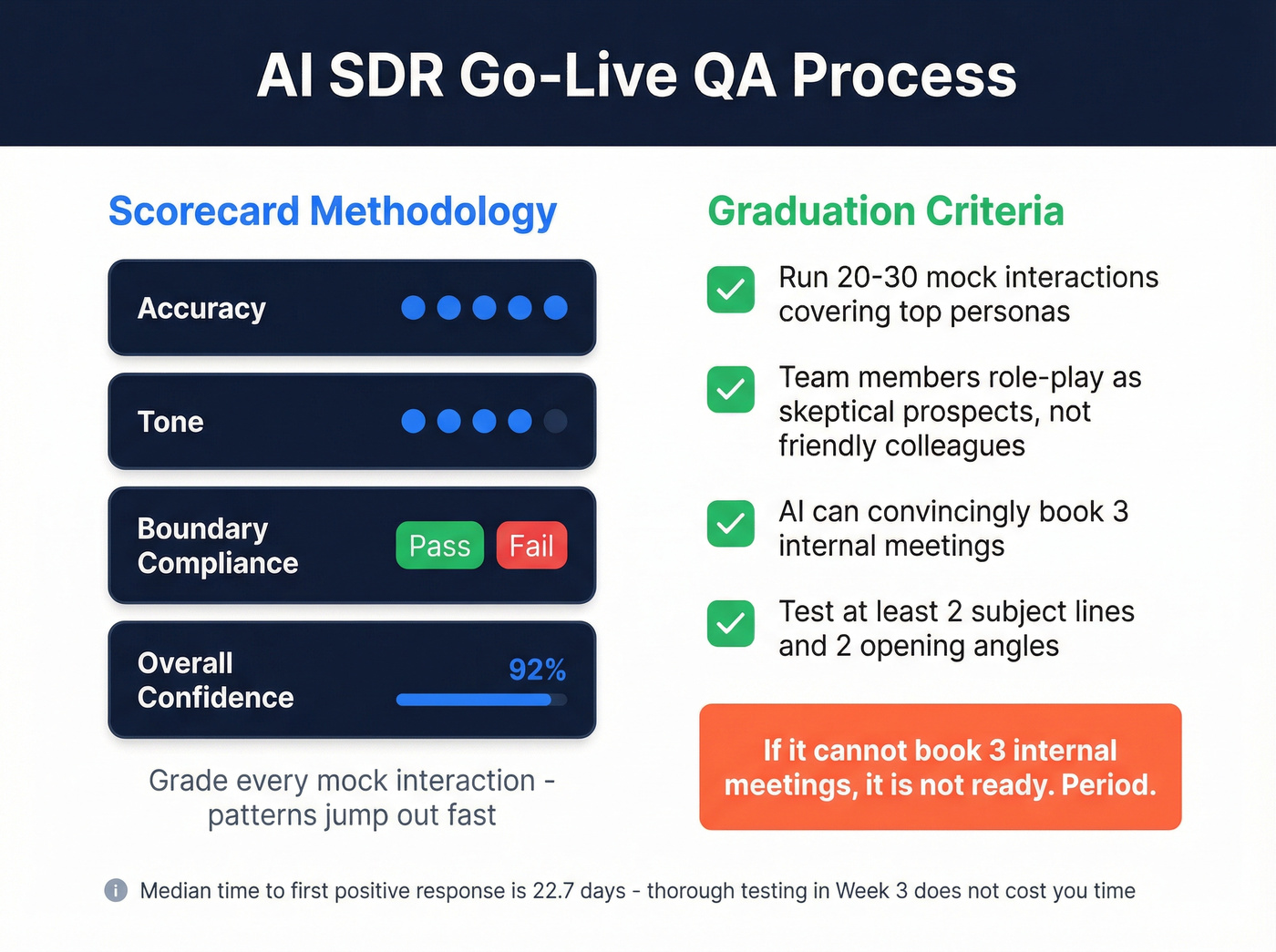
Run 20-30 mock interactions covering your top personas, common objections, and edge cases. Have team members role-play as skeptical prospects, not friendly colleagues. Some teams also use AI chatbots for sales onboarding scenarios, running automated role-plays at scale to stress-test edge cases faster than humans can.
Scorecard Methodology
Some platforms have built-in scorecards for this. If yours doesn't, build a simple spreadsheet with four columns: accuracy (1-5), tone (1-5), boundary compliance (pass/fail), and overall confidence score. Grade every mock interaction. The patterns jump out fast.
Graduation Criteria
If the AI can convincingly book 3 internal meetings where team members role-play as prospects, it's ready. If it can't, it's not. Period.
A/B Messaging Variants
Test at least 2 subject line approaches and 2 opening angles before go-live. The median time to first positive response is 22.7 days - you're not losing time by testing thoroughly in week 3.
If you need a starting point for copy, pull from proven outreach email templates and adapt them to your ICP.
Weeks 4-6 - Pilot, Iterate, Scale
Launch with 2-3 SDRs on a narrow segment for 30 days. This limits blast radius while generating enough data to learn from.
Monitoring Cadence
Daily reviews during week one of the pilot. Look at positive response rate, bounce rate, spam complaints, and meetings booked. After the first week, shift to weekly reviews - unless something spikes.
Key Benchmarks
Expect your first positive response around day 22-23. First meetings typically follow 1-3 weeks later, depending on routing and calendar friction. If you're seeing zero positive signals by day 30, something's wrong with your data, messaging, or ICP targeting - not the platform.
The Feedback Loop
Weekly KB updates based on real conversations. Expand the objection library as new objections surface. Adjust ICP criteria based on who's actually responding. This isn't a "set and forget" system - budget $6K-$24K/year for ongoing optimization, or the performance will decay.
Scaling Criteria
Expand to your full ICP when three conditions are met: positive response rate is stable, bounce rate stays under 3%, and meeting-to-opportunity conversion is within 80% of your human SDR benchmark. Scale domains and volume proportionally - don't 5x your sending overnight.
If you're planning to ramp volume, follow a deliverability-first guide on how to scale outbound campaigns without wrecking reputation.
Mistakes That Kill Deployments
Look, most AI SDR failures aren't technology failures - they're project management failures. If your average deal size clears $5K and your team can follow a 6-week checklist, you'll outperform 88% of deployments. The bar is that low.
Here are the six mistakes that keep it low:
Using your main corporate domain. One bad week of AI outbound can tank the domain reputation you've built over years. Use secondary domains. Always.
Skipping warmup. Sending 100 cold emails from a brand-new domain on day one is a guaranteed trip to spam. Budget 2-4 weeks minimum.
No data audit before launch. Feeding unverified contacts to a premium platform - often $5K-$10K/month - is lighting money on fire. Verify emails at ~$0.01/lead with a tool like Prospeo before they tank your sender score.
No testing phase. If your AI SDR hasn't passed a graduation test with internal team members, it's not ready for real prospects. Skip this if you enjoy apologizing to prospects for AI hallucinations.
No human-in-the-loop escalation. AI SDRs that can't hand off to humans will eventually say something that damages a deal or a relationship. Build the escalation triggers before go-live.
Expecting meetings on day one. The 22.7-day median to first positive response is real. We've watched pilots get killed at day 14 because leadership expected meetings on day 3. If leadership expects ROI in week one, reset those expectations before you launch - or the pilot dies before it has a chance to work.
Let's be honest: vendors telling you setup takes "minutes" are selling a fantasy. Budget the 4-6 weeks. The consensus on r/sales backs this up - the teams posting about failed AI SDR pilots almost always skipped the infrastructure and data prep work.
Meritt cut their bounce rate from 35% to under 4% and tripled pipeline to $300K/week - because they fixed the data layer first. Prospeo gives your AI SDR 300M+ verified profiles with 30+ filters to nail your ICP from day one, at roughly $0.01 per email.
Your Week 0 data audit starts here. 75 free emails, no contract.
FAQ
How long does it take to onboard an AI SDR?
Plan for 4-6 weeks covering infrastructure setup, knowledge base creation, QA testing, and a 30-day pilot. First positive responses typically arrive around day 22-23. Teams following a structured deployment plan consistently hit production faster than those winging it.
How much does an AI SDR cost per year?
Total year-1 cost ranges from $31K-$147K including platform, setup, infrastructure, enrichment, and optimization - compared to $110K-$168K for a fully loaded human SDR. The savings only materialize if the deployment actually reaches production.
What's the #1 reason AI SDR deployments fail?
Data accuracy - 62% of revenue leaders cite it as their top challenge. Verify all contact lists before loading them into your platform. A 5-step verification process that catches spam traps and honeypots keeps bounce rates under 4%.
Should I use my main domain for AI SDR outbound?
Never. Buy secondary domains and warm each for 2-4 weeks before sending cold. Your primary domain's reputation takes years to build and days to destroy. Budget 3-5 secondary domains for any serious outbound operation.
When should I expect my first booked meeting?
First positive response around week 3 (22.7-day median). First meetings follow 1-3 weeks later depending on calendar friction. If you're seeing nothing by day 30, revisit data quality, ICP targeting, and messaging before blaming the platform.