Your CRM Is Probably Sabotaging Your Email Deliverability
Imagine you ran a 10,000-email campaign from your CRM. Open rate: 12%. You blamed the subject line, tweaked the copy, sent again. Same result.
The subject line wasn't the problem. Choosing a CRM with email deliverability as a core priority matters more than most teams realize - and if your platform's inbox placement sits at 77.7%, that means nearly a quarter of your emails never reached the inbox at all. They went to spam. Or they just vanished. If you're not watching deliverability metrics, you'll never know where the leak is.
Delivery vs. Deliverability - They're Not the Same
Most teams confuse these two concepts. Delivery means the receiving mail server accepted your email - it didn't hard bounce. Deliverability means it actually landed in the inbox, not the spam folder or the void. An email can be "delivered" and still never seen by a human.
Across 15 platforms tested by EmailTooltester in early 2024, the average inbox placement rate was 83.1%. Of the 16.9% that missed, 10.5% landed in spam and 6.4% went missing entirely - not bounced, not spam-foldered, just gone. That's not a rounding error. That's a pipeline leak.
Browse any r/Emailmarketing or r/CRM thread about deliverability and you'll see the same complaints: shared IP pools tanking rates, emails silently going to spam, and zero visibility into what's happening behind the scenes.
Inbox Placement Rates by Platform
Stop comparing template libraries. Start comparing inbox placement rates.
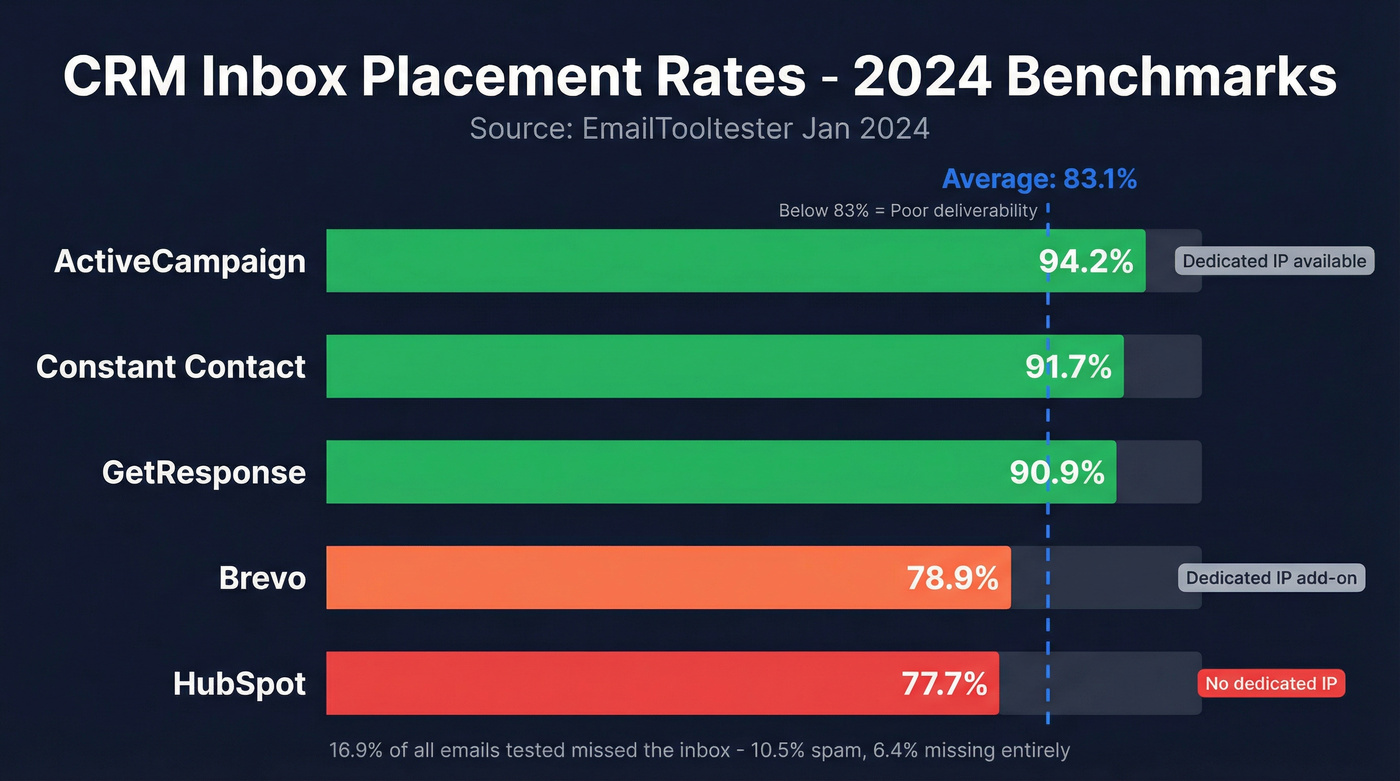
| Platform | Inbox Rate | Spam Rate | Dedicated IP Available? | Starting Price |
|---|---|---|---|---|
| ActiveCampaign | 94.2% | Low | Yes | ~$15/mo |
| Constant Contact | 91.7% | Low | No | ~$12/mo |
| GetResponse | 90.9% | Low | Yes (paid add-on) | ~$16/mo |
| FluentCRM | SMTP-dependent | SMTP-dependent | Via SMTP relay | $129-$499/yr + ESP |
| HubSpot | 77.7% | High | No | $20/mo |
| Brevo | 78.9% | 19.7% | Yes (paid add-on) | ~$8/mo |
EmailTooltester's published benchmarks don't include Salesforce. Salesforce enterprise email programs typically run on dedicated infrastructure with custom configurations - expect $1,000-$5,000+/mo depending on edition and scale.
ActiveCampaign at 94.2% is the clear deliverability leader. HubSpot at 77.7% falls into what EmailTooltester calls "poor" - anything below 83% inbox placement. That's a platform teams pay $100/month for on Sales Hub Professional.
Here's how we'd break down the decision. If deliverability is your top priority and you're an SMB, ActiveCampaign is the obvious pick. Already locked into HubSpot? Don't switch - fix your authentication and clean your lists instead. Want maximum control over your sending layer? FluentCRM paired with an SMTP provider like Amazon SES or Postmark gives you CRM workflows with ESP-grade infrastructure.

Authentication Rules That Still Catch Teams Off Guard
Gmail and Yahoo's 2024 bulk sender requirements didn't just raise the bar - they made authentication non-optional. If you're sending 5,000+ messages per day, here's what's mandatory:
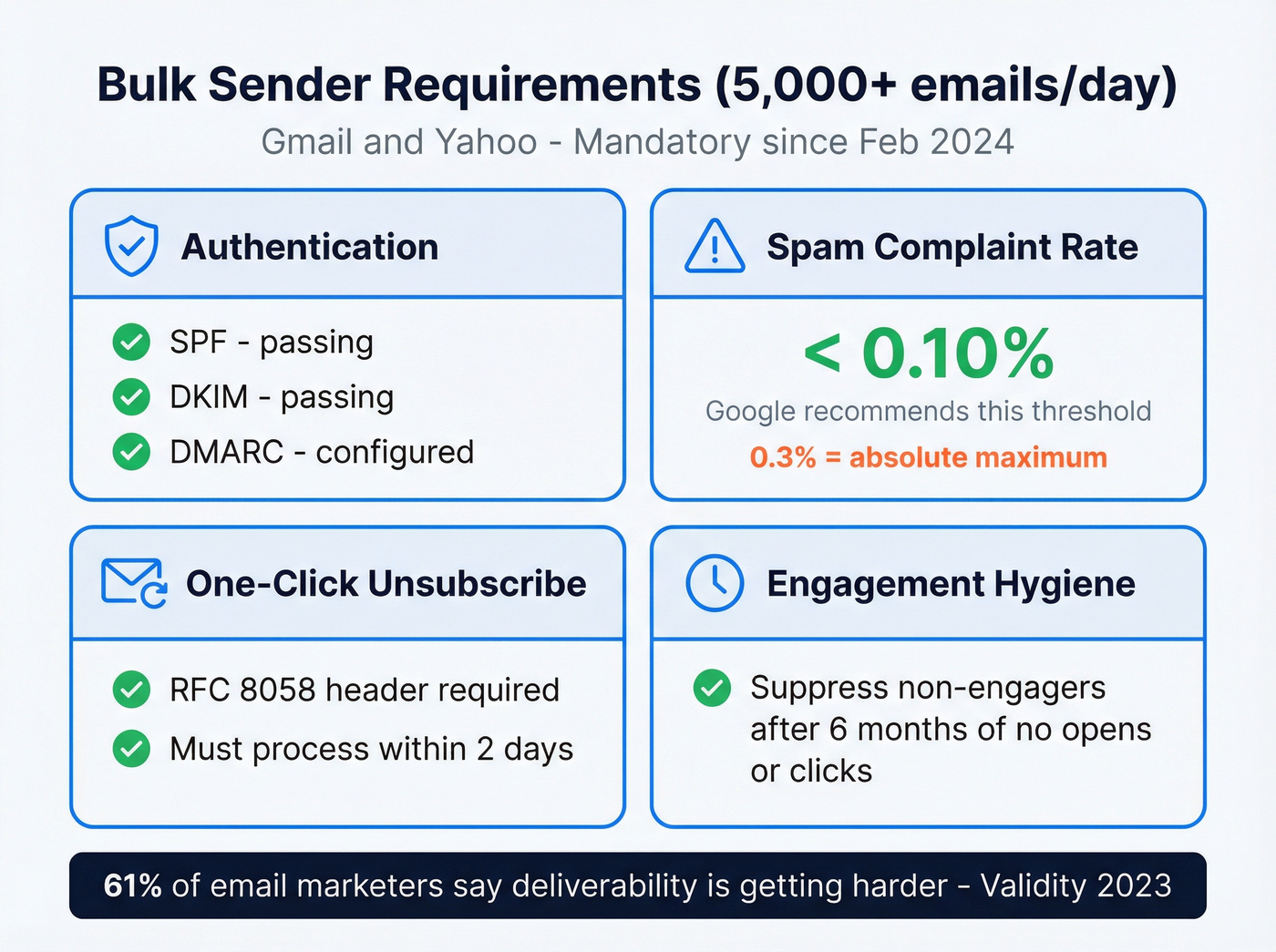
- SPF, DKIM, and DMARC configured and passing on your sending domain (see SPF, DKIM, DMARC)
- Spam complaint rate below 0.3% - Gmail recommends staying under 0.10%
- One-click unsubscribe via RFC 8058 header, processed within 2 days
- Non-engagers suppressed (rule of thumb: 6 months of no opens or clicks)
In a 2023 Validity survey, 61% of email marketers said deliverability was getting harder. The requirements aren't unreasonable. They're enforcing hygiene that should've been standard years ago.

Bad data is the fastest way to tank your CRM's email deliverability. Prospeo's 5-step verification catches spam traps, honeypots, and invalid addresses before they ever hit your sending infrastructure - at 98% accuracy with a 7-day refresh cycle.
Stop blaming your subject lines. Fix the list first.
Why Sending Infrastructure Matters More Than Features
Here's the thing: the CRM industry has convinced you that "all-in-one" is a feature. For deliverability, it's often a liability.
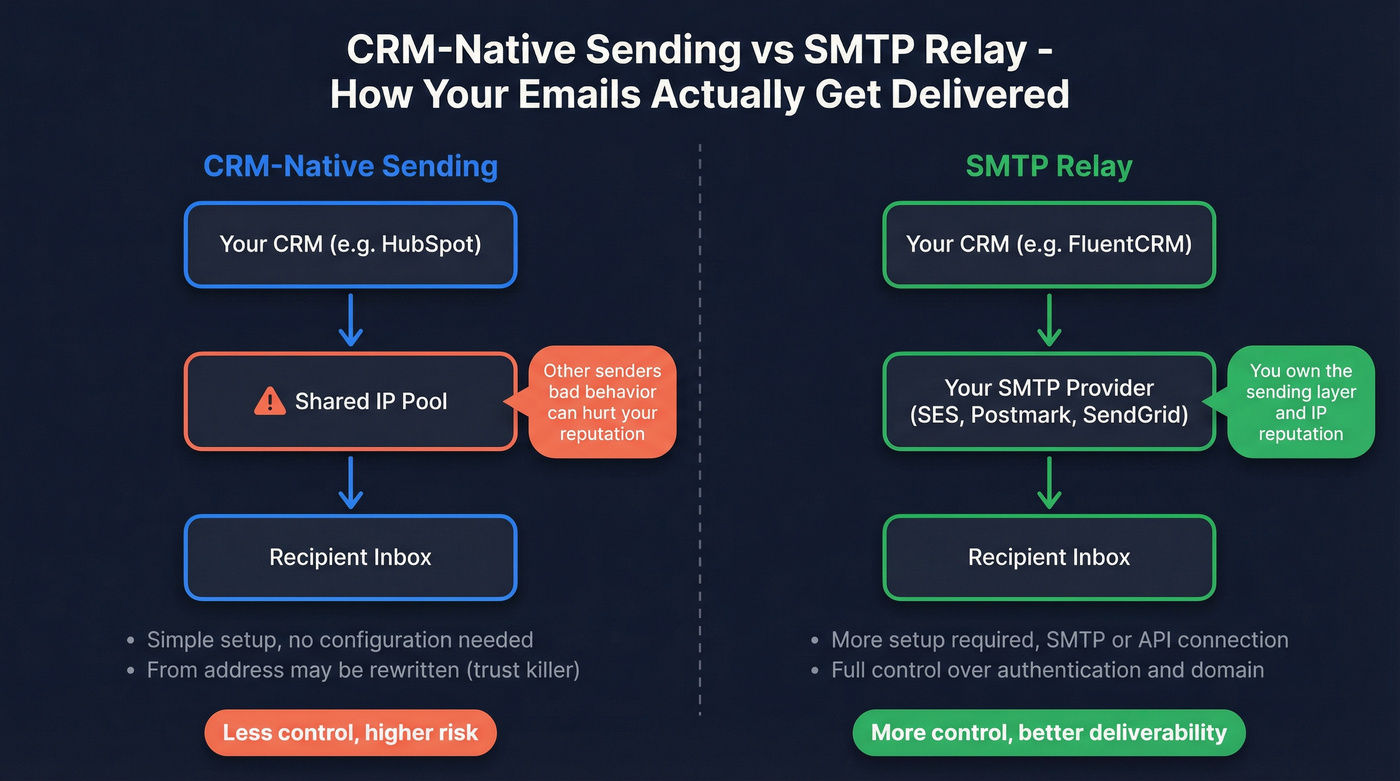
CRM-native sending is what tools like HubSpot use by default. Your emails go through their infrastructure, on their IPs. Simple - but shared IP pools mean another sender's bad behavior can tank your inbox placement. And if you haven't configured DKIM on HubSpot, it rewrites your From address to something like user=yourcompany.com@hs-domain.com. That's an instant trust killer, and it's the default behavior until you connect your domain.
SMTP relay is the "bring your own sending provider" model FluentCRM recommends. The CRM generates the email, but delivery routes through Amazon SES, Postmark, SendGrid, or similar providers via SMTP/API connections. More setup, but you own the sending layer. For cold outbound specifically, dedicated infrastructure providers like Maildoso ($99 for 3 months - that's $33/mo for 3 domains and 12 mailboxes) exist to bypass CRM sending limitations entirely.
On dedicated vs. shared IPs: Salesforce's guidance puts the threshold at 100,000 emails/month. But here's what most articles miss - at Gmail, domain reputation matters more than IP reputation. A dedicated IP won't save you if your domain is burned from bounces and spam complaints (more on dedicated vs. shared IP).
Data Quality: The Silent Deliverability Killer
We've seen teams lose weeks of pipeline because nobody checked the list before hitting send. Picture this: your marketing team imports 5,000 trade show contacts with no verification. The first campaign bounces 800 - a 16% bounce rate. Your sender reputation tanks overnight, and every campaign after that gets filtered harder.
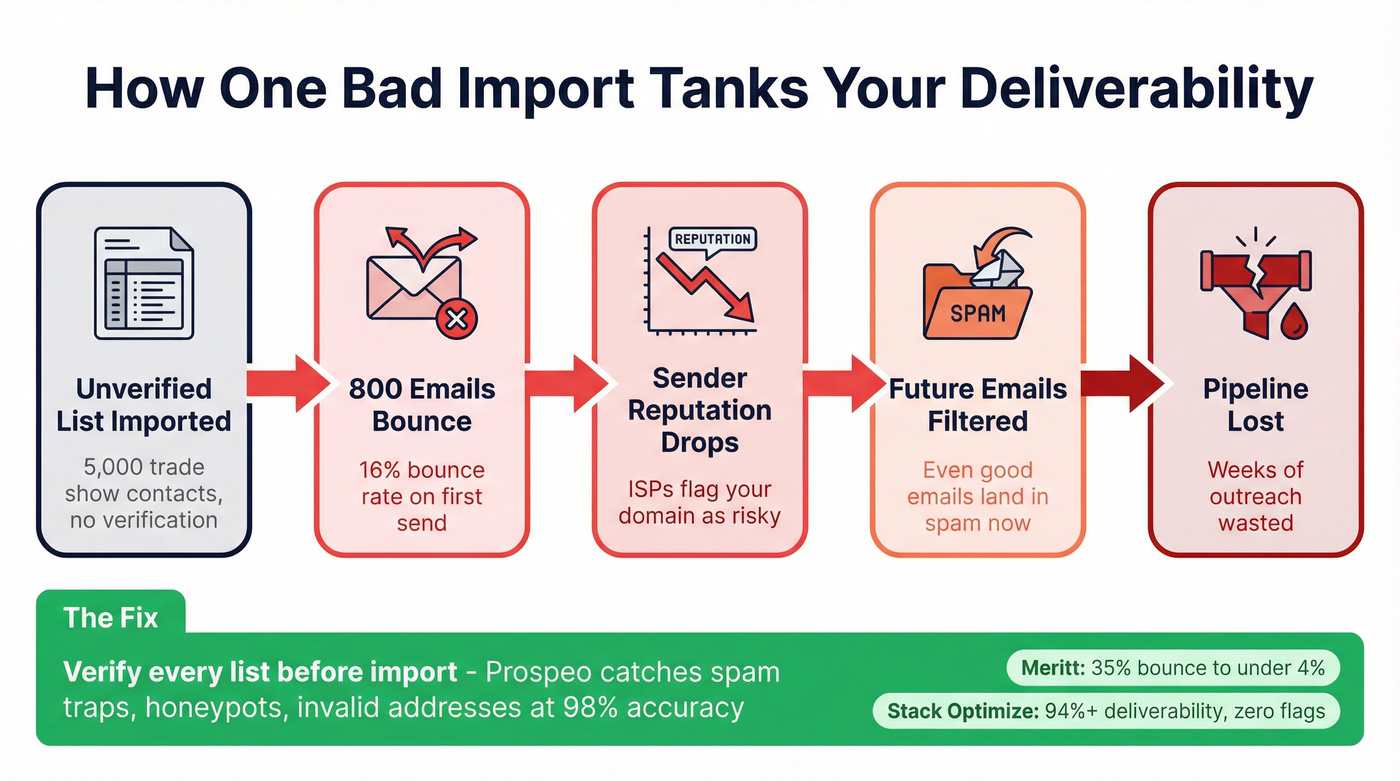
Bounce spikes are the fastest way to destroy deliverability, and they're the most preventable. Spam traps hiding in purchased or stale lists are even worse - a single hit can flag your domain at major ISPs.
Before you send a single email from your CRM, verify the list. Prospeo's 5-step verification process catches invalid addresses, spam traps, and honeypots before they touch your sending infrastructure. At 98% email accuracy with a 7-day data refresh cycle, it prevents the bounce spikes that tank sender reputation in the first place.
The results are concrete. Meritt, a B2B outbound agency, dropped their bounce rate from 35% to under 4% after routing all imported lists through verification before loading them into their CRM. Stack Optimize maintains 94%+ client deliverability with under 3% bounce rates across every account - zero domain flags.
Deliverability Audit Checklist
Run through this before your next major campaign:
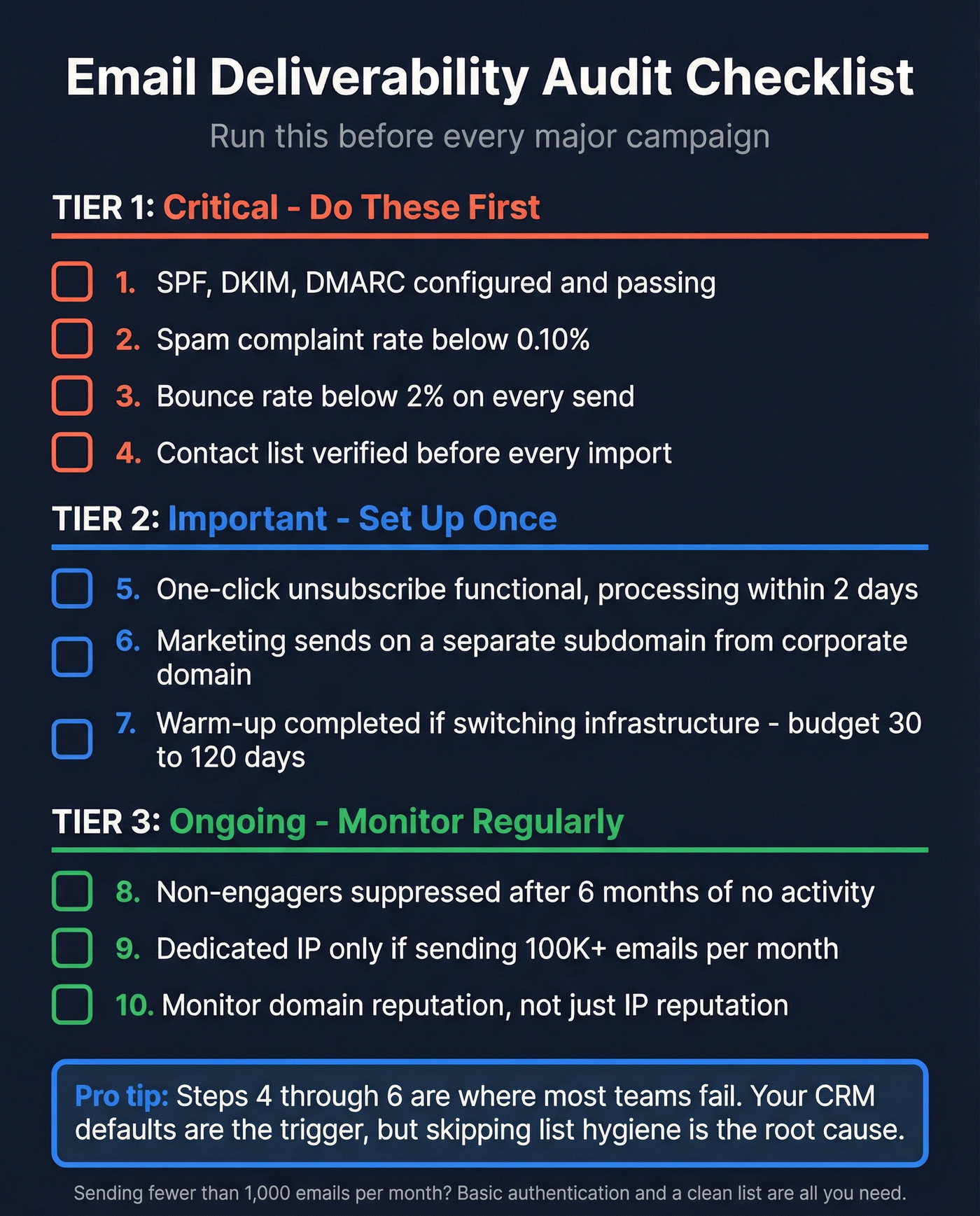
- Authentication protocols configured and passing - check with MXToolbox or Google Postmaster Tools
- Spam complaint rate below 0.10% (not just below 0.3%)
- Bounce rate below 2% on every send
- One-click unsubscribe functional and processing within 2 days
- Contact list verified before every major import or campaign (use a CRM verify workflow)
- Non-engagers suppressed after 6 months of no opens or clicks (see re-engagement tactics)
- Marketing sends on a separate subdomain from your corporate domain
- Warm-up completed if you've switched infrastructure or IPs - budget 30-120 days (see automated email warmup)
- Dedicated IP only if you're sending 100K+ emails/month; otherwise shared is fine
- Monitor domain reputation, not just IP reputation
Let's be honest: your CRM's defaults are the trigger, but the root cause is almost always skipping steps 4 through 6 on this list. Pairing any CRM with email deliverability best practices - authentication, list hygiene, engagement-based suppression - matters more than the platform you pick. Skip this if you're sending fewer than 1,000 emails a month; at that volume, basic authentication and a clean list are all you need (use this email deliverability checklist if you want the full version).
Meritt cut their bounce rate from 35% to under 4%. Stack Optimize holds 94%+ deliverability with zero domain flags. The difference? Every contact is verified at 98% accuracy before it enters the CRM - at roughly $0.01 per email.
Protect your sender reputation before your next campaign goes out.
FAQ
Which CRM has the best email deliverability?
ActiveCampaign leads at 94.2% inbox placement in EmailTooltester's Jan 2024 benchmarks, followed by Constant Contact at 91.7% and GetResponse at 90.9%. HubSpot trails at 77.7%. That said, authentication setup and contact data quality matter more than the platform itself - a well-configured Brevo account with clean lists will outperform a misconfigured HubSpot instance every time.
Do I need a dedicated IP for CRM emails?
Only if you're sending 100,000+ emails per month. Below that volume, shared IPs work fine and carry less warm-up risk. Domain reputation matters more than IP reputation at Gmail, so focus on SPF/DKIM/DMARC authentication and list hygiene first.
How do I stop CRM emails from going to spam?
Configure SPF, DKIM, and DMARC on your sending domain, then verify your contact list to remove invalid addresses and spam traps. Keep complaint rates below 0.10% by suppressing non-engagers and making unsubscribe effortless. If you're still landing in spam after that, check whether your CRM is rewriting your From address - that's a common culprit on platforms like HubSpot.
Can bad contact data really hurt deliverability?
A single campaign with a 10%+ bounce rate can damage your sender reputation for weeks. Spam traps in purchased or stale lists are worse - one hit can flag your domain at major ISPs. Verifying every list before import is the highest-ROI deliverability tactic most teams skip.