Email Tracking Metrics: What to Measure (and Trust) in 2026
Open rates used to be the scoreboard. Now they're a weather report: interesting, noisy, and not something you should bet budget on. Between Apple Mail Privacy Protection (MPP), image blocking, preview panes, and security scanners, "engagement" gets manufactured without a human ever reading your email.
If you want email tracking metrics you can actually run a business on in 2026, you need two things: (1) deliverability discipline and (2) instrumentation that survives privacy changes.
One more thing: you need the guts to stop reporting numbers you don't trust.
What you need (quick version)
Your 10-minute checklist
- Stop using open rate as a decision KPI. Keep it as a diagnostic only (subject line or deliverability smoke test).
- Track deliverability separately from delivery: "delivered" isn't "inbox."
- Make inbox placement (or a proxy) a weekly metric, not a quarterly panic.
- Treat spam complaints like a hard SLA: 0.3% is the hard ceiling for bulk senders, and <0.1% is the best-practice target.
- Filter bot activity (opens and clicks) in your ESP before you celebrate "engagement."
- Tie email to outcomes with UTMs + GA4 hygiene so you can trust revenue attribution.
- Use a consistent denominator (sent vs delivered) and report unique vs total separately.
A point of view that'll save you months: protect deliverability first, then measure human action, then tie it to outcomes. If you do it in the opposite order, you'll "optimize" creative while half your list lands in spam and the other half gets clicked by scanners.
Privacy-proofing moves (do these even if your metrics look fine)
Litmus' 2026 trend is clear: if tracking gets noisier, you win by collecting better signals, not by staring harder at opens.
- Build a preference center and collect zero-party data (topics, cadence, format).
- Use double opt-in (or run a re-permission campaign for older lists).
- Adopt BIMI if you're a brand sender and volume justifies it (it supports trust and recognition).
- Reduce PII in URLs: keep UTMs clean and avoid stuffing emails with personal identifiers in query parameters.
Metric stack (the only one that scales)
Deliverability -> Engagement -> Outcomes
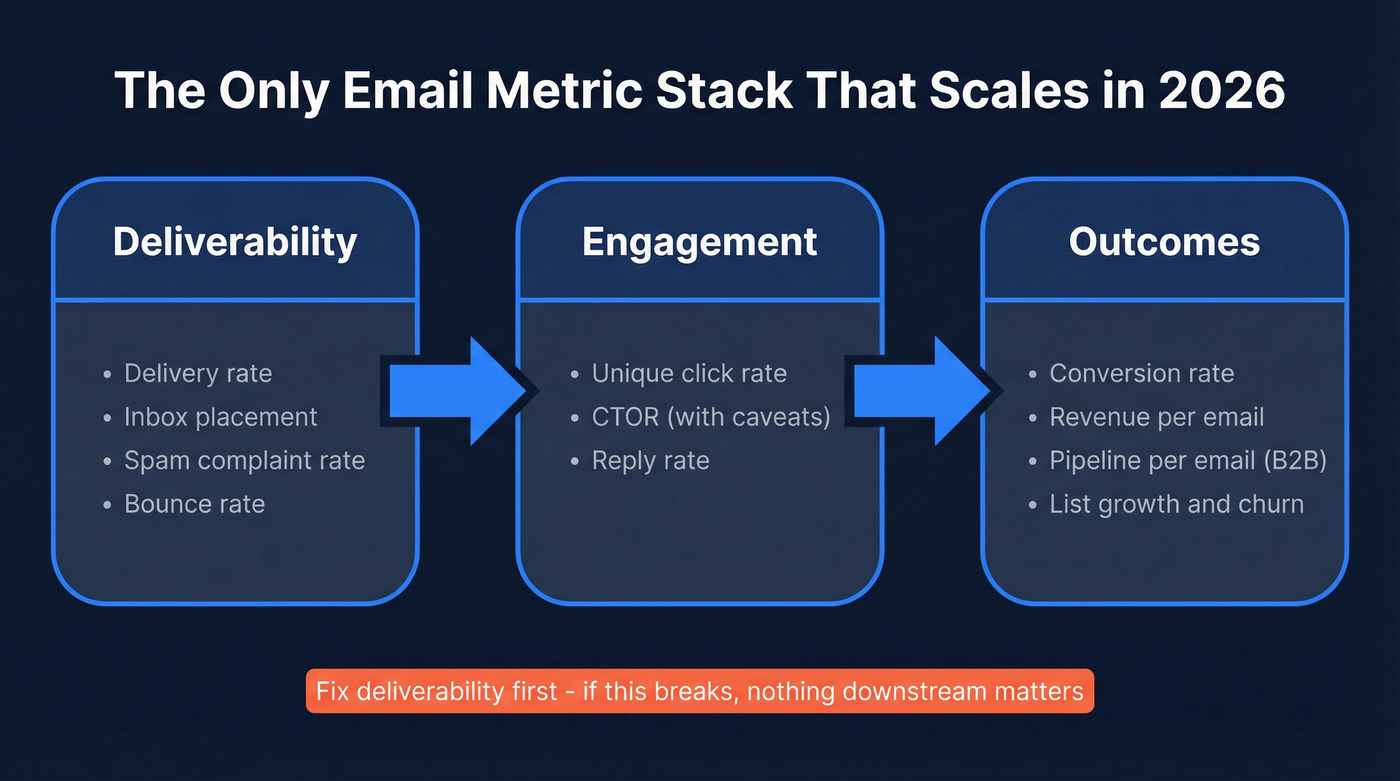
- Deliverability: delivery rate, inbox placement, spam complaint rate, bounce rate
- Engagement: unique click rate, CTOR (with caveats), reply rate (if applicable)
- Outcomes: conversion rate, revenue per email (RPE), pipeline per email (B2B), list growth/churn
Litmus' 2026 trend is blunt: teams are moving away from unreliable metrics like open rates and toward measurement that holds up under privacy changes. Nutshell puts a number on why: Apple MPP affects about 40% of emails, which is enough to poison any dashboard that treats opens like truth.
The 2026 reality: opens aren't a decision KPI anymore
Here's the part most dashboards hide: open tracking is an inference, not a fact. An "open" is recorded when an email client loads a tiny 1x1 tracking pixel. If images don't load, you get a false negative. If a proxy or privacy feature loads the pixel automatically, you get a false positive. That's why opens swing wildly even when nothing meaningful changed.

HubSpot's benchmark write-up includes the stat that should end the argument internally: open rates jumped 18 points after MPP rolled out. That's not "better subject lines." That's machines.
Microsoft's breakdown of open-rate failure modes is basically a checklist of why your chart lies:
- Image blocking = real reads that never count as opens.
- Preview panes = "opens" that are just a split-second preview.
- MPP auto-opens = opens that happen even if the email never gets read.
Two "in the wild" truths from teams running email in 2026:
- Practitioners keep getting asked to "prove email works" with opens. Post-MPP, that's a trap. You'll end up defending a number that doesn't mean what leadership thinks it means.
- Teams also see CTR spikes that don't show up as site traffic. That's not a miracle campaign, it's scanners.
So what do you do with open rate now?
Keep (it's useful here):
- Comparing subject lines within the same audience (A/B tests)
- Spotting deliverability issues (opens collapsing can be a canary)
Skip (it'll mislead you):
- Budget decisions ("email is working because opens are up")
- Lifecycle triggers ("opened 3 times = hot lead")
- Reporting "engagement" to leadership without bot filtering
Hot take: you don't need a "perfect" open rate. You need clean deliverability and clean attribution. That's what moves revenue.
Email tracking metrics that matter (the stack you can run weekly)
Nutshell's recommended post-MPP stack is the right direction: reply rate, CTR, revenue per email sent, conversion rate, and deliverability/inbox placement. I'd tighten it for weekly ops and make the proxy part explicit so it doesn't turn into hand-waving.
Real talk: you only need 3 weekly non-negotiables to keep email healthy:
- Inbox placement (or a proxy you trust)
- Spam complaint rate
- Conversions (or revenue/pipeline)
Everything else is supporting evidence.
The stack table (goal -> KPIs)
| Goal | Primary KPIs | Secondary KPIs |
|---|---|---|
| Reach inbox | Inbox placement | Delivery rate |
| Protect rep | Spam complaint rate | Unsub rate |
| List health | Hard/soft bounce | List churn |
| Drive action | Unique click rate | CTOR |
| Drive value | Conversion rate | Revenue/email |

How to run this without overbuilding: start every weekly review with deliverability. If inbox placement or complaints are off, stop. Don't debate CTAs. Don't rewrite copy. Fix the foundation first, otherwise you're grading creative performance on a broken distribution channel.
If you can't measure inbox placement directly, pick one proxy and commit to it consistently. Consistency beats perfection here; you're looking for trend and diagnosis, not a vanity number.
We've tested this approach on teams that send everything from a small founder newsletter to high-volume lifecycle. The ones that win aren't the ones with the fanciest dashboards. They're the ones that refuse to "optimize" on top of bad deliverability.

You just read why bounce rate and spam complaints are the metrics that actually matter. Both start with data quality - and bad contact data is the #1 way to wreck deliverability. Prospeo's 5-step email verification delivers 98% accuracy, keeping hard bounces near zero.
Stop debugging dashboards. Start with emails that actually reach inboxes.
Definitions that stop reporting mistakes (denominators + unique vs total)
Most "email performance" arguments are just denominator fights. The fastest way to stop them is to define your denominators once, then enforce them everywhere (ESP dashboard, Looker/Power BI, leadership slides).
Glossary (with the denominators that matter)
- Sent: emails your ESP attempted to send.
- Delivered: emails accepted by recipient servers (not bounced).
- Delivery rate: delivered ÷ sent.
- Deliverability: where delivered mail lands (inbox vs spam vs tabs). Delivered != inbox.
- Unique vs total:
- Unique clicks = how many recipients clicked at least once
- Total clicks = how many clicks happened overall (one person can click 10 times)
Formula bullets (copy/paste into your reporting doc)
- Delivery rate = Delivered / Sent
- Hard bounce rate = Hard bounces / Sent
- Soft bounce rate = Soft bounces / Sent
- Unique click rate = Unique clickers / Delivered (or Sent, pick one and stick to it)
- CTOR = Unique clickers / Unique openers
- Conversion rate (email) = Conversions / Delivered (or Sessions from email, be explicit)
- Revenue per email (RPE) = Revenue attributed to email / Delivered (or Sent)
Worked example (so everyone stops guessing)
If you sent 100,000, delivered 98,000, and had 2,058 unique clickers:

- Delivery rate = 98,000 / 100,000 = 98%
- Unique click rate (of delivered) = 2,058 / 98,000 = 2.10%
- If you had 196 purchases: conversion rate (of delivered) = 196 / 98,000 = 0.20%
Pick your denominator once. Then keep it forever.
Bounce handling rule (don't overthink it)
Litmus' guidance is the operational standard:
- Remove hard bounces immediately (they're permanent).
- Retry soft bounces 1-2 times, then remove if they persist.
I've seen teams keep "soft bounce" addresses for months because "maybe it'll work later." It won't. It just drags your sender reputation and makes every other metric harder to trust.
Core metrics (what they mean + how to use them)
Below are the metrics that earn a place on your dashboard, plus the ways they lie.

Unique click rate
What it tells you: Whether humans are taking the next step. It's the cleanest engagement metric left.
When it lies: Corporate security scanners can click links before a person does.
What to do: Compare clicks to GA4 sessions and conversions. If clicks spike but sessions don't, you're looking at scanners.
Skip this if your ESP can't filter bot clicks. In that case, don't use clicks for automation triggers. Use GA4 sessions or conversion events as the trigger instead.
CTOR (click-to-open rate)
What it tells you: Creative relevance after the email is opened.
When it lies: MPP inflates opens, which makes CTOR look worse than it is. MailerLite calls this out directly: inflated opens push CTOR down even if clicks are stable.
What to do: Use CTOR for within-campaign creative comparisons, not cross-quarter performance reporting.
Reply rate (for sales + lifecycle)
What it tells you: Human intent. Replies are hard to fake and usually correlate with pipeline.
When it lies: Auto-responders and out-of-office messages inflate it.
What to do: Separate positive replies from OOO/auto and track both. If you only track "replies," you'll celebrate vacations.
Conversion rate (email)
What it tells you: Whether email drives the action you care about (purchase, signup, demo request).
When it lies: Attribution breaks (missing UTMs, cross-domain issues, consent mode limitations) hide conversions.
What to do: Define conversions with one owner (marketing ops or analytics), then enforce UTMs and GA4 tag order so the source survives the journey.
Here's a scenario I've watched play out more than once: a team launches a new checkout on a separate domain, conversions look like they fell off a cliff, leadership blames email creative, and someone spends two weeks rewriting templates...only to find GA4 started crediting everything to "referral" because cross-domain linking wasn't set.
That kind of mistake is infuriating because it's so avoidable.
Revenue per email (RPE)
What it tells you: The most honest "value" metric for email because it forces outcomes.
When it lies: If your attribution model is messy, RPE becomes "revenue GA4 happened to credit to email."
Rule: Use RPE for trend, not absolute truth, and only after your UTM + cross-domain QA passes (see GA4 section). If QA fails, don't present RPE to leadership. Fix measurement first.
Unsubscribe rate
What it tells you: Whether you're burning list trust.
When it lies: It doesn't capture silent disengagement (people who ignore you forever).
What to do: Watch unsub rate alongside spam complaints and list churn. If unsub is low but complaints are rising, your targeting is off or your frequency's too high.
List churn / list growth
What it tells you: Whether your list is compounding or decaying.
When it lies: Net growth hides a leaky bucket (high churn masked by high acquisition).
What to do: Track:
- Gross adds
- Gross removals (bounces + unsub + complaints)
- Net growth
Then segment by source (paid, organic, partners, events). Bad sources poison deliverability fast.
Diagnostic cuts that still matter (even when "engagement" is noisy)
When a metric's imperfect, the breakdowns are often more useful than the topline:
- Click rate by mailbox provider/domain (Gmail vs Outlook vs Yahoo)
- Complaint rate by domain
- Bounce rate by acquisition source (forms, events, partners, scraped lists, yes, it shows)
If Gmail clicks are fine but Outlook clicks crater, don't rewrite the email. Diagnose deliverability and rendering for that domain first.
Benchmarks to use in 2026 (latest 2026 medians + "good" targets)
MailerLite's benchmark post is one of the few that's both large and clear about methodology: 3.6M campaigns across 181,000 approved accounts, covering Dec 2024-Nov 2025, reported as medians. That's exactly what you want for "typical" performance.
Before you benchmark anything, three rules:
- Use medians, not averages. A few huge senders can distort averages beyond recognition.
- Benchmark within your reality. List size, send frequency, and audience temperature matter more than your industry label.
- Benchmark outcomes first. Clicks and conversions beat opens and CTOR every time in 2026.
Latest median benchmarks (and what "good" looks like)
| Metric | 2026 median | "Good" target |
|---|---|---|
| Open rate | 43.46% | Diagnostic only* |
| Click rate | 2.09% | 2-4% |
| CTOR | 6.81% | Diagnostic only* |
| Unsub rate | 0.22% | <0.3% |
| Bounce rate | - | <2% healthy; investigate >2% |
*Open and CTOR are heavily distorted by MPP. Treat them as diagnostics, not goals.
That bounce guidance is the one I enforce operationally: HubSpot's guidance puts bounce rate under 2% as the healthy line. If you're above 2%, you don't have a copy problem. You've got a list problem.
Industry examples (MailerLite medians)
| Industry | Open | Click |
|---|---|---|
| E-commerce | 32.67% | 1.07% |
| Non-profits | 52.38% | 2.90% |
| Software/web apps | 39.31% | 1.15% |
How to use this without fooling yourself:
- If your click rate is below 1% in most industries, you've got a relevance problem or an inbox placement problem. Diagnose by domain before you panic.
- If your open rate is "amazing" but clicks and conversions are flat, you're measuring machines.
- If unsub creeps above ~0.3%, you're pushing too hard or targeting too broadly.
- If you're comparing your newsletter to someone else's promotional blasts, stop. Different game, different baselines.
Deliverability metrics & non-negotiable thresholds (where performance really starts)
If you're sending at any real volume, deliverability isn't a nice-to-have. It's the foundation that makes every other metric meaningful. "Delivered" is table stakes; inbox placement is the game.
Use this / skip this
Use: inbox placement (or a proxy), spam complaint rate, hard bounce rate, authentication coverage (SPF/DKIM/DMARC), unsubscribe processing time.
Skip: obsessing over "delivered" while ignoring where mail lands.
Inbox placement: how to measure it (and the proxies that actually work)
Direct inbox placement measurement usually requires seed testing, but you've still got options.
Best (direct):
- Seed testing inbox rate using a tool like GlockApps-style testing across mailbox providers.
Good (proxy, consistent):
- Gmail Postmaster Tools trends: domain reputation and spam rate trends tell you if Gmail's souring on you.
- Engagement proxy (human-only): % of delivered that generate a GA4 session within 24-72 hours, after bot filtering. It's not inbox placement, but it's a reliable early-warning system.
- Internal panel sampling: maintain a small set of real inboxes (Gmail/Outlook/Yahoo + a corporate domain) and track "inbox vs spam" manually. It's not perfect, but it's consistent, and consistency is what you need to spot drift.
If you can't measure inbox placement at all, don't run creative tests on cold segments. Fix list hygiene and authentication first, then test.
Thresholds box (treat these like guardrails)
- Spam complaint rate (Gmail/Yahoo rule): <0.3% for bulk senders, plus one-click unsubscribe and unsub processing within 2 days.
- Operational targets (Suped):
- Best practice: <0.1%
- Warning: 0.1-0.3%
- Critical: >0.3%
- Amazon SES enforcement: pauses can happen at 0.5% complaint rate.
Inbox placement is the other metric teams ignore because it's annoying to measure. But it's the one that explains "why performance fell off a cliff."
GlockApps' Q4 2025 inbox placement numbers show how brutal this can be:
- Gmail: 56.97%
- Outlook: 45.06%
- Office365 (Exchange): 67.95%
That means "delivered" can still be "not seen" at scale, especially on Outlook.
Authentication coverage checklist (make it measurable)
Don't just "have SPF." Track coverage like an ops metric.
- SPF/DKIM/DMARC aligned (domain alignment matters, not just presence)
- DKIM aligned
- DMARC policy at least
p=none, with a plan to move toquarantine->reject - Track % of volume passing DMARC (or aligned auth pass rate if your tooling supports it)
- BIMI (when brand + volume justify it): it's a trust signal and pairs well with a preference-center strategy
Mini playbook (the fixes that move the needle)
- If hard bounces are high: clean the list, tighten acquisition sources, and stop re-mailing dead addresses.
- If complaints are high: reduce frequency, narrow targeting, and make unsub one-click and immediate.
- If inbox placement is low: audit authentication alignment, warm sending patterns, and remove risky segments (old, unengaged, purchased, scraped).
One lever that pays back fast is list verification. If your hard bounce rate is >2%, verify before sending, full stop. Tools like Prospeo, "The B2B data platform built for accuracy," are built for exactly this: 98% verified email accuracy, a 7-day data refresh cycle, and real-time verification that keeps dead addresses from wrecking your sender reputation.

Data quality: bot opens & bot clicks (how false engagement is created)
Bot activity isn't a rounding error anymore. Corporate-heavy lists often see around 5-15% of clicks coming from scanners, and it can be higher on heavily secured domains.
Diagnostic checklist (fast triage)
- Clicks spike, but GA4 sessions from email don't.
- Clicks happen within ~1 second of delivery.
- One recipient "clicks" every link (including footer/legal).
- You see engagement spikes with no downstream conversions.
- Heatmaps show weird patterns (footer links outperform CTAs).
What modern platforms do about it (so you should too)
Marketo's bot filtering mechanics are refreshingly concrete:
- Matches against the IAB bot list
- Detects a proximity pattern (two+ activities at the same time, under a second, for the same lead + email asset)
- Flags activities with Bot Activity attributes and can filter known bad IP sources When you enable it, reported opens/clicks often drop. That's not performance down. That's lies removed.
Braze took the same direction: since July 9, 2025, new workspaces have bot filtering on by default. It exposes fields like is_suspected_bot_click and suspected_bot_click_reason, which is exactly what analysts need to build human-only reporting.
Validity's detection signals are the ones I use in audits because they're simple and they work:
- Instant clicks (~1s)
- Clicks on all links
- Spikes without conversions/site traffic
Hard rule on honeypots: don't use honeypot links unless you've got deliverability expertise and a rollback plan. It's easy to turn "bot detection" into a deliverability incident.
Implementation checklist: UTMs + GA4 attribution hygiene (so revenue ties back to email)
If you can't tie email to sessions and conversions, you'll end up back in open-rate purgatory. This is where most teams quietly lose: the email's fine, but attribution's broken.
Checklist (do these, in this order)
- Add UTMs to every link in every campaign:
utm_sourceutm_mediumutm_campaign
- Standardize naming (lowercase) and keep a UTM registry so GA4 doesn't dump traffic into Unassigned.
- Configure cross-domain tracking so checkout/payment domains don't overwrite your original email source.
- In GTM, fire the Google Tag on Initialization before other tags/events so attribution context exists when events fire.
- Set up Consent Mode intentionally:
- Basic = tags blocked when consent denied
- Advanced = cookieless pings + better modeling
Two UTM naming patterns that don't fall apart
Pick one and enforce it.
Pattern A (simple, scalable):
utm_source=newsletterutm_medium=emailutm_campaign=2026-02_product-update
Pattern B (team + motion clarity):
utm_source=lifecycleutm_medium=emailutm_campaign=trial_onboarding_day7
The key isn't creativity, it's consistency. GA4 punishes almost-consistent naming, and it does it in the most annoying way possible: by quietly shoving your traffic into buckets nobody trusts.
QA checklist (10 minutes, saves a quarter of arguing)
Do this every time you launch a new template, new domain, or new checkout flow:
- Send yourself a test email and click a primary CTA.
- In GA4 Realtime, confirm the session shows source/medium you expect.
- Complete the conversion path (signup/purchase/demo).
- Confirm the conversion event carries the same source/medium (no "referral" overwrite).
- If you use cross-domain: confirm both domains are in the linker configuration.
- If you use Consent Mode: test with consent granted and denied to see what breaks.
If step 2 or 4 fails, don't publish performance reporting. Fix the plumbing first.
Do / don't (the stuff that breaks attribution)
Do
- Use consistent
utm_mediumvalues that map cleanly (e.g.,email) - Keep campaign names stable across systems (ESP, GA4, CRM)
- Validate with a test: click -> session -> conversion shows correct source
Don't
- Mix casing (
Emailvsemail) across teams - Let different teams invent new mediums ("newsletter", "blast", "crm_email")
- Ignore "(not set)" until the quarter ends
Troubleshooting playbook: symptom -> likely cause -> fix
| Symptom | Likely cause | Fix |
|---|---|---|
| Opens up, revenue flat | MPP inflation | Shift to clicks + GA4 conversions |
| Clicks spiked, no conv | Bot/scanner clicks | Enable bot filtering; check GA4 sessions |
| Delivered, not in inbox | Reputation/auth issues | Check complaints; align SPF/DKIM/DMARC |
| Conversions show "(not set)" | Tag order/consent | Init Google Tag; set consent mode |
| Revenue credited to referral | Cross-domain missing | Set cross-domain; stop overwrite |
How to use this table: pick the symptom that matches your dashboard, apply the fix, then re-check the metric that should move. Example: if you enable bot filtering, your click rate might drop, but your clicks-to-sessions ratio should tighten. That's the win.
I've watched teams spend weeks rewriting copy when the real issue was cross-domain attribution overwriting email with "referral." Fix measurement first, then optimize creative.
Final recommendation: measure less, trust more
If you take nothing else: opens aren't a decision KPI in 2026, delivered isn't inbox, and clicks can be noisy. Your weekly non-negotiables are still inbox placement (or a proxy), spam complaints, and conversions.
If you need a simple way to communicate performance to leadership, build a lightweight score that weights deliverability (inbox placement + complaints) and outcomes (sessions, conversions, revenue) far more than opens.
Your next 7 days:
- Turn on bot filtering in your ESP and rebuild human-only click reporting.
- Add UTMs everywhere and fix GA4 tag order + cross-domain tracking.
- Monitor complaint rate and inbox placement like you monitor paid spend.
- Add a preference center and run re-permission if your list's aging.
Clean inputs, clean measurement, better decisions, and email tracking metrics you can actually trust.
Your weekly deliverability review is only as good as the list you're sending to. Prospeo refreshes 300M+ contacts every 7 days - not every 6 weeks like competitors - so your bounce rate stays clean and your sender reputation stays intact.
Fresh data every week means metrics you can finally trust.
FAQ: email tracking metrics in 2026
Are email open rates accurate in 2026?
Open rates aren't accurate enough to use as a decision KPI in 2026 because MPP auto-opens, image blocking, and preview panes create both false positives and false negatives. Keep opens for diagnostics (subject line tests, sudden deliverability drops), but run decisions on clicks you can validate in GA4, replies, conversions, and inbox placement.
How do I tell if email clicks are bots?
Bot clicks show up as time-to-click around 1 second, "clicked every link" patterns (including footer/legal), and click spikes without matching GA4 sessions or conversions. Turn on ESP bot filtering (like Marketo Bot Activity or Braze suspected bot fields) and report human-only clicks; you should see clicks-to-sessions tighten within 7 days.
How can I reduce bounce rate so my metrics improve?
Lower bounce rate by removing hard bounces immediately, retrying soft bounces 1-2 times, and suppressing persistent soft bounces. If hard bounces exceed 2%, verify addresses before you send; Prospeo's 98% email accuracy helps keep dead addresses out of your sends, which protects sender reputation and improves inbox placement over time.