How Conversational AI Actually Improves Email Follow-Ups - And What Most Guides Get Wrong
Your SDR sends 200 follow-ups a week. Half bounce because contacts changed jobs three months ago. The other half land in inboxes where they sit ignored, reading like every other "just circling back" template in existence. Meanwhile, the average sales team takes 46-47 hours to respond to a lead - and 78% of buyers choose the first company that replies.
That's the broken follow-up workflow. Conversational AI fixes it, but not the way most articles describe.
What You Need (Quick Version)
Before you read 3,500 words, here's the hierarchy that actually matters:
Conversational AI isn't ChatGPT copy-pasting. It's two-way dialogue management - the AI reads intent across an email thread, decides what to say, and knows when to escalate to a human. Generative AI creates content. Conversational AI manages conversations. 63% of marketers already use AI tools in their email workflows, and that number keeps climbing.
The priority stack for follow-up performance, straight from practitioners running 100K+ emails per month: deliverability > list quality > relevance > offer > personalization. Most teams obsess over the last item and ignore the first two.
Now let's get into the details.
What "Conversational AI" Actually Means for Email (And Why It Isn't Just ChatGPT)
Every vendor slaps "AI-powered" on their email tool and calls it a day. But there's a massive difference between an AI that writes an email and an AI that manages a conversation.
The Three Layers
Layer 1: Rule-based automation. If prospect opens email, wait 3 days, send follow-up #2. This is what most "automated sequences" actually are. No intelligence. Just timers and triggers.
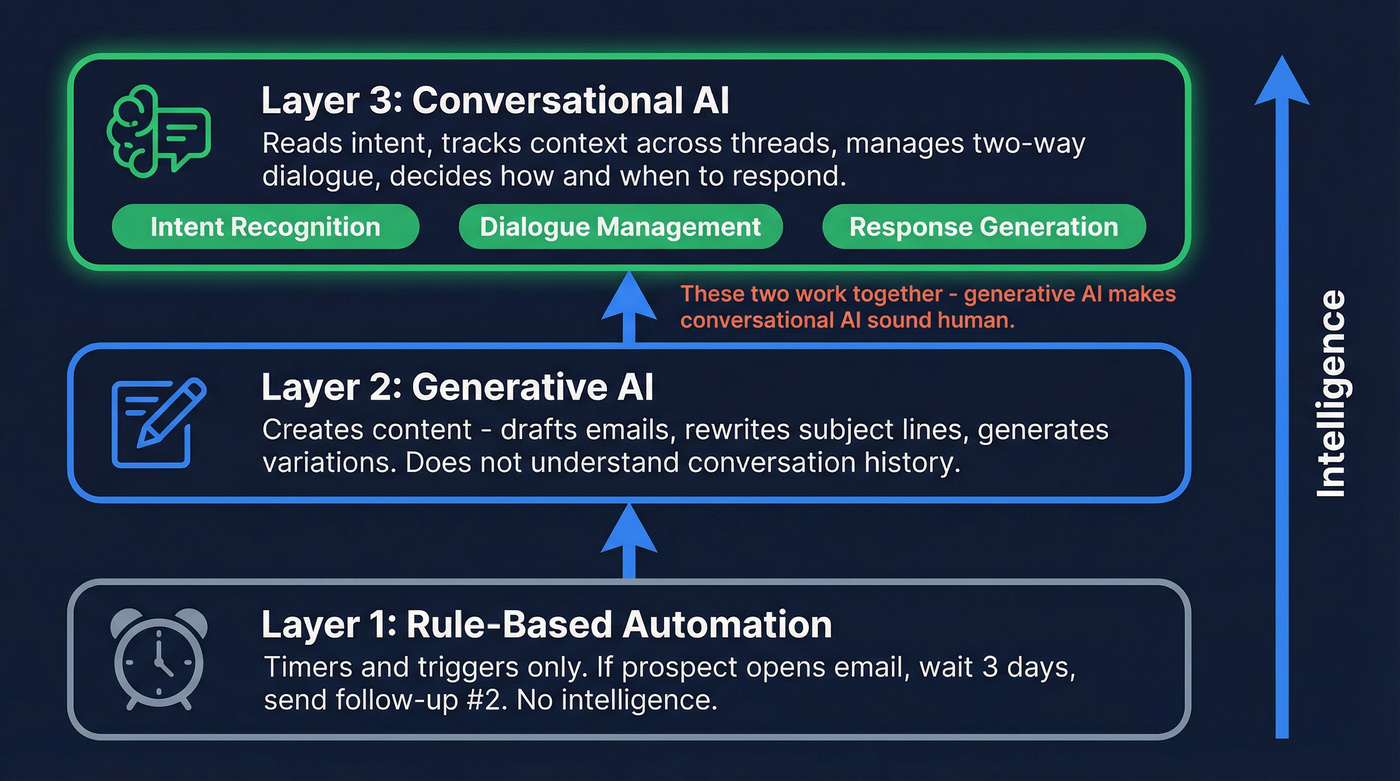
Layer 2: Generative AI. Tools like ChatGPT, Claude, or the AI writers built into Lemlist and Instantly. They create content - draft emails, rewrite subject lines, generate variations. They're good at producing text. They don't understand what happened in the conversation before.
Layer 3: Conversational AI. This is where it gets interesting. This layer uses natural language processing (NLP) and natural language understanding (NLU) to manage two-way dialogue. It doesn't just write - it reads, interprets intent, tracks context across an entire email thread, and decides how to respond.
The key components: intent recognition (what does the prospect actually want?), dialogue management (what's the conversation history and what should happen next?), and response generation (what's the right reply given all that context?).
Generative and conversational AI aren't competitors. They're complementary. Generative AI makes conversational AI sound more human. Conversational AI gives generative AI the context it needs to say the right thing at the right time.
What This Looks Like in an Actual Inbox
Here's the gap most guides miss. They talk about AI writing emails. The real value is AI managing the conversation. Compare these two follow-ups to the same prospect - someone who replied "interesting, but we're locked into a contract until Q3":
Rule-based follow-up (Day 4, on schedule):
Hi Sarah, just wanted to circle back on my previous email. Would love to find 15 minutes to chat about how we can help your team. Are you free this week?
Conversational AI follow-up (scheduled for late Q2):
Hi Sarah, you mentioned your current contract runs through Q3 - that's coming up fast. I put together a migration timeline that shows how teams in your situation typically transition without downtime. Worth a look before renewal conversations start?
The first email ignores everything the prospect said. The second reads the thread, recognizes the intent (interested but timing issue), logs the constraint, and responds with the right message at the right time.
That's the difference.

Conversational AI can't save a follow-up that bounces. Half your sequences fail before the AI even kicks in - because the contact changed jobs months ago. Prospeo refreshes every record on a 7-day cycle and delivers 98% email accuracy, so your AI follow-ups actually land.
Stop feeding stale data to smart AI. Start with emails that connect.
Six Ways AI-Driven Follow-Ups Outperform Manual Sequences
1. Instant Response and Speed-to-Lead
Use this when: You're getting inbound interest (demo requests, content downloads, reply-to-sequence responses) and your team can't respond within minutes.

Skip this if: Your entire motion is outbound and you control the timing.
78% of customers buy from the first company to respond. Replying within one minute boosts conversions by 391%. Within five minutes, you're 21x more effective than waiting 30 minutes. AI cuts email response time by up to 90%, turning a two-day gap into a two-minute one.
Conversational AI responds instantly - not with a canned autoresponder, but with a contextually relevant reply. The difference between "Thanks for reaching out! A rep will contact you shortly" and "You mentioned you're evaluating tools for your EMEA team - here's a quick comparison that might help" is the difference between a lead that waits and a lead that engages.
2. Two-Way Thread Management
Use this when: Your reps manage 50+ active email threads and things fall through the cracks.
This is where conversational AI earns its name. Thread-aware memory means the AI tracks what's been said across an entire email chain - even when conversations span days and involve multiple topics. It performs automatic triage, detects intent, and tags priority.
We've all seen the horror scenario: an SDR sends a cheerful "just checking in!" to a prospect who already said no two emails ago. Conversational AI catches this because it actually reads the thread. It classifies replies (interested, objection, not now, wrong person), detects sentiment (frustrated tone means escalate to a human immediately; enthusiastic tone means accelerate the sequence), and drafts responses that acknowledge what the prospect said.
3. Behavior-Triggered Sequences
Traditional outbound sequences are linear. Email 1, wait 3 days, email 2, wait 4 days, email 3. Conversational AI makes them dynamic:
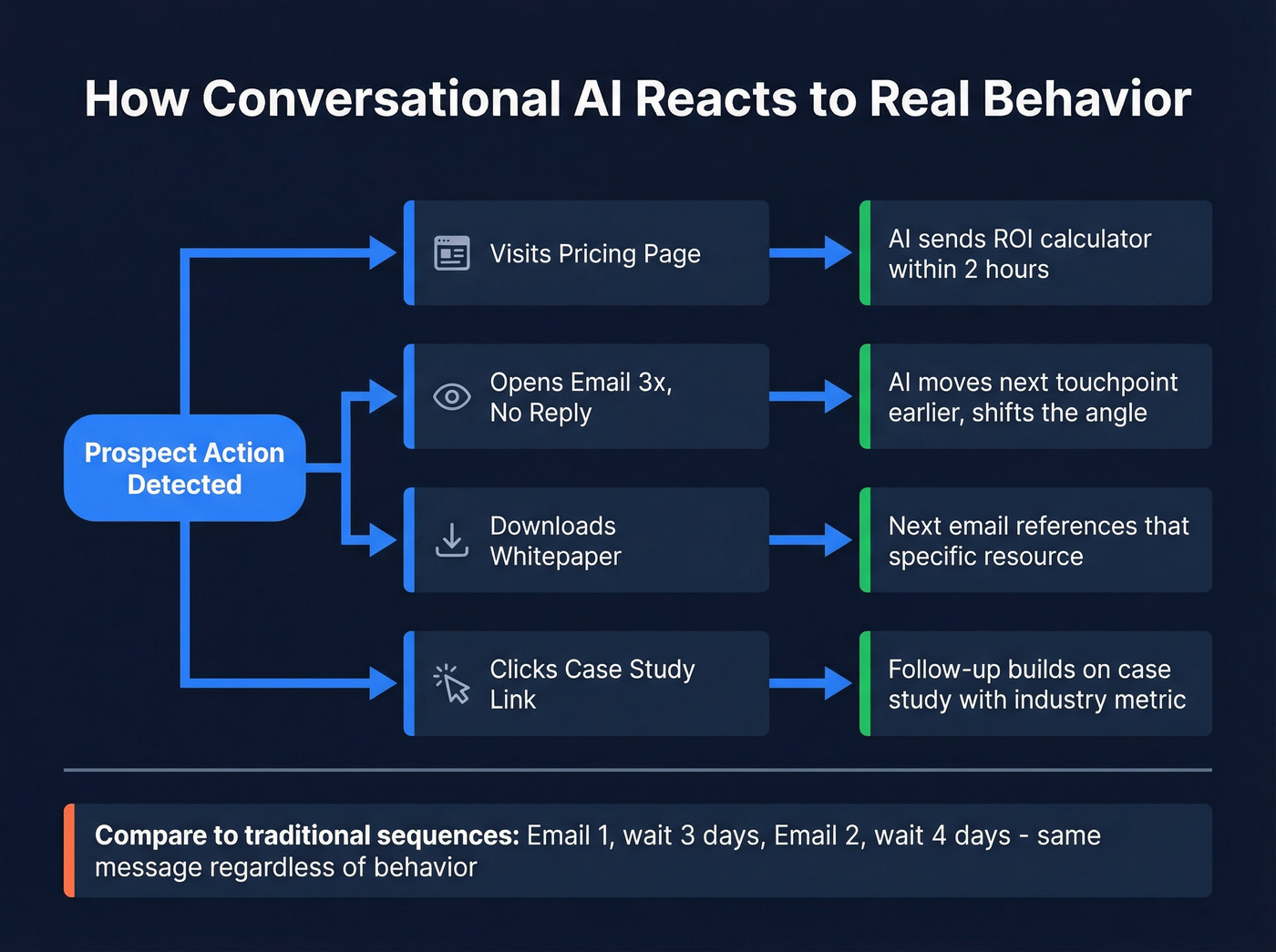
- Prospect visits your pricing page - AI sends an ROI calculator within 2 hours, not the generic follow-up scheduled for Thursday.
- Prospect opens email 1 three times but doesn't reply - AI shifts the next touchpoint earlier and adjusts the angle.
- Prospect downloads a whitepaper - Next email references that specific resource instead of pitching cold.
- Prospect clicks the case study link - Follow-up builds on that case study with a relevant metric for their industry.
Reply classification is the underrated feature here. Instead of a rep manually sorting through "out of office," "not interested," "forward to my colleague," and "let's talk next quarter," the AI categorizes and routes automatically. That alone saves hours per week for teams running volume.
4. Personalization at Scale (Without Being Creepy)
AI-driven personalization delivers a 41% revenue increase and 13.44% higher click-through rates. AI-crafted emails see 26% higher open rates than generic templates.
But there's a line between relevant and creepy.
Here's the thing: the best practitioner advice I've seen on this came from a Reddit thread on AI automation mistakes. The takeaway was blunt - "generic but relevant beats creepy-personal." An email that references the prospect's industry and a common pain point outperforms one that name-drops their recent social post, their dog's name, and the conference they attended last Tuesday. The first feels helpful. The second feels like surveillance.
Conversational AI hits the sweet spot by personalizing based on conversation context - what they've said, what they've clicked, what stage they're in - rather than scraping personal details.
5. Optimized Send Timing
The data varies by source, but the pattern is consistent: mid-week outperforms weekends, and mid-morning (9:30-11:00 AM) and post-lunch (1:30-3:00 PM) in the recipient's timezone are the sweet spots. Instantly's 2026 benchmark data (billions of cold emails) points to Wednesday as peak engagement day; other sources favor Tuesday and Thursday. Test for your audience.
Here's the nuance most people miss: follow-ups framed as replies to the original thread outperform formal reminders by 30%.
Conversational AI handles both - it learns when individual prospects engage (some executives check email at 10 PM) and it formats follow-ups as natural thread continuations rather than standalone messages. That combination of timing optimization and format optimization compounds over time.
6. Cold Lead Revival
80% of sales require at least five follow-up touches. 42% of all replies come from follow-ups, not the first email.
That means nearly half your pipeline potential is sitting in leads you've already contacted but stopped following up with.

Conversational AI revives cold leads by re-engaging with context. Instead of "Hey, just wanted to circle back," it references the original conversation, acknowledges time has passed, and introduces a new angle. It can also detect trigger events - job changes, funding rounds, new hires - that signal a cold lead is warming up. The AI doesn't just retry. It retries with a reason.
The Data Quality Prerequisite - Why AI Follow-Ups Fail Before They Start
Here's where most conversational AI guides go wrong: they skip the foundation.

Average email deliverability sits at 83%. That means nearly 1 in 5 emails never reaches an inbox - they're bouncing, landing in spam, or disappearing into the void. If your bounce rate climbs above 2%, you're actively damaging your domain reputation. And once that reputation tanks, even your best emails to your best prospects end up in spam.
The practitioner hierarchy is unambiguous: deliverability > list quality > relevance > offer > personalization. You can have the most sophisticated conversational AI on the planet, and it won't matter if 15% of your list is invalid.
Garbage in, garbage out. It's the #1 reason AI follow-up campaigns fail.

The proof is in the numbers: Meritt went from a 35% bounce rate to under 4% after cleaning their data, and their pipeline tripled from $100K to $300K per week. That's not an AI improvement - that's a data quality improvement that made everything else work.
You read the priority stack: deliverability > list quality > relevance. Prospeo handles the first two - 143M+ verified emails, catch-all handling, spam-trap removal, and bounce rates under 4% for teams who switched. At $0.01 per email, clean data costs less than one bounced sequence.
Your AI writes the perfect follow-up. Make sure someone actually receives it.
The Optimal Follow-Up Cadence (Data-Backed)
The Day-by-Day Framework
Data from billions of cold emails shows 4-7 touchpoints is the sweet spot. Under 4 and you're quitting too early. Beyond 7 and you're burning goodwill. Space touches 3-4 days apart.

| Day | Email Type | Purpose | Word Target |
|---|---|---|---|
| 1 | Initial outreach | Value prop, single CTA | 50-80 words |
| 3 | Value hook ping | New angle, reference email 1 | 40-60 words |
| 6 | Case study / proof | Third-party validation | 80-125 words |
| 10 | Personal observation | Pattern interrupt, insight | 50-80 words |
| 15+ | Breakup / low-pressure | Permission-based close | 30-50 words |
Emails under 80 words outperform longer ones. A single CTA beats multiple asks every time. And the breakup email on Day 15+ isn't just a courtesy - it's often the highest-converting email in the sequence because it removes pressure.
Conversational AI enhances this framework by making each step adaptive. If the prospect replied to email 1 with a question, email 2 isn't a "value hook ping" - it's an answer. If they opened email 3 but didn't click, email 4 shifts the angle. The cadence stays the same; the content becomes dynamic.
Look, the biggest mistake I see teams make is building a 7-email sequence before they've nailed email 1. Fix the first email. Get the reply rate above 3.43% (that's the 2026 average). Then build the sequence around it.
The Business Case - AI vs. Human Follow-Up Economics
Let's talk numbers, because this is where the conversation usually gets real.
| Factor | Human SDR | AI SDR Platform |
|---|---|---|
| Annual cost | ~$98,000 | ~$28,000 |
| Monthly qualified opportunities | 15-20 | 40-60 |
| Response time | Hours to days | Under 5 minutes |
| Scalability | Requires hiring | No headcount needed |
| Ramp time | 3-6 months | 1-3 months |
That's a 71% cost reduction with 2-3x the output. Automated email campaigns generate 320% more revenue than non-automated ones, and the average ROI is $3.70 for every $1 invested in AI. Teams using AI-driven lead generation report 76% higher win rates, 78% shorter deal cycles, and 70% larger deal sizes.
If your deals average under $10K ACV, you probably don't need a $98K SDR managing follow-ups manually. An AI sales agent platform at $28K/year with clean data will outperform a human on volume every time. Save the human reps for the conversations that actually close.
The realistic ROI timeline:
- Month 1: Setup and testing. 5-10 qualified opportunities while you calibrate.
- Month 2: Scaling. 20-30 opportunities as the AI learns your ICP's response patterns.
- Month 3: Full speed. 40-60 opportunities at steady state.
If your data is messy, add 3-6 months to that timeline. The hidden costs nobody talks about: 40-60 hours of data preparation before launch, and ongoing quality control - someone needs to review AI outputs weekly, minimum.
Mistakes That Kill AI-Powered Follow-Up Performance
Over-Personalizing With Bad Data
The scenario: "Hi John! I see you're interested in our enterprise solution for your 50,000-person company!" - sent to a 3-person startup. This happens when AI pulls from outdated enrichment data and tries to be hyper-personal with bad inputs.
The fix: Verify and enrich your contacts before feeding them to any AI. If a data point isn't confirmed within the last 30 days, don't let the AI reference it. Generic but relevant always beats creepy-personal with wrong facts.
No Human Oversight
I've seen teams turn on an AI SDR, walk away, and come back three weeks later to discover the AI had been sending nonsensical follow-ups after an API connection broke. Prospects were getting gibberish. For weeks.
The fix: Build confidence scores into your workflow. Set monitoring alerts for reply rates that drop below baseline. Spend 30% of your setup time testing edge cases - weird inputs, broken integrations, empty fields. Define clear handoff points: when a prospect responds, when a lead score hits a threshold, when buying intent signals appear. The AI handles volume; humans handle judgment.
Poor Prompt Engineering
Bad prompt: "Write a follow-up email."
Good prompt: "Write a 60-word follow-up to a VP of Marketing at a mid-market SaaS company who opened our initial email about reducing CAC but didn't reply. Tone: direct, peer-level. Reference the 41% revenue increase stat from AI personalization. Single CTA: 15-minute call. Don't mention pricing. Don't use exclamation marks."
The difference in output quality is staggering.
The Set-and-Forget Trap
70-85% of AI projects fail to reach production or expected business impact. The biggest reason isn't technology - it's neglect.
Context changes. A prospect's company announces layoffs, and your AI sends a cheerful "exciting growth opportunity!" email. A decision-maker leaves, and the AI keeps following up with someone who no longer works there.
The fix: Review AI outputs weekly. Update prompts monthly. Refresh your contact data continuously. Define 2-3 key success metrics before you automate - reply rate, bounce rate, and meeting conversion rate are the three that matter most. Treat your AI like a junior rep who needs coaching, not a machine you can ignore.
Implementation Roadmap - From Zero to AI-Enhanced Follow-Ups
Only 1% of companies consider themselves mature in AI adoption. That's not a reason to wait - it's a reason to start simple and build deliberately.
Step 1: Clean your data. Verify emails, remove duplicates, update job titles. Prospeo's enrichment tools return 50+ data points per contact at a 92% match rate, giving your AI the clean inputs it needs.
Step 2: Warm your domains. This takes 4-6 weeks. Start at 5-10 sends per day and ramp gradually. Use a dedicated sending domain - never your primary company domain. There are no shortcuts here. (If you need the full process, follow a warm up an email address playbook.)
Step 3: Build one sequence. Start with 100-200 test accounts. Monitor daily. Track reply rates, bounce rates, and unsubscribe rates. Don't build five sequences simultaneously. Master one. Use a B2B cold email sequence structure so you’re not guessing.
Step 4: Add AI personalization. Once your base sequence is performing above the 3.43% average reply rate, layer in AI-generated subject lines, opening lines, and CTAs. A/B test everything. AI-generated subject lines lift open rates by up to 22% - but only if the underlying sequence works. (More frameworks: A/B testing lead generation campaigns.)
Step 5: Layer conversational intelligence. This is the final step, not the first. Add two-way thread management, intent detection, and automated escalation. Sequencers like Instantly ($30-97/mo) or Lemlist ($39-99/mo) handle the outbound infrastructure. For enterprise-grade conversational AI with full sales engagement capabilities, platforms like Outreach or Salesloft run $100-150/seat/month. Reply.io and Salesforge offer mid-market options in the $50-100/mo range.

Realistic timeline: 2-6 weeks for basic setup (Steps 1-3), then 3-6 months to fully optimize Steps 4-5. The teams that rush to Step 5 without nailing Steps 1-3 are the ones who end up in the "70-85% of AI projects fail" statistic.
FAQ
Is conversational AI the same as ChatGPT for email?
No. ChatGPT is generative AI - it creates content on demand. Conversational AI manages two-way dialogue, tracks intent across email threads, and decides how to respond based on conversation history. They're complementary: generative AI makes conversational AI sound natural, while conversational AI provides the context that makes generated content relevant.
How many follow-up emails should I send before stopping?
Send 4-7 touchpoints spaced 3-4 days apart. 42% of all replies come from follow-ups rather than the initial email, so stopping at 2-3 leaves pipeline on the table. The breakup email at touchpoint 5-7 often converts highest because it removes pressure.
What's the biggest reason AI follow-ups fail?
Bad data. A 15% bounce rate tanks your domain reputation faster than any algorithm can recover it. Verify your list first - teams like Meritt cut bounce rates from 35% to under 4% after cleaning their data, and their pipeline tripled as a result.
How long does it take to implement AI email follow-ups?
Expect 2-6 weeks for basic setup including domain warm-up, then 3-6 months to fully optimize conversational AI capabilities. Start with 100-200 test accounts and scale only after your reply rate exceeds the 3.43% 2026 benchmark.
What does a full conversational AI follow-up stack cost?
Budget $500-2,000/month total. You'll need a data verification platform, an outbound sequencer like Instantly ($30-97/mo) or Lemlist ($39-99/mo), and a CRM. For full thread management and intent detection, add Outreach ($100-150/seat/mo) or Reply.io.