AI SDR Co Pilot Mode: What It Is, How It Works, and When to Use It
AI's already writing a big chunk of outbound. The problem isn't whether it can write - it's whether you can control what it sends, what it promises, and what it "learns" from messy inputs.
That's what ai sdr co pilot mode is for: you get the speed of an agent, but you keep a human in the driver's seat for anything that leaves your company.
Here's the hook: if you set up co-pilot correctly, you can scale volume without turning your inbox into a compliance incident.
Co-pilot mode exists for one reason: you want AI speed without letting a model "commit" on behalf of your company.
What you need (quick version)
Treat co-pilot mode like a control system, not a shiny feature.
Rollout order (don't skip steps):
- Data verification (inputs layer) -> verify emails/mobiles before anything gets sequenced. (If you're formalizing this, use a simple email verification list SOP.)
- KB grounding (truth layer) -> give the agent approved facts, not "go read the website."
- Approval workflow (control layer) -> one place to review, one SLA to clear it.
- Scaling rules (execution layer) -> only then increase volume or move actions to autopilot.
Go / no-go thresholds (deliverability gates):
- Run a test of 100-200 sends first.
- Keep bounce <=1%.
- Maintain primary inbox placement >=80%.
One line that saves weeks: if you can't hit those numbers, don't "fix it with more AI." Fix your list, domains, and targeting (start with the email deliverability basics).

What "AI SDR co-pilot mode" actually means (not a feature toggle)
"Co-pilot mode" is overloaded language. In outbound, it should mean one thing: the AI can draft and recommend actions, but a human has final approval before anything external happens.
Reply.io draws the cleanest line with Jason AI SDR:
- Co-pilot mode: the AI drafts a response, and a human reviews/edits/approves before it sends.
- Auto-pilot mode: the AI sends responses automatically without waiting for approval.
That's the whole game: who has final say before an external action happens.
A real co-pilot also tracks conversation state across the thread. That's not "nice to have." It's the difference between a helpful assistant and an embarrassing one. The agent should remember what it already asked, what the prospect already answered, what asset it already sent, and what commitment it already made ("I'll send X by Friday") so reviewers spend their time approving good work instead of cleaning up avoidable repetition.
If a vendor sells "co-pilot mode" but it still auto-sends under certain conditions, that's not co-pilot. That's autopilot with exceptions.
Definition (practical): ai sdr co pilot mode is an operating mode where the agent can research, classify, and draft messages, but a human must approve before sending, booking, or updating systems of record.
Helpful reads:
- Reply.io on Jason AI SDR (conversation context + reply handling): https://reply.io/blog/jason-ai-sdr/
- Reply.io on Knowledge Base + instructions setup: https://reply.io/blog/ai-sdr-knowledge-base/
Copilot vs autopilot vs manual (the 3-mode control model)
Most teams argue about "AI SDR vs not." That's the wrong decision. The real decision is which actions live in which mode.

Salesforge uses the same autonomy framing most modern AI SDR tools do:
- Auto-pilot: handles everything automatically.
- Co-pilot: you're monitoring and approving actions.
SaaS Hill's category definition is even more blunt:
- Co-pilot waits for approval (send a response, book a meeting, launch a sequence).
- Autopilot executes based on instructions.
Manual is still a mode too. It's just "humans do everything," which is sometimes the right call when stakes are high or inputs are messy (especially with a new ideal customer profile).
The 3-mode control model table
| Mode | Who decides | What gets executed | Risk level | Best for |
|---|---|---|---|---|
| Manual | Human | Human writes/sends | Low | New ICPs and new offers |
| Co-pilot | Human approves | AI drafts/actions | Medium | Scaling safely |
| Autopilot | AI | AI sends/updates | High | Mature motions with stable data + KB |
Hot take: for lower-priced deals, you usually don't need full autopilot. You need clean data + fast approvals. Autopilot demos well. Co-pilot ships revenue without creating cleanup work.
Autonomy levels (L0-L3): a more useful way to think about "modes"
The 3-mode model is simple, but real teams live in the middle.
- L0 - Manual: humans do everything.
- L1 - Draft-only co-pilot: AI drafts; humans decide and send.
- L2 - Co-pilot with auto-approve rules: AI executes low-risk actions automatically; humans approve high-risk actions.
- L3 - Autopilot: AI executes end-to-end with only exception handling.
Most teams should aim for L2 as the steady state. It's the sweet spot: you get speed where it's safe, and you keep humans where it's expensive to be wrong.

Co-pilot mode fails when your inputs are dirty. Bounce rates above 1% kill deliverability before your AI even gets a chance to perform. Prospeo's 5-step email verification delivers 98% accuracy with a 7-day refresh cycle - so every draft your AI generates goes to a real inbox.
Fix the data layer first. Your co-pilot will thank you.
How co-pilot approvals work end-to-end (standard workflow pattern)
Co-pilot implementations vary, but the workflow pattern stays consistent: drafts must land somewhere reviewable, with enough context to approve quickly.
Reply.io gives a useful operational clue: in co-pilot mode, the AI's draft reply is saved in your inbox for review. That's the right UX principle even if your stack uses a queue, Slack, or CRM tasks.
End-to-end co-pilot workflow (standard pattern)
- Inbound signal arrives
- A prospect replies, clicks, asks a question, or objects.
- The system captures the message plus thread context.

Classification (topic + intent)
- The agent classifies the message (pricing question, security review, competitor mention, unsubscribe, meeting request).
- Good classifiers map intent and route to the right playbook.
Grounding (retrieve approved facts)
- The agent pulls relevant snippets from your KB: product facts, positioning, case studies, security docs, pricing rules.
- If you don't provide a KB, systems fall back to website info + generic sales practices. That's where confident wrong answers are born.
Draft generation
- The agent drafts a reply in your required tone and structure.
- It should include approved links (case study, security page, calendar link) instead of inventing attachments.
Co-pilot queue / inbox staging
- Draft is staged for review (inbox, shared queue, Slack approval request, or CRM task).
- Typical UI elements you want here: unsent draft, approve/send button, reason tag (why this draft was generated), and KB snippet links so reviewers can verify facts fast.
Human review + edit
- Approver checks: factual accuracy, tone, compliance, and whether the next step is correct.
- Humans add the situational truth the model can't know (account politics, deal context, internal constraints).
Approval -> execution
- Once approved, the system sends the message (or books the meeting, or updates CRM).
- Execution should write back to systems of record (CRM activity, conversation tag, owner).
Feedback loop
- Rejected drafts get a reason label ("pricing wrong," "security doc outdated," "too pushy").
- Those labels become your fastest path to better instructions and KB coverage.
Inbound message -> classify -> retrieve KB snippets -> draft -> hold -> human approves -> send + log -> learn.
Approval UIs vary, but the winning pattern's consistent: one approval surface, a clear SLA, and audit logging that explains why the agent did what it did.
Thread coherence checks (the part most teams forget)
Co-pilot mode breaks down when the AI "sounds smart" but behaves like it has amnesia. Add explicit coherence checks to your approval rubric and your agent instructions:

- No repeated questions: if you already asked "Who owns this?" don't ask again two emails later.
- No duplicate assets: don't resend the same case study unless the prospect asked for it again.
- Track the last CTA: if the last email asked for a 15-minute call, the next one shouldn't ask for a demo "sometime next week" like it's a new thread.
- Preserve commitments: if you promised "I'll send the security pack," the next message should actually send the approved link or route to the security workflow.
- Respect the prospect's constraints: if they said "email only," don't suggest a call; if they said "Q3," don't push "this week."
In our experience, this one checklist cuts review time more than any prompt tweak, because it stops the "polished but pointless" drafts that look fine in isolation and fall apart in a thread.
Design approval gates that don't become ops hell
Co-pilot fails in one of two ways:
- you approve everything, drown in approvals, and turn it off, or
- you approve almost nothing, and you're basically in autopilot without admitting it.
The fix is to design gates by risk, not by "AI vs human."
Microsoft's human-in-the-loop pattern is the most reusable model here: the agent can pause, send a structured request, then resume with parameters once a human responds. That's exactly what outbound needs.
Use this if / skip this if (approval gate design)
Approve (human required) if:
- Pricing, discounting, packaging is mentioned.
- Legal/security/compliance questions show up (SOC 2, DPA, pen test, data residency).
- The prospect asks for custom terms or anything that sounds like procurement.
- The agent wants to book a meeting with an exec or a strategic account (see a practical strategic account selection model).
- The reply includes attachments or external links you don't fully control.
- The thread is heated (complaint, threat, "remove me," "this is spam").
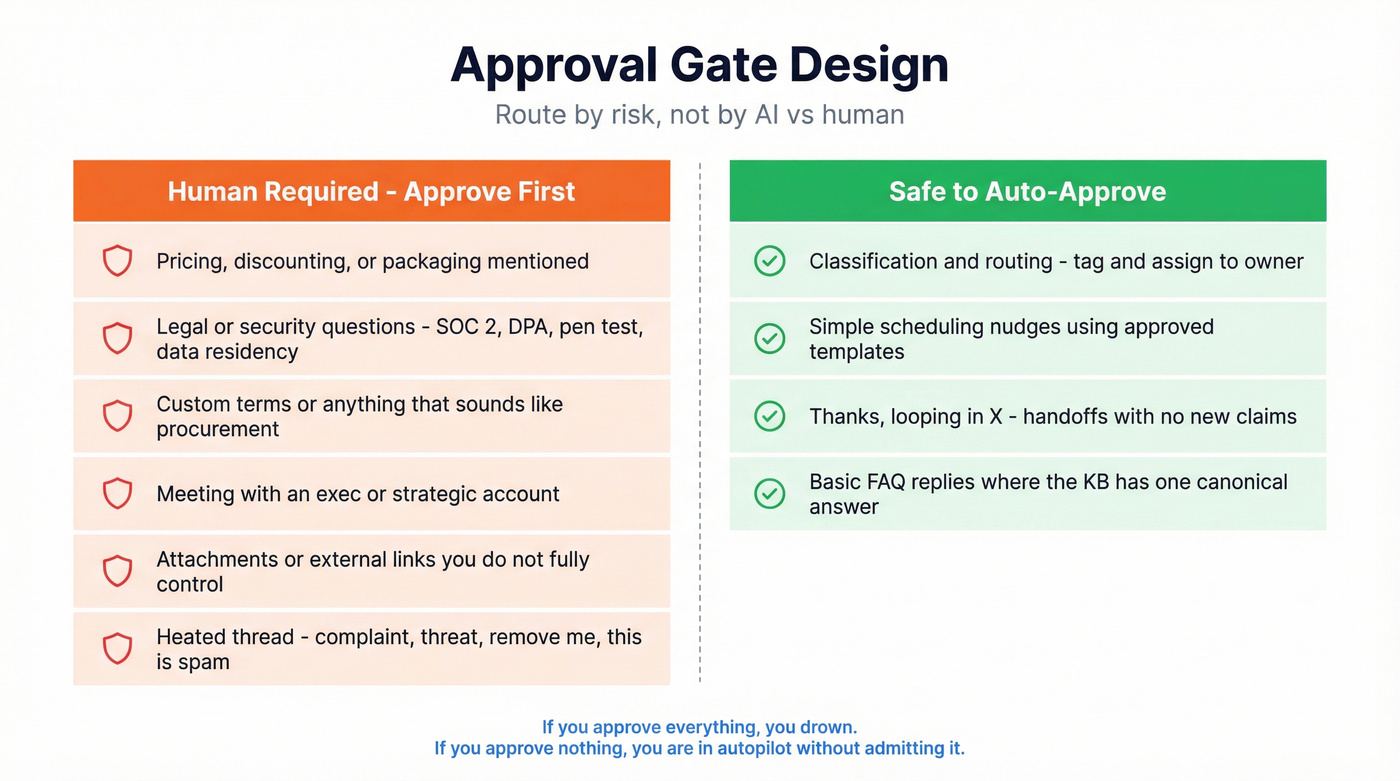
Auto-approve (safe to automate) if:
- Classification + routing (tag "pricing question," assign to owner).
- Simple scheduling nudges using approved templates.
- "Thanks - looping in X" handoffs with no new claims.
- Basic FAQ replies where the KB has a single canonical answer.
Approval roles (who should approve what)
Make approvals boring by making them explicit:
- SDR/AEs: approve tone, next step, and personalization.
- RevOps: owns routing rules, suppression logic, and what triggers approval.
- Sales leadership: approves pricing guardrails and escalation rules.
- Security/Legal (as-needed): approves security pack links, DPA language, and any non-standard commitments.
- Marketing/Brand (optional): approves voice and claims for high-visibility segments.
If you don't assign owners, co-pilot becomes a shared inbox nobody wants to touch.
SLA checklist (so approvals don't stall revenue)
- Define an approval SLA (example: "reply approvals within 2 business hours").
- Define a fallback (if SLA's missed, route to manual handling).
- Batch approvals (2-3 review windows/day beats constant interruptions).
- Use structured approval prompts:
- "Approve/Reject"
- "Choose offer A/B"
- "Select pricing tier"
- "Confirm security doc link"
- Pick the right approval rule:
- "First to respond" keeps flow moving.
- "Everyone must approve" creates a bottleneck - use it only for truly high-stakes actions.
Look, if your co-pilot requires a manager to approve every reply, you didn't buy an AI SDR. You bought a manager tax.
Minimum audit log fields (non-negotiable for enterprise sanity)
If you want co-pilot to survive security reviews and internal post-mortems, log the basics:
- Timestamp (draft created, approved, sent)
- Approver identity (name + role)
- Draft vs final diff (what changed)
- KB snippet IDs/links used to ground the reply
- Rule that triggered approval (pricing mentioned, security keyword, exec account, etc.)
- Channel (email, call task, SMS, social)
- Outcome tag (approved, rejected, escalated) + reason
This isn't bureaucracy. It's how you answer "why did we send this?" in 30 seconds instead of 3 hours.
Grounding layer: knowledge base + instructions (how to prevent confident wrong answers)
Co-pilot mode doesn't make outputs correct. It makes mistakes catchable - if your reviewers can spot them fast.
The grounding layer makes reviewers fast and consistent.
Reply.io's setup model is concrete:
- You create a Knowledge Base by uploading documents/links.
- You define instructions for reply handling: tone, structure, objection handling.
- You add sample responses so the agent learns what "good" looks like.
- You attach approved resources so replies can point to canonical assets.
If there's no KB coverage for a question type, the agent falls back to website info + generic sales practices. That's fine for "what do you do?" It's dangerous for "do you support SCIM?" or "what's your SLA?"
KB examples that actually reduce approvals (pricing, security, competitor)
1) Pricing KB snippet (guardrailed)
- "List price range: $X-$Y per seat/month for SMB."
- "Discount cap: 10% without VP approval."
- "If asked for enterprise pricing: offer a call + share pricing one-pager link."
- "Never quote multi-year terms in email."
2) Security KB snippet (fast + safe)
- "SOC 2 Type II: available on request via security portal link."
- "DPA: standard template link + who signs."
- "Data retention: default policy + configurable options."
- "Escalation: if they ask about pen test results, route to Security."
3) Competitor KB snippet (keeps you out of trouble)
- "Win themes: 3 bullets."
- "Where competitor is strong: 1-2 bullets (no trash talk)."
- "Landmines: phrases we don't use."
- "Approved comparison asset: one link."
These snippets turn approvals from "rewrite the email" into "approve and move on."
KB checklist (what to include)
- One-page product truth doc: what it does, what it doesn't, who it's for
- Pricing rules: list price ranges, discount guardrails, who can approve exceptions
- Security pack: SOC 2, DPA template, subprocessor list, data retention basics
- Competitor positioning: where you win, where you don't, landmine phrases to avoid
- Objection library: "already have a vendor," "no budget," "send info," "not a priority" (a solid starting point: objection handling scripts)
- Approved links: one canonical link per asset (no random PDFs floating around)
Instruction examples (copy/paste style)
- "Use 6th-grade readability. Max 120 words. Ask one question."
- "Never mention pricing numbers unless the KB snippet includes them."
- "If security is mentioned, route to Security template + request their requirements."
- "If the prospect says 'not now,' offer a specific follow-up month and stop."
Data quality layer (the prerequisite nobody wants to talk about)
Co-pilot mode's sold as "reduce SDR workload." In practice, it moves workload upstream. If your inputs are messy, approvals become a cleanup queue.
I've seen teams roll out co-pilot, celebrate for a week, then hit the same wall: bounce rates creep up, personalization gets weird, and suddenly the "approval queue" is just three people rewriting bad drafts that were doomed because the contact data was wrong in the first place.
Bad data creates three predictable failures:
- Deliverability damage (bounces, spam traps, domain flags)
- Personalization errors (wrong role, wrong company size, wrong tech stack)
- Routing errors (wrong owner, wrong segment, wrong sequence)
Key facts that matter operationally:
- 300M+ professional profiles (from 800M+ collected records, 5-step verification)
- 143M+ verified emails and 125M+ verified mobile numbers
- 98% email accuracy
- 30% mobile pickup rate across all regions
- 7-day data refresh cycle (industry average: 6 weeks)
- 15,000+ companies using it and 40,000+ extension users
- 83% enrichment match rate and 92% API match rate
- Intent data across 15,000 topics (powered by Bombora)
- GDPR compliant, opt-out enforced globally, DPAs available
If you want to see the product surfaces referenced below:
- Data Enrichment: https://prospeo.io/b2b-data-enrichment
- Integrations: https://prospeo.io/integrations
What "verified" means in practice (so your AI isn't guessing)
"Verified" should mean more than "looks plausible." Verification needs to protect deliverability outcomes, not just fill a spreadsheet.
- 5-step verification with proprietary email-finding infrastructure (no third-party email providers)
- Catch-all handling (so you don't treat catch-all domains as "good enough")
- Spam-trap and honeypot filtering (so you don't poison domains)
- Automatic duplicate removal across searches
- Zero-trust data partner policy (vetted sources only)
Data hygiene tradeoffs (regardless of tool)
These aren't tool "gotchas." They're the operational work every team has to do if they want AI SDRs to behave.
- You need an owner for suppression lists, enrichment rules, and field mapping.
- You need a single definition of "sequence-ready" (verified + required fields present). (If you need a baseline, start with data quality scorecards.)
- You need a feedback loop when reps mark records as wrong.
- You need clear suppression and segmentation rules so the AI SDR can exclude contacts that should never be messaged (unsubscribes, competitors, existing customers, do-not-contact lists, and sensitive accounts).
Do this once, and co-pilot approvals stop feeling like janitorial work.
Rollout checklist: verify -> enrich -> export/sync (mini workflow)
Start suppression-first
- Remove existing bounces, unsubscribes, and role accounts.
- Deduplicate by email + domain + company.
Verify emails and mobiles
- Upload a CSV (or paste a list/URL) and run verification.
- Keep only deliverable addresses for sequencing. (If you're comparing vendors, see email verifier websites.)
Enrich for routing + personalization
- Select the fields your agent actually uses (title, department, company size, location, tech signals).
- Add intent topics when you want prioritization by in-market signals (more on intent signals).
Export/sync into execution tools
- Push verified contacts into your sequencer and CRM so humans and AI read the same truth.
- Use native integrations where possible to avoid CSV drift.
Lock the rules
- Only verified emails can enter outbound sequences.
- Only enriched records can trigger personalization-heavy prompts.
- Everything else routes to a needs-data queue.

What the screenshot should show (so the workflow's obvious):
- CSV upload panel -> run verification
- Results split into valid / invalid / catch-all
- Enrichment field selector (choose the 10-20 fields you care about)
- Export/sync destination picker (CRM or sequencer)
- A saved rule like "block invalid + role accounts" before export
Guardrails for ai sdr co pilot mode: metrics, deliverability, and scale readiness
Co-pilot's the safe default. Autopilot's earned.
Instantly's outbound playbook gives practical thresholds that map well to "are we safe to scale?":
- Test 100-200 sends before ramping volume.
- Target bounce <=1%.
- Target reply rate >=5%.
- Target primary inbox placement >=80%.
Those numbers aren't academic. They're the difference between scaling and burning domains.
The scale-readiness scorecard (what to measure weekly)
Deliverability (non-negotiable)
- Bounce rate (goal: <=1%)
- Inbox placement (goal: >=80% primary)
- Spam complaint rate (keep it near zero; any spike's a stop sign - know your spam rate threshold)
- Unsubscribe rate (watch for sudden jumps after copy changes)
Domain + mailbox health (practitioner reality)
- Mailbox-to-domain ratio (don't overload one domain with too many mailboxes)
- Volume ramp rate (increase gradually; sudden spikes get punished)
- Blocklist monitoring (if you land on one, pause and isolate immediately - use a blacklist alert workflow)
Conversation quality (what leadership actually cares about)
- Positive reply rate vs total reply rate (a high reply rate can still be mostly negative)
- Objection mix (are you triggering "spam" and "not relevant" more than "timing"?)
- Meeting show rate (AI can book junk meetings)
- Meeting-to-opportunity rate (the real quality filter)
- Time-to-first-human-touch on high-intent replies (co-pilot should reduce this)
Ops health (whether co-pilot's sustainable)
- Approval SLA adherence (are drafts waiting 2 days?)
- Reject reasons (top 3 reasons should shrink over time)
- Cycle time from inbound reply -> approved response
- KB coverage rate (what % of inbound intents have a canonical snippet?)
Stop-loss rules (operational best practice)
These rules keep you from "powering through" a bad week:
- If spam complaints spike, pause new sends immediately and tighten targeting.
- If inbox placement drops week-over-week, isolate the domain, re-verify the next batch, and reduce volume.
- If bounce rises above 1%, stop sequencing new contacts until verification's fixed.
- If negative replies jump after a copy change, roll back the copy and re-check your ICP filters.
- If approvals backlog exceeds your SLA for more than a day, reduce AI-generated volume until the queue clears.
When to move actions from co-pilot to autopilot
Move one action at a time, not "flip the switch."
Good first candidates:
- Auto-send for simple FAQ replies with strong KB coverage.
- Auto-tagging and routing.
- Auto-follow-ups that are purely scheduling nudges.
Keep in co-pilot longer:
- Anything involving pricing, security, or custom terms.
- Competitive threads.
- Enterprise accounts where one wrong sentence becomes a screenshot.
If you do move actions over, be explicit about which autonomy you're enabling: approvals for high-risk threads, and autopilot only for the narrow, well-instrumented actions you've proven are safe.
The maintenance time nobody budgets for
Even in co-pilot, this isn't set-and-forget. SaaStr's field reporting on AI agent operations puts maintenance at 15-20 hours per week for many teams (prompt updates, KB refreshes, routing tweaks, edge cases). Budget that time up front and co-pilot stays stable. Ignore it and you'll "mysteriously" churn tools every quarter.
Failure modes (and the fixes that actually work)
Most co-pilot rollouts fail in predictable ways. Here's what shows up again and again.
1) Approval queue overload
Symptom: reviewers drown; approvals slow; reps bypass the system. Fix: move to L2 (auto-approve low-risk actions), batch approvals, and add structured prompts ("choose A/B") instead of freeform edits.
2) Confident wrong answers
Symptom: drafts sound polished but contain incorrect product/security/pricing details. Fix: tighten KB snippets, add "never quote pricing unless snippet includes it," and require KB links in the draft view.
3) Thread incoherence
Symptom: repeated questions, mismatched CTAs, awkward loops. Fix: add explicit thread-state checks (last CTA, last asset, commitments) and reject drafts that violate them until the agent learns.
4) Deliverability regression after "success"
Symptom: week 1 looks great; week 3 tanks. Fix: keep stop-loss rules, re-verify new lists, and ramp volume slowly. Co-pilot doesn't protect domains - inputs do.
Pricing & packaging reality check (what co-pilot mode costs in 2026)
Co-pilot mode isn't a line item by itself. You pay for it through:
- the AI SDR platform,
- the sequencing/deliverability layer,
- and the data layer (verification + enrichment).
Reply.io is explicit on pricing for Jason AI SDR:
- $500/mo for 1,000 active contacts (annual)
- $1,500/mo for 5,000 active contacts (annual)
- $3,000/mo for 10,000 active contacts (annual)
"Active contacts" matters because it's effectively your monthly top-of-funnel cap: unique contacts you can send one first-step email plus unlimited follow-ups per month.
Reply.io also publishes channel add-ons that change your true cost:
- LinkedIn automation add-on: $69/month
- Calls/SMS add-on: $29/month
Microsoft 365 Copilot is a different category, but it's a useful governance anchor: $30/user/month. The software's cheap; the workflow design is the work.
Instantly pricing is often discussed in terms of credits. Instantly has published working examples in its blog: $47 / $97 / $197 per month for 1,500 / 5,000 / 10,000 credits. Treat it as a directional meter for agent work, not a guaranteed rate card.
Qualified is typically sold on custom enterprise pricing. Vendr benchmarks show ~25 users can land around ~$40k/year at median negotiation outcomes (Premier), with list prices often higher.
Amplemarket sits in the middle: $600/month for the Startup plan on an annual term, then custom tiers above that. It's popular because it bundles a lot. G2 sentiment is strong overall, but the same two complaints pop up in the real world: data accuracy and a learning curve. Co-pilot helps because it assumes you'll need guardrails while you learn the system.
If you already run Salesloft, Outreach, or Trellus
If your team lives in Salesloft or Outreach, don't bolt approvals onto a random new inbox nobody checks. Put co-pilot approvals where reps already work: an inbox-style queue, a task surface, or a routed "needs approval" stage that matches your existing workflow.
If your motion's call-heavy, tools like Trellus (and similar call-first stacks) change what "co-pilot" means: approvals often look like call task creation, talk tracks, objection handling prompts, and disposition logging rather than pure email drafting. The principle stays the same - humans approve high-risk moves - but the surface area shifts.
Pricing anchors table
| Tool/category | Copilot concept | Pricing anchor | Best for |
|---|---|---|---|
| Reply.io Jason AI SDR | Draft + approve | $500-$3,000/mo | SMB outbound |
| Instantly (credits) | Credit-priced agent tasks | $47/$97/$197 mo (blog examples) | Volume tests |
| Microsoft 365 Copilot | HITL patterns | $30/user/mo | Governance |
| Amplemarket | Copilot-style | $600/mo+ | All-in-one |
| Qualified | Enterprise agent | ~$40k/yr (Vendr benchmark for ~25 users) | Enterprise |
Hidden costs you should expect (and plan for):
- Channel add-ons (calls/SMS, social automation)
- Extra mailboxes and domains
- Warmup and monitoring tools
- Data verification/enrichment credits
- Human time for approvals + KB maintenance
Outbound links worth opening:
- https://reply.io/pricing-ai/
- https://reply.io/pricing/
- https://www.microsoft.com/en-us/microsoft-365-copilot/pricing/enterprise
- https://www.amplemarket.com/pricing
- https://learn.microsoft.com/en-us/microsoft-copilot-studio/flows-advanced-approvals
You just read that the first step in any co-pilot rollout is verifying emails and mobiles before anything gets sequenced. Prospeo gives you 143M+ verified emails and 125M+ verified mobiles - at $0.01 per email, with bounce rates under 4% across 15,000+ teams.
Don't let bad data turn your AI SDR into a compliance incident.
FAQ: AI SDR co-pilot mode
What's the difference between AI SDR co-pilot mode and autopilot mode?
Co-pilot mode drafts replies and next steps but requires human approval before anything's sent, booked, or logged externally; autopilot executes automatically based on rules. For most teams, start with co-pilot for at least the first 2-4 weeks of live threads, then automate only the lowest-risk actions.
Where do approvals happen in co-pilot mode (inbox, queue, Slack, CRM)?
Approvals usually happen in an inbox-style draft queue, a shared approval queue inside the SDR tool, a Slack-based human-in-the-loop request, or a CRM task. Pick one primary surface and enforce an SLA (for example, <=2 business hours) so drafts don't stall and prospects don't go cold.
What should always require human approval (pricing, legal, security, custom terms)?
Pricing, discounts, security/privacy (SOC 2, DPA, data residency), legal terms, procurement requests, and custom commitments should always be human-approved because one wrong sentence can create real contractual or compliance risk. As a rule: if it changes money, risk, or obligations, keep it gated.
What metrics tell me it's safe to move from co-pilot to autopilot?
Move a single action to autopilot only after you've held stable for 2 consecutive weeks on bounce <=1%, primary inbox placement >=80%, and reply rate >=5%, with near-zero complaints. If meeting show rate drops or negative replies spike after a change, roll back and tighten targeting before scaling.
Should I verify leads before turning on an AI SDR?
Yes - verify first, then automate: keeping bounce at <=1% is much easier when your list's verified before it hits a sequencer. Prospeo's free plan includes 75 email credits plus 100 extension credits/month, which is enough to validate a pilot list before you scale approvals and volume.
Co-pilot mode is the default we recommend: start at L1, graduate to L2, and only earn L3 when your data, KB, and stop-loss rules are proven. Do it in that order and ai sdr co pilot mode stops being "a risky AI feature" and becomes a workflow you can actually scale.