Spam Rate Thresholds: Every Limit You Need to Know in 2026
The spam rate threshold isn't a theoretical number - it's the tripwire between your emails reaching inboxes and your domain getting torched. One SaaS founder watched open rates crater from 34% to 12%, then spent six weeks clawing back to normal. The cause? Three spam complaints. Three. On a 4,000-person list.
If you're sending any volume of email in 2026 and you don't know these numbers cold, you're gambling with your domain every time you hit send.
What You Need (Quick Version)
Two numbers matter:
- 0.1% - the recommended ceiling. Stay below this. Always.
- 0.3% - the cliff edge. Exceed this and Gmail, Yahoo, and Microsoft all start punishing you. Gmail rejects your messages outright. Yahoo degrades deliverability. Microsoft routes you to Junk, with outright rejection coming soon.
All three major providers now enforce sender requirements. Gmail and Yahoo formalized theirs in early 2024. Microsoft joined in May 2025 with requirements for anyone sending 5,000+ daily emails to Outlook.com addresses.
There's no safe harbor anymore.
Three things to do right now:
- Authenticate everything. SPF, DKIM, and DMARC at minimum p=quarantine. Not optional.
- Monitor your actual spam rate. Set up Google Postmaster Tools and Yahoo Sender Hub. Your ESP dashboard is probably underreporting your real complaint rate - more on that below.
- Clean your list. Remove anyone who hasn't opened in six months. Verify every address before sending.
Here's the thing: your ESP's spam rate number and Google's spam rate number aren't measuring the same thing. The gap between them is where deliverability problems hide.
What Is a Spam Complaint Rate (and Why Should You Care)?
Your spam complaint rate is the percentage of delivered emails that recipients manually mark as spam. The formula:
Spam Complaint Rate = (Spam Complaints / Emails Delivered) x 100
If you send 10,000 emails and 15 people hit "Report Spam," your rate is 0.15%. That's already above the recommended maximum.
Most teams obsess over open rates and click rates. Complaint rates get ignored until it's too late - and by then, the damage compounds fast. 83% of undelivered emails fail because of sender reputation, not content. You can write the perfect subject line, nail your segmentation, and still land in spam because your domain reputation is wrecked from complaints you didn't even know about.
Sender reputation is cumulative. Every complaint, every bounce, every ignored unsubscribe request chips away at it. Once it drops below a certain level, mailbox providers don't just filter one campaign - they filter everything from your domain. Recovering takes weeks, sometimes months.
The maddening part? If you're sending low volumes - say, 100-200 emails a day - a single complaint gives you a 0.5-1% rate. That's catastrophic.
The Numbers That Matter: 0.1% vs. 0.3%
The industry has converged on two thresholds, and understanding the gap between them is critical.

0.1% is the recommended maximum. Gmail, Yahoo, and Outlook all align on this number. It's not a suggestion - it's the line where mailbox providers start paying closer attention to your sending behavior. Think of it as the speed limit.
0.3% is the enforcement threshold. Cross this and you're in active danger. Gmail rejects your messages with permanent 5.7.x failure codes. Yahoo degrades your deliverability. Your ESP may throttle or suspend your account.
But here's what most guides won't tell you: even 0.1% is too high if you're aiming for long-term deliverability. Marcel Becker, Sr. Director of Product at Yahoo, put it bluntly in a Mailgun fireside chat:
"A spam rate of 0.3% is really high. This is nothing new... Internally, we look at much lower spam rates across the board. If you're a good sender your spam rates will be well below 0.3%."
Mailgun's own Acceptable Use Policy sets their internal limit at 0.08%. Industry best practice? 0.02%. The [global average spam complaint rate sits around 0.014%](https://spotler.com/blog/four-unexpected-insights-from-the-gdma-email-benchmark-2024), which means most legitimate senders are well below the recommended ceiling.
Think of it in tiers:
- 0.01-0.05%: Excellent. You're a healthy sender.
- 0.05-0.1%: Healthy but watch it. One bad campaign could push you over.
- 0.1-0.3%: Warning zone. Providers are scrutinizing you. Fix something now.
- 0.3%+: Danger. Active enforcement. Messages getting rejected.
How Many Complaints Does It Actually Take?
Percentages feel abstract. Here's what the email complaint rate threshold looks like in absolute numbers:
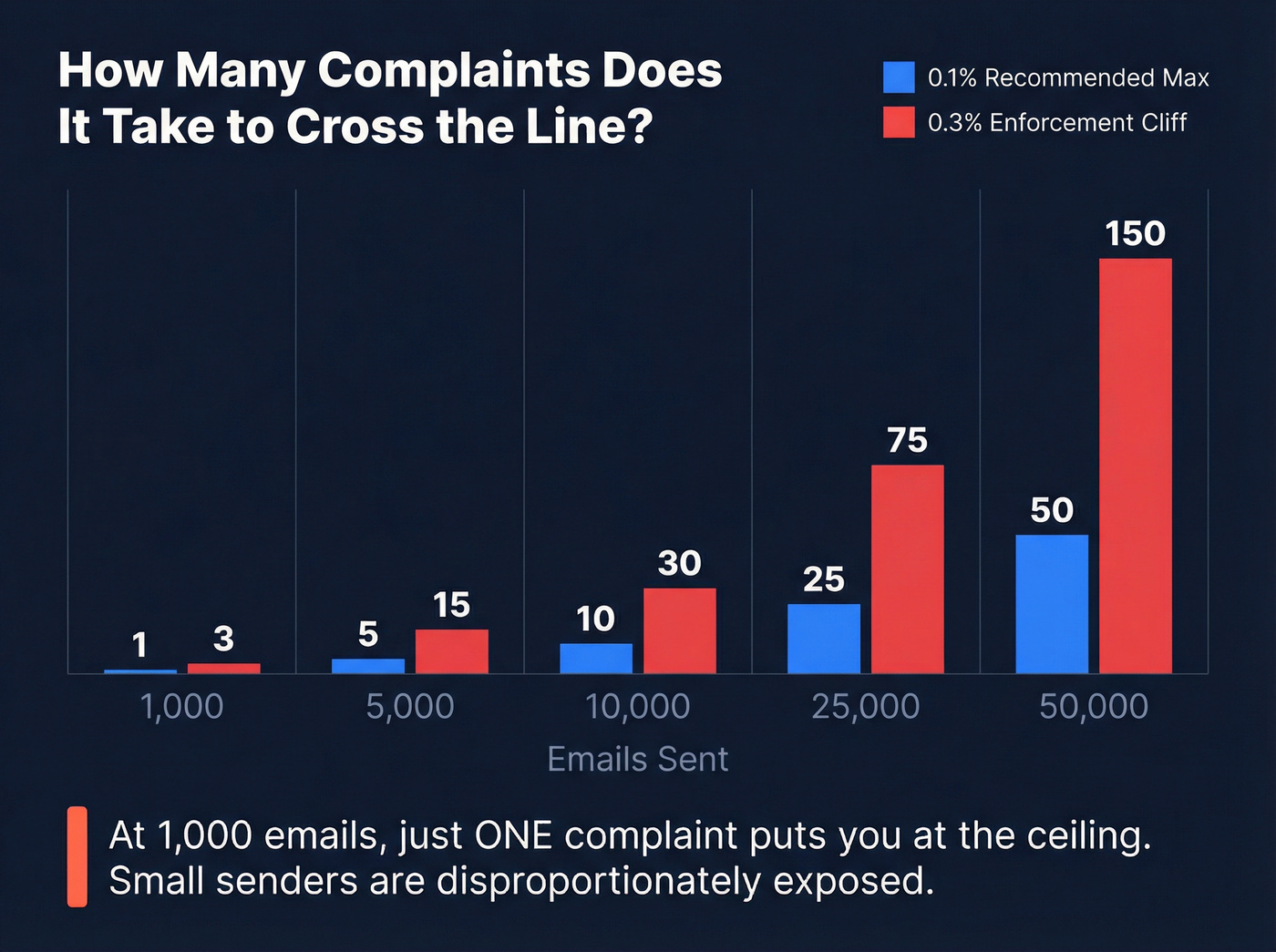
| Emails Sent | Complaints for 0.1% | Complaints for 0.3% |
|---|---|---|
| 1,000 | 1 | 3 |
| 5,000 | 5 | 15 |
| 10,000 | 10 | 30 |
| 25,000 | 25 | 75 |
| 50,000 | 50 | 150 |
At 1,000 emails, a single complaint puts you at the recommended ceiling. Three complaints and you've crossed the enforcement line.
Small-volume senders are disproportionately exposed.
Industry Benchmarks
Your acceptable complaint rate depends partly on your vertical:
- Ecommerce: 0.05-0.15% (higher due to promotional frequency)
- B2B SaaS: 0.02-0.08% (lower - recipients tend to be opted-in professionals)
- Media/Publishing: 0.01-0.05% (lowest - high engagement, strong opt-in)
If you're a B2B SaaS company sitting at 0.12%, you're not just above the recommended max - you're significantly above your industry peers. That context matters when diagnosing problems.

Three spam complaints on a 4,000-person list can torch your domain. The #1 cause? Sending to bad addresses that bounce or belong to people who never opted in. Prospeo's 5-step verification - with catch-all handling, spam-trap removal, and honeypot filtering - delivers 98% email accuracy so your complaint rate stays well below 0.1%.
Stop gambling with your domain. Start with verified data.
Spam Rate Thresholds by Provider
Each major mailbox provider handles enforcement differently. The thresholds are similar, but the mechanics - and the consequences - vary.

Gmail's Spam Rate Threshold
Gmail is the most transparent about its limits and the most aggressive about enforcement. Understanding Gmail's complaint threshold is essential because Gmail accounts for roughly half of all consumer email opens.
The rules: keep your rate below 0.1% and never exceed 0.3%. These apply to bulk senders - anyone who's sent 5,000+ emails to personal Gmail accounts in a single day. That classification is permanent. Once you're tagged as a bulk sender, you can't revert by reducing volume.
Starting November 2025, Gmail escalated enforcement significantly. Non-compliant messages now face temporary failure codes (4.7.x series) that rate-limit your mail and permanent failure codes (5.7.x series) that block messages outright. A "Fail" on your Compliance Status in Google Postmaster Tools means Gmail can reject your mail with 5xx errors - not just route it to spam.
New domains face accelerated enforcement timelines. If you haven't been sending 5,000+ daily since January 2024, expect tighter scrutiny from the start. There's also a practical daily sending limit to consider: even if you're technically authenticated, sending massive volumes from a new domain without warmup will trigger rate-limiting regardless of complaint rates.
The recovery requirement is brutal: if you exceed the 0.3% enforcement line, you lose access to Gmail's mitigation support until you maintain rates below 0.3% for seven consecutive days. Seven days of perfect behavior before they'll even talk to you again.
Yahoo (and AOL)
Yahoo enforces the same 0.3% threshold, but there's a critical difference in how they calculate it. Yahoo's denominator is emails delivered to the inbox - not total emails delivered. If Gmail is auto-filtering half your emails to spam before users see them, those filtered emails still count in Gmail's denominator. Yahoo only counts what actually hit the inbox.
This means your Yahoo complaint rate will typically appear higher than your Gmail rate for the same sending behavior. Don't panic when you see a higher number in Yahoo Sender Hub - it's a more precise measurement, not a worse result.
Yahoo launched its Sender Hub Insights dashboard in October 2025, giving senders direct visibility into complaint rates and delivered volume. Data appears after 24-48 hours, aggregated at the DKIM domain level, with up to 180 days of historical data in UTC timezone. Yahoo's Complaint Feedback Loop identifies individual complainers - unlike Gmail, which only provides aggregate data.
Yahoo requires unsubscribes to be honored within 2 days. No exceptions.
Microsoft Outlook
Microsoft was the last major provider to formalize sender requirements, rolling them out in May 2025 for domains sending 5,000+ emails/day to Outlook.com consumer addresses (hotmail.com, live.com, outlook.com).
The requirements: SPF pass, DKIM pass, and DMARC at minimum p=none aligned with either SPF or DKIM. Non-compliant messages get routed to Junk first, with outright rejection coming at a future date TBD. Rejected messages return a 550 5.7.515 error code.
Microsoft's gap: they don't publish a specific complaint rate limit. They "reserve the right to take negative action" for authentication or hygiene breaches, but there's no published 0.3% line like Gmail and Yahoo. Treat 0.3% as the ceiling for Outlook too - you won't go wrong staying below it.
Microsoft sends DMARC aggregate reports (rua) but doesn't send forensic reports (ruf). Their feedback loop (JMRP) is IP-based, not domain-based.
| Provider | Recommended Max | Enforcement | Auth Required | FBL Type |
|---|---|---|---|---|
| Gmail | 0.1% | 0.3% (reject) | SPF+DKIM+DMARC | Feedback-ID only |
| Yahoo/AOL | 0.1% | 0.3% (degrade) | SPF+DKIM+DMARC | Domain-based CFL |
| Microsoft | 0.1% (industry) | Not published | SPF+DKIM+DMARC | IP-based JMRP |
| Apple Mail | Not published | Not published | DMARC only | None |
Your ESP Has Stricter Limits Than You Think
Mailbox providers set the floor. Your ESP often sets a lower one - and they'll throttle or suspend you before Gmail ever does.

This catches teams off guard. You might be at 0.09% - technically below the recommended limit - and still get flagged by your ESP.
| ESP | Warning Level | Action Level | Notes |
|---|---|---|---|
| Klaviyo | 0.01% | ~0.05%+ | Flags "high" at 0.01% |
| Mailgun | 0.08% | AUP violation | Stricter than Gmail |
| AWS SES | 0.1% | 0.5% (pause) | May suspend service |
| Mailchimp | ~0.1% | Varies | General guidance only |
Klaviyo's threshold is the one that surprises people most. They flag anything over 0.01% as a "high" complaint rate. That's ten times stricter than Gmail's recommended maximum. Three or four complaints on a 1,000-person send triggers their warning system.
The AWS SES complaint rate is particularly dangerous for small-volume senders. If you're sending 100 emails a day and one person complains, that's a 1% rate - ten times the recommended max and double the level where AWS may pause your account entirely. AWS SES will put your account under review at 0.1% and can suspend sending privileges at 0.5%, so monitoring your AWS SES complaint rate daily is non-negotiable if you rely on their infrastructure.
These ESP thresholds exist because these platforms share infrastructure. Your bad reputation affects their other customers. They have every incentive to cut you off early.
How Spam Rate Is Actually Calculated (and Where the Numbers Lie)
The standard formula looks straightforward:
Spam Rate = (Manual Spam Reports / Emails Delivered to Inbox) x 100
But there's a critical blind spot that most deliverability guides completely miss - and it's the reason your ESP dashboard can show a healthy rate while your actual deliverability is tanking.
The problem: the calculation only measures manual reports. When a recipient opens their inbox, sees your email, and clicks "Report Spam," that gets counted. But when Gmail's algorithms automatically filter your email to spam before the recipient ever sees it? That email can't be manually reported. It never shows up in the calculation.
This creates a perverse dynamic. As your reputation degrades and more emails get auto-filtered, your visible complaint rate actually goes down - because fewer people see your emails to complain about them. A declining rate in Google Postmaster Tools can mean your deliverability is getting worse, not better.
I've seen teams celebrate a dropping complaint rate while their open rates cratered. They were looking at the wrong metric. The rate was low because Gmail was filtering 40% of their emails before anyone could report them.
Yahoo's calculation adds another wrinkle. Their denominator is emails delivered to the inbox, not total emails delivered. If Yahoo delivers 1,000 of your emails but only 600 make it to the inbox (400 go to spam), and 3 people complain, your Yahoo rate is 3/600 = 0.5%. Your ESP might calculate 3/1,000 = 0.3%. Same complaints, different rates.
The takeaway: never rely on a single number. Cross-reference Google Postmaster Tools, Yahoo Sender Hub, and your ESP dashboard. Run inbox placement tests. If your open rates are declining but your complaint metrics look fine, you're probably being auto-filtered.
How to Monitor Your Spam Rate
Monitoring isn't optional anymore. With all three major providers enforcing thresholds, flying blind means flying into a wall.
Google Postmaster Tools (v2)
Google Postmaster Tools is the single most important free monitoring tool for email senders. But the October 2025 v2 update stripped it down significantly.
Gone: the IP Reputation and Domain Reputation dashboards. What remains: Compliance Status (pass/fail on technical requirements) and Spam Rate (user-reported complaints). That's it.
Setup takes five minutes: add your domain, verify via DNS TXT record, and wait 24-48 hours for data to populate. Know the limitations:
- Data isn't real-time. There's a 24-hour delay, sometimes longer.
- Google hides data on low-volume days (under ~100-200 emails).
- A "Fail" on Compliance Status now triggers 5xx rejections - this is enforcement, not a warning.
- The rate shown only reflects manual reports, not automatic filtering.
Check it at least twice per week. Account for the reporting delay - what you see today reflects sending from 1-3 days ago.
Yahoo Sender Hub Insights
Yahoo's Insights dashboard, launched October 2025, gives direct visibility into complaint rates and delivered volume at the DKIM domain level. Data appears after 24-48 hours, presented in UTC, with up to 180 days of historical data. The key advantage over Google: Yahoo's Complaint Feedback Loop identifies individual complainers, so you can actually suppress specific addresses that reported you.
Beyond the Big Two
No single tool tells the whole story. Sender Score, Talos Intelligence, and MXToolbox each provide a different angle on your reputation - IP-based scoring, real-time blacklist checks, and DNS health, respectively. Layer these with Postmaster Tools and Yahoo Sender Hub for a complete picture. If one tool shows green and another shows red, dig deeper.
Feedback Loops by Provider
Feedback loops (FBLs) are how mailbox providers tell you who complained. Not all FBLs are created equal.
| Provider | FBL Type | IDs Individuals? | Based On | Signup Needed? |
|---|---|---|---|---|
| Gmail | Feedback-ID header | No | Aggregate only | No (header-based) |
| Yahoo/AOL | Domain-based CFL | Yes | DKIM domain | Yes |
| Microsoft | IP-based JMRP | Yes | Sending IP | Yes |
| Apple | None | N/A | N/A | N/A |
Gmail's approach is the most frustrating. There's no traditional FBL - just a Feedback-ID header that provides aggregate data in Postmaster Tools. You can't identify individual complainers. Yahoo and Microsoft both let you see who complained, which is infinitely more useful for list hygiene.
Apple offers nothing at all. No FBL, no published thresholds, no transparency. You're flying blind with Apple Mail recipients.
What Happens When You Exceed the Spam Rate Threshold
Crossing 0.3% isn't a yellow card. It's closer to a red.
Gmail's enforcement ladder:
- Rate-limiting with temporary 4.7.x failure codes. Your emails slow to a trickle.
- Permanent rejection with 5.7.x codes. Messages bounce outright.
- Loss of mitigation support. Gmail won't help you fix the problem until you maintain rates below 0.3% for seven consecutive days.
- Permanent bulk sender classification. You can't undo this by reducing volume.
Yahoo's response is less transparent but equally damaging. Deliverability degrades progressively - more emails routed to spam, reduced inbox placement, potential blocking for persistent offenders.
Microsoft currently routes non-compliant messages to Junk. Outright rejection is coming at a future date they haven't announced. The 550 5.7.515 error code is already live for authentication failures.
The compounding effect is what kills you. Once your reputation drops, mailbox providers filter more aggressively. Fewer people see your emails. Engagement metrics tank. Lower engagement further damages reputation. It's a death spiral that accelerates the longer you wait to fix it.
And here's the detail that catches people: Gmail's seven-day consecutive compliance requirement means you can't just fix the problem and move on. One bad day resets the clock.
Recovery: What It Actually Takes
Theory is nice. Here's what recovery actually looks like in practice.
SaaS Founder - 3 Complaints, 6 Weeks to Recover
A SaaS founder shared their nightmare on Reddit. Open rates dropped from 34% to 12%. It took three months just to diagnose the problem.
The root cause? Three spam complaints on a list of 4,000 subscribers. That's a 0.075% complaint rate - technically below the 0.1% recommended max - but it was enough to get them blacklisted.
The recovery playbook:
- Removed everyone who hadn't opened in six months. List went from 4,000 to 2,100.
- Sent only to highly engaged users for two weeks.
- Set up DKIM, SPF, and DMARC (should've been done from day one).
- Moved from shared IP to dedicated IP.
- Gradually re-warmed the domain over four weeks.
After six weeks: back to 31% open rates. Not quite the original 34%, but functional.
The founder's takeaway: "2,100 engaged subscribers > 4,000 subscribers who get you blacklisted."
Stripo - Volume Spike Destroyed Domain Reputation
Stripo, an email template company, published a detailed case study of their own deliverability crisis. Delivery rate dropped from 99.8% to 80%. Open rates fell from 25% to 11%. Bounce rate peaked around 20%.
The root cause: two campaigns sent to four times their normal audience size. The domain wasn't prepared for the volume spike.
Making it worse: they were on shared IPs with other senders who had poor practices. IP reputation was already weakened before the spike. Both IP and domain reputation dropped to "Bad" - the lowest possible rating in Google Postmaster Tools. Some providers returned 550 5.7.1 hard errors.
The insidious part? The problem "didn't appear suddenly." It looked like normal fluctuation at first. By the time they realized something was seriously wrong, the damage had compounded for days. Had they been checking Postmaster Tools twice per week - accounting for the 1-3 day reporting delay - they would've caught the reputation drop before it spiraled.
Their recovery approach: stop the bleeding first (pause all non-essential sends), then rebuild by sending only to the most engaged segment, gradually increasing volume over weeks.
Recovery timeline reality: Most senders recover within 4-8 weeks with aggressive list cleaning and re-warming. Severe cases - domain reputation at "Bad" in Postmaster Tools - can take 3+ months. There are no shortcuts.
How to Keep Your Complaint Rate Below 0.1%
Prevention is infinitely cheaper than recovery.
Authenticate everything. SPF, DKIM, and DMARC at minimum p=quarantine (not just p=none). This is table stakes in 2026. Gmail, Yahoo, and Microsoft all require it. If you haven't done this, stop reading and go do it now. (If you need the exact records and alignment rules, see SPF, DKIM, and DMARC.)
Implement one-click unsubscribe. RFC 8058 compliance isn't optional. Include the List-Unsubscribe-Post header. Honor unsubscribes within 2 days - Yahoo explicitly requires this. Every unsubscribe you make difficult becomes a spam complaint instead.
Clean your list ruthlessly. Remove anyone who hasn't opened in six months. We've seen teams cut their lists by 40-50% and see deliverability improve immediately. A smaller, engaged list beats a large, disengaged one every time. (If you want a repeatable workflow, use an email verification list SOP.)
Fix your data quality at the source. This is the root cause most teams ignore. Bad prospect data causes bounces. Bounces damage sender reputation. Damaged reputation triggers spam filtering, which kills deliverability. Prospeo's 5-step verification process catches these problems before they reach your sending infrastructure - catch-all domain handling, spam-trap removal, and honeypot filtering strip out the addresses that would otherwise wreck your reputation.

Don't let your emails look like spam. 80% of people report emails as spam simply because they "look like spam" - sloppy formatting, excessive images, broken links, or walls of text. Clean design isn't just aesthetic; it directly reduces complaint rates.
Manage send frequency. Sudden volume spikes are one of the fastest ways to tank reputation - Stripo learned this the hard way. If you need to increase volume, ramp gradually over 2-4 weeks. (Use email pacing and sending limits rules, not vibes.)
Segment by engagement. Send your most frequent campaigns to your most engaged subscribers. Less engaged segments get lower frequency. This keeps your aggregate engagement metrics healthy, which signals to mailbox providers that recipients want your email. (If your segmentation is messy, start with how to segment your email list.)
Use a dedicated IP for high volume. If you're sending 50,000+ emails per month, shared IPs are a liability. Other senders' bad behavior affects your reputation. A dedicated IP means your reputation is entirely in your hands. (More nuance here: dedicated IP vs shared IP cold outreach.)
Cold Email and the 0.3% Enforcement Line
Look, the same spam rate threshold applies to cold email. There's no exemption, no special treatment, no "but it's outbound" exception. Gmail, Yahoo, and Microsoft don't care about your intent - they care about recipient behavior.
Hot take: If your average deal size is under $10k, you probably can't afford the deliverability risk of sloppy cold email. The cost of burning a domain and rebuilding over 6-8 weeks will dwarf whatever pipeline you generated. Either invest in data quality upfront or stick to inbound.
Cold email operates on thinner margins than marketing email. Your recipients didn't opt in. They're more likely to hit "Report Spam" than an engaged subscriber. That means every technical detail matters more, not less. (If you're building a system, start with a B2B cold email sequence.)
Warmup is non-negotiable. New domains need 2-4 weeks of gradual warmup. Start with 5-10 emails per day to engaged contacts, then scale slowly. Jumping straight to production volume is the fastest way to burn a domain.
Use custom tracking domains. Shared tracking domains pool your reputation with every other sender using the same service. One bad actor tanks everyone. Custom domains isolate your reputation.
Keep copy tight. 25-100 words, one clear ask. Long emails with multiple links trigger spam filters and annoy recipients - both of which drive complaints.
Bounces must stay under 2%. This is the threshold Gmail and Yahoo enforce alongside complaint rates. Every bounce chips away at your domain reputation. Verify every address before loading it into your sequencer - tools like Prospeo catch invalid contacts, spam traps, and honeypots before they do damage. (If you need a step-by-step, see how to verify an email address.)
The Reddit reality check: practitioners on r/b2bmarketing consistently report that even with SPF, DKIM, DMARC, domain warming, and link rotation, consistently hitting 90%+ deliverability is a struggle. The #1 lever that separates teams hitting 90%+ from those stuck at 70%? Data quality. Bad data is the silent killer of cold email programs.
Every bounce and every complaint chips away at your sender reputation. Teams using Prospeo see bounce rates drop below 4% - because our 143M+ emails are re-verified every 7 days, not every 6 weeks like competitors. At $0.01 per email, clean data costs less than one deliverability crisis.
Pay a penny per email now or pay with your domain later.
FAQ
What spam rate should I actually aim for?
Target 0.02-0.05%. The 0.1% recommended ceiling is the maximum, not the goal. Good senders consistently stay below 0.05%. Yahoo's Marcel Becker confirmed that internally they evaluate senders at rates well below 0.3%. The global average sits around 0.014% - if you're above that, there's room to improve.
What is the Gmail spam rate threshold exactly?
Gmail enforces a two-tier system: stay below 0.1% as the recommended maximum and never exceed 0.3% as the hard enforcement line. Crossing 0.3% triggers 5.7.x permanent rejection codes and requires seven consecutive days of compliance before Gmail restores mitigation support. These rules apply permanently to any domain that's sent 5,000+ messages to Gmail in a single day.
How many spam complaints does it take to get blacklisted?
Fewer than you think. A SaaS founder got blacklisted by just 3 complaints on a 4,000-person list (0.075%). On AWS SES, 1 complaint out of 100 daily emails gives you a 1% rate - ten times the recommended maximum. Small-volume senders are disproportionately vulnerable because a single complaint has outsized impact on the percentage.
How long does it take to recover from a high spam rate?
Most senders recover within 4-8 weeks with aggressive list cleaning, authentication setup, and domain re-warming. Severe cases with "Bad" domain reputation in Postmaster Tools can take 3+ months. Gmail requires 7 consecutive days below 0.3% before restoring support - one bad day resets the clock entirely.
Can email verification help reduce spam complaints?
Yes - bad email data causes bounces, and high bounce rates damage sender reputation, which triggers spam filtering. Verifying addresses before sending removes invalid contacts, spam traps, and honeypots. Prospeo's free tier covers 75 emails per month, enough to test verification on your next campaign before committing to a paid plan. NeverBounce and ZeroBounce are other options worth evaluating.