Email Reputation Services: 2026 Guide to Tools & Strategy
Your SDR team uploads 10,000 contacts from a new list vendor. The first campaign bounces 12%, and within 48 hours Gmail starts routing everything - including replies from active deals - to spam. The domain you spent six months warming is now flagged. That's not a hypothetical. It's a Tuesday.
The right email reputation services would have caught the warning signs, but the real fix starts before you ever hit send.
About one in six emails never reaches the inbox, per Validity/Litmus 2025 deliverability benchmarks. The damage isn't evenly distributed across providers:
| Provider | Inbox Rate | Spam | Missing |
|---|---|---|---|
| Gmail | 87.2% | 6.8% | 6.0% |
| Microsoft | 75.6% | 14.6% | 9.8% |
| Yahoo/AOL | 86.0% | 4.8% | 9.2% |
| Apple Mail | 76.3% | 14.3% | 9.4% |
Microsoft and Apple Mail are the worst offenders - roughly a quarter of messages don't land in the inbox.
What You Need (Quick Version)
If you don't want to read 2,000 words, here's the stack:
- Free monitoring: Google Postmaster Tools + Sender Score + MXToolbox. Covers Gmail reputation, IP scoring, and blacklist checks. Most teams don't need more than this.
- Paid inbox testing: GlockApps (from $85/mo) for inbox placement data across Gmail, Outlook, Yahoo, and Apple Mail. Worth it once you're sending at scale and need true inbox placement data, not just reputation signals.
- Prevention: Verify your prospect data before sending. Bad emails destroy reputation faster than any monitoring tool can save it. (If you need a shortlist, start with an email checker tool or a dedicated email ID validator.)
What Is Sender Reputation?
Think of sender reputation as a credit score for your email program - except the metrics directly control whether anyone sees your messages. Every email you send either builds or erodes your score. Mailbox providers assign a reputation to your sending domain and IP address based on how recipients interact with your messages. High engagement and low complaints? Good score. Bounces, spam reports, and spam-trap hits? Your score tanks, and your emails start disappearing.

IP reputation is tied to the server sending your mail - it's shared if you're on a shared IP, which means someone else's bad behavior can drag you down. Domain reputation is tied to your sending domain and follows you regardless of infrastructure changes. That's why a reliable domain reputation service matters: it gives you visibility into the score that travels with your brand no matter what infrastructure you use. (If you're deciding between setups, see Dedicated IP vs Shared IP.)
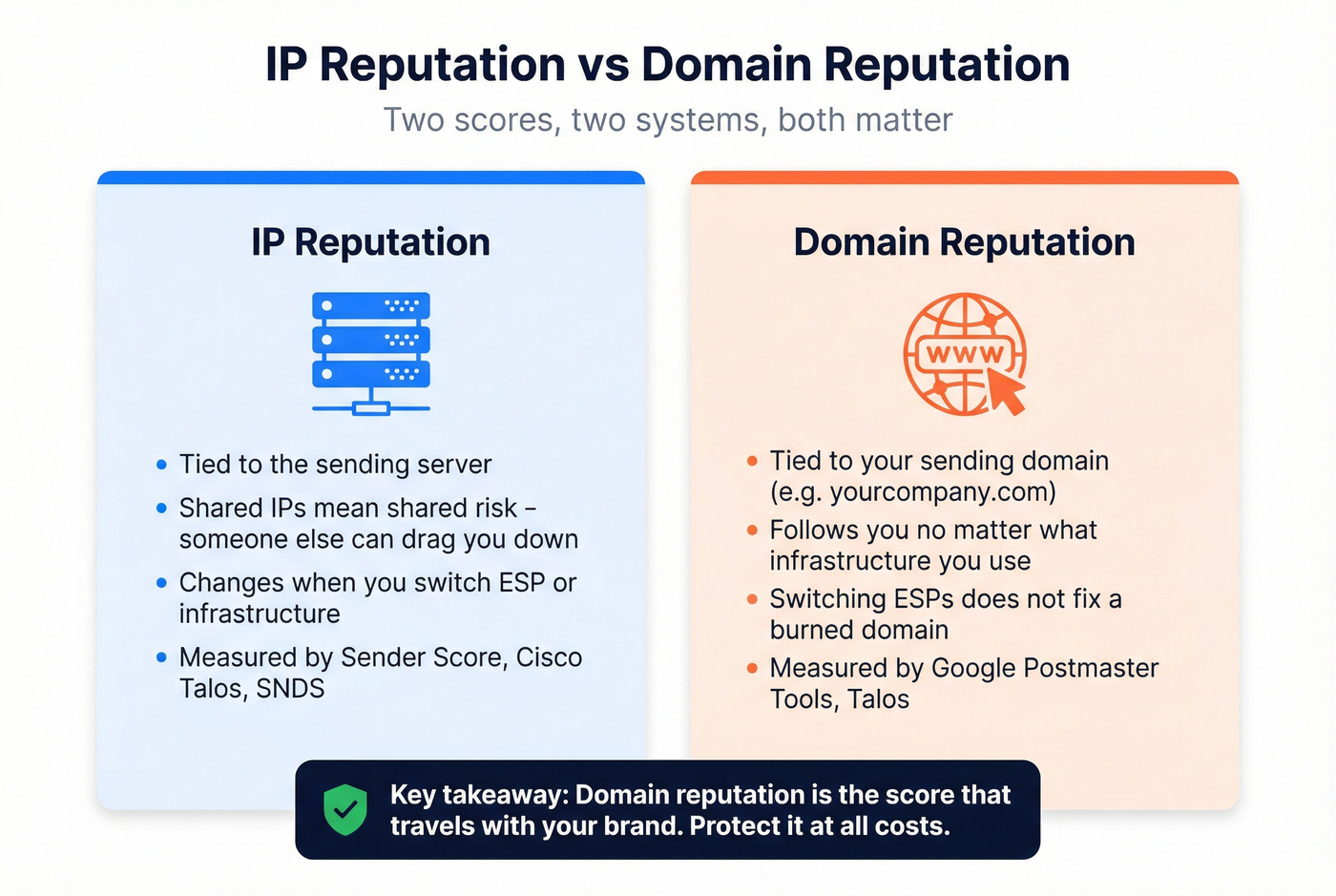
Switching ESPs doesn't magically fix deliverability problems. If the domain is burned, the domain is burned.
One clarification worth making: "email reputation services" actually means two different things depending on who's asking. For most sales and marketing teams, it means sender reputation monitoring tools - platforms that track how mailbox providers view your domain and IP. But there's a second category: email address risk-scoring APIs (like emailrep.io) that evaluate whether a specific email address is trustworthy, useful for fraud prevention, phishing detection, and signup verification. Both matter, but they solve different problems. This guide covers both.
What Changed in 2024-2026
We're in the strictest enforcement era email has ever seen. Here's how we got here:
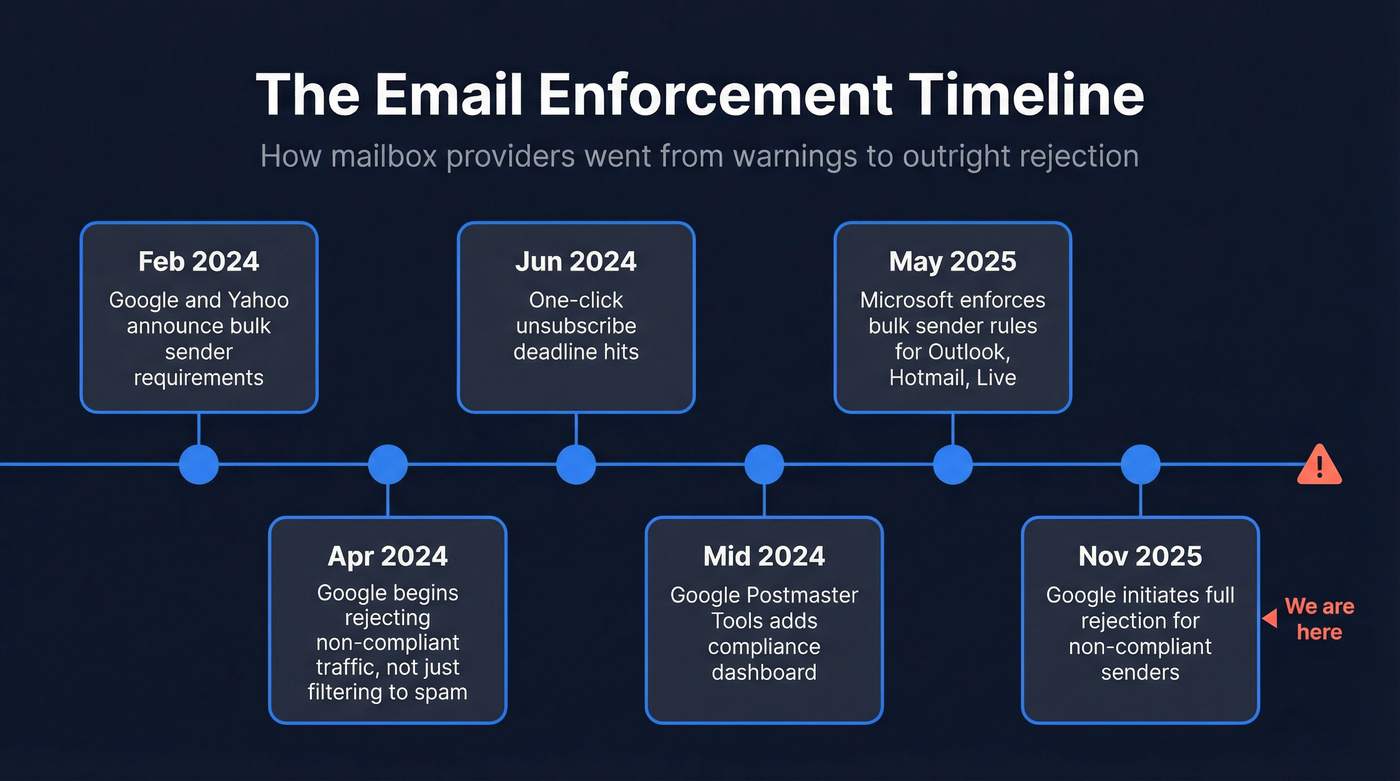
- February 2024: Google and Yahoo announce new bulk sender requirements.
- April 2024: Google begins rejecting some non-compliant traffic. Not just filtering to spam - outright rejection.
- June 2024: One-click unsubscribe deadline hits.
- Mid-2024: Google Postmaster Tools adds a compliance status dashboard.
- May 2025: Microsoft joins the enforcement wave, applying bulk sender requirements to Outlook.com, Hotmail, and Live.com.
- November 2025: Google initiates stricter enforcement with full rejection for non-compliant senders.
The requirements aren't optional anymore. If you're sending 5,000+ messages per day, you need SPF, DKIM, and DMARC properly configured. Your "From" domain must align with either SPF or DKIM. You need a DMARC record with at least p=none (though p=reject is the goal). And your spam complaint rate must stay below 0.3% - ideally under 0.1%. (If you want the step-by-step, use this SPF, DKIM, DMARC explained guide.)
Here's the thing: 0.3% sounds generous until you do the math. Send 10,000 emails, and just 30 spam complaints put you at the ceiling. Three people per thousand clicking "Report Spam" is all it takes to trigger throttling. Prevention matters more than monitoring - by the time you see the damage in your dashboards, the complaints have already been filed.

Monitoring tools show you the damage after it's done. The real fix is never sending to bad emails in the first place. Prospeo's 5-step verification process delivers 98% email accuracy - teams using it consistently report bounce rates under 4%, well below the 0.3% complaint threshold that triggers Gmail and Microsoft throttling.
Stop reacting to reputation damage. Prevent it at the source.
How Mailbox Providers Score You
Mailbox providers don't publish their exact algorithms, but the signals they use are well-documented. AWS breaks it down into the key factors: authentication status (SPF/DKIM/DMARC), engagement rates (opens, clicks, replies), complaint rates, bounce rates, spam-trap hits, and sending history. A new domain with no history starts neutral. A domain that's been sending clean mail for two years has a buffer. A domain that just hit a spam trap has a problem. (For a broader playbook, see our email deliverability guide.)
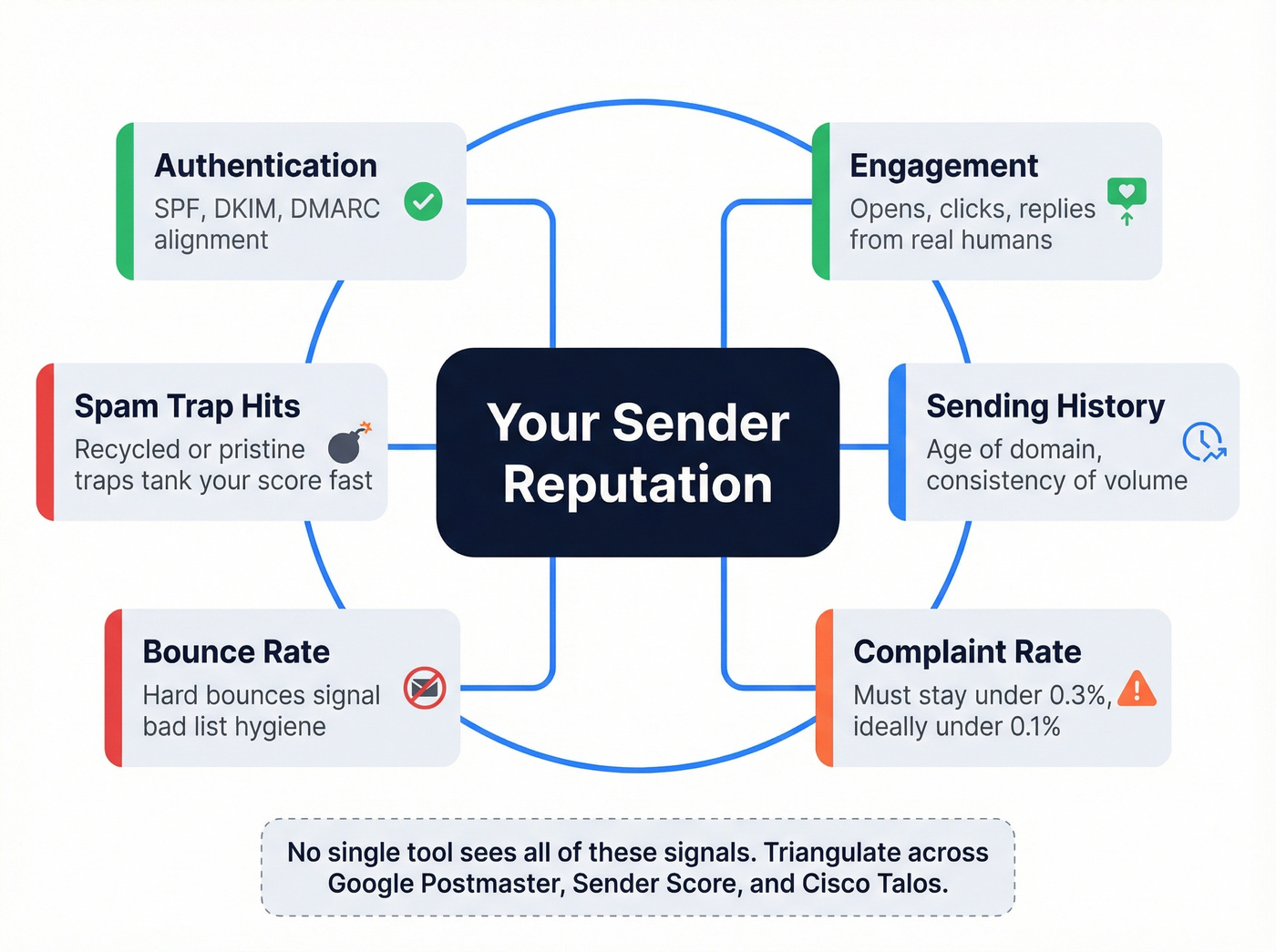
The frustrating part? There's no single source of truth. Google Postmaster Tools might show your domain reputation as "Low." Sender Score gives you a 78 out of 100. Cisco Talos says "Neutral." All three are technically correct - they're measuring different things from different vantage points.
Let's be honest about something most guides won't tell you: reputation scores can be gamed. Sophisticated spammers warm domains, build engagement with seed lists, and maintain clean scores right up until they blast. That's exactly why mailbox providers lean heavily on behavioral signals - real human engagement, complaint patterns, and sending history - not just static reputation scores and blacklist checks.
The practical reality is that reputation tools disagree constantly, blacklist monitoring is noisy, and no single dashboard gives you the full picture. The best approach is triangulating across multiple tools and weighting the one that matches your audience. If 70% of your prospects use Gmail, Google Postmaster Tools is your primary signal. Selling into enterprises on Microsoft? You need SNDS data too.
Best Tools for Monitoring Sender Reputation
| Tool | Category | Best For | Free? | Starting Price |
|---|---|---|---|---|
| Google Postmaster | Monitoring | Gmail domain reputation & compliance | Yes | Free |
| Microsoft SNDS | Monitoring | Outlook/Hotmail delivery diagnostics | Yes | Free |
| Yahoo Sender Hub | Monitoring | Yahoo/AOL sender feedback loops | Yes | Free |
| Sender Score | Quick check | IP reputation trending (0-100 score) | Yes | Free |
| Cisco Talos | Quick check | Real-time IP/domain reputation lookup | Yes | Free |
| BarracudaCentral | Quick check | Barracuda-specific blacklist status | Yes | Free |
| MXToolbox | Diagnostics | DNS health, blacklist, auth validation | Yes | From $129/mo |
| Mail-tester | Testing | One-off spam score checks | Yes | Free (limited) |
| emailrep.io | Risk scoring | Email address fraud/phishing risk | Yes | Free API tier |
| GlockApps | Testing | Cross-provider inbox placement | Limited | From $85/mo |
| Validity Everest | Platform | Enterprise seed-list monitoring | No | From $29/mo |
| MailMonitor | Platform | Ongoing seed-based inbox testing | No | $85-$750/mo |
| Mailtrap | Testing | Dev/staging email testing | Yes | From $15/mo |
| InboxAlly | Warmup | Domain reputation repair via engagement | No | From $149/mo |
| ZeroBounce | Verification | Bounce prevention via list cleaning | Limited | From $49/mo |
| Prospeo | Prevention | Pre-send verification to prevent damage | Yes | ~$0.01/email |

A few notes on tools that don't get their own sections below: Microsoft SNDS and Yahoo Sender Hub are free and essential if your audience skews toward those providers - set them up alongside Google Postmaster Tools. BarracudaCentral is worth a quick check if you suspect Barracuda appliances are filtering your mail in enterprise environments. emailrep.io is the standout for security teams evaluating whether an email address is linked to fraud or phishing - a different use case from sender reputation, but increasingly relevant for signup flows and lead validation. MailMonitor and InboxAlly are worth exploring for ongoing seed testing or active reputation repair, respectively. Mailtrap is a developer tool for testing email in staging environments before anything touches production.
Google Postmaster Tools
Use this if: Gmail is your primary audience - and it probably is, since Gmail dominates B2B inboxes. The domain reputation dashboard, compliance status panel, and authentication reports are genuinely useful, and it's completely free. No other tool gives you direct insight into how Google views your domain.
Skip this if: You need cross-provider visibility. Postmaster Tools is Gmail-only. Essential but incomplete - one leg of a three-legged stool. You also need meaningful volume for the data to populate; fewer than a few hundred emails per day to Gmail addresses means sparse or empty dashboards.
GlockApps
GlockApps is the best affordable option for cross-provider inbox placement testing. We've found it indispensable for teams sending at scale. It runs inbox placement tests using seed addresses across Gmail, Outlook, Yahoo, and Apple Mail, gives you a DMARC analyzer, and provides uptime alerts for your sending infrastructure. At $85/mo, it fills the gap that free tools leave open.
The catch: seed-testing methodology requires enough volume to be statistically meaningful. If you're a small team sending under 10K emails/month, $85/mo is hard to justify when free tools cover your basics. And if you only care about Gmail, Postmaster Tools is free and more accurate for that single provider.
Cisco Talos Intelligence
Cisco Talos is the go-to free tool for IP and domain reputation lookups. It uses a -10 to +10 reputation scoring model that maps into Good/Neutral/Poor categories, and the data updates every three hours - far more frequently than most free alternatives. The recovery window is surprisingly fast: fix the underlying issue and reputation can improve within 3-5 days. That makes Talos particularly useful during active reputation incidents when you need to track recovery in near-real-time.
MXToolbox
MXToolbox is the first place most ops teams go when something breaks. The free tier handles DNS lookups, blacklist checks, and SPF/DKIM/DMARC validation. The paid Delivery Center ($129/mo) adds ongoing monitoring and alerting, while the Plus tier ($399/mo) covers multiple domains and deeper analytics. Good for teams that want one dashboard for infrastructure health, though it doesn't do inbox placement testing. (If you're actively troubleshooting, this blacklist alert guide helps with triage.)
Validity Everest
Everest is Validity's deliverability platform - the same company behind Sender Score. It combines inbox placement testing via seed lists, reputation monitoring, and design rendering previews. Pricing starts at $29/mo, and plans scale up for high-volume senders who want deeper testing and analytics in one place. Best suited for teams that need a single platform rather than stitching together free tools.
Sender Score
Sender Score gives you a free 0-100 reputation rating for any sending IP. It's the most widely referenced reputation metric in the industry and a solid starting point. The limitation is actionability - it tells you your score but doesn't explain exactly why it's low or what to fix. A thermometer, not a diagnosis. Use it alongside Google Postmaster Tools and Cisco Talos for context.
How to Manage Your Sender Reputation
Monitoring tools are necessary but insufficient. AWS's four-pillar framework - Prevention, Monitoring, Analysis, Response - is the most practical model we've seen for managing reputation systematically.
Prevention
This is the pillar 90% of teams skip. It's the one that matters most.
Before you send a single email from a new domain, get the basics right: configure SPF, DKIM, and DMARC. For high-volume senders (a common threshold is 50,000+ emails daily), a dedicated IP helps isolate your reputation from other senders. Warm up new domains and IPs gradually - don't spike volume overnight. Use separate subdomains for marketing, transactional, and cold outreach so a reputation hit on one doesn't bleed into the others. Scrub your lists every 3-6 months at minimum. (If you're building the process, use an email deliverability checklist and a dedicated email verification for outreach workflow.)
Look - if your deals average under five figures, you probably don't need enterprise-grade monitoring tools. What you need is clean data and proper authentication. Most deliverability problems we see aren't monitoring problems. They're prevention problems. Teams spend $500/mo on inbox placement testing while sending to lists they never verified. Fix the input and the output fixes itself.
Monitoring
Once prevention is in place, build a monitoring stack. The free combination covers most teams:
- Google Postmaster Tools for Gmail domain reputation and compliance status
- Microsoft SNDS for Outlook/Hotmail delivery data
- Sender Score for IP reputation trending
- MXToolbox for blacklist alerts and DNS health
Track bounces, complaints, and provider status codes at the account, domain, and IP level. Upgrade to paid tools like GlockApps or Validity Everest when you're sending at scale across multiple domains and need cross-provider inbox placement data. (If you're scaling outbound, follow cold email volume best practices.)
Analysis
Raw data from monitoring tools is useless without thresholds. Keep complaint rates below 0.1% - that's the number that matters, not the 0.3% enforcement threshold where mailbox providers start getting aggressive. Declining open rates across a domain (not just one campaign) can indicate reputation erosion before the dashboards turn red.
When tools disagree - and they will - we weight Google Postmaster Tools highest for Gmail-heavy audiences. Cisco Talos is your best signal for IP-level issues. Sender Score provides trend data but shouldn't be your sole indicator.
Response
When reputation takes a hit, act fast:
- Identify the cause - check blacklists via MXToolbox, review Postmaster Tools for sudden reputation drops, and audit recent list sources.
- Reduce volume immediately while you investigate. Continuing to send at full volume compounds the damage.
- Clean your lists - remove bounced addresses, unengaged contacts, and any addresses from the suspect source.
- Request blacklist removal - most blacklists have a delisting process. Cisco Talos reputation can recover within 3-5 days after the issue is resolved.
- Re-warm gradually - after a major reputation event, treat your domain like it's new. Ramp volume back up over a few weeks with your most engaged segments first.
The consensus on r/coldemail is that most reputation damage is self-inflicted - bad lists, no warmup, authentication gaps. The tools exist to catch problems early, but they can't fix what you keep feeding them.
Your domain reputation follows you everywhere - switching ESPs won't save a list full of spam traps and dead addresses. Prospeo refreshes its 143M+ verified emails every 7 days, not every 6 weeks like most providers. That means the contacts you pull today are accurate today, not last quarter.
Clean data is the only reputation service that actually works.
FAQ
What are email reputation services?
They're tools that monitor, score, or protect your sender reputation - the trust score mailbox providers assign to your domain and IP. Two categories exist: sender reputation monitoring tools like Google Postmaster Tools and GlockApps that track how providers view your sending, and email address risk-scoring APIs like emailrep.io that evaluate whether a specific address is trustworthy for fraud prevention.
What's a good sender score?
Above 80 out of 100 on Sender Score is good, and above 90 is excellent. But that number alone doesn't determine inbox placement - it's one signal among many. Check Google Postmaster Tools for domain reputation and Cisco Talos for IP reputation to get the full picture.
How long does reputation recovery take?
Cisco Talos data shows IP reputation can improve within 3-5 days after fixing the underlying issue. Domain reputation recovery is slower - often 2-4 weeks of consistent, clean sending at reduced volume. Severity matters: a single blacklisting recovers faster than weeks of high bounce rates.
How can I prevent reputation damage before it happens?
Verify every email list before sending. Bad data is the #1 cause of reputation damage. Combine verification with proper SPF/DKIM/DMARC authentication and gradual domain warmup for the strongest prevention stack.
What complaint rate is too high?
Keep spam complaints below 0.1% of sent volume. At 0.3%, mailbox providers start rejecting or routing your mail to spam. Microsoft enforces similar bulk-sender requirements as of May 2025. If you're above 0.1%, audit your list sources and sending frequency before it escalates.