

Email vs InMail B2B: Benchmarks, Costs & Playbooks (2026)
You can reach almost anyone now and still get ignored, flagged, or blocked from following up.
The email vs inmail b2b debate isn't philosophical; it's operational. It comes down to sequencing, deliverability, credits, and compliance (GDPR/PECR), plus what you're actually trying to buy: replies or meetings.
Here's my hot take: when deal sizes are smaller and your list is bigger than a few dozen people, InMail's usually a distraction. It feels premium, but it doesn't scale, and the follow-up rule kneecaps most outbound motions.
What you need (quick version)
Default stance for 2026: run email-first as your backbone, add social touches for context, and use InMail as selective escalation for top-tier targets. Email's the only channel here that reliably supports sequencing, attribution, and throughput week after week.

Pick email when you need scale and sequencing
- You need predictable follow-ups (and you actually win deals on touch 2-3).
- You're running a sequencer (Outreach, Salesloft, Smartlead, Instantly) and care about attribution.
- You can handle deliverability like an adult: SPF/DKIM/DMARC, bounce control, domain warmup, and list hygiene.
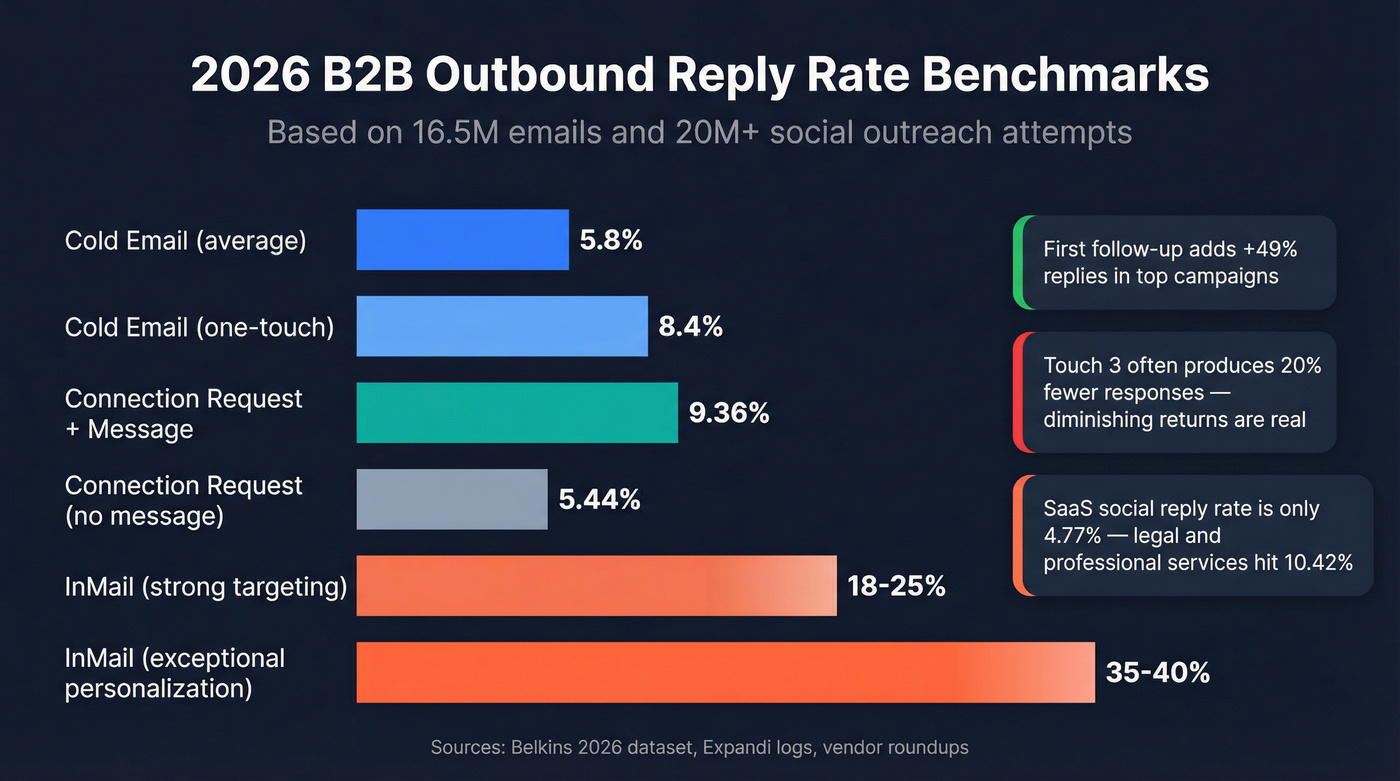
- Benchmark reality: cold email averages 5.8% reply rate (Belkins, 16.5M emails, 2026 update based on their latest published dataset).
Pick InMail when you need precision and you can't risk deliverability
- You're targeting a small list of high-value people and you can personalize hard.
- You're OK paying per message (credits) and living with platform rules.
- You're treating it as a single, high-intent first touch, not a nurture channel.
- In practice, teams typically see ~18-25% InMail reply rates when targeting is tight; 35-40% happens with exceptional personalization; <10% means your targeting or offer's off.
Three edge cases where the default flips
- Brand-new sending domain or a recently cooked domain: start social-first for 1-2 weeks while you rebuild deliverability, then move to email-first.
- Regulated or reputation-sensitive industries (finance, legal, healthcare): use smaller, tighter lists and heavier personalization; InMail can be worth it for executive access, but don't pretend it replaces email sequencing.
- Ultra-small TAM (e.g., 30-80 accounts total): you can justify InMail earlier because you're not trying to scale volume - you're trying to crack specific doors.
The gotcha most teams learn too late
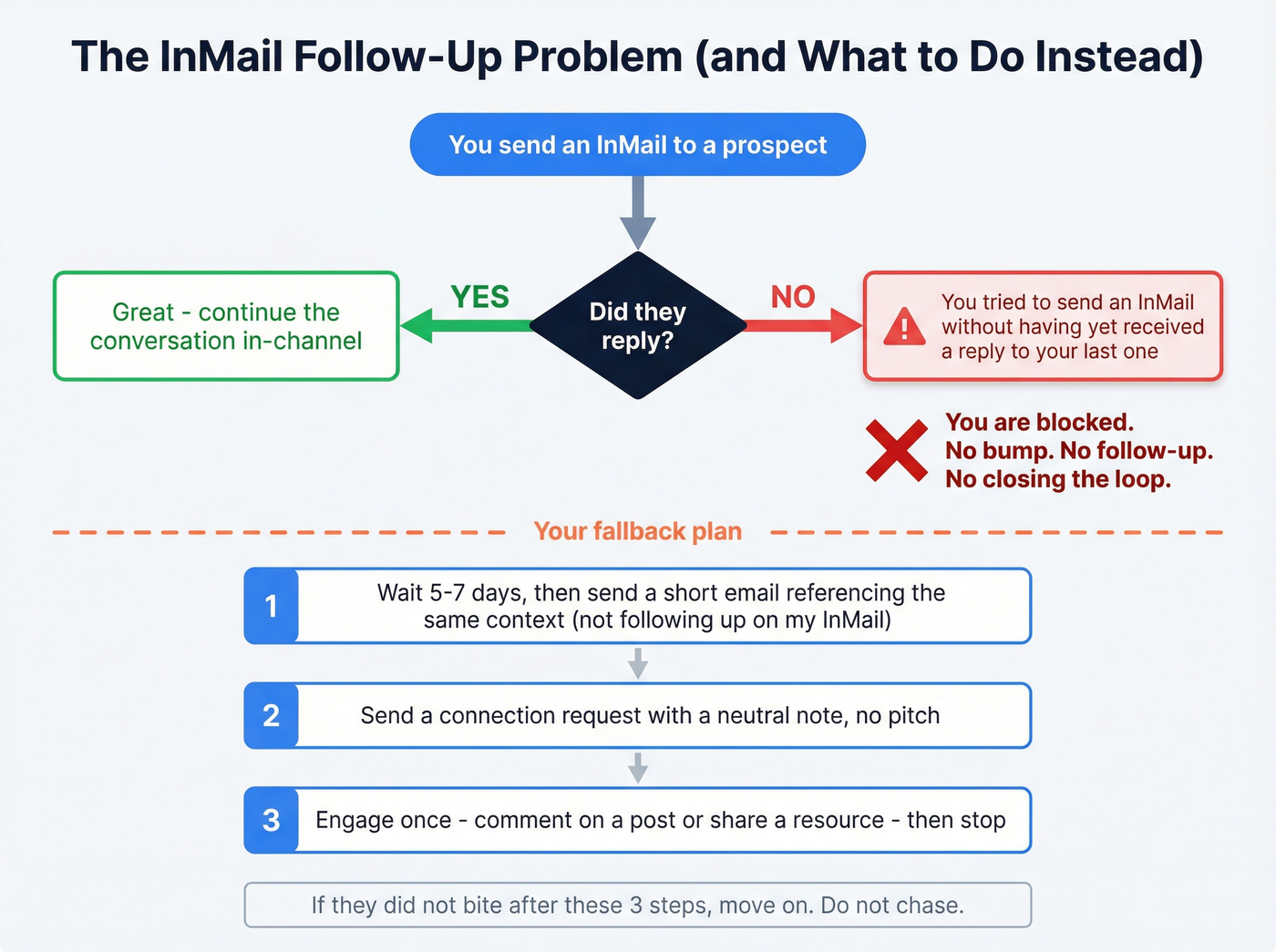
- InMail follow-up is structurally blocked unless they reply. You'll literally see: "You tried to send an InMail without having yet received a reply to your last one".
Mini decision tree
- Need >200 new touches/week? -> Email first
- Need <50 high-stakes touches/week and can personalize? -> InMail
- Need follow-ups to win? -> Email (InMail breaks sequences)
- Getting bounces / spam flags? -> Fix data + deliverability, don't "escape to InMail"
Definitions that actually matter (Email vs DM vs InMail)
Email's simple: you send to an address, you can follow up, and deliverability's your responsibility. It's the most scalable outbound channel because nothing stops you from running a 3-touch sequence to 5,000 prospects other than your own domain reputation.
Messaging inside a professional network isn't one thing. Don't confuse these:
- InMail: a paid, credit-based message you can send to someone you're not connected to. It's closer to "paid cold outreach" than a normal DM.
- Connection request message: the short note you attach when you request to connect. It's not InMail, it doesn't consume InMail credits, and it behaves differently in the inbox.
- 1:1 message (DM): a message to an existing connection (or in some cases, someone you can message via an "open profile" setting). This is the closest analog to email follow-ups, but it's still governed by platform limits and enforcement.
One nuance teams miss: Open Profile / group / event messaging can act like a "free-ish" DM to non-connections in specific contexts. It's useful when it's available, but it's not a strategy you can bank on. Availability changes by account type and region, and limits still apply.
Practical takeaway: email's a sequencing channel. InMail's a paid first-touch channel with constraints that make nurture awkward. If you build your outreach motion assuming "InMail = DM," you'll design sequences that can't actually run.
Email vs InMail B2B: side-by-side comparison
| Dimension | Cold email | InMail |
|---|---|---|
| Scale | High | Low-mid |
| Follow-ups | Easy | Blocked unless they reply |
| Cost | Tools + inboxes + data | Credits per message |
| Tracking | Strong | Limited |
| Deliverability | Risky if sloppy | No email spam-filter risk |
| Limits | ESP/domain reputation | Strict caps + enforcement |
| Compliance | GDPR/PECR obligations | Platform rules + your own compliance |
| Hard rule | N/A | No reply = stop |

A clean way to think about it: email is cheap volume with deliverability and compliance work. InMail is expensive precision with platform constraints.
If you need predictable pipeline: choose email because...
Email lets you run a repeatable system: list -> sequence -> follow-ups -> booked meetings -> attribution. If you're selling to 1,000 mid-market ops managers, you don't need a "high reply rate" channel; you need a channel that can produce enough total meetings without getting you restricted.
We've tested this pattern across teams that run weekly outbound targets, and the same thing keeps happening: when results dip, email gives you knobs to turn (targeting, copy, tracking, cadence, domains, verification). With InMail, you mostly just send fewer messages and hope.
If you need executive access: choose InMail because...
If you're targeting 50 CFOs and each meeting is worth real money, InMail can be the cleanest way to get a first response without deliverability drama. You're paying for access and placement, not for scale.
The winning pattern in 2026: combine both
The best teams don't pick a side. They run:
- Email as the backbone (sequencing + volume)
- Social touches for context (credibility + timing)
- InMail as escalation (top accounts, high intent, one-shot)
That mix beats "email-only" and "InMail-only" because it respects how each channel actually behaves.
Email vs InMail B2B benchmarks in 2026
Cold email performance's softened, but it hasn't collapsed. Belkins' analysis of 16.5M cold emails across 93 domains is still one of the most useful datasets for planning.
Cold email (B2B)
- Average reply rate: 5.8%
- One-touch campaigns: 8.4% reply rate (yes, one email often wins)
- First follow-up impact: +49% replies in high-performing campaigns
- Risk climbs with touches:
- Spam complaints: 0.5% (touch 1) -> 1.6% (touch 4)
- Unsubscribes: up to ~2% by touch 4
Here's the thing: reply rates slid, and the penalty for over-sequencing got harsher. In practice, touch 3 often underperforms; Belkins found the third email produced ~20% fewer responses in some analyses, which is why "just add more follow-ups" is the fastest way to torch a domain while telling yourself you're being persistent.
Messaging benchmarks (connection requests + DMs) Belkins also published a large messaging dataset from Expandi logs: 20M+ outreach attempts.
- Connection request with a message: 9.36% reply rate
- Connection request without a message: 5.44% reply rate
- Acceptance rate barely changes with/without a note (26.42% vs 26.37%). The note doesn't get you accepted; it gets you answered.
- Multi-action campaigns (connect + message + follow-ups) can reach up to 11.87% reply rate in the same dataset.
- Industry variance is real:
- Legal & professional services: 10.42%
- Software & SaaS: 4.77%
If you sell SaaS and social feels "worse than email," you're not crazy. It often is.
InMail reply rates (directional operating range) There isn't a single primary dataset I'd treat like the email benchmark. But across vendor roundups and what we've seen teams get in the wild, a practical planning range is:
- ~18-25% when targeting + personalization are strong
- 35-40% when the message is genuinely specific and the offer's sharp
- <10% when you're spraying titles or pitching too early
Nuance that saves budgets: InMail can win on reply rate, but email often wins on total meetings because you can send 10-20x the volume and you can follow up.

Cold email wins on sequencing and scale, but bad data kills the whole motion. Prospeo's 98% verified emails keep bounce rates under control - so your domain stays healthy and your sequences actually run.
Stop escaping to InMail because your email data is broken.
The hidden constraint: InMail isn't a follow-up channel
Use InMail like a scalpel, not a sequencer.
Use InMail if
- You have a short, curated target list (think: 25-100 people).
- You can write a message that's obviously specific to their role/company.
- You're OK treating it like a paid "first touch" that either converts or dies.
Skip InMail if
- Your motion depends on 2-4 touches to convert.
- You're running nurture sequences where the follow-up does the work.
- You need consistent throughput week after week.
Why? Because the product blocks you. The in-product error string's painfully explicit: "You tried to send an InMail without having yet received a reply to your last one".
That one rule breaks most sequencing logic:
- You can't do "bump" follow-ups.
- You can't do objection handling in message #2.
- You can't do a polite "closing the loop."
One quick scenario we see all the time: an SDR runs a pilot, sends 40 InMails to a tight list, gets 9 replies, everyone's excited, and then week two falls apart because the other 31 never replied and now the SDR can't follow up in-channel, so the "sequence" turns into a messy scramble across email, DMs, and random comments that feel awkward and don't track cleanly.
Fallback plan (when your InMail gets ignored)
- Wait 5-7 days, then send a short email referencing the same context (not "following up on my InMail").
- Send a connection request with a neutral note (no pitch).
- Engage once (comment on a post or share a relevant resource), then stop. If they didn't bite, move on.
Operational limits and crackdown reality (as of 2026)
As of 2026, you should plan outreach like enforcement's part of the product, because it is. Limits fluctuate by account trust, and the platform doesn't publish a clean "official limits" table, so treat these as planning numbers, not promises.
PhantomBuster's limits compilation is still a practical cheat sheet for planning volume.
Planning checklist (what to assume)
- Connection requests: ~100/week (80/week is the "don't get cute" number)
- Messages: ~100/week on free accounts, ~150/week on Premium/Sales Navigator
- InMail: credit-based; subject up to 200 characters, message up to 1,900
Safe ops heuristic that keeps teams out of trouble
- Keep connection requests <25/day.
- Don't run identical templates all day.
- Mix real activity with outreach (profile views, genuine comments, normal browsing).
Failure modes we see in 2026 (even on paid plans)
This part's frustrating, because it's rarely one big mistake.
- Verification loop: sudden "confirm your identity" prompts mid-workflow; throughput drops to zero until resolved.
- Temporary restriction after months of "being fine": teams run automation for 6+ months, then get clipped in a single week when patterns cross a threshold.
- Template similarity flags: same structure + same CTA across many sends triggers warnings faster than raw volume does.
Recovery plan (when you get warned or restricted)
- Cooldown week: stop outreach for 5-7 days.
- Go human-only: manual browsing + a few genuine interactions daily.
- Rewrite templates: change structure, not just synonyms; vary CTAs and openings.
- Restart at 30-50% volume for two weeks, then ramp slowly.
Simple planning table
| Motion | "Safe" plan | High-risk plan |
|---|---|---|
| Connection requests | 80-100/wk | 150-200/wk |
| Messages | 100-150/wk | 200-250/wk |
| Risk level | Lower | Higher |
| Best for | Consistency | Short bursts |
If you need predictable volume, email's still the channel where you can control the throttle without waking up to a restriction.
Unit economics: cost per reply and cost per meeting (simple model)
Reply rate's vanity until you translate it into cost per meeting and time per meeting.
Step 1: Use working InMail costs (credits)
A practical planning model many teams use: Sales Navigator Core at $99.99/month (or $79.99/month billed annually) including 50 InMail credits (varies by region/packaging). Extra credits are commonly priced at ~$10/credit, and you get a credit refund if the recipient replies within 90 days.
Use these numbers to plan, then sanity-check inside your own account.
Step 2: Add the cost everyone forgets: time
InMail only wins when you can afford personalization time.
A realistic planning assumption:
- InMail personalization: 6-10 minutes per message (research + writing)
- Cold email personalization: 30-90 seconds per prospect when you're using a tight template and light tailoring
At 50 InMails/week, you're spending 5-8.3 hours just writing. That's fine for enterprise. It's insane for SMB volume.
Step 3: Sensitivity table (reply rate x meeting conversion)
Assume:
- InMail cost: $99.99 for 50 credits (= ~$2 per send)
- Meeting conversion from replies: 20% or 30%
Meetings per 50 InMails
- 10% reply -> 5 replies -> 1.0-1.5 meetings
- 20% reply -> 10 replies -> 2.0-3.0 meetings
- 30% reply -> 15 replies -> 3.0-4.5 meetings
Credit cost per meeting (credits only)
- 10% reply: $67-$100 / meeting
- 20% reply: $33-$50 / meeting
- 30% reply: $22-$33 / meeting
Now add labor. If your fully loaded SDR cost's $35/hour and you spend 7 hours writing 50 InMails, that's $245 in labor, often bigger than the credit cost.
Step 4: Deal-size threshold heuristic (when InMail makes sense)
Use expected value per meeting:
- If your expected value per meeting's <$300, InMail-heavy motions usually lose once you include labor.
- If your expected value per meeting's $500-$2,000+ (enterprise, high-margin services), InMail's easy to justify, especially for exec access.
Example math (meetings, not vibes)
InMail example
- 50 InMails
- 20% reply rate -> 10 replies
- 20-30% to meeting -> 2-3 meetings
- Credits cost ~= $99.99 -> $33-$50 per meeting (plus labor)
Cold email example
- 1,000 emails
- 5.8% reply rate -> 58 replies
- 20-30% to meeting -> 12-17 meetings
- Marginal send cost's near-zero; your real costs are inboxes, tools, and data quality.
Mini table: what you're buying
| Channel | Example volume | Replies | Meetings |
|---|---|---|---|
| InMail | 50 | 10 | 2-3 |
| 1,000 | 58 | 12-17 |
If email's "failing," fix the real bottleneck (data + deliverability)
Most "email is dead" complaints are really one of these four problems.
Diagnostic checklist (symptom -> cause -> fix)
High bounce rate (>3-5%) -> Bad/stale addresses, catch-all traps, poor list hygiene -> Tighten verification, suppress risky domains, refresh data more often (see B2B contact data decay)
Low opens + low replies -> Sender reputation issues, spam placement, over-tracked emails -> Validate SPF, DKIM, DMARC, reduce links, simplify HTML, consider turning off open tracking (more in email deliverability) -> Write like a human: 6-8 sentences, <200 words performs best in Belkins' dataset
Replies are negative ("stop spamming me") -> Bad targeting and too-broad list pulls -> Narrow ICP, personalize to role pains, reduce touches (use an ideal customer definition you can actually enforce)
You're hitting the same company too hard -> "Spray the org chart" behavior -> Target 1-2 people/company first (7.8% reply rate) instead of blasting 10+ (3.8%)
Belkins also found turning off open tracking pixels drove ~3% higher response rates in their experiments. I'm firmly in the "turn it off unless you truly need it" camp; open tracking's a deliverability tax disguised as analytics.
If you want one unsexy lever that fixes a lot fast, it's verified contact data. Prospeo (the B2B data platform built for accuracy) gives you 300M+ professional profiles, 143M+ verified emails, and 98% verified email accuracy on a 7-day refresh cycle, so you're not burning domains on stale addresses and catch-all junk. (If you’re comparing vendors, start with our roundup of email lookup tools and the shortlist of B2B email lookup tool options.)
At $0.01 per verified email, Prospeo costs a fraction of a single InMail credit - and you get unlimited follow-ups. Run 1,000+ touches per week with 98% accuracy and a 7-day data refresh cycle.
Scale email outbound without torching your domain or your budget.
Proven sequences (email-first, social-first, InMail escalation)
These sequences work because they respect constraints: deliverability on email, limits on messaging, and the InMail follow-up block.
Playbook: Email-first (scale + controlled risk)
Goal: maximize meetings while stopping before reputation damage.
- Day 1 (Thu works best): Email #1 (6-8 sentences, <200 words)
- Day 3: Email #2 (first follow-up; this is the one that can add +49% replies)
- Day 7: Email #3 (final; keep it short, "close the loop")
- Stop before touch 4. By touch 4 you're at 1.6% spam complaints and ~2% unsubs.
Also: don't assume "more touches = more replies." The third email can produce ~20% fewer responses in some analyses. If touch 2 didn't move the needle, touch 3 should be materially different, or you should stop (see follow up email sequence strategy).
Timing tip: Thursday's the best email day at 6.87% reply rate. Monday's the worst at 5.29%. If your ICP's US-based, test 8-11 PM sends; Belkins saw 6.52% peak replies. (More on timing in cold email time zones.)
Playbook: Social-first (relationship + warm context)
Goal: earn the right to email later, especially where messaging performs well.
- Day 1 (Tue works best): Connection request with a short note
- Expect 9.36% reply rate with a message vs 5.44% without
- Don't overthink acceptance: acceptance's basically unchanged with/without a note (26.42% vs 26.37%). The note's for replies.
- Day 3: DM #1 (if accepted): 1 question, no pitch
- Day 7: DM #2: share a relevant insight + ask permission to send details
- Day 10: Email (now you've got context and a reason)
Timing tip: Tuesday's the best day for messaging at 6.90% reply rate. If you want a full system, start with how to do social selling.
Playbook: InMail escalation (precision, not nurture)
Rule: treat InMail as escalation because follow-up's blocked.
- Trigger: they didn't reply to 1-2 emails, but they're a top-tier account/person
- Send 1 InMail: highly specific, one clear CTA, no "checking in"
- If they reply: move to DM or email thread and continue normally
- If they don't reply: don't waste credits trying to "sequence" it - you can't
Real talk: InMail's best when you'd be willing to spend $30-$100 to get a conversation started. If you wouldn't spend that, don't use credits.
Message examples you can steal (email + InMail)
These aren't "templates." They're starting points that match how each channel actually works in 2026.
Cold email example (first touch, <200 words)
Subject: Quick question about {{initiative}}
Hi {{FirstName}} - I noticed {{Company}} is {{specific trigger: hiring / new product / tech stack}}.
When teams hit {{pain tied to role}}, they usually pick between:
- {{option A}}, or
- {{option B}}.
We help {{peer group}} get {{outcome}} without {{common downside}}. Worth a 12-minute call next week to see if this is relevant for {{Company}}?
- {{Name}} P.S. If I'm off, who owns {{area}}?
Why it works: short, specific, one ask, and a clean "wrong person?" escape hatch. (More frameworks in B2B cold email sequence.)
InMail example (one-shot escalation)
Hi {{FirstName}} - I'm reaching out because {{one specific observation}}.
We're helping {{similar companies}} {{measurable outcome}} by {{mechanism}}. If you're the right person for {{area}}, would you be open to a quick chat this week?
If not, tell me who owns it and I'll go away.
Why it works: it reads like you did your homework, and it respects the fact you don't get a real follow-up.
Decision model (2 minutes): pick Email-first, Social-first, or InMail-first
Use five inputs. Don't overcomplicate it.
1) List size (new prospects/week)
- 200+ -> Email-first
- 50-200 -> Email-first + social touches
- <50 -> InMail escalation is viable
2) Deal size (expected value per meeting)
- <$300/meeting -> Email-first (InMail labor cost will hurt)
- $500-$2,000+/meeting -> InMail escalation makes sense
3) Personalization time you can afford
- <1 min/prospect -> Email-first
- 6-10 min/prospect -> InMail only for top-tier targets
4) Deliverability health
- Healthy (bounces <3%, complaints low): keep email as backbone
- Unhealthy: fix data + tracking + domain setup; don't hide in InMail (use this email verification list SOP)
5) Compliance risk tolerance (GDPR/PECR + brand)
- Low tolerance: smaller lists, higher relevance, clearer opt-outs, tighter documentation (see GDPR for sales and marketing)
- Higher tolerance: still document, just move faster
Output
- Most teams: Email-first + social touches + selective InMail escalation
- Enterprise ABM: Email + InMail for execs (but still email for sequencing)
- Tiny TAM: InMail-first (with email as the second channel, not the other way around)
When to combine both channels (the 3-week cadence that actually works)
If you only remember one thing: email carries the sequence; social provides context; InMail's the break-glass move.
A simple cadence that doesn't get weird:
- Week 1: Email #1 -> Email #2
- Week 2: Connection request (neutral note) -> DM (one question)
- Week 3: Email #3 (new angle) -> InMail (only for top 10-20% of targets)
This avoids the two classic mistakes:
- burning credits too early, and
- hammering the same person with four emails and calling it "persistence."
Compliance in practice (UK/EU checklist for outbound)
This is where teams get sloppy, then panic later. Treat compliance like ops: document it once, then run it consistently.
As of 2026, the ICO's legitimate interests guidance is under review in light of the Data (Use and Access) Act effective 19 June 2026. That doesn't mean "stop outbound." It means: be intentional and be able to explain yourself.
UK/EU outbound checklist (practical)
- Pick a lawful basis intentionally. Legitimate interests isn't a sticker you slap on everything; do a balancing test / Legitimate Interests Assessment (LIA) for your specific purpose.
- Minimize data and be transparent. Use what you need (role, company, work contact) and include a clear opt-out.
- Respect channel expectations. B2B email can be reasonable when it's relevant; scraping personal data and blasting it isn't.
- Handle sole traders correctly. In the UK, sole traders/partnerships are often treated closer to consumers under PECR.
- Make opt-out real. One-click unsubscribe or a clear "reply stop" process, and honor it fast.
What to document (so you're not scrambling later)
- Your LIA (purpose, necessity, balancing test)
- Data source (where the contact data came from)
- Suppression list process (opt-outs, bounces, complaints)
- Retention window (how long you keep prospect data)
- Opt-out mechanism (and proof it's enforced)
Also: "publicly available" doesn't mean "free to market to forever." Keep relevance tight, document sourcing, and maintain suppression properly.
FAQ
Does InMail bypass spam filters?
InMail bypasses email spam filters because it's not sent through email infrastructure, so it won't impact your domain reputation. The tradeoff's hard platform constraints: credit costs, weekly caps, and the no-reply/no-follow-up rule that limits sequencing.
Can you follow up with another InMail if they don't reply?
No. Most accounts can't send a second InMail to the same person until the first one gets a reply, and the UI may show the "You tried to send an InMail..." error. Plan it as one paid attempt, then switch to email or a connection + DM path.
How many cold email follow-ups is too many in 2026?
For most B2B outbound, more than 2 follow-ups is too many: one-touch campaigns can hit 8.4% replies, the first follow-up can lift replies by 49%, but by touch 4 spam complaints reach 1.6% and unsubscribes approach ~2%.
What's a good free tool for verified B2B emails?
Prospeo's free tier includes 75 email credits + 100 Chrome extension credits per month, with 98% verified email accuracy and a 7-day refresh cycle. Hunter and Apollo also have free tiers, but freshness and verification depth vary.
Bottom line in 2026
Email wins when you need a system: sequencing, follow-ups, attribution, and predictable weekly pipeline.
InMail wins when you need executive access and each meeting's valuable enough to justify credits and personalization time.
Most teams should run both: email as the backbone, social touches for context, and InMail as selective escalation for top-tier targets.