Prompt Engineering for Salespeople: The Practitioner's Playbook
It's Monday morning. You've got 47 accounts to touch this week, a pipeline review Thursday, and your manager just forwarded a blog post about "using AI for 10x productivity." So you open ChatGPT, type "write me a cold email," and get back something that sounds like it was written by a marketing intern who's never made a phone call.
That's not an AI problem. It's a prompt engineering problem - and for salespeople, it's already a quota gap.
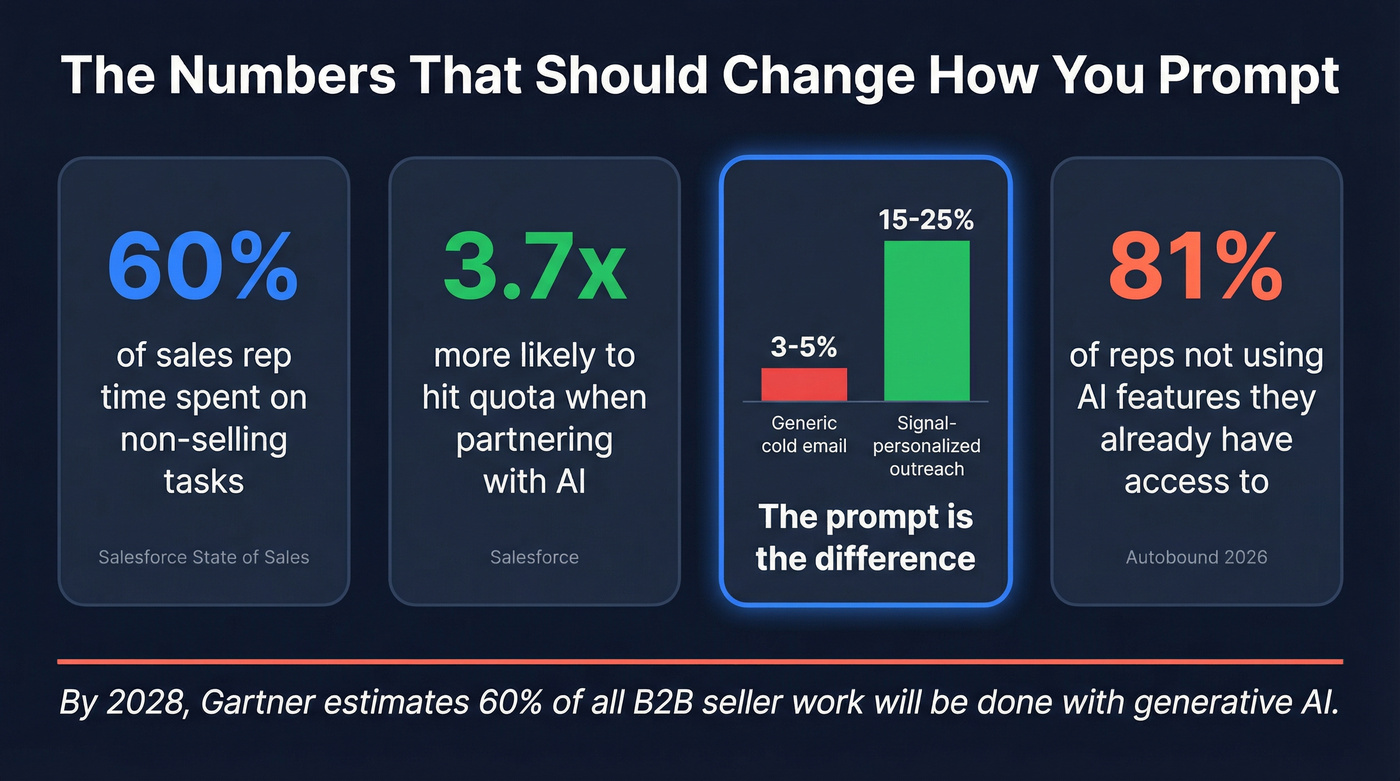
Sales reps spend 60% of their time on non-selling tasks to close deals, and your week disappears into admin. Sellers who partner with AI tools are 3.7x more likely to meet quota. Signal-personalized outreach hits 15-25% reply rates versus 3-5% for generic cold email. Yet only 19% of reps actually use AI features built into the sales tools they already have. Four out of five reps are leaving free productivity on the table. By 2028, Gartner estimates 60% of all B2B seller work will be executed using generative AI. The reps who learn to direct that AI will eat the ones who don't.
What You Need (Quick Version)
- One framework to memorize: Role -> Context -> Task -> Constraints -> Format -> Iterate. Every good sales prompt follows this structure.
- The single biggest mistake: No context. If you don't tell the model who you're selling to, what stage the deal is in, and what you need, you'll get generic output every time.
- The stat that should motivate everything: Signal-personalized outreach pulls 15-25% reply rates. Generic AI output gets 3-5%. The difference is in the prompt.
- Where to start: Jump to the templates section below and grab the ones that match your daily workflow. Then read the framework section to understand why they work.
You don't need a course. You need 10 good prompts and the discipline to iterate. And verify your prospect data before you send anything AI-generated - the best prompt in the world can't save an email that bounces. (If you need a quick shortlist, start with an email ID validator.)
Why Sales Prompting Matters in 2026
The most common complaint about AI-generated emails is that they "sound like a bot wrote them." That's almost always a context problem, not a model problem. The reps getting real results aren't using fancier tools - they're giving the same tools better instructions.
Here's the thing most AI content won't give you: if your average deal is under $5K, you probably don't need a $200/month AI sales platform. You need ChatGPT, 10 solid prompts, and clean prospect data. The framework below works regardless of what you're paying for.
The One Framework Worth Memorizing
Several prompt frameworks float around - TCREI, the 3Cs, various acronyms that consultants love. They all point at the same underlying truth: structured input produces structured output. Whether you're exploring AI prompting as an individual contributor or rolling it out across an entire org, this framework scales.
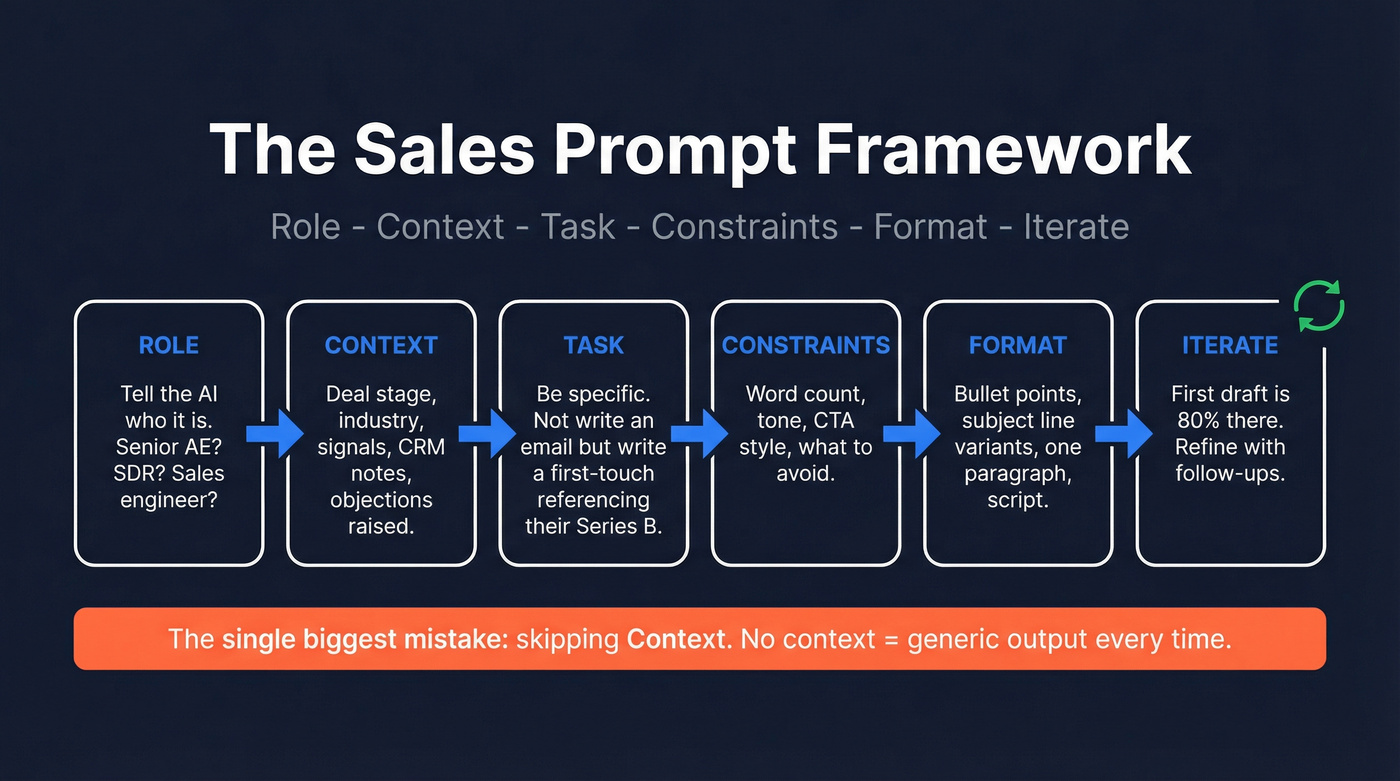
Here's the synthesized, sales-specific version we keep coming back to:
Role -> Context -> Task -> Constraints -> Format -> Iterate
- Role: Tell the model who it is. "You're a senior AE selling cybersecurity to mid-market CFOs."
- Context: Feed it everything relevant. Deal stage, prospect's industry, recent signals, objections raised, CRM notes.
- Task: Be specific. Not "write an email" but "write a first-touch cold email referencing their recent Series B."
- Constraints: Set boundaries. "Under 90 words. No buzzwords. Soft CTA only."
- Format: Specify the output shape. "Bullet points," "3 subject line variants," "one paragraph."
- Iterate: Expect the first draft to be about 80% there. Refine with follow-ups like "Make it shorter," "More specific to their pain point," or "Less salesy."
A fully annotated prompt looks like this:
[ROLE] You are a senior SDR at a B2B SaaS company selling expense management software.
[CONTEXT] The prospect is a VP of Finance at a 200-person logistics company that just raised a $30M Series B. They currently use spreadsheets for expense tracking.
[TASK] Write a first-touch cold email that references their funding round and connects it to the pain of scaling finance ops without automation.
[CONSTRAINTS] Under 90 words. No jargon. One soft CTA ("worth a quick chat?"). Don't mention competitors by name.
[FORMAT] Subject line + email body.
That prompt will produce something usable on the first pass. A bare "write me a cold email" won't.
For teams using a sales AI tool with system-level prompt configuration (like custom GPTs or platform-embedded AI), the framework still applies - your system prompt sets the Role and Constraints permanently, while your user prompt handles Context and Task per interaction.
Which AI Model to Use
Sellers use 8 tools on average to close deals, and overwhelmed sellers are 45% less likely to attain quota. Don't add to the problem by bouncing between three AI models. Pick one and get good at it.
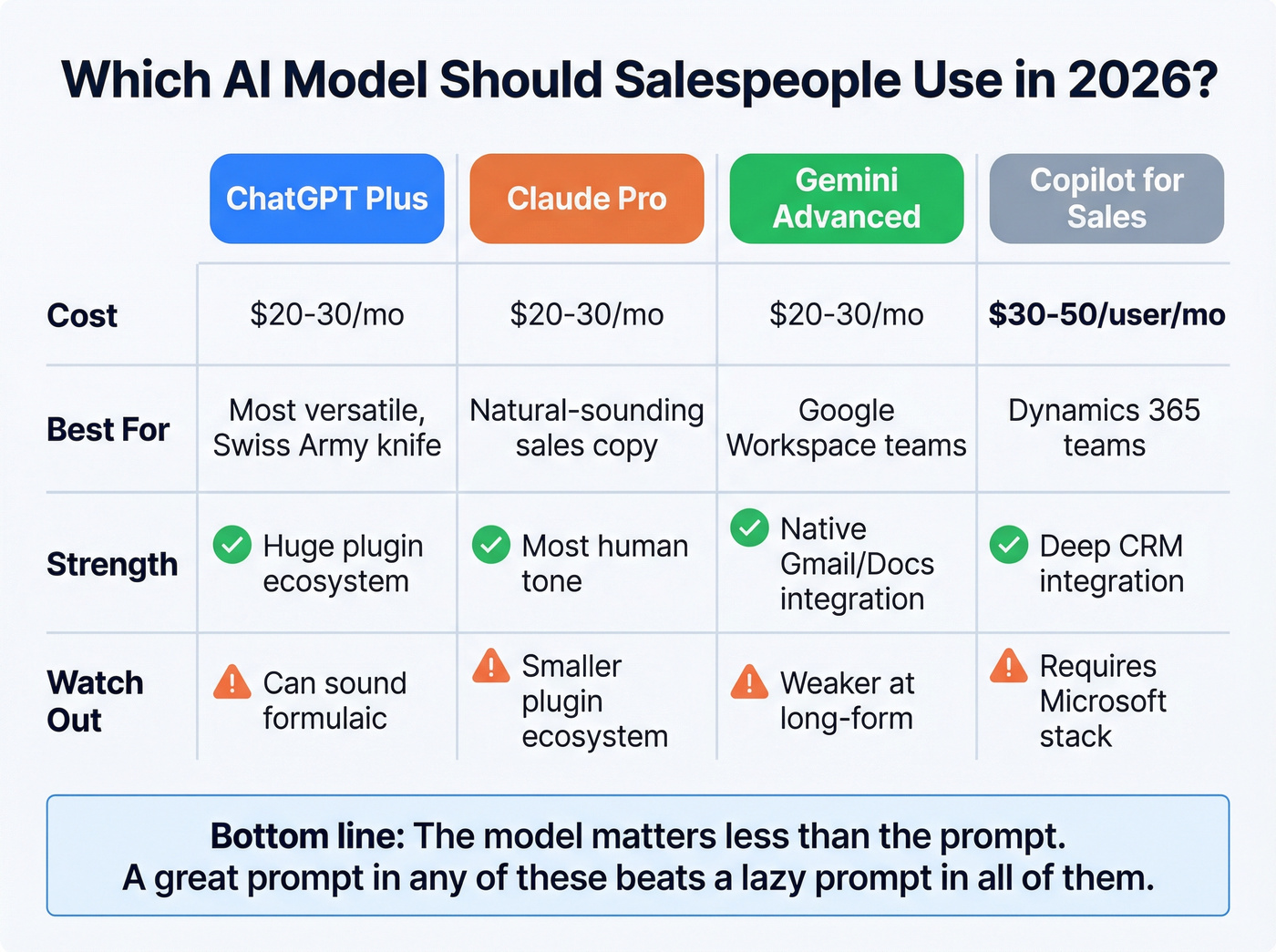
| Model | Cost | Best For | Tradeoff |
|---|---|---|---|
| ChatGPT Plus | ~$20-30/mo | Most versatile | Can sound formulaic |
| Claude Pro | ~$20-30/mo | Natural sales copy | Smaller plugin ecosystem |
| Gemini Advanced | ~$20-30/mo | Google Workspace native | Weaker at long-form |
| Copilot for Sales | ~$30-50/user/mo | Dynamics 365 teams | Requires Microsoft stack |
Claude writes the most human-sounding sales emails in our experience. ChatGPT is the Swiss Army knife. If your company lives in Google Workspace, Gemini's native integration saves real time. But the model matters less than the prompt - a great prompt in any of these will outperform a lazy prompt in all of them.
Prompt Templates by Sales Task
Copy-paste ready. Swap in your details and iterate.
Prospect Research
Analyze [PROSPECT NAME]'s digital footprint - their company website, recent press, job postings, and public content. Summarize their top 3 priorities, likely pain points, buying triggers, and probable objections to [YOUR PRODUCT CATEGORY]. Format as bullet points.
Job-posting intelligence is one of the most underused research angles (pair it with a tighter prospect research before outreach routine):
Turn the following job listing into a list of business problems the company is likely trying to solve. Then generate 3 relevant outreach angles connecting those problems to [YOUR PRODUCT/VALUE PROP].

[PASTE JOB LISTING]
Cold Email Sequences
First touch - under 90 words, soft CTA:
[ROLE] Senior SDR selling [PRODUCT] to [PERSONA].
[CONTEXT] Prospect is [TITLE] at [COMPANY]. They [SIGNAL: recently hired 5 SDRs / adopted Salesforce / raised funding]. Their likely pain point is [PAIN].
[TASK] Write a first-touch cold email under 90 words. Reference the signal. End with a soft CTA like "worth a quick chat?" No buzzwords, no "I hope this email finds you well."
Follow-up under 70 words:
I sent [PROSPECT] a cold email about [TOPIC] 4 days ago. No reply. Write a follow-up under 70 words with a curiosity-based subject line. Don't repeat the first email. Add one new angle or insight.
Short bump under 40 words:
Write a 2-sentence bump email to [PROSPECT] who hasn't replied to two previous emails about [TOPIC]. Casual tone. No guilt-tripping. Under 40 words.
If you want more copy-paste options, keep a tab open with an outreach email template library.
Cold Call Opener + Script
Generate 5 cold call openers for reaching [PERSONA] at [COMPANY TYPE]. Each should build trust quickly, avoid cliches like "How are you today?", and create enough curiosity to earn 30 more seconds. Vary approaches: pattern interrupt, referral-style, insight-led, direct ask, permission-based.
If calling is part of your week, it’s worth aligning this with a B2B cold calling guide so your prompts match real benchmarks.
Discovery Questions (SPIN/MEDDIC)
Generate 8 discovery questions for a [TITLE] at a [COMPANY SIZE] [INDUSTRY] company using the SPIN framework. Focus on uncovering pain around [PROBLEM AREA]. Include 2 Situation, 2 Problem, 2 Implication, and 2 Need-Payoff questions. Make them conversational, not interrogative.
If your org runs MEDDIC/MEDDPICC, map prompts to your qualification fields (see MEDDIC vs MEDDPICC).
Objection Handling
The prospect just said: "[EXACT OBJECTION]." Draft 3 responses: one empathetic reframe that validates their concern, one data-driven counter using [RELEVANT STAT OR CASE STUDY], and one redirect that pivots back to the value they've already acknowledged.
Signal-Based Personalization
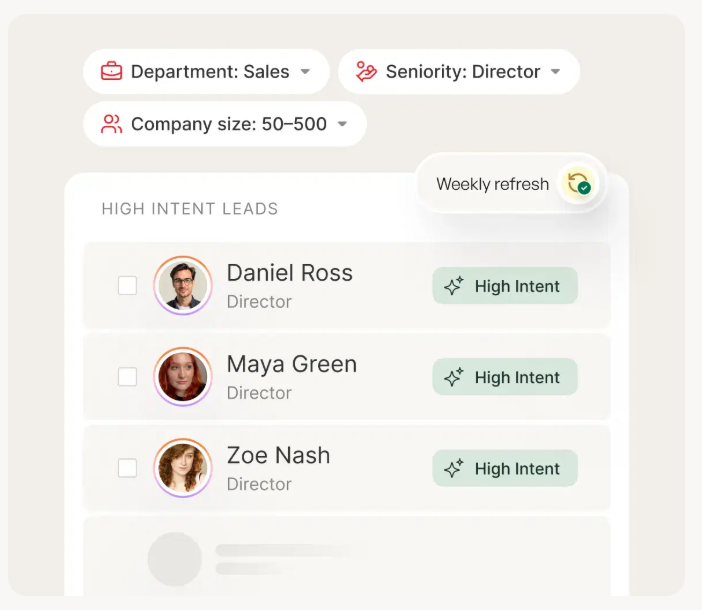
Signal-personalized outreach hits 15-25% reply rates versus 3-5% for generic B2B outreach. The prompt only works if you have the signal. Tools like Prospeo track 15,000 intent topics via Bombora and let you filter by buyer intent, job changes, and funding events - so your prompts start with real data instead of guesswork. (If you’re building a system around this, use a signal-based outbound workflow.)
This prospect's company just [SIGNAL: raised Series B / hired 5 SDRs / adopted Salesforce / expanded into EMEA]. Their [TITLE] is likely dealing with [INFERRED PAIN based on signal]. Write a first-touch email that references this signal naturally - not as a gimmick, but as evidence you've done your homework. Under 90 words. Soft CTA.
Post-Call CRM Summary
Here's a transcript from my call with [PROSPECT]. Summarize into: (1) key pain points, (2) next steps agreed, (3) objections raised and how I handled them, (4) recommended deal stage, (5) red flags. Under 200 words - this goes into Salesforce.
If you want to reduce admin time, pair this with AI CRM data entry automation.

The best prompt in the world can't save an email that bounces. Prospeo delivers 98% verified email accuracy on 300M+ profiles - refreshed every 7 days, not 6 weeks. Feed your AI prompts with clean signals and real contact data.
Stop engineering prompts for prospects you'll never reach.
CRM Context + AI Roleplay
Feed CRM Context Into Every Prompt
The difference between a generic prompt and one that produces usable output often comes down to CRM context. When you include properties like role, deal stage, last activity, content viewed, and objections raised, the model stops guessing and starts writing something relevant. This is where AI-assisted selling moves from theory to daily practice - your CRM becomes the fuel for every prompt you run. (This also gets easier when you maintain solid CRM hygiene.)
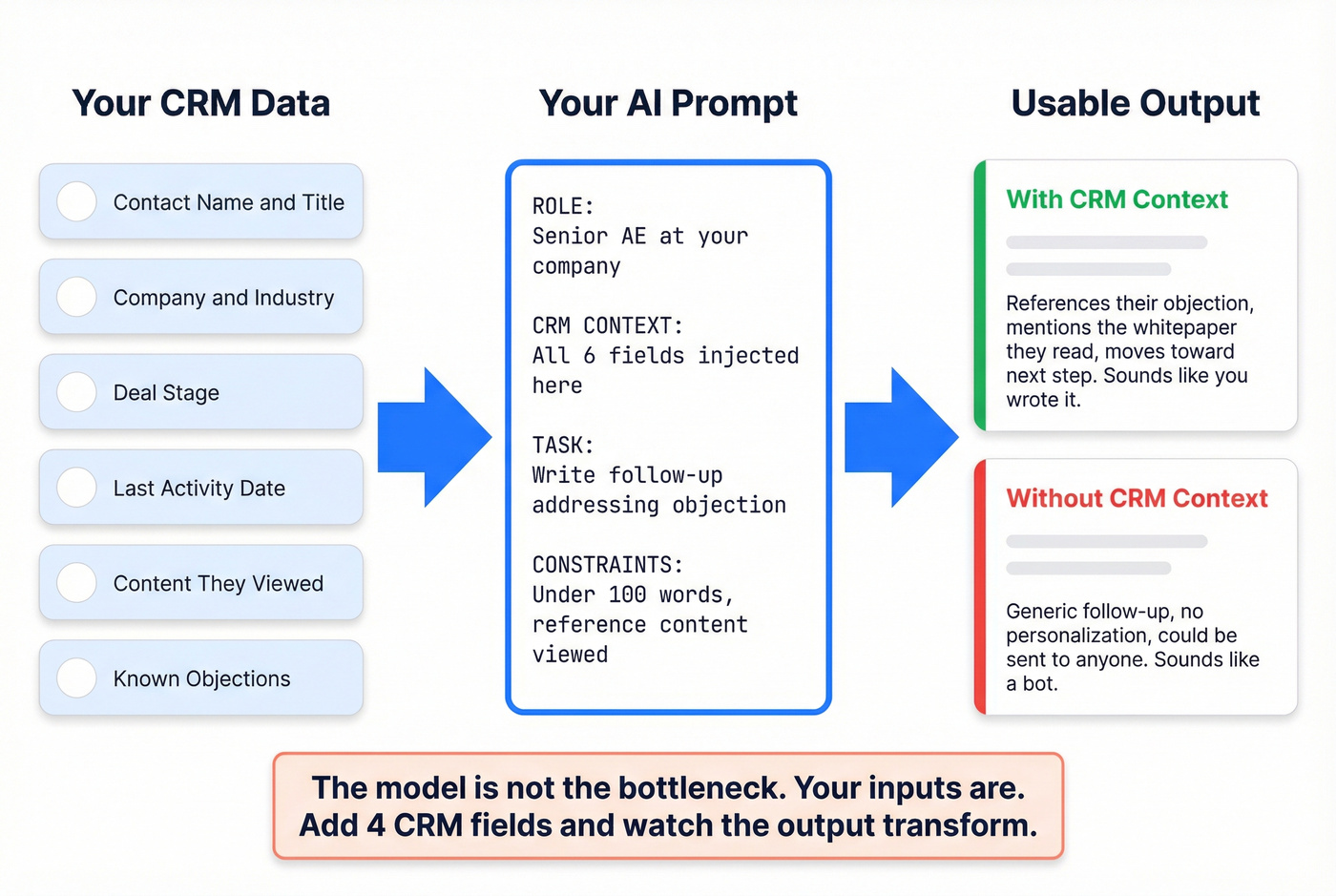
A template with CRM placeholders:
[ROLE] Senior AE at [YOUR COMPANY].
[CRM CONTEXT] Prospect: {contact.name}, {contact.title} at {company.name}. Deal stage: {deal.stage}. Last activity: {deal.last_activity}. Content viewed: {contact.last_content}. Known objection: {deal.objection}.
[TASK] Write a follow-up email that addresses their objection and moves toward {deal.next_step}.
[CONSTRAINTS] Under 100 words. Reference the content they viewed. Don't repeat previous messaging.
We've seen teams go from "ChatGPT writes generic stuff" to "this actually sounds like me" just by adding four CRM fields to every prompt. The model isn't the bottleneck. Your inputs are.
AI Roleplay for Objection Practice
This is the most underrated use of AI in sales enablement, and I'm genuinely frustrated more teams aren't doing it. Instead of practicing on live prospects, practice on a model that's been instructed to push back.
The master prompt, adapted from Hyperbound's roleplay framework:
You are a skeptical [TITLE] at a [COMPANY SIZE] [INDUSTRY] company. I'm going to pitch you [YOUR PRODUCT/SERVICE] which helps with [VALUE PROP]. This is a 15-minute cold call simulation.

Your persona: You're busy, mildly skeptical, and have tried similar solutions before. Your pain points are [PAIN 1] and [PAIN 2]. You have budget authority but need to justify ROI to your CFO.

Rules: Be challenging but not impossible. Raise realistic objections about price, integration complexity, and switching costs. Do not break character unless I type "PAUSE ROLEPLAY."
After the roleplay, ask for structured feedback:
PAUSE ROLEPLAY. Analyze my performance: What were my 3 strongest moments? Where did I lose momentum? Critique my discovery questions against the SPIN framework. What should I do differently next time?
Use voice mode if your model supports it. Typing responses doesn't simulate the pressure of thinking on your feet during a real call.
Advanced Techniques That Compound
Prompt Chaining
Long, complex prompts cause models to lose track of instructions. Research from Cornell, summarized by Udemy's engineering blog, found that breaking tasks into sequential steps improves reliability. A four-step sales chain:
- "Research [COMPANY] and summarize their top 3 strategic priorities."
- "Based on those priorities, identify which pain points [YOUR PRODUCT] solves."
- "Draft a personalized cold email to [TITLE] that connects priority #1 to our solution."
- "Generate 5 subject line variants for that email. A/B test-ready."
Each step's output feeds the next. The result is dramatically better than cramming all four instructions into one prompt.
If you’re operationalizing this, it helps to document a repeatable prospecting workflow so reps don’t reinvent the chain every time.
Meta-Prompting
Use the model to improve your own prompts. This is the fastest way to level up:
Review the following prompt I use for [TASK]. Identify weaknesses in specificity, context, and constraints. Suggest 3 improvements. Then rewrite the prompt incorporating those improvements.

[PASTE YOUR CURRENT PROMPT]
We run this on our best-performing prompts quarterly. Even good prompts get stale as models update and your product positioning evolves.
Evaluation Loops
Add this to the end of any prompt that generates outward-facing content:
Before outputting, verify your reasoning, flag any assumptions you made, and check for factual claims you're uncertain about. Mark uncertain claims with [VERIFY].
This single addition reduces hallucinations and generic filler. It forces the model to self-audit before handing you something you'd send to a prospect without reading carefully enough.
7 Prompting Mistakes That Kill Output
- No role or persona. Always start with "You are a [ROLE] who [CONTEXT]."
- No constraints. Set word count, tone, format, and what to avoid.
- No examples provided. Paste 1-2 examples of output you like. Few-shot learning works.
- One-shot mentality. Treat every prompt as a draft. Iterate 2-4 times minimum.
- Pasting sensitive data. Anonymize customer PII, deal terms, and internal pricing before prompting.
- Ignoring tone instructions. Specify "conversational," "executive-level," or "casual" - and give an example sentence in that tone.
- Optimizing word choice instead of structure. Rewrite the prompt architecture before tweaking individual phrases. Generic outputs aren't a model problem - they're a prompting problem.
What NOT to Paste Into AI
51% of sales pros say data security concerns halt AI initiatives at their companies. They're not wrong to worry - 60% of data breaches stem from internal issues, and 85% are linked to human error.
| Safe to Paste | Don't Paste |
|---|---|
| Public company info | Full customer PII |
| Your own templates | Deal terms under NDA |
| Anonymized scenarios | Internal pricing sheets |
| Product descriptions | CRM exports with personal data |
| Job postings | Confidential org charts |
If you're operating in GDPR or CCPA jurisdictions, this isn't optional. Anonymize first, prompt second. When in doubt, strip names and company identifiers before pasting anything into a model that isn't running on your company's private instance. (For outbound-specific guardrails, see GDPR for Sales and Marketing.)
The Data Quality Problem Nobody Talks About
Let's be honest about something. You can spend 20 minutes crafting the perfect sequence using every technique in this article - loading CRM context, chaining your prompts, iterating three times - and then 18 of your 50 emails bounce because the data was garbage. The prompt was flawless. The data wasn't.
Great prompts and clean data are two halves of the same revenue workflow. One gets you the message. The other gets you the delivery. Prospeo runs 143M+ verified emails at 98% accuracy on a 7-day refresh cycle, compared to the 6-week industry average. Meritt switched and watched their bounce rate drop from 35% to under 4% while their pipeline tripled from $100K to $300K per week. The free tier gives you 75 email verifications per month - enough to test the workflow before committing.
Skip this section if your bounce rates are already under 5%. But if you're north of 10%, no amount of prompt engineering will fix that. (If you’re diagnosing why lists rot, start with B2B contact data decay benchmarks.)
You just built the perfect prompt with role, context, and constraints. Now you need the context - funding signals, headcount growth, verified emails. Prospeo gives you 30+ search filters and 50+ data points per contact so every AI-generated email lands.
Great prompts need great data. Start with 75 free emails.
FAQ
Is prompt engineering a technical skill?
No - it's a communication skill. If you can write a clear brief for a colleague, you can write a good prompt. The Role -> Context -> Task -> Constraints -> Format -> Iterate framework gets most reps producing usable output within a day.
Which AI model writes the best sales emails?
Claude produces the most natural-sounding sales copy in our testing. ChatGPT is the most versatile all-rounder. Start with whichever your team already pays for - the prompt matters more than the model.
How many prompts does a sales rep actually need?
Ten well-crafted prompts covering research, outreach, call prep, follow-up, and objection handling will cover roughly 90% of daily tasks. Build those ten first, then expand.
Can AI fully replace personalized outreach?
AI generates the draft; you add judgment and the final edit. Signal-personalized AI outreach hits 15-25% reply rates, but only when paired with accurate prospect data and at least one round of human iteration.
How do I stop AI-generated emails from bouncing?
Verify your prospect list before sending. Real-time verification tools catch invalid addresses before they tank your sender reputation. The consensus on r/coldemail is that anything above a 5% bounce rate is a domain reputation risk - and most of those bounces come from stale data, not bad targeting.