

How to Automate CRM Data Entry With AI (And Stop Losing Deals to Bad Data)
It's Monday morning. Your VP of Sales pulls up the pipeline review, and half the opportunity fields are blank. No next steps logged, MEDDIC stages untouched, close dates from two quarters ago. The uncomfortable truth: 70% of CRM data remains incomplete across the average sales org, and CRM updates alone eat 1-1.5 hours of every rep's day. AI CRM data entry automation has gone from nice-to-have to the single highest-ROI investment most revenue teams can make right now.
And if you were counting on Dooly to fix this - bad news. Dooly shut down on June 30, 2025. The market has moved on, and the tools that replaced it are genuinely better.
What You Need (Quick Version)
- Best overall for Salesforce teams: Scratchpad - free tier available, paid plans $19-$49/user/mo, 4.8/5 on G2 with 1,493 reviews
- Best for Slack-first workflows: Rattle - Starter from $19/user/mo up to $79/user/mo for Team, one-click CRM updates from Slack
- Best budget/modular option: Oliv.ai - CRM Manager agent starts at $19/user/mo, 14-day free trial
The 4 Levels of CRM Automation
Not all "CRM automation" is the same. Most tools only solve Level 1, and buyers don't realize it until they're locked in.
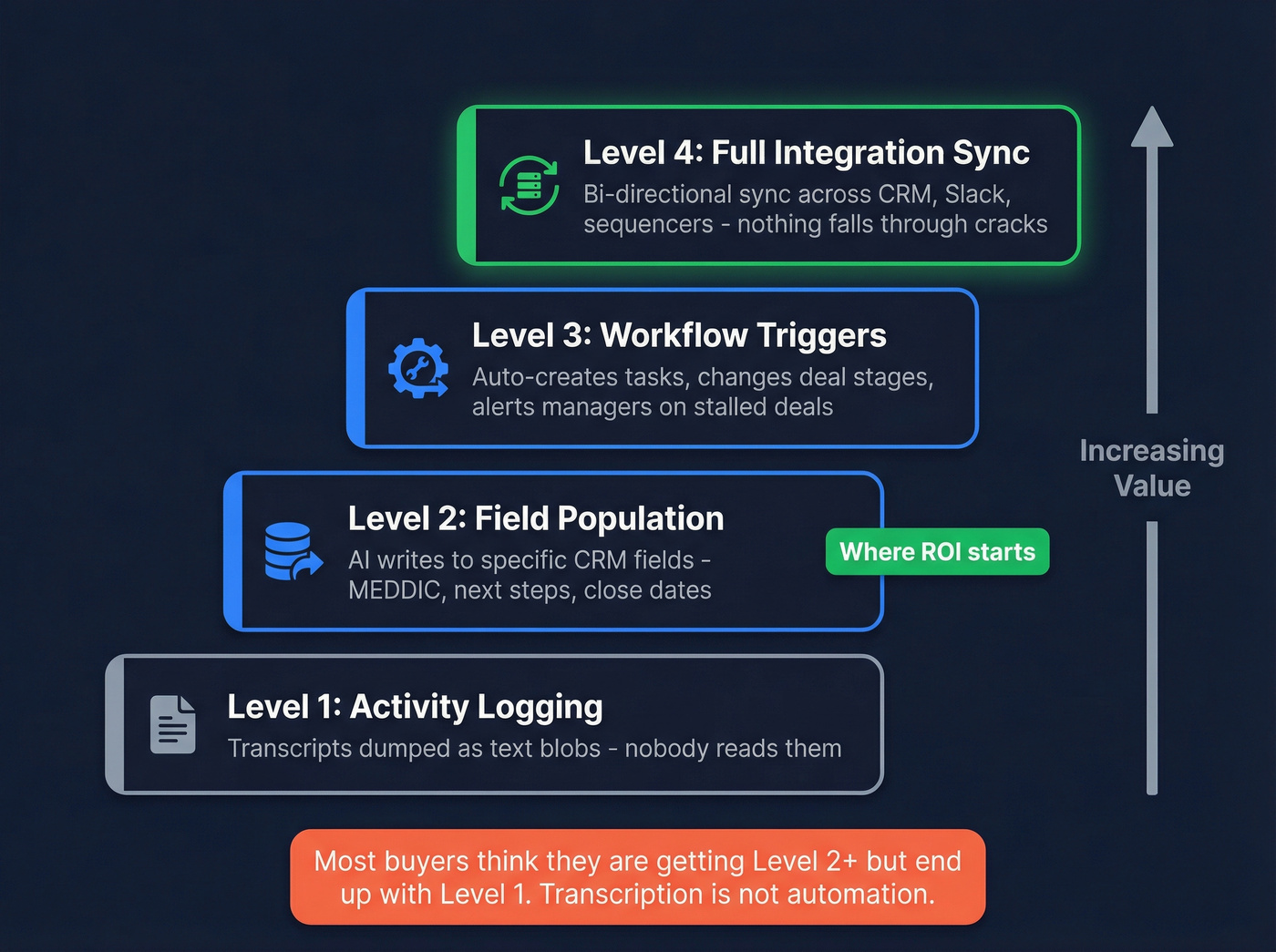
Level 1: Activity Logging. Call transcripts and meeting notes get dumped into your CRM as text blobs. Better than nothing, but nobody reads a 3,000-word transcript attached to an opportunity. This is where Fireflies and Fathom live.
Level 2: Field Population. AI extracts structured data from conversations and writes it to specific CRM fields - MEDDIC stages, next steps, decision criteria, close dates. This is the level that actually moves the needle on deal forecast accuracy.
Level 3: Workflow Triggers. The tool doesn't just fill fields - it creates follow-up tasks, changes deal stages, and alerts managers when deals stall. Rattle's no-code workflow builder is a good example here.
Level 4: Full Integration Sync. Bi-directional sync between your CRM and every tool in the stack. Changes in Salesforce push to Slack, updates in your sequencer reflect in HubSpot, nothing falls through the cracks. Very few tools deliver this cleanly, and it's where the real efficiency gains live.
Most buyers think they're getting Level 2+ and end up with Level 1. Transcription isn't automation. Make sure you know which level you're buying.
Why Most Buyers Pick the Wrong Tool
Three categories of tools claim to automate CRM data entry. Two of them are overselling.
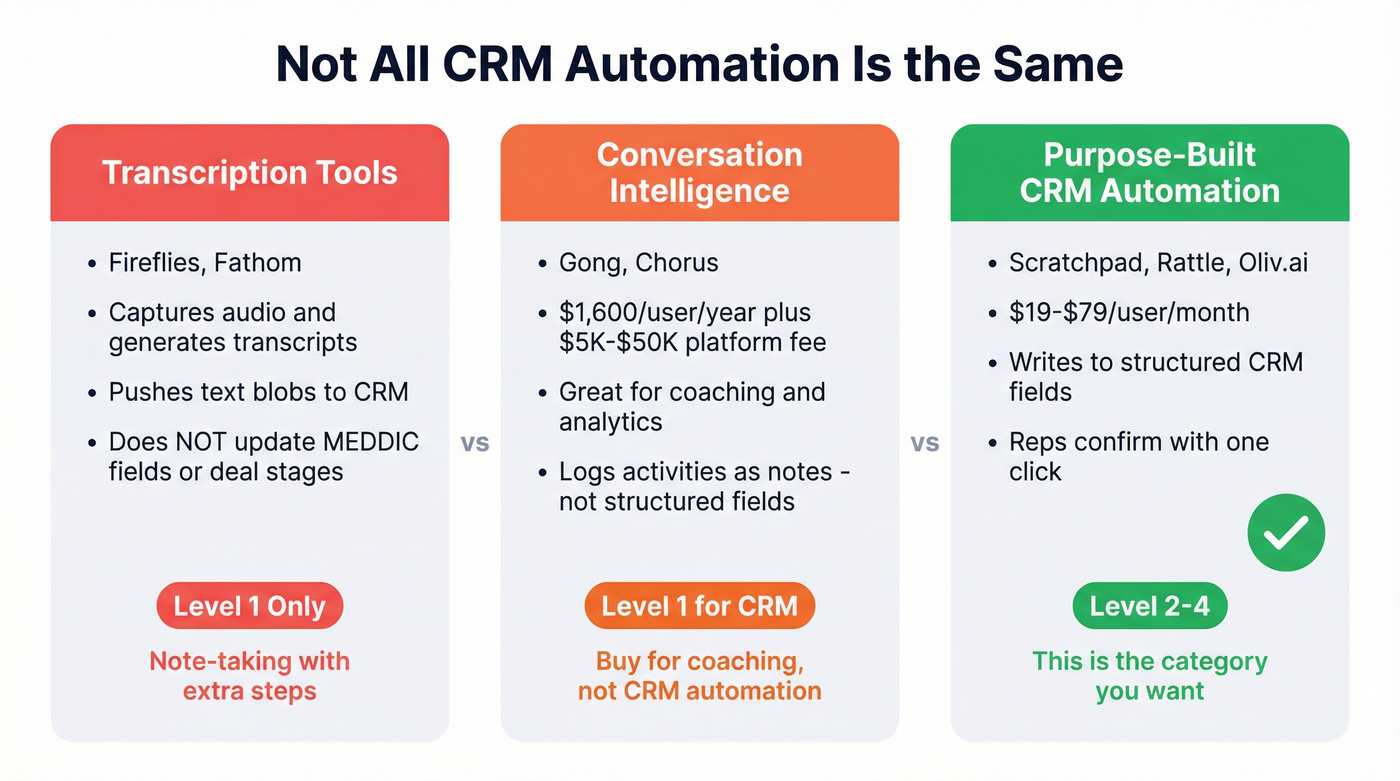
Category 1: Transcription tools. Fireflies, Fathom, and similar meeting recorders capture audio, generate transcripts, and push text to your CRM. They don't update your MEDDIC fields, change deal stages, or create next-step tasks. You still need a human to read the transcript and manually update the opportunity. That's note-taking with extra steps.
Category 2: Conversation intelligence platforms. Everyone asks about Gong. It's a phenomenal coaching and analytics tool. It's also ~$1,600/user/year plus a $5,000-$50,000 annual platform fee - budget $28K-$170K+ in year one depending on team size. After all that spend, Gong logs activities as notes. It doesn't update specific MEDDIC/BANT fields. Stop buying Gong for CRM automation. Buy it for coaching. Buy something else for field updates.
Category 3: Purpose-built CRM automation. Scratchpad, Rattle, and Oliv.ai actually write to structured fields. They extract data from meetings, suggest field values, and let reps confirm with a click. This is the category you want. If you're building a modern B2B sales stack, these tools sit right in the middle of it.

CRM automation fixes how data gets in. But garbage in, garbage out. Prospeo's 98% email accuracy and 7-day refresh cycle mean the contacts flowing into your CRM are verified before they ever hit a field - no stale records, no bounces wrecking your domain.
Start with clean data and your CRM automation actually works.
Best Tools for Automated CRM Data Entry in 2026
| Tool | Starting Price | What It Automates | CRM Support | Best For | G2 Rating |
|---|---|---|---|---|---|
| Scratchpad | Free / $19/user/mo | Fields, pipeline, notes | Salesforce | Salesforce teams | 4.8/5 (1,493) |
| Rattle | $19/user/mo | Slack CRM updates, deals | SF, HubSpot | Slack-first teams | 4.7/5 (107) |
| Oliv.ai | $19/user/mo | Meeting to field population | SF, HubSpot | Budget / modular | N/A |
| Modjo | ~$108/user/mo | Call to CRM fields | SF, HubSpot | European teams | N/A |
| SalesDirector.ai | $29/user/mo | Activity capture | SF, Dynamics | Activity reporting | N/A |
| AskElephant | $99/mo | Post-meeting CRM writes | SF, HubSpot | Early adopters | Not yet rated |
Scratchpad
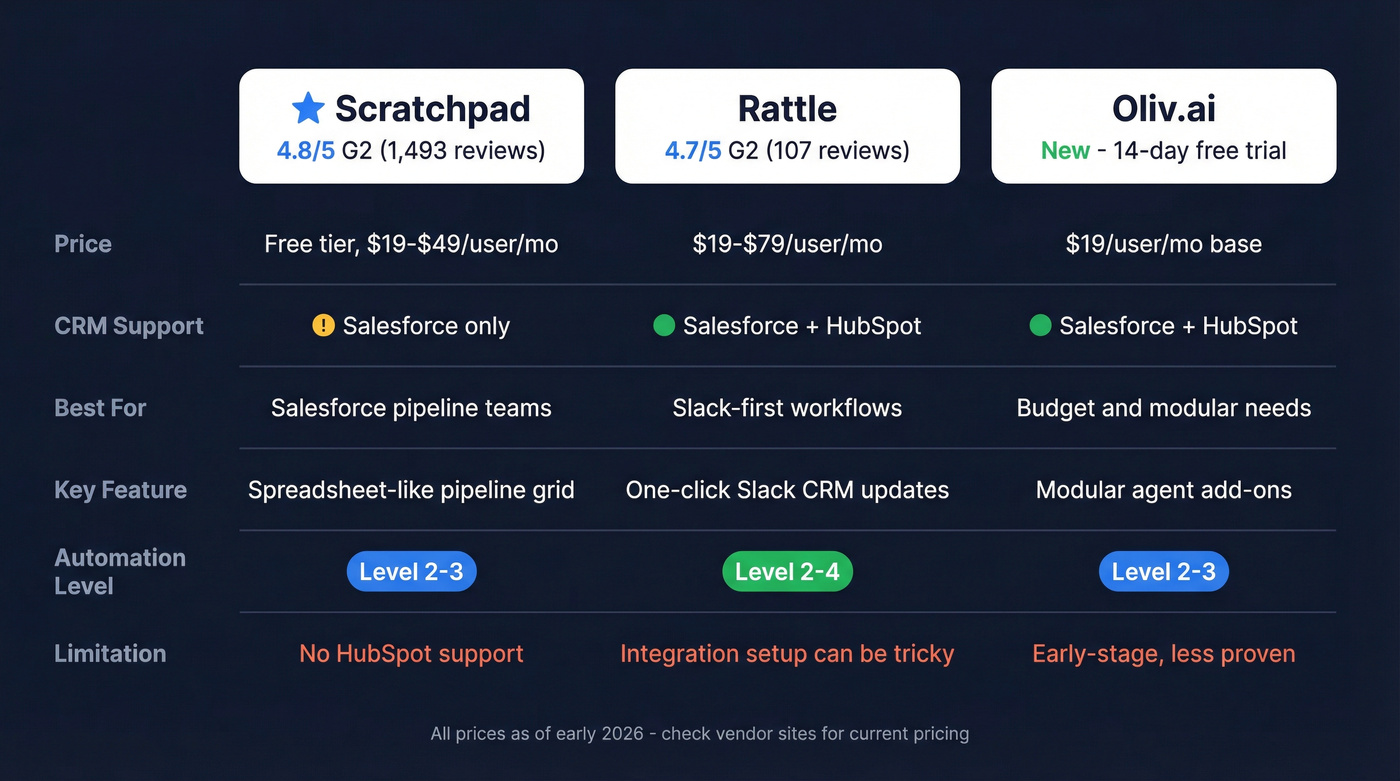
Scratchpad is the obvious pick for Salesforce-heavy teams, and it's not particularly close. The spreadsheet-like UI lets reps update pipeline fields without ever opening Salesforce - which means they actually do it. For teams looking to automate Salesforce data entry without a steep learning curve, this is the fastest path. Free tier gets you in the door, paid plans run $19-$49/user/mo depending on features.
With 1,493 G2 reviews at 4.8/5, it's one of the most-reviewed tools in this category. G2 pros highlight ease of use and tight Salesforce integration. The main complaint? "Expensive" shows up in the cons - though at $19-$49/user, that's a fraction of what you'd spend on Gong.
The real limitation is that it's Salesforce-only. If you're on HubSpot, keep reading (or compare HubSpot vs Salesforce first).
Use this if: Your team runs Salesforce and you need reps to actually update deal fields without nagging.
Skip this if: You're on HubSpot or Dynamics 365.
Rattle
Here's the thing about Rattle: instead of building another UI nobody wants, it meets reps where they already work - Slack and Teams. One-click CRM validation from a Slack message, no-code workflow builder for Salesforce automations, AI call summaries that push structured data to deal records. Reps confirm updates without leaving their messaging app, and that's the kind of frictionless AI data capture sales teams actually adopt.
Pricing starts at $19/user/mo for Starter, with Solo at $29/user/mo and Team at $79/user/mo (forecasting costs extra). The G2 rating sits at 4.7/5 across 107 reviews - smaller sample than Scratchpad, but "Helpful" and "Ease of Use" tags dominate the pros. Integration issues show up in the cons, so plan time for initial setup.
Use this if: Your team lives in Slack and won't open another tab.
Skip this if: You need deep pipeline grid views or your team doesn't use Slack heavily.
Oliv.ai
| Component | Price | What You Get |
|---|---|---|
| CRM Manager agent | $19/user/mo | Meeting to field population, pipeline tracking |
| Deal Insights add-on | $29/user/mo | Win/loss analysis, deal health scoring |
| Pipeline Tracker add-on | $49/user/mo | Forecast rollups, stage movement alerts |
| Viewers & collaborators | Free | Read-only access for managers, ops |
The modular approach means you're not paying for features you'll never touch. The 14-day free trial is genuinely useful - most teams can evaluate fit within two weeks. Setup takes 2-4 weeks for full customization. It's early-stage compared to Scratchpad and Rattle, but for teams under 20 reps who want to start lean and add capabilities over time, Oliv is the smartest entry point.
Modjo
European teams should look at Modjo. It runs ~$108/user/mo with a 15-seat minimum, putting the baseline at roughly $19,440/year. The standout feature is the choice between semi-automation and full-automation modes - you decide whether AI suggestions get reviewed by reps before writing to CRM, or go straight in. A commonly cited outcome is 2-4 hours/week saved on admin. Expect $2,000-$5,000 in onboarding costs.
Quick Mentions
SalesDirector.ai ($29/user/mo) is an activity capture specialist that tracks 50+ sales data elements and 30 activity types, feeding them into Salesforce, Dynamics 365, or BI tools like Tableau. Squarely a Level 1 tool - strong on logging, weaker on structured field population.
AskElephant ($99/mo) claims 95%+ extraction accuracy and direct CRM field writes. We haven't tested it deeply enough to recommend it as a primary tool. Zero Capterra reviews as of early 2026 makes it too unproven for a team that can't afford to experiment. Worth watching.
The Data Quality Problem Nobody Talks About
Let's be honest: the tool you pick matters less than the data underneath it.
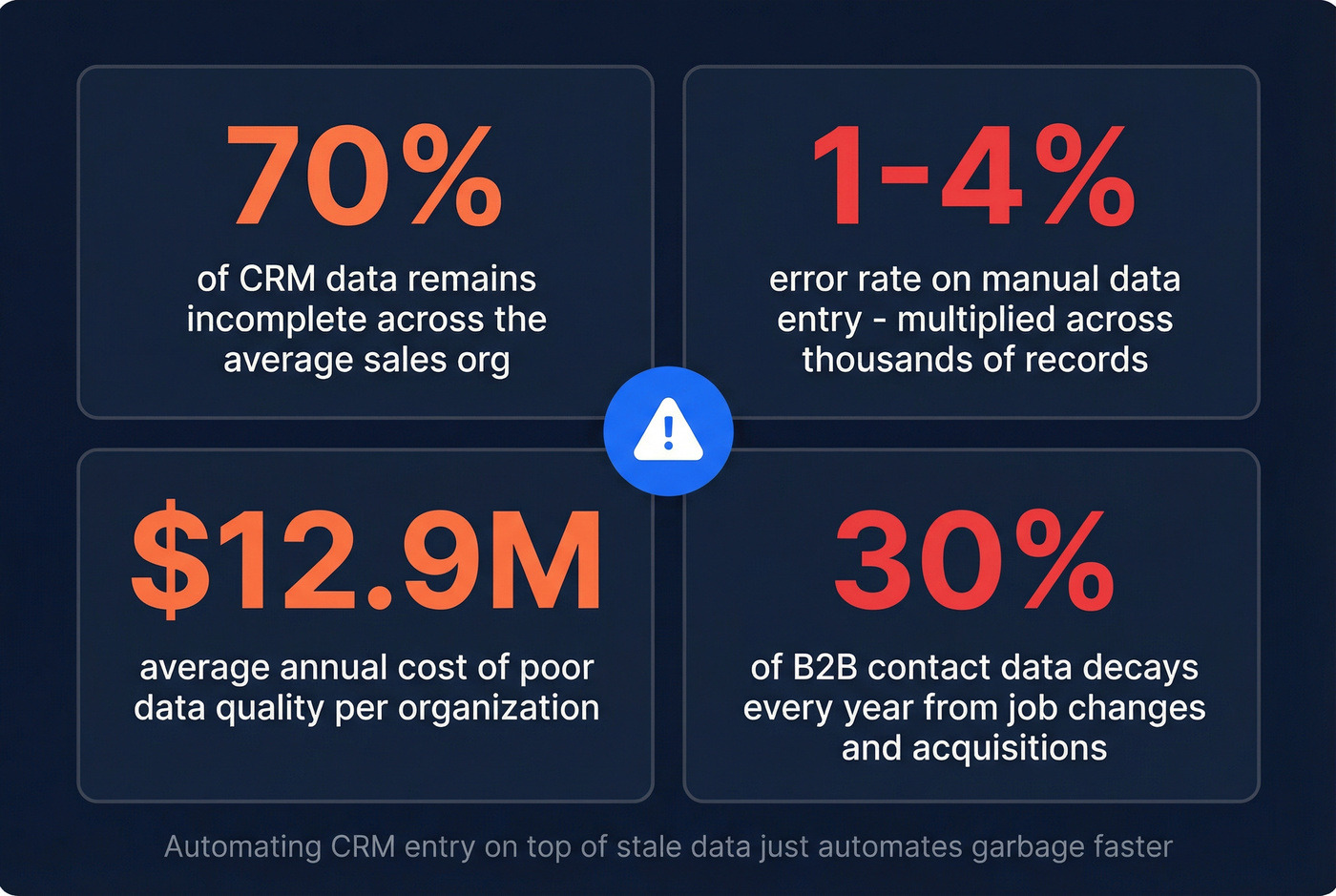
Managers spend 8-12 hours weekly auditing deals for forecasts, and manual data entry carries a 1-4% error rate. Poor data quality costs organizations an average of $12.9M annually. B2B contact data decays roughly 30% per year - people change jobs, companies get acquired, email domains rotate.
Automating CRM entry on top of stale contact data just automates garbage faster. You're filling fields with phone numbers that don't connect and emails that bounce. RevOps communities on Reddit consistently flag CRM data decay as the #1 reason automation projects underdeliver. If you want the benchmarks and fixes, start with B2B contact data decay and then build a repeatable CRM hygiene cadence.
The numbers back this up: 74% of sales teams using AI already prioritize data hygiene, according to Salesforce's 2026 State of Sales report. The automation layer only works if the foundation is clean.
How to Set This Up
Step 1: Audit your CRM data. Pull a report on field completion rates, bounced emails, and contacts that haven't been updated in 90+ days. You'll probably find that 30-40% of your records are stale. That's normal - and fixable. (If you need a framework, use this data quality scorecard approach.)
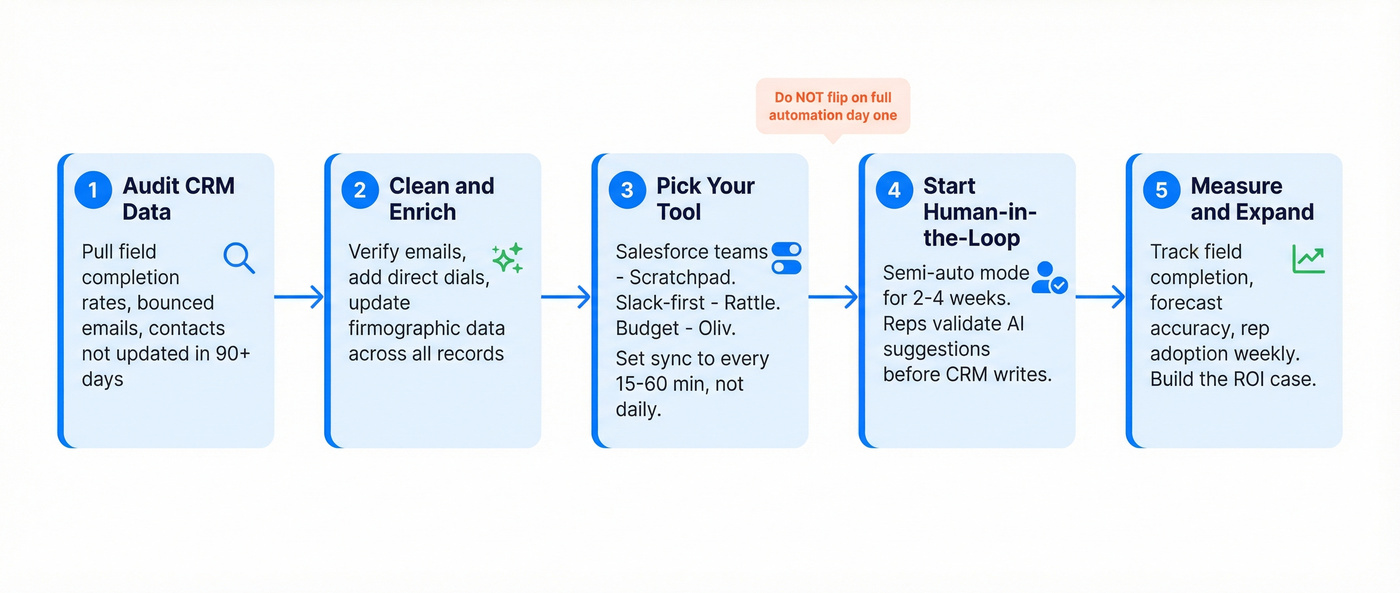
Step 2: Clean and enrich your database. Connect your CRM to an enrichment tool or upload a CSV. You want verified emails, direct dials, and firmographic data flowing back into every contact record. This takes minutes, not weeks. If you're doing this specifically for outbound, follow a data enrichment for cold email workflow.
Step 3: Pick an automation tool and set sync frequency. Match your CRM, team size, and budget to the comparison table above. Salesforce-only teams start with Scratchpad. Slack-first teams go Rattle. Budget-conscious teams try Oliv. One technical detail that trips people up: set your sync frequency to every 15-60 minutes, not daily. Daily syncs create a lag where reps see stale data and stop trusting the system.
Step 4: Start with human-in-the-loop mode. Don't flip on full automation day one. Use semi-automated mode where reps validate AI suggestions before they write to CRM. Rattle's one-click confirmation flow is built for exactly this. Give it 2-4 weeks before expanding to full automation.
A quick note on security: confirm that any tool handling your CRM data is SOC 2 compliant and, if you operate in Europe, GDPR-ready. Most tools on this list are, but ask before you connect (and align with your GDPR for Sales and Marketing requirements).
Step 5: Measure and expand. Track field completion rates, forecast accuracy, and rep adoption weekly. If field completion jumps materially in the first month, you've got your ROI story for leadership.
Your reps just got an hour back from automated CRM entry. Now make sure they're reaching real buyers. Prospeo enriches CRM records with 50+ data points at a 92% match rate - verified emails, direct dials, intent signals - for roughly $0.01 per contact.
Automate the entry, then fill it with data that converts.
What This Actually Costs
Budget tier (under $20/user/mo): Scratchpad's free plan plus Oliv's $19/user CRM Manager agent. You get field population, pipeline tracking, and a 14-day trial to validate before committing. This is where most teams under 20 reps should start.
Mid-market tier (under $100/user/mo): Rattle Team at $79/user/mo plus data enrichment at roughly $0.01/email for ongoing data hygiene. Slack-native CRM updates, no-code workflows, and a clean database underneath. Solid stack for 20-100 rep teams.
Enterprise tier ($500+/user/mo): Gong at $28K-$170K/year plus implementation fees that often run $7,500-$28,500 for legacy stacks. Real talk: most teams get 90% of the value from a $20-$80/user/month tool paired with clean data. We've watched teams spend six figures on Gong only to still have reps manually updating MEDDIC fields - because Gong doesn't do that part.
FAQ
What is AI CRM data entry automation?
It's the use of artificial intelligence to extract structured data from sales calls, emails, and meetings, then write it directly to CRM fields - deal stages, next steps, close dates, MEDDIC criteria - without reps doing it manually. The best tools populate specific fields, create follow-up tasks, and trigger workflow changes, going well beyond basic transcription.
Does Gong automate CRM data entry?
No. Gong logs call transcripts and AI-generated summaries as notes in your CRM, but it doesn't update specific MEDDIC/BANT fields or change deal stages. For actual field population, pair Gong with a purpose-built tool like Scratchpad ($19/user/mo) or Rattle.
What happened to Dooly?
Dooly shut down on June 30, 2025. Scratchpad is the closest feature overlap with a free tier to ease the transition. Rattle is the better alternative if your team lives in Slack rather than a standalone app.
How do I keep CRM data accurate after automating entry?
B2B contact data decays roughly 30% per year, so weekly enrichment refreshes beat the 6-week industry average. Prospeo runs a 7-day refresh cycle with 98% email accuracy and 50+ data points per contact - keeping automated fields populated with current records instead of stale ones.
What's the cheapest way to automate CRM data entry?
Scratchpad's free tier plus Oliv's $19/user CRM Manager agent. That's under $20/user/month for field population and pipeline tracking, with a 14-day free trial on the Oliv side so you can validate before spending anything.